Mass Storage Device error code 10. Drivers failing to install.

Laura5790

New member
Local time
6:05 AM
Messages
12
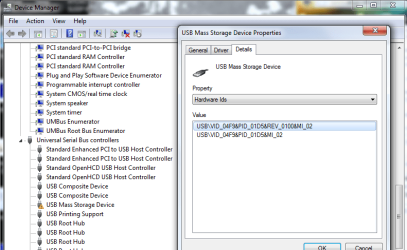
I keep getting a message saying drivers failed to install correctly and a yellow exclamation mark next to the USB mass storage device (error code 10) when I look in Device Manager...

I've don't really know where to start with any of this but I am thankfully quite good at following instructions so fingers crossed someone can help me out!

It isn't proving to be a problem with USB keys but my printer (Brother MFC-235C) isn't being recognised at all now and was previously just initiating driver installation but obviously then I was getting the failed message...

Any help would be hugely appreciated as a student without access to a printer is a small disaster!

Thanks again
 

Attachments
  • USB Mass Storage Device.png
    USB Mass Storage Device.png
    33.7 KB · Views: 109

My Computer My Computer

OS
Windows 7 Home Premium 32bit
Last edited:

My Computer My Computer

Computer type
PC/Desktop
Computer Manufacturer/Model Number
self build
OS
win 7 ultimate32bit, Win8.1pro wmc 32bit
CPU
amd phenom x4 9600
Motherboard
asus m2n32-sli deluxe
Memory
corsair twinxs 2x2gb
Graphics Card(s)
2x nvidia 1gb 8500gt
Sound Card
onboard
Monitor(s) Displays
23" PB Viseo 233d
Screen Resolution
1920x1080
Hard Drives
maxtor sata 500gb
maxtor sata 320gb
fujitsu sata200gb
PSU
oryxx tornado 750w
Case
thermaltake xaser lll
Cooling
artic freezer64 pro + 7 case fans
Hi Pebbly, yes I have and it just says I have the most up to date drivers... The printer has been working fine and I can still run a test print from the printer menus itself... I've just found that so am working through it now!
 

My Computer My Computer

OS
Windows 7 Home Premium 32bit
Hi Pebbly, yes I have and it just says I have the most up to date drivers... The printer has been working fine and I can still run a test print from the printer menus itself... I've just found that so am working through it now!
OK , if you need more help let us know and we will do our best to help you :)
 

My Computer My Computer

Computer type
PC/Desktop
Computer Manufacturer/Model Number
self build
OS
win 7 ultimate32bit, Win8.1pro wmc 32bit
CPU
amd phenom x4 9600
Motherboard
asus m2n32-sli deluxe
Memory
corsair twinxs 2x2gb
Graphics Card(s)
2x nvidia 1gb 8500gt
Sound Card
onboard
Monitor(s) Displays
23" PB Viseo 233d
Screen Resolution
1920x1080
Hard Drives
maxtor sata 500gb
maxtor sata 320gb
fujitsu sata200gb
PSU
oryxx tornado 750w
Case
thermaltake xaser lll
Cooling
artic freezer64 pro + 7 case fans
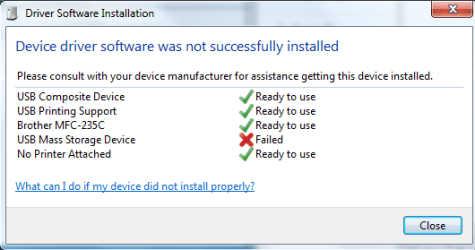
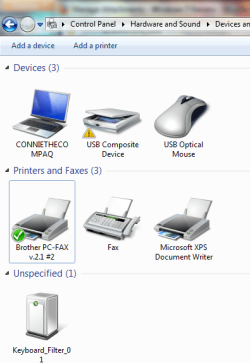
Ok so i followed the other page's instructions and after a restart plugged my printer in. It started to install some of the drivers but it came up with the USB mass storage device issue again (See first screenshot) but was showing my printer. However, when I look in devices & printers my printer isn't being picked up (see second screenshot).

Is this all part of the same issue?
 

Attachments

  • Untitled.png
    Untitled.png
    11 KB · Views: 16
  • Untitled2.png
    Untitled2.png
    31.1 KB · Views: 21

My Computer My Computer

OS
Windows 7 Home Premium 32bit
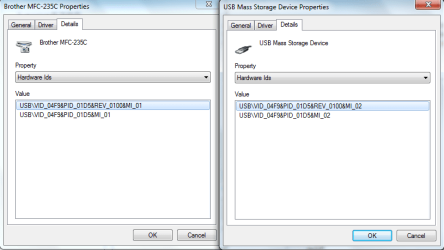
Also - I've just noticed the hardware ids for both the USB mass storage device with the exclamation mark & the printer are the same... Does this have any significance?
 

Attachments

  • Untitled3.png
    Untitled3.png
    18.6 KB · Views: 26

My Computer My Computer

OS
Windows 7 Home Premium 32bit
Ok so i followed the other page's instructions and after a restart plugged my printer in. It started to install some of the drivers but it came up with the USB mass storage device issue again (See first screenshot) but was showing my printer. However, when I look in devices & printers my printer isn't being picked up (see second screenshot).

Is this all part of the same issue?
Can't understand the "usb composite device"Have you downloaded all the drivers for the printer? The usb is referring to the printers onboard SD/USB reader If you downloaded the full driver and software package it should install correctly Do you have full admin rights ?
 

My Computer My Computer

Computer type
PC/Desktop
Computer Manufacturer/Model Number
self build
OS
win 7 ultimate32bit, Win8.1pro wmc 32bit
CPU
amd phenom x4 9600
Motherboard
asus m2n32-sli deluxe
Memory
corsair twinxs 2x2gb
Graphics Card(s)
2x nvidia 1gb 8500gt
Sound Card
onboard
Monitor(s) Displays
23" PB Viseo 233d
Screen Resolution
1920x1080
Hard Drives
maxtor sata 500gb
maxtor sata 320gb
fujitsu sata200gb
PSU
oryxx tornado 750w
Case
thermaltake xaser lll
Cooling
artic freezer64 pro + 7 case fans
This is from the install instructions from Brother

Notes:
  • The instructions may vary depending on the Windows® 7 version.
  • If the drivers are already installed into your computer, uninstall them first before you install the new driver.
    To uninstall the current drivers, download the Uninstall Tool.
  • You must be logged on as an Administrator.
  • If the User Account Control dialog box appears, click Continue.
  • If the Windows Security dialog box appears, check Always trust software from "Brother Industries, ltd.". and click Install.
  1. Disconnect your Brother machine from your computer if you already connected an interface cable.
  2. Make a temporary folder on your HDD [hard disk drive] as the location to save the downloaded self-extracting file, e.g. C:\brodnt
  3. Download the file to the temporary folder.
  4. Once the download is complete, open the folder and double click on the downloaded file to extract it. Then open the folder that is created.
  5. You will find multiple folders: "xxxx" (where xxxx = your model name) and "Data" in the folder created in Step 4.
  6. Open the "xxxx" (where xxxx = your model name) folder and double click "Setup.exe".
  7. Select your language with reference to the language list and click "OK".
    Notes:
    If the error message "An error occurred during the installation. ... ." appears, please make sure that you double click the "Setup.exe" in the correct folder in Step 6.
  8. The installation will start. Please follow the installation screen directions.
Have you followed this to the letter :)
 

My Computer My Computer

Computer type
PC/Desktop
Computer Manufacturer/Model Number
self build
OS
win 7 ultimate32bit, Win8.1pro wmc 32bit
CPU
amd phenom x4 9600
Motherboard
asus m2n32-sli deluxe
Memory
corsair twinxs 2x2gb
Graphics Card(s)
2x nvidia 1gb 8500gt
Sound Card
onboard
Monitor(s) Displays
23" PB Viseo 233d
Screen Resolution
1920x1080
Hard Drives
maxtor sata 500gb
maxtor sata 320gb
fujitsu sata200gb
PSU
oryxx tornado 750w
Case
thermaltake xaser lll
Cooling
artic freezer64 pro + 7 case fans
Yes i have full rights - theres only my account on here - and as far as i'm aware i have all the drivers for the printer - i just downloaded the software for my printer again from Brother and it's saying there's no need for install as everything is already installed. would it pick up missing drivers per se?
 

My Computer My Computer

OS
Windows 7 Home Premium 32bit
Yep - just says there are no additionall items to install :s
 

My Computer My Computer

OS
Windows 7 Home Premium 32bit
Yes i have full rights - theres only my account on here - and as far as i'm aware i have all the drivers for the printer - i just downloaded the software for my printer again from Brother and it's saying there's no need for install as everything is already installed. would it pick up missing drivers per se?
It may or maynot pickup the drivers ,On the setup.exe of the full package are you right clicking on it and selecting "run as administrator" ? It does appear the problem lies with admin rights not 100% sure on that , did the card reader work on the printer before you upgraded to win 7 ? ;)
 

My Computer My Computer

Computer type
PC/Desktop
Computer Manufacturer/Model Number
self build
OS
win 7 ultimate32bit, Win8.1pro wmc 32bit
CPU
amd phenom x4 9600
Motherboard
asus m2n32-sli deluxe
Memory
corsair twinxs 2x2gb
Graphics Card(s)
2x nvidia 1gb 8500gt
Sound Card
onboard
Monitor(s) Displays
23" PB Viseo 233d
Screen Resolution
1920x1080
Hard Drives
maxtor sata 500gb
maxtor sata 320gb
fujitsu sata200gb
PSU
oryxx tornado 750w
Case
thermaltake xaser lll
Cooling
artic freezer64 pro + 7 case fans
Ok so now the printer is being picked up but upon trying to share the printer (as requested in the instructions) it's coming up with "Printer settings could not be saved. Operation could not be completed (error 0x00000842).

I'm running everything as administrator :/
 

My Computer My Computer

OS
Windows 7 Home Premium 32bit
The printer only has a USB port for USB sticks to pick up images, no card reader as such. But i've never had any problems with the printer before - windows 7 came before the printer!
 

My Computer My Computer

OS
Windows 7 Home Premium 32bit
Thats good , you got the printer working ok ,Is the usb showing correctly now? I am going to ask one of our valued members for more help on the error message for you so please be patient a little while longer :)
 

My Computer My Computer

Computer type
PC/Desktop
Computer Manufacturer/Model Number
self build
OS
win 7 ultimate32bit, Win8.1pro wmc 32bit
CPU
amd phenom x4 9600
Motherboard
asus m2n32-sli deluxe
Memory
corsair twinxs 2x2gb
Graphics Card(s)
2x nvidia 1gb 8500gt
Sound Card
onboard
Monitor(s) Displays
23" PB Viseo 233d
Screen Resolution
1920x1080
Hard Drives
maxtor sata 500gb
maxtor sata 320gb
fujitsu sata200gb
PSU
oryxx tornado 750w
Case
thermaltake xaser lll
Cooling
artic freezer64 pro + 7 case fans
Laura just found this ,give it a try

a) Click Start, click Settings, and then click Printers.
b) Right-click the problem printer, and then click Sharing.
c) Write down the share name of the printer.
d) Stop sharing this printer by clicking the Not Shared radio button, and then close the printer folder.
e) Open Control Panel, double-click Services, select the Spooler Service, click Stop, and then click Start.
f) After the Spooler Service restarts, open the printer folder and re-create the printer share using the share name found in step c. Do this by clicking Start, clicking Settings, and then clicking Printers. Right-click the problem printer, and then click Sharing. Click the Shared radio button, and then share the printer with the same name as before. Also Check if file and printer sharing is turned on

also may be worth try a system file check for corrupted drivers http://www.sevenforums.com/tutorials/1538-sfc-scannow-command-system-file-checker.html :)
 

My Computer My Computer

Computer type
PC/Desktop
Computer Manufacturer/Model Number
self build
OS
win 7 ultimate32bit, Win8.1pro wmc 32bit
CPU
amd phenom x4 9600
Motherboard
asus m2n32-sli deluxe
Memory
corsair twinxs 2x2gb
Graphics Card(s)
2x nvidia 1gb 8500gt
Sound Card
onboard
Monitor(s) Displays
23" PB Viseo 233d
Screen Resolution
1920x1080
Hard Drives
maxtor sata 500gb
maxtor sata 320gb
fujitsu sata200gb
PSU
oryxx tornado 750w
Case
thermaltake xaser lll
Cooling
artic freezer64 pro + 7 case fans
thanks for helping out!
Unfortunately, although it's now at least recognising my printer (both in MSWord & devices&printers) it isn't actually printing anything - the page just sits in the queue!

I tried scanning something in from the printer but it's not connecting to the laptop!
 

My Computer My Computer

OS
Windows 7 Home Premium 32bit
thanks for helping out!
Unfortunately, although it's now at least recognising my printer (both in MSWord & devices&printers) it isn't actually printing anything - the page just sits in the queue!

I tried scanning something in from the printer but it's not connecting to the laptop!
Ok that's got to be file and printer sharing, hopefully someone will come along with a better solution :)
 

My Computer My Computer

Computer type
PC/Desktop
Computer Manufacturer/Model Number
self build
OS
win 7 ultimate32bit, Win8.1pro wmc 32bit
CPU
amd phenom x4 9600
Motherboard
asus m2n32-sli deluxe
Memory
corsair twinxs 2x2gb
Graphics Card(s)
2x nvidia 1gb 8500gt
Sound Card
onboard
Monitor(s) Displays
23" PB Viseo 233d
Screen Resolution
1920x1080
Hard Drives
maxtor sata 500gb
maxtor sata 320gb
fujitsu sata200gb
PSU
oryxx tornado 750w
Case
thermaltake xaser lll
Cooling
artic freezer64 pro + 7 case fans
Just tried the above steps and checked that file sharing etc is on - it was off but everytime i change it to on and save the changes it just reverts back to off again!
 

My Computer My Computer

OS
Windows 7 Home Premium 32bit
Have you ran the sfc/ scannow command ? there could be a system file corruption. file and printer sharing needs to be turned on :(
 

My Computer My Computer

Computer type
PC/Desktop
Computer Manufacturer/Model Number
self build
OS
win 7 ultimate32bit, Win8.1pro wmc 32bit
CPU
amd phenom x4 9600
Motherboard
asus m2n32-sli deluxe
Memory
corsair twinxs 2x2gb
Graphics Card(s)
2x nvidia 1gb 8500gt
Sound Card
onboard
Monitor(s) Displays
23" PB Viseo 233d
Screen Resolution
1920x1080
Hard Drives
maxtor sata 500gb
maxtor sata 320gb
fujitsu sata200gb
PSU
oryxx tornado 750w
Case
thermaltake xaser lll
Cooling
artic freezer64 pro + 7 case fans
This may be way off base and without going to look it up I don't know off hand how you do it but, would this have anything to do with Taking Ownership of the printer ?
 

My Computer My Computer

Computer type
PC/Desktop
Computer Manufacturer/Model Number
Acer Aspire XC-704 x64 bit/ Asus K55A Notebook PC/HP Envy x360 Convertible 15-bq0xx
OS
Windows 10 64bit/Windows 10 64bit/Windows 10 64bit
CPU
Intel Pentium J3710 @ 60GHz/Intel B820,1.7GHz/AMD A9 Radeon
Motherboard
Acer Aspire XC-704 (SOCKET 0)/Asus/HP 8312 (Socket FP4)
Memory
8.00GB DDR3 @ 1599MHz/8GB 2 x 4GB DDR3/8.00GB Dual-Channel
Graphics Card(s)
Intel HD Graphics/Intel/512MB ATI AMD Radeon R5 Graphics (HP
Sound Card
Realtek High Definition Audio/Onboard/AMD High Definition Au
Monitor(s) Displays
Acer LCD K222HQL /Asus 15.6/Generic PnP Monitor (1920x1080@6
Screen Resolution
1920x1080@59Hz/1366 x 768/1920x1080@60Hz
Hard Drives
1863GBWesternn Digital WDC/Asus/119GB SanDisk SD8SN8U-128G-1006 (SSD)
931GB Hitachi HGST HTS721010A9E630 (SATA)
Keyboard
Microsoft Natural Ergonomic Keyboard 4000 (UK)/Inbuilt/Inbui
Mouse
Microsoft Optical Wheel Mouse/Same plus Touchpad/Same + Pad
Internet Speed
Infinity 2 up to 76 Mbps
Antivirus
MSE/MSE/MSE and all 3 have MalwareBytes Premium
Browser
Edge, Firefox/Edge, Firefox/Edge, Firefox, Chrome
Other Info
Seagate Expansion 500GB External Desktop Drive
Seagate Expansion Portable Drives 500GB and 1TB
Epson XP-332 Wireless Printer
Back
Top