MBR - Restore Windows 7 Master Boot Record

How to Restore the Windows 7 MBR (Master Boot Record)

   Information
If you have been dual booting with Linux, then you probably know one of the Linux boot managers like Grub or LILO has been installed in the MBR of your hard drive. What can you do when you no longer want Linux on that hard drive? This tutorial will show you how to use your 7 DVD and BOOTSECT.EXE to restore the "bootsector code" of the MBR and allow you to begin booting to Windows 7 again.
   Tip
You can use this method to update the bootsector code for Windows 7, Vista, XP, 2000 or switch between Bootmgr and NTLDR. Just check the Microsoft TechNet site for the correct command.


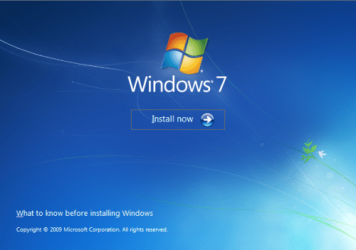
Here's How:1. Boot your computer to the Windows 7 DVD (or to a "Repair CD"). At this screen choose to install now.
25672d1251414873-mbr-restore-windows-7-master-boot-record-mbr_02.png


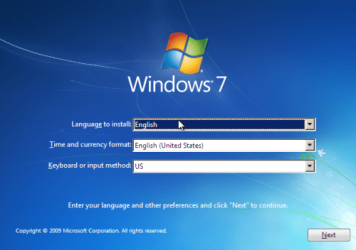
2. Select your language and click next.
25673d1251414836-mbr-restore-windows-7-master-boot-record-mbr_03.png


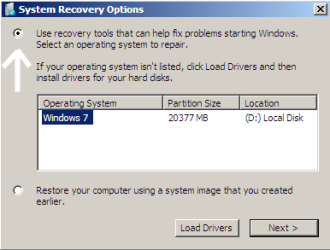
3. Click the button for "Use recovery tools".
25674d1251414836-mbr-restore-windows-7-master-boot-record-mbr_04.png


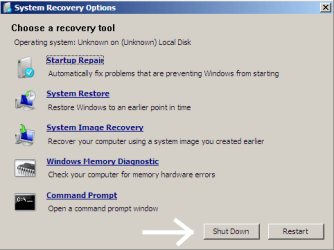
4. Then select "Command Prompt".
25675d1251414836-mbr-restore-windows-7-master-boot-record-mbr_05.png


5. When open, the command prompt will look like this:
53598d1251414836-mbr-restore-windows-7-master-boot-record-mbr_16.png


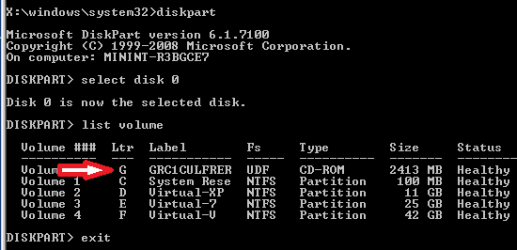
6. The command we will use, bootsect.exe, is in a folder (named boot) on the DVD.We need to know what drive letter has been assigned the DVD drive to access the folder.

Code:
Type: [B]diskpart[/B]
and press [B]Enter[/B]
 
Type: [B]select disk 0[/B] (zero)
and press [B]Enter[/B]
 
type: [B]list volume[/B]
and press [B]Enter[/B]
In this screen shot, the 7 DVD is letter: G
53599d1251414836-mbr-restore-windows-7-master-boot-record-mbr_17a.png


7. Use your DVD drive letter and

Code:
Type: [B]exit[/B]
and press [B]Enter[/B]
 
to close Diskpart
 
Type: [B]G:[/B] (use the letter of your DVD drive)
and press [B]Enter[/B]
 
Type: [B]cd boot[/B]
and press [B]Enter[/B]
 
Type: [B]dir[/B]
and press [B]Enter[/B]
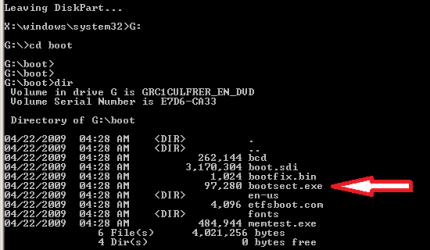
to verify that bootcect.exe is there (if you really need to)
53600d1251414836-mbr-restore-windows-7-master-boot-record-mbr_18a.png


8. To restore the "bootsector code":

Code:
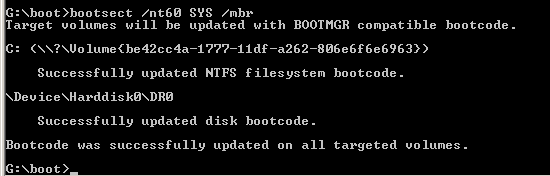
TYPE: [B]bootsect /nt60 SYS /mbr[/B]
and press [B]Enter[/B]
53601d1251414836-mbr-restore-windows-7-master-boot-record-mbr_19.png


NOTE: If this method fails to restore the MBR, you can try the bootrec command as it is also a tool for repairing the MBR.


9. When completed successfully,

Code:
Type: [B]exit[/B]
and press [B]Enter[/B]
This will close the command prompt window.

10. Now select Shut Down or Restart
25680d1251414836-mbr-restore-windows-7-master-boot-record-mbr_10.png


11. Then you can reboot your computer into Windows.
25681d1251414836-mbr-restore-windows-7-master-boot-record-mbr_12.png


Attachments

  • mbr_02.png
    mbr_02.png
    53.7 KB · Views: 1,640,315
  • mbr_03.png
    mbr_03.png
    54.3 KB · Views: 1,635,478
  • mbr_04.png
    mbr_04.png
    6.9 KB · Views: 1,633,763
  • mbr_05.png
    mbr_05.png
    10.5 KB · Views: 1,579,666
  • mbr_10.png
    mbr_10.png
    10.4 KB · Views: 1,576,678
  • mbr_12.png
    mbr_12.png
    5.3 KB · Views: 1,552,307
  • mbr_16.png
    mbr_16.png
    3.3 KB · Views: 1,554,623
  • mbr_17a.png
    mbr_17a.png
    3.8 KB · Views: 1,565,873
  • mbr_18a.png
    mbr_18a.png
    3.7 KB · Views: 1,620,585
  • mbr_19.png
    mbr_19.png
    2.4 KB · Views: 1,569,958
Last edited by a moderator:
Thank you so much

Dear iseeuu,

Thank you so much for posting this article. I purchased a brand new laptop and the second day ( due to my play arounds with MBR, it got corrupted ).... I was terribly upset as I have to re install windows....
Tried a lot with ubuntu live cds, re-installing grub, windows 7 automatic startup recovery...but nothing helped....

But the procedure given by you really rocks!!!!

May God bless you :-)

~ Nagarajan
 

My Computer My Computer

OS
Windows 7 home basic
Dear iseeuu,

Thank you so much for posting this article. I purchased a brand new laptop and the second day ( due to my play arounds with MBR, it got corrupted ).... I was terribly upset as I have to re install windows....
Tried a lot with ubuntu live cds, re-installing grub, windows 7 automatic startup recovery...but nothing helped....

But the procedure given by you really rocks!!!!

May God bless you :-)

~ Nagarajan
Thank you Nagarajan. I am glad you found a solution at Windows Seven Forums!

Cheers!
Robert
 

My Computer My Computer

OS
...
This thread is magical. I was experimenting with Ubuntu awhile back and I found that I didn't want to run it on my desktop so I deleted the partition and shut down, Fast forward to 2 months later I went to power on said desktop on a lack of sleep and found that the computer was booting to "grub recuse" command. I didn't know that Ubuntu overridden the MBR with Grub. Now I do. :) Found this site because I could not remember now to fix the MBR to save my life. That and I was overlooking the simplest answer to my problem.

Long story short, you saved my lack of sleep ass and I thank you for it. :)
 

My Computer My Computer

OS
Windows 7 Ultimate x64
CPU
AMD 965 Black
Motherboard
MSI 790FX-GD70
Memory
12 Gb of Patroit
Graphics Card(s)
XFX 5770
Sound Card
Using the graphic card for sound via the HDMI port.
Monitor(s) Displays
40' Sony Bravia
Hard Drives
1 - 1tb Seagate Barracuda - Win 7
1 - 1tb Western Digital - Server 2003 EE
PSU
Corsair 850
Case
Thermaltake v9 Black ed.
Cooling
Air (for now)
This thread is magical. I was experimenting with Ubuntu awhile back and I found that I didn't want to run it on my desktop so I deleted the partition and shut down, Fast forward to 2 months later I went to power on said desktop on a lack of sleep and found that the computer was booting to "grub recuse" command. I didn't know that Ubuntu overridden the MBR with Grub. Now I do. :) Found this site because I could not remember now to fix the MBR to save my life. That and I was overlooking the simplest answer to my problem.

Long story short, you saved my lack of sleep ass and I thank you for it. :)
Thank you 14058, and welcome to Windows Seven Forums. We like nothing better than to hear that our time spent posting here equals "problem solved" for visitors like you!

Cheers!
Robert
 

My Computer My Computer

OS
...
Beautiful

Add me to your list of converts. Installed Ubuntu x64 & then tried some ill-informed shortcuts to uninstall it. You can guess the rest.

This thread saved my butt, my system, & perhaps my marriage. Thank you.
 

My Computer My Computer

Computer Manufacturer/Model Number
EVGA
OS
Windows 7 Ultimate x64
CPU
Intel Core i7 940
Motherboard
EVGA X58 SLI
Memory
12 GB Corsair Dominator 1600
Graphics Card(s)
ATI Radeon 5850
Sound Card
SoundBlaster X-Fi Titanium
Monitor(s) Displays
Samsung P2770
Hard Drives
2 WD 1 TB FBYS
WD Velociraptor 300GB RAID 0
3 WD 1 TB FAEX
1 WD 1 TB FALS
1 Hitachi 2TB DeskStar
PSU
Corsair TX 850W
Case
Antec 1200
Cooling
CoolerMaster V8 180W
Keyboard
Microsoft Wireless 6000
Mouse
Microsoft Wireless 2000
Add me to your list of converts. Installed Ubuntu x64 & then tried some ill-informed shortcuts to uninstall it. You can guess the rest.

This thread saved my butt, my system, & perhaps my marriage. Thank you.
Thanks for the post, HappyBubbster, and welcome to Windows Seven Forums! Glad you found some help here!

First time been thanked for saving a marriage!

Cheers!
Robert
 

My Computer My Computer

OS
...
thanks

i used acronis option to backup and then recover and then ran the win 7 dvd recovery twice and it worked. Thanks for posting.
 

My Computer My Computer

OS
ultimate 86
i used acronis option to backup and then recover and then ran the win 7 dvd recovery twice and it worked. Thanks for posting.
Welcome to Windows Seven Forums, dangus!

Thanks for letting us know you found help here.

Cheers!
Robert
 

My Computer My Computer

OS
...
Hi Robert,
I have a similar problem with my computer. I have a partitioned HDD, XP Pro installed originally and Win7 Ult on the partition which was dual booted. It work great and I really liked the way Win 7 operated. A problem occurred and I formatted Win 7 but in doing so it left the MBR still showing the dual boot screen, which i can access XP pro and it works great. i tried to clean install Win7 and i get the BSOD and cannot get any further. I wish to keep XP pro as it has applications that will not work on Win 7 but i would dearly love to get Win7 reinstalled.:cry:
Is there any help you or someone can help with!

Thanks
Kevin
 

My Computer My Computer

Computer Manufacturer/Model Number
Dell Dimension 9150
OS
xp pro 32 bit
Memory
2G
Hard Drives
250 GB Maxtor Sata Partitioned (XP/Win7??)
160GB Samsung Sata
320GB Maxtor
Are you able to read what the bsod says?
 

My Computers My Computers

System One System Two

  • Computer type
    PC/Desktop
    OS
    7 X64
    CPU
    i5 8400
    Motherboard
    gigabyte b365m ds3h
    Memory
    2x8gb 3200mhz
    Hard Drives
    various
    PSU
    pure power 11 400w cm
    Case
    Coolermaster
    Cooling
    cryorig m9i
  • Computer type
    PC/Desktop
    OS
    7x64
    CPU
    g5400
    Motherboard
    ga b365m ds3h
    Memory
    8gb ddr4 2400
    PSU
    xfx pro 450w
Hi Thanks for answering. I could at the time but i can't remember now. I can rerun the installation and get that information. what I can remember of it was it gave a reference something like 0x00.. but I'm not sure waht it would relate to.

Kev.
 

My Computer My Computer

Computer Manufacturer/Model Number
Dell Dimension 9150
OS
xp pro 32 bit
Memory
2G
Hard Drives
250 GB Maxtor Sata Partitioned (XP/Win7??)
160GB Samsung Sata
320GB Maxtor
Hi,
This time when i tried to install, (from bootup) if got through the "windows loading files" screen changed to "starting Windows" then the PC fell silent. I left it for 5-6 mins but it stayed at that point. no BSOD this time.

Thanks

Kev
 

My Computer My Computer

Computer Manufacturer/Model Number
Dell Dimension 9150
OS
xp pro 32 bit
Memory
2G
Hard Drives
250 GB Maxtor Sata Partitioned (XP/Win7??)
160GB Samsung Sata
320GB Maxtor
Now my registry is corrupt too :(

Hi,
I installed a new HDD after the installation the Pc would not boot:confused:, (MBR was missing), so I got out the DVD to repair the PC but my C: drive did not show up (only E: drive showed up)
I then follewd the the tutorial on restoring the MBR, but now it comes up with the error that the regestry files are corrupt or missing.

Any help or ideas on how I can go on would be greatly appreciated.

Kind regards Sanchio :D
 

My Computer My Computer

OS
Win7 ultimate x64
CPU
Intel E8500
Motherboard
Asus
Memory
OCZ Reaper 8GB
Graphics Card(s)
Nvidea 8800gt
Cooling
good
Hi,
I installed a new HDD after the installation the Pc would not boot:confused:, (MBR was missing), so I got out the DVD to repair the PC but my C: drive did not show up (only E: drive showed up)
I then follewd the the tutorial on restoring the MBR, but now it comes up with the error that the regestry files are corrupt or missing.

Any help or ideas on how I can go on would be greatly appreciated.

Kind regards Sanchio :D
Hello Sanchez, and welcome to Windows Seven Forums!

The premise of this tutorial thread was to show how to replace a working Grub boot loader (Linux) with the Windows boot loader by restoring the original MBR boot code.

Your situation seems to be different. If when you put the new hard drive in your computer and booted up, the BIOS was only looking at the new (empty) hard drive then you would get a "MBR missing" error message because all of the files were on another hard drive. Using "bootsec.exe" would not fix this because it would be trying to fix an empty drive. If my guess is correct, the answer is to set the hard drive with Windows installed as the boot drive in your bios. I would suggest you remove the new (empty) hard drive and then run the "startup repair" to restore booting to Windows.

http://www.sevenforums.com/tutorials/681-startup-repair.html

To get more help installing your new hard drive, I recommend you start a new thread and explain your situation with more detail.

Cheers!
Robert
 

My Computer My Computer

OS
...
Thank you ver y much, it helped
 

My Computer My Computer

Computer Manufacturer/Model Number
Lenovo
OS
Windows 7 Ultimate x32
CPU
Dual Core 2.3Ghz
Memory
2GB
i've just referred a friend to this thread, and he noticed that there was a step missed out early in the tutorial.

in between steps 2 and 3, there should be a mention of this screen, where you click 'repair your computer'.

961d1227431628-system-recovery-options-repair_option.jpg


it's pretty obvious that you need to do this, but including it may help a few panicking inexperienced readers, and it would make a great tutorial even greater. :)
 

My Computer My Computer

Computer Manufacturer/Model Number
mickey megabyte 1234
OS
ultimate 64 sp1
CPU
i5 2500K [email protected]
Motherboard
MSI P67A-GD53
Memory
8 gigs GSkill Ripjaws 1600
Graphics Card(s)
amd hd6950
Sound Card
creative x-fi gamer
Monitor(s) Displays
samsung 24"
Screen Resolution
1920x1080
Hard Drives
ocz vertex 2e 60 gig, samsung f3 1tb, buffalo 2tb ext
PSU
antec 550
Case
antec three hundred
Cooling
i'm a cooling fan
Keyboard
saitek eclipse ii
Mouse
logitech g3
Internet Speed
about 4 Mbps
Other Info
i love win7
Back
Top