MBR - Restore Windows 7 Master Boot Record

How to Restore the Windows 7 MBR (Master Boot Record)

   Information
If you have been dual booting with Linux, then you probably know one of the Linux boot managers like Grub or LILO has been installed in the MBR of your hard drive. What can you do when you no longer want Linux on that hard drive? This tutorial will show you how to use your 7 DVD and BOOTSECT.EXE to restore the "bootsector code" of the MBR and allow you to begin booting to Windows 7 again.
   Tip
You can use this method to update the bootsector code for Windows 7, Vista, XP, 2000 or switch between Bootmgr and NTLDR. Just check the Microsoft TechNet site for the correct command.


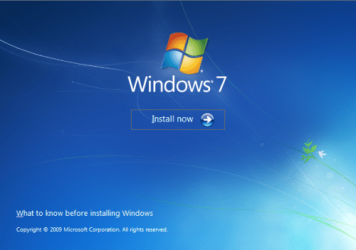
Here's How:1. Boot your computer to the Windows 7 DVD (or to a "Repair CD"). At this screen choose to install now.
25672d1251414873-mbr-restore-windows-7-master-boot-record-mbr_02.png


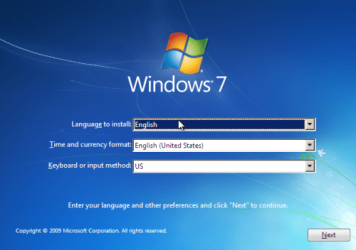
2. Select your language and click next.
25673d1251414836-mbr-restore-windows-7-master-boot-record-mbr_03.png


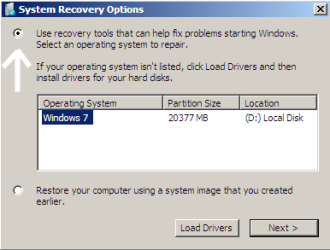
3. Click the button for "Use recovery tools".
25674d1251414836-mbr-restore-windows-7-master-boot-record-mbr_04.png


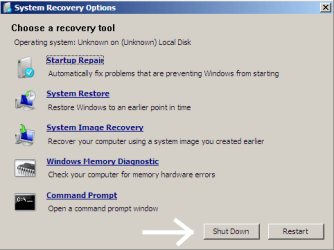
4. Then select "Command Prompt".
25675d1251414836-mbr-restore-windows-7-master-boot-record-mbr_05.png


5. When open, the command prompt will look like this:
53598d1251414836-mbr-restore-windows-7-master-boot-record-mbr_16.png


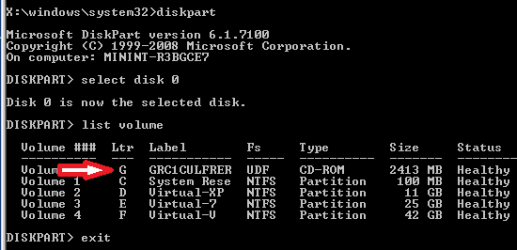
6. The command we will use, bootsect.exe, is in a folder (named boot) on the DVD.We need to know what drive letter has been assigned the DVD drive to access the folder.

Code:
Type: [B]diskpart[/B]
and press [B]Enter[/B]
 
Type: [B]select disk 0[/B] (zero)
and press [B]Enter[/B]
 
type: [B]list volume[/B]
and press [B]Enter[/B]
In this screen shot, the 7 DVD is letter: G
53599d1251414836-mbr-restore-windows-7-master-boot-record-mbr_17a.png


7. Use your DVD drive letter and

Code:
Type: [B]exit[/B]
and press [B]Enter[/B]
 
to close Diskpart
 
Type: [B]G:[/B] (use the letter of your DVD drive)
and press [B]Enter[/B]
 
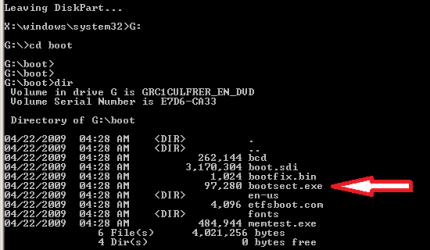
Type: [B]cd boot[/B]
and press [B]Enter[/B]
 
Type: [B]dir[/B]
and press [B]Enter[/B]
to verify that bootcect.exe is there (if you really need to)
53600d1251414836-mbr-restore-windows-7-master-boot-record-mbr_18a.png


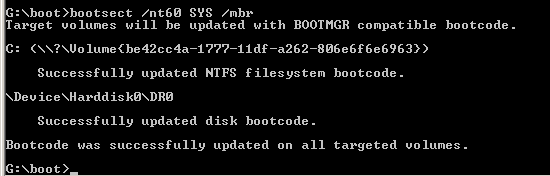
8. To restore the "bootsector code":

Code:
TYPE: [B]bootsect /nt60 SYS /mbr[/B]
and press [B]Enter[/B]
53601d1251414836-mbr-restore-windows-7-master-boot-record-mbr_19.png


NOTE: If this method fails to restore the MBR, you can try the bootrec command as it is also a tool for repairing the MBR.


9. When completed successfully,

Code:
Type: [B]exit[/B]
and press [B]Enter[/B]
This will close the command prompt window.

10. Now select Shut Down or Restart
25680d1251414836-mbr-restore-windows-7-master-boot-record-mbr_10.png


11. Then you can reboot your computer into Windows.
25681d1251414836-mbr-restore-windows-7-master-boot-record-mbr_12.png


Attachments

  • mbr_02.png
    mbr_02.png
    53.7 KB · Views: 1,640,315
  • mbr_03.png
    mbr_03.png
    54.3 KB · Views: 1,635,478
  • mbr_04.png
    mbr_04.png
    6.9 KB · Views: 1,633,763
  • mbr_05.png
    mbr_05.png
    10.5 KB · Views: 1,579,666
  • mbr_10.png
    mbr_10.png
    10.4 KB · Views: 1,576,678
  • mbr_12.png
    mbr_12.png
    5.3 KB · Views: 1,552,307
  • mbr_19.png
    mbr_19.png
    2.4 KB · Views: 1,569,958
  • mbr_18a.png
    mbr_18a.png
    3.7 KB · Views: 1,620,585
  • mbr_17a.png
    mbr_17a.png
    3.8 KB · Views: 1,565,873
  • mbr_16.png
    mbr_16.png
    3.3 KB · Views: 1,554,623
Last edited by a moderator:
What message do you see at the boot screen when the hard drive is the first boot device and will not boot?
There is no message, just after bios load it seems like freeze. But slash blinking.
Your responses are perplexing.

Please try this: Boot to the 7 DVD, make your way to the command prompt option.

TYPE: bootrec /RebuildBcd

Let us know what happens?
 

My Computer My Computer

OS
...
Your responses are perplexing.

Please try this: Boot to the 7 DVD, make your way to the command prompt option.

TYPE: bootrec /RebuildBcd

Let us know what happens?
Here is what happens:
 

Attachments

  • P1050811.JPG
    P1050811.JPG
    335.8 KB · Views: 374

My Computer My Computer

OS
Windows 7 Ultimate x64
Your responses are perplexing.

Please try this: Boot to the 7 DVD, make your way to the command prompt option.

TYPE: bootrec /RebuildBcd

Let us know what happens?
Here is what happens:
Excellent! You answered yes to adding Windows 7 on C, if you also answer yes to adding Windows 7 on D, you should be able to boot to either the old Windows 7 install or the new one.

Have you tried to boot to Windows yet?
 

My Computer My Computer

OS
...
Your responses are perplexing.

Please try this: Boot to the 7 DVD, make your way to the command prompt option.

TYPE: bootrec /RebuildBcd

Let us know what happens?
Here is what happens:
Excellent! You answered yes to adding Windows 7 on C, if you also answer yes to adding Windows 7 on D, you should be able to boot to either the old Windows 7 install or the new one.

Have you tried to boot to Windows yet?

I answered yes on adding both Windows 7 (C and D), but after restart, again no boot option to choose.
Even tried to install XP, but after XP copies the required files from the installation disk of XP, the computer restarts to begin the actual installation of XP, but after load BIOS, install XP does not start and still nothing to boot.
 

My Computer My Computer

OS
Windows 7 Ultimate x64
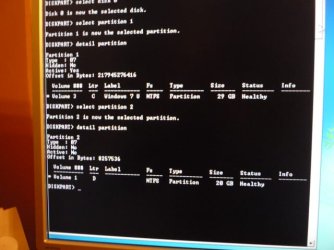
OK ... lets use Diskpart to see some detail.

Boot to the 7 DVD to the command prompt option. This time

TYPE: diskpart

Wait for diskpart to start, then type these lines one by one:

select disk 0

select partition 1

detail partition


What I need to know is what, if any partition is marked active:

Partition 0
Type : 07
Hidden: No
*** Active: Yes ***

If "partition 1" is not active then do:

select partition 2

detail partition


and check to see if it is "Active" or not
 

My Computer My Computer

OS
...
OK ... lets use Diskpart to see some detail.

Boot to the 7 DVD to the command prompt option. This time

TYPE: diskpart

Wait for diskpart to start, then type these lines one by one:

select disk 0

select partition 1

detail partition


What I need to know is what, if any partition is marked active:

Partition 0
Type : 07
Hidden: No
*** Active: Yes ***

If "partition 1" is not active then do:

select partition 2

detail partition


and check to see if it is "Active" or not

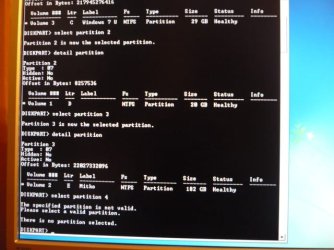
Here is the result: Partition 1 (old windows 7) is active, Partition 2 (new Windows 7) is not active.
 

Attachments

  • P1050821.JPG
    P1050821.JPG
    63.2 KB · Views: 479

My Computer My Computer

OS
Windows 7 Ultimate x64
That looks great! You have 3 "Volumes" (or partitions) so please do "select partition 3", "detail partition" so I can see what it is.

When finished, type "exit" to close "Diskpart", then "exit" again to close the command prompt.
 

My Computer My Computer

OS
...
That looks great! You have 3 "Volumes" (or partitions) so please do "select partition 3", "detail partition" so I can see what it is.

When finished, type "exit" to close "Diskpart", then "exit" again to close the command prompt.

Partition 3 is again not active. On partition 3 is my pictures, my music i so on. On partition 3 there is no operating system instaled.
 

Attachments

  • P1050822.JPG
    P1050822.JPG
    70.3 KB · Views: 644

My Computer My Computer

OS
Windows 7 Ultimate x64
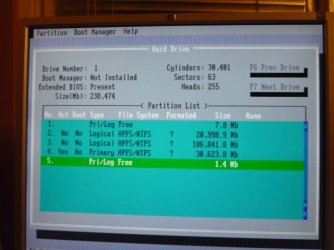
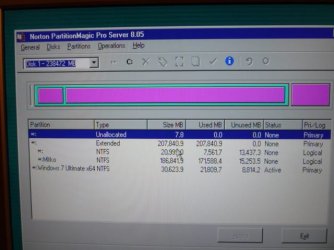
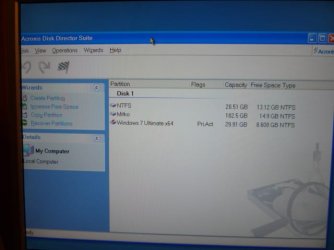
This is screens from aplications from Hiren's Boot CD 10. This is my partitions:
 

Attachments

  • P1050823.JPG
    P1050823.JPG
    63.3 KB · Views: 595
  • P1050824.JPG
    P1050824.JPG
    62.9 KB · Views: 455
  • P1050825.JPG
    P1050825.JPG
    53 KB · Views: 752

My Computer My Computer

OS
Windows 7 Ultimate x64
Well ... your hard drive is correctly setup to boot. There is no software issue that would prevent you from booting to Windows.

Please again, boot to the DVD and run the "Startup Repair" option. Reboot the computer and run the "Startup Repair" a second time and if necessary, reboot and run it a third.

If you are still not able to boot to Windows, then you have a hardware issue between your motherboard, BIOS, and hard drive. One last suggestion would be to shutdown the computer and move the hard drive to a different cable connection or plug on the motherboard. If it is a SATA hard drive, the motherboard will have 2 to 4 SATA sockets in a row. Just unplug the small SATA cable from one socket and put it in the next one.
 

My Computer My Computer

OS
...
This is screens from aplications from Hiren's Boot CD 10. This is my partitions:
OK ... this is an unusual way to setup partitions. Usually the first partition is the "Primary" one and holds the boot code. Then the "Extended" partition with the "Logical" partitions inside it comes after the primary partition.

One reason is you can not boot from a logical partition. However if the boot code is in a primary partition at the front of the drive (for example the 100MB "System Reserved" partition Windows 7 installs) you can boot to an OS in a logical partition.

If you still cannot get Windows 7 to boot after this, I would suggest you need a second hard drive anyway to store you music files and to keep backups of your Windows 7 on a seperate hard drive. Get another hard drive, unplug the old drive and do a fresh install of Windows 7. Later you can save and transfer your files and settings to the new Windows 7 on the new hard drive.
 

My Computer My Computer

OS
...
I have 2 partitions, one is 207MB "not assigned" and the other is 37.37GB "free space". Is there any way to change the state of 207MB partition to "free space"?.
Enrique;

Thank you for the screen shot. The Windows 7 Disk Management utility has some limitations, but you can still use it. You will need to right click on the last partition, the green one, and select "Delete partition." There should not be any data on that partition or it will also be deleted. It was the Fedora partition, and I assume you have not put anything there. When you delete the partition, all of the space will become "not allocated" and will be colored black.

View attachment 54565

Now you have some choices. You can make a partition out of all of the "not allocated" space. You can extend the partition C into the "not allocated" space. Or you can extend the C partition into some of the "not allocated" space and make a new partition from the rest.

View attachment 54566

Please let us know if we may help in any way.

Cheers!
Robert


Robert,

It worked!

Thanks a lot and best regards,

Enrique
 

My Computer My Computer

OS
Windows 7
It worked!

Thanks a lot and best regards,

Enrique
You are most welcome! Glad to know you got everything sorted out the way you want.

Happy surfing!
Robert
 

My Computer My Computer

OS
...
No DVD

Hello,
I've been using Ubuntu 9.10 and since I've had some problems with the drivers I decided to uninstall it. The problem is my laptop came with windows 7 preinstalled, so I don't have the installation DVD, so I don't know how I can fix my MBR.
I'd really appreciate any help.

Thanks
 

My Computer My Computer

OS
Windows 7
Hello,
I've been using Ubuntu 9.10 and since I've had some problems with the drivers I decided to uninstall it. The problem is my laptop came with windows 7 preinstalled, so I don't have the installation DVD, so I don't know how I can fix my MBR.
I'd really appreciate any help.

Thanks
Hi cbaulies, and welcome to Windows Seven Forums.

Hopefully, the Ubuntu 9.10 Grub boot loader is still in tack so you can boot to Windows 7?

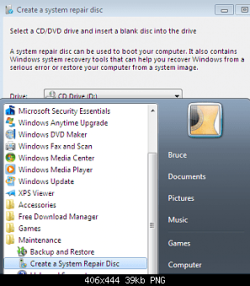
Frequently, computers with pre-installed Windows have recovery partitions. Manufacturers design them so you can burn their Windows installation media yourself. That gives you the DVD to use for repair and restore. Also Windows will burn a repair CD for you that will work as a repair the same way the DVD supplies repair utilities. You can boot to the CD instead of the DVD and use this tutorial to restore your MBR.

create_repair_cd.png

http://www.sevenforums.com/performance-maintenance/51100-repair-cd-system-repair-disk.html

If none of these options are available to you, a copy of the repair CD can be downloaded from the Internet.

Cheers!
Robert
 

My Computer My Computer

OS
...
Thank You!

I am going to school for Computer Networking and Linux is one of our classes. I overwrote my Windows 7 when I initially installed Linux Mint. Just got everything back and installed it again. This time it worked but I didn't like Linux being the first O.S. to boot so I deleted the partition and this article helped me fix my mbr so Windows 7 is back to normal. Cant thank you enough for writing this. Ill stick with Windows on my computer and boot Linux from flash drive from now on. :D
 

My Computer My Computer

Computer Manufacturer/Model Number
ME
OS
Dual: Windows 7 PRO 64 bit & Windows Server 2008 64 bit
CPU
AMD Phenom II X4 955 Black Edition Deneb 3.2GHz Socket AM3
Motherboard
ASUS M4A785TD-V EVO
Memory
4 GB G.SKILL DDR3
Graphics Card(s)
Nvidia Geforce 9500gt
Sound Card
On-board
Monitor(s) Displays
Hanns G HW191D
Screen Resolution
1440 x 900
Hard Drives
2 WD Caviar Black 640GB drives WD6401AALS
PSU
OCZ 600W OCZ600MXSP
Case
Rosewill Wind Knight
Cooling
Stock AMD heatsink/fan, 6x120mm fans, G.Skill Ram Fan
Keyboard
Logitech
Mouse
Logitech
Internet Speed
Cable
I am going to school for Computer Networking and Linux is one of our classes. I overwrote my Windows 7 when I initially installed Linux Mint. Just got everything back and installed it again. This time it worked but I didn't like Linux being the first O.S. to boot so I deleted the partition and this article helped me fix my mbr so Windows 7 is back to normal. Cant thank you enough for writing this. Ill stick with Windows on my computer and boot Linux from flash drive from now on. :D
peoplearebusy;

You are most certainly welcome! And thank you for posting your experience, you are appreciated!

BTW, some other options for installing Linux would be WUBI and Sun's VirtualBox.

Cheers!
Robert
 

My Computer My Computer

OS
...
Hi guys. This seem to be a very helpful thread. I read about 5 pages, but does not seem to find solution to my problem on google or here.

I merged my 200MB hidden partion to my primary windows C partition. Now each time I try to boot up, it gives me blue screen right after windows logo appear on loading screen.

I tried various fixes about bootsec.exe ect, but it does not seem to want to solve my problem. Also automatic system repair wont work anymore.
Fixmbr cant find my master partition, it says I have 0 OS installed.

Any idea how I can recreate the sectors I deleted or the data so I can boot up windows again?
Formatting is an option, but I would rather avoid it since I reformated a week ago.
 

My Computer My Computer

Computer Manufacturer/Model Number
Selvbuild
OS
Windows 7 Pro 64bit
CPU
Core 2 Duo E3400
Motherboard
Asus P5E-Deluxe
Memory
8GB DDR2
Graphics Card(s)
XFX Radeon 5970 Black Edition
Sound Card
Creative X-FI Soundblaster xTremeGamer
Hard Drives
4 hard drives
1 500gb OS (separeted in 2 partitions, system and personal files)
1 500gb for games
1 500gb for downloads
1 1tb for anime storage
PSU
650W
Case
Antec something
Cooling
Asus SilentKnight 2
Hi guys. This seem to be a very helpful thread. I read about 5 pages, but does not seem to find solution to my problem on google or here.

I merged my 200MB hidden partion to my primary windows C partition. Now each time I try to boot up, it gives me blue screen right after windows logo appear on loading screen.

I tried various fixes about bootsec.exe ect, but it does not seem to want to solve my problem. Also automatic system repair wont work anymore.
Fixmbr cant find my master partition, it says I have 0 OS installed.

Any idea how I can recreate the sectors I deleted or the data so I can boot up windows again?
Formatting is an option, but I would rather avoid it since I reformated a week ago.
Hello ZingFreelancer, and welcome to Windows Seven Forums.

I appears by your own description (it gives me blue screen right after windows logo) that you did successfully repair your boot code and do not need to recreate a "System Reserved" boot partition. The blue screen (often referred to as the blue screen of death, or BSOD) is another matter and is more likely caused by a hardware issue. Recreating the boot partition will not affect an issue with hardware.

If I may suggest, your next step would be to create a new thread in the Crashes and Debugging section, after looking at this link: http://www.sevenforums.com/crash-lockup-debug-how/34900-1-novice-how-ask-help-bsod-problem.html

We have helped hundreds with their BSOD issues and hope to assist you with yours.

Cheers!
Robert
 

My Computer My Computer

OS
...
Hello iseeuu.

Thank you for your reply. How ever, I am the impatient guy who think he can solve the problem by using google. But that usually tend to make things worst.

So I tried to fix my problems with gparted and accidentally deleted partition table. My System disk had two partitions, C and D. I set it up in such manner so that if need arise I can nuke my C drive and still keep all important stuff on D drive. Well, havent that just backfired on me? :D

Hardware problems? Well that might be the cause of 5970 or something else... Creative happened to cause that sort of problem due to bad drivers... At any rate I will attempt to rebuild my D drive, take a few file copies and nuke C drive.

Also, something noteworthy is that when I try to boot my system disk alone, he would give me an error telling me something wrong with my boot sequence. I could either go to repair (recommended) or start windows normally. Repair fail to find any solution to the problem.
While Starting Windows gives me a BSOD.

Right now using Partition Doctor and my systers hard drive (which is set in a similar matter as mine, with C and D drives), he managed to find my C drive, but takes so god damn long time to find D drive :(

Before I nuke it, I will take my system drive to my sisters PC and see if I can get it booted up.

Do you have any suggestion for what tool can be used for that? quickly and effective?


UPDATE: Returned my D disk back with all files with DiskTest tool. Attempted to repair boot sector but no luck. Will take out my system drive and take it to my sisters PC to test the blue screen.
 
Last edited:

My Computer My Computer

Computer Manufacturer/Model Number
Selvbuild
OS
Windows 7 Pro 64bit
CPU
Core 2 Duo E3400
Motherboard
Asus P5E-Deluxe
Memory
8GB DDR2
Graphics Card(s)
XFX Radeon 5970 Black Edition
Sound Card
Creative X-FI Soundblaster xTremeGamer
Hard Drives
4 hard drives
1 500gb OS (separeted in 2 partitions, system and personal files)
1 500gb for games
1 500gb for downloads
1 1tb for anime storage
PSU
650W
Case
Antec something
Cooling
Asus SilentKnight 2
Back
Top