Memory problem?

bjosephs

New member
Local time
5:26 PM
Messages
4
I am currently running windows 7 ultimate x64. My PC has been running very slowly. I opened my task manager and at idle my cpu is running at about 25% (which seems ok), I have 4GB on memory installed. Physical memory usage at idle shows almost 4GB exactly. Could this be why my PC is running slowly, or is this normal? Seems to me that if its 4GB at idle, than it would need more, just looking for some advice as to whether I should upgrade to 8GB, or if I may have another issue.

Thanks
 

My Computer

OS
Windows 7 Ultimate x64
CPU
AMD Phenom II x4, DUal core
Motherboard
ASUS M3N
Memory
4GIG
Graphics Card(s)
NVIDIA GFORCE GTS 250
Hard Drives
1TB
That's not normal. Just sitting here reading the post my cpu goes from 0-3% usage... while writing the post it spikes to 7%. 25% means something is going on.

Is this happening all the time, or just sometimes?

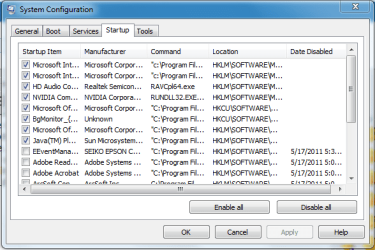
Hit the logo key and type, msconfig, then hit enter. Click the startup tab and list everything you've got checked.
 

My Computer

OS
7 Ultimate x64
CPU
i5-2500k
Motherboard
Asus P8P67 Pro
Memory
8GB G.Skill Ripjaws X F3-12800CL7D-8GBXH 1866MHz 8-9-8-24
Graphics Card(s)
EVGA GTX 570 SC
Sound Card
X-Fi Titanium Fatality
Monitor(s) Displays
Samsung S27A550H 27" LED
Screen Resolution
1920x1080
Hard Drives
OCZ Vertex 3 120GB.
1TB Samsung F3.
2TB Samsung F4.
PSU
PC Power & Cooling Silencer 760
Case
Lian Li Lancool K62
Cooling
Thermalright Venomous X Black/Scythe S-Flex/Shin-Etsu X23
Keyboard
MS Natural Elite 4000 Ergonomic
Mouse
Logitech G500
Internet Speed
6MB/768
Other Info
Logitech Z-5500 505 watts.
D-Link DGL-4500.
Tripp-Lite Smart Pro 1500.
I am at work now, but will look at that when I get home and post what I find (screen shot perhaps?). This is constant. I can say that I have used AVG, spybot, and malwarebytes and came up with nothing, so I think this is a hardware issue.
 

My Computer

OS
Windows 7 Ultimate x64
CPU
AMD Phenom II x4, DUal core
Motherboard
ASUS M3N
Memory
4GIG
Graphics Card(s)
NVIDIA GFORCE GTS 250
Hard Drives
1TB
I doubt that. It's most likely something you've got running. Hardware, on its own, isn't going to start working for no reason at all.

If you have AVG, Spybot and Malwarebytes all loaded at startup, that would definitely cause a slowdown.
 

My Computer

OS
7 Ultimate x64
CPU
i5-2500k
Motherboard
Asus P8P67 Pro
Memory
8GB G.Skill Ripjaws X F3-12800CL7D-8GBXH 1866MHz 8-9-8-24
Graphics Card(s)
EVGA GTX 570 SC
Sound Card
X-Fi Titanium Fatality
Monitor(s) Displays
Samsung S27A550H 27" LED
Screen Resolution
1920x1080
Hard Drives
OCZ Vertex 3 120GB.
1TB Samsung F3.
2TB Samsung F4.
PSU
PC Power & Cooling Silencer 760
Case
Lian Li Lancool K62
Cooling
Thermalright Venomous X Black/Scythe S-Flex/Shin-Etsu X23
Keyboard
MS Natural Elite 4000 Ergonomic
Mouse
Logitech G500
Internet Speed
6MB/768
Other Info
Logitech Z-5500 505 watts.
D-Link DGL-4500.
Tripp-Lite Smart Pro 1500.
I am currently running windows 7 ultimate x64. My PC has been running very slowly. I opened my task manager and at idle my cpu is running at about 25% (which seems ok), I have 4GB on memory installed. Physical memory usage at idle shows almost 4GB exactly. Could this be why my PC is running slowly, or is this normal? Seems to me that if its 4GB at idle, than it would need more, just looking for some advice as to whether I should upgrade to 8GB, or if I may have another issue.

Thanks


So from what you have said , your memory usage is totally maxed out , this will certainly cause the pc to be very slow.

Something is hogging it all , hit control alt del/start task manager/processes tab then look at the memory column , see if one program in particular is using a massive amount.
 

My Computer

OS
Windows 7 Professional 64 bit
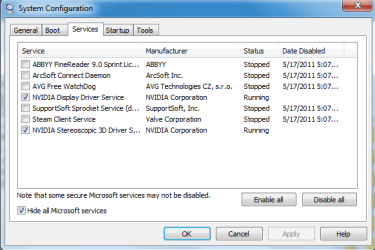
Here is the update. I have disable MANY applications (adobe, quicktime etc) from the start up menu in msconfig. The only thing I left active were windows services. This made a big difference...to a point. When I start my PC and open task manager, I see between 0 - 4% cpu usage and about 10% on memory. My computer has been running for about 15-20 minutes...and I am right back to were I started, 25% cpu usage and memory is about 72%, this is at idle (with this forum open).

I attached screen shots of both the performance tab of the task manager and of the services running in msconfig. Any thoughts on why usage would still be so high?

Thanks again, this is a little frustrating!
 

Attachments

  • Capture.PNG
    Capture.PNG
    18.7 KB · Views: 13
  • Capture2.PNG
    Capture2.PNG
    14.8 KB · Views: 16
  • Capture3.PNG
    Capture3.PNG
    16.5 KB · Views: 15

My Computer

OS
Windows 7 Ultimate x64
CPU
AMD Phenom II x4, DUal core
Motherboard
ASUS M3N
Memory
4GIG
Graphics Card(s)
NVIDIA GFORCE GTS 250
Hard Drives
1TB
Fixed! Apparently windows media player file sharing is a resource hog (and mind you, I never opened the service). Once I turned off sharing and extender services things went back to normal.

Thanks for all the help.
 

My Computer

OS
Windows 7 Ultimate x64
CPU
AMD Phenom II x4, DUal core
Motherboard
ASUS M3N
Memory
4GIG
Graphics Card(s)
NVIDIA GFORCE GTS 250
Hard Drives
1TB
Back
Top