Migrate Win7 system to a larger SSD

squirrel123

New member
Local time
2:02 AM
Messages
5
I've got a Lenovo laptop running Win7. The laptop came with a 128GB SSD which is great, but I'm running out of space for software. I've bought a 250GB SSD and I want to upgrade.

I run my small business off this machine, and all software is set up 'just right,' so starting from scratch and reinstalling programs is the last resort. A system breakdown/data loss would be even worse

I have lots of spare HDDs and SATA docks and USB sticks that I can use to copy data. I just don't know how to deal with Master Boot Records or whatever

Here's my idea, will this work?

1) Boot the 128GB system
2) Plug in the 250GB SSD into a SATA/USB dock
3) Use Minitool Partition Wizard to copy the Win7 partitions (including the 100MB 'system' partition) to the 250GB SSD
4) physically remove the 128GB ssd and replace with the 250GB ssd
5) boot up from teh 250GB ssd
6) Use Minitool Partition Wizard to expand the 128GB partition to fill the entire 250GB SDD


All replies appreciated
 

My Computer My Computer

Computer type
PC/Desktop
Computer Manufacturer/Model Number
Lenovo x220
OS
Windows 7
CPU
i3
Hard Drives
Samsung 128GB SSD
Easiest way (and how I did it when I converted to SSD) is to use Macrium Reflect and make a disc Image (NOT Clone) of the entire disc, all partitions. Restore that image to the new SSD.

Macrium Software
 

My Computer My Computer

Computer type
PC/Desktop
Computer Manufacturer/Model Number
My Own Build
OS
Windows 10 64 bit
CPU
Intel i7 6700K
Motherboard
ASUS ROG Maximus VIII Hero
Memory
16GB Corsair Dominator
Graphics Card(s)
Intel CPU Graphics
Sound Card
RealTek
Monitor(s) Displays
27" Dell S2719dgf
Screen Resolution
2560X1440
Hard Drives
1 TB Samsung 850 EVO SSD for Win 10 Pro
500GB Samsung 850 EVO SSD for Win 10 Insider
2 TB drive for backup
PSU
EVGA Supernova 750G2
Case
BeQuiet Silent Base 600
Cooling
Deepcool Captain 120EX
Keyboard
Microsoft Wireless 2000
Mouse
Microsoft wireless
Internet Speed
100 MB/sec (Cable)
Antivirus
Microsoft Defender and Malwarebytes
Browser
Edge/Firefox
Other Info
Cakewalk (Sonar) by BandLab and Studio One 4.1 Pro recording studio software. MOTU 896Mk3 Hybrid recording interface, Frontier Tranzport wireless control unit, Behringer X-Touch Control Surface.
Five USB connected optical drives for CD Audio production using Nero BurningROM
Easiest way (and how I did it when I converted to SSD) is to use Macrium Reflect and make a disc Image (NOT Clone) of the entire disc, all partitions. Restore that image to the new SSD.

Macrium Software

Ok
something like this?

1) Boot the 128GB system
2) Plug in the 250GB SSD into a SATA/USB dock
3) Use Macrium Reflect to make a disk image of the 128GB ssd with all partitions
4) Restore image to the 250GB ssd
5) physically remove the 128GB ssd and replace with the 250GB ssd
6) boot up from the 250GB ssd
7) Use Minitool Partition Wizard to expand the 128GB partition to fill the entire 250GB SDD
 

My Computer My Computer

Computer type
PC/Desktop
Computer Manufacturer/Model Number
Lenovo x220
OS
Windows 7
CPU
i3
Hard Drives
Samsung 128GB SSD
Easiest way (and how I did it when I converted to SSD) is to use Macrium Reflect and make a disc Image (NOT Clone) of the entire disc, all partitions. Restore that image to the new SSD.

Macrium Software

Ok
something like this?

1) Boot the 128GB system
2) Plug in the 250GB SSD into a SATA/USB dock
3) Use Macrium Reflect to make a disk image of the 128GB ssd with all partitions
4) Restore image to the 250GB ssd
5) physically remove the 128GB ssd and replace with the 250GB ssd
6) boot up from the 250GB ssd
7) Use Minitool Partition Wizard to expand the 128GB partition to fill the entire 250GB SDD

That would likely work. You might consider avoiding the dock in case it causes complications.

You need somewhere to store that image file. I assume you have an external you can use for that purpose.

You may not need to include "all partitions" in the image file, depending on your setup. Data can just be copied manually, without reliance on Macrium.

You should make Macrium recovery media so you can recover in those instances where you have a defective drive.
 

My Computer My Computer

Computer type
PC/Desktop
Computer Manufacturer/Model Number
Ignatz Special; 4 speed manual gearbox; factory air conditioning; one of one
OS
Windows 7 Home Premium SP1, 64-bit
CPU
Intel Skylake i5-6600K, not overclocked
Motherboard
AsRock Z170M Extreme 4, micro ATX
Memory
8 GB HyperX DDR4-2666 (2 x 4 GB)
Graphics Card(s)
none; graphics are integrated on CPU
Sound Card
onboard: Realtek ALC1150; external: USB Behringer UF0-202
Monitor(s) Displays
Dell S2340M 23 inch IPS
Screen Resolution
1600 x 900
Hard Drives
System: Crucial MX100 series SSD, 128 GB;
Data: Samsung Spinpoint 103SJ, 1 TB;
Backup: WD Caviar Green WD30EZRX-00D8PB0, 3 TB
PSU
Rosewill SilentNight 500 watt fanless, semi-modular
Case
Antec Solo II
Cooling
Noctua NH-U12S; Noctua F12 intake, Noctua S12A exhaust
Keyboard
Microsoft 200 6JH-00001 USB
Mouse
Dell or Microsoft optical wired; USB
Antivirus
Microsoft Security Essentials and Malwarebytes Premium
Browser
Pale Moon
Other Info
All fans PWM; speeds at idle: CPU circa 500 rpm; intake circa 600 rpm; exhaust circa 600 rpm; CPU temps 27 idle and 47 C load in a warm room (27 C/81 F) when running Intel Extreme Tuning Utility stress test.
I didn't have to expand the partition. You only need to do that if "Clone", and you are using Disc Image to "backup" the entire drive (all partitions) to some external media. You "restore" from the external media to the new SSD.
 

My Computer My Computer

Computer type
PC/Desktop
Computer Manufacturer/Model Number
My Own Build
OS
Windows 10 64 bit
CPU
Intel i7 6700K
Motherboard
ASUS ROG Maximus VIII Hero
Memory
16GB Corsair Dominator
Graphics Card(s)
Intel CPU Graphics
Sound Card
RealTek
Monitor(s) Displays
27" Dell S2719dgf
Screen Resolution
2560X1440
Hard Drives
1 TB Samsung 850 EVO SSD for Win 10 Pro
500GB Samsung 850 EVO SSD for Win 10 Insider
2 TB drive for backup
PSU
EVGA Supernova 750G2
Case
BeQuiet Silent Base 600
Cooling
Deepcool Captain 120EX
Keyboard
Microsoft Wireless 2000
Mouse
Microsoft wireless
Internet Speed
100 MB/sec (Cable)
Antivirus
Microsoft Defender and Malwarebytes
Browser
Edge/Firefox
Other Info
Cakewalk (Sonar) by BandLab and Studio One 4.1 Pro recording studio software. MOTU 896Mk3 Hybrid recording interface, Frontier Tranzport wireless control unit, Behringer X-Touch Control Surface.
Five USB connected optical drives for CD Audio production using Nero BurningROM

My Computer My Computer

Computer type
PC/Desktop
Computer Manufacturer/Model Number
Lenovo x220
OS
Windows 7
CPU
i3
Hard Drives
Samsung 128GB SSD
You might consider avoiding the dock in case it causes complications.

what would you suggest as an alternative?

Make the image of the 128, storing it on an external drive, not the dock.

Remove the 128. Install the 250 in it's place. I assume the laptop cannot accommodate 2 internals.

Boot from Macrium recovery media and restore from the external to the 250.

Either method could work or fail. It's just an alternative.
 

My Computer My Computer

Computer type
PC/Desktop
Computer Manufacturer/Model Number
Ignatz Special; 4 speed manual gearbox; factory air conditioning; one of one
OS
Windows 7 Home Premium SP1, 64-bit
CPU
Intel Skylake i5-6600K, not overclocked
Motherboard
AsRock Z170M Extreme 4, micro ATX
Memory
8 GB HyperX DDR4-2666 (2 x 4 GB)
Graphics Card(s)
none; graphics are integrated on CPU
Sound Card
onboard: Realtek ALC1150; external: USB Behringer UF0-202
Monitor(s) Displays
Dell S2340M 23 inch IPS
Screen Resolution
1600 x 900
Hard Drives
System: Crucial MX100 series SSD, 128 GB;
Data: Samsung Spinpoint 103SJ, 1 TB;
Backup: WD Caviar Green WD30EZRX-00D8PB0, 3 TB
PSU
Rosewill SilentNight 500 watt fanless, semi-modular
Case
Antec Solo II
Cooling
Noctua NH-U12S; Noctua F12 intake, Noctua S12A exhaust
Keyboard
Microsoft 200 6JH-00001 USB
Mouse
Dell or Microsoft optical wired; USB
Antivirus
Microsoft Security Essentials and Malwarebytes Premium
Browser
Pale Moon
Other Info
All fans PWM; speeds at idle: CPU circa 500 rpm; intake circa 600 rpm; exhaust circa 600 rpm; CPU temps 27 idle and 47 C load in a warm room (27 C/81 F) when running Intel Extreme Tuning Utility stress test.
You might consider avoiding the dock in case it causes complications.

what would you suggest as an alternative?

Make the image of the 128, storing it on an external drive, not the dock.

Remove the 128. Install the 250 in it's place. I assume the laptop cannot accommodate 2 internals.

Boot from Macrium recovery media and restore from the external to the 250.

Either method could work or fail. It's just an alternative.

by Macrium recovery media I assume you mean the image that I made of the 128.
Thanks
 

My Computer My Computer

Computer type
PC/Desktop
Computer Manufacturer/Model Number
Lenovo x220
OS
Windows 7
CPU
i3
Hard Drives
Samsung 128GB SSD
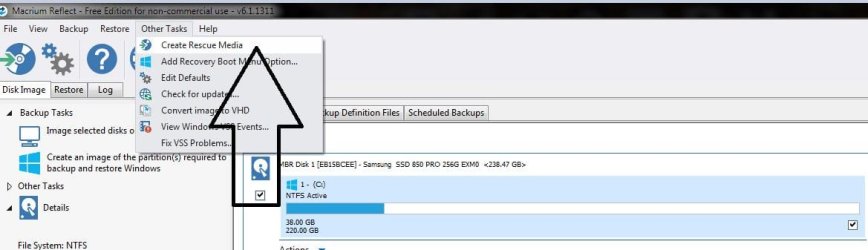
No, you have to create a Macrium Recovery cd, that`s what you will boot from to put the image on the new ssd.

Open Macrium and up top you`ll see Other Tasks, click that and you`ll see Create Rescue Media
 

Attachments

  • Capture.JPG
    Capture.JPG
    49.5 KB · Views: 1

My Computer My Computer

Computer type
PC/Desktop
Computer Manufacturer/Model Number
Skylake Special #666
OS
Windows 10 Pro x64
CPU
Intel Core i7 6700K
Motherboard
Asus Sabertooth Z170 Mark 1
Memory
GSkill TridentZ RGB 16GB 3600 16-16-16-36
Graphics Card(s)
EVGA GTX 980 Ti SC x2
Sound Card
Realtek High Definition
Monitor(s) Displays
AOC G2460PG
Screen Resolution
1920 x 1080 144Hz
Hard Drives
Samsung 860 Pro 256GB, Seagate Barracuda 4TB x2
PSU
EVGA 1000 P2, EVGA White Custom Braided Cables
Case
Corsair Vengeance C70 Gunmetal Black
Cooling
Corsair H100i v2, Corsair ML120 x2, Thermal Grizzly Kryonaut
Keyboard
Logitech G910 Orion Spectrum
Mouse
Logitech G700s
Internet Speed
Verizon Fios Quantum Gateway 75/75
Antivirus
Windows Defender, Malwarebytes Free 3.8.3
Browser
Chrome
Other Info
Corsair SP120 x4, LG Blu-ray Drive, Durabrand HT-395 100 Watt Dolby Digital Amp, Corsair H2100 Wireless 7.1 Headset
No, you have to create a Macrium Recovery cd, that`s what you will boot from to put the image on the new ssd.

Open Macrium and up top you`ll see Other Tasks, click that and you`ll see Create Rescue Media

cool thanks!
 

My Computer My Computer

Computer type
PC/Desktop
Computer Manufacturer/Model Number
Lenovo x220
OS
Windows 7
CPU
i3
Hard Drives
Samsung 128GB SSD
Here's my idea, will this work?

1) Boot the 128GB system
2) Plug in the 250GB SSD into a SATA/USB dock
3) Use Minitool Partition Wizard to copy the Win7 partitions (including the 100MB 'system' partition) to the 250GB SSD
4) physically remove the 128GB ssd and replace with the 250GB ssd
5) boot up from teh 250GB ssd
6) Use Minitool Partition Wizard to expand the 128GB partition to fill the entire 250GB SDD

This is exactly what I did a few weeks ago, it works most excellently, for me anyways, , , plus the 128 g is your backup in storage.

-c-
 

My Computer My Computer

Computer type
Laptop
Computer Manufacturer/Model Number
toshiba 505
OS
Windows 7 Home Premium bit
CPU
amd?
Motherboard
?
Memory
4 gig
Monitor(s) Displays
Samsung S27D360 &S24D300 - Acer K222HQL - Eizo 21" (4x3)
Screen Resolution
1280 x 720 -1600x900 - (eizo 1024x768
Hard Drives
240 ssd
PSU
amd (?)
Mouse
logitech tackball
Antivirus
360 total security
Browser
firefox portable 29.0.1
I've already did what Squirrel fist suggest, copying the partitions to the new disk.
Instead of copying partition one by one, AOMEI has a copy disk.
The two are slow as they are copping partitions in use.
Clonezilla is an Linux graphic app that you boot from a pendrive and clone one disk to the other. It resizes the partition. It's fast. I recommend it.
Clonezilla - About
 

My Computers My Computers

System One System Two

  • Computer type
    PC/Desktop
    Computer Manufacturer/Model Number
    custom build
    OS
    Windows 7 HP 64
    CPU
    i5 6600K - 800MHz to 4200MHz
    Motherboard
    GA-Z170-HD3P
    Memory
    4+4G GSkill DDR4 3000
    Graphics Card(s)
    IG - Intel 530
    Monitor(s) Displays
    Samsung 226BW
    Screen Resolution
    1680x1050
    Hard Drives
    (1) -1 SM951 – 128GB M.2 AHCI PCIe SSD drive for Windows 7 and Lubuntu
    (2) -1 WD SATA 3 - 1T for Data
    (3) -1 WD SATA 3 - 1T for backup
    PSU
    Thermaltake 450W TR2 gold
    Keyboard
    Old and good Chicony mechanical keyboard
    Mouse
    Logitech mX performance - 9 buttons (had to disable some)
    Internet Speed
    500Mb/s
    Browser
    Firefox 64
    Other Info
    TinyWall firewall
  • Computer type
    Laptop
    System Manufacturer/Model Number
    Asus Q550LF
    OS
    Windows 7 Pro
    CPU
    i7-4500U 800MHz to 3.0GHz
    Motherboard
    Asus Q550LF
    Memory
    (4+4)G DDR3 1600
    Graphics Card(s)
    IG intel 4400 + NVIDIA GeForce GT 745M
    Sound Card
    Realtek
    Monitor(s) Displays
    LG Display LP156WF4-SPH1
    Screen Resolution
    1920 x 1080
    Hard Drives
    BX500 120G SSD for Windows and programs +
    1T HDD for data
    Internet Speed
    500 Mb/s
    Browser
    Firefox
    Other Info
    TinyWall firewall
Back
Top