[MORE HELP] Windows 7 - RAM issue

MitchellEve

New member
Member
VIP
Local time
10:07 PM
Messages
117
Hey guys,

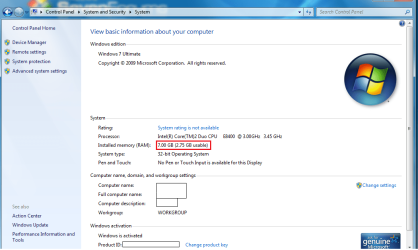
So I have 4 slots for ram on my mother board. They are a filled with 2 GB sticks (All different brands) and I have one 1 GB stick. I go into Windows 7 Windows Explorer and in the System properties it says this:
29axlbr.png

Any assistance is great!
 

My Computer

OS
Windows 7 Ultimate x64
Hello Mitchell,

Welcome to Seven Forums.

If you fill in your system specs under User CP, that would help. You can see what kind of info is useful by looking at mine and others specs, lower left of each post.

Although you can install all the ram, a 32 bit system can only address 4 GB max. Some of this address space is used by other hardware so effectively you have only 3 or so GB useable depending on the hardware you have in your system. In order to use more than 4 GB of ram you need to have a 64 bit OS. Most newer systems are 64 bit compatible. Only thing that is generally ever a problem is finding 64 bit drivers for some hardware. If you can find 64 bit drivers for all your hardware, I would suggest you download the 64 bit version of W7 and install that. You won't be able to upgrade, it will have to be a clean install.

Hope this helps. If you need more help with this, we'll be around.

Gary
 

My Computer

Computer Manufacturer/Model Number
Dell XPS420
OS
Vista Ult 64 bit Seven Ult RTM x64
CPU
Intel Core2 Quad Q6600 2.40 gigahertz
Memory
Crucial Ballistix 4x2GB PC2 6400
Graphics Card(s)
NVIDIA GeForce 8600 GTS 256 MB
Sound Card
Creative SB X-Fi audio
Monitor(s) Displays
HP w2207 + HPvs15
Screen Resolution
1680x1050 + 1024x768
Hard Drives
2-WD5000AAKS-500 GB
WD5000AAV-500 GB external
Keyboard
Microsoft Comfort Curve
Mouse
MX Revolution
Other Info
Wacom Intuos 2 Graphics Tablet
Experience Index=5.5
Install 64 bit version..

And btw if u are new to computers i would suggest to u not overclock anything yet as u may cause your hardware to fail...but your call and your money afterall.....:D
 

My Computer

OS
Windows 7
CPU
Q6600
Motherboard
Asus P5Q
Memory
OCZ Reaper 6400(800mhz) 4GB
Graphics Card(s)
BFG GTX 260 Maxcore
Monitor(s) Displays
Samsung T220
Screen Resolution
1680*1050
Hard Drives
WD Raptor 360
WD 640AAKS
PSU
Corsair 750
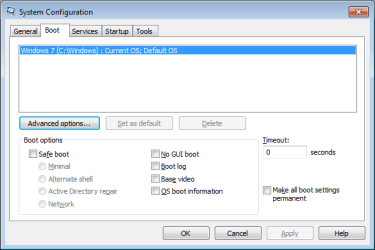
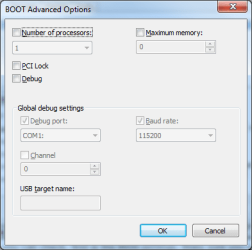
Couple of things you can check, first is the BIOS settings. Make sure you can see all the ram in your POST. Secondly, type 'msconfig' in your Start menu and check to make sure the Maximum Memory is de-selected. Or, you can force it to 8192MB if that doesn't work.

Also, fill out your system specs in your profile, if you haven't already. ;)
 

Attachments

  • msconfig1.png
    msconfig1.png
    9.3 KB · Views: 2,163
  • msconfig2.png
    msconfig2.png
    10.8 KB · Views: 637

My Computer

Computer type
PC/Desktop
Computer Manufacturer/Model Number
Custom Build/Mod
OS
Windows 7 Home Premium x64
CPU
Intel QX9650 Extreme 4.0 GHz
Motherboard
ASUS Rampage Extreme Rev2
Memory
8GB (4x2) Corsair Dominator DDR3
Graphics Card(s)
2x Radeon R390X [8GB]
Sound Card
SupremeFX X-Fi
Monitor(s) Displays
Dell 2408WFP 26" Panel
Screen Resolution
1920x1200
Hard Drives
4x WD 2TB (8TB+ Total)
2x Crucial SSD 128GB (RAID-0)
1x LG Blu-ray read/write
1x Phillips LightScribe DVD read/write
PSU
Corsair HX1000
Case
CoolerMaster - Cosmos S
Cooling
Custom Liquid - 320mm rad w/ 3x 80mm fans, CPU/NB/SB Blocks
Keyboard
Logitech Illuminater Pro
Mouse
Logitech
Internet Speed
Fractional T1 - 125Mbps
Antivirus
ESET Security Suite / Microsoft Security Essentials
Browser
Cyberfox Intel x64
Other Info
OC'd to 5.0GHz @ 44c under full load
I did everything you guys suggested but take out the ram. Should I do that? Also, check out my other thread guys.
 

My Computer

OS
Windows 7 Ultimate x64
I did everything you guys suggested but take out the ram. Should I do that? Also, check out my other thread guys.

Double-posting won't really help you or anyone else. Be patient and refrain from posting multiple threads on the same issue.
 

My Computer

Computer type
PC/Desktop
Computer Manufacturer/Model Number
Custom Build/Mod
OS
Windows 7 Home Premium x64
CPU
Intel QX9650 Extreme 4.0 GHz
Motherboard
ASUS Rampage Extreme Rev2
Memory
8GB (4x2) Corsair Dominator DDR3
Graphics Card(s)
2x Radeon R390X [8GB]
Sound Card
SupremeFX X-Fi
Monitor(s) Displays
Dell 2408WFP 26" Panel
Screen Resolution
1920x1200
Hard Drives
4x WD 2TB (8TB+ Total)
2x Crucial SSD 128GB (RAID-0)
1x LG Blu-ray read/write
1x Phillips LightScribe DVD read/write
PSU
Corsair HX1000
Case
CoolerMaster - Cosmos S
Cooling
Custom Liquid - 320mm rad w/ 3x 80mm fans, CPU/NB/SB Blocks
Keyboard
Logitech Illuminater Pro
Mouse
Logitech
Internet Speed
Fractional T1 - 125Mbps
Antivirus
ESET Security Suite / Microsoft Security Essentials
Browser
Cyberfox Intel x64
Other Info
OC'd to 5.0GHz @ 44c under full load
Probably no use in powering the extra ram if your not going to install an OS that can use it.

Gary
 

My Computer

Computer Manufacturer/Model Number
Dell XPS420
OS
Vista Ult 64 bit Seven Ult RTM x64
CPU
Intel Core2 Quad Q6600 2.40 gigahertz
Memory
Crucial Ballistix 4x2GB PC2 6400
Graphics Card(s)
NVIDIA GeForce 8600 GTS 256 MB
Sound Card
Creative SB X-Fi audio
Monitor(s) Displays
HP w2207 + HPvs15
Screen Resolution
1680x1050 + 1024x768
Hard Drives
2-WD5000AAKS-500 GB
WD5000AAV-500 GB external
Keyboard
Microsoft Comfort Curve
Mouse
MX Revolution
Other Info
Wacom Intuos 2 Graphics Tablet
Experience Index=5.5
I did everything you guys suggested but take out the ram. Should I do that? Also, check out my other thread guys.
.
If you plan to switch to the 64 bit OS you may as well leave it in. Otherwise it would make sense to reduce the amount to 4 gigs since the extra ram is doing nothing. Actually you should consider removing the 1 gig stick anyway since it's preventing the memory from running in dual channel mode (if you motherboard supports it). Note your current memory score in the WEI and run the test again after removing the 1 gig stick. You will see an improvement if the memory is switched to dual channel mode.
 

My Computer

Computer type
PC/Desktop
OS
Windows 7 x64
CPU
Intel Core2 Extreme Q6850 3.00GHz
Motherboard
EVGA 132-CK-NF79
Memory
8 GB
Graphics Card(s)
Radeon R7 260X
Sound Card
Xonar DS
Hard Drives
Hitachi Deskstar 1 tb
Back
Top