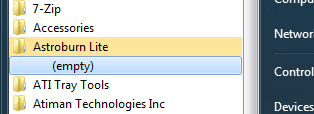
Most start menu program folders say (empty)

Vladimir8185

New member
Local time
2:46 AM
Messages
10
Hi there,

I have a problem with most of the programs in my start menu no longer containing any shortcuts but just displaying "(empty)" as shown below.
attachment.php

And when I use "search programs & files" to find the program it doesn't find it either.

I first noticed this happening about 3 months after I did a clean install of Windows 7 and I am 99% sure it affects all programs I have installed since then. The shortcuts are there after the programs are first installed (I don't check this all the time though) but disappear soon after - maybe after the next logon... I don't know.

It must be related to permissions because when I right click on "All Programs" and select "All Users", if I try to open one of the affected program's folders I get the message "You don't currently have permission to access this folder". I can click "continue" and open the folder and the shortcuts are there.
(A related problem maybe that some of the shortcuts have lost their icons??)

I don't know much permissions and ownership etc but have managed to change the ownership of one of these folders to Administrator and it then the shortcuts also appear again in the start menu.
I could just go through and do this to all the 40 odd programs that are affected buy I want to know what's causing it to stop it happening in the future.

I have spent hours trying to find a solution to this problem and it is driving me crazy!
I have seen a lot about the Windows 7 restore virus that makes start menu folders empty? I don't think this is the problem (I used to run AVG but now Microsoft Security Essentials and they have never found anything) but I haven't actually seen any info about how to confirm if you have this virus or not - mainly people advising to run different "virus fix" programs which I am wary about.

I have only ever had one user account on the computer which is set to admin privileges too.
Any help would be much appreciated, Thanks! :)
 

Attachments

  • Untitled.png
    Untitled.png
    3.3 KB · Views: 143

My Computer

Computer type
PC/Desktop
OS
Windows 7 Home Premium 64 Bit (Service Pack 1)
Antivirus
Microsoft Security Essentials
Browser
Chrome
just saw this in the "similar threads" below this post

http://www.sevenforums.com/general-discussion/51328-start-menu-empty.html

Quote: Originally Posted by beabt1
My Start Menu......Once was populated but now is vacant. I'm not aware of any action of mine that has caused the original list to disappear. Items can still be added to the menu if I choose to do so.

It is a known problem when start gets more than abt 80 items. I have it now. there are 2 fixes. first have less than that number of items. second there is a thread here that has the cure. I forget its name and fix. Just search for it. Me I just deal with it too much trouble.
 

My Computer

Computer type
PC/Desktop
OS
Windows 7 Home Premium 64 Bit (Service Pack 1)
Antivirus
Microsoft Security Essentials
Browser
Chrome
Have you tried re installing the program ?
 

My Computer

Computer type
PC/Desktop
Computer Manufacturer/Model Number
Skylake Special #666
OS
Windows 10 Pro x64
CPU
Intel Core i7 6700K
Motherboard
Asus Sabertooth Z170 Mark 1
Memory
GSkill TridentZ RGB 16GB 3600 16-16-16-36
Graphics Card(s)
EVGA GTX 980 Ti SC x2
Sound Card
Realtek High Definition
Monitor(s) Displays
AOC G2460PG
Screen Resolution
1920 x 1080 144Hz
Hard Drives
Samsung 860 Pro 256GB, Seagate Barracuda 4TB x2
PSU
EVGA 1000 P2, EVGA White Custom Braided Cables
Case
Corsair Vengeance C70 Gunmetal Black
Cooling
Corsair H100i v2, Corsair ML120 x2, Thermal Grizzly Kryonaut
Keyboard
Logitech G910 Orion Spectrum
Mouse
Logitech G700s
Internet Speed
Verizon Fios Quantum Gateway 75/75
Antivirus
Windows Defender, Malwarebytes Free 3.8.3
Browser
Chrome
Other Info
Corsair SP120 x4, LG Blu-ray Drive, Durabrand HT-395 100 Watt Dolby Digital Amp, Corsair H2100 Wireless 7.1 Headset
Yes, it's not just one program though, i'm pretty sure it's all of the programs I have installed since it first started happening 6 months ago (and no, I have no idea what changes might have happened at the time)
 

My Computer

Computer type
PC/Desktop
OS
Windows 7 Home Premium 64 Bit (Service Pack 1)
Antivirus
Microsoft Security Essentials
Browser
Chrome
Did you install the programs form your user account or from an Administrator one? Did you select "Install for all Users" or maybe "Just Me"?
How have you accessed them for the last 6 months?
 

My Computer

Computer type
PC/Desktop
Computer Manufacturer/Model Number
Home Built Desktop By DataTech
OS
Windows 7 Ultimate X64 SP1
CPU
Intel i5-2550K, Differing ~4.4-4.8GHz No built in GPU
Motherboard
ASUS P8Z68-V PRO/GEN3
Memory
16GB G.Skill Sniper 1866MHz @ 2133MHz 2x8GB
Graphics Card(s)
ASUS GTX650TIB-DC2OC-2GD5, (650TI Boost)
Sound Card
Onboard Realtek 5-1
Monitor(s) Displays
Samsung P2570HD
Screen Resolution
1920x1080
Hard Drives
Samsung 840 Pro 256GB SSD for OS, 500GB Seagate Constellation (Enterprise drive) for Data
PSU
Corsair HX650W
Case
Inwin Dragon Rider
Cooling
Hyper 212 EVO w/two Noctua fans, push-pull, @1300 RPM
Keyboard
E-Z Eyes, bright yellow keys with large characters
Mouse
steelseries SENSEI Laser Pro Gaming
Internet Speed
48-51Mbs Mbs down, 11 Mbs up Xfinity Cable
Antivirus
Norton Internet Security 2013
Browser
IE 10, Opera, Pale Moon if needed
Other Info
4 case fans, LG BluRay-RE, ASUS DVD-RW, Mr. Fusion power supply, 1.21 gigawatts.
Installed from my account (which is an admin account anyway) and always select All Users if the option is given.
I just pinned to the start menu the ones I use often and the others I open directly from within program files....which I have gotten sick of doing now hence having ANOTHER go at trying to find an answer, giving up and posting here haha :D
 

My Computer

Computer type
PC/Desktop
OS
Windows 7 Home Premium 64 Bit (Service Pack 1)
Antivirus
Microsoft Security Essentials
Browser
Chrome
Does no one have any ideas on this one??? :cry:
 

My Computer

Computer type
PC/Desktop
OS
Windows 7 Home Premium 64 Bit (Service Pack 1)
Antivirus
Microsoft Security Essentials
Browser
Chrome
Hi Vladimir8185

Can you tell me if you have this folder ( in bold ) C:\Users\(YourUserAccount)\AppData\Local\Temp\smtmp ?
 

My Computer

Computer Manufacturer/Model Number
Custom Built
OS
Windows 7 Ultimate 32-Bit & Windows 7 Ultimate 64-Bit
CPU
Intel Core i7 CPU 950 @ 3.07GHz
Motherboard
ASUS P6T DELUXE V2
Memory
OCZ 6GB (3 x 2GB) 240-Pin DDR3 SDRAM DDR3 1600 OCZ3X1600R2
Graphics Card(s)
ATI Radeon HD 5700 Series
Sound Card
OnBoard
Hard Drives
WD6400AACS-00M3B0 (640GB SATA )
PSU
CORSAIR 850w
Case
NZXT LEXA
Cooling
Intel Stock Heatsink Fan
Keyboard
Microsoft Wireless Laser Keyboard 7000
Mouse
Microsoft Wireless Laser Mouse 7000
No I don't, I checked the Administrator user as well. Is that how you check if you have that virus that affects the start menu?
 

My Computer

Computer type
PC/Desktop
OS
Windows 7 Home Premium 64 Bit (Service Pack 1)
Antivirus
Microsoft Security Essentials
Browser
Chrome
Yes the virus stores folders in that folder and the folders are numbered 1 , 2 , 4 . Each number goes to a specific folder . Can you take a screen shot of the entire start menu ?
 

My Computer

Computer Manufacturer/Model Number
Custom Built
OS
Windows 7 Ultimate 32-Bit & Windows 7 Ultimate 64-Bit
CPU
Intel Core i7 CPU 950 @ 3.07GHz
Motherboard
ASUS P6T DELUXE V2
Memory
OCZ 6GB (3 x 2GB) 240-Pin DDR3 SDRAM DDR3 1600 OCZ3X1600R2
Graphics Card(s)
ATI Radeon HD 5700 Series
Sound Card
OnBoard
Hard Drives
WD6400AACS-00M3B0 (640GB SATA )
PSU
CORSAIR 850w
Case
NZXT LEXA
Cooling
Intel Stock Heatsink Fan
Keyboard
Microsoft Wireless Laser Keyboard 7000
Mouse
Microsoft Wireless Laser Mouse 7000

My Computer

Computer type
PC/Desktop
Computer Manufacturer/Model Number
Custom Build MPCBS AMII
OS
Windows 7 Professional x64
CPU
AMD Athlon II x4 3.00 GHz
Motherboard
MSI GF615M-p33
Memory
16GB Kingston DDR3
Graphics Card(s)
Nvidia 8600 (dual DVI out for 2 monitors)
Sound Card
Onboard
Monitor(s) Displays
Acer H233H 23", ASUS 23"
Screen Resolution
1366 x 768
Hard Drives
(2) WD Blue 1 TB 3 partitions, (1) Seagate 7200 500GB with 2 partitions for useless and frequently deleted data Looking forward do an ssd for os soon.
PSU
Corsair 1100Watt
Case
Apevia HAF
Cooling
HAF AMD High Profile Heat sink and fan
Keyboard
wireless Logitech
Mouse
wireless Logitech
Internet Speed
16 mbps
Antivirus
eSet, AVG, Clam and Clamwin (depends on machine)
Browser
Firefox
Other Info
(9) Win 7 machines all x64 (POS Updated to Windows 7 pro YEA), (4) Linux machines x64 and x86 including a v3000 compaq lappy brought back to life with Mint 9 used to scan drives, (1) Linux Machine dual boot XP Pro (for testing and destroying), (1) Win 7 pro x64/Win 8.1 Lenovo Laptop Dual Boot.
mohavepc

if he ran a cleaner to delete his temp files that folder is gone and the tutorial you gave him is pointless.
 

My Computer

Computer Manufacturer/Model Number
Custom Built
OS
Windows 7 Ultimate 32-Bit & Windows 7 Ultimate 64-Bit
CPU
Intel Core i7 CPU 950 @ 3.07GHz
Motherboard
ASUS P6T DELUXE V2
Memory
OCZ 6GB (3 x 2GB) 240-Pin DDR3 SDRAM DDR3 1600 OCZ3X1600R2
Graphics Card(s)
ATI Radeon HD 5700 Series
Sound Card
OnBoard
Hard Drives
WD6400AACS-00M3B0 (640GB SATA )
PSU
CORSAIR 850w
Case
NZXT LEXA
Cooling
Intel Stock Heatsink Fan
Keyboard
Microsoft Wireless Laser Keyboard 7000
Mouse
Microsoft Wireless Laser Mouse 7000
Regarding the virus and temp\smtmp folder...now I googled that virus again and checked your link mohavepc I can remember checking for that folder now when I had a good go at researching this problem 6 months ago, and again 3 months ago. Both times that folder didn't exist so I was confident that wasn't it (the possiblity of the virus was my main concern over the inconvenience). And I have never run cccleaner or anything similar that would delete my temp files either (there be 500 odd folders and 2300 files when i just checked the properties of my temp folder).

Someone else also suggested running an offline virus check like microsoft defender offline which I have done and came back clean.

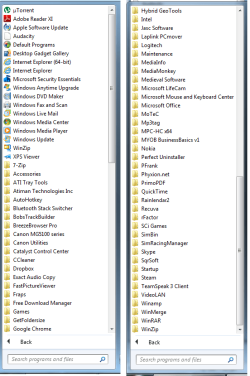
Vistaking, here are the screenshots of my complete start menu, I presume the reason is you want to see if there are any suspect programs there? There are a couple of issues I have had which has required me to use "deep" uninstallers because the normal uninstall or add/remove programs won't seem to work. May or may not have any significance but just in case...
1. Had major dramas trying to get bluetooth talking to my phone so ending up installing and uninstalling a variety of bluetooth stacks to try and get it to work (with no luck in the end btw! :rolleyes:)
2. I have a Sapphire 7750 video card which I had a bit of trouble setting up to begin with but was working fine until I stupidly updated Catalyst Control Centre hoping to fix a minor issue. After a few days pulling my hair out on this one I had to used ATIman uninstaller to get it working again. This seems to be a pretty serious program and I became a bit suspect about it when Security Essentials kept hanging on one of the ATIman exes, so tryed to uninstall it but it wouldn't.
3. After using AVG (free) for years I gave up on it because it kept getting errors updating. As is well known, this is a bit more involved than just clicking "uninstall" too but I am 99% sure it was done properly. I say this because this seems to be the most common reason why people are having trouble with MSE hanging.
Well after I deleted the ATIman folder (because it wouldn't uninstall) MSE is now hanging on
C:\windows\system32\codeintegrity\driver.stl !! :rolleyes::confused::cry:

Sorry about the longwinded and possible irrelevant response but I figured too much info is probably better than not enough! Thanks for your help guys.
 

Attachments

  • Untitled.png
    Untitled.png
    31.4 KB · Views: 9

My Computer

Computer type
PC/Desktop
OS
Windows 7 Home Premium 64 Bit (Service Pack 1)
Antivirus
Microsoft Security Essentials
Browser
Chrome
Try running this to get rid of AVG items. AVG | Download tools and utilities

Let me understand you, in the right snip of the All Program menu if you click any of those folders it is empty?
 

My Computer

Computer type
PC/Desktop
Computer Manufacturer/Model Number
Home Built Desktop By DataTech
OS
Windows 7 Ultimate X64 SP1
CPU
Intel i5-2550K, Differing ~4.4-4.8GHz No built in GPU
Motherboard
ASUS P8Z68-V PRO/GEN3
Memory
16GB G.Skill Sniper 1866MHz @ 2133MHz 2x8GB
Graphics Card(s)
ASUS GTX650TIB-DC2OC-2GD5, (650TI Boost)
Sound Card
Onboard Realtek 5-1
Monitor(s) Displays
Samsung P2570HD
Screen Resolution
1920x1080
Hard Drives
Samsung 840 Pro 256GB SSD for OS, 500GB Seagate Constellation (Enterprise drive) for Data
PSU
Corsair HX650W
Case
Inwin Dragon Rider
Cooling
Hyper 212 EVO w/two Noctua fans, push-pull, @1300 RPM
Keyboard
E-Z Eyes, bright yellow keys with large characters
Mouse
steelseries SENSEI Laser Pro Gaming
Internet Speed
48-51Mbs Mbs down, 11 Mbs up Xfinity Cable
Antivirus
Norton Internet Security 2013
Browser
IE 10, Opera, Pale Moon if needed
Other Info
4 case fans, LG BluRay-RE, ASUS DVD-RW, Mr. Fusion power supply, 1.21 gigawatts.
Briton30: one of those is exactly what I used run to uninstall AVG properly. I don't really think I have a problem there, I was just saying that before anyone told me that's the reason for MSE hanging during a scan.

No not ALL the programs are affected, about 75% are and if I order all the folders by date created it seems to be most of them from a certain point onwards but not all of them. Just the other day I saw a program still had it's shortcuts there a day or 2 after I installed it but now it is empty.

cottonball: I am 99% sure it is not that virus (or any virus for that matter)! When I go into C:\ProgramData\Microsoft\Windows\Start Menu\Programs all my programs and shortcuts are actually there. Except I don't have permission to open the folders for the programs that are affected. If I change the owner to myself then the shortcuts within that folder reappear in the start menu.
 

My Computer

Computer type
PC/Desktop
OS
Windows 7 Home Premium 64 Bit (Service Pack 1)
Antivirus
Microsoft Security Essentials
Browser
Chrome

My Computer

Computer Manufacturer/Model Number
Custom Built
OS
Windows 7 Ultimate 32-Bit & Windows 7 Ultimate 64-Bit
CPU
Intel Core i7 CPU 950 @ 3.07GHz
Motherboard
ASUS P6T DELUXE V2
Memory
OCZ 6GB (3 x 2GB) 240-Pin DDR3 SDRAM DDR3 1600 OCZ3X1600R2
Graphics Card(s)
ATI Radeon HD 5700 Series
Sound Card
OnBoard
Hard Drives
WD6400AACS-00M3B0 (640GB SATA )
PSU
CORSAIR 850w
Case
NZXT LEXA
Cooling
Intel Stock Heatsink Fan
Keyboard
Microsoft Wireless Laser Keyboard 7000
Mouse
Microsoft Wireless Laser Mouse 7000

My Computer

Computer type
Laptop
Computer Manufacturer/Model Number
Employer provided Dell Latitude
OS
W7 Pro SP1 64bit
CPU
i7
Memory
8GB
Graphics Card(s)
Intel HD Graphics
Hard Drives
crappy SSD
Antivirus
Employer mandated Symantec Endpoint Protection
Browser
Pale Moon 64bit, IE11 64bit & Chrome 64bit
found it

after searching around i found this and it worked for me:


Hey, I figured out how to get my all programs folders restored to where they were no longer empty.

1)Go to the startup icon
2)then put cursor over "All Programs" and right click and click on "open"
3) then select the "programs" folder and right click and select "properties"
4) then select the "previous version" tab, await the previous versions to show up and select the folder that existed prior to your problems and hit restore and follow through with prompts.
 

My Computer

Computer type
Laptop
Computer Manufacturer/Model Number
acer
OS
windows 7
Welcome to the Seven Forums and thanks for the added info.
 

My Computer

Computer type
Laptop
Computer Manufacturer/Model Number
Employer provided Dell Latitude
OS
W7 Pro SP1 64bit
CPU
i7
Memory
8GB
Graphics Card(s)
Intel HD Graphics
Hard Drives
crappy SSD
Antivirus
Employer mandated Symantec Endpoint Protection
Browser
Pale Moon 64bit, IE11 64bit & Chrome 64bit
Back
Top