Move Windows 7

CTerrian

New member
Local time
7:27 PM
Messages
21
Location
Atlanta Area
I installed Win 7 on a 20 GB partition of a 1 TB drive. (my mistake as I've run out of room)
I've searched and have not found any programs that will move the partition. :cry:
If I bought another drive, is there a program (preferably free) to image Windows 7 to a new partation?
My version of Norton Ghost won't recognize SATA drives. :cry: :cry:
 

My Computer

Computer Manufacturer/Model Number
Custom Build
OS
Windows 7
CPU
AMD Phenom II X2 550 Black Edition Callisto 3.1GHz
Motherboard
ASUS M3N72-D
Memory
G.Skill 4 GB, DDR2-1066 (PC2-8500)
Graphics Card(s)
GeForce 8800
Sound Card
SB Audigy
Cooling
Sunbeam Freezer
Acronis.. But you're going to have to head to the torrents for that :)
 

My Computer

Computer type
PC/Desktop
Computer Manufacturer/Model Number
DELL VOSTRO 3650
OS
Windows 8.1 PRO
CPU
3rd Generation Intel Core i7‐3612QM CPU @ 2.10GHZ
Memory
8GB DDR3
Graphics Card(s)
NVIDIA GeForce GT 525M (128 bit), 1GB Grpahics
Screen Resolution
1920X1080
Hard Drives
750GB 5400RPM
I use Acronis Image v.12 and Acronis Disk Suite to do all that.
1. install Image and make a complete FULLBackup. store on a clean partition.
2. Make the Startup Disk with which you can boot to and restore you FULL Image.
3. Install Acronis Disk Suite. and you can move increase the space or shrink the space as you see with.
I first installed Win7 on a 16GB partition. Later i used Disk Suite to increase the partition size to 50GB. It did move transfer all data and I never lost any data.

The image and boot disk is simply incase you mess up and lose data.

versions I use:
Acronis True Image Home 2009 12.0.0.9796
Acronis CoreDiskDirectorSuite.10.2160
 
Can't you use windows backup, its built in. Though you will need a drive the same or larger in capacity to do a restore.

All so you can increase your partition size in disk management if you have spare unallocated adjacent space.
 

My Computer

Computer Manufacturer/Model Number
DIY and dell vostro 1200
OS
Vista, Server08, Win7, XP
CPU
E6400, E6600, T7250, X2 5000+, cele 540
Motherboard
Various
Memory
Generic, Crucial, ocz
Graphics Card(s)
3400HD, 2900Xt, 7300GT, on board
Sound Card
NA
Monitor(s) Displays
Dell 2407wfp
Hard Drives
Numerous
PSU
Antec true power, thermaltake toughpower, Coolermaster RP Pr
Case
Various
Cooling
Stock to Watercooled
Acronis does make very small full image backups... imho much easier, faster and smaller than Win7 backup.
currently my C:\win7 partition is almost 20g. Full backup via Acronis is 8.1GB
 
Can't you use windows backup, its built in. Though you will need a drive the same or larger in capacity to do a restore.

All so you can increase your partition size in disk management if you have spare unallocated adjacent space.

Disk Management will not allow me to resize the "C:" drive. :cry:

I can shrink the "D:" drive, and have say 50 GB of unallotcated space. Then try to extend the "C:" drive and it refuses.
 

My Computer

Computer Manufacturer/Model Number
Custom Build
OS
Windows 7
CPU
AMD Phenom II X2 550 Black Edition Callisto 3.1GHz
Motherboard
ASUS M3N72-D
Memory
G.Skill 4 GB, DDR2-1066 (PC2-8500)
Graphics Card(s)
GeForce 8800
Sound Card
SB Audigy
Cooling
Sunbeam Freezer

My Computer

OS
Win7 x64 7232 // XP x86 SP3
CPU
E8400 @ 3.825GHz
Motherboard
EVGA 750i FTW
Memory
4GB G.Skill DDR2 1000MHz
Graphics Card(s)
MSI 8800GTS (G92) in SLI
Sound Card
HT|OMEGA Claro Plus+
Monitor(s) Displays
Dell S2209W
Screen Resolution
1920x1080
Hard Drives
WD Caviar Black 1TB //
Hitachi 7k1000.B 1TB //
WD SE16 640GB
PSU
Corsair 750TX
Case
ABS Monolith

My Computer

Computer Manufacturer/Model Number
Custom workstation /// Lenovo X61t tablet notebook
OS
Windows 7 RTM x64
CPU
Core i7 980X @ 4.04GHz OC /// Core Duo L7500 @ 1.6GHz
Motherboard
Asus P6T6 WS Revolution ///
Memory
12GB G. Skill @ DDR-1600 OC /// 4GB
Graphics Card(s)
Saphire HD4870 Toxic 1GB /// Intel Mobile GMA X3100
Monitor(s) Displays
Dual Eizo 24" SX2461W /// 12"
Screen Resolution
1920x1200 /// 1400x1050
Hard Drives
Workstation:
5x 750GB Barracuda-11 on Areca ARC-1220;
4x 1.5TB Barracuda-11 on Intel ICH10R;
Volumes:
300GB RAID 0, 2.7TB RAID 10 on Intel;
100GB RAID 0, 1.4TB RAID 10 on Areca ///
Notebook: G.Skill Titan 256GB SSD
PSU
Tagan ITZ 1100
Case
GHS-1500 ///
Cooling
Thermalright IFX-14 + a slew of stealth fans ///
Keyboard
Logitech Edge ///
Mouse
Logitech Wireless Optical Trackball
Internet Speed
5Mbps down / 820Kbps up
Other Info
Main use: photography;
DVD Drive: L.G GGW-H20L Blu-Ray / DVD;
OC: QPI/DRAM @ 1.33v, CPU @ 1.293v, DRAM Bus @ 1.65v, CPU PLL @ 1.88v, CPU mult = 25x, BCLK = 160, DDR3-1604 @ 7-8-7-24
Well, if you know how to clone XP, you can clone Win7. This assumes you are running XP or some other OS while you copy the Win7 partition. Most copy programs can't copy a Win7 partition because of the hard links. XP's backup program (ntbackup) can do it. You make a backup and then restore it to the new partition. The OS doing the restore must know the new partition by the same drive letter as the OS doing the backup knew the original partition, or it won't work because the hard links won't be restored.

As always, you still need to tinker with the registry hive before running the clone. I use the "saving partitions" program to do the tinkering. This is not for beginners.
 

My Computer

Computer Manufacturer/Model Number
me
OS
windows 7
CPU
e4400
Motherboard
Intel dg43nb
Memory
1 gig
Graphics Card(s)
onboard
Sound Card
onboard
Monitor(s) Displays
Samsung 17 inch LCD 172T
Hard Drives
WD 640aajs
PSU
Seasonic s-12
Case
Antec Super Lanboy
Cooling
12 cm yate loon fans, Asus heatsink
Disk Management will not allow me to resize the "C:" drive. :cry:

I can shrink the "D:" drive, and have say 50 GB of unallotcated space. Then try to extend the "C:" drive and it refuses.
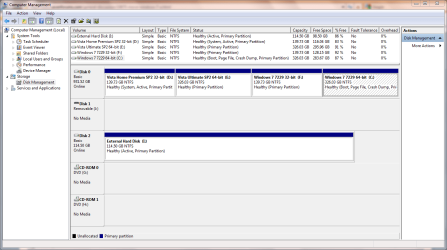
Can you post an image showing your drive layout in Disk Management? The following is from my system, just to give you an idea of the information required.
Capture.PNG
 

My Computer

Computer type
PC/Desktop
Computer Manufacturer/Model Number
Dwarf Dwf/11/2012 r09/2013
OS
Windows 8.1 Pro RTM x64
CPU
Intel Core-i5-3570K 4-core @ 3.4GHz (Ivy Bridge) (OC 4.4GHz)
Motherboard
ASRock Z77 Extreme4-M
Memory
4 x 4GB DDR3-1600 Corsair Vengeance CMZ8GX3M2A1600C9B (16GB)
Graphics Card(s)
MSI GeForce GTX770 Gaming OC 2GB
Sound Card
Realtek High Definition on board solution (ALC 898)
Monitor(s) Displays
ViewSonic VA1912w Widescreen (VGA)
Screen Resolution
1440x900
Hard Drives
OCZ Agility 3 SSD 120GB SATA III x2 (RAID 0)
Samsung HD501LJ 500GB SATA II x2
Hitachi HDS721010CLA332 1TB SATA II
Iomega 1.5TB Ext USB 2.0
WD 2.0TB Ext USB 3.0
PSU
XFX Pro Series 850W Semi-Modular
Case
Gigabyte IF233
Cooling
1 x 120mm Front Inlet 1 x 120mm Rear Exhaust
Keyboard
Microsoft Comfort Curve Keyboard 3000 (USB)
Mouse
Microsoft Comfort Mouse 3000 for Business (USB)
Internet Speed
NetGear DG834Gv3 ADSL Modem/Router (Ethernet) ~4.0 Mb/s (O2)
Antivirus
Avast! 8.0.1497
Browser
IE 11
Other Info
Optical Drive: HL-DT-ST BD-RE BH10LS30 SATA Bluray
Lexmark S305 Printer/Scanner/Copier (USB)
WEI Score: 8.1/8.1/8.5/8.5/8.25
Asus Eee PC 1011PX Netbook (Windows 7 x86 Starter)
Can you post an image showing your drive layout in Disk Management? The following is from my system, just to give you an idea of the information required.

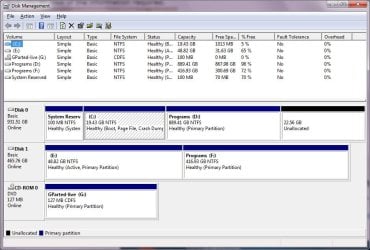
Sure thing! As you can see, I just took 22.56 GB of unallocated from the "D:" drive. And I just burned G-Parted Live to the CD-Rom. Diskmgmt refuses to expand the available space to the "C:" drive.
 

Attachments

  • diskmgmt.jpg
    diskmgmt.jpg
    79.9 KB · Views: 17

My Computer

Computer Manufacturer/Model Number
Custom Build
OS
Windows 7
CPU
AMD Phenom II X2 550 Black Edition Callisto 3.1GHz
Motherboard
ASUS M3N72-D
Memory
G.Skill 4 GB, DDR2-1066 (PC2-8500)
Graphics Card(s)
GeForce 8800
Sound Card
SB Audigy
Cooling
Sunbeam Freezer
The reason why you cannot expand C into the Unallocated space is because it is not contiguous. You can only expand a partition into unallocated space that lies to its immediate right. Other tools might be able to do this, but the only tool that I have experience of is the built-in one, which does not permit this. Sorry. :(
 

My Computer

Computer type
PC/Desktop
Computer Manufacturer/Model Number
Dwarf Dwf/11/2012 r09/2013
OS
Windows 8.1 Pro RTM x64
CPU
Intel Core-i5-3570K 4-core @ 3.4GHz (Ivy Bridge) (OC 4.4GHz)
Motherboard
ASRock Z77 Extreme4-M
Memory
4 x 4GB DDR3-1600 Corsair Vengeance CMZ8GX3M2A1600C9B (16GB)
Graphics Card(s)
MSI GeForce GTX770 Gaming OC 2GB
Sound Card
Realtek High Definition on board solution (ALC 898)
Monitor(s) Displays
ViewSonic VA1912w Widescreen (VGA)
Screen Resolution
1440x900
Hard Drives
OCZ Agility 3 SSD 120GB SATA III x2 (RAID 0)
Samsung HD501LJ 500GB SATA II x2
Hitachi HDS721010CLA332 1TB SATA II
Iomega 1.5TB Ext USB 2.0
WD 2.0TB Ext USB 3.0
PSU
XFX Pro Series 850W Semi-Modular
Case
Gigabyte IF233
Cooling
1 x 120mm Front Inlet 1 x 120mm Rear Exhaust
Keyboard
Microsoft Comfort Curve Keyboard 3000 (USB)
Mouse
Microsoft Comfort Mouse 3000 for Business (USB)
Internet Speed
NetGear DG834Gv3 ADSL Modem/Router (Ethernet) ~4.0 Mb/s (O2)
Antivirus
Avast! 8.0.1497
Browser
IE 11
Other Info
Optical Drive: HL-DT-ST BD-RE BH10LS30 SATA Bluray
Lexmark S305 Printer/Scanner/Copier (USB)
WEI Score: 8.1/8.1/8.5/8.5/8.25
Asus Eee PC 1011PX Netbook (Windows 7 x86 Starter)
Recommend you get install and use Acronic Disk Director. This will allow you to expand the BOOT Drive. It will lock the data, boot to DOS, complete the job, then allow you to have a larger C: partition.
Windows diskmanagement software suks.
I use Acronis Disk Director , have had NO PROBLEMS. Highly Recommend
 
uuuuhhh, lost a lot of data once that way. It's a bit like anticonception, it works 95% of the time but you are in sh*tcreek if you're in the 5%.

be sure to have a total backup.
 

My Computer

Computer Manufacturer/Model Number
me and myself
OS
vista x64/ win 7 x64
CPU
phenom 9950 BE
Motherboard
ASUS M2A-VM HDMI
Memory
8 gb
Graphics Card(s)
nvidia gts 250
Sound Card
realtek HD onboard
Monitor(s) Displays
dual hd 19" tft
Screen Resolution
1440x900
Hard Drives
2 x 500 gb WDC
1 x 500 gb Seagate
1 x 1000 gb Seagate
1 80 gb raptor
1 usb 160 gb
Cooling
standard issue
Keyboard
logitech g11
Mouse
usb wireless MS laser 6000
Internet Speed
18 mb (according to my provider :)

My Computer

Computer type
PC/Desktop
Computer Manufacturer/Model Number
Dwarf Dwf/11/2012 r09/2013
OS
Windows 8.1 Pro RTM x64
CPU
Intel Core-i5-3570K 4-core @ 3.4GHz (Ivy Bridge) (OC 4.4GHz)
Motherboard
ASRock Z77 Extreme4-M
Memory
4 x 4GB DDR3-1600 Corsair Vengeance CMZ8GX3M2A1600C9B (16GB)
Graphics Card(s)
MSI GeForce GTX770 Gaming OC 2GB
Sound Card
Realtek High Definition on board solution (ALC 898)
Monitor(s) Displays
ViewSonic VA1912w Widescreen (VGA)
Screen Resolution
1440x900
Hard Drives
OCZ Agility 3 SSD 120GB SATA III x2 (RAID 0)
Samsung HD501LJ 500GB SATA II x2
Hitachi HDS721010CLA332 1TB SATA II
Iomega 1.5TB Ext USB 2.0
WD 2.0TB Ext USB 3.0
PSU
XFX Pro Series 850W Semi-Modular
Case
Gigabyte IF233
Cooling
1 x 120mm Front Inlet 1 x 120mm Rear Exhaust
Keyboard
Microsoft Comfort Curve Keyboard 3000 (USB)
Mouse
Microsoft Comfort Mouse 3000 for Business (USB)
Internet Speed
NetGear DG834Gv3 ADSL Modem/Router (Ethernet) ~4.0 Mb/s (O2)
Antivirus
Avast! 8.0.1497
Browser
IE 11
Other Info
Optical Drive: HL-DT-ST BD-RE BH10LS30 SATA Bluray
Lexmark S305 Printer/Scanner/Copier (USB)
WEI Score: 8.1/8.1/8.5/8.5/8.25
Asus Eee PC 1011PX Netbook (Windows 7 x86 Starter)
Recommend you get install and use Acronic Disk Director. This will allow you to expand the BOOT Drive. It will lock the data, boot to DOS, complete the job, then allow you to have a larger C: partition.
Windows diskmanagement software suks.
I use Acronis Disk Director , have had NO PROBLEMS. Highly Recommend
As I have mentioned earlier, I have been testing Acronis all during the Win7 Beta and prior to. I have never had any loss. Not that It can not happen, but AS OF TODAY. I hae had NO LOSS of data either on increasing or decreasing, moving, or what ever term you want to USE.
Yes, I also want it know. when doing this; I DO NOT ATTEMPT TO DO OTHER STUFF. I have also used Acronis True Image v 12. formated current drive, reinstalled back to Vista SP2, upgraded to Win 7 Ultimate RTM. Formatted and restored the last Win7 Clean install,
Yes, I do have current Full Images of:
1. Vista SP2 -18005.
2. Vista SP2-upgraded to Win7 RTM
3. Clean install Win7 RTM
I do recommend if you are NOOBIE with any program. Do a Full complete BACKUP of your current system.
Read all the instructions, print out the instructions, due to WOOPs I forgot what the hell it said.
Waste a little time on instruction, and printing, and almost certainly you will have 100% satisfaction on Increasing your Boot Patition size and the NO % lose of data.
 
Snuffy this is good to know. I have a license of Disk Directory but did not install it on Win 7 x64 since the Acronis website does not say it's compatible.

Sounds like you had good luck with it. Do you run Disk Director on 64-bit ?

Recommend you get install and use Acronic Disk Director. This will allow you to expand the BOOT Drive. It will lock the data, boot to DOS, complete the job, then allow you to have a larger C: partition.
Windows diskmanagement software suks.
I use Acronis Disk Director , have had NO PROBLEMS. Highly Recommend
 

My Computer

Computer Manufacturer/Model Number
Self-Built
OS
Win 7 RTM 7600 Ultimate 64-bit
CPU
E8500 SLAPK Q814A161
Motherboard
Gigabyte EP35-DS3R
Memory
4GB Gskill PI PC2-8500CL5D
Graphics Card(s)
XFX 8800GTS Extreme 640MB
Sound Card
Creative X-Fi XtremeGamer
Monitor(s) Displays
Samsung 213T
Screen Resolution
1600x1200
Hard Drives
1 x Western Digital SATA 500GB
1 x Maxtor SATA 320GB
Case
Antec Nine Hundred
Cooling
CPU: Xigmatek HDT-S1283
Keyboard
Saitek Eclipse
Mouse
Trackman Marble
Internet Speed
6 Mbps down cable
Back
Top