Mozilla Firefox errors

you have to be logged in the new user account to browse. just like you are in your current one.
 

My Computer

Computer type
PC/Desktop
Computer Manufacturer/Model Number
Self assembled
OS
Windows 10 Home 64Bit
CPU
Intel Core i5 10400 @ 2.90GHz
Motherboard
Intel Corporation DG41WV (PROCESSOR)
Memory
8.00GB Single-Channel Unknown @ 1329MHz (16-20-20-38)
Sound Card
Realtek High Definition Audio
Monitor(s) Displays
DELL E170S
Screen Resolution
1280x1024 pixels
Hard Drives
931GB TOSHIBA DT01ACA100 (SATA)
238GB TEAM TM8PS7256G (SATA SSD)
Case
Nothing Fancy
Cooling
Fans
Keyboard
A4 Tech Co LTD
Mouse
A4 Tech Co Ltd/Logitech
Internet Speed
25 Mbps
If I just log out of ff and log back in it doesn't say anything about user accounts, I have no idea which one I am in now?
 

My Computer

Computer Manufacturer/Model Number
Vostro 220 Mini Tower Desktop Details | Dell
OS
Windows 7 Home Premium SP 1, 32-bit
CPU
Intel(R) Core(TM)2 Duo CPU E7400 @ 2.80GHz
Motherboard
Dell Inc. 0P301D
Memory
3.00 GB
Graphics Card(s)
(1) Intel(R) G45/G43 Express Chipset (2) Intel(R) G45/G43
Sound Card
(1) High Definition Audio Device (2) High Definition Audio
Monitor(s) Displays
Dell 22" wide E228WFP Analog flat panelq
Mouse
Dell optical usb mouse vostro
Other Info
OPTICAL READER, MOUSE,SPEAKERS, MONITOR, MODEM
If I just log out of ff and log back in it doesn't say anything about user accounts, I have no idea which one I am in now?

what i mean is
you need to log in to the new user account you created and use mozilla FF there
 

My Computer

Computer type
PC/Desktop
Computer Manufacturer/Model Number
Self assembled
OS
Windows 10 Home 64Bit
CPU
Intel Core i5 10400 @ 2.90GHz
Motherboard
Intel Corporation DG41WV (PROCESSOR)
Memory
8.00GB Single-Channel Unknown @ 1329MHz (16-20-20-38)
Sound Card
Realtek High Definition Audio
Monitor(s) Displays
DELL E170S
Screen Resolution
1280x1024 pixels
Hard Drives
931GB TOSHIBA DT01ACA100 (SATA)
238GB TEAM TM8PS7256G (SATA SSD)
Case
Nothing Fancy
Cooling
Fans
Keyboard
A4 Tech Co LTD
Mouse
A4 Tech Co Ltd/Logitech
Internet Speed
25 Mbps
Patti, you need to click the start menu and click the arrow (right after the shut down button, but don't click shut down), then click log off. Your new user account will be one of those profiles. Firefox has nothing to do with user accounts, it is a program on each of the user accounts.

Also, A likely place that the trouble is coming from is within control panel. Uninstall everything that says yahoo in control panel - uninstall programs. Let me know if you want me to post a picture.

These problems are probably the same going on in this thread (click to be linked to it) anyway, and it may help to have everything together so we know all of what is going on.
 

My Computer

Computer type
PC/Desktop
Computer Manufacturer/Model Number
Custom Asus Build
OS
Microsoft Windows 8.1 Pro 64-bit
CPU
Intel(R) Core(TM) i3-4130 CPU @ 3.40GHz
Motherboard
B85M-E
Memory
8.00 GB
Graphics Card(s)
None
Sound Card
Realtek High Definition Audio
Monitor(s) Displays
Asus 23.6" Monitor
Screen Resolution
1920 x 1080 x 32 bits (4294967296 colors) @ 60 Hz
Hard Drives
INTEL SSDSC2BW180A4
Samsung SSD 840 PRO Series
PSU
Seasonic S12II-380Bronze
Case
Lian Li
Cooling
Fan, Passive
Keyboard
Logitech K120
Mouse
Microsoft Touch Mouse
Internet Speed
4ms Ping, 19.0 Mbps Download, 19.0 Mbps Upload
Antivirus
Eset Endpoint
Browser
Internet Explorer, Chrome
All I did was go to the start menu, click of change user, and when it came up everything was gone!! All my desktop items, I didn't really want to go any further. But now I know what you mean about what changing users does. So I am back at my original user/
 

My Computer

Computer Manufacturer/Model Number
Vostro 220 Mini Tower Desktop Details | Dell
OS
Windows 7 Home Premium SP 1, 32-bit
CPU
Intel(R) Core(TM)2 Duo CPU E7400 @ 2.80GHz
Motherboard
Dell Inc. 0P301D
Memory
3.00 GB
Graphics Card(s)
(1) Intel(R) G45/G43 Express Chipset (2) Intel(R) G45/G43
Sound Card
(1) High Definition Audio Device (2) High Definition Audio
Monitor(s) Displays
Dell 22" wide E228WFP Analog flat panelq
Mouse
Dell optical usb mouse vostro
Other Info
OPTICAL READER, MOUSE,SPEAKERS, MONITOR, MODEM
Patti,

yes, everything is different in it. It is like a new banking account, you will not have money in it from another account, because it is different, just as an example.

What we were wondering is if you could find firefox, probably by typing it in the start search, and see if you are still having problems. Unlike my analogy, Firefox should be somewhere and useable in the new account (Like free cash for signing up!)

Basically the two accounts are completely seperate accounts. Most setting changes don't effect the other account, so you will always have your desktop icons in the other one, etc.

Let us know how it goes
 

My Computer

Computer type
PC/Desktop
Computer Manufacturer/Model Number
Custom Asus Build
OS
Microsoft Windows 8.1 Pro 64-bit
CPU
Intel(R) Core(TM) i3-4130 CPU @ 3.40GHz
Motherboard
B85M-E
Memory
8.00 GB
Graphics Card(s)
None
Sound Card
Realtek High Definition Audio
Monitor(s) Displays
Asus 23.6" Monitor
Screen Resolution
1920 x 1080 x 32 bits (4294967296 colors) @ 60 Hz
Hard Drives
INTEL SSDSC2BW180A4
Samsung SSD 840 PRO Series
PSU
Seasonic S12II-380Bronze
Case
Lian Li
Cooling
Fan, Passive
Keyboard
Logitech K120
Mouse
Microsoft Touch Mouse
Internet Speed
4ms Ping, 19.0 Mbps Download, 19.0 Mbps Upload
Antivirus
Eset Endpoint
Browser
Internet Explorer, Chrome
Dust sailor, when I switched to my new name, I had firefox and trash can, no toolbars. Aren't my system specs already on here?
 

My Computer

Computer Manufacturer/Model Number
Vostro 220 Mini Tower Desktop Details | Dell
OS
Windows 7 Home Premium SP 1, 32-bit
CPU
Intel(R) Core(TM)2 Duo CPU E7400 @ 2.80GHz
Motherboard
Dell Inc. 0P301D
Memory
3.00 GB
Graphics Card(s)
(1) Intel(R) G45/G43 Express Chipset (2) Intel(R) G45/G43
Sound Card
(1) High Definition Audio Device (2) High Definition Audio
Monitor(s) Displays
Dell 22" wide E228WFP Analog flat panelq
Mouse
Dell optical usb mouse vostro
Other Info
OPTICAL READER, MOUSE,SPEAKERS, MONITOR, MODEM
Dust sailor, when I switched to my new name, I had firefox and trash can, no toolbars. Aren't my system specs already on here?
Patti: its not a problem, all your things are safe in your actual user. the new user we asked you to create is just to see how your firefox performs. you could call it a TEST USER ACCOUNT. after we get the results of your firefox, you can remove it :)
 

My Computer

Computer type
PC/Desktop
Computer Manufacturer/Model Number
Self assembled
OS
Windows 10 Home 64Bit
CPU
Intel Core i5 10400 @ 2.90GHz
Motherboard
Intel Corporation DG41WV (PROCESSOR)
Memory
8.00GB Single-Channel Unknown @ 1329MHz (16-20-20-38)
Sound Card
Realtek High Definition Audio
Monitor(s) Displays
DELL E170S
Screen Resolution
1280x1024 pixels
Hard Drives
931GB TOSHIBA DT01ACA100 (SATA)
238GB TEAM TM8PS7256G (SATA SSD)
Case
Nothing Fancy
Cooling
Fans
Keyboard
A4 Tech Co LTD
Mouse
A4 Tech Co Ltd/Logitech
Internet Speed
25 Mbps
If I go into my new user account, there is nothing there but trash can and IE and firefox, I don't want that
 

My Computer

Computer Manufacturer/Model Number
Vostro 220 Mini Tower Desktop Details | Dell
OS
Windows 7 Home Premium SP 1, 32-bit
CPU
Intel(R) Core(TM)2 Duo CPU E7400 @ 2.80GHz
Motherboard
Dell Inc. 0P301D
Memory
3.00 GB
Graphics Card(s)
(1) Intel(R) G45/G43 Express Chipset (2) Intel(R) G45/G43
Sound Card
(1) High Definition Audio Device (2) High Definition Audio
Monitor(s) Displays
Dell 22" wide E228WFP Analog flat panelq
Mouse
Dell optical usb mouse vostro
Other Info
OPTICAL READER, MOUSE,SPEAKERS, MONITOR, MODEM
your actual user is alright don't worry we just want you to test how the mozilla ff works there
 

My Computer

Computer type
PC/Desktop
Computer Manufacturer/Model Number
Self assembled
OS
Windows 10 Home 64Bit
CPU
Intel Core i5 10400 @ 2.90GHz
Motherboard
Intel Corporation DG41WV (PROCESSOR)
Memory
8.00GB Single-Channel Unknown @ 1329MHz (16-20-20-38)
Sound Card
Realtek High Definition Audio
Monitor(s) Displays
DELL E170S
Screen Resolution
1280x1024 pixels
Hard Drives
931GB TOSHIBA DT01ACA100 (SATA)
238GB TEAM TM8PS7256G (SATA SSD)
Case
Nothing Fancy
Cooling
Fans
Keyboard
A4 Tech Co LTD
Mouse
A4 Tech Co Ltd/Logitech
Internet Speed
25 Mbps
Patti: Uninstall the existing flash player from add/remove programs, download and install fresh the latest version from here: Adobe - Downloads . Do the same with Mozilla FF and download the latest version from here: Mozilla Firefox Web Browser. Also uninstall the program JAVA (if you have it). Remember to tick mark the option where it asks you if you want to remove the extension/add on. Run cCleaner, tick mark all the points under Mozilla FF and Multimedia (see pic attached - it will be tick marked by default). Delete any chunks left inside you Computer/C: Drive/Program files/Mozilla Firefox. Restart, now with a clean install of both, browse and do the usual stuff you do with your browser and report back. You could try creating a new user account with administrator rights here: http://www.sevenforums.com/tutorials/181024-user-account-create.html and let us know if you notice any changes.

Okay, I did the above, I guess I will have to wait and see if it does it again.
 

My Computer

Computer Manufacturer/Model Number
Vostro 220 Mini Tower Desktop Details | Dell
OS
Windows 7 Home Premium SP 1, 32-bit
CPU
Intel(R) Core(TM)2 Duo CPU E7400 @ 2.80GHz
Motherboard
Dell Inc. 0P301D
Memory
3.00 GB
Graphics Card(s)
(1) Intel(R) G45/G43 Express Chipset (2) Intel(R) G45/G43
Sound Card
(1) High Definition Audio Device (2) High Definition Audio
Monitor(s) Displays
Dell 22" wide E228WFP Analog flat panelq
Mouse
Dell optical usb mouse vostro
Other Info
OPTICAL READER, MOUSE,SPEAKERS, MONITOR, MODEM
Patti: Uninstall the existing flash player from add/remove programs, download and install fresh the latest version from here: Adobe - Downloads . Do the same with Mozilla FF and download the latest version from here: Mozilla Firefox Web Browser. Also uninstall the program JAVA (if you have it). Remember to tick mark the option where it asks you if you want to remove the extension/add on. Run cCleaner, tick mark all the points under Mozilla FF and Multimedia (see pic attached - it will be tick marked by default). Delete any chunks left inside you Computer/C: Drive/Program files/Mozilla Firefox. Restart, now with a clean install of both, browse and do the usual stuff you do with your browser and report back. You could try creating a new user account with administrator rights here: http://www.sevenforums.com/tutorials/181024-user-account-create.html and let us know if you notice any changes.

Okay, I did the above, I guess I will have to wait and see if it does it again.

have you removed all those toolbars?
one of you thread was been remove right?
 

My Computer

Computer type
PC/Desktop
Computer Manufacturer/Model Number
Self assembled
OS
Windows 10 Home 64Bit
CPU
Intel Core i5 10400 @ 2.90GHz
Motherboard
Intel Corporation DG41WV (PROCESSOR)
Memory
8.00GB Single-Channel Unknown @ 1329MHz (16-20-20-38)
Sound Card
Realtek High Definition Audio
Monitor(s) Displays
DELL E170S
Screen Resolution
1280x1024 pixels
Hard Drives
931GB TOSHIBA DT01ACA100 (SATA)
238GB TEAM TM8PS7256G (SATA SSD)
Case
Nothing Fancy
Cooling
Fans
Keyboard
A4 Tech Co LTD
Mouse
A4 Tech Co Ltd/Logitech
Internet Speed
25 Mbps
Patti, where is the other thread we were helping you in? Did you delete it? What's going on?
 
Greg:

If you are referring to that very long thread, I assume mods deleted it several days ago. It just disappeared. Not sure why. Patti says she was temporarily banned. I dunno.

Can an ordinary member delete an entire thread if they are the thread starter? I don't think Patti deleted it.
 

My Computer

Computer type
PC/Desktop
Computer Manufacturer/Model Number
Ignatz Special; 4 speed manual gearbox; factory air conditioning; one of one
OS
Windows 7 Home Premium SP1, 64-bit
CPU
Intel Skylake i5-6600K, not overclocked
Motherboard
AsRock Z170M Extreme 4, micro ATX
Memory
8 GB HyperX DDR4-2666 (2 x 4 GB)
Graphics Card(s)
none; graphics are integrated on CPU
Sound Card
onboard: Realtek ALC1150; external: USB Behringer UF0-202
Monitor(s) Displays
Dell S2340M 23 inch IPS
Screen Resolution
1600 x 900
Hard Drives
System: Crucial MX100 series SSD, 128 GB;
Data: Samsung Spinpoint 103SJ, 1 TB;
Backup: WD Caviar Green WD30EZRX-00D8PB0, 3 TB
PSU
Rosewill SilentNight 500 watt fanless, semi-modular
Case
Antec Solo II
Cooling
Noctua NH-U12S; Noctua F12 intake, Noctua S12A exhaust
Keyboard
Microsoft 200 6JH-00001 USB
Mouse
Dell or Microsoft optical wired; USB
Antivirus
Microsoft Security Essentials and Malwarebytes Premium
Browser
Pale Moon
Other Info
All fans PWM; speeds at idle: CPU circa 500 rpm; intake circa 600 rpm; exhaust circa 600 rpm; CPU temps 27 idle and 47 C load in a warm room (27 C/81 F) when running Intel Extreme Tuning Utility stress test.
Patti, where is the other thread we were helping you in? Did you delete it? What's going on?

I have no idea. They had banned me from these forums because I accidently put one of the emails in spam by mistake. They said on there I would NEVER be allowed back on. I wrote to several administrators and after a while they reactivated me. But the "computer very slow" thread is gone. Ignat thinks it is because it was too long. Makes me so mad because there was so much info in there I wanted to keep.
I have been keeping track of the specifics of what is going on with the computer though.
I still keep getting the error "Firefox can't find server at us.mg6.mail.yahoo.com", but other than that, right now it is running
 

My Computer

Computer Manufacturer/Model Number
Vostro 220 Mini Tower Desktop Details | Dell
OS
Windows 7 Home Premium SP 1, 32-bit
CPU
Intel(R) Core(TM)2 Duo CPU E7400 @ 2.80GHz
Motherboard
Dell Inc. 0P301D
Memory
3.00 GB
Graphics Card(s)
(1) Intel(R) G45/G43 Express Chipset (2) Intel(R) G45/G43
Sound Card
(1) High Definition Audio Device (2) High Definition Audio
Monitor(s) Displays
Dell 22" wide E228WFP Analog flat panelq
Mouse
Dell optical usb mouse vostro
Other Info
OPTICAL READER, MOUSE,SPEAKERS, MONITOR, MODEM
Greg:

If you are referring to that very long thread, I assume mods deleted it several days ago. It just disappeared. Not sure why. Patti says she was temporarily banned. I dunno.

Can an ordinary member delete an entire thread if they are the thread starter? I don't think Patti deleted it.

I know I didn't delete it, because I couldn't even get on. I kept your emails that came to me about "slow computer" and it said it was no longer available. I also went to search and put my name in and tried going to the thread that way, but there wasn't anything there. I think you are right, they deleted it because it was too long.
 

My Computer

Computer Manufacturer/Model Number
Vostro 220 Mini Tower Desktop Details | Dell
OS
Windows 7 Home Premium SP 1, 32-bit
CPU
Intel(R) Core(TM)2 Duo CPU E7400 @ 2.80GHz
Motherboard
Dell Inc. 0P301D
Memory
3.00 GB
Graphics Card(s)
(1) Intel(R) G45/G43 Express Chipset (2) Intel(R) G45/G43
Sound Card
(1) High Definition Audio Device (2) High Definition Audio
Monitor(s) Displays
Dell 22" wide E228WFP Analog flat panelq
Mouse
Dell optical usb mouse vostro
Other Info
OPTICAL READER, MOUSE,SPEAKERS, MONITOR, MODEM
When I tried to go to that long thread this is what I got:

PattiChati, you do not have permission to access this page. This could be due to one of several reasons:

  1. The page has been removed.
  2. Your user account may not have sufficient privileges to access this page. Are you trying to edit someone else's post, access administrative features or some other privileged system?
  3. If you are trying to post, the administrator may have disabled your account, or it may be awaiting activation.
I wrote and they said I was reactivated to the forums, but this one doesn't exist I guess.
 

My Computer

Computer Manufacturer/Model Number
Vostro 220 Mini Tower Desktop Details | Dell
OS
Windows 7 Home Premium SP 1, 32-bit
CPU
Intel(R) Core(TM)2 Duo CPU E7400 @ 2.80GHz
Motherboard
Dell Inc. 0P301D
Memory
3.00 GB
Graphics Card(s)
(1) Intel(R) G45/G43 Express Chipset (2) Intel(R) G45/G43
Sound Card
(1) High Definition Audio Device (2) High Definition Audio
Monitor(s) Displays
Dell 22" wide E228WFP Analog flat panelq
Mouse
Dell optical usb mouse vostro
Other Info
OPTICAL READER, MOUSE,SPEAKERS, MONITOR, MODEM
Ah well, it is what it is. Glad to see you back Patti, haven't had this much fun in a while ;)

For this firefox error that you get, have you tried a simple google search for yahoo mail? Click this link ( https://www.google.com/search?q=yahoo+mail%5C&rls=com.microsoft:en-us&ie=UTF-8&oe=UTF-8&startIndex=&startPage=1 ), then click Yahoo mail which sould be at the top, and try to log in.

And here is the direct link to Yahoo mail: https://login.yahoo.com/config/login_verify2?&.src=ym

So you've completely reinstalled firefox and you are still getting this error, even with the links above? Everything should have been cleared with an uninstall. Patti, have you emptied temporary internet files and firefox cache? Here is a tutorial on how to do both, which may help you out if you haven't already done this.

:warn: Patti, these methods will clear your internet files but will not cause any damage. However, you will lose saved information in your browser. All that means is you may have to remember your passwords and usernames for websites (and any other saved information). But after you fill that in again in the websites that require it, such as this one, it will remember it once again. This may help clear any "bad data". It shouldn't cause you too much hassle provided you remember passwords and usernames. If you don't, websites usually provide a link to reset the password. However, you will need access to your email account in order to reset any passwords. Let me know if you don't want to do this because you are afraid you will lose saved information, and let me know what you are afraid of losing so we can work something out.

Follow this method to clear Firefox's settings:
Patti, click this link ( http://support.mozilla.com/en-US/kb/Clear Recent History ) to go into firefox's website. It will show you how to clear the recent history. Scroll down the webpage till you come to the title that says "How do I clear my history?" Make sure you select the clear option that says clear ALL history. It will ask "Time range to clear", and you will need to select "Everything" to clear it all.

Follow this method to clear Temporary Internet Files:
Click the start menu button, then type "disk cleanup" without the quotes into the start menu, and at the top you will see "Disk Cleanup" listed. Click it. It will pop up with a list of "files to delete" (See picture). Uncheck everything EXCEPT for "Temporary Internet Files". Leave that checked, and click "Ok".
Here is a picture:
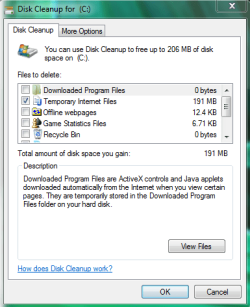
disk cleanup.PNG

Also Patti, let me know the things that you do and the things that you don't do so I can keep up. I don't want to harp on you if you don't do something, but I need to know what you do and don't do as it will help me troubleshoot the issue.


:note: Patti, this is the only issue you are experiencing right? You computer's internet and the computer itself are speedy enough for you, without any other problems?
  • Does this problem happen right when you log into firefox, or after you try to go to Yahoo? If Yahoo works, you might try changing your homepage to something different. If you want Yahoo as your homepage, click this link: http://www.yahoo.com/sethomepage
  • Let me know if you don't understand what a homepage is and I will gladly explain. In fact, I will always expalin anything you should ask, don't be afraid to ask questions.

 
Last edited:

My Computer

Computer type
PC/Desktop
Computer Manufacturer/Model Number
Custom Asus Build
OS
Microsoft Windows 8.1 Pro 64-bit
CPU
Intel(R) Core(TM) i3-4130 CPU @ 3.40GHz
Motherboard
B85M-E
Memory
8.00 GB
Graphics Card(s)
None
Sound Card
Realtek High Definition Audio
Monitor(s) Displays
Asus 23.6" Monitor
Screen Resolution
1920 x 1080 x 32 bits (4294967296 colors) @ 60 Hz
Hard Drives
INTEL SSDSC2BW180A4
Samsung SSD 840 PRO Series
PSU
Seasonic S12II-380Bronze
Case
Lian Li
Cooling
Fan, Passive
Keyboard
Logitech K120
Mouse
Microsoft Touch Mouse
Internet Speed
4ms Ping, 19.0 Mbps Download, 19.0 Mbps Upload
Antivirus
Eset Endpoint
Browser
Internet Explorer, Chrome
This is your idea of fun? You must like challenges like me. I will do all the above tomorrow, but I did uninstall FF and reinstalled. Did a couple of times.
 

My Computer

Computer Manufacturer/Model Number
Vostro 220 Mini Tower Desktop Details | Dell
OS
Windows 7 Home Premium SP 1, 32-bit
CPU
Intel(R) Core(TM)2 Duo CPU E7400 @ 2.80GHz
Motherboard
Dell Inc. 0P301D
Memory
3.00 GB
Graphics Card(s)
(1) Intel(R) G45/G43 Express Chipset (2) Intel(R) G45/G43
Sound Card
(1) High Definition Audio Device (2) High Definition Audio
Monitor(s) Displays
Dell 22" wide E228WFP Analog flat panelq
Mouse
Dell optical usb mouse vostro
Other Info
OPTICAL READER, MOUSE,SPEAKERS, MONITOR, MODEM
I did uninstall FF and reinstalled. Did a couple of times.

Are you merely uninstalling from Control Panel/Programs and Features?

Or are you doing that plus also deleting the Mozilla folder at C:\Users\your user name\appdata\roaming?

If you are only doing the former, all you are doing is reinstalling the Firefox application files.

If you also delete the Mozilla folder, you will get a new Firefox profile and new Firefox configuration.

I mentioned this to you several days ago in another thread.

You will lose your bookmarks when you delete the Mozilla folder, so be sure to back them up first.

I have no good idea of your current problems as I have lost track, but if I suspected that Firefox was causing me a problem, I would certainly reinstall it, to include deleting the existing Mozilla folder.
 

My Computer

Computer type
PC/Desktop
Computer Manufacturer/Model Number
Ignatz Special; 4 speed manual gearbox; factory air conditioning; one of one
OS
Windows 7 Home Premium SP1, 64-bit
CPU
Intel Skylake i5-6600K, not overclocked
Motherboard
AsRock Z170M Extreme 4, micro ATX
Memory
8 GB HyperX DDR4-2666 (2 x 4 GB)
Graphics Card(s)
none; graphics are integrated on CPU
Sound Card
onboard: Realtek ALC1150; external: USB Behringer UF0-202
Monitor(s) Displays
Dell S2340M 23 inch IPS
Screen Resolution
1600 x 900
Hard Drives
System: Crucial MX100 series SSD, 128 GB;
Data: Samsung Spinpoint 103SJ, 1 TB;
Backup: WD Caviar Green WD30EZRX-00D8PB0, 3 TB
PSU
Rosewill SilentNight 500 watt fanless, semi-modular
Case
Antec Solo II
Cooling
Noctua NH-U12S; Noctua F12 intake, Noctua S12A exhaust
Keyboard
Microsoft 200 6JH-00001 USB
Mouse
Dell or Microsoft optical wired; USB
Antivirus
Microsoft Security Essentials and Malwarebytes Premium
Browser
Pale Moon
Other Info
All fans PWM; speeds at idle: CPU circa 500 rpm; intake circa 600 rpm; exhaust circa 600 rpm; CPU temps 27 idle and 47 C load in a warm room (27 C/81 F) when running Intel Extreme Tuning Utility stress test.
Back
Top