Ah well, it is what it is. Glad to see you back Patti, haven't had this much fun in a while

For this firefox error that you get, have you tried a simple google search for yahoo mail? Click this link (
https://www.google.com/search?q=yahoo+mail%5C&rls=com.microsoft:en-us&ie=UTF-8&oe=UTF-8&startIndex=&startPage=1 ), then click Yahoo mail which sould be at the top, and try to log in.
And here is the direct link to Yahoo mail:
https://login.yahoo.com/config/login_verify2?&.src=ym
So you've completely reinstalled firefox and you are still getting this error, even with the links above? Everything should have been cleared with an uninstall. Patti, have you emptied temporary internet files and firefox cache? Here is a tutorial on how to do both, which may help you out if you haven't already done this.
:warn:
Patti, these methods will clear your internet files but will not cause any damage. However, you
will lose saved information in your browser. All that means is you may have to remember your passwords and usernames for websites (and any other saved information). But after you fill that in again in the websites that require it, such as this one, it will remember it once again. This may help clear any "bad data". It shouldn't cause you too much hassle provided you remember passwords and usernames. If you don't, websites usually provide a link to reset the password. However, you will need access to your email account in order to reset any passwords. Let me know if you don't want to do this because you are afraid you will lose saved information, and let me know what you are afraid of losing so we can work something out.
Follow this method to clear Firefox's settings:
Patti, click this link (
http://support.mozilla.com/en-US/kb/Clear Recent History ) to go into firefox's website. It will show you how to clear the recent history. Scroll down the webpage till you come to the title that says "How do I clear my history?" Make sure you select the clear option that says clear
ALL history. It will ask "Time range to clear", and you will need to select "Everything" to clear it all.
Follow this method to clear Temporary Internet Files:
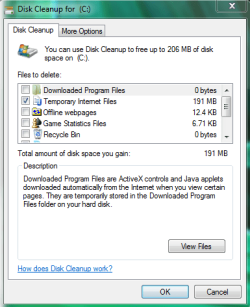
Click the start menu button, then type "disk cleanup"
without the quotes into the start menu, and at the top you will see "Disk Cleanup" listed. Click it. It will pop up with a list of "files to delete" (See picture).
Uncheck everything EXCEPT for "Temporary Internet Files". Leave that checked, and click "Ok".
Here is a picture:
Also Patti, let me know the things that you do and the things that you don't do so I can keep up. I don't want to harp on you if you don't do something, but I need to know what you do and don't do as it will help me troubleshoot the issue.
:note:
Patti, this is the only issue you are experiencing right? You computer's internet
and the computer itself are speedy enough for you, without any other problems?
- Does this problem happen right when you log into firefox, or after you try to go to Yahoo? If Yahoo works, you might try changing your homepage to something different. If you want Yahoo as your homepage, click this link: http://www.yahoo.com/sethomepage
- Let me know if you don't understand what a homepage is and I will gladly explain. In fact, I will always expalin anything you should ask, don't be afraid to ask questions.



