Mozilla Firefox errors

Hi - I have reinstalled all my adobe stuff. Also, I have had so many conflicting answers on 1. Get rid of Java and 2. get rid of cCleaner. So I am not sure what to do. Don't you need Java to run some programs. I am still getting the error of firefox cannot find server though.
 

My Computer

Computer Manufacturer/Model Number
Vostro 220 Mini Tower Desktop Details | Dell
OS
Windows 7 Home Premium SP 1, 32-bit
CPU
Intel(R) Core(TM)2 Duo CPU E7400 @ 2.80GHz
Motherboard
Dell Inc. 0P301D
Memory
3.00 GB
Graphics Card(s)
(1) Intel(R) G45/G43 Express Chipset (2) Intel(R) G45/G43
Sound Card
(1) High Definition Audio Device (2) High Definition Audio
Monitor(s) Displays
Dell 22" wide E228WFP Analog flat panelq
Mouse
Dell optical usb mouse vostro
Other Info
OPTICAL READER, MOUSE,SPEAKERS, MONITOR, MODEM
Hi - I have reinstalled all my adobe stuff. Also, I have had so many conflicting answers on 1. Get rid of Java and 2. get rid of cCleaner. So I am not sure what to do. Don't you need Java to run some programs. I am still getting the error of firefox cannot find server though.

Hundreds of millions of people run PCs successfully for years and they have never even heard of CCleaner.

What does that tell you?

You may be under the mistaken impression that it is going to bail you out of some of your issues. If that were the case, how is it that hundreds of millions of PCs work fine without it?

Windows has a built-in "cleanup" tool that works quite well.

I use CCleaner because it gives me the fleeting sensation that I am doing something productive. And I am at least as compulsive as the next guy.

But, I went 15 years on PCs without using it. Successfully. CCleaner hasn't made my PC experience better, but as I said, I use it because it makes me feel good---a perfectly silly reason.

Yes, you need JAVA for some programs. Probably not as many as you think. You could uninstall it and see if you run into problems, in which case reinstall it. I'm not sure why you think it is contributing to your issues.
 

My Computer

Computer type
PC/Desktop
Computer Manufacturer/Model Number
Ignatz Special; 4 speed manual gearbox; factory air conditioning; one of one
OS
Windows 7 Home Premium SP1, 64-bit
CPU
Intel Skylake i5-6600K, not overclocked
Motherboard
AsRock Z170M Extreme 4, micro ATX
Memory
8 GB HyperX DDR4-2666 (2 x 4 GB)
Graphics Card(s)
none; graphics are integrated on CPU
Sound Card
onboard: Realtek ALC1150; external: USB Behringer UF0-202
Monitor(s) Displays
Dell S2340M 23 inch IPS
Screen Resolution
1600 x 900
Hard Drives
System: Crucial MX100 series SSD, 128 GB;
Data: Samsung Spinpoint 103SJ, 1 TB;
Backup: WD Caviar Green WD30EZRX-00D8PB0, 3 TB
PSU
Rosewill SilentNight 500 watt fanless, semi-modular
Case
Antec Solo II
Cooling
Noctua NH-U12S; Noctua F12 intake, Noctua S12A exhaust
Keyboard
Microsoft 200 6JH-00001 USB
Mouse
Dell or Microsoft optical wired; USB
Antivirus
Microsoft Security Essentials and Malwarebytes Premium
Browser
Pale Moon
Other Info
All fans PWM; speeds at idle: CPU circa 500 rpm; intake circa 600 rpm; exhaust circa 600 rpm; CPU temps 27 idle and 47 C load in a warm room (27 C/81 F) when running Intel Extreme Tuning Utility stress test.
Quite a good explaination, ignat.

Patti, Both of those programs you probably don't need. Only use them if you want them. CCleaner has the potential to mess up your computer's registry, so I would recommend not having it for that reason alone. Novice users shouldn't play with it because they may not know what they are actually doing in the program.

Java is fine, but make sure it is updated (That will keep it more secure). Most of the time you won't need it, but you might as well keep it in case you do. It does make your computer slightly more vulnerable to viruses, but your microsoft security essentials virus remover should handle the viruses in such an event. Java is used for lots of things, but sometimes people don't use those things, so they don't often need java running on their computers.

You can disable it as I have done until you need to use it again in the future, then just enable it again. Entirely up to you what you do for both programs.

Patti, how is it going with the previous list I posted? Would you be able to answer some of those questions I've asked, like if firefox or your computer are still acting slow, among the other questions?
 

My Computer

Computer type
PC/Desktop
Computer Manufacturer/Model Number
Custom Asus Build
OS
Microsoft Windows 8.1 Pro 64-bit
CPU
Intel(R) Core(TM) i3-4130 CPU @ 3.40GHz
Motherboard
B85M-E
Memory
8.00 GB
Graphics Card(s)
None
Sound Card
Realtek High Definition Audio
Monitor(s) Displays
Asus 23.6" Monitor
Screen Resolution
1920 x 1080 x 32 bits (4294967296 colors) @ 60 Hz
Hard Drives
INTEL SSDSC2BW180A4
Samsung SSD 840 PRO Series
PSU
Seasonic S12II-380Bronze
Case
Lian Li
Cooling
Fan, Passive
Keyboard
Logitech K120
Mouse
Microsoft Touch Mouse
Internet Speed
4ms Ping, 19.0 Mbps Download, 19.0 Mbps Upload
Antivirus
Eset Endpoint
Browser
Internet Explorer, Chrome
I did everything you told me to do except the user account thing because I don't understand it yet. I don't have cCleaner and I do have Java enabled. I reinstalled both Adobe Reader and Adobe Flash. The Adobe Flash player was always crashing. I can't think of what else, but I had them all written down and checked them all as I did them.
My computer is running faster and the glitches are all with yahoo mail I believe. I write them but it takes forever for them to get back and then it is just like a form letter and they don't really address the problems.
I am able to go from webpage to webpage at a pretty good clip at this point. I will keep cleaning from the tools menu and running the spyware and that is all I will do. I won't download anything unless I absolutely need it.
If I can just get yahoo straightened out, I'll be good to go.
 

My Computer

Computer Manufacturer/Model Number
Vostro 220 Mini Tower Desktop Details | Dell
OS
Windows 7 Home Premium SP 1, 32-bit
CPU
Intel(R) Core(TM)2 Duo CPU E7400 @ 2.80GHz
Motherboard
Dell Inc. 0P301D
Memory
3.00 GB
Graphics Card(s)
(1) Intel(R) G45/G43 Express Chipset (2) Intel(R) G45/G43
Sound Card
(1) High Definition Audio Device (2) High Definition Audio
Monitor(s) Displays
Dell 22" wide E228WFP Analog flat panelq
Mouse
Dell optical usb mouse vostro
Other Info
OPTICAL READER, MOUSE,SPEAKERS, MONITOR, MODEM
Did you ever fully uninstall Firefox as mentioned in post 40 in this thread?

If your problems are limited to Yahoo mail, I'm not sure what you can do about it other than delete all Yahoo cookies and doo-dads, add-ons, toolbars, and whatever other crap they might offer you.

Yahoo is in financial straits and not exactly the sharpest knife in the drawer anymore. I have a Yahoo email account that I use only once a month or so. No problems with it.
 

My Computer

Computer type
PC/Desktop
Computer Manufacturer/Model Number
Ignatz Special; 4 speed manual gearbox; factory air conditioning; one of one
OS
Windows 7 Home Premium SP1, 64-bit
CPU
Intel Skylake i5-6600K, not overclocked
Motherboard
AsRock Z170M Extreme 4, micro ATX
Memory
8 GB HyperX DDR4-2666 (2 x 4 GB)
Graphics Card(s)
none; graphics are integrated on CPU
Sound Card
onboard: Realtek ALC1150; external: USB Behringer UF0-202
Monitor(s) Displays
Dell S2340M 23 inch IPS
Screen Resolution
1600 x 900
Hard Drives
System: Crucial MX100 series SSD, 128 GB;
Data: Samsung Spinpoint 103SJ, 1 TB;
Backup: WD Caviar Green WD30EZRX-00D8PB0, 3 TB
PSU
Rosewill SilentNight 500 watt fanless, semi-modular
Case
Antec Solo II
Cooling
Noctua NH-U12S; Noctua F12 intake, Noctua S12A exhaust
Keyboard
Microsoft 200 6JH-00001 USB
Mouse
Dell or Microsoft optical wired; USB
Antivirus
Microsoft Security Essentials and Malwarebytes Premium
Browser
Pale Moon
Other Info
All fans PWM; speeds at idle: CPU circa 500 rpm; intake circa 600 rpm; exhaust circa 600 rpm; CPU temps 27 idle and 47 C load in a warm room (27 C/81 F) when running Intel Extreme Tuning Utility stress test.
Yahoo is consistent enough I think we can assume your problems are in Firefox.

When I connected a few weeks ago you had a shipload of Firefox Add-on's and Search providers enabled including some suspicious Search and Shopping ones which are almost always adware at the least. Once these were uninstaller and/or Disabled in Firefox to only Google, Flash, Adobe Acrobat (for online PDF's), Java (or not) and WMP player add-on you reported good performance afterwards.

What changed?

Do you have any Restore Points from that time?
 
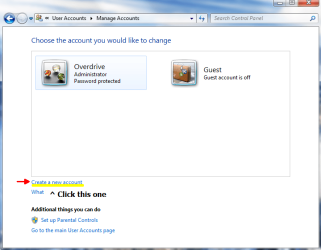
Patti, in addition to what everyone else just said, the user account thing is just to find out if firefox works in another user account. You don't have to do it if you get lost. But I'll post some pics if it helps you out any - this will tell you how to do it if you are still interested:

  • First, Go to the start menu, then type what you see in this picture into the start menu search, and click on the link at the very top with the same name:
Add or remove user accountspng.png
(To make the picture bigger, click on it)

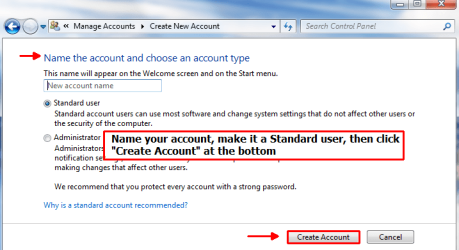
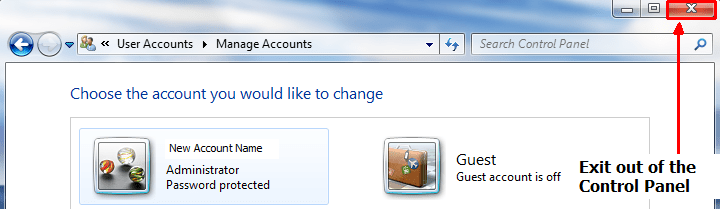
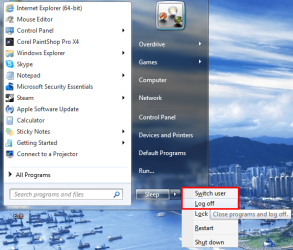
  • Next, follow what the rest of the pictures tell you.
    :info:If you are asked to create a password for your new account, it is up to you to make one or not.
Create new user accountpng.pngNaming accountpng.png
(To make the pictures bigger, click on them)

  • Keep at it, it is not as difficult as it would seem...
    Remember, if it asks you to make a password, it is up to you to make one or not, but remember it!
Exitpng.pngSwitch User or Log offpng.png
(To make the pictures bigger, click on them)

Now click on your new account and log in. Everything will be different, but don't panic! After it loads the desktop, just click on the start menu and type the words "FIREFOX" without the quotes. It should pop up at the top. Click it and go to Yahoo mail, and let me know if it works or not. After that, just go back to the start menu and exit out by clicking "Log off". Then click on your real user account and you are back to normal.

Now you can keep the new user account for future use, or delete it. Here is how to delete it, as they tell you how at the microsoft website:

  1. Open User Accounts by clicking the Start button
    4f6cbd09-148c-4dd8-b1f2-48f232a2fd33_818.jpg
    , clicking Control Panel, clicking User Accounts and Family Safety, clicking User Accounts, and then clicking Manage another account.
    18abb370-ac1e-4b6b-b663-e028a75bf05b_48.jpg
    If you're prompted for an administrator password or confirmation, type the password or provide confirmation.
  2. Click the account you want to delete, and then click Delete the account.
  3. Decide if you want to keep or delete the files created under the account by clicking Keep Files or Delete Files.
  4. Click Delete Account.
 
Last edited:

My Computer

Computer type
PC/Desktop
Computer Manufacturer/Model Number
Custom Asus Build
OS
Microsoft Windows 8.1 Pro 64-bit
CPU
Intel(R) Core(TM) i3-4130 CPU @ 3.40GHz
Motherboard
B85M-E
Memory
8.00 GB
Graphics Card(s)
None
Sound Card
Realtek High Definition Audio
Monitor(s) Displays
Asus 23.6" Monitor
Screen Resolution
1920 x 1080 x 32 bits (4294967296 colors) @ 60 Hz
Hard Drives
INTEL SSDSC2BW180A4
Samsung SSD 840 PRO Series
PSU
Seasonic S12II-380Bronze
Case
Lian Li
Cooling
Fan, Passive
Keyboard
Logitech K120
Mouse
Microsoft Touch Mouse
Internet Speed
4ms Ping, 19.0 Mbps Download, 19.0 Mbps Upload
Antivirus
Eset Endpoint
Browser
Internet Explorer, Chrome
Yes ignat, I did fully uninstall Firefox. I can do it again using revo this time. But yes, all the other problems are related to Yahoo.
I do have a question for you though (see you are not getting off scott free)
I never had to sign in all the time for all the different websites, I just stayed logged in. I live by myself, so don't have to worry about someone seeing it. Is there something I can change? I remember seeing something about deleting everything including passwords, but have no idea where I saw that. Any ideas?
 

My Computer

Computer Manufacturer/Model Number
Vostro 220 Mini Tower Desktop Details | Dell
OS
Windows 7 Home Premium SP 1, 32-bit
CPU
Intel(R) Core(TM)2 Duo CPU E7400 @ 2.80GHz
Motherboard
Dell Inc. 0P301D
Memory
3.00 GB
Graphics Card(s)
(1) Intel(R) G45/G43 Express Chipset (2) Intel(R) G45/G43
Sound Card
(1) High Definition Audio Device (2) High Definition Audio
Monitor(s) Displays
Dell 22" wide E228WFP Analog flat panelq
Mouse
Dell optical usb mouse vostro
Other Info
OPTICAL READER, MOUSE,SPEAKERS, MONITOR, MODEM
Did you set firefox to delete everything (Cookies, temporary files, passwords, etc) and forget to change it back?
You will need to accept cookies for yahoo mail. Here is the website with information on enabling all of that stuff:
Enabling and disabling cookies | How to | Firefox Help

uncheck "clear history when firefox closes" and you might uncheck "remember download history" as well so it doesn't get bogged down and confuse you. But everything else you see there probably should be checked.

The "remember passwords" option will be on the security tab in that same window. I wrote more about this in the last paragraph of this post: V Down there at the bottom V

To clear the cache, you can do this: http://support.mozilla.com/en-US/kb/How to clear the cache
Also, make sure you allocate some space to the cache. I think the default is 50MB of space, just make sure it isn't set to below 50. The cache is good to have, but can be cleared to clean it up a little bit (sort of "renew it" in a way).


:info: At the bottom of that website (This one: http://support.mozilla.com/en-US/kb/How to clear the cache ), it gives you a picture of privacy settings and how to get to it. make sure in that very last picture (the pop-up called "Settings for clearing history") you don't have anything checked at all.
 
Last edited:

My Computer

Computer type
PC/Desktop
Computer Manufacturer/Model Number
Custom Asus Build
OS
Microsoft Windows 8.1 Pro 64-bit
CPU
Intel(R) Core(TM) i3-4130 CPU @ 3.40GHz
Motherboard
B85M-E
Memory
8.00 GB
Graphics Card(s)
None
Sound Card
Realtek High Definition Audio
Monitor(s) Displays
Asus 23.6" Monitor
Screen Resolution
1920 x 1080 x 32 bits (4294967296 colors) @ 60 Hz
Hard Drives
INTEL SSDSC2BW180A4
Samsung SSD 840 PRO Series
PSU
Seasonic S12II-380Bronze
Case
Lian Li
Cooling
Fan, Passive
Keyboard
Logitech K120
Mouse
Microsoft Touch Mouse
Internet Speed
4ms Ping, 19.0 Mbps Download, 19.0 Mbps Upload
Antivirus
Eset Endpoint
Browser
Internet Explorer, Chrome
Patti, how's the computer stuff coming along?
 

My Computer

Computer type
PC/Desktop
Computer Manufacturer/Model Number
Custom Asus Build
OS
Microsoft Windows 8.1 Pro 64-bit
CPU
Intel(R) Core(TM) i3-4130 CPU @ 3.40GHz
Motherboard
B85M-E
Memory
8.00 GB
Graphics Card(s)
None
Sound Card
Realtek High Definition Audio
Monitor(s) Displays
Asus 23.6" Monitor
Screen Resolution
1920 x 1080 x 32 bits (4294967296 colors) @ 60 Hz
Hard Drives
INTEL SSDSC2BW180A4
Samsung SSD 840 PRO Series
PSU
Seasonic S12II-380Bronze
Case
Lian Li
Cooling
Fan, Passive
Keyboard
Logitech K120
Mouse
Microsoft Touch Mouse
Internet Speed
4ms Ping, 19.0 Mbps Download, 19.0 Mbps Upload
Antivirus
Eset Endpoint
Browser
Internet Explorer, Chrome
Well, the computer overall is faster, but I am having several problems with yahoo mail. Unfortunately there isn't a decent forum for that and writing yahoo is a joke, so I don't know what I am gong to do there. Every once in a while the xoftspy thing comes up again, but I just click it closed. I have lists of what is wrong.
 

My Computer

Computer Manufacturer/Model Number
Vostro 220 Mini Tower Desktop Details | Dell
OS
Windows 7 Home Premium SP 1, 32-bit
CPU
Intel(R) Core(TM)2 Duo CPU E7400 @ 2.80GHz
Motherboard
Dell Inc. 0P301D
Memory
3.00 GB
Graphics Card(s)
(1) Intel(R) G45/G43 Express Chipset (2) Intel(R) G45/G43
Sound Card
(1) High Definition Audio Device (2) High Definition Audio
Monitor(s) Displays
Dell 22" wide E228WFP Analog flat panelq
Mouse
Dell optical usb mouse vostro
Other Info
OPTICAL READER, MOUSE,SPEAKERS, MONITOR, MODEM
The computer is working great.
I have a problem with Yahoo mail and I know this isn't the forum, but I have written the software forum and got no answer. Can you give me advice where I can find help on this. Yahoo mail is "wacko". Thanksl
 

My Computer

Computer Manufacturer/Model Number
Vostro 220 Mini Tower Desktop Details | Dell
OS
Windows 7 Home Premium SP 1, 32-bit
CPU
Intel(R) Core(TM)2 Duo CPU E7400 @ 2.80GHz
Motherboard
Dell Inc. 0P301D
Memory
3.00 GB
Graphics Card(s)
(1) Intel(R) G45/G43 Express Chipset (2) Intel(R) G45/G43
Sound Card
(1) High Definition Audio Device (2) High Definition Audio
Monitor(s) Displays
Dell 22" wide E228WFP Analog flat panelq
Mouse
Dell optical usb mouse vostro
Other Info
OPTICAL READER, MOUSE,SPEAKERS, MONITOR, MODEM
Normally, right here. However, some of the things we might ask you to do seem to be too advanced for you and you are afraid of doing something wrong. But unless you get your hands dirty, there is no way to clean the mess. I am willing to help you again if you are willing to do the dirty. You won't even need to install anything
 

My Computer

Computer type
PC/Desktop
Computer Manufacturer/Model Number
Custom Asus Build
OS
Microsoft Windows 8.1 Pro 64-bit
CPU
Intel(R) Core(TM) i3-4130 CPU @ 3.40GHz
Motherboard
B85M-E
Memory
8.00 GB
Graphics Card(s)
None
Sound Card
Realtek High Definition Audio
Monitor(s) Displays
Asus 23.6" Monitor
Screen Resolution
1920 x 1080 x 32 bits (4294967296 colors) @ 60 Hz
Hard Drives
INTEL SSDSC2BW180A4
Samsung SSD 840 PRO Series
PSU
Seasonic S12II-380Bronze
Case
Lian Li
Cooling
Fan, Passive
Keyboard
Logitech K120
Mouse
Microsoft Touch Mouse
Internet Speed
4ms Ping, 19.0 Mbps Download, 19.0 Mbps Upload
Antivirus
Eset Endpoint
Browser
Internet Explorer, Chrome
Yahoo Mail

I will be willing to do anything if you give me step by step instructions.
For some reason I am not getting email notification that someone has answered. I don't know why that is, but I am putting this in advanced where I can check that box again and hopefully I will know when you answer. Thanks.
 

My Computer

Computer Manufacturer/Model Number
Vostro 220 Mini Tower Desktop Details | Dell
OS
Windows 7 Home Premium SP 1, 32-bit
CPU
Intel(R) Core(TM)2 Duo CPU E7400 @ 2.80GHz
Motherboard
Dell Inc. 0P301D
Memory
3.00 GB
Graphics Card(s)
(1) Intel(R) G45/G43 Express Chipset (2) Intel(R) G45/G43
Sound Card
(1) High Definition Audio Device (2) High Definition Audio
Monitor(s) Displays
Dell 22" wide E228WFP Analog flat panelq
Mouse
Dell optical usb mouse vostro
Other Info
OPTICAL READER, MOUSE,SPEAKERS, MONITOR, MODEM
Alrighty, then I will gladly help you, step by step.

In order to get emails again, at the very top of this website, you will see on the far right small words at the top. One of them says "subscriptions". click it, and you will be taken to a page that looks like this:
Email notepng.png

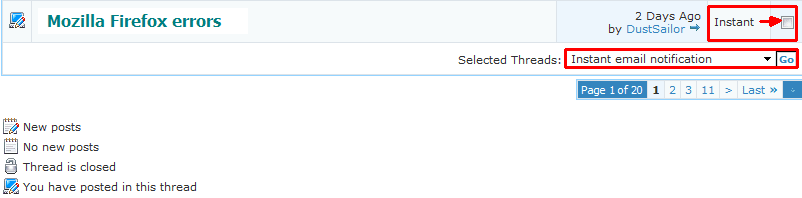
You will need to look for the thread that says "Mozilla Firefox errors" and check the box, even if it doesn't say "instant" like mine does. Then at the very bottom, click that box and select "Instant email notification" and click on "GO", much like this:
Email note2png.png

You should be emailed for the thread now whenever someone responds.

Now patti, very important :warn:
Please tell me once again everything that is going wrong. I know you've said it like a thousand times, but I need to know it all in one post. Tell me everything that is going wrong, if it is a problem with firefox, windows, or yahoo email. Tell me everything that you cannot do, isn't loading or sending out emails, etc. After that, I will have you do things step by step.
 

My Computer

Computer type
PC/Desktop
Computer Manufacturer/Model Number
Custom Asus Build
OS
Microsoft Windows 8.1 Pro 64-bit
CPU
Intel(R) Core(TM) i3-4130 CPU @ 3.40GHz
Motherboard
B85M-E
Memory
8.00 GB
Graphics Card(s)
None
Sound Card
Realtek High Definition Audio
Monitor(s) Displays
Asus 23.6" Monitor
Screen Resolution
1920 x 1080 x 32 bits (4294967296 colors) @ 60 Hz
Hard Drives
INTEL SSDSC2BW180A4
Samsung SSD 840 PRO Series
PSU
Seasonic S12II-380Bronze
Case
Lian Li
Cooling
Fan, Passive
Keyboard
Logitech K120
Mouse
Microsoft Touch Mouse
Internet Speed
4ms Ping, 19.0 Mbps Download, 19.0 Mbps Upload
Antivirus
Eset Endpoint
Browser
Internet Explorer, Chrome
I wonder how that got changed, I always received emails from you guys before. Oh well, I did what you said and hopefully that will correct it. Ok, here are the errors I can remember:
1. When opening mail it gives the error "problem loading message"
2. "Yahoo mail was unable to connect, please reload" - this always happens. I will go to another website and come back to mail and it gives me error. Sometimes I just have to reboot.
3. Adobe flash plugin crashes a lot and I finally uninstalled and reinstalled a new one, but every once in a while it says that again.
4. "Firefox can't find server at us.mg6.mail.yahoo.com"
5. Computer just freezes up - that is on any website though
6. It won't stay logged in, it says my session is up - I have never had this before.
7. Sometimes out of the blue it will ask for my password again.
8. Everyone I email or emails me becomes a "contact"
9. Every so often, not a lot, but XoftspySE will pop up and says to reinstall because of missing components. I thought we had gotten rid of that a long time ago. This doesn't affect anything, I just skip it and go on.

So that is all I can remember and have written down. Hope you can help me without too much pain!!
 

My Computer

Computer Manufacturer/Model Number
Vostro 220 Mini Tower Desktop Details | Dell
OS
Windows 7 Home Premium SP 1, 32-bit
CPU
Intel(R) Core(TM)2 Duo CPU E7400 @ 2.80GHz
Motherboard
Dell Inc. 0P301D
Memory
3.00 GB
Graphics Card(s)
(1) Intel(R) G45/G43 Express Chipset (2) Intel(R) G45/G43
Sound Card
(1) High Definition Audio Device (2) High Definition Audio
Monitor(s) Displays
Dell 22" wide E228WFP Analog flat panelq
Mouse
Dell optical usb mouse vostro
Other Info
OPTICAL READER, MOUSE,SPEAKERS, MONITOR, MODEM
This is crazy. I just went back to the "subscription" page you sent me to and instead of it saying "immediate notification" it says "move to folder". It won't stay on immediate notification.
 

My Computer

Computer Manufacturer/Model Number
Vostro 220 Mini Tower Desktop Details | Dell
OS
Windows 7 Home Premium SP 1, 32-bit
CPU
Intel(R) Core(TM)2 Duo CPU E7400 @ 2.80GHz
Motherboard
Dell Inc. 0P301D
Memory
3.00 GB
Graphics Card(s)
(1) Intel(R) G45/G43 Express Chipset (2) Intel(R) G45/G43
Sound Card
(1) High Definition Audio Device (2) High Definition Audio
Monitor(s) Displays
Dell 22" wide E228WFP Analog flat panelq
Mouse
Dell optical usb mouse vostro
Other Info
OPTICAL READER, MOUSE,SPEAKERS, MONITOR, MODEM
This is crazy. I just went back to the "subscription" page you sent me to and instead of it saying "immediate notification" it says "move to folder". It won't stay on immediate notification.
Patti, if you look for "Mozilla Firefox errors" in that subscription page, it should say "instant" to the right of that thread, meaning you get instant email, despite what the box says. The "move to folder" box only allows you to change the settings after you've checked one of the threads at the top, in order to change them to a different setting. It will stay on "move to folder" normally.

* Let me know if you get this email from this messege. It will work so long as Mozilla Firefox errors is set to "instant".

* Also, how are you able to get emails with Yahoo? You told me it was giving you errors. Also, you said you "remember" it giving errors. Is it still giving errors?

:tip: Can you post pictures of these errors and all the things you are having trouble with?

:note: It may take some time for me to post directions, I may not be available fully all the time... be patient with me
:)

Also, I looked up one of your problems and found a reason you got the yahoo error was because the server was down. Let me know if you are still getting any errors
 

My Computer

Computer type
PC/Desktop
Computer Manufacturer/Model Number
Custom Asus Build
OS
Microsoft Windows 8.1 Pro 64-bit
CPU
Intel(R) Core(TM) i3-4130 CPU @ 3.40GHz
Motherboard
B85M-E
Memory
8.00 GB
Graphics Card(s)
None
Sound Card
Realtek High Definition Audio
Monitor(s) Displays
Asus 23.6" Monitor
Screen Resolution
1920 x 1080 x 32 bits (4294967296 colors) @ 60 Hz
Hard Drives
INTEL SSDSC2BW180A4
Samsung SSD 840 PRO Series
PSU
Seasonic S12II-380Bronze
Case
Lian Li
Cooling
Fan, Passive
Keyboard
Logitech K120
Mouse
Microsoft Touch Mouse
Internet Speed
4ms Ping, 19.0 Mbps Download, 19.0 Mbps Upload
Antivirus
Eset Endpoint
Browser
Internet Explorer, Chrome
I wonder how that got changed, I always received emails from you guys before. Oh well, I did what you said and hopefully that will correct it. Ok, here are the errors I can remember:
1. When opening mail it gives the error "problem loading message"
2. "Yahoo mail was unable to connect, please reload" - this always happens. I will go to another website and come back to mail and it gives me error. Sometimes I just have to reboot.
3. Adobe flash plugin crashes a lot and I finally uninstalled and reinstalled a new one, but every once in a while it says that again.
4. "Firefox can't find server at us.mg6.mail.yahoo.com"
5. Computer just freezes up - that is on any website though
6. It won't stay logged in, it says my session is up - I have never had this before.
7. Sometimes out of the blue it will ask for my password again.
8. Everyone I email or emails me becomes a "contact"
9. Every so often, not a lot, but XoftspySE will pop up and says to reinstall because of missing components. I thought we had gotten rid of that a long time ago. This doesn't affect anything, I just skip it and go on.
Patti, I can probably help you with numbers 3, 4, and 9, but all the rest need to be asked of someone who uses the same thing you do (Yahoo). I recommend asking them on their forum. All I found that might help you is this website, but you can look and see if there is another: Help Central | Help
Be sure to let them know that you aren't good with computers so they don't think you are trying to waste their time, but that you actually don't know how to do it.

But I will still try and help you with #s 3, 4, and 9
 

My Computer

Computer type
PC/Desktop
Computer Manufacturer/Model Number
Custom Asus Build
OS
Microsoft Windows 8.1 Pro 64-bit
CPU
Intel(R) Core(TM) i3-4130 CPU @ 3.40GHz
Motherboard
B85M-E
Memory
8.00 GB
Graphics Card(s)
None
Sound Card
Realtek High Definition Audio
Monitor(s) Displays
Asus 23.6" Monitor
Screen Resolution
1920 x 1080 x 32 bits (4294967296 colors) @ 60 Hz
Hard Drives
INTEL SSDSC2BW180A4
Samsung SSD 840 PRO Series
PSU
Seasonic S12II-380Bronze
Case
Lian Li
Cooling
Fan, Passive
Keyboard
Logitech K120
Mouse
Microsoft Touch Mouse
Internet Speed
4ms Ping, 19.0 Mbps Download, 19.0 Mbps Upload
Antivirus
Eset Endpoint
Browser
Internet Explorer, Chrome
Back
Top