My computer will not shut down or go into hibernate

Melissa

New member
Power User
Local time
10:48 PM
Messages
394
Dear Forum,

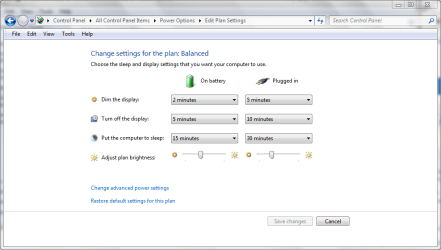
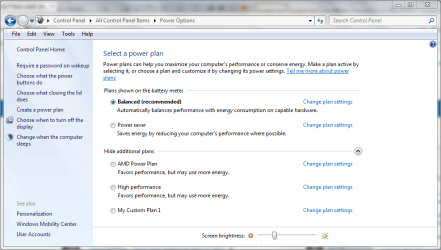
I am having issues where I have changed the time that the display goes to sleep on my computer. Yet it will never shut down completely.

This is after a power surge that caused it to shut down. Everything is working fine apart from the settings not working.

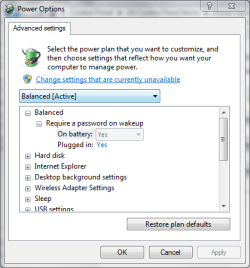
Attached are screen snips are the current settings that I have it on.

I also have two External Hard Drive attached - one is powered via the USB - 500GB and the other is plugged in 1TB.

Thank you
 

Attachments
  • POWER PLAN - 1.PNG2.PNG
    POWER PLAN - 1.PNG2.PNG
    16.6 KB · Views: 2
  • POWER PLAN - 1.PNG
    POWER PLAN - 1.PNG
    30.1 KB · Views: 6
  • POWER PLAN.PNG
    POWER PLAN.PNG
    48.9 KB · Views: 5

My Computer My Computer

At a glance

Windows 7 Home Premium 64bitWindows 7 Service Pack 1 x86 NTFS4 GB
Computer type
Laptop
Computer Manufacturer/Model Number
Sony VAIO / E Series VPCEB46FG
OS
Windows 7 Home Premium 64bit
CPU
Windows 7 Service Pack 1 x86 NTFS
Motherboard
AMD E-350 Processor
Memory
4 GB
Hard Drives
500GB
Other Info
1.6GHz
First thing is to remove any electrical current within the machine and then try to shutdown the machine. To do this please remove your laptop battery from the machine and remove any chargers so that there is no power in the machine and then press the power button. This should clear any stored current. After that please boot up the machine normally and test if shut down works?

If not could you please boot into Safe mode and see if shutting down works from then. If so then there is an application that is preventing Windows from shutting down or hibernating

To boot into safe mode follow this tutorial - http://www.sevenforums.com/tutorials/69585-safe-mode.html

Many Thanks,
Josh! :)
 

My Computer My Computer

At a glance

Windows 7 Professional x64 SP1 ; Windows Serv...Intel Core i5 2400 @ 3.10GHz8.0GB DDR3 @ 665MHz (2GBx4)AMD Radeon HD 6870
Computer type
PC/Desktop
Computer Manufacturer/Model Number
Custom Built
OS
Windows 7 Professional x64 SP1 ; Windows Server 2012 R2 Standard
CPU
Intel Core i5 2400 @ 3.10GHz
Motherboard
Foxconn H67MP-S/-V/H67MP
Memory
8.0GB DDR3 @ 665MHz (2GBx4)
Graphics Card(s)
AMD Radeon HD 6870
Sound Card
Realtek High Definition Audio
Monitor(s) Displays
AOC 2243W & SMB1930NW
Screen Resolution
1440x900 & 1920x1080
Hard Drives
977GB Seagate ST31000524AS ATA Drive (SATA)
250GB WD iSCSI attached Drive
PSU
750W Gaming PSU
Case
Novatech Night
Cooling
Fan
Keyboard
Dell Standard PS/2 Keyboard
Mouse
R.A.T 07 Gaming Mouse
Internet Speed
Download: 10 Mbps Ping: 30ms Upload: 0.81 Mbps
Browser
Google Chrome
Other Info
Optiarc DVD RW AD-5260S ATA Device
Hi Melissa, hope you are doing well :)

1st off, you are confused about a few things, or just wording it wrong.

When a monitor or screen goes off, the computer does not go to sleep.

And when a computer goes to sleep it never actually shuts down.

If it actually shut down, then moving the mouse or touching the keyboard or raising the lid/screen would have no affect and defeat the purpose.

Hibernation should be as close as it comes to shutting down, but when you hit the power button it will resume windows from exactly where it was when it went into hibernation.

Now this isn't written in stone and different motherboards may do it differently.

When my MSI board goes to sleep the power light blinks and I have to hit the power switch to bring it back to life, moving the mouse does nothing.

I hope that makes sense to you ;)
 

My Computer My Computer

At a glance

Windows 10 Pro x64Intel Core i7 6700KGSkill TridentZ RGB 16GB 3600 16-16-16-36EVGA GTX 980 Ti SC x2
Computer type
PC/Desktop
Computer Manufacturer/Model Number
Skylake Special #666
OS
Windows 10 Pro x64
CPU
Intel Core i7 6700K
Motherboard
Asus Sabertooth Z170 Mark 1
Memory
GSkill TridentZ RGB 16GB 3600 16-16-16-36
Graphics Card(s)
EVGA GTX 980 Ti SC x2
Sound Card
Realtek High Definition
Monitor(s) Displays
AOC G2460PG
Screen Resolution
1920 x 1080 144Hz
Hard Drives
Samsung 860 Pro 256GB, Seagate Barracuda 4TB x2
PSU
EVGA 1000 P2, EVGA White Custom Braided Cables
Case
Corsair Vengeance C70 Gunmetal Black
Cooling
Corsair H100i v2, Corsair ML120 x2, Thermal Grizzly Kryonaut
Keyboard
Logitech G910 Orion Spectrum
Mouse
Logitech G700s
Internet Speed
Verizon Fios Quantum Gateway 75/75
Antivirus
Windows Defender, Malwarebytes Free 3.8.3
Browser
Chrome
Other Info
Corsair SP120 x4, LG Blu-ray Drive, Durabrand HT-395 100 Watt Dolby Digital Amp, Corsair H2100 Wireless 7.1 Headset
That is what is not happening with my computer.
It was not shutting down completely - just the display was closing - going dark.
Usually prior to me altering the settings - it was going to the stage of it closing everything - going into hibernate. I would have to press on my profile pic to get back in to my computer. It usually 'flashed orange instead of green' for a while - then hibernated.

I thought that I should conserve power when I could with my computer.

Your explanation after my silly post in the forum was thorough.

I had my computer crash - so perhaps this will assist with the settings to be applied.
 

My Computer My Computer

At a glance

Windows 7 Home Premium 64bitWindows 7 Service Pack 1 x86 NTFS4 GB
Computer type
Laptop
Computer Manufacturer/Model Number
Sony VAIO / E Series VPCEB46FG
OS
Windows 7 Home Premium 64bit
CPU
Windows 7 Service Pack 1 x86 NTFS
Motherboard
AMD E-350 Processor
Memory
4 GB
Hard Drives
500GB
Other Info
1.6GHz
My apologies for the confusion. Are you saying that your display disappears when entering hibernation? If so then that is normal procedure and you should leave the machine to do its thing and it will eventually shut down.

Also you said your computer crashed? Was it a blue screen?

It usually 'flashed orange instead of green' for a while - then hibernated. - Is that referring to the power button on the machine?

Josh
 

My Computer My Computer

At a glance

Windows 7 Professional x64 SP1 ; Windows Serv...Intel Core i5 2400 @ 3.10GHz8.0GB DDR3 @ 665MHz (2GBx4)AMD Radeon HD 6870
Computer type
PC/Desktop
Computer Manufacturer/Model Number
Custom Built
OS
Windows 7 Professional x64 SP1 ; Windows Server 2012 R2 Standard
CPU
Intel Core i5 2400 @ 3.10GHz
Motherboard
Foxconn H67MP-S/-V/H67MP
Memory
8.0GB DDR3 @ 665MHz (2GBx4)
Graphics Card(s)
AMD Radeon HD 6870
Sound Card
Realtek High Definition Audio
Monitor(s) Displays
AOC 2243W & SMB1930NW
Screen Resolution
1440x900 & 1920x1080
Hard Drives
977GB Seagate ST31000524AS ATA Drive (SATA)
250GB WD iSCSI attached Drive
PSU
750W Gaming PSU
Case
Novatech Night
Cooling
Fan
Keyboard
Dell Standard PS/2 Keyboard
Mouse
R.A.T 07 Gaming Mouse
Internet Speed
Download: 10 Mbps Ping: 30ms Upload: 0.81 Mbps
Browser
Google Chrome
Other Info
Optiarc DVD RW AD-5260S ATA Device
My apologies for the confusion. Are you saying that your display disappears when entering hibernation? If so then that is normal procedure and you should leave the machine to do its thing and it will eventually shut down.

The display dims after the period that I entered into the screen

Also you said your computer crashed? Was it a blue screen?

No - BSOD did not happen - when it did crash -- when I switched it back on I was advised to do so in safe mode and do any changes

It usually 'flashed orange instead of green' for a while - then hibernated. - Is that referring to the power button on the machine?

Josh

I am sorry that my wording caused some confusion - I will try and be more clear next time. Yes I was referring to the power button.

I have been on Google and I was looking at the following instructions - is this correct?


Step 1: Reset and restore the power plans to default


a) Click Start, type cmd in the Start search box and hit ENTER.

b) In the command prompt, type powercfg –restoredefaultschemes and hit Enter.

c) Exit command prompt.


Note: This would reset the power plan settings to default. Any customized power plans are would be removed.


Refer to the link below for more information on Powercfg command-line options


Powercfg Command-Line Options
 

My Computer My Computer

At a glance

Windows 7 Home Premium 64bitWindows 7 Service Pack 1 x86 NTFS4 GB
Computer type
Laptop
Computer Manufacturer/Model Number
Sony VAIO / E Series VPCEB46FG
OS
Windows 7 Home Premium 64bit
CPU
Windows 7 Service Pack 1 x86 NTFS
Motherboard
AMD E-350 Processor
Memory
4 GB
Hard Drives
500GB
Other Info
1.6GHz
Back
Top