My Documents folder inadvertently renamed

jmbissell

New member
Local time
1:22 PM
Messages
5
Either through my own fault or when importing my XP data into Win7 via the Windows 7 Easy Transfer Utility, I now have a C:\user\john\documents folder instead of a C:\user\john\My Documents folder (I still have the My Documents junction point). The "Documents" folder does not have a Location tab on its properties sheet and it will not allow a rename to "My Documents" which it says already exists. I have all my documents in this folder but things like Office that are looking for My Documents say that it is missing.
Also, the My Pictures, My Videos, and My Music links that were inside the My Documents folder are gone.
Is there any way to get the My Documents alias back on this folder and restore that to be pointing to Location C:\users\john\documents? I realize that I could probably just create a new user but then I'd have to move all of the AppData and other files which would be a pain.
 

My Computer

Computer Manufacturer/Model Number
User Built
OS
Windows 7 32-bit
CPU
E8400
Motherboard
Gigabyte GA-P965-DS3
Memory
2GB
Either through my own fault or when importing my XP data into Win7 via the Windows 7 Easy Transfer Utility, I now have a C:\user\john\documents folder instead of a C:\user\john\My Documents folder (I still have the My Documents junction point). The "Documents" folder does not have a Location tab on its properties sheet and it will not allow a rename to "My Documents" which it says already exists. I have all my documents in this folder but things like Office that are looking for My Documents say that it is missing.
Also, the My Pictures, My Videos, and My Music links that were inside the My Documents folder are gone.
Is there any way to get the My Documents alias back on this folder and restore that to be pointing to Location C:\users\john\documents? I realize that I could probably just create a new user but then I'd have to move all of the AppData and other files which would be a pain.

wouldnt it be easier to redirect office and the other programs that need the path ?
 

My Computer

Computer Manufacturer/Model Number
built my own
OS
win7 ultimate / virtual box
CPU
Intel Core i7 3770K,1155, Ivy Bridge
Motherboard
MSI Z77A-G43
Memory
GSkill Ripjaws Z Series 1600 CL 9.0 16GB
Graphics Card(s)
KFA2 GeForce GTX 670 EX OC 2048MB GDDR5 PCI-E gfx card
Sound Card
onboard Nvidia HDMI audio
Monitor(s) Displays
ASUS VK222H 22" widescreen LCD monitor
Screen Resolution
1680x1050
Hard Drives
Kingston 128gb SSD
OCZ Vertex 90gb SSD
500GB WDCaviar 16mb 5000KS
320GB WDCaviar 16mb 3200AAKS sata 2
1TB Samsung 16mb HD103SJ sata 2
PSU
Corsair HX 750W ATX2.2 Modular
Cooling
Antec 25 Kuhler H2O 620
Keyboard
logitech
Mouse
logitech MX518
Internet Speed
7mb adsl
I'd prefer to have things the way Windows 7 sets them up to maintain consistency across users and to make it easier to move files between computers.
Seems like this ought to be a trivial fix but I'm baffled.
 

My Computer

Computer Manufacturer/Model Number
User Built
OS
Windows 7 32-bit
CPU
E8400
Motherboard
Gigabyte GA-P965-DS3
Memory
2GB
Either through my own fault or when importing my XP data into Win7 via the Windows 7 Easy Transfer Utility, I now have a C:\user\john\documents folder instead of a C:\user\john\My Documents folder (I still have the My Documents junction point). The "Documents" folder does not have a Location tab on its properties sheet and it will not allow a rename to "My Documents" which it says already exists. I have all my documents in this folder but things like Office that are looking for My Documents say that it is missing.
Also, the My Pictures, My Videos, and My Music links that were inside the My Documents folder are gone.
Is there any way to get the My Documents alias back on this folder and restore that to be pointing to Location C:\users\john\documents? I realize that I could probably just create a new user but then I'd have to move all of the AppData and other files which would be a pain.

Have you tried moving the folder to a different directory and adding a new My Documents? Hopefully this time it will allow you to use the name. You can then move your docs back to the folder.
 

My Computer

Computer type
PC/Desktop
Computer Manufacturer/Model Number
Custom Build
OS
Windows 7 Home Premium 32-Bit - Build 7600 SP1
CPU
Intel Core i3-2120 3.30Ghz
Motherboard
Asus P8Z68-V LX Intel Z68 Socket H2 ATX
Memory
Kingston 4 GB DDR3 1333 mhz
Graphics Card(s)
AMD Radeon HD6670
Sound Card
Sound Blaster Audigy SE 24-Bit
Monitor(s) Displays
Asus VE228
Screen Resolution
1440 X 900
Hard Drives
OCZ Vertex 3 120 GB Sata 3 SSD ==
Kingston SH103/S3 120 G Hyper X 120 GB SSD ==
Western Digital 500 GB Caviar Green 7200 RPM ==
PSU
Corsair CX600M == 600 Watt
Case
NZXT Apollo - Silver with Clear Side Panel
Cooling
Three 120 mm Fans
Keyboard
Microsoft Natural 4000
Mouse
Microsoft Custom Optical 3000
Internet Speed
AT&T Fiber Optic Wireless Network
Antivirus
Microsoft Security Essentials
Browser
Chrome
Other Info
120 mm Blue LED Fan -- Three Blue LED Lazer Light Sticks
I can rename the folder but when I try to create a new My Documents, it tells me that the folder already exists and do I want to merge it with the other one (which is actually the junction point My Documents). Even if I say Yes, nothing happens.
I'm wondering if I can first delete the My Documents junction point, rename Documents to My Documents, and then recreate the junction point.
 

My Computer

Computer Manufacturer/Model Number
User Built
OS
Windows 7 32-bit
CPU
E8400
Motherboard
Gigabyte GA-P965-DS3
Memory
2GB
Hello John, and welcome to Seven Forums.

This should help: :)
  • Backup anything that you do not want to lose in the folder.
  • Delete it and any other instance of the "My Documents" folder.
  • Restore the default location of the "My Documents" folder.
  • Restart the computer. You may need to restart a few times before "My Documents" is restored.
Hope this helps,
Shawn
 

My Computer

Computer type
PC/Desktop
Computer Manufacturer/Model Number
Self built custom
OS
64-bit Windows 11 Pro for Workstations
CPU
Intel i7-8700K OC'd to 5 GHz
Motherboard
ASUS ROG Maximus XI Formula Z390
Memory
64 GB (4x16GB) G.SKILL TridentZ RGB DDR4 3600 MHz
Graphics Card(s)
ASUS ROG-STRIX-GTX1080TI-O11G-GAMING
Sound Card
Integrated
Monitor(s) Displays
2 x Samsung Odyssey G7 27"
Screen Resolution
2560x1440
Hard Drives
1TB Samsung 990 PRO M.2,
4TB Samsung 990 PRO PRO M.2,
TerraMaster F8 SSD Plus NAS
PSU
Seasonic Prime Titanium 850W
Case
Thermaltake Core P3
Cooling
Corsair Hydro H115i
Keyboard
Logitech wireless K800
Mouse
Logitech MX Master 4
Internet Speed
2 Gb/s Download and 100 Mb/s Upload
Antivirus
Malwarebyte Anti-Malware Premium
Browser
Google Chrome
Other Info
Logitech Z625 speaker system,
Logitech BRIO 4K Pro webcam,
HP Color LaserJet Pro MFP M477fdn,
APC SMART-UPS RT 1000 XL - SURT1000XLI,
Galaxy S23 Plus phone
Hello John, and welcome to Seven Forums.

This should help: :)
  • Backup anything that you do not want to lose in the folder.
  • Delete it and any other instance of the "My Documents" folder.
  • Restore the default location of the "My Documents" folder.
  • Restart the computer. You may need to restart a few times before "My Documents" is restored.
Hope this helps,
Shawn

I must be missing something here. After I delete the My Documents folder it doesn't show up in the list of things I can restore to their default locations. I finally got so frustrated w/ this that I saved off the information, deleted the account, and added the user back as a new account. Caused a lot of (re)setup of things that had already been working but them's the breaks. Thanks for your help!
 

My Computer

Computer Manufacturer/Model Number
User Built
OS
Windows 7 32-bit
CPU
E8400
Motherboard
Gigabyte GA-P965-DS3
Memory
2GB
I'm happy to hear that you got it sorted, but sorry you had to create a new account to do it.
 

My Computer

Computer type
PC/Desktop
Computer Manufacturer/Model Number
Self built custom
OS
64-bit Windows 11 Pro for Workstations
CPU
Intel i7-8700K OC'd to 5 GHz
Motherboard
ASUS ROG Maximus XI Formula Z390
Memory
64 GB (4x16GB) G.SKILL TridentZ RGB DDR4 3600 MHz
Graphics Card(s)
ASUS ROG-STRIX-GTX1080TI-O11G-GAMING
Sound Card
Integrated
Monitor(s) Displays
2 x Samsung Odyssey G7 27"
Screen Resolution
2560x1440
Hard Drives
1TB Samsung 990 PRO M.2,
4TB Samsung 990 PRO PRO M.2,
TerraMaster F8 SSD Plus NAS
PSU
Seasonic Prime Titanium 850W
Case
Thermaltake Core P3
Cooling
Corsair Hydro H115i
Keyboard
Logitech wireless K800
Mouse
Logitech MX Master 4
Internet Speed
2 Gb/s Download and 100 Mb/s Upload
Antivirus
Malwarebyte Anti-Malware Premium
Browser
Google Chrome
Other Info
Logitech Z625 speaker system,
Logitech BRIO 4K Pro webcam,
HP Color LaserJet Pro MFP M477fdn,
APC SMART-UPS RT 1000 XL - SURT1000XLI,
Galaxy S23 Plus phone
The "My " portion in front of Documents, Music, Pictures, and Videos are not actually part of the real folder name. You can actually rename this folders to anything you want. It is only a visual thing for Windows Explorer.
 

My Computer

Computer type
PC/Desktop
Computer Manufacturer/Model Number
Alienware Aurora ALX R4
OS
Windows 10 Pro (x64)
CPU
Intel Core i7-3930K (3.2GHz - 4.5GHz)
Motherboard
Alienware Aurora-R4 x79
Memory
4x Samsung 4GB PC3-12800 DDR3 (16GB 1600MHz)
Graphics Card(s)
Nvidia Geforce GTX 690
Sound Card
SteelSeries Siberia Elite
Monitor(s) Displays
Dell UltraSharp U3011
Screen Resolution
2560x1600
Hard Drives
Samsung 850 Pro 256 GB, Seagate 1TB Desktop Hybrid HDD, 2x Western Digital 4TB Green HDD
PSU
875W Some Dell PSU <.<
Case
Alienware Aurora ALX
Cooling
Custom Liquid Cooling (EK CPU & GPU blocks) dual EK 480RAD
Keyboard
Logitech G710+ Mechanical
Mouse
Logitech G700s
Internet Speed
Verizon Fios (50 mbps average)
Other Info
Server: Intel NUC D54250WYK: i5-4250U, 16GB, 256 GB mSATA, Windows Server 2012 R2
The one thing you can't seem to do is to rename it back to My Documents. And some of my legacy apps (like Office XP/2002) seemed to fail when I would click on the My Documents button.
 

My Computer

Computer Manufacturer/Model Number
User Built
OS
Windows 7 32-bit
CPU
E8400
Motherboard
Gigabyte GA-P965-DS3
Memory
2GB
The one thing you can't seem to do is to rename it back to My Documents. And some of my legacy apps (like Office XP/2002) seemed to fail when I would click on the My Documents button.

That is because the directory is no longer set as your Documents folder.
 

My Computer

Computer type
PC/Desktop
Computer Manufacturer/Model Number
Alienware Aurora ALX R4
OS
Windows 10 Pro (x64)
CPU
Intel Core i7-3930K (3.2GHz - 4.5GHz)
Motherboard
Alienware Aurora-R4 x79
Memory
4x Samsung 4GB PC3-12800 DDR3 (16GB 1600MHz)
Graphics Card(s)
Nvidia Geforce GTX 690
Sound Card
SteelSeries Siberia Elite
Monitor(s) Displays
Dell UltraSharp U3011
Screen Resolution
2560x1600
Hard Drives
Samsung 850 Pro 256 GB, Seagate 1TB Desktop Hybrid HDD, 2x Western Digital 4TB Green HDD
PSU
875W Some Dell PSU <.<
Case
Alienware Aurora ALX
Cooling
Custom Liquid Cooling (EK CPU & GPU blocks) dual EK 480RAD
Keyboard
Logitech G710+ Mechanical
Mouse
Logitech G700s
Internet Speed
Verizon Fios (50 mbps average)
Other Info
Server: Intel NUC D54250WYK: i5-4250U, 16GB, 256 GB mSATA, Windows Server 2012 R2
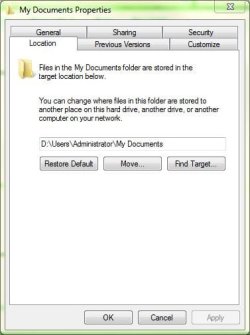
Probably what I would have tried would be to make a new folder called "my documents" then go to c:\<account>, right click on the documents folder and click properties. Go to location tab. Click move and then navigate to the my documents folder you created and click ok. That would move the contents officially to the recreated my documents folder.

location.jpg
 

My Computer

Computer Manufacturer/Model Number
self built
OS
Windows 7 Professional 64-bit
CPU
Intel E8400 3GHz
Motherboard
Intel DX48BT2
Memory
Kingston PC3-10700H 4Gb
Graphics Card(s)
XFX Radeon HD 5850 BlackEd.
Sound Card
Asus Xonar DG
Monitor(s) Displays
2x Samsung SM-T220HD 22"
Screen Resolution
1680x1050 on two monitors
Hard Drives
OCZ Vertex 2 120gb 3.5" (OS)
Seagate Momentus XT 500gb
Samsung F3 1Tb (games)
2x Samsung F1 1Tb
PSU
Thermaltake ToughPower 850w
Case
Thermaltake Armor
Cooling
Scythe Mugen II
Keyboard
Microsoft Comfort Curve USB
Mouse
Razer Diamondback 3G
Internet Speed
8128/443
Back
Top