My Issues with Windows 7

Status
Not open for further replies.
I am dissapointed that they wont let you install to a USB device though. I guess its too big of an installation anyway. Would really like to see a mini Win 7 that only takes up a couple gigs and less then 500mb of ram...
Yep, it's called Winbuilder.

And no, it is not stable, but it does work.
 

My Computer

Computer Manufacturer/Model Number
Self Built
OS
Win 7 Ultimate 32bit
CPU
C2D E6600 2.4Ghz
Motherboard
Intel D965WH
Memory
4G Kingston KHX5400D2
Graphics Card(s)
EVGA GTX 570 HD SC (012-P3-1573-KR)
Sound Card
On-Board
Monitor(s) Displays
Samsung 226BW
Screen Resolution
1680 x 1050
Hard Drives
2 x 250 Seagate Barracuda
2 x 500 Seagate Barracuda (Raid1)
PSU
Corsair TX750W
Case
In-Win C589
Cooling
Stock Intel Cooling
You can make the task bar smaller , looks just like Vistas and why do you need a quicklaunch ? Just put the icons you use right on the taskbar.
 

My Computer

Computer Manufacturer/Model Number
Myself
OS
Windows 7 Ultimate 64Bit
CPU
C2D E8200
Motherboard
XFX 750i
Memory
8GB PNY PC2-6400
Graphics Card(s)
BFG 9600GT x 2
Sound Card
Stock XFX Optical
Monitor(s) Displays
Gateway 22" HD Display
Hard Drives
C: 1 TB G: 500 GB H: 500 GB
PSU
Ultra LSP 550 Pro Lifetime Series
Case
Xion2
Cooling
ThermalTake
You can make the task bar smaller , looks just like Vistas and why do you need a quicklaunch ? Just put the icons you use right on the taskbar.

Umm they take up to much room... they move around in weird ways... I dont like taskbar items grouping in this manner...

I like my screen neet and tidy. I dont have a 1920x1200 monitor to have its space wasted by useless large icons with large spaces between them and having to hunt for items that move around...
 

My Computer

Computer Manufacturer/Model Number
Custom
OS
Windows 7 Ultimate x64
CPU
QX6700 @ 3.2Ghz (temporarily till I get the drive to tweak)
Motherboard
Asus Maximus Formula
Memory
8gb (4x2gb) OCZ PC2-8500
Graphics Card(s)
GTX280
Sound Card
Auzentech Prelude
Monitor(s) Displays
Samsung 244T & 940BF
Screen Resolution
1920x1200 & 1280x1024
Hard Drives
2 x Hitatchi 7K500 500GB in raid 0
PSU
Seasonic M-12 700w
Case
Lian Li PC-6077B
Cooling
Liquid (D-tek Fuzion 2/DDC+/240GTX)
Keyboard
Saitech Eclipse II
Mouse
Logitech G9
Internet Speed
22Mbit burst - 15 Mbit typical down / 500Kbit up
Other Info
http://pics.livejournal.com/bun_bun/pic/001c64ww
Ok finally got around to this...

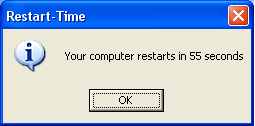
Win XP Restart Time (non tweaked)

untitled.PNG

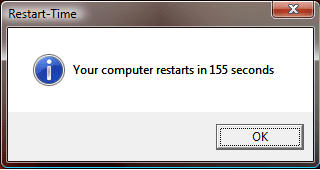
Win Vista Restart Time (semi-tweaked)

Vista Restart.png

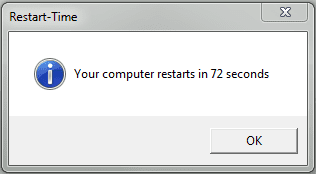
Win 7 Restart Time (tweaked)

Windows 7 Restart Raid.PNG

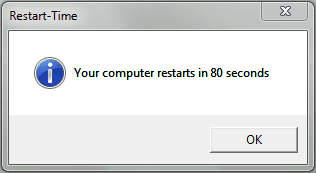
Now I must make note on a couple points. Windows 7 shuts down in a hurry... quite a bit faster then XP in my case. So the ratio between shut down and start up is lower making XP's boot even faster then what it seems in the above numbers which is really what I am going after. However that said Windows 7 is much more responsive and usable at first seeing the desktop on start up. XP is very sluggish to begin with and sometimes network traffic is not possible after immediate boot up, have to wait a few seconds before loading IE where as 7 I can load IE instantly.

All the above was on my raid array. Now being that Windows 7 is booting with twice the memory usage of my XP build it is quite an impressive feat. However that is a slow XP boot up for me. I can cut that time by 50% I just dont have time to mess in a OS right now that I have no intentions of useing.

However all said and done I am almost willing to say that Windows 7 boot is more appleasing to the user experience due to the fact that it is more responsive immediatly upon showing the desktop (and the windows 7 loading screen doesn't chug like XP's loading bar does sometimes) and I have a suspiscion that 7 would perform better on a SSD then XP would, although I have no personal experience to make any claims on that. My initial claim of XP booting faster and being overall more responsive still stands as I beleive Windows 7 could be a lot better had more thought been put into optimizing boot times and onboot memory usage.

And now to the nay sayers about my external drive...

Win 7 Restart on external hard drive connected via e-Sata (tweaked)

Windows 7 Restart External.PNG

And my windows experience index showing the drives performance

Capture.PNG

Which is the same as my raid array.
 

My Computer

Computer Manufacturer/Model Number
Custom
OS
Windows 7 Ultimate x64
CPU
QX6700 @ 3.2Ghz (temporarily till I get the drive to tweak)
Motherboard
Asus Maximus Formula
Memory
8gb (4x2gb) OCZ PC2-8500
Graphics Card(s)
GTX280
Sound Card
Auzentech Prelude
Monitor(s) Displays
Samsung 244T & 940BF
Screen Resolution
1920x1200 & 1280x1024
Hard Drives
2 x Hitatchi 7K500 500GB in raid 0
PSU
Seasonic M-12 700w
Case
Lian Li PC-6077B
Cooling
Liquid (D-tek Fuzion 2/DDC+/240GTX)
Keyboard
Saitech Eclipse II
Mouse
Logitech G9
Internet Speed
22Mbit burst - 15 Mbit typical down / 500Kbit up
Other Info
http://pics.livejournal.com/bun_bun/pic/001c64ww
A lot is made of the relative speed of start-up and reboot between win7 and XP this is a non issue for me as it's something I only do once a week or so on average (or when an install/upgrade requires it).

I would also add that whereas XP would tend to slow down over time when left running, forcing the need to re-boot, win7 does not. This results in the relevent comparison being, "is the boot of win7 faster than three or four XP re-boots"

Just my opinion and experience of course ;)
 

My Computers

System One System Two

  • Computer type
    PC/Desktop
    Computer Manufacturer/Model Number
    ChillBlast - Custom to my design
    OS
    Windows 11 Pro x64 [Latest Release and Release Preview]
    CPU
    Ryzen 9 5950X, 3.8 - 5.2 MHz
    Motherboard
    Asus Prime X570-Pro
    Memory
    64GB [2 x 32GB] DDR4 3200MHz
    Graphics Card(s)
    4GB NVIDIA GEFORCE GTX 1650 Ti
    Sound Card
    On-board SPDIF to 5.1 System + HDMI [5.1 system]
    Monitor(s) Displays
    32" UHD 32 Bit HDR Monitor + 43" UHD 4K 32Bit HDR TV
    Screen Resolution
    2 x 3840 x 2160 @60Hz
    Hard Drives
    1TB M2 SSD OS, 500GB Fast Access SSD, 2 x 8TB Data + Various Externals from 1TB to 4TB, 10TB NAS
    PSU
    NZXT C750 80 PLUS Gold 750W Modular PSU
    Case
    Workstation Case [Matt Black]
    Cooling
    NZXT Kraken X63 280mm CPU Cooler +2x Quiet Case fans
    Keyboard
    Logitech Wireless MX Keys & K400 + others
    Mouse
    Logitech Wireless MX Master 3S
    Internet Speed
    920 MB Down 50 MB Up
    Antivirus
    BitDefender Total Security Pro
    Browser
    Chrome (always run latest Non-Beta)
    Other Info
    Also run ...
    Laptop - Quad 8GB - Windows 10 Pro x64
    Nexus 7 Android tablet x2
    Samsung 10.2" tablet
    Blackview TAB 8 4G Android Tablet c/w Keyboard
    Wacom Intuos Pro Medium Pen Pad
    Wacom Intuos Pro Small Pen Pad
    Wacom Expresskeys Remote
    Loopdeck+ Graphics Controller
    Shuttle Pro v2 Control
  • Computer type
    Laptop
    System Manufacturer/Model Number
    Dell XPS 17 10750H
    OS
    Windows 11 Pro x64 Latest RP
    CPU
    Intel I7 10750H 5.0GHz
    Motherboard
    Dell XPS
    Memory
    32GB [2x16GB] DDR4 2933 MHz
    Graphics Card(s)
    nVidia GTX1650Ti 4 GB GDDR6
    Sound Card
    Stock [Realtek] 4 Speaker
    Monitor(s) Displays
    17" IPS UHD+ Infinity Edge Touchscreen
    Screen Resolution
    3840 x 2400
    Hard Drives
    2TB M2 NVMe, 4TB External + various 500GB & 1TB External NVMe (also have access to spinner HDD from
    PSU
    Stock
    Case
    Stock XPS Aluminium & Carbon Fibre
    Cooling
    Stock - Active Fan Control
    Keyboard
    Backlit + Various Logitech
    Mouse
    Stock Track Pad + Logitech MX Trackball
    Internet Speed
    72 MB Down 18MB Up
    Browser
    Chrome
    Other Info
    Also run ...
    Laptop - Quad 8GB - Windows 10 Pro x64
    Nexus 7 Android tablet x2
    10.2" tablet
    Sony Z3 Android Smartphone
    Wacom Intuos Pro Medium Pen Pad
    Wacom Intuos Pro Small Pen Pad
    Wacom Expresskeys Remote
    Loopdeck+ Graphics Controller
    Shuttle Pro v2 Control Pad
    10TB NAS
MaximumPC got a Windows 7 rig to boot up in just 30 seconds. Depending on your hardware, you may not see these results, but I bet reading this article could help you shave your boot time.
In Search of the Sub-30 Second Boot | Maximum PC
 

My Computer

Computer Manufacturer/Model Number
Asus K60IJ
OS
Windows 7 Ultimate x64
CPU
Intel Pentium Dual Core T4200
Motherboard
HP Laptop
Memory
4gb PC-6400
Graphics Card(s)
Integrated Intel GMA 4500
Sound Card
onboard(laptop)
Monitor(s) Displays
16"
Screen Resolution
1300 X 766 with true 720p HD support
Hard Drives
320GB 5400RPM
Mouse
Microsoft 3000 laptop mouse
Internet Speed
15mbit+ down and 768kbit up
Other Info
1TB external Western Digital Essentials HDD
A lot is made of the relative speed of start-up and reboot between win7 and XP this is a non issue for me as it's something I only do once a week or so on average (or when an install/upgrade requires it).

I would also add that whereas XP would tend to slow down over time when left running, forcing the need to re-boot, win7 does not. This results in the relevent comparison being, "is the boot of win7 faster than three or four XP re-boots"

Just my opinion and experience of course ;)

Definitly your experience as I have to restart Windows 7 quite regularily as it slows down after awhile as well. I prefer to turn off my systems when not in use rather then standby (side exception of my media center of course and with my power hungry machine of 250-300watts on idle I tend to shut it down quite a bit) so boot times are very important. Vista this was not possible as its boot times were horrendous so I always would put it to sleep restarting it only once a week.

Also I do a lot of troubleshooting and testing of various technologies on a consistent basis and waiting for my computer to restart multiple times in short period is not fun.

MaximumPC got a Windows 7 rig to boot up in just 30 seconds. Depending on your hardware, you may not see these results, but I bet reading this article could help you shave your boot time.
In Search of the Sub-30 Second Boot | Maximum PC

Thank you I will check that out later. My point still stands however as out of the box XP is still quite a bit faster and Microsoft doesn't seem to understand this concern. Yes SSD's are here which improve everything 10 fold but if they keep on this path then boot times and memory usages will keep going up and we will be in this constant state of slow booting unresponsive computers. As hardware gets better the user experience should get better not stay the same as the trend has been.
 

My Computer

Computer Manufacturer/Model Number
Custom
OS
Windows 7 Ultimate x64
CPU
QX6700 @ 3.2Ghz (temporarily till I get the drive to tweak)
Motherboard
Asus Maximus Formula
Memory
8gb (4x2gb) OCZ PC2-8500
Graphics Card(s)
GTX280
Sound Card
Auzentech Prelude
Monitor(s) Displays
Samsung 244T & 940BF
Screen Resolution
1920x1200 & 1280x1024
Hard Drives
2 x Hitatchi 7K500 500GB in raid 0
PSU
Seasonic M-12 700w
Case
Lian Li PC-6077B
Cooling
Liquid (D-tek Fuzion 2/DDC+/240GTX)
Keyboard
Saitech Eclipse II
Mouse
Logitech G9
Internet Speed
22Mbit burst - 15 Mbit typical down / 500Kbit up
Other Info
http://pics.livejournal.com/bun_bun/pic/001c64ww
My point still stands however as out of the box XP is still quite a bit faster and Microsoft doesn't seem to understand this concern.
- That's pretty much what I've seen too. A lot of people don't really do a correct comparison between the two. An XP system running for 6 months, 2 yrs, etc.. will already be slower than a fresh installed XP (meaning you can't compare a running XP install with a fresh Win 7 install and expect the tests to be even). Right now, few people can compare how Win 7 does after it runs for 6months to a yr.

Like Barman, I only have to restart my system once a week. I haven't seen a single bit of slowdown for extended use.

However all said and done I am almost willing to say that Windows 7 boot is more appleasing to the user experience due to the fact that it is more responsive immediately upon showing the desktop
- That's probably what the major goal was. If you load a desktop that still takes some time to get going, people automatically assume their computer is slow, but when you take an extra 20-30 seconds to get everything else running, people see a fully loaded desktop that is completely workable, and think it's fast.

I guess the only thing to learn here, which is evident in other benchmarks too, is that Win 7 doesn't always boot faster than XP. I think we can all agree this isn't really a deal breaker, but hopefully something MS may look at in their next OS.

Thanks for posting those restart times :)
 

My Computer

OS
Windows 7
Let the Thread Live & Thrive!
fmg
 

My Computer

OS
W7 Pro 64bit
CPU
Intel Core 2 Quad Q6600 Kentsfield
Motherboard
GIGABYTE GA-EX38-DQ6
Memory
6gb
Graphics Card(s)
MSI N9600GT 512M OC GeForce 9600 GT
Hard Drives
Intel SSD
Just for the sake of the argument :devil:

I think that the only true comparison between XP and win7 would have to be performed on a level playing field, with XP at the same stage of it's development as win7 is now.

That would mean testing XP on an machine that was available at that time and using an XP at the same stage of development, that is no Service packs, and just the first few months of updates.

I'm sure that win7 will run at an amazing speed on whatever hardware will be available in eight or nine years ;), but as only Doc Brown would possibly have access to those benchmarks and real comparison can only be conjecture :D
 

My Computers

System One System Two

  • Computer type
    PC/Desktop
    Computer Manufacturer/Model Number
    ChillBlast - Custom to my design
    OS
    Windows 11 Pro x64 [Latest Release and Release Preview]
    CPU
    Ryzen 9 5950X, 3.8 - 5.2 MHz
    Motherboard
    Asus Prime X570-Pro
    Memory
    64GB [2 x 32GB] DDR4 3200MHz
    Graphics Card(s)
    4GB NVIDIA GEFORCE GTX 1650 Ti
    Sound Card
    On-board SPDIF to 5.1 System + HDMI [5.1 system]
    Monitor(s) Displays
    32" UHD 32 Bit HDR Monitor + 43" UHD 4K 32Bit HDR TV
    Screen Resolution
    2 x 3840 x 2160 @60Hz
    Hard Drives
    1TB M2 SSD OS, 500GB Fast Access SSD, 2 x 8TB Data + Various Externals from 1TB to 4TB, 10TB NAS
    PSU
    NZXT C750 80 PLUS Gold 750W Modular PSU
    Case
    Workstation Case [Matt Black]
    Cooling
    NZXT Kraken X63 280mm CPU Cooler +2x Quiet Case fans
    Keyboard
    Logitech Wireless MX Keys & K400 + others
    Mouse
    Logitech Wireless MX Master 3S
    Internet Speed
    920 MB Down 50 MB Up
    Antivirus
    BitDefender Total Security Pro
    Browser
    Chrome (always run latest Non-Beta)
    Other Info
    Also run ...
    Laptop - Quad 8GB - Windows 10 Pro x64
    Nexus 7 Android tablet x2
    Samsung 10.2" tablet
    Blackview TAB 8 4G Android Tablet c/w Keyboard
    Wacom Intuos Pro Medium Pen Pad
    Wacom Intuos Pro Small Pen Pad
    Wacom Expresskeys Remote
    Loopdeck+ Graphics Controller
    Shuttle Pro v2 Control
  • Computer type
    Laptop
    System Manufacturer/Model Number
    Dell XPS 17 10750H
    OS
    Windows 11 Pro x64 Latest RP
    CPU
    Intel I7 10750H 5.0GHz
    Motherboard
    Dell XPS
    Memory
    32GB [2x16GB] DDR4 2933 MHz
    Graphics Card(s)
    nVidia GTX1650Ti 4 GB GDDR6
    Sound Card
    Stock [Realtek] 4 Speaker
    Monitor(s) Displays
    17" IPS UHD+ Infinity Edge Touchscreen
    Screen Resolution
    3840 x 2400
    Hard Drives
    2TB M2 NVMe, 4TB External + various 500GB & 1TB External NVMe (also have access to spinner HDD from
    PSU
    Stock
    Case
    Stock XPS Aluminium & Carbon Fibre
    Cooling
    Stock - Active Fan Control
    Keyboard
    Backlit + Various Logitech
    Mouse
    Stock Track Pad + Logitech MX Trackball
    Internet Speed
    72 MB Down 18MB Up
    Browser
    Chrome
    Other Info
    Also run ...
    Laptop - Quad 8GB - Windows 10 Pro x64
    Nexus 7 Android tablet x2
    10.2" tablet
    Sony Z3 Android Smartphone
    Wacom Intuos Pro Medium Pen Pad
    Wacom Intuos Pro Small Pen Pad
    Wacom Expresskeys Remote
    Loopdeck+ Graphics Controller
    Shuttle Pro v2 Control Pad
    10TB NAS
I think that the only true comparison between XP and win 7 would have to be performed on a level playing field, with XP at the same stage of it's development as Windows 7 is now.
- Never really thought about that, but you're right.. XP with years and years of fixes, is not comparing apples to apple when vs the new Win 7.
 

My Computer

OS
Windows 7
I would also add that whereas XP would tend to slow down over time when left running, forcing the need to re-boot, win7 does not. This results in the relevent comparison being, "is the boot of win7 faster than three or four XP re-boots"

Just my opinion and experience of course ;)

My experiencing also and my computer runs 24/7. I reboot about every five days - usually because I've added or eliminated something requiring a reboot.
 

My Computer

Computer Manufacturer/Model Number
Home built
OS
Windows 7 Ultimate 32 bit
CPU
Intel(R) Pentium(R) 4 CPU 3.00GHz
Motherboard
ASUS P4P800-VM Motherboard Chipset: Intel 865G + ICH5
Memory
2.50 GB RAM
Graphics Card(s)
NVIDIA GeForce 7600 GS
Sound Card
SoundMax Integrated Digital Audio (Chip)
Monitor(s) Displays
ViewSonic VX 1962 wm
Screen Resolution
1680 X 1050
Hard Drives
Seagate Barracuda 7200.10 80 GB
ST380215A ATA Device 18.6 GB
Western Digital "My Book" external hard drive 750 GB
Cooling
Fan based
Keyboard
Microsoft Comfort Curve Keyboard 2000 v10 USB
Mouse
Logitec optic USB
Internet Speed
3.01 Mb/s download 0.64 Mb/s upload
The level playing feel for apple's to apple's comparison is a valid arguement... from one standpoint. Also XP would have been designed and optimzed at that hardware as well but you would also have to uninstall all service packs and updates to get back to that point as well. However being that SP3 was done on today's hardware I feel that this standpoint is moot with a fully updated XP install.

However the other standpoint is this. As technology improves the user experience should improve, not stay the same or get worse. If Windows 7 is about the same on today's hardware as XP was back then, we have not made any progress. A linux developer talked about this quite extensively and I completely agreed with him. He left the Linux scene due to problems with the cpu scheduler that no one was listening to. He said that the user experience should improve with better hardware and technology, where as with the way linux was and has been going the user experience is staying the same. So you could compare apples to apples from then to now but in the end what matters is the user experience. Windows XP improved with hardware and new software should not slow it down it should only make it better. Albeit there are some exceptions to the rule and a bit more overhead and other random things are to be expected. I just feel that Vista and Windows 7 took it too far.

The way I see it is Vista took the user experience back too far in terms of boot times/used resources etc. Windows 7 has regained some of that back. Is it enough? That is up to the individual user to judge based on their experience. Is it enough for me? I think Vista was abysmal and Windows 7 is acceptable. However there are many other benefits to Windows 7 that make it a clear winner which is why I am now useing it and am happy with it.

Don't get me wrong, I am not saying Windows 7 is a horrible OS or a failed attempt by Microsoft. I never said that about Vista either. However it is not perfect and still has a lot of room to improve and one of the area's that is a major concern to myself and many others is boot times and used resources on boot. IMO the OS should boot at least just as fast if not faster then its predecessor. Back when I got Win XP I had a pretty low end machine. Once I upgraded to a midrange machine for the time I found that XP performed better in almost every respect then Win 98. It used a bit more RAM but it wasn't that much more and I was still ok with my 256MB. However boot times were faster, the OS was more responsive, and everything just gave a nicer feel to it. This is because the OS was coded to take advantage of newer arch advancements of CPU's that 98 was not designed to do. However a lot of changes have been made to Windows 7 from XP and maybe theres some improvements that were not yet taking advantage of yet in our hardware (like how Athlon XP's improved XP so much) but for now IMO Windows 7 is off to a slower start, but like I said brings much more to the table that is a lot better which makes up for a lot of its downfalls.

And the biggest thing of all is simply with all the praise Windows 7 has been getting I was expecting a 98-Win XP type of experience. However this was not the case, and felt misled. I am simply sharing my experience with others so that hopefully someone else will learn from my experience and realize a few things and maybe learn something about their computer.

I hope all that made sense. My brain isn't quite with me today.
 

My Computer

Computer Manufacturer/Model Number
Custom
OS
Windows 7 Ultimate x64
CPU
QX6700 @ 3.2Ghz (temporarily till I get the drive to tweak)
Motherboard
Asus Maximus Formula
Memory
8gb (4x2gb) OCZ PC2-8500
Graphics Card(s)
GTX280
Sound Card
Auzentech Prelude
Monitor(s) Displays
Samsung 244T & 940BF
Screen Resolution
1920x1200 & 1280x1024
Hard Drives
2 x Hitatchi 7K500 500GB in raid 0
PSU
Seasonic M-12 700w
Case
Lian Li PC-6077B
Cooling
Liquid (D-tek Fuzion 2/DDC+/240GTX)
Keyboard
Saitech Eclipse II
Mouse
Logitech G9
Internet Speed
22Mbit burst - 15 Mbit typical down / 500Kbit up
Other Info
http://pics.livejournal.com/bun_bun/pic/001c64ww
Why do y'all keep encouraging him to go on and on and on?
 

My Computer

Computer Manufacturer/Model Number
* BFK Customs *
OS
W 7 64-bit Ultimate
CPU
Intel Q9550 Yorkfield
Motherboard
ASUS P5Q Pro
Memory
8GB Dominator 8500C5D
Graphics Card(s)
ATI : XFX 5870
Sound Card
Realtek HD Audio 7-1
Monitor(s) Displays
1x 47" LCD HDMI & 3x 26" LCD HDMI
Screen Resolution
1920x1080P & 1920x1200
Hard Drives
1x 80GB Intel X25-M G2 SSD : 1x 500GB & 1x 640GB WD Caviar Black(s)
PSU
Corsair 620HX
Case
Cooler Master RC-690
Cooling
Tuniq Tower 120, 2x 140mm and 3x 120mm case fans
Keyboard
Microsoft 500
Mouse
Razer Diamondback 3G
Internet Speed
14 Mb/s
Other Info
1x Koutech 3Gb/s SATA HDD Hot Swap Rack

My Computer

Computer type
PC/Desktop
Computer Manufacturer/Model Number
self build
OS
win 7 ultimate32bit, Win8.1pro wmc 32bit
CPU
amd phenom x4 9600
Motherboard
asus m2n32-sli deluxe
Memory
corsair twinxs 2x2gb
Graphics Card(s)
2x nvidia 1gb 8500gt
Sound Card
onboard
Monitor(s) Displays
23" PB Viseo 233d
Screen Resolution
1920x1080
Hard Drives
maxtor sata 500gb
maxtor sata 320gb
fujitsu sata200gb
PSU
oryxx tornado 750w
Case
thermaltake xaser lll
Cooling
artic freezer64 pro + 7 case fans

My Computer

Computer Manufacturer/Model Number
Dell XPS 730
OS
Windows 7 Home Premium 64 bit
CPU
Intel Core 2 quad Extreme Q9770 @ 3.2 GHz
Memory
4x2 GB Muskin 1600 MHz ram
Graphics Card(s)
NVidia GTX 250
Sound Card
Soundblaster X-Fi Fatality Champion
Monitor(s) Displays
2 Dell 2007WFP Ultrascans
Screen Resolution
3360 x 1050
Hard Drives
WD Black 1TB sata, 2-WD Black 500 sata, 2-Seagate 500 Go external
PSU
1000 Watt
Cooling
air
Keyboard
MS Natrual Keyboard Pro
Mouse
Logitech Wireless Trackball
Internet Speed
DSL Elite
Hmm.. What can I say. Xp is old. Let it die the peaceful death it deserves. I happen to like Vista (It's still on a laptop). I use Win 7 Ultimate X64 with a a mere 2 Gb of RAM. Boots fast. (Fast being relative). Yes, I know I could make it faster. Removing a couple of gadgets would help a lot (One that shows the Network useage meter, the other being my weather gadget).

You want to boot faster? Disable or delay services/programs/etc that you can. Defrag your hard drive, run chkdsk on occassion. What memory hog type programs are you running? MS SQL Server? It'll take almost as much memory as you have and it grows. Also slows things down after a bit. Stop and restart it's services (MS SQL Server and agent, at the least). Wow, maybe save 10-15 seconds saved. You still can't live with that??? Maybe you shouldn't be using a pc. Get a life. Read a book, go for a walk, etc.

My point is, at least in my experience, Windows 7 is faster than XP, and maybe a bit faster than Vista (and on my machine with a dual core AMD X2 proc and 2GB of RAM isn't slow).

Sorry, but you who are saying Win7 boos slow, runs slow, whatever sound like your doing nothing but trying to cause trouble. It's old and tiresome.
 

My Computer

Computer Manufacturer/Model Number
HP Pavilion a1540n
OS
Windows 7 Ultimate 64bit
CPU
AMD X2 64bit
Memory
2GB
Graphics Card(s)
ATI 4350
Monitor(s) Displays
Samsung SyncMaster T260HD
:orb:* yawns emphatically.

What? Who said that?

You really do have an axe to grind don't you.

My windows seven installation boots faster, plays games better, is more responsive, a lot more stable, better to look at and a lot more functional than xp.

That's all...................


ps, are you an apple boy with a windows wig on?
 

My Computer

Computer Manufacturer/Model Number
Custom Build.
OS
Windows 7 Ultimate x64.
CPU
i5 760 @ 4.2Ghz. 1.18v
Motherboard
Gigabyte - H55M-USB3
Memory
4g Corsair xms3 ddr3, 1600Mhz.
Graphics Card(s)
Gigabyte GTX-560Ti soc edition
Sound Card
Asus Xonar Dx - Logitech Z5500.
Monitor(s) Displays
Acer 22" LCD Wide screen 1680-1050 -Samsung 42" Plasma....
Screen Resolution
1680/1050 -----1920/1080p.
Hard Drives
2x 2TB Seagate Go Flex,
1x 1TB Seagate,
1x 640WD Black,
x16 Gig sandisc flash drive,
1x8Gig sandisc flash drive.
PSU
XigmaTek 80plus NRP-PC702 - 700w dual 30a.
Case
Venus Gamers Midi Tower Case with LED Display
Cooling
Arctic Freezer 7 Pro Rev 2... x2 Arctic F8 case fans........
Keyboard
Logitech G15-v2 Gaming.
Mouse
Microsoft Sidewinder X8.
Internet Speed
Virgin Media - 50mb down- 8mb up.
Other Info
x2 Xbox 360 wireless controllers...

Dual layer optical disc drive...

Chrome 79million

A.V = MSE
   Note
This thread needs to be allowed to fade away peacefully. ;)


.
 
Last edited:

My Computer

Computer Manufacturer/Model Number
* BFK Customs *
OS
W 7 64-bit Ultimate
CPU
Intel Q9550 Yorkfield
Motherboard
ASUS P5Q Pro
Memory
8GB Dominator 8500C5D
Graphics Card(s)
ATI : XFX 5870
Sound Card
Realtek HD Audio 7-1
Monitor(s) Displays
1x 47" LCD HDMI & 3x 26" LCD HDMI
Screen Resolution
1920x1080P & 1920x1200
Hard Drives
1x 80GB Intel X25-M G2 SSD : 1x 500GB & 1x 640GB WD Caviar Black(s)
PSU
Corsair 620HX
Case
Cooler Master RC-690
Cooling
Tuniq Tower 120, 2x 140mm and 3x 120mm case fans
Keyboard
Microsoft 500
Mouse
Razer Diamondback 3G
Internet Speed
14 Mb/s
Other Info
1x Koutech 3Gb/s SATA HDD Hot Swap Rack
Why do y'all keep encouraging him to go on and on and on?

Why do some of of you have this serious issue with some people actually having something negative to say about Windows 7? The positive opinion of those around here is not the only opinion.

Hmm.. What can I say. Xp is old. Let it die the peaceful death it deserves. I happen to like Vista (It's still on a laptop). I use Win 7 Ultimate X64 with a a mere 2 Gb of RAM. Boots fast. (Fast being relative). Yes, I know I could make it faster. Removing a couple of gadgets would help a lot (One that shows the Network useage meter, the other being my weather gadget).

You want to boot faster? Disable or delay services/programs/etc that you can. Defrag your hard drive, run chkdsk on occassion. What memory hog type programs are you running? MS SQL Server? It'll take almost as much memory as you have and it grows. Also slows things down after a bit. Stop and restart it's services (MS SQL Server and agent, at the least). Wow, maybe save 10-15 seconds saved. You still can't live with that??? Maybe you shouldn't be using a pc. Get a life. Read a book, go for a walk, etc.

My point is, at least in my experience, Windows 7 is faster than XP, and maybe a bit faster than Vista (and on my machine with a dual core AMD X2 proc and 2GB of RAM isn't slow).

Sorry, but you who are saying Win7 boos slow, runs slow, whatever sound like your doing nothing but trying to cause trouble. It's old and tiresome.

If you notice I have already tweaked windows 7 quite extensively and have very little installed. And it is still slower then a fully patched non tweaked XP (which I proved with restart times and on boot memory usage).

I am not trying to cause trouble. I am trying to get the "other" side of the story out so to speak. Windows 7 is not perfect like everyone makes it out to seem. I am not the only one who feels this way as there is plenty of forum members who join in my threads but get overshadowed by those flaming/trolling about how we should just give up and that windows 7 is perfect.

If I didn't realize how incredible inpractical and outrageous it would be I would say that Microsoft is paying off 1000's of people to just up talk Windows 7 all over the internet...

:orb:* yawns emphatically.

What? Who said that?

You really do have an axe to grind don't you.

My windows seven installation boots faster, plays games better, is more responsive, a lot more stable, better to look at and a lot more functional than xp.

That's all...................


ps, are you an apple boy with a windows wig on?

Comparing your boot time to what? I agree games do run better in Windows 7 thanks to the new video sub system introduced in Vista. I also agree certain things are more responsive. The UI is matter of taste, it is subjective you can not say that for everyone.

And I do sorta have a axe to grind. I get tired of everyone saying how perfect Windows 7 is yet bash Vista when Vista doesn't deserve the extent of bashing it has (Vista 32bit on 1gb RAM 5400 RPM HDD laptops, which was the majority of the hardware being released with it at launch, is not a fair testbed) and Windows 7 is definitly not perfect.

And no I am not an apply boy. Never owned a mac and disliked the OS everytime I have tired to use it for anything. I hate how aspects of it are creeping into windows.

   Note
This thread needs to be allowed to fade away peacefully. ;)

There are those who have found this thread useful and informative and others who have contributed. If you are neither then why are you here?
 
Last edited:

My Computer

Computer Manufacturer/Model Number
Custom
OS
Windows 7 Ultimate x64
CPU
QX6700 @ 3.2Ghz (temporarily till I get the drive to tweak)
Motherboard
Asus Maximus Formula
Memory
8gb (4x2gb) OCZ PC2-8500
Graphics Card(s)
GTX280
Sound Card
Auzentech Prelude
Monitor(s) Displays
Samsung 244T & 940BF
Screen Resolution
1920x1200 & 1280x1024
Hard Drives
2 x Hitatchi 7K500 500GB in raid 0
PSU
Seasonic M-12 700w
Case
Lian Li PC-6077B
Cooling
Liquid (D-tek Fuzion 2/DDC+/240GTX)
Keyboard
Saitech Eclipse II
Mouse
Logitech G9
Internet Speed
22Mbit burst - 15 Mbit typical down / 500Kbit up
Other Info
http://pics.livejournal.com/bun_bun/pic/001c64ww
Status
Not open for further replies.
Back
Top