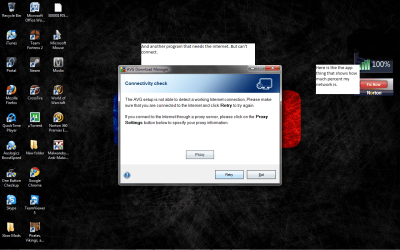
My windows 7 wont let me update my norton

Tucker can you clarify;

You have a good Internet connection (looking at the browser benchmark you posted i would say you have)?

Everything is working OK you just cant update your Security Software (namely Norton & Malwarebytes)?

Do you have some other software installed that is not security based that you can see if it will check for updates successfully?
 

My Computer My Computer

At a glance

Windows Seven Home Premium 32bit SP1AMD Athlon QI46 2.1Ghz2048 Mb DDR2 SD RAMNVidea GE GoForce 8200M G/256mb dedicated gra...
Computer Manufacturer/Model Number
Hewlett Packard Compaq Presario CQ60-305au
OS
Windows Seven Home Premium 32bit SP1
CPU
AMD Athlon QI46 2.1Ghz
Motherboard
Wistron 303c
Memory
2048 Mb DDR2 SD RAM
Graphics Card(s)
NVidea GE GoForce 8200M G/256mb dedicated graphics memory
Sound Card
MCP78S NVidea high definition
Monitor(s) Displays
15.6" High definition Brightview Widescreen
Screen Resolution
1336x768
Hard Drives
Toshiba MK2555GSX ATA
Yeah the thing is my Norton is not the full version and I have the installation of avg but when install it needs to connect to the internet and that's the problem I'm having.

Try uninstalling all your AV's, reboot & install the AV you would like.
 

My Computer My Computer

At a glance

ME/XP/Vista/Win7
OS
ME/XP/Vista/Win7
Here's another
 

Attachments

  • norton help2.png
    norton help2.png
    278.3 KB · Views: 9

My Computer My Computer

At a glance

Windows 7Inspiron 1318
Computer Manufacturer/Model Number
Dell
OS
Windows 7
CPU
Inspiron 1318
Here is another program.
 

Attachments

  • Untitled.png
    Untitled.png
    361 KB · Views: 6

My Computer My Computer

At a glance

Windows 7Inspiron 1318
Computer Manufacturer/Model Number
Dell
OS
Windows 7
CPU
Inspiron 1318
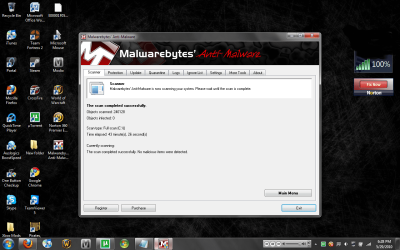
I've used rkill and im scanning as we speak. I will post a picture of the results.
 

My Computer My Computer

At a glance

Windows 7Inspiron 1318
Computer Manufacturer/Model Number
Dell
OS
Windows 7
CPU
Inspiron 1318
I believe the problem is the half install of AVG.
 

My Computer My Computer

At a glance

ME/XP/Vista/Win7
OS
ME/XP/Vista/Win7
Here is the results of the scan.
 

Attachments

  • 2.png
    2.png
    271.4 KB · Views: 10

My Computer My Computer

At a glance

Windows 7Inspiron 1318
Computer Manufacturer/Model Number
Dell
OS
Windows 7
CPU
Inspiron 1318
Yeah the thing is my Norton is not the full version and I have the installation of avg but when install it needs to connect to the internet and that's the problem I'm having.

Try uninstalling all your AV's, reboot & install the AV you would like.

My apologies i think i have been paddling up the wrong creek here.

Follow THEOG advice here you need to run with only one AV & best as he says uninstall both & choose only one.

Thank you THEOG :o:o
 

My Computer My Computer

At a glance

Windows Seven Home Premium 32bit SP1AMD Athlon QI46 2.1Ghz2048 Mb DDR2 SD RAMNVidea GE GoForce 8200M G/256mb dedicated gra...
Computer Manufacturer/Model Number
Hewlett Packard Compaq Presario CQ60-305au
OS
Windows Seven Home Premium 32bit SP1
CPU
AMD Athlon QI46 2.1Ghz
Motherboard
Wistron 303c
Memory
2048 Mb DDR2 SD RAM
Graphics Card(s)
NVidea GE GoForce 8200M G/256mb dedicated graphics memory
Sound Card
MCP78S NVidea high definition
Monitor(s) Displays
15.6" High definition Brightview Widescreen
Screen Resolution
1336x768
Hard Drives
Toshiba MK2555GSX ATA
I believe the problem is the half install of AVG.
This has been happening before i thought of downloading AVG.
 

My Computer My Computer

At a glance

Windows 7Inspiron 1318
Computer Manufacturer/Model Number
Dell
OS
Windows 7
CPU
Inspiron 1318
I removed Norton and i tried installing AVG and I'm still having the same problem.
 

My Computer My Computer

At a glance

Windows 7Inspiron 1318
Computer Manufacturer/Model Number
Dell
OS
Windows 7
CPU
Inspiron 1318
Can you update anything?
 

My Computer My Computer

At a glance

Windows 7 Pro 64bit build 7601 SP1Intel Core I5 3570K 3.4Ghz w/ Zalman CNPS9900...G.Skill F3-12800CL9D-8GbXL ; 4Gx2EVGA Geforce GTX 770 Superclocked
Computer type
PC/Desktop
Computer Manufacturer/Model Number
Custom Build
OS
Windows 7 Pro 64bit build 7601 SP1
CPU
Intel Core I5 3570K 3.4Ghz w/ Zalman CNPS9900NT RT
Motherboard
MSI Z77A-G45 Gaming
Memory
G.Skill F3-12800CL9D-8GbXL ; 4Gx2
Graphics Card(s)
EVGA Geforce GTX 770 Superclocked
Sound Card
Creative Sound Blaster Z
Monitor(s) Displays
Dual ViewSonic VX2770Smh-LED Black 27"IPS-Panel
Screen Resolution
1920x1080
Hard Drives
Kingston Hyper X 240GB SSD Win8 Pro 64bit 6GB/s Sata III
Intel 335 Series SSD 240GB Win8 Storage 6GB/s Sata III
Intel 320 Series SSD 600GB Storage 3GB/s Sata II
Western Digital Scorpio Black 1TB - Docked via Esata
PSU
Coolermaster GX 750W
Case
Corsair Vengence C70
Cooling
Coolermaster 120mm and Enermax 140mm
Keyboard
Corsair Vengence K70
Mouse
Logitech G500
Internet Speed
22mbps+
Browser
Firefox, Chrome, IE
Other Info
Swan M50W 2.1 speakers
APC UPS
Thermaltake BlacX HDD Dock
Samsung BD Optical Drive
Netgear WNDR4500
3.o Primer edition.
 

My Computer My Computer

At a glance

Windows 7Inspiron 1318
Computer Manufacturer/Model Number
Dell
OS
Windows 7
CPU
Inspiron 1318
Have you tried updating in safe mode with networking?
 

My Computer My Computer

At a glance

Windows 7 Pro 64bit build 7601 SP1Intel Core I5 3570K 3.4Ghz w/ Zalman CNPS9900...G.Skill F3-12800CL9D-8GbXL ; 4Gx2EVGA Geforce GTX 770 Superclocked
Computer type
PC/Desktop
Computer Manufacturer/Model Number
Custom Build
OS
Windows 7 Pro 64bit build 7601 SP1
CPU
Intel Core I5 3570K 3.4Ghz w/ Zalman CNPS9900NT RT
Motherboard
MSI Z77A-G45 Gaming
Memory
G.Skill F3-12800CL9D-8GbXL ; 4Gx2
Graphics Card(s)
EVGA Geforce GTX 770 Superclocked
Sound Card
Creative Sound Blaster Z
Monitor(s) Displays
Dual ViewSonic VX2770Smh-LED Black 27"IPS-Panel
Screen Resolution
1920x1080
Hard Drives
Kingston Hyper X 240GB SSD Win8 Pro 64bit 6GB/s Sata III
Intel 335 Series SSD 240GB Win8 Storage 6GB/s Sata III
Intel 320 Series SSD 600GB Storage 3GB/s Sata II
Western Digital Scorpio Black 1TB - Docked via Esata
PSU
Coolermaster GX 750W
Case
Corsair Vengence C70
Cooling
Coolermaster 120mm and Enermax 140mm
Keyboard
Corsair Vengence K70
Mouse
Logitech G500
Internet Speed
22mbps+
Browser
Firefox, Chrome, IE
Other Info
Swan M50W 2.1 speakers
APC UPS
Thermaltake BlacX HDD Dock
Samsung BD Optical Drive
Netgear WNDR4500
Have you tried updating in safe mode with networking?
How do i do that again because i tried and it didn't work.( It's when the computer turning on and pressing F5 right?)
 

My Computer My Computer

At a glance

Windows 7Inspiron 1318
Computer Manufacturer/Model Number
Dell
OS
Windows 7
CPU
Inspiron 1318
Reboot and hit F8 or you can in the Run command type "msconfig" and click on the boot tab and click safe boot and click network. Click OK and reboot. While you're in safe mode you should scan with malwarebytes as well after you update it.
 

My Computer My Computer

At a glance

Windows 7 Pro 64bit build 7601 SP1Intel Core I5 3570K 3.4Ghz w/ Zalman CNPS9900...G.Skill F3-12800CL9D-8GbXL ; 4Gx2EVGA Geforce GTX 770 Superclocked
Computer type
PC/Desktop
Computer Manufacturer/Model Number
Custom Build
OS
Windows 7 Pro 64bit build 7601 SP1
CPU
Intel Core I5 3570K 3.4Ghz w/ Zalman CNPS9900NT RT
Motherboard
MSI Z77A-G45 Gaming
Memory
G.Skill F3-12800CL9D-8GbXL ; 4Gx2
Graphics Card(s)
EVGA Geforce GTX 770 Superclocked
Sound Card
Creative Sound Blaster Z
Monitor(s) Displays
Dual ViewSonic VX2770Smh-LED Black 27"IPS-Panel
Screen Resolution
1920x1080
Hard Drives
Kingston Hyper X 240GB SSD Win8 Pro 64bit 6GB/s Sata III
Intel 335 Series SSD 240GB Win8 Storage 6GB/s Sata III
Intel 320 Series SSD 600GB Storage 3GB/s Sata II
Western Digital Scorpio Black 1TB - Docked via Esata
PSU
Coolermaster GX 750W
Case
Corsair Vengence C70
Cooling
Coolermaster 120mm and Enermax 140mm
Keyboard
Corsair Vengence K70
Mouse
Logitech G500
Internet Speed
22mbps+
Browser
Firefox, Chrome, IE
Other Info
Swan M50W 2.1 speakers
APC UPS
Thermaltake BlacX HDD Dock
Samsung BD Optical Drive
Netgear WNDR4500
Reboot and hit F8 or you can in the Run command type "msconfig" and click on the boot tab and click safe boot and click network. Click OK and reboot. While you're in safe mode you should scan with malwarebytes as well after you update it.
Nothing worked.
 

My Computer My Computer

At a glance

Windows 7Inspiron 1318
Computer Manufacturer/Model Number
Dell
OS
Windows 7
CPU
Inspiron 1318
Back
Top