Emerald Boa
New member
- Local time
- 2:49 AM
- Messages
- 8
For the past 2 weeks I've been getting a .dll error on startup.

At first I didn't notice anything wrong (aside from that, obviously) but now the icons for Office, Skype, Messenger, Adobe Reader, and quite a few other programs, have stopped working. The programs themselves are fine. I realised that they're all programs that came with the OS when I installed it; all the shareware I have is ok. I concluded that there must've been an error in the installation. Correct? :sarc:
I don't really want to reinstall Windows, even with the repair install, because my disk is partitioned (and I think some people have had problems with that) and I'm scared it'll screw up my connection (it's something that happens every time I so much as blink at it, so paranoia is justified).
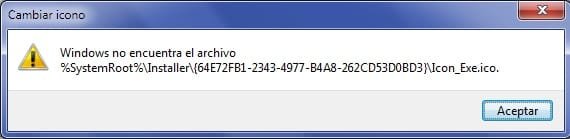
So I thought, Ah ha! I shall uninstall the programs (none of them are paid for, after all) and then reinstall the lot. Eureka. But -joy oh joy- some of them can't be uninstalled. I get the following error:

Or, in the case of Office, a polite refusal. Uninstallation didn't work, sorry mate.
Argh.
Additional: now Secunia PSI (just installed) has no icon. Which it did, 2 min ago. This is getting scary.
At first I didn't notice anything wrong (aside from that, obviously) but now the icons for Office, Skype, Messenger, Adobe Reader, and quite a few other programs, have stopped working. The programs themselves are fine. I realised that they're all programs that came with the OS when I installed it; all the shareware I have is ok. I concluded that there must've been an error in the installation. Correct? :sarc:
I don't really want to reinstall Windows, even with the repair install, because my disk is partitioned (and I think some people have had problems with that) and I'm scared it'll screw up my connection (it's something that happens every time I so much as blink at it, so paranoia is justified).
So I thought, Ah ha! I shall uninstall the programs (none of them are paid for, after all) and then reinstall the lot. Eureka. But -joy oh joy- some of them can't be uninstalled. I get the following error:
Or, in the case of Office, a polite refusal. Uninstallation didn't work, sorry mate.
Argh.
Additional: now Secunia PSI (just installed) has no icon. Which it did, 2 min ago. This is getting scary.
Last edited:
My Computer
- OS
- Windows 7 Home Premium