New To Overclocking help!

@kbrady1979 and @TwoCables


if you guys are going to bash and fight, take it elsewhere. i dont want that crap in my thread

@TwoCables

i wish you posted that earlier. i bought the CX500M. damn. owell. by the time i receive the rebate, ill be back up and running. so idk how long it takes. my stock CPU cooler is fine for now and fine for some experimenting at least.

my future upgrades consisted of 660Ti and 8 core FX cpu, mobo, and HDD/SSD with some OCing of course. the other reason why i bought the CX500M is because it has a 5 year warranty. so the warranty and the price kinda won me over the 450W one you posted earlier.
 
Last edited:

My Computer My Computer

Computer type
PC/Desktop
Computer Manufacturer/Model Number
Custom Build
OS
Windows 7 Professional x64
CPU
AMD FX 4300 @ 4.2 GHZ
Motherboard
MSI 970A-G43
Memory
G.SKILL Ripjaws X Series 8GB
Graphics Card(s)
PNY GTX 560 Ti OC
Sound Card
Realtek ALC892
Monitor(s) Displays
20" Hanns-G HL203
Screen Resolution
1600x900
Hard Drives
WD Caviar Black 500GB 7200RPM
PSU
Corsair CX500M
Case
Athena Power- Black Widow
Cooling
Cooler Master GeminII S524
Keyboard
Logitech K360 LE
Mouse
Rocketfish Nano
Internet Speed
60Mbps Down 8Mbps Up
Other Info
Dell Studio 1458 Laptop Setup:

Windows 7 Home Premium~
Intel Core i5 560M @3.2GHZ~
6GB DDR3 RAM~
ATI Mobility Radeon 540v 512MB~
Intel 330 Sata III 120GB SSD~
Illuminated Keyboard
It's true if money was never an object then it would be Seasonic's forever and all would be 1000+ or higher wattage and Silver, Gold or Platinum rated. Having personal experience with 3 Ultra's I'm happy with the performance and value but I don't expect them to equal the Seasonic of which I have 1 for double the Ultra's price. I've used a couple of builder Corsairs and they're just ok. Not really fair to compare those budget Corsairs with top flight high power modular units. I think there are more great PSU's also being made by many others. The one overriding concern I have is Japanese caps, good warranty, excellent and quiet cooling and then not under purchasing on power. I've read many a bad review as I've read many a good and I find that when reading reviews it's as important to read between the lines and look for those words which ring true to you. In order of preference for me money being no object.
Seasonic, Corsair, Thermaltake, Antec, EVGA, Coolermaster, Silverstone, Ultra, XFX, OCZ, Kingwin
 

My Computer My Computer

Computer type
PC/Desktop
Computer Manufacturer/Model Number
A blend of brains, brawn and dumb luck.
OS
Windows 7 Ultimate 64
CPU
i7 3770k OC'd 4.6 @ 1.17v, also FX 8120 & i5 miniITX
Motherboard
MSI P67A-GD80 b3
Memory
32 gb G.Skill Sniper DDR3 10-12-12-31 @ 2133
Graphics Card(s)
XFX Radeon 7870 2GB DDR5
Sound Card
Sound Blaster Z Series Card
Monitor(s) Displays
(2) LG LED 23" 1920 x 1080 2ms Monitors via mini d-port
Screen Resolution
1680 X 1050 p
Hard Drives
Samsung 256 gb 830 SSD sata III
(1) 1 tb WD Black
(2) 1 tb Hitachi deskmates/sata II
(2) 1 tb WD green/sata II
(2) 3 tb Seagate Barracuda
(1) 120 gb OCZ Vertex SS
(1) Drobo 5N w/5 Seagate 3tb
PSU
EVGA modular 1000G2 80% gold rating & APC 1200 RS
Case
CoolerMaster Storm Styker
Cooling
7 case fans 140mm & 120mm, NZXT Kraken X60
Keyboard
(2) Logitech Illuminated Keyboards (1) usb (1) wireless
Mouse
Logitech G700 & T-BC21 - nano nx for the laptop
Internet Speed
Basic 120mbps down
Antivirus
Trend Micro Titanium Max Security & Malwarebytes Premium
Browser
Chrome and IE 10
Other Info
5 Noctua case fans + 3 Noctua in p/p on NZXT cooler
Integrated hot swap drive bays for 2.5" Drives
(2) Lite-on dvd/cd/Blu Ray optical 22X
Integrated fan controller and led on/off
HP Officejet Pro 8630 all-n-one
Hot-swappable 3.5" hard drive bay
Netgear Nighthawk router
Asus USB 3 & sata 6 PCIe card
Vantec IDE to sata adptr./Ultra sata adptr
Lenovo L420 i5 lappy with m sata
Drobo 5N advanced NAS
kbrady: whether or not you realize it, you said that I'm wrong by showing me what Guru3D recommends and then saying "Taken directly from your 2nd link. I made my recommendation........I'm done". It looks to me like you're using that to say that I'm wrong and that I'm also blind for not seeing that on the same article that I linked to (I also felt like you were throwing it back in my face, which I really don't appreciate)! Well, as I hope to have shown you, I know what their recommendations are and I also know what kind of PSUs they're talking about too. Again, they're talking about peak-rated units just like how both AMD and NVIDIA are (and how all aftermarket brands are) with their recommendations/requirements. The reason they're not talking about continuous-rated units is then they would have to teach their customers about the difference between peak-rated and continuous-rated and they would also have to teach them other PSU-related things. This way they can just state their recommendations/requirements and be done with it. There are people out in the field like me to take care of that education, and they know that.

I just wish you would back off. That's all. It seems to me like every time I post something, you come along trying to contradict it somehow and I'm absolutely sick and tired of it. So please stop! You're the only one in this entire community who's doing it! It has reached a point for me where every time I see one of your posts after mine, I roll my eyes and say "Oh great. Now what?".

I don't know, it just feels like you don't like me and that you'd rather I quit coming here. I feel accepted by everyone in this community except you. What is your problem with me? Should we just put each other on ignore and be done with it or what?

I really think you have the wrong idea about me, or maybe the wrong impression of me. Whatever the deal is, I want to work this out. If we can't work it out, then I would want you to put me on ignore. I'm sick and tired of having to defend my facts because of you. You're the only one in this entire community who's doing this to me!


@kbrady1979 and @TwoCables


if you guys are going to bash and fight, take it elsewhere. i dont want that crap in my thread

@TwoCables

i wish you posted that earlier. i bought the CX500M. damn. owell. by the time i receive the rebate, ill be back up and running. so idk how long it takes. my stock CPU cooler is fine for now and fine for some experimenting at least.

my future upgrades consisted of 660Ti and 8 core FX cpu, mobo, and HDD/SSD with some OCing of course. the other reason why i bought the CX500M is because it has a 5 year warranty. so the warranty and the price kinda won me over the 450W one you posted earlier.

What's nice though is you'll have a modular PSU. It has more hardwired cables than most modular PSUs, but still: once you experience a modular PSU, you'll never want to own a non-modular one!

The only regret I think I have here is that you could have spent a lot less up front, but it looks like you don't mind waiting 1½ to 2 months to receive the prepaid rebate card (it takes 6-8 weeks to arrive once you send in the request form).

The CX430/500/600 PSUs aren't bad though. You could've done much worse. ;)
 

My Computer My Computer

Computer type
PC/Desktop
I have to continually defend myself because of my recommendations. I have never said you were wrong, just offered another option. In fact, SEVERAL other members usually have the same opinion as mine, and none of us tell you that you are wrong. Get off your cross, we need the wood.......nobody is picking on you. I don't appreciate how you disregard my opinion/recommendations, but I don't bitch and whine about it like you do. I think I have you figured out pretty well, and still have managed to back you up in several posts BECAUSE I'm aware you are knowledgeable. There is no harm in you having an opinion, and someone else having an opinion. The quicker you can wrap your head around that, the better off everybody will be.

Carry on.
 

My Computer My Computer

Computer type
PC/Desktop
Computer Manufacturer/Model Number
Custom Built
OS
Windows 7 Professional 64bit SP1
CPU
Intel Core i5-3570K @ 4.5GHz
Motherboard
Asus Sabertooth Z77
Memory
Corsair Vengeance 16GB (4x4) @1866MHz CL 9-9-9-24 1T
Graphics Card(s)
EVGA GTX 750 Ti FTW
Sound Card
Onboard Audio
Monitor(s) Displays
Dell S2309W
Screen Resolution
1920x1080
Hard Drives
Samsung 830 128GB SSD - OS
(4) Seagate 5TB HDD
(1) Seagate 2TB HDD
PSU
Seasonic X750 80+ Gold Full Modular
Case
Antec Eleven Hundred Super Mid Tower
Cooling
Intel Liquid Cooler
Keyboard
Max Nighthawk X8 Mechanical keyboard
Mouse
Mionix Naos 7000
Internet Speed
50 Mbps Down / 10 Mbps Up
Antivirus
Microsoft Security Essentials/Malwarebytes Anti-Malware
Browser
Chrome/Firefox
Other Info
Klipsch ProMedia 2.1's
Asus RT-N66R Wireless Router
IF YOU GUYD ARE GPING TO FIGHT. FU*KING LEAVE!

@TwoCables

Well this way I have to excuse to buy anything within that 3 months cause it would be mastering money :) I call it smart! Haha
 

My Computer My Computer

Computer type
PC/Desktop
Computer Manufacturer/Model Number
Custom Build
OS
Windows 7 Professional x64
CPU
AMD FX 4300 @ 4.2 GHZ
Motherboard
MSI 970A-G43
Memory
G.SKILL Ripjaws X Series 8GB
Graphics Card(s)
PNY GTX 560 Ti OC
Sound Card
Realtek ALC892
Monitor(s) Displays
20" Hanns-G HL203
Screen Resolution
1600x900
Hard Drives
WD Caviar Black 500GB 7200RPM
PSU
Corsair CX500M
Case
Athena Power- Black Widow
Cooling
Cooler Master GeminII S524
Keyboard
Logitech K360 LE
Mouse
Rocketfish Nano
Internet Speed
60Mbps Down 8Mbps Up
Other Info
Dell Studio 1458 Laptop Setup:

Windows 7 Home Premium~
Intel Core i5 560M @3.2GHZ~
6GB DDR3 RAM~
ATI Mobility Radeon 540v 512MB~
Intel 330 Sata III 120GB SSD~
Illuminated Keyboard
IF YOU GUYD ARE GPING TO FIGHT. FU*KING LEAVE!

@TwoCables

Well this way I have to excuse to buy anything within that 3 months cause it would be mastering money :) I call it smart! Haha

Oh yeah, it's kind of like self-discipline or something. :)
 

My Computer My Computer

Computer type
PC/Desktop
IF YOU GUYD ARE GPING TO FIGHT. FU*KING LEAVE!

@TwoCables

Well this way I have to excuse to buy anything within that 3 months cause it would be mastering money :) I call it smart! Haha

Oh yeah, it's kind of like self-discipline or something. :)

exactly! lol

idk this whole build costed me $260 out of pocket for parts! grand total was $386. but after $20 mail in rebate, and my check from youtube, it kinda even its self out.

the only thing im biting my self on is not getting the FX 4350 and a different MOBO. but whatever. i can live with it.
 

My Computer My Computer

Computer type
PC/Desktop
Computer Manufacturer/Model Number
Custom Build
OS
Windows 7 Professional x64
CPU
AMD FX 4300 @ 4.2 GHZ
Motherboard
MSI 970A-G43
Memory
G.SKILL Ripjaws X Series 8GB
Graphics Card(s)
PNY GTX 560 Ti OC
Sound Card
Realtek ALC892
Monitor(s) Displays
20" Hanns-G HL203
Screen Resolution
1600x900
Hard Drives
WD Caviar Black 500GB 7200RPM
PSU
Corsair CX500M
Case
Athena Power- Black Widow
Cooling
Cooler Master GeminII S524
Keyboard
Logitech K360 LE
Mouse
Rocketfish Nano
Internet Speed
60Mbps Down 8Mbps Up
Other Info
Dell Studio 1458 Laptop Setup:

Windows 7 Home Premium~
Intel Core i5 560M @3.2GHZ~
6GB DDR3 RAM~
ATI Mobility Radeon 540v 512MB~
Intel 330 Sata III 120GB SSD~
Illuminated Keyboard
How'd you get a check from youtube? :confused:
 

My Computer My Computer

Computer type
PC/Desktop
Computer Manufacturer/Model Number
Home Built Desktop By DataTech
OS
Windows 7 Ultimate X64 SP1
CPU
Intel i5-2550K, Differing ~4.4-4.8GHz No built in GPU
Motherboard
ASUS P8Z68-V PRO/GEN3
Memory
16GB G.Skill Sniper 1866MHz @ 2133MHz 2x8GB
Graphics Card(s)
ASUS GTX650TIB-DC2OC-2GD5, (650TI Boost)
Sound Card
Onboard Realtek 5-1
Monitor(s) Displays
Samsung P2570HD
Screen Resolution
1920x1080
Hard Drives
Samsung 840 Pro 256GB SSD for OS, 500GB Seagate Constellation (Enterprise drive) for Data
PSU
Corsair HX650W
Case
Inwin Dragon Rider
Cooling
Hyper 212 EVO w/two Noctua fans, push-pull, @1300 RPM
Keyboard
E-Z Eyes, bright yellow keys with large characters
Mouse
steelseries SENSEI Laser Pro Gaming
Internet Speed
48-51Mbs Mbs down, 11 Mbs up Xfinity Cable
Antivirus
Norton Internet Security 2013
Browser
IE 10, Opera, Pale Moon if needed
Other Info
4 case fans, LG BluRay-RE, ASUS DVD-RW, Mr. Fusion power supply, 1.21 gigawatts.

My Computer My Computer

Computer type
PC/Desktop
Computer Manufacturer/Model Number
Custom Build
OS
Windows 7 Professional x64
CPU
AMD FX 4300 @ 4.2 GHZ
Motherboard
MSI 970A-G43
Memory
G.SKILL Ripjaws X Series 8GB
Graphics Card(s)
PNY GTX 560 Ti OC
Sound Card
Realtek ALC892
Monitor(s) Displays
20" Hanns-G HL203
Screen Resolution
1600x900
Hard Drives
WD Caviar Black 500GB 7200RPM
PSU
Corsair CX500M
Case
Athena Power- Black Widow
Cooling
Cooler Master GeminII S524
Keyboard
Logitech K360 LE
Mouse
Rocketfish Nano
Internet Speed
60Mbps Down 8Mbps Up
Other Info
Dell Studio 1458 Laptop Setup:

Windows 7 Home Premium~
Intel Core i5 560M @3.2GHZ~
6GB DDR3 RAM~
ATI Mobility Radeon 540v 512MB~
Intel 330 Sata III 120GB SSD~
Illuminated Keyboard
ok so i am now trying my hand at OCing. im not going for my orgional 4.5 or 4.4. im now shooting for 4.2...


so i want my base clock to be 4.0ghz and turbo to be 4.2ghz. my main pet peve tho is that i still want the CPU to scale its speeds and voltages. to keep temps down. how should i go about doing this, and what should i enable/disable for CPU features?

also there are 2 settings i can change in bios for the turbo speed. one is CPU MAX turbo speed, and the other is CPU turbo speed. which one do i change?
 

My Computer My Computer

Computer type
PC/Desktop
Computer Manufacturer/Model Number
Custom Build
OS
Windows 7 Professional x64
CPU
AMD FX 4300 @ 4.2 GHZ
Motherboard
MSI 970A-G43
Memory
G.SKILL Ripjaws X Series 8GB
Graphics Card(s)
PNY GTX 560 Ti OC
Sound Card
Realtek ALC892
Monitor(s) Displays
20" Hanns-G HL203
Screen Resolution
1600x900
Hard Drives
WD Caviar Black 500GB 7200RPM
PSU
Corsair CX500M
Case
Athena Power- Black Widow
Cooling
Cooler Master GeminII S524
Keyboard
Logitech K360 LE
Mouse
Rocketfish Nano
Internet Speed
60Mbps Down 8Mbps Up
Other Info
Dell Studio 1458 Laptop Setup:

Windows 7 Home Premium~
Intel Core i5 560M @3.2GHZ~
6GB DDR3 RAM~
ATI Mobility Radeon 540v 512MB~
Intel 330 Sata III 120GB SSD~
Illuminated Keyboard
i think i got it. base is 4 and it boosts to 4.2 also the cpu is scaling and so is the voltage. just have to stress test it and make sure its stable.

also 1 other problem. when i go into bios, it says my RAM is at 1600mhz. but the speed its really rated at is 1866mhz. id i change the DRAM value to DDR3 1866, bios now sees it as 1866 ram in some parts, but MSI control center still sees it as 1600mhz. what can i do to fix this?
 

My Computer My Computer

Computer type
PC/Desktop
Computer Manufacturer/Model Number
Custom Build
OS
Windows 7 Professional x64
CPU
AMD FX 4300 @ 4.2 GHZ
Motherboard
MSI 970A-G43
Memory
G.SKILL Ripjaws X Series 8GB
Graphics Card(s)
PNY GTX 560 Ti OC
Sound Card
Realtek ALC892
Monitor(s) Displays
20" Hanns-G HL203
Screen Resolution
1600x900
Hard Drives
WD Caviar Black 500GB 7200RPM
PSU
Corsair CX500M
Case
Athena Power- Black Widow
Cooling
Cooler Master GeminII S524
Keyboard
Logitech K360 LE
Mouse
Rocketfish Nano
Internet Speed
60Mbps Down 8Mbps Up
Other Info
Dell Studio 1458 Laptop Setup:

Windows 7 Home Premium~
Intel Core i5 560M @3.2GHZ~
6GB DDR3 RAM~
ATI Mobility Radeon 540v 512MB~
Intel 330 Sata III 120GB SSD~
Illuminated Keyboard
i think i got it. base is 4 and it boosts to 4.2 also the cpu is scaling and so is the voltage. just have to stress test it and make sure its stable.

also 1 other problem. when i go into bios, it says my RAM is at 1600mhz. but the speed its really rated at is 1866mhz. id i change the DRAM value to DDR3 1866, bios now sees it as 1866 ram in some parts, but MSI control center still sees it as 1600mhz. what can i do to fix this?

Don't use MSI control center go by the bios only that program will produce false results
 

My Computer My Computer

Computer type
PC/Desktop
Computer Manufacturer/Model Number
CoreI7-6700K MrFingerIII Special Builds
OS
Windows 10 Home Premium 64bit sp1
CPU
Intel I7-6700K @ 4.6 Ghz 1.344 volts everyday OC
Motherboard
Asrock Fatality K6 Z170 Socket 1151
Memory
32GB G-Skill TridentZ 3200mhz 16-18-18-38 DDR4
Graphics Card(s)
Sli Gigabyte Windforce GTX 980 G1
Sound Card
AC97 Creative Rage Tactic 3D Headphones Bluetooth
Monitor(s) Displays
27" Asus ROG Swift PG278Q G-Sync 48" Vizio Smart HD TV
Screen Resolution
2560x1440p 27"- 48" Currently Gaming at 2560x1440p Res 2K
Hard Drives
250GB Samsung Evo840SSD Seagate baracuda 500 GB WD Mybook 500Gb 1TB Seagate Barracuda
PSU
HX1050w Corsair Silver 80plus certified crosfire/sli
Case
Enthod Pro Full Tower
Cooling
Corsair H110i GT 280 mm High Performance WaterBlock
Keyboard
Logitech wireless keyboard
Mouse
Logitech wireless mouse
Internet Speed
Cox Cable 100+ mb
Antivirus
WebRoot Spysweeper with Antivirus
Browser
IE-10, Chrome, Opera
Other Info
My Other Rig is a AMD FX8320E @4.6Ghz 16GB Ballistic Sport Ram
Mobo Asrock Fatality 990FX 120GB OCZ SSD 1TB Seagate Barracuda Corsair H75 Cooling PSU Corsair CX750
GPU GTX Gigabyte 970G1
i think i got it. base is 4 and it boosts to 4.2 also the cpu is scaling and so is the voltage. just have to stress test it and make sure its stable.

also 1 other problem. when i go into bios, it says my RAM is at 1600mhz. but the speed its really rated at is 1866mhz. id i change the DRAM value to DDR3 1866, bios now sees it as 1866 ram in some parts, but MSI control center still sees it as 1600mhz. what can i do to fix this?

Don't use MSI control center go by the bios only that program will produce false results

bios in the top right when first opened says DDR3 1866. but when in other parts of the bios like the mem section, it reads 1600mhz

thats when i change DRAM to DDR3 1866
 

My Computer My Computer

Computer type
PC/Desktop
Computer Manufacturer/Model Number
Custom Build
OS
Windows 7 Professional x64
CPU
AMD FX 4300 @ 4.2 GHZ
Motherboard
MSI 970A-G43
Memory
G.SKILL Ripjaws X Series 8GB
Graphics Card(s)
PNY GTX 560 Ti OC
Sound Card
Realtek ALC892
Monitor(s) Displays
20" Hanns-G HL203
Screen Resolution
1600x900
Hard Drives
WD Caviar Black 500GB 7200RPM
PSU
Corsair CX500M
Case
Athena Power- Black Widow
Cooling
Cooler Master GeminII S524
Keyboard
Logitech K360 LE
Mouse
Rocketfish Nano
Internet Speed
60Mbps Down 8Mbps Up
Other Info
Dell Studio 1458 Laptop Setup:

Windows 7 Home Premium~
Intel Core i5 560M @3.2GHZ~
6GB DDR3 RAM~
ATI Mobility Radeon 540v 512MB~
Intel 330 Sata III 120GB SSD~
Illuminated Keyboard
i think i got it. base is 4 and it boosts to 4.2 also the cpu is scaling and so is the voltage. just have to stress test it and make sure its stable.

also 1 other problem. when i go into bios, it says my RAM is at 1600mhz. but the speed its really rated at is 1866mhz. id i change the DRAM value to DDR3 1866, bios now sees it as 1866 ram in some parts, but MSI control center still sees it as 1600mhz. what can i do to fix this?

Don't use MSI control center go by the bios only that program will produce false results

bios in the top right when first opened says DDR3 1866. but when in other parts of the bios like the mem section, it reads 1600mhz
its rated speed and what it is running at is two different thing the BIOS reports 1866 ram but it was downclocked to 1600mhz im thinking that is wh at you see you need to select it to 1866 and save it

Now if it goes back to 1600mhz something is up with your ram because natively those chips support 1866
 

My Computer My Computer

Computer type
PC/Desktop
Computer Manufacturer/Model Number
CoreI7-6700K MrFingerIII Special Builds
OS
Windows 10 Home Premium 64bit sp1
CPU
Intel I7-6700K @ 4.6 Ghz 1.344 volts everyday OC
Motherboard
Asrock Fatality K6 Z170 Socket 1151
Memory
32GB G-Skill TridentZ 3200mhz 16-18-18-38 DDR4
Graphics Card(s)
Sli Gigabyte Windforce GTX 980 G1
Sound Card
AC97 Creative Rage Tactic 3D Headphones Bluetooth
Monitor(s) Displays
27" Asus ROG Swift PG278Q G-Sync 48" Vizio Smart HD TV
Screen Resolution
2560x1440p 27"- 48" Currently Gaming at 2560x1440p Res 2K
Hard Drives
250GB Samsung Evo840SSD Seagate baracuda 500 GB WD Mybook 500Gb 1TB Seagate Barracuda
PSU
HX1050w Corsair Silver 80plus certified crosfire/sli
Case
Enthod Pro Full Tower
Cooling
Corsair H110i GT 280 mm High Performance WaterBlock
Keyboard
Logitech wireless keyboard
Mouse
Logitech wireless mouse
Internet Speed
Cox Cable 100+ mb
Antivirus
WebRoot Spysweeper with Antivirus
Browser
IE-10, Chrome, Opera
Other Info
My Other Rig is a AMD FX8320E @4.6Ghz 16GB Ballistic Sport Ram
Mobo Asrock Fatality 990FX 120GB OCZ SSD 1TB Seagate Barracuda Corsair H75 Cooling PSU Corsair CX750
GPU GTX Gigabyte 970G1
Don't use MSI control center go by the bios only that program will produce false results

bios in the top right when first opened says DDR3 1866. but when in other parts of the bios like the mem section, it reads 1600mhz
its rated speed and what it is running at is two different thing the BIOS reports 1866 ram but it was downclocked to 1600mhz im thinking that is wh at you see you need to select it to 1866 and save it

Now if it goes back to 1600mhz something is up with your ram because natively those chips support 1866

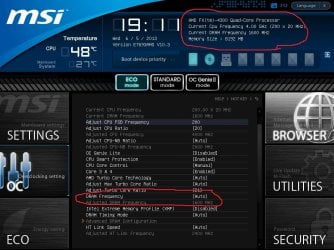
let me clear this up..... and get SS.

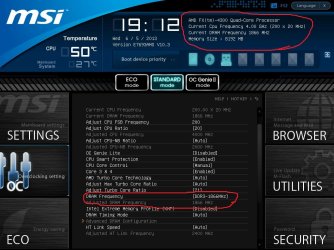
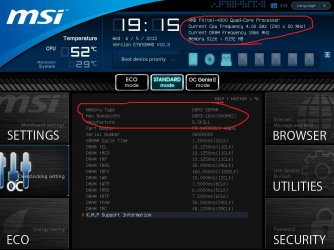
if i have everything set to "auto" bios will read my 1866mhz ram as 1600mhz. if i go into bios and change DRAM from auto to DDR3 1866, bios will read it as 1866, but MSI CC will not. ill post SS of what i mean
 

My Computer My Computer

Computer type
PC/Desktop
Computer Manufacturer/Model Number
Custom Build
OS
Windows 7 Professional x64
CPU
AMD FX 4300 @ 4.2 GHZ
Motherboard
MSI 970A-G43
Memory
G.SKILL Ripjaws X Series 8GB
Graphics Card(s)
PNY GTX 560 Ti OC
Sound Card
Realtek ALC892
Monitor(s) Displays
20" Hanns-G HL203
Screen Resolution
1600x900
Hard Drives
WD Caviar Black 500GB 7200RPM
PSU
Corsair CX500M
Case
Athena Power- Black Widow
Cooling
Cooler Master GeminII S524
Keyboard
Logitech K360 LE
Mouse
Rocketfish Nano
Internet Speed
60Mbps Down 8Mbps Up
Other Info
Dell Studio 1458 Laptop Setup:

Windows 7 Home Premium~
Intel Core i5 560M @3.2GHZ~
6GB DDR3 RAM~
ATI Mobility Radeon 540v 512MB~
Intel 330 Sata III 120GB SSD~
Illuminated Keyboard
ok first pic is when everything is set to "auto"

second pic is when i changed DRAM from "auto" to "DDR3 1866"

third pic is what is displayed in RAM Specs section when still configured to 1866

fourth pic is what is displayed in MSI CC when still configured to 1866

my cpu stoped scaling frequencies after i changed it.
 

Attachments

  • msBS0001.jpg
    msBS0001.jpg
    115.5 KB · Views: 6
  • msBS0002.jpg
    msBS0002.jpg
    115 KB · Views: 5
  • msBS0003.jpg
    msBS0003.jpg
    102.2 KB · Views: 5
  • Capture.PNG
    Capture.PNG
    14 KB · Views: 5

My Computer My Computer

Computer type
PC/Desktop
Computer Manufacturer/Model Number
Custom Build
OS
Windows 7 Professional x64
CPU
AMD FX 4300 @ 4.2 GHZ
Motherboard
MSI 970A-G43
Memory
G.SKILL Ripjaws X Series 8GB
Graphics Card(s)
PNY GTX 560 Ti OC
Sound Card
Realtek ALC892
Monitor(s) Displays
20" Hanns-G HL203
Screen Resolution
1600x900
Hard Drives
WD Caviar Black 500GB 7200RPM
PSU
Corsair CX500M
Case
Athena Power- Black Widow
Cooling
Cooler Master GeminII S524
Keyboard
Logitech K360 LE
Mouse
Rocketfish Nano
Internet Speed
60Mbps Down 8Mbps Up
Other Info
Dell Studio 1458 Laptop Setup:

Windows 7 Home Premium~
Intel Core i5 560M @3.2GHZ~
6GB DDR3 RAM~
ATI Mobility Radeon 540v 512MB~
Intel 330 Sata III 120GB SSD~
Illuminated Keyboard
1st Enable XMP

Core control needs to be Auto

lots of your settings are off

HT link needs to be manually set to match up to 2600 it's native HT speed you are at 2400
 

My Computer My Computer

Computer type
PC/Desktop
Computer Manufacturer/Model Number
CoreI7-6700K MrFingerIII Special Builds
OS
Windows 10 Home Premium 64bit sp1
CPU
Intel I7-6700K @ 4.6 Ghz 1.344 volts everyday OC
Motherboard
Asrock Fatality K6 Z170 Socket 1151
Memory
32GB G-Skill TridentZ 3200mhz 16-18-18-38 DDR4
Graphics Card(s)
Sli Gigabyte Windforce GTX 980 G1
Sound Card
AC97 Creative Rage Tactic 3D Headphones Bluetooth
Monitor(s) Displays
27" Asus ROG Swift PG278Q G-Sync 48" Vizio Smart HD TV
Screen Resolution
2560x1440p 27"- 48" Currently Gaming at 2560x1440p Res 2K
Hard Drives
250GB Samsung Evo840SSD Seagate baracuda 500 GB WD Mybook 500Gb 1TB Seagate Barracuda
PSU
HX1050w Corsair Silver 80plus certified crosfire/sli
Case
Enthod Pro Full Tower
Cooling
Corsair H110i GT 280 mm High Performance WaterBlock
Keyboard
Logitech wireless keyboard
Mouse
Logitech wireless mouse
Internet Speed
Cox Cable 100+ mb
Antivirus
WebRoot Spysweeper with Antivirus
Browser
IE-10, Chrome, Opera
Other Info
My Other Rig is a AMD FX8320E @4.6Ghz 16GB Ballistic Sport Ram
Mobo Asrock Fatality 990FX 120GB OCZ SSD 1TB Seagate Barracuda Corsair H75 Cooling PSU Corsair CX750
GPU GTX Gigabyte 970G1
1st Enable XMP

Core control needs to be Auto

lots of your settings are off

HT link needs to be manually set to match up to 2600 it's native HT speed you are at 2400


Your in good hands here Quad. Don't worry what control center says as stated above, even after you enable xmp (or what amd calls it) it wont read write. CPU-z memory tab will show you its at 1866
 

My Computer My Computer

Computer type
PC/Desktop
Computer Manufacturer/Model Number
Dude Build
OS
Windows 10 Pro X64
CPU
Intel(R) Core(TM) i5-3570K CPU OC@ 4.5GHZ Turbo
Motherboard
MSI Z77A-G45 Gaming
Memory
8.00 GB DDR3 1600Mhz
Graphics Card(s)
MSI Gaming X GTX 1070
Sound Card
Realtek High Definition
Monitor(s) Displays
Dell S23O9W, HP L1710
Screen Resolution
DELL-1920 x 1080 HP-1280 x1024
Hard Drives
Crucial m4 256 SSD, WD 7200RPM 500GB WD 1TB
PSU
Seasonic X650 GOLD
Case
Zalman Z12
Cooling
Antec Kuhler 920
Keyboard
Logitech
Mouse
MSI DS100 Interceptor
Internet Speed
50 down and 5 up
Antivirus
MSE
Browser
Chrome, IE 11
Other Info
Logitech X-620 Speakers
alright ive tried EVERYTHING!!!!!! can not get it to 1866 even after manually changing the timings. so im just going to leave it. not worth it for how much of a gain it will be....
 

My Computer My Computer

Computer type
PC/Desktop
Computer Manufacturer/Model Number
Custom Build
OS
Windows 7 Professional x64
CPU
AMD FX 4300 @ 4.2 GHZ
Motherboard
MSI 970A-G43
Memory
G.SKILL Ripjaws X Series 8GB
Graphics Card(s)
PNY GTX 560 Ti OC
Sound Card
Realtek ALC892
Monitor(s) Displays
20" Hanns-G HL203
Screen Resolution
1600x900
Hard Drives
WD Caviar Black 500GB 7200RPM
PSU
Corsair CX500M
Case
Athena Power- Black Widow
Cooling
Cooler Master GeminII S524
Keyboard
Logitech K360 LE
Mouse
Rocketfish Nano
Internet Speed
60Mbps Down 8Mbps Up
Other Info
Dell Studio 1458 Laptop Setup:

Windows 7 Home Premium~
Intel Core i5 560M @3.2GHZ~
6GB DDR3 RAM~
ATI Mobility Radeon 540v 512MB~
Intel 330 Sata III 120GB SSD~
Illuminated Keyboard

My Computer My Computer

Computer type
PC/Desktop
Computer Manufacturer/Model Number
Custom Build
OS
Windows 7 Professional x64
CPU
AMD FX 4300 @ 4.2 GHZ
Motherboard
MSI 970A-G43
Memory
G.SKILL Ripjaws X Series 8GB
Graphics Card(s)
PNY GTX 560 Ti OC
Sound Card
Realtek ALC892
Monitor(s) Displays
20" Hanns-G HL203
Screen Resolution
1600x900
Hard Drives
WD Caviar Black 500GB 7200RPM
PSU
Corsair CX500M
Case
Athena Power- Black Widow
Cooling
Cooler Master GeminII S524
Keyboard
Logitech K360 LE
Mouse
Rocketfish Nano
Internet Speed
60Mbps Down 8Mbps Up
Other Info
Dell Studio 1458 Laptop Setup:

Windows 7 Home Premium~
Intel Core i5 560M @3.2GHZ~
6GB DDR3 RAM~
ATI Mobility Radeon 540v 512MB~
Intel 330 Sata III 120GB SSD~
Illuminated Keyboard
Back
Top