
No Audio Output Device is Installed

First Lets see exactly what your system is reporting, as my last post was an assumption, and it could be another error just as easily that occured unrelated to the HDD space.

* If installed it should indeed be showing via Start > right click Computer > Properties >Viewing Basic Information > Windows Edition.

* Have you checked in Event Viewer?
Type eventvwr in search.
Go to the Windows Logs > Application { then System} > in the left hand column.
Note any error or warning that relates to when you installed SP1.
Please note the event ID, and the source codes and tell us what they are.


then click (Start) and enter the text msinfo32 and press enter.
then type the version number on the second line, fully.

Mike
 

My Computer My Computer

Computer Manufacturer/Model Number
Custom self build - Desktop
OS
MS Windows 7 Home Premium SP1 64-bit (Family Pack Lic.) Upgrade
CPU
AMD Phenom II X6: Black Ed 1090T - AM3 / 3.2GHz / 8MB
Motherboard
Biostar TA790XE3
Memory
2 dual ch sets OCZ DDR3 PC3-10666 Platinum 1333MHz 8GB total
Graphics Card(s)
Onboard
Sound Card
Onboard 5.1 channel HD
Monitor(s) Displays
SyncMaster "Legal-sized" LCD (rotatable)
Screen Resolution
unknown (8.5"x15")? pixels are not known
Hard Drives
HDD1: WD RE3 Enterprize [p/n: WD500ABYS-NDW]
________SATA-II (3Gb/s) 500GB/7200rpm/16MB

HDD2: Deskstar 7K1000.C [p/n: HDS721010CLA332]
________SATA-II (3Gb/s) 1TB/7200rpm/32MB
PSU
Antec 900W mATX 20+4 w/6-8SATA;2MLX;4x6(+2)PCIe[p/n HCG-900]
Case
Mid 10-bay tower - free space design interior & well vented
Cooling
CPU HS cooler, 14.5" Case-sysfan1, dual sysfan2, exhaust
Keyboard
Blue Star Ergonomic - ps/2
Mouse
LED coorded w/v. roller wheel - ps/2
Internet Speed
GbLAN 10/100/1000 & WLAN - on T1 (Peer Network)
Other Info
Harmon-Karden speakers (L,R @ sub)

APC (Lead/Acid Batt backup UPC+Surge protector+etc)

Sony DVD SATA(300) - RW DVD/CD SATA-II(300)
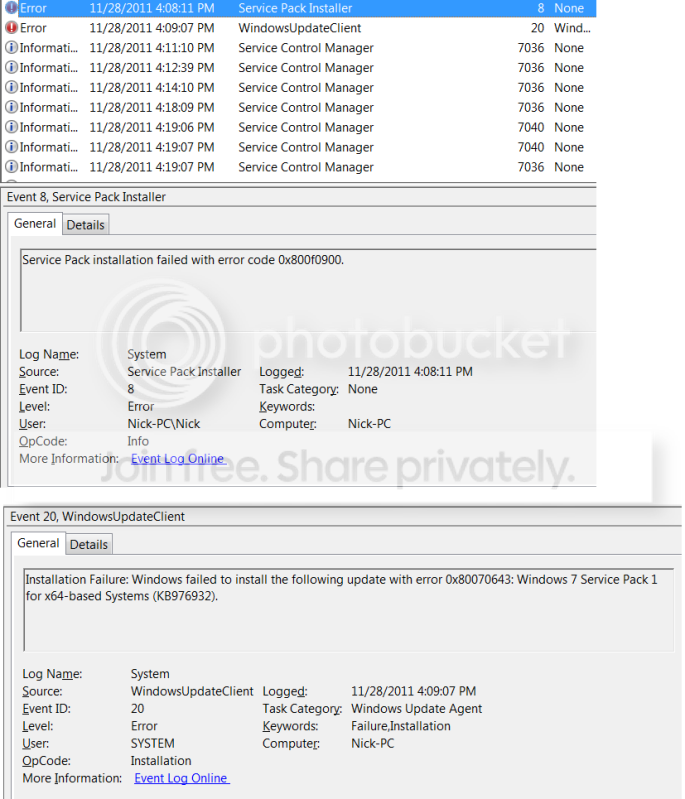
Sorry, Mike, but I am unclear as to exactly what you want me to do. Here is what I found:

ErrorLogs.png

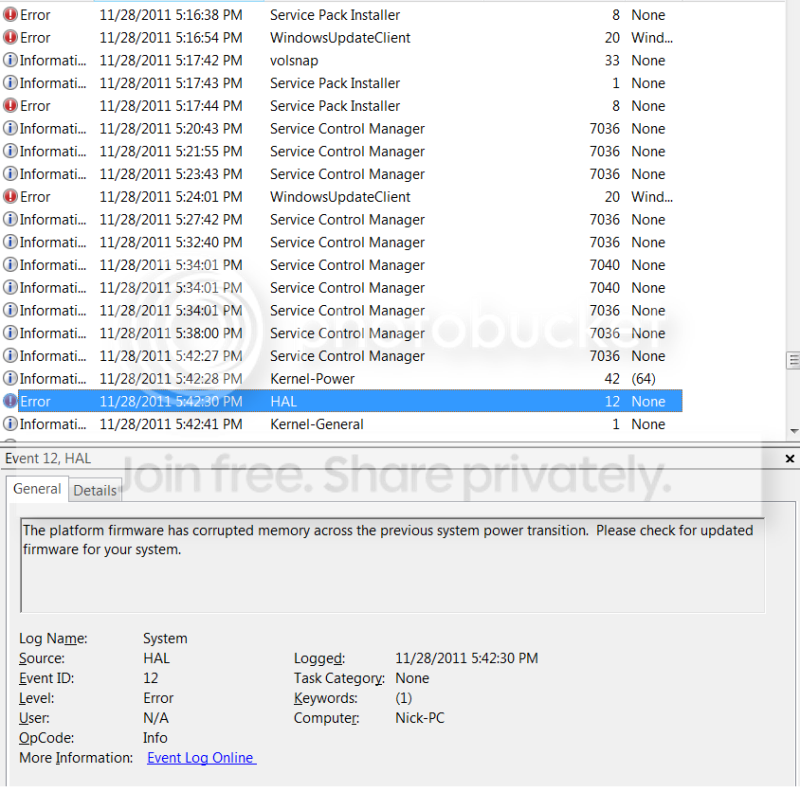
ErrorLog2.png


What else should I do?
 

My Computer My Computer

Computer Manufacturer/Model Number
Toshiba Qosmio X505
OS
Windows 7 Home Premium 64 bit
CPU
Intel Core i7 Q 740 @ 1.73 GHz
Sound Card
Conexant SmartAudio HD
Version number =

6.1.7600 Build 7600
 

My Computer My Computer

Computer Manufacturer/Model Number
Toshiba Qosmio X505
OS
Windows 7 Home Premium 64 bit
CPU
Intel Core i7 Q 740 @ 1.73 GHz
Sound Card
Conexant SmartAudio HD
and that version # is from msinfo32.exe or the first instruction in the quote (properties)? or do the match exactly? Ill look at your screen shots (above) now.
 

My Computer My Computer

Computer Manufacturer/Model Number
Custom self build - Desktop
OS
MS Windows 7 Home Premium SP1 64-bit (Family Pack Lic.) Upgrade
CPU
AMD Phenom II X6: Black Ed 1090T - AM3 / 3.2GHz / 8MB
Motherboard
Biostar TA790XE3
Memory
2 dual ch sets OCZ DDR3 PC3-10666 Platinum 1333MHz 8GB total
Graphics Card(s)
Onboard
Sound Card
Onboard 5.1 channel HD
Monitor(s) Displays
SyncMaster "Legal-sized" LCD (rotatable)
Screen Resolution
unknown (8.5"x15")? pixels are not known
Hard Drives
HDD1: WD RE3 Enterprize [p/n: WD500ABYS-NDW]
________SATA-II (3Gb/s) 500GB/7200rpm/16MB

HDD2: Deskstar 7K1000.C [p/n: HDS721010CLA332]
________SATA-II (3Gb/s) 1TB/7200rpm/32MB
PSU
Antec 900W mATX 20+4 w/6-8SATA;2MLX;4x6(+2)PCIe[p/n HCG-900]
Case
Mid 10-bay tower - free space design interior & well vented
Cooling
CPU HS cooler, 14.5" Case-sysfan1, dual sysfan2, exhaust
Keyboard
Blue Star Ergonomic - ps/2
Mouse
LED coorded w/v. roller wheel - ps/2
Internet Speed
GbLAN 10/100/1000 & WLAN - on T1 (Peer Network)
Other Info
Harmon-Karden speakers (L,R @ sub)

APC (Lead/Acid Batt backup UPC+Surge protector+etc)

Sony DVD SATA(300) - RW DVD/CD SATA-II(300)
Second line of msinfo32
 

My Computer My Computer

Computer Manufacturer/Model Number
Toshiba Qosmio X505
OS
Windows 7 Home Premium 64 bit
CPU
Intel Core i7 Q 740 @ 1.73 GHz
Sound Card
Conexant SmartAudio HD
The screenshots are great, if I need more I'll ask.

I'm reading through several solutions, at MS and here at SF but either way you should check your system for errors that may have happened during that faulty SP1 installation. Heres the tutorial: SFC /SCANNOW Command - System File Checker


Mike
 

My Computer My Computer

Computer Manufacturer/Model Number
Custom self build - Desktop
OS
MS Windows 7 Home Premium SP1 64-bit (Family Pack Lic.) Upgrade
CPU
AMD Phenom II X6: Black Ed 1090T - AM3 / 3.2GHz / 8MB
Motherboard
Biostar TA790XE3
Memory
2 dual ch sets OCZ DDR3 PC3-10666 Platinum 1333MHz 8GB total
Graphics Card(s)
Onboard
Sound Card
Onboard 5.1 channel HD
Monitor(s) Displays
SyncMaster "Legal-sized" LCD (rotatable)
Screen Resolution
unknown (8.5"x15")? pixels are not known
Hard Drives
HDD1: WD RE3 Enterprize [p/n: WD500ABYS-NDW]
________SATA-II (3Gb/s) 500GB/7200rpm/16MB

HDD2: Deskstar 7K1000.C [p/n: HDS721010CLA332]
________SATA-II (3Gb/s) 1TB/7200rpm/32MB
PSU
Antec 900W mATX 20+4 w/6-8SATA;2MLX;4x6(+2)PCIe[p/n HCG-900]
Case
Mid 10-bay tower - free space design interior & well vented
Cooling
CPU HS cooler, 14.5" Case-sysfan1, dual sysfan2, exhaust
Keyboard
Blue Star Ergonomic - ps/2
Mouse
LED coorded w/v. roller wheel - ps/2
Internet Speed
GbLAN 10/100/1000 & WLAN - on T1 (Peer Network)
Other Info
Harmon-Karden speakers (L,R @ sub)

APC (Lead/Acid Batt backup UPC+Surge protector+etc)

Sony DVD SATA(300) - RW DVD/CD SATA-II(300)
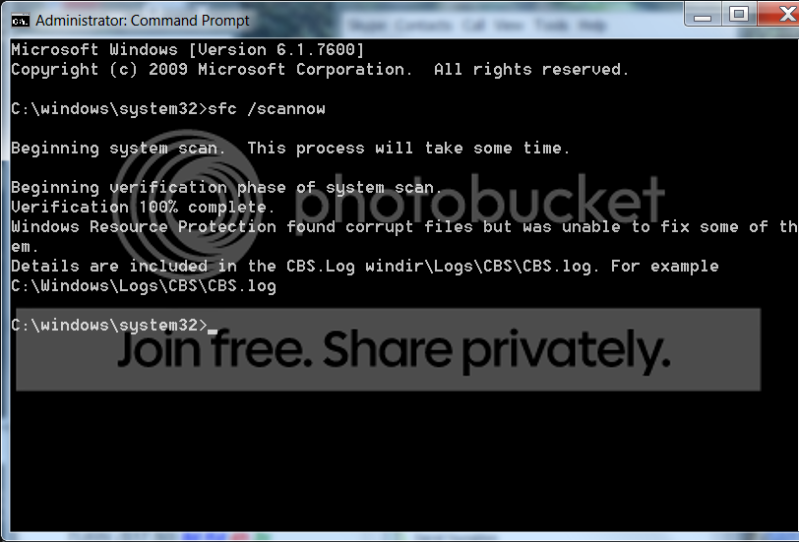
scannow.png
 

My Computer My Computer

Computer Manufacturer/Model Number
Toshiba Qosmio X505
OS
Windows 7 Home Premium 64 bit
CPU
Intel Core i7 Q 740 @ 1.73 GHz
Sound Card
Conexant SmartAudio HD
I am signing off for a couple hours. Seems like we may be on the verge though, so I am optimistic. Thanks a lot guys.
 

My Computer My Computer

Computer Manufacturer/Model Number
Toshiba Qosmio X505
OS
Windows 7 Home Premium 64 bit
CPU
Intel Core i7 Q 740 @ 1.73 GHz
Sound Card
Conexant SmartAudio HD
Okay, lets see what couldn't be fixed (it was step 3 in the tutorial - but its simple enough just read it here)

Open an elevated command prompt just like you did before (or use the same window if it is still opened:

copy and paste the command:
Code:
findstr /c:"[SR]" %windir%\Logs\CBS\CBS.log >%userprofile%\Desktop\sfcdetails.txt
then press enter and it should copy the file "sfcdetails.txt" to your desktop.

locate it and double click it to open it with a text viewer like notepad.

report the results.

(BTW do you have antivirus software running - You may have told me already, but rather than look back.)
 

My Computer My Computer

Computer Manufacturer/Model Number
Custom self build - Desktop
OS
MS Windows 7 Home Premium SP1 64-bit (Family Pack Lic.) Upgrade
CPU
AMD Phenom II X6: Black Ed 1090T - AM3 / 3.2GHz / 8MB
Motherboard
Biostar TA790XE3
Memory
2 dual ch sets OCZ DDR3 PC3-10666 Platinum 1333MHz 8GB total
Graphics Card(s)
Onboard
Sound Card
Onboard 5.1 channel HD
Monitor(s) Displays
SyncMaster "Legal-sized" LCD (rotatable)
Screen Resolution
unknown (8.5"x15")? pixels are not known
Hard Drives
HDD1: WD RE3 Enterprize [p/n: WD500ABYS-NDW]
________SATA-II (3Gb/s) 500GB/7200rpm/16MB

HDD2: Deskstar 7K1000.C [p/n: HDS721010CLA332]
________SATA-II (3Gb/s) 1TB/7200rpm/32MB
PSU
Antec 900W mATX 20+4 w/6-8SATA;2MLX;4x6(+2)PCIe[p/n HCG-900]
Case
Mid 10-bay tower - free space design interior & well vented
Cooling
CPU HS cooler, 14.5" Case-sysfan1, dual sysfan2, exhaust
Keyboard
Blue Star Ergonomic - ps/2
Mouse
LED coorded w/v. roller wheel - ps/2
Internet Speed
GbLAN 10/100/1000 & WLAN - on T1 (Peer Network)
Other Info
Harmon-Karden speakers (L,R @ sub)

APC (Lead/Acid Batt backup UPC+Surge protector+etc)

Sony DVD SATA(300) - RW DVD/CD SATA-II(300)
I run Avira antivirus. The results of that command are pretty long:
 
Last edited:

My Computer My Computer

Computer Manufacturer/Model Number
Toshiba Qosmio X505
OS
Windows 7 Home Premium 64 bit
CPU
Intel Core i7 Q 740 @ 1.73 GHz
Sound Card
Conexant SmartAudio HD
Sorry, I should have explained how to post a text file, but it wasn't too long! I'll look through it, but:
Avira anti-virus Needs to be Inactive during the Download/Installation of Service Pack 1, I wasn't sure if you did previous times or not, but the directions should have indicated that in the window that appeared before installation began. Did you turn off Avira during the previous attempts?


Mike


Edit: I have copied and pasted your previous listed text into a file with the original name and uploaded it properly, so when you get back if you might edit and remove the long listed version posted above, or delete it please.
 

Attachments

Last edited:

My Computer My Computer

Computer Manufacturer/Model Number
Custom self build - Desktop
OS
MS Windows 7 Home Premium SP1 64-bit (Family Pack Lic.) Upgrade
CPU
AMD Phenom II X6: Black Ed 1090T - AM3 / 3.2GHz / 8MB
Motherboard
Biostar TA790XE3
Memory
2 dual ch sets OCZ DDR3 PC3-10666 Platinum 1333MHz 8GB total
Graphics Card(s)
Onboard
Sound Card
Onboard 5.1 channel HD
Monitor(s) Displays
SyncMaster "Legal-sized" LCD (rotatable)
Screen Resolution
unknown (8.5"x15")? pixels are not known
Hard Drives
HDD1: WD RE3 Enterprize [p/n: WD500ABYS-NDW]
________SATA-II (3Gb/s) 500GB/7200rpm/16MB

HDD2: Deskstar 7K1000.C [p/n: HDS721010CLA332]
________SATA-II (3Gb/s) 1TB/7200rpm/32MB
PSU
Antec 900W mATX 20+4 w/6-8SATA;2MLX;4x6(+2)PCIe[p/n HCG-900]
Case
Mid 10-bay tower - free space design interior & well vented
Cooling
CPU HS cooler, 14.5" Case-sysfan1, dual sysfan2, exhaust
Keyboard
Blue Star Ergonomic - ps/2
Mouse
LED coorded w/v. roller wheel - ps/2
Internet Speed
GbLAN 10/100/1000 & WLAN - on T1 (Peer Network)
Other Info
Harmon-Karden speakers (L,R @ sub)

APC (Lead/Acid Batt backup UPC+Surge protector+etc)

Sony DVD SATA(300) - RW DVD/CD SATA-II(300)
I did not. I tried, but couldn't figure it out. Will try to turn avira off and update now though.
 

My Computer My Computer

Computer Manufacturer/Model Number
Toshiba Qosmio X505
OS
Windows 7 Home Premium 64 bit
CPU
Intel Core i7 Q 740 @ 1.73 GHz
Sound Card
Conexant SmartAudio HD
Don't see an obv way to turn avira off. Any help in that regard?
 

My Computer My Computer

Computer Manufacturer/Model Number
Toshiba Qosmio X505
OS
Windows 7 Home Premium 64 bit
CPU
Intel Core i7 Q 740 @ 1.73 GHz
Sound Card
Conexant SmartAudio HD
Log files are great if you can understand what's going on in them.
I prefer to find articles which directly relate to the error code
and a fix for the problem.

Yes, as Mike has inferred this problem can be caused by the antivirus
being active during installation- so yes disable it- or hey- if it's the free
Avira version you can uninstall it and reinstall after if you like.

With that being said, the error code 0x80070643 is most commonly caused
by a problem with the Microsoft .Net Framework as explained here:
You receive

Personally I try to steer clear of anything I can't manually perform and therefore
I would be doing a manual uninstall (from programs and features) and reinstall.
But hey- each to there own right.

Anyway - give this a go
 

My Computer My Computer

OS
Windows 7 Home Premium 64 Bit OS
I'll start looking at info about HAL error if I can find any.

Maybe it's HAL 9000 from 2001 A Space Odyssey and he has
taken control of your ship!

Ahhh- you gotta laugh sometimes otherwise you'd cry

More info: OK here you will find the major causes of hal.dll error
and the possible fixes:
http://pcsupport.about.com/od/errorh/a/hal-dll-missing-windows-7-vista.htm

Yes I linked out to the first in the list but I wasn't writing all this down.
 

My Computer My Computer

OS
Windows 7 Home Premium 64 Bit OS
Hello everyone,

Cruxone,
I'd prefer to get someone that can interpret the results of the system scan, there were at least 5 files corrupt. They seem to be beyond the applications ability to fix and need manual removal and replacement (as AllOnTheBus just said). Now that said, there are a few things that you're going to need to do, 1 scan the hard drive for errors (including damaged physical sectors) which is a very simple thing to do and is initiated from the drive properties with a click and reboot.

(Do you have backups of your existing important files? You could copy them to a flash drive or whatever medium you have available - I would do this first if not already done)

If we do get ready to (attempt) to install SP1 I'll talk you Through the disabling of avira, its relatively simple. And when it was installed it should have disabled windows defender (as they are basically the same engine inside) technically we should then do a "readiness tool" run to check if your system has any problems preventing the install that can be fixed by said tool.

if none of this helps with the error, then a startup repair should be preformed and once rebooted the SP1 install can be tried a final time.

if all is to no avail, we alway could preform a repair install, or better yet wipe/format the drive and do a clean install.

This is the recommend course of events, as derived form many reliable sources. of course no two will agree, but this would be my recommended course of action. I would like to get a good read on the CBS.log produced first, although you could be backing up important files that you would like to transfer to a new install if it does come to that. Just copy the files, rather than move them until we know what the more qualified ruling is on the files.

Mike
 

My Computer My Computer

Computer Manufacturer/Model Number
Custom self build - Desktop
OS
MS Windows 7 Home Premium SP1 64-bit (Family Pack Lic.) Upgrade
CPU
AMD Phenom II X6: Black Ed 1090T - AM3 / 3.2GHz / 8MB
Motherboard
Biostar TA790XE3
Memory
2 dual ch sets OCZ DDR3 PC3-10666 Platinum 1333MHz 8GB total
Graphics Card(s)
Onboard
Sound Card
Onboard 5.1 channel HD
Monitor(s) Displays
SyncMaster "Legal-sized" LCD (rotatable)
Screen Resolution
unknown (8.5"x15")? pixels are not known
Hard Drives
HDD1: WD RE3 Enterprize [p/n: WD500ABYS-NDW]
________SATA-II (3Gb/s) 500GB/7200rpm/16MB

HDD2: Deskstar 7K1000.C [p/n: HDS721010CLA332]
________SATA-II (3Gb/s) 1TB/7200rpm/32MB
PSU
Antec 900W mATX 20+4 w/6-8SATA;2MLX;4x6(+2)PCIe[p/n HCG-900]
Case
Mid 10-bay tower - free space design interior & well vented
Cooling
CPU HS cooler, 14.5" Case-sysfan1, dual sysfan2, exhaust
Keyboard
Blue Star Ergonomic - ps/2
Mouse
LED coorded w/v. roller wheel - ps/2
Internet Speed
GbLAN 10/100/1000 & WLAN - on T1 (Peer Network)
Other Info
Harmon-Karden speakers (L,R @ sub)

APC (Lead/Acid Batt backup UPC+Surge protector+etc)

Sony DVD SATA(300) - RW DVD/CD SATA-II(300)
Additionally, if you do decide to uninstall Avira (which I wouldn't feel is necessary, but I am but one opinion) You need to use the uninstall tool from their website, not the windows installer. The a/v software just needs to not be actively blocking or trying to encrypt to quarantine, any parts of the download that it doesn't agree with. If we shut down the resident shield and other ACTIVE sections from the main avira screen, it should do the job, I believe, and have never heard any differently.

Oh and one last thing, I see quite a few updates to your BIOS, and some involve fixes to conditions, that "resemble" factors that may have caused, or affected the problem. It may be worth checking into, although I try to avoid a BIOS flash as much as the next tech, I'd hate to see your system get a clean install or we fix it and it occurs all over again once you computer gets caught up on updates!

Mike
 
Last edited:

My Computer My Computer

Computer Manufacturer/Model Number
Custom self build - Desktop
OS
MS Windows 7 Home Premium SP1 64-bit (Family Pack Lic.) Upgrade
CPU
AMD Phenom II X6: Black Ed 1090T - AM3 / 3.2GHz / 8MB
Motherboard
Biostar TA790XE3
Memory
2 dual ch sets OCZ DDR3 PC3-10666 Platinum 1333MHz 8GB total
Graphics Card(s)
Onboard
Sound Card
Onboard 5.1 channel HD
Monitor(s) Displays
SyncMaster "Legal-sized" LCD (rotatable)
Screen Resolution
unknown (8.5"x15")? pixels are not known
Hard Drives
HDD1: WD RE3 Enterprize [p/n: WD500ABYS-NDW]
________SATA-II (3Gb/s) 500GB/7200rpm/16MB

HDD2: Deskstar 7K1000.C [p/n: HDS721010CLA332]
________SATA-II (3Gb/s) 1TB/7200rpm/32MB
PSU
Antec 900W mATX 20+4 w/6-8SATA;2MLX;4x6(+2)PCIe[p/n HCG-900]
Case
Mid 10-bay tower - free space design interior & well vented
Cooling
CPU HS cooler, 14.5" Case-sysfan1, dual sysfan2, exhaust
Keyboard
Blue Star Ergonomic - ps/2
Mouse
LED coorded w/v. roller wheel - ps/2
Internet Speed
GbLAN 10/100/1000 & WLAN - on T1 (Peer Network)
Other Info
Harmon-Karden speakers (L,R @ sub)

APC (Lead/Acid Batt backup UPC+Surge protector+etc)

Sony DVD SATA(300) - RW DVD/CD SATA-II(300)
Ok. Most of what you (both) said went straight over my head. I did get the HAL9000 reference though. As far as AVIRA goes, I have a paid subscription. If you can just tell me what to do, I will get to it.

"1 scan the hard drive for errors (including damaged physical sectors) which is a very simple thing to do and is initiated from the drive properties with a click and reboot. " Ok, how do I do that?

"(Do you have backups of your existing important files? You could copy them to a flash drive or whatever medium you have available - I would do this first if not already done)"

I don't have many, if any, crucial files. I also do not have an external HD with me. Will be on in a couple hours if you are willing to walk me through this stuff.
 

My Computer My Computer

Computer Manufacturer/Model Number
Toshiba Qosmio X505
OS
Windows 7 Home Premium 64 bit
CPU
Intel Core i7 Q 740 @ 1.73 GHz
Sound Card
Conexant SmartAudio HD
Starting to feel like this is a running battle here.

So Mike is that another negatory / don't try that in regard to .NET framework
uninstall and reinstall? Starting to wonder whether any of my suggestions are
worthwhile here if your gonna shoot em down every time with the you should try the
more advanced approach first thing that seems to be happening in this back and forth.

Are the 5 errors not related. By this I mean 4 of them are referring to updates be they
SP1 or the update client and the other one is the hall.dll error- are these the five
errors you are referring to? If so could you please explain to me why the suggestion I
have made should be so quickly disregarded? Have the link outs I have provided
not covered the errors previously referenced?

Nice advice about how to safely uninstall the antivirus or disable it. Follow that
for sure but should we not try what I have suggested before wasting more time producing
detailed reports which can't be analysed by cruxone who in turn has to wait for them to be analysed
and in the meantime sits around twiddling thumbs still without an outcome. If someone
does know how to analyse these logs and give cruxone a definitive solution then do an invite
Mike- get them here and let's get it solved. You mentioned somewhere about twelve hours ago (not to be to specific) that someone had some very positive looking info in regard to this case- is this person able to provide you the answer yet?

If both of us keep looking back at posts and what has and hasn't happened during the course of this
thread, then we will continually go round and round in circles till we are dizzy, and with that said
you have bought up recovery/ clean install which WHOEVER mentioned as what you refer to
as EONS ago. I offered to leave this in your hands Mike but you sent me a private message
asking to be assisted on this matter and I have helped in every possible way I know how.

This post is not private cause I don't consider myself a person to hold back. I don't consider
this a contest, I consider this trying to help as I once needed a hell of a lot of help.
 

My Computer My Computer

OS
Windows 7 Home Premium 64 Bit OS
@AllOnTheBus - you've obviously misunderstood me, I didn't mean anything you sayd was wrong (aside from the "opinion" about the anti-virus) - thats the info I spent today trying to get the closest I could to a straight line of reasoning answer, your ideas should be inserted or removed as you believe necessary. So I apologies if you thought I was speaking against you, as I was not, simply providing what I had come up with, your ideas should mold it into whatever would make it better, And the 5 corrupt files were in reference to the CBS.log report (one actually has 3 components) So, If I offended you I apologize. I wanted to lay out what I had, as I spent the better half of the day going over the error codes, corrupt files, and manners with which to work on them, etc...
I'm actually going to go spend the final 1-1/2 hours of my Birthday with my friend like I told you about earlier. So I'll back off and let you do with your/my advise as you'd like, "no harm, no foul" here, but I'd rather just let one of us help cruxone for the night, to let it cool down, okay? other wise just drop me a PM because I don't like to talk about this in the public forum, as I'm sure you feel the same. ok?:) have a good night, and I'll catch up in the am.

@Cruxone - I apologize to you for the confusion this has likely caused, so I have already written the plan I worked out, and I'm not leaving, just trying to defuse any unintentional "foot stepping" or whatever you'd like to call it.

I wish you both a good night, and I'll stop back and see if I can lend anything useful tomorrow
Bye all,
Mike:)
 
Last edited:

My Computer My Computer

Computer Manufacturer/Model Number
Custom self build - Desktop
OS
MS Windows 7 Home Premium SP1 64-bit (Family Pack Lic.) Upgrade
CPU
AMD Phenom II X6: Black Ed 1090T - AM3 / 3.2GHz / 8MB
Motherboard
Biostar TA790XE3
Memory
2 dual ch sets OCZ DDR3 PC3-10666 Platinum 1333MHz 8GB total
Graphics Card(s)
Onboard
Sound Card
Onboard 5.1 channel HD
Monitor(s) Displays
SyncMaster "Legal-sized" LCD (rotatable)
Screen Resolution
unknown (8.5"x15")? pixels are not known
Hard Drives
HDD1: WD RE3 Enterprize [p/n: WD500ABYS-NDW]
________SATA-II (3Gb/s) 500GB/7200rpm/16MB

HDD2: Deskstar 7K1000.C [p/n: HDS721010CLA332]
________SATA-II (3Gb/s) 1TB/7200rpm/32MB
PSU
Antec 900W mATX 20+4 w/6-8SATA;2MLX;4x6(+2)PCIe[p/n HCG-900]
Case
Mid 10-bay tower - free space design interior & well vented
Cooling
CPU HS cooler, 14.5" Case-sysfan1, dual sysfan2, exhaust
Keyboard
Blue Star Ergonomic - ps/2
Mouse
LED coorded w/v. roller wheel - ps/2
Internet Speed
GbLAN 10/100/1000 & WLAN - on T1 (Peer Network)
Other Info
Harmon-Karden speakers (L,R @ sub)

APC (Lead/Acid Batt backup UPC+Surge protector+etc)

Sony DVD SATA(300) - RW DVD/CD SATA-II(300)
Back
Top