No Audio Output Device is Installed

This all seems over my head. Is all this really the best way to get my sound back working?
 

My Computer My Computer

Computer Manufacturer/Model Number
Toshiba Qosmio X505
OS
Windows 7 Home Premium 64 bit
CPU
Intel Core i7 Q 740 @ 1.73 GHz
Sound Card
Conexant SmartAudio HD
I posted the four links for reference, They are all related. The "Windows 7- clean Install" is the simplest descripton of what you need to do. Some of the rest of it is just repeating, you may want to have a print out of it if possible, In case you have a queation that I can't help you with, you'll have something to fall back on.

As to your second question, I was working with you to troubleshoot quite a while back, and you wanted to stop and do a clean install. I honestly can't say if it would have got us anywhere or not.

Mike
 

My Computer My Computer

Computer Manufacturer/Model Number
Custom self build - Desktop
OS
MS Windows 7 Home Premium SP1 64-bit (Family Pack Lic.) Upgrade
CPU
AMD Phenom II X6: Black Ed 1090T - AM3 / 3.2GHz / 8MB
Motherboard
Biostar TA790XE3
Memory
2 dual ch sets OCZ DDR3 PC3-10666 Platinum 1333MHz 8GB total
Graphics Card(s)
Onboard
Sound Card
Onboard 5.1 channel HD
Monitor(s) Displays
SyncMaster "Legal-sized" LCD (rotatable)
Screen Resolution
unknown (8.5"x15")? pixels are not known
Hard Drives
HDD1: WD RE3 Enterprize [p/n: WD500ABYS-NDW]
________SATA-II (3Gb/s) 500GB/7200rpm/16MB

HDD2: Deskstar 7K1000.C [p/n: HDS721010CLA332]
________SATA-II (3Gb/s) 1TB/7200rpm/32MB
PSU
Antec 900W mATX 20+4 w/6-8SATA;2MLX;4x6(+2)PCIe[p/n HCG-900]
Case
Mid 10-bay tower - free space design interior & well vented
Cooling
CPU HS cooler, 14.5" Case-sysfan1, dual sysfan2, exhaust
Keyboard
Blue Star Ergonomic - ps/2
Mouse
LED coorded w/v. roller wheel - ps/2
Internet Speed
GbLAN 10/100/1000 & WLAN - on T1 (Peer Network)
Other Info
Harmon-Karden speakers (L,R @ sub)

APC (Lead/Acid Batt backup UPC+Surge protector+etc)

Sony DVD SATA(300) - RW DVD/CD SATA-II(300)
Ok. Guess it's just a little case of cold feet. Going to give it a go. Fingers crossed!
 

My Computer My Computer

Computer Manufacturer/Model Number
Toshiba Qosmio X505
OS
Windows 7 Home Premium 64 bit
CPU
Intel Core i7 Q 740 @ 1.73 GHz
Sound Card
Conexant SmartAudio HD
Best of luck!

Mike!:D
 

My Computer My Computer

Computer Manufacturer/Model Number
Custom self build - Desktop
OS
MS Windows 7 Home Premium SP1 64-bit (Family Pack Lic.) Upgrade
CPU
AMD Phenom II X6: Black Ed 1090T - AM3 / 3.2GHz / 8MB
Motherboard
Biostar TA790XE3
Memory
2 dual ch sets OCZ DDR3 PC3-10666 Platinum 1333MHz 8GB total
Graphics Card(s)
Onboard
Sound Card
Onboard 5.1 channel HD
Monitor(s) Displays
SyncMaster "Legal-sized" LCD (rotatable)
Screen Resolution
unknown (8.5"x15")? pixels are not known
Hard Drives
HDD1: WD RE3 Enterprize [p/n: WD500ABYS-NDW]
________SATA-II (3Gb/s) 500GB/7200rpm/16MB

HDD2: Deskstar 7K1000.C [p/n: HDS721010CLA332]
________SATA-II (3Gb/s) 1TB/7200rpm/32MB
PSU
Antec 900W mATX 20+4 w/6-8SATA;2MLX;4x6(+2)PCIe[p/n HCG-900]
Case
Mid 10-bay tower - free space design interior & well vented
Cooling
CPU HS cooler, 14.5" Case-sysfan1, dual sysfan2, exhaust
Keyboard
Blue Star Ergonomic - ps/2
Mouse
LED coorded w/v. roller wheel - ps/2
Internet Speed
GbLAN 10/100/1000 & WLAN - on T1 (Peer Network)
Other Info
Harmon-Karden speakers (L,R @ sub)

APC (Lead/Acid Batt backup UPC+Surge protector+etc)

Sony DVD SATA(300) - RW DVD/CD SATA-II(300)
Ok. I installed it. Good news: Sound works. I also didn't lose my files. The problem now is that I can't find a way to connect to my wireless internet. Wireless is the only internet available in my hotel room, so this is an urgent problem. I am at an internet cafe, but it is closing soon. Bottom right of my screen near the clock, where I would normally be able to connect to a network doesn't have that option. The little wireless icon is nowhere to be seen. HELP!
 

My Computer My Computer

Computer Manufacturer/Model Number
Toshiba Qosmio X505
OS
Windows 7 Home Premium 64 bit
CPU
Intel Core i7 Q 740 @ 1.73 GHz
Sound Card
Conexant SmartAudio HD
when you click the icon that looks like a computer monitor with a LAN (Ethernet) cord on it's left-side it should show the available wireless networks. you might want to try this when you get back to the wireless connection area again.

If you cannot do this then right click on the same icon and the network and sharing center should be available where you can set up a connection to the wireless network, the same that you needed to when you first used that wireless network.

(windows help might be able to explain it better since you don't have much time now)


The icon I'm talking about it on the lower right side of the screen, and when you click on and then connect to a wireless network - it should show up as the wireless icon. but you may still need to download more drivers (wireless network driver, etc) before you can get that far
 

My Computer My Computer

Computer Manufacturer/Model Number
Custom self build - Desktop
OS
MS Windows 7 Home Premium SP1 64-bit (Family Pack Lic.) Upgrade
CPU
AMD Phenom II X6: Black Ed 1090T - AM3 / 3.2GHz / 8MB
Motherboard
Biostar TA790XE3
Memory
2 dual ch sets OCZ DDR3 PC3-10666 Platinum 1333MHz 8GB total
Graphics Card(s)
Onboard
Sound Card
Onboard 5.1 channel HD
Monitor(s) Displays
SyncMaster "Legal-sized" LCD (rotatable)
Screen Resolution
unknown (8.5"x15")? pixels are not known
Hard Drives
HDD1: WD RE3 Enterprize [p/n: WD500ABYS-NDW]
________SATA-II (3Gb/s) 500GB/7200rpm/16MB

HDD2: Deskstar 7K1000.C [p/n: HDS721010CLA332]
________SATA-II (3Gb/s) 1TB/7200rpm/32MB
PSU
Antec 900W mATX 20+4 w/6-8SATA;2MLX;4x6(+2)PCIe[p/n HCG-900]
Case
Mid 10-bay tower - free space design interior & well vented
Cooling
CPU HS cooler, 14.5" Case-sysfan1, dual sysfan2, exhaust
Keyboard
Blue Star Ergonomic - ps/2
Mouse
LED coorded w/v. roller wheel - ps/2
Internet Speed
GbLAN 10/100/1000 & WLAN - on T1 (Peer Network)
Other Info
Harmon-Karden speakers (L,R @ sub)

APC (Lead/Acid Batt backup UPC+Surge protector+etc)

Sony DVD SATA(300) - RW DVD/CD SATA-II(300)
When I click on that icon it does not show available wireless networks. I tried to set up a conection via that route, manually typing in the network name because it obviously isn't showing up anywhere, but that didn't work either. It basically just failed to connect. Perhaps I typed the network name incorrectly? I found somewhere while dicking around tryig to fix it that it said "wireless network not enabled." I can't for the life of me figure out how to enable it though. Am I just missing a driver or something? Do I need to connect to wired internet to get that driver? So frustrated.
 

My Computer My Computer

Computer Manufacturer/Model Number
Toshiba Qosmio X505
OS
Windows 7 Home Premium 64 bit
CPU
Intel Core i7 Q 740 @ 1.73 GHz
Sound Card
Conexant SmartAudio HD
Ok. Went to cafe and plugged into wired internet. I then updated my drivers and now everything works.

Couple more things. The first time I tried to install Windows I did it on the E drive. It got almost all the way through, but didn't work. I got it to work (OBV) on the C drive though. Now when I turn on my computer, black screen asks me which OS I would like to boot, Windows 7 or Windows 7. The second one goes into the one that wouldnt install. The first one runs fine. Any way to get rid of the one that didn't work?
 

My Computer My Computer

Computer Manufacturer/Model Number
Toshiba Qosmio X505
OS
Windows 7 Home Premium 64 bit
CPU
Intel Core i7 Q 740 @ 1.73 GHz
Sound Card
Conexant SmartAudio HD
Yeah, that was a bunch of what I was going to tell you to do, pretty much!
  1. Did you get the update from Windows Update or the Toshiba site? (Sorry I'll get to your answer in a minute...)
  2. How much room is left on the C : drive now?
  3. Are you still getting updates (is the win update set to auto install?)
  4. You must have done a Custom Install, rarther than a Clean Install, or it would have formatted the drive first. So you saved your files (you said earlier) do you mean the copy on the E : drive or on the C : drive in a folder named Windows.old?
  5. I also assume you installed your anti-virus as soon as you were in windows, and updated it to the current virus signature database, etc.

(And to answer your question, yes that can be fixed. your computer assigned both drives as system drives, E first, then later C - I don't think it will run from E : but just use the C : copy for the moment - it's kinda like a dual boot, just not set up right, and both copys of windows have the same key)


Mike :)
 
Last edited:

My Computer My Computer

Computer Manufacturer/Model Number
Custom self build - Desktop
OS
MS Windows 7 Home Premium SP1 64-bit (Family Pack Lic.) Upgrade
CPU
AMD Phenom II X6: Black Ed 1090T - AM3 / 3.2GHz / 8MB
Motherboard
Biostar TA790XE3
Memory
2 dual ch sets OCZ DDR3 PC3-10666 Platinum 1333MHz 8GB total
Graphics Card(s)
Onboard
Sound Card
Onboard 5.1 channel HD
Monitor(s) Displays
SyncMaster "Legal-sized" LCD (rotatable)
Screen Resolution
unknown (8.5"x15")? pixels are not known
Hard Drives
HDD1: WD RE3 Enterprize [p/n: WD500ABYS-NDW]
________SATA-II (3Gb/s) 500GB/7200rpm/16MB

HDD2: Deskstar 7K1000.C [p/n: HDS721010CLA332]
________SATA-II (3Gb/s) 1TB/7200rpm/32MB
PSU
Antec 900W mATX 20+4 w/6-8SATA;2MLX;4x6(+2)PCIe[p/n HCG-900]
Case
Mid 10-bay tower - free space design interior & well vented
Cooling
CPU HS cooler, 14.5" Case-sysfan1, dual sysfan2, exhaust
Keyboard
Blue Star Ergonomic - ps/2
Mouse
LED coorded w/v. roller wheel - ps/2
Internet Speed
GbLAN 10/100/1000 & WLAN - on T1 (Peer Network)
Other Info
Harmon-Karden speakers (L,R @ sub)

APC (Lead/Acid Batt backup UPC+Surge protector+etc)

Sony DVD SATA(300) - RW DVD/CD SATA-II(300)
Nick,

Not sure where you went, But I hope your not having any trouble!
Don't miss my questions in prev. post, they're kind of important.

Thanks,
Mike
 

My Computer My Computer

Computer Manufacturer/Model Number
Custom self build - Desktop
OS
MS Windows 7 Home Premium SP1 64-bit (Family Pack Lic.) Upgrade
CPU
AMD Phenom II X6: Black Ed 1090T - AM3 / 3.2GHz / 8MB
Motherboard
Biostar TA790XE3
Memory
2 dual ch sets OCZ DDR3 PC3-10666 Platinum 1333MHz 8GB total
Graphics Card(s)
Onboard
Sound Card
Onboard 5.1 channel HD
Monitor(s) Displays
SyncMaster "Legal-sized" LCD (rotatable)
Screen Resolution
unknown (8.5"x15")? pixels are not known
Hard Drives
HDD1: WD RE3 Enterprize [p/n: WD500ABYS-NDW]
________SATA-II (3Gb/s) 500GB/7200rpm/16MB

HDD2: Deskstar 7K1000.C [p/n: HDS721010CLA332]
________SATA-II (3Gb/s) 1TB/7200rpm/32MB
PSU
Antec 900W mATX 20+4 w/6-8SATA;2MLX;4x6(+2)PCIe[p/n HCG-900]
Case
Mid 10-bay tower - free space design interior & well vented
Cooling
CPU HS cooler, 14.5" Case-sysfan1, dual sysfan2, exhaust
Keyboard
Blue Star Ergonomic - ps/2
Mouse
LED coorded w/v. roller wheel - ps/2
Internet Speed
GbLAN 10/100/1000 & WLAN - on T1 (Peer Network)
Other Info
Harmon-Karden speakers (L,R @ sub)

APC (Lead/Acid Batt backup UPC+Surge protector+etc)

Sony DVD SATA(300) - RW DVD/CD SATA-II(300)
Yeah, that was a bunch of what I was going to tell you to do, pretty much!
  1. Did you get the update from Windows Update or the Toshiba site? (Sorry I'll get to your answer in a minute...) Windows Update
  2. How much room is left on the C : drive now? Less than 2 GB. Would it be cool to transfer my windows.old folder to the bigger drive and then delete it? That would leave me like 30 GB free.
  3. Are you still getting updates (is the win update set to auto install?) I installed the updates, but am not sure if it is set to auto install them. How do I check that?
  4. You must have done a Custom Install, rarther than a Clean Install, or it would have formatted the drive first. So you saved your files (you said earlier) do you mean the copy on the E : drive or on the C : drive in a folder named Windows.old? I followed the tutorial for clean install. Not a big deal right? Windows.old is where all my old stuff is.
  5. I also assume you installed your anti-virus as soon as you were in windows, and updated it to the current virus signature database, etc. I did this immediately.


My answers in red obviously.
 

My Computer My Computer

Computer Manufacturer/Model Number
Toshiba Qosmio X505
OS
Windows 7 Home Premium 64 bit
CPU
Intel Core i7 Q 740 @ 1.73 GHz
Sound Card
Conexant SmartAudio HD
Also, what other drivers or software will I need or would you suggest I DL from the Toshiba site? NVIDIA? Conexant? Any other video or audio stuff? It seems like my video is really choppy now.
 

My Computer My Computer

Computer Manufacturer/Model Number
Toshiba Qosmio X505
OS
Windows 7 Home Premium 64 bit
CPU
Intel Core i7 Q 740 @ 1.73 GHz
Sound Card
Conexant SmartAudio HD
I just typed the entire post and hit some messed-up key so I'll be really brief for now:

Windows Update I think thats fine (unless you experience issues in the future - I doubt)

2GB way too Small ---- esp. since win update is likely d/l-ing more each time you power on/off. ----- so yes copy it onto a DVD( or flash drive )if you can, although I doubt you'll need anything off of it really. DON'T copy it onto the other drive, It may be fine, but there's no reason to do that propr to deleting them.


........
 

My Computer My Computer

Computer Manufacturer/Model Number
Custom self build - Desktop
OS
MS Windows 7 Home Premium SP1 64-bit (Family Pack Lic.) Upgrade
CPU
AMD Phenom II X6: Black Ed 1090T - AM3 / 3.2GHz / 8MB
Motherboard
Biostar TA790XE3
Memory
2 dual ch sets OCZ DDR3 PC3-10666 Platinum 1333MHz 8GB total
Graphics Card(s)
Onboard
Sound Card
Onboard 5.1 channel HD
Monitor(s) Displays
SyncMaster "Legal-sized" LCD (rotatable)
Screen Resolution
unknown (8.5"x15")? pixels are not known
Hard Drives
HDD1: WD RE3 Enterprize [p/n: WD500ABYS-NDW]
________SATA-II (3Gb/s) 500GB/7200rpm/16MB

HDD2: Deskstar 7K1000.C [p/n: HDS721010CLA332]
________SATA-II (3Gb/s) 1TB/7200rpm/32MB
PSU
Antec 900W mATX 20+4 w/6-8SATA;2MLX;4x6(+2)PCIe[p/n HCG-900]
Case
Mid 10-bay tower - free space design interior & well vented
Cooling
CPU HS cooler, 14.5" Case-sysfan1, dual sysfan2, exhaust
Keyboard
Blue Star Ergonomic - ps/2
Mouse
LED coorded w/v. roller wheel - ps/2
Internet Speed
GbLAN 10/100/1000 & WLAN - on T1 (Peer Network)
Other Info
Harmon-Karden speakers (L,R @ sub)

APC (Lead/Acid Batt backup UPC+Surge protector+etc)

Sony DVD SATA(300) - RW DVD/CD SATA-II(300)
to get to Windows update, press (START) type "update" int he search box and press enter. are there more important/optional updates waiting to be installed?

Click Change Settings... There should be a green sheil in the middle of the screen. that means the updates auto D/L & install.

close out


drivers... wait and see after all have been installed (since I am guessing it's not done yet!) and you can always try that, is other video online similar?

also do you have all the software you need?

Have you checked in device manager to see if there are any errors/warnings/disabled drivers (it's in the control panel under device management (a yellow/red/grey/ or white indicator will show the one's with trouble)

Great with the anti-virus protection :D !
 

My Computer My Computer

Computer Manufacturer/Model Number
Custom self build - Desktop
OS
MS Windows 7 Home Premium SP1 64-bit (Family Pack Lic.) Upgrade
CPU
AMD Phenom II X6: Black Ed 1090T - AM3 / 3.2GHz / 8MB
Motherboard
Biostar TA790XE3
Memory
2 dual ch sets OCZ DDR3 PC3-10666 Platinum 1333MHz 8GB total
Graphics Card(s)
Onboard
Sound Card
Onboard 5.1 channel HD
Monitor(s) Displays
SyncMaster "Legal-sized" LCD (rotatable)
Screen Resolution
unknown (8.5"x15")? pixels are not known
Hard Drives
HDD1: WD RE3 Enterprize [p/n: WD500ABYS-NDW]
________SATA-II (3Gb/s) 500GB/7200rpm/16MB

HDD2: Deskstar 7K1000.C [p/n: HDS721010CLA332]
________SATA-II (3Gb/s) 1TB/7200rpm/32MB
PSU
Antec 900W mATX 20+4 w/6-8SATA;2MLX;4x6(+2)PCIe[p/n HCG-900]
Case
Mid 10-bay tower - free space design interior & well vented
Cooling
CPU HS cooler, 14.5" Case-sysfan1, dual sysfan2, exhaust
Keyboard
Blue Star Ergonomic - ps/2
Mouse
LED coorded w/v. roller wheel - ps/2
Internet Speed
GbLAN 10/100/1000 & WLAN - on T1 (Peer Network)
Other Info
Harmon-Karden speakers (L,R @ sub)

APC (Lead/Acid Batt backup UPC+Surge protector+etc)

Sony DVD SATA(300) - RW DVD/CD SATA-II(300)
I already transferred the windows.old to the E drive, which for some reason is now called the D drive. I just deleted it and now have 31 GB free on C. Windows update is set to auto. The update is also complete. Youtube seems to work fine after I installed flashplayer. WMP, though, is playing video quite choppy.

Like I said, in device manager, there is no NVIDIA or Conexant any more. Not sure what else is missing though since those are all I had been messing with over the last month. Do I need those?

Do I have all the software I need? Is there anything specific to which you are referring?:

Drivers: Is there somewhere other than device manager to look at these or is that what you were talking about? I am not seeing any of the yellow/gray/white/red indicators anywhere in device manager. Maybe I am looking in the wrong place?
 

My Computer My Computer

Computer Manufacturer/Model Number
Toshiba Qosmio X505
OS
Windows 7 Home Premium 64 bit
CPU
Intel Core i7 Q 740 @ 1.73 GHz
Sound Card
Conexant SmartAudio HD
yeah you do need them, but I suspect windows installed them during the install process, or subsequently as it has been probing MS's site for updates.

In Device Manager,
To get to it you can simply press the windows key on the keyboard + R, and enter "devmgmt.msc"
If there are no issues found, then there would be no "colored marks", nor would there be any "sub-items" opened beyond the main headings (great!): So the drivers you didn't see might have been under the header "Sound, Video and Game Controllers" (NVIDIA and Conex't

you said the sound is working? right.


other than the video - and the drive - all is okay seemingly?

 
Last edited:

My Computer My Computer

Computer Manufacturer/Model Number
Custom self build - Desktop
OS
MS Windows 7 Home Premium SP1 64-bit (Family Pack Lic.) Upgrade
CPU
AMD Phenom II X6: Black Ed 1090T - AM3 / 3.2GHz / 8MB
Motherboard
Biostar TA790XE3
Memory
2 dual ch sets OCZ DDR3 PC3-10666 Platinum 1333MHz 8GB total
Graphics Card(s)
Onboard
Sound Card
Onboard 5.1 channel HD
Monitor(s) Displays
SyncMaster "Legal-sized" LCD (rotatable)
Screen Resolution
unknown (8.5"x15")? pixels are not known
Hard Drives
HDD1: WD RE3 Enterprize [p/n: WD500ABYS-NDW]
________SATA-II (3Gb/s) 500GB/7200rpm/16MB

HDD2: Deskstar 7K1000.C [p/n: HDS721010CLA332]
________SATA-II (3Gb/s) 1TB/7200rpm/32MB
PSU
Antec 900W mATX 20+4 w/6-8SATA;2MLX;4x6(+2)PCIe[p/n HCG-900]
Case
Mid 10-bay tower - free space design interior & well vented
Cooling
CPU HS cooler, 14.5" Case-sysfan1, dual sysfan2, exhaust
Keyboard
Blue Star Ergonomic - ps/2
Mouse
LED coorded w/v. roller wheel - ps/2
Internet Speed
GbLAN 10/100/1000 & WLAN - on T1 (Peer Network)
Other Info
Harmon-Karden speakers (L,R @ sub)

APC (Lead/Acid Batt backup UPC+Surge protector+etc)

Sony DVD SATA(300) - RW DVD/CD SATA-II(300)
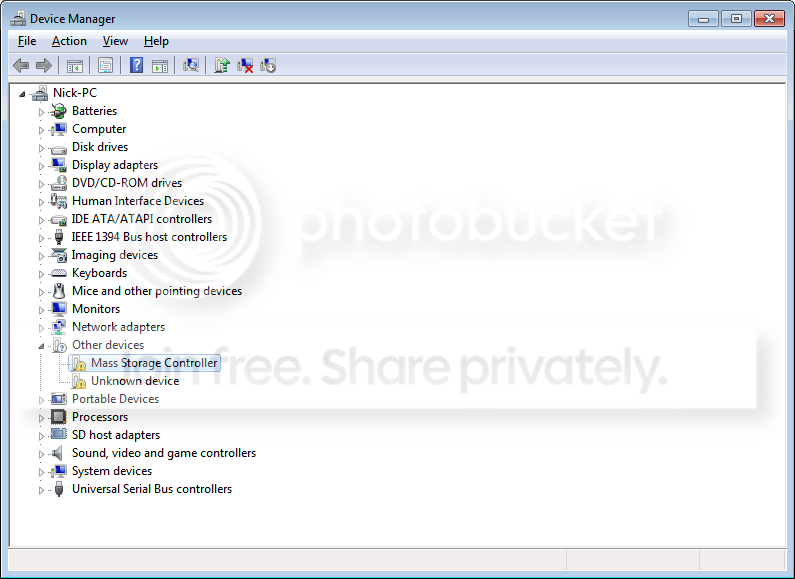
So I guess there is an issue:
DeviceManager.png


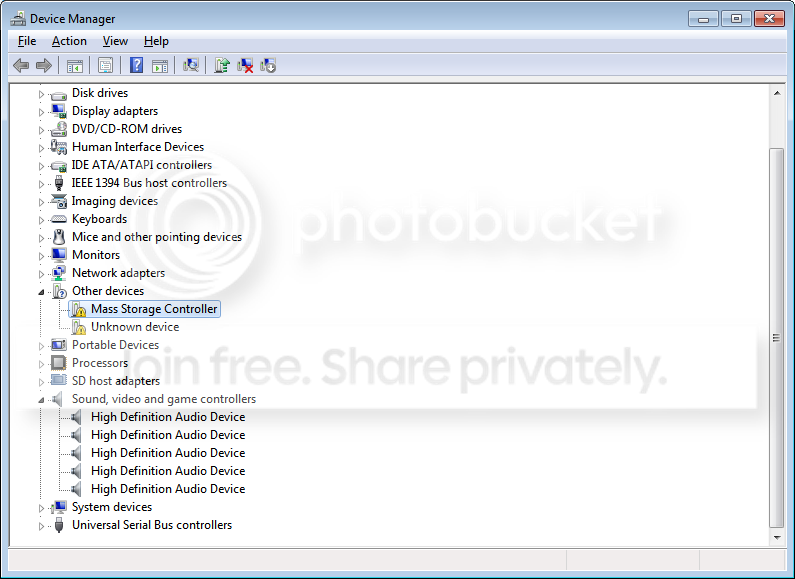
It seems like my graphics are just generally less sharp than before. And again, those drivers I didn't see are not under the heading of sound and video.

DeviceManager-1.png


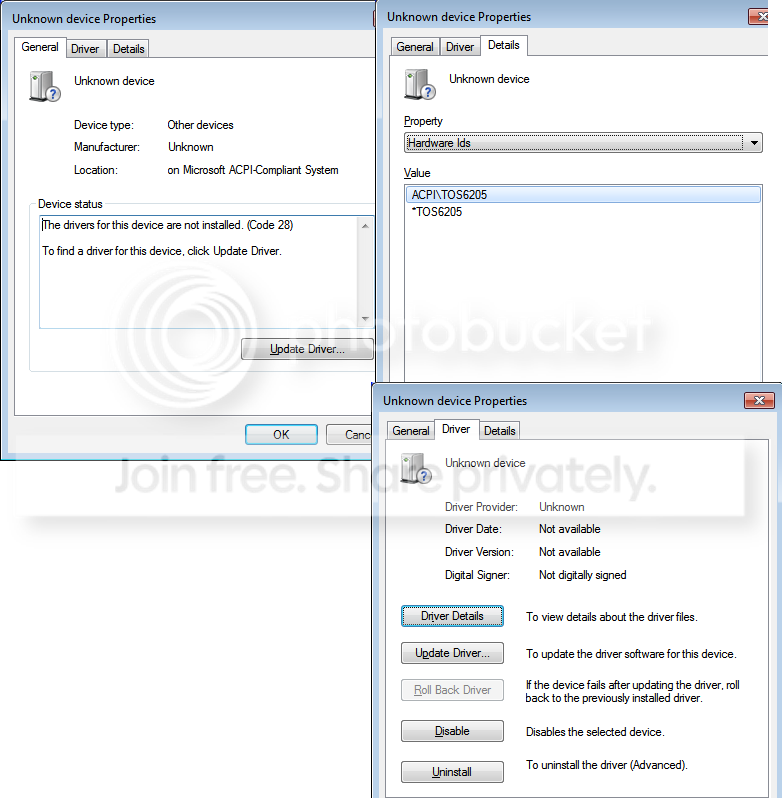
I tried to update the driver for that "unknown device" and it didn't find one.

DeviceManager-2.png
 

My Computer My Computer

Computer Manufacturer/Model Number
Toshiba Qosmio X505
OS
Windows 7 Home Premium 64 bit
CPU
Intel Core i7 Q 740 @ 1.73 GHz
Sound Card
Conexant SmartAudio HD
My resolution is much worse than it was. When I set it to the highest possible (1280x1024) things become stretched very wide. My work requires higher resolution as I had prior to reinstalling windows. How do I fix this? Would it be a mistake to try and dl NVIDIA?
 

My Computer My Computer

Computer Manufacturer/Model Number
Toshiba Qosmio X505
OS
Windows 7 Home Premium 64 bit
CPU
Intel Core i7 Q 740 @ 1.73 GHz
Sound Card
Conexant SmartAudio HD
In reference to my resolution being worse, one application I use all the time types in a fairly small font. It was still totally sharp before, but now I can hardly read my typing.
 

My Computer My Computer

Computer Manufacturer/Model Number
Toshiba Qosmio X505
OS
Windows 7 Home Premium 64 bit
CPU
Intel Core i7 Q 740 @ 1.73 GHz
Sound Card
Conexant SmartAudio HD
well whats under display drivers?

but also I need to identify the two yellow marked items under the "white marked" heading - Unknown Devices can you look through the lists in each for #'s labeled HID, PIN, VIN and or VEN (hardware, product, vendor) - it should be under the tab(s) Details >>> [Properties]

then in the drop down look for values that have these "id's" in them as you select them....if that makes sense
 

My Computer My Computer

Computer Manufacturer/Model Number
Custom self build - Desktop
OS
MS Windows 7 Home Premium SP1 64-bit (Family Pack Lic.) Upgrade
CPU
AMD Phenom II X6: Black Ed 1090T - AM3 / 3.2GHz / 8MB
Motherboard
Biostar TA790XE3
Memory
2 dual ch sets OCZ DDR3 PC3-10666 Platinum 1333MHz 8GB total
Graphics Card(s)
Onboard
Sound Card
Onboard 5.1 channel HD
Monitor(s) Displays
SyncMaster "Legal-sized" LCD (rotatable)
Screen Resolution
unknown (8.5"x15")? pixels are not known
Hard Drives
HDD1: WD RE3 Enterprize [p/n: WD500ABYS-NDW]
________SATA-II (3Gb/s) 500GB/7200rpm/16MB

HDD2: Deskstar 7K1000.C [p/n: HDS721010CLA332]
________SATA-II (3Gb/s) 1TB/7200rpm/32MB
PSU
Antec 900W mATX 20+4 w/6-8SATA;2MLX;4x6(+2)PCIe[p/n HCG-900]
Case
Mid 10-bay tower - free space design interior & well vented
Cooling
CPU HS cooler, 14.5" Case-sysfan1, dual sysfan2, exhaust
Keyboard
Blue Star Ergonomic - ps/2
Mouse
LED coorded w/v. roller wheel - ps/2
Internet Speed
GbLAN 10/100/1000 & WLAN - on T1 (Peer Network)
Other Info
Harmon-Karden speakers (L,R @ sub)

APC (Lead/Acid Batt backup UPC+Surge protector+etc)

Sony DVD SATA(300) - RW DVD/CD SATA-II(300)
Back
Top