"No Internet Access" problem with Dell N5110 Windows 7 Home Premium

avisesh

New member
Local time
8:54 AM
Messages
21
"No Internet Access" problem with Dell N5110 Windows 7 Home Premium

Hello Guys,

I have been facing issues with my dell N5110 and Windows 7 laptop. I have been using it for over a year but never faced this issue. My wireless (and wired) connection connects to the router but doesnt connect to internet. A yellow triangle appears on the network connection symbol.

I know for a fact that there is no issue with router because my other devices (another compaq laptop, an Ipad, a Kindle, HTC desire phone) connect fine. I havent changed the router or any of the settings. My dell laptop refuses to connect to the internet.

I have tried some of the remedies mentioned in the forum like resetting TCP/IP protocol using netsh command, ipconfig renew, re-installed the driver from the manufacturers CD but to no avail.

Any help would be greatly appreciated.

With Regards,
Avisesh
 

My Computer My Computer

At a glance

LondonIntel i3 2310 2.10 Ghz3 GB
Computer Manufacturer/Model Number
Dell N5110
OS
London
CPU
Intel i3 2310 2.10 Ghz
Memory
3 GB
Hello Guys,

I have been facing issues with my dell N5110 and Windows 7 laptop. I have been using it for over a year but never faced this issue. My wireless (and wired) connection connects to the router but doesnt connect to internet. A yellow triangle appears on the network connection symbol.

I know for a fact that there is no issue with router because my other devices (another compaq laptop, an Ipad, a Kindle, HTC desire phone) connect fine. I havent changed the router or any of the settings. My dell laptop refuses to connect to the internet.

I have tried some of the remedies mentioned in the forum like resetting TCP/IP protocol using netsh command, ipconfig renew, re-installed the driver from the manufacturers CD but to no avail.

Any help would be greatly appreciated.

With Regards,
Avisesh

If you can post a screen shot of the ipconfig/all it would be very helpful. :)
 

My Computer My Computer

At a glance

Windows 7 Ult, Windows 8.1 Pro,Q9650-4.275GHz, E8600 4.5GHz, E6750-3.8GHzG.Skill PC2 9600 1200Mhz 5 5 5 15 2TGTX480
Computer type
PC/Desktop
Computer Manufacturer/Model Number
Home built
OS
Windows 7 Ult, Windows 8.1 Pro,
CPU
Q9650-4.275GHz, E8600 4.5GHz, E6750-3.8GHz
Motherboard
Evga 780i FTW
Memory
G.Skill PC2 9600 1200Mhz 5 5 5 15 2T
Graphics Card(s)
GTX480
Sound Card
Asus Xonar D2
Monitor(s) Displays
HannsG
Screen Resolution
1680X1050
Hard Drives
GSkill Phoenix Pro 120GB SSD
PSU
ThermalTake Toughpower 1000Watt modular
Case
ThermalTake XaserV
Cooling
Xigmatek S1283
Keyboard
Logitech G15
Mouse
Logitech G9
Internet Speed
T1
Hey Chev,

Thanks for the prompt reply.

When I run ipconfig/all it says media state - Media Disconnected for everything displayed. Does that help in figuring out the problem?

With Regards,
Avisesh
 

My Computer My Computer

At a glance

LondonIntel i3 2310 2.10 Ghz3 GB
Computer Manufacturer/Model Number
Dell N5110
OS
London
CPU
Intel i3 2310 2.10 Ghz
Memory
3 GB
Hey Chev,

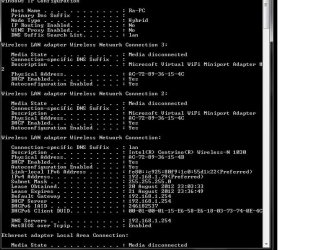
Please find attached the screen shot of Ip config.
 

Attachments

  • IpConfig Image.jpg
    IpConfig Image.jpg
    79.3 KB · Views: 112

My Computer My Computer

At a glance

LondonIntel i3 2310 2.10 Ghz3 GB
Computer Manufacturer/Model Number
Dell N5110
OS
London
CPU
Intel i3 2310 2.10 Ghz
Memory
3 GB
Hey Chev,

Please find attached the screen shot of Ip config.

According to the ipconfig you should be online. The Media Disconnected is typical and doesn't mean much.

Can you first disable both of those Microsoft virtual wifi mini port adaptors, you can find them in Device Manager under Network adaptors. They are only used for setting up a shared wireless access point but they can also cause connection problems.

Let me know if that has any effect on your connection problem. :)
 

My Computer My Computer

At a glance

Windows 7 Ult, Windows 8.1 Pro,Q9650-4.275GHz, E8600 4.5GHz, E6750-3.8GHzG.Skill PC2 9600 1200Mhz 5 5 5 15 2TGTX480
Computer type
PC/Desktop
Computer Manufacturer/Model Number
Home built
OS
Windows 7 Ult, Windows 8.1 Pro,
CPU
Q9650-4.275GHz, E8600 4.5GHz, E6750-3.8GHz
Motherboard
Evga 780i FTW
Memory
G.Skill PC2 9600 1200Mhz 5 5 5 15 2T
Graphics Card(s)
GTX480
Sound Card
Asus Xonar D2
Monitor(s) Displays
HannsG
Screen Resolution
1680X1050
Hard Drives
GSkill Phoenix Pro 120GB SSD
PSU
ThermalTake Toughpower 1000Watt modular
Case
ThermalTake XaserV
Cooling
Xigmatek S1283
Keyboard
Logitech G15
Mouse
Logitech G9
Internet Speed
T1
Hi,

I am currently experiencing the exact same problem on the exact same model of Dell. I had connectivity issues a few days ago which resolved themselves but then I turned my computer on yesterday morning to find no Internet access. I have also tried all the standard solutions and have disabled the miniport adapters (and the Bluetooth as per someone else's suggestion). My ipconfig looks much the same as avisesh's. All this is happening a lovely 8 days after my warranty has expired as well. I am very eager to find a solution and hope someone can figure it out soon. It is a little strange that this has happened to both of us on the same day. I did install some standard windows updates a few days ago and updated a game the day before the issues arose - I don't know if that has done anything? Any help would be appreciated :)

Thanks,
Rhiannon
 

My Computer My Computer

At a glance

Windows 7 home premium
OS
Windows 7 home premium
PROBLEM SOLVED! ok guys I worked it out. The latest widows 7 update had a driver update for the Bluetooth which messed with the network conection. I did a system restore to before the update and now my Internet works perfectly. Yay!
 

My Computer My Computer

At a glance

Windows 7 home premium
OS
Windows 7 home premium
Back
Top