NVIDIA nForce Network Controller Problem

asuccar

New member
Local time
8:36 AM
Messages
7
Hey All,

This is my first ever post so please go easy on me:-)

Ok, here's the deal...

I'm running Win7 Ultimate x64 and my PC has a ASUSTeK M2N32 WS Professional motherboard.

ALL IS WORKING PERFECT!!!!....except...my nForce network controller!

Consider this scenario, and maybe it'll explain my issue a little better:


  1. I turn my PC on

  2. Win7 OS loads
  3. I open IE8 but I can't connect to the net
    (note: at this point, I go to 'Network and Sharing Center' and the network picture under 'View you basic network information and set up connections' on the right side it says 'no internet connection'
  4. I then go to Device Manager and expand Network Adapters
  5. Under Network Adapters, i right click on NVIDIA nForce 10/100/1000 Mbps Ethernet #2 --> select 'Disable' --> then I click on yes when the message appears to confirm that i want to disable the device
  6. After that, I simply right click the same device and select 'Enable'.

....
THEN THE INTERNET WORKS AGAIN!!!...Until I restart the PC then I have to disable/enable the adapter again!

What the heck is that all about? I have tried uninstalling/reinstalling the drivers and made sure i have the latest drivers.

Can any1 help? Much appreciated!
 

My Computer

OS
Windows 7 Ultimate x64
CPU
AMD Athlon 64 X2 Dual Core 3.0GHz
Motherboard
ASUS M2N32 WS Professional
Memory
8GB
Graphics Card(s)
NVIDIA GeForce 8600 GTS
Sound Card
SoundMAX Integrated Digital HD Audio
Hard Drives
ST332062 0AS SCSI Disk Device (320.07 GB) -- drive 1
ST332062 0AS SCSI Disk Device (320.07 GB) -- drive 0
WDC WD10 EADS-00L5B1 SCSI Disk Device (1000.20 GB) -- drive 2
Hello Asuccar. Welcome to the Forum.

That motherboard has 2 Marvell 88E1116 LAN Chipsets on it.
If you are only using one LAN connection then go into the Network Connections and disable the one you are not using (#2?) and plug in to the one you are using (#1) and run it like that.

I suspect the IP addresses are changing each time you boot, a common issue using DNS and two NICs.

If you are trying to use both, then post back.
 

My Computer

Computer type
PC/Desktop
Computer Manufacturer/Model Number
Home Built - Jan 2013
OS
Windows 7 64 Bit Home Premium SP1
CPU
i7-3820
Motherboard
Asus P9X79-PRO - Bios 4608
Memory
GSkill F3-14900CL9Q - 16GB
Graphics Card(s)
EVGA GeForce GTX660 - Driver 352.86
Sound Card
On board Realtek ALC898
Monitor(s) Displays
Acer S271HL
Screen Resolution
1920 x 1080
Hard Drives
#1- Samsung 840 Pro Series
#2- Western Digital WD1002FAEX Sata3 Black
#3- Western Digital WD1002FAEX Sata3 Black
PSU
Corsair CMPSU-850TX-V2 - 850 watt (by Seasonic)
Case
Corsair Obsidian 550D
Cooling
Standard 3 120mm case fans, Cooler Master Hyper 212 EVO
Keyboard
MS KC-0405
Mouse
Intellimouse 5-button
Internet Speed
56 Mbits/Sec (on a good day)
Antivirus
Avast & Malwarebytes
Browser
Firefox
Other Info
Asus DVD - DRW-24B1ST 24X
Hey All,

This is my first ever post so please go easy on me:-)

Ok, here's the deal...

I'm running Win7 Ultimate x64 and my PC has a ASUSTeK M2N32 WS Professional motherboard.

ALL IS WORKING PERFECT!!!!....except...my nForce network controller!

Consider this scenario, and maybe it'll explain my issue a little better:


  1. I turn my PC on

  2. Win7 OS loads
  3. I open IE8 but I can't connect to the net
    (note: at this point, I go to 'Network and Sharing Center' and the network picture under 'View you basic network information and set up connections' on the right side it says 'no internet connection'
  4. I then go to Device Manager and expand Network Adapters
  5. Under Network Adapters, i right click on NVIDIA nForce 10/100/1000 Mbps Ethernet #2 --> select 'Disable' --> then I click on yes when the message appears to confirm that i want to disable the device
  6. After that, I simply right click the same device and select 'Enable'.

....
THEN THE INTERNET WORKS AGAIN!!!...Until I restart the PC then I have to disable/enable the adapter again!

What the heck is that all about? I have tried uninstalling/reinstalling the drivers and made sure i have the latest drivers.

Can any1 help? Much appreciated!


Seems like a simple driver issue but cant tell till we get more info from you.

We need your Network setup and what version of win 7.

Thanks in advance


Ken J
 

My Computer

Computer Manufacturer/Model Number
HP Pavillion dv-7 1005 Tx
OS
Win 8 Release candidate 8400
CPU
[email protected]
Memory
4 gigs
Graphics Card(s)
Nvidia 9600M
Sound Card
HD built-in
Monitor(s) Displays
17" Wxga
Screen Resolution
1440x900
Cooling
none
Internet Speed
45Mb down 5Mb up

My Computer

Computer type
PC/Desktop
Computer Manufacturer/Model Number
self build
OS
win 7 ultimate32bit, Win8.1pro wmc 32bit
CPU
amd phenom x4 9600
Motherboard
asus m2n32-sli deluxe
Memory
corsair twinxs 2x2gb
Graphics Card(s)
2x nvidia 1gb 8500gt
Sound Card
onboard
Monitor(s) Displays
23" PB Viseo 233d
Screen Resolution
1920x1080
Hard Drives
maxtor sata 500gb
maxtor sata 320gb
fujitsu sata200gb
PSU
oryxx tornado 750w
Case
thermaltake xaser lll
Cooling
artic freezer64 pro + 7 case fans
In addition to what pebbly said do not install the "network management tools"; and if it is already installed open Programs and Features, locate Nvidia Drivers and perform a custom uninstall and remove it.
 

My Computer

Computer type
PC/Desktop
Computer Manufacturer/Model Number
Me
OS
Win 7 Ultimate x64
CPU
FX-8350 @ 4.6 GHz so far
Motherboard
Asus M5A97 EVO
Memory
ADATA XPG V1 Series Black 8GB DDR3 1600
Graphics Card(s)
Sapphire R9 270x Dual-X
Sound Card
Xonar DGX w/ Corsair Vengence 1300
Monitor(s) Displays
Acer S232HL Abid
Screen Resolution
1920x1080
Hard Drives
120 GB OCZ Vertex 3
500 GB Seagate 7200.12
PSU
Antec Earthwatts 650W Green
Case
Antec Three Hundred
Cooling
Cooler Master 212 EVO
Keyboard
Logitech G510
Mouse
Logitech G500s
Internet Speed
35000/3000
Thanks for all your help guys!

I tried everything you guys suggested but, alas the problem remains!

I have no idea where i should go from here...
 

My Computer

OS
Windows 7 Ultimate x64
CPU
AMD Athlon 64 X2 Dual Core 3.0GHz
Motherboard
ASUS M2N32 WS Professional
Memory
8GB
Graphics Card(s)
NVIDIA GeForce 8600 GTS
Sound Card
SoundMAX Integrated Digital HD Audio
Hard Drives
ST332062 0AS SCSI Disk Device (320.07 GB) -- drive 1
ST332062 0AS SCSI Disk Device (320.07 GB) -- drive 0
WDC WD10 EADS-00L5B1 SCSI Disk Device (1000.20 GB) -- drive 2
OK, asuccar, I did a little research this morning and have come up with this from a Gigabyte forum:

The issue was corrected when the user tweaked the BIOS. They were guessing it had something to do with verifying the DMI Data Pool.
There are two ways to try this:

The first is to note all of your BIOS preferences. Then go into the BIOS and reset the BIOS optimized defaults. Reboot, go back into BIOS and reset your preferences. See if the LAN controllers are properly recognized now.

The second is to go into the BIOS and disable Quick Boot.

You can test those and let us know. This is all dependent, of course, on having the most recent chipset drivers from Asus properly installed first.
 

My Computer

Computer type
PC/Desktop
Computer Manufacturer/Model Number
Home Built - Jan 2013
OS
Windows 7 64 Bit Home Premium SP1
CPU
i7-3820
Motherboard
Asus P9X79-PRO - Bios 4608
Memory
GSkill F3-14900CL9Q - 16GB
Graphics Card(s)
EVGA GeForce GTX660 - Driver 352.86
Sound Card
On board Realtek ALC898
Monitor(s) Displays
Acer S271HL
Screen Resolution
1920 x 1080
Hard Drives
#1- Samsung 840 Pro Series
#2- Western Digital WD1002FAEX Sata3 Black
#3- Western Digital WD1002FAEX Sata3 Black
PSU
Corsair CMPSU-850TX-V2 - 850 watt (by Seasonic)
Case
Corsair Obsidian 550D
Cooling
Standard 3 120mm case fans, Cooler Master Hyper 212 EVO
Keyboard
MS KC-0405
Mouse
Intellimouse 5-button
Internet Speed
56 Mbits/Sec (on a good day)
Antivirus
Avast & Malwarebytes
Browser
Firefox
Other Info
Asus DVD - DRW-24B1ST 24X
Well, did exactly that...same problem! BTW, when i disabled quick boot it took forever to load:-) after 3 reboots i almost slit my throat:-)

So, what now? What could it possibly be?
 

My Computer

OS
Windows 7 Ultimate x64
CPU
AMD Athlon 64 X2 Dual Core 3.0GHz
Motherboard
ASUS M2N32 WS Professional
Memory
8GB
Graphics Card(s)
NVIDIA GeForce 8600 GTS
Sound Card
SoundMAX Integrated Digital HD Audio
Hard Drives
ST332062 0AS SCSI Disk Device (320.07 GB) -- drive 1
ST332062 0AS SCSI Disk Device (320.07 GB) -- drive 0
WDC WD10 EADS-00L5B1 SCSI Disk Device (1000.20 GB) -- drive 2
When you say "it took forever to load", do you mean "to load the BIOS"?
Or "To load Windows".
And by forever, do you mean 30 seconds instead of 15, or 3 minutes instead of 15 seconds?

A Quick boot just skips some basic enumerations. But a regular boot should not take much longer to go through the BIOS startup.
Long boot delays can be caused by incorrect, corrupted, or conflicting drivers.

It would help if you gave us your Network Setup as ZigZag asked.
 

My Computer

Computer type
PC/Desktop
Computer Manufacturer/Model Number
Home Built - Jan 2013
OS
Windows 7 64 Bit Home Premium SP1
CPU
i7-3820
Motherboard
Asus P9X79-PRO - Bios 4608
Memory
GSkill F3-14900CL9Q - 16GB
Graphics Card(s)
EVGA GeForce GTX660 - Driver 352.86
Sound Card
On board Realtek ALC898
Monitor(s) Displays
Acer S271HL
Screen Resolution
1920 x 1080
Hard Drives
#1- Samsung 840 Pro Series
#2- Western Digital WD1002FAEX Sata3 Black
#3- Western Digital WD1002FAEX Sata3 Black
PSU
Corsair CMPSU-850TX-V2 - 850 watt (by Seasonic)
Case
Corsair Obsidian 550D
Cooling
Standard 3 120mm case fans, Cooler Master Hyper 212 EVO
Keyboard
MS KC-0405
Mouse
Intellimouse 5-button
Internet Speed
56 Mbits/Sec (on a good day)
Antivirus
Avast & Malwarebytes
Browser
Firefox
Other Info
Asus DVD - DRW-24B1ST 24X
No no...you know when you boot your pc and it does the 'count-up' of your RAM...well normally it takes like a few seconds to do it...but with quick-boot disabled, it takes a few minutes to 'count-up' my 8Gigs of RAM...about 5 mins! But once it finishes counting, the boot process is normal from there on.

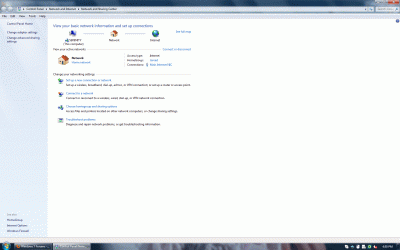
Network Setup? What do you actually mean? Sorry, i'm not too techy...see my attached screenshot of 'Control Panel\Network and Internet\Network and Sharing Center'...is this the info you need? I have cable internet, my pc connects to a Netgear WNR2000 router (to which my cable modem is plugged into).

My set up has been running perfectly for over a year, but when i upgraded to win7 my problem started!
 

Attachments

  • screenshot.gif
    screenshot.gif
    152.1 KB · Views: 192

My Computer

OS
Windows 7 Ultimate x64
CPU
AMD Athlon 64 X2 Dual Core 3.0GHz
Motherboard
ASUS M2N32 WS Professional
Memory
8GB
Graphics Card(s)
NVIDIA GeForce 8600 GTS
Sound Card
SoundMAX Integrated Digital HD Audio
Hard Drives
ST332062 0AS SCSI Disk Device (320.07 GB) -- drive 1
ST332062 0AS SCSI Disk Device (320.07 GB) -- drive 0
WDC WD10 EADS-00L5B1 SCSI Disk Device (1000.20 GB) -- drive 2
Any1?
 

My Computer

OS
Windows 7 Ultimate x64
CPU
AMD Athlon 64 X2 Dual Core 3.0GHz
Motherboard
ASUS M2N32 WS Professional
Memory
8GB
Graphics Card(s)
NVIDIA GeForce 8600 GTS
Sound Card
SoundMAX Integrated Digital HD Audio
Hard Drives
ST332062 0AS SCSI Disk Device (320.07 GB) -- drive 1
ST332062 0AS SCSI Disk Device (320.07 GB) -- drive 0
WDC WD10 EADS-00L5B1 SCSI Disk Device (1000.20 GB) -- drive 2
Well I'm just guessing now, but Windows is not setting or keeping you LAN settings because you have 2 LAN controllers, so I would think that the motherboard's driver(s) for the LAN(s) is corrupted or conflicting. You might try uninstalling (removing) the LAN controllers from Device Manager and rebooting to see if the driver package that Pebbly gave you (that you downloaded and installed previously) will reinstall automatically without problems this time. If they don't automatically install then just run the download to install them.
 

My Computer

Computer type
PC/Desktop
Computer Manufacturer/Model Number
Home Built - Jan 2013
OS
Windows 7 64 Bit Home Premium SP1
CPU
i7-3820
Motherboard
Asus P9X79-PRO - Bios 4608
Memory
GSkill F3-14900CL9Q - 16GB
Graphics Card(s)
EVGA GeForce GTX660 - Driver 352.86
Sound Card
On board Realtek ALC898
Monitor(s) Displays
Acer S271HL
Screen Resolution
1920 x 1080
Hard Drives
#1- Samsung 840 Pro Series
#2- Western Digital WD1002FAEX Sata3 Black
#3- Western Digital WD1002FAEX Sata3 Black
PSU
Corsair CMPSU-850TX-V2 - 850 watt (by Seasonic)
Case
Corsair Obsidian 550D
Cooling
Standard 3 120mm case fans, Cooler Master Hyper 212 EVO
Keyboard
MS KC-0405
Mouse
Intellimouse 5-button
Internet Speed
56 Mbits/Sec (on a good day)
Antivirus
Avast & Malwarebytes
Browser
Firefox
Other Info
Asus DVD - DRW-24B1ST 24X
Has anyone found a solution for this? I have the exact same problem...
 

My Computer

OS
Windows 7 Ultimate x64
nforce 630A onboard NIC problem

Hi,
I found exactly same problem on my motherboard ASROCK n68-s3 ucc with AMD Phenom II 810 and 8GB DDR3 RAM as on the 1st post. I have tried even to update the driver from Windows update service, however, it doesn't help. By the way, it's regarding situation, where NIC try to obtain address from DHCP server, if you enter static IP, it works fine. I think that this is relating to driver or nVidia chipset architecture itself, which is relatively old and I can't understand why new motherboards still use it. I can't use static IP in my network enviroment, so I decided to disable onboard LAN and use PCI-E ethernet card, it solves the problem.
 

My Computer

OS
Windows 7 Home Premium x64 SP1
Windows 7 and onboard NVidia Ethenet controller

I had this same problem for weeks. Tried dozens of fixes, new drivers, bio this and that with not success. Fix is assigning an IP address, subnet, default gateway and DNS server. No problems since.
 

My Computer

OS
windows 7 pro 64 bit
Back
Top