Ongoing Annoying Problem!

tystuh

New member
Local time
1:45 PM
Messages
25
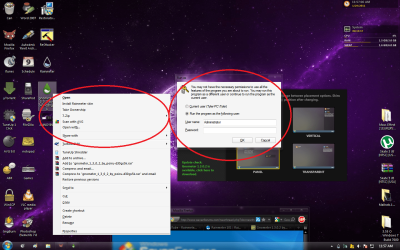
Okay, is there a way to make EVERYTHING stop asking for administrator confirmation AND ESPECIALLY passwords and stuff, because it gets annoying and some files i cannot run as administrator. even if i put my current password in, it will say that it's wrong...

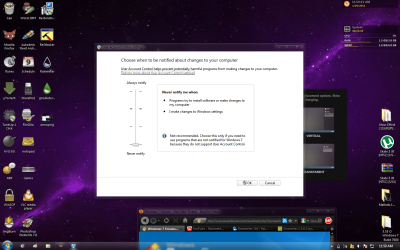
although i have the uac settings all the way down, and I know im an admin...

It Would Help a TON, THIS IS A S U P E R A N N O Y I N G
 

Attachments

  • Admin.png
    Admin.png
    294 KB · Views: 63
  • annoying.png
    annoying.png
    349 KB · Views: 69
  • UAC.png
    UAC.png
    326 KB · Views: 42

My Computer

Computer Manufacturer/Model Number
Dell
OS
windows 7 ultimate 32-bit
CPU
Intel pentium 4 3.00 Ghz
Motherboard
phoenix i think
Memory
4 gb
Graphics Card(s)
ATI Radeon 4800
First off I would very strongly recommend you put the UAC setting back to the recommended mark. There is nothing to be gained by turning it off. It is there for a very good reason!
If you are asked for a password then if it says "The password is wrong" just double check that you haven't made a typo.
can you be a bit more specific when you say
is there a way to make EVERYTHING stop asking for administrator confirmation AND ESPECIALLY passwords and stuff
What do you mean by "Everything" and "Stuff"?
 

My Computer

Computer type
PC/Desktop
OS
Microsoft Windows 7 Home Premium 64-bit 7601 Multiprocessor Free Service Pack 1
CPU
Intel(R) Core(TM) i7-3770 CPU @ 3.40GHz
Motherboard
ASUSTeK COMPUTER INC. P8H77-M
Memory
8.00 GB
Graphics Card(s)
Intel(R) HD Graphics 4000
Sound Card
On Board
Monitor(s) Displays
Dell 24"
Screen Resolution
1920 x 1080
Hard Drives
(1) INTEL SSDSC2CT180A3 ATA Device (2) ST500DM002-1BD142 ATA Device (3) WDC WD3200AAKS-75L9A0 ATA Device (4) Generic- Compact Flash USB Device (5) Generic- MS/MS-Pro USB Device (6) Generic- SD/MMC USB Device (7) Generic- SM/xD-Picture USB
PSU
500w Corsair
Case
Cooler Master
Cooling
3 Fans
Keyboard
Logitech MK300
Mouse
Logitech WOM
Internet Speed
75Mb
Antivirus
Norton 360
Browser
Firefox, Opera, IE
i mean like everytime i try to move a file it will ask for admin permission even though i am admin

also, no password works...
 

My Computer

Computer Manufacturer/Model Number
Dell
OS
windows 7 ultimate 32-bit
CPU
Intel pentium 4 3.00 Ghz
Motherboard
phoenix i think
Memory
4 gb
Graphics Card(s)
ATI Radeon 4800
also, no password works...

I notice in the 2nd screenshot that your account (TylerPC/Tyler) is not selected. This is likely why 'no password works'. Make sure that the correct 'run as' is selected.

That siad, if you are running as admin, you shouldn't be asked to enter your password for all tasks...you should be presented with a confirmation, to which you would click OK.

James

Edit: Did this always occur? Have you been changing any permissions?
 

My Computer

OS
Win7U 64 RTM
CPU
Q9550
Motherboard
GA-EP45-UD3R
Memory
8GB Gskill
Graphics Card(s)
ASUS|EAH4850/HTDI/1GD3/A
Sound Card
xfi Plat
Monitor(s) Displays
Dell 2405fpw
Screen Resolution
1920x1200
Hard Drives
Seagate & WD sata Drives
PSU
Antec
Case
Antec
Keyboard
MS Natural Ergonomic 4000
Mouse
Logitech MX610 USB Cordless
Just out of interest I notice you didn't comment on my recommendation regarding the UAC, are you intending to run with it off?
When you say
i mean like everytime i try to move a file it will ask for admin permission
Can you not just click "Continue"
 

My Computer

Computer type
PC/Desktop
OS
Microsoft Windows 7 Home Premium 64-bit 7601 Multiprocessor Free Service Pack 1
CPU
Intel(R) Core(TM) i7-3770 CPU @ 3.40GHz
Motherboard
ASUSTeK COMPUTER INC. P8H77-M
Memory
8.00 GB
Graphics Card(s)
Intel(R) HD Graphics 4000
Sound Card
On Board
Monitor(s) Displays
Dell 24"
Screen Resolution
1920 x 1080
Hard Drives
(1) INTEL SSDSC2CT180A3 ATA Device (2) ST500DM002-1BD142 ATA Device (3) WDC WD3200AAKS-75L9A0 ATA Device (4) Generic- Compact Flash USB Device (5) Generic- MS/MS-Pro USB Device (6) Generic- SD/MMC USB Device (7) Generic- SM/xD-Picture USB
PSU
500w Corsair
Case
Cooler Master
Cooling
3 Fans
Keyboard
Logitech MK300
Mouse
Logitech WOM
Internet Speed
75Mb
Antivirus
Norton 360
Browser
Firefox, Opera, IE
Okay, is there a way to make EVERYTHING stop asking for administrator confirmation AND ESPECIALLY passwords and stuff, because it gets annoying and some files i cannot run as administrator. even if i put my current password in, it will say that it's wrong...

Yes, install MS-DOS, or turn Windows 7 into MS-DOS security-wise.

Other than that, if you see the kinds of prompts you describe, the options are:
- You run software that is not compatible with Windows 7
- You are attempting to do things you really should not be messing with (such as move system files)
- Your system is (half) broken

My guess it's all of the above. The only way to make the prompts go away in that case is to make modifications to the system you really should not be making.
 

My Computer

OS
Windows 7 64-bit
If you're bothered by password prompting, then remove the password for Tyler in User Accounts.

When it prompts you for password, you have to check Tyler box if you want to supply it.

In User Accounts, click Manage Another Account to see what other accounts exist. Did you set up an Administrator named account which is set to prompt UAC?

Normally you won't be prompted if UAC is turned all the way down, or you operate as hidden Administrator.

It isn't recommended to use hidden Admin unless you know what you're doing (and you know who you are) ;)
 
The only reason that I can see for having UAC enabled, is if there are multiple users on the computer. I suppose that UAC might possibly prevent someone from making a mistake of some kind, but I prefer to make my own mistakes, without a robotic guardian.
 

My Computer

Computer Manufacturer/Model Number
DIY
OS
W7x64 Pro, SuSe 12.1/** W7 x64 Pro, XP MCE
CPU
Phenom II 1090T w/Noctua NH-D14 /**4400+ X2 w/CM Hyper TX 3
Motherboard
ASRock 890FX Deluxe 4/**A8N-SLI
Memory
2 x 2GB Patriot PGS34g1600LLKA/**4x1GB Corsair VS
Graphics Card(s)
EVGA GTX460 SC/**EVGA 8800GTS
Sound Card
Asus Xonar D2X/**Xonar D1
Monitor(s) Displays
Acer X233H, Dell E152FPc /**LG M237-WD
Screen Resolution
1920x1080 & 1024x768/**1980x1080
Hard Drives
WDC 2TB, 1.5TB, 1TB, 500GB,Seagate 500GB , Maxtor 80GB /**500GB Seagate & WDC 1TB Black
PSU
CM RS600 w/ APC BX1000G/**Antec 500 TP w/ APC BX1000
Case
HAF922/**Antec 1040IIB
Cooling
3x200mm, 1x140 and 1x120mm/**5x80mm fans
Keyboard
Logitech Media USB/**Saitek Eclipse
Mouse
Cordless Trackman Wheel/**Ditto
Internet Speed
3.3Mbps
Other Info
SB 560 5.1 w/ Sennheiser RS140/**Creative T20 speakers, Dvico FusionHDTV7 Gold RT, Cisco E3000, HP 5510V AIO, Linksys E3000, Belkin F5U237 hub and **F5D8055 adapter
(** = 2nd rig)
The only reason that I can see for having UAC enabled, is if there are multiple users on the computer. I suppose that UAC might possibly prevent someone from making a mistake of some kind, but I prefer to make my own mistakes, without a robotic guardian.

UAC also prevents rogue programs from installing themselves or doing nasty things of their own initiative..

James
 

My Computer

OS
Win7U 64 RTM
CPU
Q9550
Motherboard
GA-EP45-UD3R
Memory
8GB Gskill
Graphics Card(s)
ASUS|EAH4850/HTDI/1GD3/A
Sound Card
xfi Plat
Monitor(s) Displays
Dell 2405fpw
Screen Resolution
1920x1200
Hard Drives
Seagate & WD sata Drives
PSU
Antec
Case
Antec
Keyboard
MS Natural Ergonomic 4000
Mouse
Logitech MX610 USB Cordless
UAC also prevents rogue programs from installing themselves or doing nasty things of their own initiative

Correct. Statistics show that more than 99.9% of all people who turn off UAC have no clue what they are doing. Yes, I just made this number up, but I am confident that it is very close to the truth, down to the third digit...
 

My Computer

OS
Windows 7 64-bit
Its a good thing I'm in that other 0.1 %.
There is something else going on here. Even with UAC at its default settings you shouldn't be getting nagged as much as you are. I have UAC turned off and don't get any nags for passwords. And before anybody lectures me, yes I know what its for and what it does. I made a choice, I turned it off, and I can live with the consequences. :)
You might want to create a new user profile and log in with that. Then see what happens. Have you changed any file or folder permissions from their default settings?
 

My Computer

Computer type
PC/Desktop
Computer Manufacturer/Model Number
Home Built
OS
Windows 10 Education 64 bit
CPU
AMD Phenom II X4 980 Black Edition Deneb 3.7GHz
Motherboard
Asus M4N68T-M V2 µATX Motherboard
Memory
8GB 4GBx2 Kingston PC10600 DDR3 1333 Memory
Graphics Card(s)
Zotac NVIDIA Geforce GT640 2 Gig DDR3 PCIe
Sound Card
VIA VT1708s High Definition Audio 8-channel Onboard
Monitor(s) Displays
22" LG E2242 1080p and 2 19" I-INC AG191D
Screen Resolution
1280x1024 - 1920x1080 - 1280x1024
Hard Drives
Crucial M100 256 GB SSD and 500 GB WD Blue SATA
PSU
Thermaltake TR 620
Case
Power Up Black ATX Mid-Tower Case
Cooling
Stock heatsink and fan
Keyboard
Logitech Wireless K350 Wave
Mouse
Logitech Wireless M570 Trackman Wheel
Internet Speed
80 Mbps Down 30 Mbps Up
Antivirus
Windows Defender
Browser
Internet Explorer 11
Other Info
HP DVD1040e Lightscribe - External USB2
Its a good thing I'm in that other 0.1 %.
There is something else going on here. Even with UAC at its default settings you shouldn't be getting nagged as much as you are. I have UAC turned off and don't get any nags for passwords. And before anybody lectures me, yes I know what its for and what it does. I made a choice, I turned it off, and I can live with the consequences. :)
You might want to create a new user profile and log in with that. Then see what happens. Have you changed any file or folder permissions from their default settings?

I always enjoy it, when finding someone that thinks like I do.
 

My Computer

Computer Manufacturer/Model Number
DIY
OS
W7x64 Pro, SuSe 12.1/** W7 x64 Pro, XP MCE
CPU
Phenom II 1090T w/Noctua NH-D14 /**4400+ X2 w/CM Hyper TX 3
Motherboard
ASRock 890FX Deluxe 4/**A8N-SLI
Memory
2 x 2GB Patriot PGS34g1600LLKA/**4x1GB Corsair VS
Graphics Card(s)
EVGA GTX460 SC/**EVGA 8800GTS
Sound Card
Asus Xonar D2X/**Xonar D1
Monitor(s) Displays
Acer X233H, Dell E152FPc /**LG M237-WD
Screen Resolution
1920x1080 & 1024x768/**1980x1080
Hard Drives
WDC 2TB, 1.5TB, 1TB, 500GB,Seagate 500GB , Maxtor 80GB /**500GB Seagate & WDC 1TB Black
PSU
CM RS600 w/ APC BX1000G/**Antec 500 TP w/ APC BX1000
Case
HAF922/**Antec 1040IIB
Cooling
3x200mm, 1x140 and 1x120mm/**5x80mm fans
Keyboard
Logitech Media USB/**Saitek Eclipse
Mouse
Cordless Trackman Wheel/**Ditto
Internet Speed
3.3Mbps
Other Info
SB 560 5.1 w/ Sennheiser RS140/**Creative T20 speakers, Dvico FusionHDTV7 Gold RT, Cisco E3000, HP 5510V AIO, Linksys E3000, Belkin F5U237 hub and **F5D8055 adapter
(** = 2nd rig)
uhh... ill just ignore it, i just got done setting up a theme and i don't really want to start over, i turned it back on and it asks me still, but at least it actually lets me do things
 

My Computer

Computer Manufacturer/Model Number
Dell
OS
windows 7 ultimate 32-bit
CPU
Intel pentium 4 3.00 Ghz
Motherboard
phoenix i think
Memory
4 gb
Graphics Card(s)
ATI Radeon 4800
w7sbc
so i downloaded windows 7 start button changer, ran as admin and picked my start button, all it did was open up my libraries folder and didn't change the start button upon restart...

this is the last part in my theme and i would love to get the fix, if there is one

i HAVE taken control over the necessary folders...
-------------------------------------------------------------------------------


From the looks of that you are creating your own problems by changing folder permissions. Modifying system files with none standard themes can also lead to problems. This isn't meant to be lecture, I'm just stating the facts.
 

My Computer

Computer type
PC/Desktop
Computer Manufacturer/Model Number
Home Built
OS
Windows 10 Education 64 bit
CPU
AMD Phenom II X4 980 Black Edition Deneb 3.7GHz
Motherboard
Asus M4N68T-M V2 µATX Motherboard
Memory
8GB 4GBx2 Kingston PC10600 DDR3 1333 Memory
Graphics Card(s)
Zotac NVIDIA Geforce GT640 2 Gig DDR3 PCIe
Sound Card
VIA VT1708s High Definition Audio 8-channel Onboard
Monitor(s) Displays
22" LG E2242 1080p and 2 19" I-INC AG191D
Screen Resolution
1280x1024 - 1920x1080 - 1280x1024
Hard Drives
Crucial M100 256 GB SSD and 500 GB WD Blue SATA
PSU
Thermaltake TR 620
Case
Power Up Black ATX Mid-Tower Case
Cooling
Stock heatsink and fan
Keyboard
Logitech Wireless K350 Wave
Mouse
Logitech Wireless M570 Trackman Wheel
Internet Speed
80 Mbps Down 30 Mbps Up
Antivirus
Windows Defender
Browser
Internet Explorer 11
Other Info
HP DVD1040e Lightscribe - External USB2
Alpha is correct. When you go changing system files, you open a lil gate that lets the bugs in :)
 

My Computer

Computer Manufacturer/Model Number
SMN-Productions
OS
Windows 7 x86/x64, Server 2008r2, Web Server 2008
CPU
i7 v2 3930K Steping stone 2
Motherboard
ASUS Rampage IV Extreme
Memory
G.SKILL Ripjaws Z Series 32GB
Graphics Card(s)
AMD HD 5770
Monitor(s) Displays
Acer 21" and Samsung 20"
Hard Drives
Patriot Pyro 80GB
PSU
1000 Watt
Case
HAF-X
Cooling
4 Fans
Keyboard
Black Widow Ultimate
Another +1 on the changing permissions on system folders issue. It's not only unneccessary, it never fails to be the biggest part of the problem.

James
 

My Computer

OS
Win7U 64 RTM
CPU
Q9550
Motherboard
GA-EP45-UD3R
Memory
8GB Gskill
Graphics Card(s)
ASUS|EAH4850/HTDI/1GD3/A
Sound Card
xfi Plat
Monitor(s) Displays
Dell 2405fpw
Screen Resolution
1920x1200
Hard Drives
Seagate & WD sata Drives
PSU
Antec
Case
Antec
Keyboard
MS Natural Ergonomic 4000
Mouse
Logitech MX610 USB Cordless
haha, okay, but no fixes yet?
 

My Computer

Computer Manufacturer/Model Number
Dell
OS
windows 7 ultimate 32-bit
CPU
Intel pentium 4 3.00 Ghz
Motherboard
phoenix i think
Memory
4 gb
Graphics Card(s)
ATI Radeon 4800
haha, okay, but no fixes yet?

Really tystuh, you have received some excellent advice in this thread and I seems that you have chosen not to take that advice. Clearly that is your right and I respect that but what is the point of asking for advice if you have no real intention of taking it. And to add what some may interpret as a sarcastic laugh is really not in keeping with the ethos of this Forum!
 

My Computer

Computer type
PC/Desktop
OS
Microsoft Windows 7 Home Premium 64-bit 7601 Multiprocessor Free Service Pack 1
CPU
Intel(R) Core(TM) i7-3770 CPU @ 3.40GHz
Motherboard
ASUSTeK COMPUTER INC. P8H77-M
Memory
8.00 GB
Graphics Card(s)
Intel(R) HD Graphics 4000
Sound Card
On Board
Monitor(s) Displays
Dell 24"
Screen Resolution
1920 x 1080
Hard Drives
(1) INTEL SSDSC2CT180A3 ATA Device (2) ST500DM002-1BD142 ATA Device (3) WDC WD3200AAKS-75L9A0 ATA Device (4) Generic- Compact Flash USB Device (5) Generic- MS/MS-Pro USB Device (6) Generic- SD/MMC USB Device (7) Generic- SM/xD-Picture USB
PSU
500w Corsair
Case
Cooler Master
Cooling
3 Fans
Keyboard
Logitech MK300
Mouse
Logitech WOM
Internet Speed
75Mb
Antivirus
Norton 360
Browser
Firefox, Opera, IE
Thank you Michell.
 

My Computer

Computer Manufacturer/Model Number
SMN-Productions
OS
Windows 7 x86/x64, Server 2008r2, Web Server 2008
CPU
i7 v2 3930K Steping stone 2
Motherboard
ASUS Rampage IV Extreme
Memory
G.SKILL Ripjaws Z Series 32GB
Graphics Card(s)
AMD HD 5770
Monitor(s) Displays
Acer 21" and Samsung 20"
Hard Drives
Patriot Pyro 80GB
PSU
1000 Watt
Case
HAF-X
Cooling
4 Fans
Keyboard
Black Widow Ultimate
Back
Top