Solved Optimal HDD bios settings

  • Thread starter Thread starter Yanta
  • Start date Start date
Y

Yanta

Guest
Hi,

I have a WD5000AADS-00L4B1 500gb SATA II Hard disk connected to a Gigabyte GA-EX58-UD3R mobo. I would like to set my system to the optimal performance settings. Could someone please provide guidance on the best settings for the following;

The Bios settings for this mobo include..

SATA RAID/AHCI mode (ICH10R); Currently disabled; Options Disabled, AHCI, Raid

SATA Port 0-3 Native mode; Currently Disabled (Legacy IDE mode); Options: Disabled (legacy), Enabled (Native)

Onboard SATA/IDE Device; Currently Enabled (Enables the Gigabyte SATA2 chip); Options Enabled, Disabled;

Onboard SATA/IDE Control Mode (Gigabyte SATA2 chip); Currently IDE, Options: IDE, AHCI, RAID/IDE.

There appears to be no other storage related settings (other than autodetection of drivers, boot sequence and S.M.A.R.T. capability - which is enabled).

What would be the optimal performance settings for this system, given it is running Win 7 Ultimate x64, 6gb DDR3 1600mhz RAM with a single HDD, and 2 DVD RW drives and a GTX260 graphics card.

thanks
 
the HDD is fastest in AHCI mode but you have to modify the Win7 registry first to enable it if it is not a clean install
 

My Computer My Computer

At a glance

Win7 x86PhenomII x2 550 (unlocked 4 cores)2x 2GB Kingston 1333Gigabyte HD4850 1GB
Computer Manufacturer/Model Number
self built
OS
Win7 x86
CPU
PhenomII x2 550 (unlocked 4 cores)
Motherboard
Gigabyte GA-MA770T-UD3P
Memory
2x 2GB Kingston 1333
Graphics Card(s)
Gigabyte HD4850 1GB
Sound Card
onboard Realtek
Monitor(s) Displays
Samsung 2233
Screen Resolution
1920x1080
Hard Drives
2x WD 512GB green sata2
PSU
Corsair 620
Case
Armor MX+
Cooling
all stock
Keyboard
MS Digital Media 3000
Mouse
MS Mouse 3000
Internet Speed
adsl2+
Right, so after I modify the registry AHCI setting, and the BIOS it will look like;

AHCI
Enabled
Enabled
AHCI

And I'll move my HDD connector to the GSATA2 connector (it's currently on SATA_0).
 
I have done a lot of testing with my drives on AHCI and IDE. I have SSDs and normal drives.

AHCI mode give such a small amount of performance, you should not waste your time, unless you're aware of something I'm not.

I have even seen AHCI give a decrease in performance.

AHCI is used mostly for "hot-swap" a'bility in hard drives. If you're not "hot-swapping" you don't need to worry about it.

FYI
 

My Computer My Computer

At a glance

Windows 7 Professional x64Intel Core i7 8604GB DDR3 Mushkin 1600Mhz @ 7-8-7-20MSI GTS250 1GB DDR3 Twin Frozr
Computer Manufacturer/Model Number
Keeps changing - (Custom)
OS
Windows 7 Professional x64
CPU
Intel Core i7 860
Motherboard
Gigabyte GA-P55-UD4P
Memory
4GB DDR3 Mushkin 1600Mhz @ 7-8-7-20
Graphics Card(s)
MSI GTS250 1GB DDR3 Twin Frozr
Sound Card
Onboard realtek
Monitor(s) Displays
Samsung SyncMaster 24" P2450 + Samsung 20" 2033
Screen Resolution
1920 X 1080 and 1600 X 900 (#2 system 1440 X 900)
Hard Drives
Patriot Inferno 120GB SSD + 3 WD Blue 640GB drives
PSU
Corsair 750 HX Modular
Case
Lancool PC-K62
Cooling
Cooler Master TX3 CPU cooler and 4-140mm and 1-120mm case
Keyboard
Gigabyte USB keyboard
Mouse
Microsoft wireless laser mouse 5000
Internet Speed
7 Mb down 1.5 up
Other Info
System #2: AMD Phenom II X6 1055T (Freezer 7 Pro cooler) - Gigabyte 880GMA-UD2H - WD 500GB Black - 9500GT (1GB) 500W OCZ modular PSU - Antec 200 case. System #3 (LapTop) Core 2 Duo T6670 - 320GB 7200RPM HD - 4GB DDR3 RAM.
...

And I'll move my HDD connector to the GSATA2 connector (it's currently on SATA_0).


if your mobo requires to move the port do it - the AHCI driver should give you ~10-15% better performance over ide, all depending on the HDD, when it is working correctly.
 

My Computer My Computer

At a glance

Win7 x86PhenomII x2 550 (unlocked 4 cores)2x 2GB Kingston 1333Gigabyte HD4850 1GB
Computer Manufacturer/Model Number
self built
OS
Win7 x86
CPU
PhenomII x2 550 (unlocked 4 cores)
Motherboard
Gigabyte GA-MA770T-UD3P
Memory
2x 2GB Kingston 1333
Graphics Card(s)
Gigabyte HD4850 1GB
Sound Card
onboard Realtek
Monitor(s) Displays
Samsung 2233
Screen Resolution
1920x1080
Hard Drives
2x WD 512GB green sata2
PSU
Corsair 620
Case
Armor MX+
Cooling
all stock
Keyboard
MS Digital Media 3000
Mouse
MS Mouse 3000
Internet Speed
adsl2+
I purchased a seagate ST3500418AS and reinstalled Windows with AHCI turned on and connected the drive to the gigabyte sata connector rather than the intel sata connector.

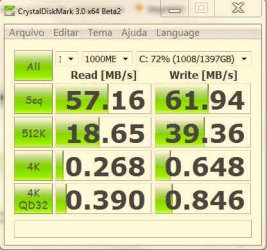
My HDD average read performance is now 104mb/s whereas on the WD it was 69.4. My average seek time is 14.1ms and on the WD is was 14.7.

I know the Seagate is a better performer than the WD anyway, but I think the exercise was worth it. Overall my system seems much more responsive now.
 
....

My HDD average read performance is now 104mb/s whereas on the WD it was 69.4. My average seek time is 14.1ms and on the WD is was 14.7.

I know the Seagate is a better performer than the WD anyway, but I think the exercise was worth it. Overall my system seems much more responsive now.


My WD's peak at 90MB/s on AHCI
your WD value of 69.4 suggests it run in sata/ide mode and not really AHCI
 
Last edited:

My Computer My Computer

At a glance

Win7 x86PhenomII x2 550 (unlocked 4 cores)2x 2GB Kingston 1333Gigabyte HD4850 1GB
Computer Manufacturer/Model Number
self built
OS
Win7 x86
CPU
PhenomII x2 550 (unlocked 4 cores)
Motherboard
Gigabyte GA-MA770T-UD3P
Memory
2x 2GB Kingston 1333
Graphics Card(s)
Gigabyte HD4850 1GB
Sound Card
onboard Realtek
Monitor(s) Displays
Samsung 2233
Screen Resolution
1920x1080
Hard Drives
2x WD 512GB green sata2
PSU
Corsair 620
Case
Armor MX+
Cooling
all stock
Keyboard
MS Digital Media 3000
Mouse
MS Mouse 3000
Internet Speed
adsl2+
....

My HDD average read performance is now 104mb/s whereas on the WD it was 69.4. My average seek time is 14.1ms and on the WD is was 14.7.

I know the Seagate is a better performer than the WD anyway, but I think the exercise was worth it. Overall my system seems much more responsive now.


My WD's peek at 90MB/s on AHCI
your WD value of 69.4 suggests it run in sata/ide mode and not really AHCI

Correct, but we knew that already, that's the reason for the original post :D
My WD peaked at 100.1, but averaged 69.4.
 
I purchased a seagate ST3500418AS and reinstalled Windows with AHCI turned on and connected the drive to the gigabyte sata connector rather than the intel sata connector.

My HDD average read performance is now 104mb/s whereas on the WD it was 69.4. My average seek time is 14.1ms and on the WD is was 14.7.

I know the Seagate is a better performer than the WD anyway, but I think the exercise was worth it. Overall my system seems much more responsive now.

This may be a stupid question but.. Whats a gigabyte sata connector as opposed to an Intel sata connector? And How do I know if I have one?
 

My Computer My Computer

At a glance

Windows 7
OS
Windows 7

Attachments

  • ide.jpg
    ide.jpg
    29.3 KB · Views: 31
  • ahci.jpg
    ahci.jpg
    29.4 KB · Views: 88
Last edited:

My Computer My Computer

At a glance

dual: windows 7 Ultimate x64 7600 and XP SP3AMD PHENOM II 720 2800MHz2 X 2 OCZ REAPER 1066MHzMSI 4850 1GB OC
Computer Manufacturer/Model Number
Personal Built (frankenstein) - WEI Here -> http://www.sevenforums.com/451826-post2094.html
OS
dual: windows 7 Ultimate x64 7600 and XP SP3
CPU
AMD PHENOM II 720 2800MHz
Motherboard
ASUS M4A78 sb700
Memory
2 X 2 OCZ REAPER 1066MHz
Graphics Card(s)
MSI 4850 1GB OC
Sound Card
REALTEK HD ONBOARD
Monitor(s) Displays
LCD SAMSUNG 21" T220
Screen Resolution
1680 x 1050 - 60Hz
Hard Drives
1.5 TB SEAGATE SATA II 7200 RPM
PSU
THERMALTAKE 430W PFC ACTIVE W0069
Case
SOLID FULL ATX
Cooling
COOLER MASTER TX-3 HEAT PIPES
Keyboard
logitech cordless keyboard
Mouse
microsoft wireless
Internet Speed
4Mb
Other Info
sound system: logitech x540 5.1
Zboard Fang gaming keyboard
PS2 joystick
Philips VOIP fone
I purchased a seagate ST3500418AS and reinstalled Windows with AHCI turned on and connected the drive to the gigabyte sata connector rather than the intel sata connector.

My HDD average read performance is now 104mb/s whereas on the WD it was 69.4. My average seek time is 14.1ms and on the WD is was 14.7.

I know the Seagate is a better performer than the WD anyway, but I think the exercise was worth it. Overall my system seems much more responsive now.

This may be a stupid question but.. Whats a gigabyte sata connector as opposed to an Intel sata connector? And How do I know if I have one?

The reply I got from Gigabyte was "Nothing". They said "theoritically" the performance for bnoth chips "should" be the same, just they are two different chips on the motherboard. Intel's is the ICH10R and Gigabytes is the GSATA2.

Ur motherboard may have different colour connectors (on mine the gsata is white while the intel are red), and of course, your mobo's manual will tell you.
 
Back
Top