optimize Windows7 for SSD

upiter77

New member
Member
Local time
10:08 PM
Messages
86
Hi

I have exchanged HDD to SSD on Lenovo ThinkCentre M81 and have done a NEW installation of WIN 7 Prof. 64-bit SP1.
Howto optimize Windows 7 for an internal SSD?
 

My Computer

Computer type
PC/Desktop
Computer Manufacturer/Model Number
ThinkCentre Edge 71 (1578E1G)
OS
Windows7 64bit
CPU
Intel(R) Core(TM) i7-2600S CPU @ 2.80GHz
Motherboard
LENOVO To be filled by O.E.M.
Memory
8.00 GB
Graphics Card(s)
Intel HD Graphics 2000 (Sandy Bridge GT1) 2172 MBytes
Sound Card
RealTek ALC662
Monitor(s) Displays
DELL E197FP
Screen Resolution
1280 x 1024 x 32 bits (4294967296 colors) @ 75 Hz
Hard Drives
WDC WD5003ABYX-01WER SCSI Disk Device
PSU
PC9059, 180W
Case
Desktop
Cooling
Noiseblocker BlackSilent XLP Rev. 3.00
Keyboard
DELL SK-8125 Keyboard
Mouse
Logitech USB Optical Mouse
Internet Speed
cable 75Mbps
Antivirus
McAfee VSE 8.8 SP2
Browser
SeaMonkey 2.24
About all you have to do is confirm that the alignment is OK and that defragmentation is turned off for the SSD.

If you are worried about running out of space, you can turn off hibernation and adjust the page file, but that normally isn't needed.

Just maintain it like you would a standard HDD.
 

My Computer

Computer type
PC/Desktop
Computer Manufacturer/Model Number
Ignatz Special; 4 speed manual gearbox; factory air conditioning; one of one
OS
Windows 7 Home Premium SP1, 64-bit
CPU
Intel Skylake i5-6600K, not overclocked
Motherboard
AsRock Z170M Extreme 4, micro ATX
Memory
8 GB HyperX DDR4-2666 (2 x 4 GB)
Graphics Card(s)
none; graphics are integrated on CPU
Sound Card
onboard: Realtek ALC1150; external: USB Behringer UF0-202
Monitor(s) Displays
Dell S2340M 23 inch IPS
Screen Resolution
1600 x 900
Hard Drives
System: Crucial MX100 series SSD, 128 GB;
Data: Samsung Spinpoint 103SJ, 1 TB;
Backup: WD Caviar Green WD30EZRX-00D8PB0, 3 TB
PSU
Rosewill SilentNight 500 watt fanless, semi-modular
Case
Antec Solo II
Cooling
Noctua NH-U12S; Noctua F12 intake, Noctua S12A exhaust
Keyboard
Microsoft 200 6JH-00001 USB
Mouse
Dell or Microsoft optical wired; USB
Antivirus
Microsoft Security Essentials and Malwarebytes Premium
Browser
Pale Moon
Other Info
All fans PWM; speeds at idle: CPU circa 500 rpm; intake circa 600 rpm; exhaust circa 600 rpm; CPU temps 27 idle and 47 C load in a warm room (27 C/81 F) when running Intel Extreme Tuning Utility stress test.
Thx, I have exchanged my classic SATA drive against SSD Crucial CT1024M550SSD1, done a fresh installation of WIN7 PRO 64-bit SP1 and I turned off defragmentation only.
I hope all other settings are OK for SSD.
 

My Computer

Computer type
PC/Desktop
Computer Manufacturer/Model Number
ThinkCentre Edge 71 (1578E1G)
OS
Windows7 64bit
CPU
Intel(R) Core(TM) i7-2600S CPU @ 2.80GHz
Motherboard
LENOVO To be filled by O.E.M.
Memory
8.00 GB
Graphics Card(s)
Intel HD Graphics 2000 (Sandy Bridge GT1) 2172 MBytes
Sound Card
RealTek ALC662
Monitor(s) Displays
DELL E197FP
Screen Resolution
1280 x 1024 x 32 bits (4294967296 colors) @ 75 Hz
Hard Drives
WDC WD5003ABYX-01WER SCSI Disk Device
PSU
PC9059, 180W
Case
Desktop
Cooling
Noiseblocker BlackSilent XLP Rev. 3.00
Keyboard
DELL SK-8125 Keyboard
Mouse
Logitech USB Optical Mouse
Internet Speed
cable 75Mbps
Antivirus
McAfee VSE 8.8 SP2
Browser
SeaMonkey 2.24
On a fresh install, Windows should have made all the changes automatically. Even defrag. While the SSD drive will show in the defrag list of drives, it should say "Never" in the last run and should never schedule a defrag for it.
 

My Computer

Computer type
PC/Desktop
Computer Manufacturer/Model Number
Built 2/11/2011
OS
Windows 7 Pro-x64
CPU
i7-2600 3.4GHz - 3.8GHz Turbo
Motherboard
Intel DH67BL-B3
Memory
8Gb - 2x4GB, Muskin 991770 PC3-1333
Graphics Card(s)
Integrated Intel HD 2000
Sound Card
Integrated Intel 10.1 HD, RealTek ALC892
Monitor(s) Displays
Asus LCD VH222H, Haier HL24XSL2a
Screen Resolution
1920x1080, 1920x1080
Hard Drives
Crucial SSD C300-128Gb,
Western Digital WD5002AALX - 500Gb,
Western Digital WD7501AALS - 750Gb
PSU
Seasonic 650W 80+ Gold Modular
Case
Rosewill Defender
Cooling
Stock CPU, Four 120mm case fans, PCH fan added
Keyboard
Logitech EX100 Y-RBH94 Wireless
Mouse
Logitech EX100 M-RCE95 Wireless
Internet Speed
3.0/1.5 Mbs
Antivirus
Microsoft Security Essentials
Browser
Microsoft Internet Explorer 11
Other Info
Antec Veris Premier-Multimedia IR Station,
Cyber Accoustics-3602 Speakers,
AFT XM-5U Card Reader,
Hauppauge TV-HVR-2250,
Sony LX300 USB Turntable

My Computer

Computer type
PC/Desktop
Computer Manufacturer/Model Number
Custom assembled by me :}
OS
Win-7-Pro64bit 7-H-Prem-64bit
CPU
i7-5930K 2nd i9-9940x both water blocked VRM's too
Motherboard
ASUS SABERTOOTH X99 2nd ASUS x299 Apex
Memory
Trident-z 3200C14 2nd Trident-z 3600C16
Graphics Card(s)
EVGA 1080ti ftw3 2nd Titan Xp both water blocked
Sound Card
Built-in Realtek
Monitor(s) Displays
1-AOC G2460PG 24"G-Sync 144Hz/ 2nd 1-ASUS VG248QE 24" 144Hz
Screen Resolution
1920 x 1080 144Hz
Hard Drives
2-Samsung M.2 Evo & Evo Plus
2-Samsung 850 EVO 500GB SSD's/ 3-2.5 W.D. Black 1tb-&3-1tb/3-3.5 WD Black 1tb hdd's
PSU
EVGA SuperNOVA 1000-P2 2nd 1200-P2
Case
2-Corsair Obsidian Series 450D Black ATX Mid Tower
Cooling
Custom water loops
Keyboard
Logitech G710+/ 2nd Logitech G910
Mouse
2-RedDragon M901 Perdition 16400 dpi Gaming mouse = wired
Internet Speed
Comcast Ping 19ms 89.31mbps download speed 6.12mbps upload
Antivirus
Malwarebytes Pro/ Superantispyware Pro
Browser
FireFox & Pale moon
Other Info
2nd ASUS X299 Apex/Intel i9-9940x with Custom water loop/7H-Prem-x64/Corsair 450D case/Ram Trident-z 3600C16 4x8gb / Samsung970Evo plus 500gb SSD/Dual ssd EZ swap evo/PSU EVGA SuperNova 1200w-P2 80+Platinum/GPU Titan Xp /8-ML-140 on push-pull on 2-280GTX rads
Thx a lot.

I have another question.
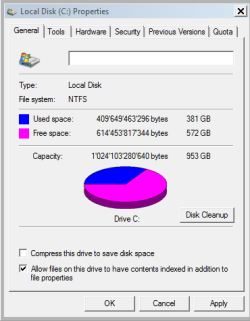
I have in the BIOS "Hard Disk Pre-delay" and don't know if should be disabled or enabled for SSD.
 

My Computer

Computer type
PC/Desktop
Computer Manufacturer/Model Number
ThinkCentre Edge 71 (1578E1G)
OS
Windows7 64bit
CPU
Intel(R) Core(TM) i7-2600S CPU @ 2.80GHz
Motherboard
LENOVO To be filled by O.E.M.
Memory
8.00 GB
Graphics Card(s)
Intel HD Graphics 2000 (Sandy Bridge GT1) 2172 MBytes
Sound Card
RealTek ALC662
Monitor(s) Displays
DELL E197FP
Screen Resolution
1280 x 1024 x 32 bits (4294967296 colors) @ 75 Hz
Hard Drives
WDC WD5003ABYX-01WER SCSI Disk Device
PSU
PC9059, 180W
Case
Desktop
Cooling
Noiseblocker BlackSilent XLP Rev. 3.00
Keyboard
DELL SK-8125 Keyboard
Mouse
Logitech USB Optical Mouse
Internet Speed
cable 75Mbps
Antivirus
McAfee VSE 8.8 SP2
Browser
SeaMonkey 2.24
Normally, you'd leave that in a disabled state.

If you enable it, it would delay the initialization of IDE devices. No reason to delay if your IDE devices (if you have any) are detected when you boot.
 

My Computer

Computer type
PC/Desktop
Computer Manufacturer/Model Number
Ignatz Special; 4 speed manual gearbox; factory air conditioning; one of one
OS
Windows 7 Home Premium SP1, 64-bit
CPU
Intel Skylake i5-6600K, not overclocked
Motherboard
AsRock Z170M Extreme 4, micro ATX
Memory
8 GB HyperX DDR4-2666 (2 x 4 GB)
Graphics Card(s)
none; graphics are integrated on CPU
Sound Card
onboard: Realtek ALC1150; external: USB Behringer UF0-202
Monitor(s) Displays
Dell S2340M 23 inch IPS
Screen Resolution
1600 x 900
Hard Drives
System: Crucial MX100 series SSD, 128 GB;
Data: Samsung Spinpoint 103SJ, 1 TB;
Backup: WD Caviar Green WD30EZRX-00D8PB0, 3 TB
PSU
Rosewill SilentNight 500 watt fanless, semi-modular
Case
Antec Solo II
Cooling
Noctua NH-U12S; Noctua F12 intake, Noctua S12A exhaust
Keyboard
Microsoft 200 6JH-00001 USB
Mouse
Dell or Microsoft optical wired; USB
Antivirus
Microsoft Security Essentials and Malwarebytes Premium
Browser
Pale Moon
Other Info
All fans PWM; speeds at idle: CPU circa 500 rpm; intake circa 600 rpm; exhaust circa 600 rpm; CPU temps 27 idle and 47 C load in a warm room (27 C/81 F) when running Intel Extreme Tuning Utility stress test.

Attachments

  • Capture.PNG
    Capture.PNG
    8.4 KB · Views: 37

My Computer

Computer type
PC/Desktop
Computer Manufacturer/Model Number
ThinkCentre Edge 71 (1578E1G)
OS
Windows7 64bit
CPU
Intel(R) Core(TM) i7-2600S CPU @ 2.80GHz
Motherboard
LENOVO To be filled by O.E.M.
Memory
8.00 GB
Graphics Card(s)
Intel HD Graphics 2000 (Sandy Bridge GT1) 2172 MBytes
Sound Card
RealTek ALC662
Monitor(s) Displays
DELL E197FP
Screen Resolution
1280 x 1024 x 32 bits (4294967296 colors) @ 75 Hz
Hard Drives
WDC WD5003ABYX-01WER SCSI Disk Device
PSU
PC9059, 180W
Case
Desktop
Cooling
Noiseblocker BlackSilent XLP Rev. 3.00
Keyboard
DELL SK-8125 Keyboard
Mouse
Logitech USB Optical Mouse
Internet Speed
cable 75Mbps
Antivirus
McAfee VSE 8.8 SP2
Browser
SeaMonkey 2.24
I would not think so :)
No indexing usually leads to a very slow search function.
 

My Computer

Computer type
PC/Desktop
Computer Manufacturer/Model Number
Custom assembled by me :}
OS
Win-7-Pro64bit 7-H-Prem-64bit
CPU
i7-5930K 2nd i9-9940x both water blocked VRM's too
Motherboard
ASUS SABERTOOTH X99 2nd ASUS x299 Apex
Memory
Trident-z 3200C14 2nd Trident-z 3600C16
Graphics Card(s)
EVGA 1080ti ftw3 2nd Titan Xp both water blocked
Sound Card
Built-in Realtek
Monitor(s) Displays
1-AOC G2460PG 24"G-Sync 144Hz/ 2nd 1-ASUS VG248QE 24" 144Hz
Screen Resolution
1920 x 1080 144Hz
Hard Drives
2-Samsung M.2 Evo & Evo Plus
2-Samsung 850 EVO 500GB SSD's/ 3-2.5 W.D. Black 1tb-&3-1tb/3-3.5 WD Black 1tb hdd's
PSU
EVGA SuperNOVA 1000-P2 2nd 1200-P2
Case
2-Corsair Obsidian Series 450D Black ATX Mid Tower
Cooling
Custom water loops
Keyboard
Logitech G710+/ 2nd Logitech G910
Mouse
2-RedDragon M901 Perdition 16400 dpi Gaming mouse = wired
Internet Speed
Comcast Ping 19ms 89.31mbps download speed 6.12mbps upload
Antivirus
Malwarebytes Pro/ Superantispyware Pro
Browser
FireFox & Pale moon
Other Info
2nd ASUS X299 Apex/Intel i9-9940x with Custom water loop/7H-Prem-x64/Corsair 450D case/Ram Trident-z 3600C16 4x8gb / Samsung970Evo plus 500gb SSD/Dual ssd EZ swap evo/PSU EVGA SuperNova 1200w-P2 80+Platinum/GPU Titan Xp /8-ML-140 on push-pull on 2-280GTX rads
Thx again.

I saw that on my PC Disk Indexing is not disabled.
Should I disable disable Disk Indexing for SSD , to get better performance?

I've always turned off indexing on all drives.

My understanding is that indexing is needed IF you search for the contents of files.

I don't. I search only for file names. I use the Everything search tool from voidtools.com. It is fantastic for that purpose and works about as fast as you can type a name into the search box.

If you are the type of person who would keep a chocolate cake recipe in a file named "Cool stuff.doc", then you probably need indexing.

If you are the type of person who would keep a chocolate cake recipe in a file named "Chocolate cake recipe.doc", you probably do NOT need indexing.
 

My Computer

Computer type
PC/Desktop
Computer Manufacturer/Model Number
Ignatz Special; 4 speed manual gearbox; factory air conditioning; one of one
OS
Windows 7 Home Premium SP1, 64-bit
CPU
Intel Skylake i5-6600K, not overclocked
Motherboard
AsRock Z170M Extreme 4, micro ATX
Memory
8 GB HyperX DDR4-2666 (2 x 4 GB)
Graphics Card(s)
none; graphics are integrated on CPU
Sound Card
onboard: Realtek ALC1150; external: USB Behringer UF0-202
Monitor(s) Displays
Dell S2340M 23 inch IPS
Screen Resolution
1600 x 900
Hard Drives
System: Crucial MX100 series SSD, 128 GB;
Data: Samsung Spinpoint 103SJ, 1 TB;
Backup: WD Caviar Green WD30EZRX-00D8PB0, 3 TB
PSU
Rosewill SilentNight 500 watt fanless, semi-modular
Case
Antec Solo II
Cooling
Noctua NH-U12S; Noctua F12 intake, Noctua S12A exhaust
Keyboard
Microsoft 200 6JH-00001 USB
Mouse
Dell or Microsoft optical wired; USB
Antivirus
Microsoft Security Essentials and Malwarebytes Premium
Browser
Pale Moon
Other Info
All fans PWM; speeds at idle: CPU circa 500 rpm; intake circa 600 rpm; exhaust circa 600 rpm; CPU temps 27 idle and 47 C load in a warm room (27 C/81 F) when running Intel Extreme Tuning Utility stress test.

My Computer

Computer type
PC/Desktop
Computer Manufacturer/Model Number
Custom assembled by me :}
OS
Win-7-Pro64bit 7-H-Prem-64bit
CPU
i7-5930K 2nd i9-9940x both water blocked VRM's too
Motherboard
ASUS SABERTOOTH X99 2nd ASUS x299 Apex
Memory
Trident-z 3200C14 2nd Trident-z 3600C16
Graphics Card(s)
EVGA 1080ti ftw3 2nd Titan Xp both water blocked
Sound Card
Built-in Realtek
Monitor(s) Displays
1-AOC G2460PG 24"G-Sync 144Hz/ 2nd 1-ASUS VG248QE 24" 144Hz
Screen Resolution
1920 x 1080 144Hz
Hard Drives
2-Samsung M.2 Evo & Evo Plus
2-Samsung 850 EVO 500GB SSD's/ 3-2.5 W.D. Black 1tb-&3-1tb/3-3.5 WD Black 1tb hdd's
PSU
EVGA SuperNOVA 1000-P2 2nd 1200-P2
Case
2-Corsair Obsidian Series 450D Black ATX Mid Tower
Cooling
Custom water loops
Keyboard
Logitech G710+/ 2nd Logitech G910
Mouse
2-RedDragon M901 Perdition 16400 dpi Gaming mouse = wired
Internet Speed
Comcast Ping 19ms 89.31mbps download speed 6.12mbps upload
Antivirus
Malwarebytes Pro/ Superantispyware Pro
Browser
FireFox & Pale moon
Other Info
2nd ASUS X299 Apex/Intel i9-9940x with Custom water loop/7H-Prem-x64/Corsair 450D case/Ram Trident-z 3600C16 4x8gb / Samsung970Evo plus 500gb SSD/Dual ssd EZ swap evo/PSU EVGA SuperNova 1200w-P2 80+Platinum/GPU Titan Xp /8-ML-140 on push-pull on 2-280GTX rads
Thx a lot I will disable Disk Indexing on my PC.
 

My Computer

Computer type
PC/Desktop
Computer Manufacturer/Model Number
ThinkCentre Edge 71 (1578E1G)
OS
Windows7 64bit
CPU
Intel(R) Core(TM) i7-2600S CPU @ 2.80GHz
Motherboard
LENOVO To be filled by O.E.M.
Memory
8.00 GB
Graphics Card(s)
Intel HD Graphics 2000 (Sandy Bridge GT1) 2172 MBytes
Sound Card
RealTek ALC662
Monitor(s) Displays
DELL E197FP
Screen Resolution
1280 x 1024 x 32 bits (4294967296 colors) @ 75 Hz
Hard Drives
WDC WD5003ABYX-01WER SCSI Disk Device
PSU
PC9059, 180W
Case
Desktop
Cooling
Noiseblocker BlackSilent XLP Rev. 3.00
Keyboard
DELL SK-8125 Keyboard
Mouse
Logitech USB Optical Mouse
Internet Speed
cable 75Mbps
Antivirus
McAfee VSE 8.8 SP2
Browser
SeaMonkey 2.24
Thx a lot I will disable Disk Indexing on my PC.

Just chiming in here with my 2 cents' worth, so take it at face value. ;)

I uncheck this on my SSD drives (actually, all of my drives) so that the contents aren't indexed, but then go into Indexing Options in the Control Panel, select the drive to Modify, and then have the whole drive and its files indexed this way. I also remove any of the other target locations from specifically being indexed.

Personal preference likely plays a fair role here too as well as the specific scenario. I don't use a page file on one of my SSD computers, because I have 64GB of RAM on that one and don't suffer from crashes (excluding when I've done overclock testing on it, pushing it to its limits). In the unlikely event that it does crash, my priority would be getting it back up and running (even from a backup, if needed) and I honestly most likely wouldn't bother checking out the crash memory dump either way. :o On the other hand, on my laptop before changing it over to running Debian primarily, I left the page file there just in case, because it only has 8GB of RAM.

I actually change the SuperFetch service to starting automatically on SSDs as a slight performance boost, even though it likely isn't perceivable with fast SSDs anyway, but also because my main computer is up and running, crunching for BOINC almost all the time and generally has a fair amount of RAM available, even with using 32GB of it for a RAM drive. Since my main computer is up and running, I run the same programs and use many of the same files multiple different times which to some extent are being held, buffered in RAM for when I need them. Over time I've gotten the Standby buffer size upwards of 40GB before, as I recall, but I don't currently have that much RAM unused and available.

I also have my Windows SSD computers set up to delete files directly instead of having them go to the Recycle Bin. I just make sure not to delete files that I don't actually want to delete. I still have it prompt me to make sure that I want to delete them though. This likely isn't something most people would want set up on their computers. Alternatively, I suppose if someone wanted to help obscure their previous file history for some reason, they might want to have this set up.

The next difference would be that I use over provisioning on SSDs to help extend their lifetime performance and reliability, but at the cost of having to not use a portion of the drive's space. On my Samsung 840 and 850 EVO SSDs, I also enable RAPID mode which is basically a somewhat dynamic capacity and data priority adjusting RAM cache for the drives.

There are other minor tweaks people sometimes make, such as using a HDD as a storage drive for media if they have one available, and relocating temporary file folders to a HDD. I do use a HDD in my main computer as a storage drive for media and backups, and then have another external HDD for backups and bulk storage transfer. I leave temp folders on the SSDs though, since I want them to be nice and snappy when they're in use.

I'm not suggesting that you need to do these things, mind you. The main things you will want to do are checking and seeing if TRIM is enabled and enabling it if it isn't, making sure you're running in AHCI mode, and check if the SSD partition is aligned. These things should be the default these days, but sometimes weird things happen, so it's good to check.

Cheers.

 

My Computer

Computer type
PC/Desktop
OS
Windows 7 Professional SP1 64bit, Manjaro Xfce, Debian 10 64bit Xfce
CPU
Intel i7-3930K @ 4.2GHz
Motherboard
ASUS P9X79 WS
Memory
Corsair Dominator 64GB Quad Channel DDR3 @ 1600MHz
Graphics Card(s)
EVGA GeForce GTX Titan Black Superclocked (×2, SLI)
Monitor(s) Displays
Sony Bravia 46"
Screen Resolution
1920×1080 (Full Screen), 1366×768 (Windows)
Hard Drives
Samsung 860 PRO 4TB SSD, Samsung 850 EVO 1TB SSD, Western Digital WD Gold 16TB 7200 RPM 512MB Cache HDD
PSU
Corsair AX1200 (1200W, 100.4A @ 12V)
Case
Corsair Obsidian 750D
Cooling
Corsair H110, 5 NOCTUA NF-A14 industrialPPC-3000 PWM Fans
Keyboard
Logitech K360
Mouse
Logitech M220
Browser
Firefox Developer Edition, Pale Moon, Tor
Thx a lot.

Now I have a question to Power Settings, if something should be done to save long life of a SSD.
I need to know if "Hibernate" and "Allow Hybrid Sleep" should be deactivated for SSD?
 

My Computer

Computer type
PC/Desktop
Computer Manufacturer/Model Number
ThinkCentre Edge 71 (1578E1G)
OS
Windows7 64bit
CPU
Intel(R) Core(TM) i7-2600S CPU @ 2.80GHz
Motherboard
LENOVO To be filled by O.E.M.
Memory
8.00 GB
Graphics Card(s)
Intel HD Graphics 2000 (Sandy Bridge GT1) 2172 MBytes
Sound Card
RealTek ALC662
Monitor(s) Displays
DELL E197FP
Screen Resolution
1280 x 1024 x 32 bits (4294967296 colors) @ 75 Hz
Hard Drives
WDC WD5003ABYX-01WER SCSI Disk Device
PSU
PC9059, 180W
Case
Desktop
Cooling
Noiseblocker BlackSilent XLP Rev. 3.00
Keyboard
DELL SK-8125 Keyboard
Mouse
Logitech USB Optical Mouse
Internet Speed
cable 75Mbps
Antivirus
McAfee VSE 8.8 SP2
Browser
SeaMonkey 2.24
Hi,
In win-7 hibernation/ hybrid sleep is harmless
Win-8 and now 10 not so harmless depending on how you use other interior and exterior drives.

Hibernation does give a false sense of a computers state = no lights on at all looks like the machine is in full shut down mode
If not using a password this can be a security risk anyone that pushes the power button is directed directly to your open user account = the security risk part.

Hyper sleep about the same
I really just use normal sleep with a screen saver playing continuously with a timer will go to a light flashing indicating the machine is sleeping not hibernating with no lights flashing.

I do not disable hibernation a lot of people do but it's a good fail safe feature in win-7 in case a power outage occurs better on a laptop too because of battery loss but then again if you a UPS battery backup you really wouldn't need hibernation at all on a desktop or if a laptop is connected to it too.

So yes it does depend
Hibernation state with a password is no different than full shut down so use full shut down for the cleanest restart.
I personally don't leave a machine on 24/7/365 I shut down every night or when I leave to work...
 

My Computer

Computer type
PC/Desktop
Computer Manufacturer/Model Number
Custom assembled by me :}
OS
Win-7-Pro64bit 7-H-Prem-64bit
CPU
i7-5930K 2nd i9-9940x both water blocked VRM's too
Motherboard
ASUS SABERTOOTH X99 2nd ASUS x299 Apex
Memory
Trident-z 3200C14 2nd Trident-z 3600C16
Graphics Card(s)
EVGA 1080ti ftw3 2nd Titan Xp both water blocked
Sound Card
Built-in Realtek
Monitor(s) Displays
1-AOC G2460PG 24"G-Sync 144Hz/ 2nd 1-ASUS VG248QE 24" 144Hz
Screen Resolution
1920 x 1080 144Hz
Hard Drives
2-Samsung M.2 Evo & Evo Plus
2-Samsung 850 EVO 500GB SSD's/ 3-2.5 W.D. Black 1tb-&3-1tb/3-3.5 WD Black 1tb hdd's
PSU
EVGA SuperNOVA 1000-P2 2nd 1200-P2
Case
2-Corsair Obsidian Series 450D Black ATX Mid Tower
Cooling
Custom water loops
Keyboard
Logitech G710+/ 2nd Logitech G910
Mouse
2-RedDragon M901 Perdition 16400 dpi Gaming mouse = wired
Internet Speed
Comcast Ping 19ms 89.31mbps download speed 6.12mbps upload
Antivirus
Malwarebytes Pro/ Superantispyware Pro
Browser
FireFox & Pale moon
Other Info
2nd ASUS X299 Apex/Intel i9-9940x with Custom water loop/7H-Prem-x64/Corsair 450D case/Ram Trident-z 3600C16 4x8gb / Samsung970Evo plus 500gb SSD/Dual ssd EZ swap evo/PSU EVGA SuperNova 1200w-P2 80+Platinum/GPU Titan Xp /8-ML-140 on push-pull on 2-280GTX rads
Thx a lot, but what is the difference between a "Normal Sleep" and "Hybrid Sleep" ?
 

My Computer

Computer type
PC/Desktop
Computer Manufacturer/Model Number
ThinkCentre Edge 71 (1578E1G)
OS
Windows7 64bit
CPU
Intel(R) Core(TM) i7-2600S CPU @ 2.80GHz
Motherboard
LENOVO To be filled by O.E.M.
Memory
8.00 GB
Graphics Card(s)
Intel HD Graphics 2000 (Sandy Bridge GT1) 2172 MBytes
Sound Card
RealTek ALC662
Monitor(s) Displays
DELL E197FP
Screen Resolution
1280 x 1024 x 32 bits (4294967296 colors) @ 75 Hz
Hard Drives
WDC WD5003ABYX-01WER SCSI Disk Device
PSU
PC9059, 180W
Case
Desktop
Cooling
Noiseblocker BlackSilent XLP Rev. 3.00
Keyboard
DELL SK-8125 Keyboard
Mouse
Logitech USB Optical Mouse
Internet Speed
cable 75Mbps
Antivirus
McAfee VSE 8.8 SP2
Browser
SeaMonkey 2.24
Thx a lot.

Now I have a question to Power Settings, if something should be done to save long life of a SSD.
I need to know if "Hibernate" and "Allow Hybrid Sleep" should be deactivated for SSD?

The primary reason you'd deactivate hibernation is if you wanted to save space on the SSD.

Hibernation takes up considerable space if you use it. Do you?

If not, no need to keep it. May as well save the space. I don't use it and never have.
 

My Computer

Computer type
PC/Desktop
Computer Manufacturer/Model Number
Ignatz Special; 4 speed manual gearbox; factory air conditioning; one of one
OS
Windows 7 Home Premium SP1, 64-bit
CPU
Intel Skylake i5-6600K, not overclocked
Motherboard
AsRock Z170M Extreme 4, micro ATX
Memory
8 GB HyperX DDR4-2666 (2 x 4 GB)
Graphics Card(s)
none; graphics are integrated on CPU
Sound Card
onboard: Realtek ALC1150; external: USB Behringer UF0-202
Monitor(s) Displays
Dell S2340M 23 inch IPS
Screen Resolution
1600 x 900
Hard Drives
System: Crucial MX100 series SSD, 128 GB;
Data: Samsung Spinpoint 103SJ, 1 TB;
Backup: WD Caviar Green WD30EZRX-00D8PB0, 3 TB
PSU
Rosewill SilentNight 500 watt fanless, semi-modular
Case
Antec Solo II
Cooling
Noctua NH-U12S; Noctua F12 intake, Noctua S12A exhaust
Keyboard
Microsoft 200 6JH-00001 USB
Mouse
Dell or Microsoft optical wired; USB
Antivirus
Microsoft Security Essentials and Malwarebytes Premium
Browser
Pale Moon
Other Info
All fans PWM; speeds at idle: CPU circa 500 rpm; intake circa 600 rpm; exhaust circa 600 rpm; CPU temps 27 idle and 47 C load in a warm room (27 C/81 F) when running Intel Extreme Tuning Utility stress test.

My Computer

Computer type
PC/Desktop
Computer Manufacturer/Model Number
Custom assembled by me :}
OS
Win-7-Pro64bit 7-H-Prem-64bit
CPU
i7-5930K 2nd i9-9940x both water blocked VRM's too
Motherboard
ASUS SABERTOOTH X99 2nd ASUS x299 Apex
Memory
Trident-z 3200C14 2nd Trident-z 3600C16
Graphics Card(s)
EVGA 1080ti ftw3 2nd Titan Xp both water blocked
Sound Card
Built-in Realtek
Monitor(s) Displays
1-AOC G2460PG 24"G-Sync 144Hz/ 2nd 1-ASUS VG248QE 24" 144Hz
Screen Resolution
1920 x 1080 144Hz
Hard Drives
2-Samsung M.2 Evo & Evo Plus
2-Samsung 850 EVO 500GB SSD's/ 3-2.5 W.D. Black 1tb-&3-1tb/3-3.5 WD Black 1tb hdd's
PSU
EVGA SuperNOVA 1000-P2 2nd 1200-P2
Case
2-Corsair Obsidian Series 450D Black ATX Mid Tower
Cooling
Custom water loops
Keyboard
Logitech G710+/ 2nd Logitech G910
Mouse
2-RedDragon M901 Perdition 16400 dpi Gaming mouse = wired
Internet Speed
Comcast Ping 19ms 89.31mbps download speed 6.12mbps upload
Antivirus
Malwarebytes Pro/ Superantispyware Pro
Browser
FireFox & Pale moon
Other Info
2nd ASUS X299 Apex/Intel i9-9940x with Custom water loop/7H-Prem-x64/Corsair 450D case/Ram Trident-z 3600C16 4x8gb / Samsung970Evo plus 500gb SSD/Dual ssd EZ swap evo/PSU EVGA SuperNova 1200w-P2 80+Platinum/GPU Titan Xp /8-ML-140 on push-pull on 2-280GTX rads
I use hibernate on my laptop as a backup save of sorts in case my laptop gets to critically low battery levels. (The laptop is now using Debian/KDE instead of Windows 8.1, but that is a moot point as this setting is an option in either OS, Windows 7 included. I have it set up similarly on my wife's Windows 7 laptop.) I don't use hibernate on my main "desktop" computer and have it disabled. My main computer is up and running nearly all the time. All of these computers use SSDs as their main boot OS drives.

I only use custom power plans and remove/uninstall any pre-installed plan options that may come with the computer (ASUS laptops my case).

As others have said, if you don't use hibernate, then go ahead and disable it.
 

My Computer

Computer type
PC/Desktop
OS
Windows 7 Professional SP1 64bit, Manjaro Xfce, Debian 10 64bit Xfce
CPU
Intel i7-3930K @ 4.2GHz
Motherboard
ASUS P9X79 WS
Memory
Corsair Dominator 64GB Quad Channel DDR3 @ 1600MHz
Graphics Card(s)
EVGA GeForce GTX Titan Black Superclocked (×2, SLI)
Monitor(s) Displays
Sony Bravia 46"
Screen Resolution
1920×1080 (Full Screen), 1366×768 (Windows)
Hard Drives
Samsung 860 PRO 4TB SSD, Samsung 850 EVO 1TB SSD, Western Digital WD Gold 16TB 7200 RPM 512MB Cache HDD
PSU
Corsair AX1200 (1200W, 100.4A @ 12V)
Case
Corsair Obsidian 750D
Cooling
Corsair H110, 5 NOCTUA NF-A14 industrialPPC-3000 PWM Fans
Keyboard
Logitech K360
Mouse
Logitech M220
Browser
Firefox Developer Edition, Pale Moon, Tor
Back
Top