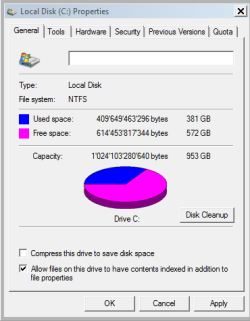
Thx a lot I will disable Disk Indexing on my PC.
Just chiming in here with my 2 cents' worth, so take it at face value.

I uncheck this on my SSD drives (actually, all of my drives) so that the contents aren't indexed, but then go into Indexing Options in the Control Panel, select the drive to Modify, and then have the whole drive and its files indexed this way. I also remove any of the other target locations from specifically being indexed.
Personal preference likely plays a fair role here too as well as the specific scenario. I don't use a page file on one of my SSD computers, because I have 64GB of RAM on that one and don't suffer from crashes (excluding when I've done overclock testing on it, pushing it to its limits). In the unlikely event that it does crash, my priority would be getting it back up and running (even from a backup, if needed) and I honestly most likely wouldn't bother checking out the crash memory dump either way.

On the other hand, on my laptop before changing it over to running Debian primarily, I left the page file there just in case, because it only has 8GB of RAM.
I actually change the SuperFetch service to starting automatically on SSDs as a slight performance boost, even though it likely isn't perceivable with fast SSDs anyway, but also because my main computer is up and running, crunching for BOINC almost all the time and generally has a fair amount of RAM available, even with using 32GB of it for a RAM drive. Since my main computer is up and running, I run the same programs and use many of the same files multiple different times which to some extent are being held, buffered in RAM for when I need them. Over time I've gotten the Standby buffer size upwards of 40GB before, as I recall, but I don't currently have that much RAM unused and available.
I also have my Windows SSD computers set up to delete files directly instead of having them go to the Recycle Bin. I just make sure not to delete files that I don't actually want to delete. I still have it prompt me to make sure that I want to delete them though. This likely isn't something most people would want set up on their computers. Alternatively, I suppose if someone wanted to help obscure their previous file history for some reason, they might want to have this set up.
The next difference would be that I use over provisioning on SSDs to help extend their lifetime performance and reliability, but at the cost of having to not use a portion of the drive's space. On my Samsung 840 and 850 EVO SSDs, I also enable RAPID mode which is basically a somewhat dynamic capacity and data priority adjusting RAM cache for the drives.
There are other minor tweaks people sometimes make, such as using a HDD as a storage drive for media if they have one available, and relocating temporary file folders to a HDD. I do use a HDD in my main computer as a storage drive for media and backups, and then have another external HDD for backups and bulk storage transfer. I leave temp folders on the SSDs though, since I want them to be nice and snappy when they're in use.
I'm not suggesting that you need to do these things, mind you. The main things you will want to do are checking and seeing if TRIM is enabled and enabling it if it isn't, making sure you're running in AHCI mode, and check if the SSD partition is aligned. These things should be the default these days, but sometimes weird things happen, so it's good to check.
Cheers.