OS partition is inaccessible and Windows won't boot

znut

New member
Local time
12:43 AM
Messages
11
I'm in a really awkward situation.
Basically my base 1tb hard driven will not boot windows off of the main partition.

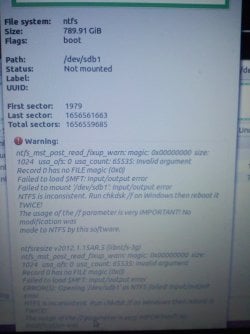
I've been messing with a live Ubuntu usb for a bit. Today, I accidentally began installing Unbuntu to my caching mSATA. I exited out of the installation and reformatted the cache drive. I think this is when my C:/ drive was no longer recognized by Ubuntu. Gparted said something along the lines that it was unstable and missing magic, so run chkdsk /f on it.

I restarted my computer, but was prompted to insert a bootable drive. After doing some serching, I created a recovery disk on my USB and booted that. My C: drive with the is was nowhere to be found.

Using command prompt, I opened DISKPART and reactivated the drive. It is now visible, when searching for drivers at the beginning of the recovery disk, but is not accessible or recognized as my OS drive.

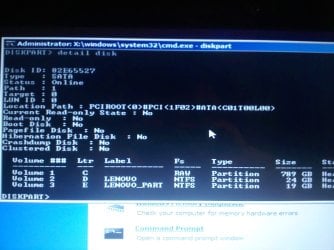
Attempting to run CHKDSK will report it's NTFS, but not not find a volume or state. The partition was even hidden at one point, so I fixed that in DISKPART. Also DISKPART reports the partition is raw.

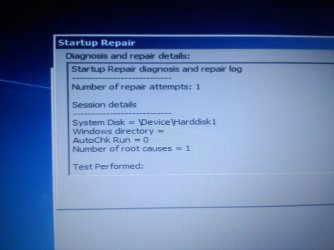
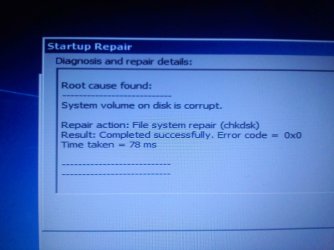
I've tried the start up repair to no avail and rebooting just gives me a unresponsive black screen with blinking terminal cursor. I'm really out of ideas what to do. Can I fix this problem or at least recover my 700+ gigs of files?

Thank you for your time and advice.
 

My Computer My Computer

At a glance

Windows 7 Home Premium x64
Computer type
Laptop
Computer Manufacturer/Model Number
Lenovo Y480
OS
Windows 7 Home Premium x64
Hard Drives
30Gb cache mSATA
1Tb SATA
My Computer My Computer

At a glance

Microsoft Windows 10 Pro Insider Preview 64-bitIntel(R) Core(TM) i3-4130 CPU @ 3.40GHzCorsair Vengence 4GB x2 (8.00GB Dual-Channel ...2047MB GeForce GTS 450 (ZOTAC International)
Computer type
PC/Desktop
Computer Manufacturer/Model Number
Self Assembled
OS
Microsoft Windows 10 Pro Insider Preview 64-bit
CPU
Intel(R) Core(TM) i3-4130 CPU @ 3.40GHz
Motherboard
Gigabyte Technology Co., Ltd. B85M-D3H
Memory
Corsair Vengence 4GB x2 (8.00GB Dual-Channel DDR3 @ 798MHz)
Graphics Card(s)
2047MB GeForce GTS 450 (ZOTAC International)
Sound Card
Onboard (Realtek High Definition Audio)
Monitor(s) Displays
LG Flatron E2040T
Screen Resolution
1600x900
Hard Drives
Western Digital 1 TB
Seagate 500 GB
PSU
Corsair VS550
Case
Cooler Master K380
Cooling
Cooler Master Seidon 120V Plus
Keyboard
Logitech MK260r
Mouse
Logitech MK260r
Internet Speed
PMPL Broadband
Antivirus
Windows Defender + MBAM
Browser
Firefox
Other Info
Dell Studio 15" Laptop
I did not start installing Ubuntu to my c drive.

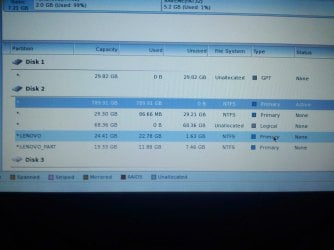
Disk 1 was my 30 gig cache mSATA that I reformatted after starting to install Ubuntu on it.
The top partition of Disk 2 is my Windows_OS drive
The rest are various partitions.
 

My Computer My Computer

At a glance

Windows 7 Home Premium x64
Computer type
Laptop
Computer Manufacturer/Model Number
Lenovo Y480
OS
Windows 7 Home Premium x64
Hard Drives
30Gb cache mSATA
1Tb SATA
Upload the screenshot if you can .... it will help us to help you better.
 

My Computer My Computer

At a glance

Microsoft Windows 10 Pro Insider Preview 64-bitIntel(R) Core(TM) i3-4130 CPU @ 3.40GHzCorsair Vengence 4GB x2 (8.00GB Dual-Channel ...2047MB GeForce GTS 450 (ZOTAC International)
Computer type
PC/Desktop
Computer Manufacturer/Model Number
Self Assembled
OS
Microsoft Windows 10 Pro Insider Preview 64-bit
CPU
Intel(R) Core(TM) i3-4130 CPU @ 3.40GHz
Motherboard
Gigabyte Technology Co., Ltd. B85M-D3H
Memory
Corsair Vengence 4GB x2 (8.00GB Dual-Channel DDR3 @ 798MHz)
Graphics Card(s)
2047MB GeForce GTS 450 (ZOTAC International)
Sound Card
Onboard (Realtek High Definition Audio)
Monitor(s) Displays
LG Flatron E2040T
Screen Resolution
1600x900
Hard Drives
Western Digital 1 TB
Seagate 500 GB
PSU
Corsair VS550
Case
Cooler Master K380
Cooling
Cooler Master Seidon 120V Plus
Keyboard
Logitech MK260r
Mouse
Logitech MK260r
Internet Speed
PMPL Broadband
Antivirus
Windows Defender + MBAM
Browser
Firefox
Other Info
Dell Studio 15" Laptop
Sorry, It didn't like me uploading from my Nexus 7.

Disk 1 was my 30 gig cache mSATA that I reformatted after starting to install Ubuntu on it.
The top partition of Disk 2 is my Windows_OS drive
The rest are various partitions.
 

Attachments

  • 0310031305.jpg
    0310031305.jpg
    240.6 KB · Views: 18

My Computer My Computer

At a glance

Windows 7 Home Premium x64
Computer type
Laptop
Computer Manufacturer/Model Number
Lenovo Y480
OS
Windows 7 Home Premium x64
Hard Drives
30Gb cache mSATA
1Tb SATA
In Disk2, there are four primary and one logical partition ..... moreover, C is not showing the Drive letter and it seems to be full.. I guess it is not a GPT disc, so it cannot handle more than four (A logical with its sub-partitions are treated as one primary) partitions.

Copy everything needful to an external device, following the guide http://www.sevenforums.com/tutorials/93347-copy-paste-windows-recovery-console.html

Then, disconnect Disc 1, format the entire Disk 2 and do a http://www.sevenforums.com/tutorials/219487-clean-reinstall-factory-oem-windows-7-a.html
 

My Computer My Computer

At a glance

Microsoft Windows 10 Pro Insider Preview 64-bitIntel(R) Core(TM) i3-4130 CPU @ 3.40GHzCorsair Vengence 4GB x2 (8.00GB Dual-Channel ...2047MB GeForce GTS 450 (ZOTAC International)
Computer type
PC/Desktop
Computer Manufacturer/Model Number
Self Assembled
OS
Microsoft Windows 10 Pro Insider Preview 64-bit
CPU
Intel(R) Core(TM) i3-4130 CPU @ 3.40GHz
Motherboard
Gigabyte Technology Co., Ltd. B85M-D3H
Memory
Corsair Vengence 4GB x2 (8.00GB Dual-Channel DDR3 @ 798MHz)
Graphics Card(s)
2047MB GeForce GTS 450 (ZOTAC International)
Sound Card
Onboard (Realtek High Definition Audio)
Monitor(s) Displays
LG Flatron E2040T
Screen Resolution
1600x900
Hard Drives
Western Digital 1 TB
Seagate 500 GB
PSU
Corsair VS550
Case
Cooler Master K380
Cooling
Cooler Master Seidon 120V Plus
Keyboard
Logitech MK260r
Mouse
Logitech MK260r
Internet Speed
PMPL Broadband
Antivirus
Windows Defender + MBAM
Browser
Firefox
Other Info
Dell Studio 15" Laptop
I figured it'd come to this. The if the main partition of Disk 2 is not readable, as in it shows up, but cannot be explored. Is there another way to save some of the files? And I've been meaning to install OEM Windows 7 onto Disk 1, do you think that is a good choice still?

Thank you for all your help.
 

My Computer My Computer

At a glance

Windows 7 Home Premium x64
Computer type
Laptop
Computer Manufacturer/Model Number
Lenovo Y480
OS
Windows 7 Home Premium x64
Hard Drives
30Gb cache mSATA
1Tb SATA
The Disk 1 is 30 GB only .... after installation you may need to move the user folders in Disk 2 to have some workable space there.

You may try with the ubuntu live CD to explore the Disk 2. Can you do it?
 

My Computer My Computer

At a glance

Microsoft Windows 10 Pro Insider Preview 64-bitIntel(R) Core(TM) i3-4130 CPU @ 3.40GHzCorsair Vengence 4GB x2 (8.00GB Dual-Channel ...2047MB GeForce GTS 450 (ZOTAC International)
Computer type
PC/Desktop
Computer Manufacturer/Model Number
Self Assembled
OS
Microsoft Windows 10 Pro Insider Preview 64-bit
CPU
Intel(R) Core(TM) i3-4130 CPU @ 3.40GHz
Motherboard
Gigabyte Technology Co., Ltd. B85M-D3H
Memory
Corsair Vengence 4GB x2 (8.00GB Dual-Channel DDR3 @ 798MHz)
Graphics Card(s)
2047MB GeForce GTS 450 (ZOTAC International)
Sound Card
Onboard (Realtek High Definition Audio)
Monitor(s) Displays
LG Flatron E2040T
Screen Resolution
1600x900
Hard Drives
Western Digital 1 TB
Seagate 500 GB
PSU
Corsair VS550
Case
Cooler Master K380
Cooling
Cooler Master Seidon 120V Plus
Keyboard
Logitech MK260r
Mouse
Logitech MK260r
Internet Speed
PMPL Broadband
Antivirus
Windows Defender + MBAM
Browser
Firefox
Other Info
Dell Studio 15" Laptop
I'm about to double check if I can access the the main partition in the recovery, but here is what Gparted had to say when I wanted to mount the partition. I've tried forcing the mount but had no luck. I can go to my school's tech services tomorrow, but what are the chances they've got a magic program to recover the data?
 

Attachments

  • 0310031448.jpg
    0310031448.jpg
    269.7 KB · Views: 8

My Computer My Computer

At a glance

Windows 7 Home Premium x64
Computer type
Laptop
Computer Manufacturer/Model Number
Lenovo Y480
OS
Windows 7 Home Premium x64
Hard Drives
30Gb cache mSATA
1Tb SATA
I requested Gregrocker to see your thread. He can do it what you are wanting.
 

My Computer My Computer

At a glance

Microsoft Windows 10 Pro Insider Preview 64-bitIntel(R) Core(TM) i3-4130 CPU @ 3.40GHzCorsair Vengence 4GB x2 (8.00GB Dual-Channel ...2047MB GeForce GTS 450 (ZOTAC International)
Computer type
PC/Desktop
Computer Manufacturer/Model Number
Self Assembled
OS
Microsoft Windows 10 Pro Insider Preview 64-bit
CPU
Intel(R) Core(TM) i3-4130 CPU @ 3.40GHz
Motherboard
Gigabyte Technology Co., Ltd. B85M-D3H
Memory
Corsair Vengence 4GB x2 (8.00GB Dual-Channel DDR3 @ 798MHz)
Graphics Card(s)
2047MB GeForce GTS 450 (ZOTAC International)
Sound Card
Onboard (Realtek High Definition Audio)
Monitor(s) Displays
LG Flatron E2040T
Screen Resolution
1600x900
Hard Drives
Western Digital 1 TB
Seagate 500 GB
PSU
Corsair VS550
Case
Cooler Master K380
Cooling
Cooler Master Seidon 120V Plus
Keyboard
Logitech MK260r
Mouse
Logitech MK260r
Internet Speed
PMPL Broadband
Antivirus
Windows Defender + MBAM
Browser
Firefox
Other Info
Dell Studio 15" Laptop
So you turned off the controller which RAIDs the 32gb cache drive (actually a chip on the HD or mobo) so you could install Ubuntu onto it? This is tricky even when we try to do it with Win7 so all bets are off if you also imposed GRUB on it. GRUB does not always play well with Win7.

Your Disk Mgmt shows the large OS partition is marked Active but does not have the Boot flag which in Partition Wizard means the System Boot files are not booting correctly. System is the flag in Disk Mgmt, Boot means the same thing in PW.

So to fix this make sure the Win7 HD is set first to boot in BIOS setup, boot into Win7 DVD to run Startup Repair - Run up to 3 Separate Times, report back what it finds.

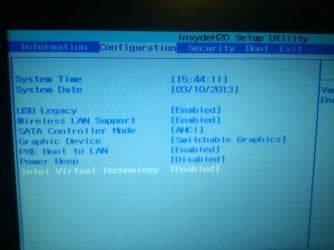
Check also in BIOS setup what any EFI settings are, including Legacy BIOS and Compatibility Support Module.

You'll need to read the Manual for your specific mobo or PC to see how to work the cache drive back in, which may require turning back on the Controller to RAID it again then running Recovery. But every PC/mobo is different with this feature. What we've helped do here is unRAID it by turning off the controller to install Win7 on it when users insist this is what they want, in spite of how pitifully small an SSD it is.
 
Last edited:
Thank you for your help. That diagnosis sounds right, although breaking the RAID and installing Ubuntu was accidental. I'll report back. I can worry about reCaching the drive later.
 

My Computer My Computer

At a glance

Windows 7 Home Premium x64
Computer type
Laptop
Computer Manufacturer/Model Number
Lenovo Y480
OS
Windows 7 Home Premium x64
Hard Drives
30Gb cache mSATA
1Tb SATA
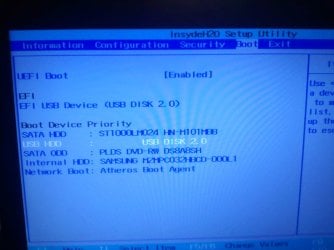
The first two pictures are my current bios settings. The boot order ect has probably changed.

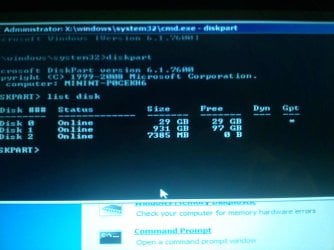
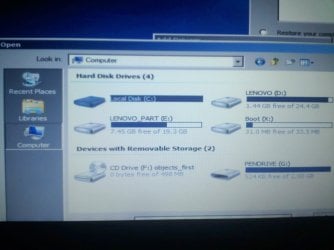
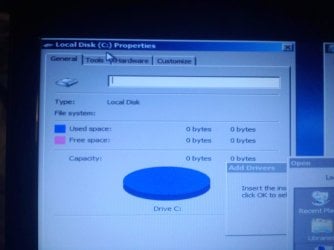
The remaining three pictures are disk/partition status after running the recovery 3 times. It does not recognize that the main partition, let alone the partition is bootable, and it says it's raw.
 

Attachments

  • 0310031750.jpg
    0310031750.jpg
    217 KB · Views: 6
  • 0310031748.jpg
    0310031748.jpg
    233 KB · Views: 7
  • 0310031742.jpg
    0310031742.jpg
    185 KB · Views: 7
  • 0310031644.jpg
    0310031644.jpg
    180.1 KB · Views: 6
  • 0310031644a.jpg
    0310031644a.jpg
    219.8 KB · Views: 7

My Computer My Computer

At a glance

Windows 7 Home Premium x64
Computer type
Laptop
Computer Manufacturer/Model Number
Lenovo Y480
OS
Windows 7 Home Premium x64
Hard Drives
30Gb cache mSATA
1Tb SATA
This is probably why it recognizes the c drive but won't do anything with it. I looked at it's properties and tried to disk check it, but had no luck.

As for the startup repair, I'm not really sure what it was trying to do. It ran very briefly and seemed to fix it, however when it reboots the system has a boot error.

It says it used chkdsk to repair it, however I've already tried using chkdsk and it would spit back out that the partition was of an unknown volume and state.

One more thing, I tried to convert the "raw" partition to ntfs, but cmd responded saying that the partition was already ntfs.
 

Attachments

  • 0310031735.jpg
    0310031735.jpg
    180.8 KB · Views: 6
  • 0310031736.jpg
    0310031736.jpg
    204.2 KB · Views: 6
  • 0310031736a.jpg
    0310031736a.jpg
    208.4 KB · Views: 6
  • 0310031729.jpg
    0310031729.jpg
    268.2 KB · Views: 6
  • 0310031730b.jpg
    0310031730b.jpg
    318 KB · Views: 4

My Computer My Computer

At a glance

Windows 7 Home Premium x64
Computer type
Laptop
Computer Manufacturer/Model Number
Lenovo Y480
OS
Windows 7 Home Premium x64
Hard Drives
30Gb cache mSATA
1Tb SATA
Your HD has no UEFI boot partition even though the BIOS is set to UEFI mode. This means that it can't boot or repair. Did you change the BIOS setting to UEFI from Legacy BIOS mode?

Is the HD booting in MBR mode which means it was installed without UEFI in Legacy Mode? You can check this now by seeing what it allows for conversion (without doing so) when you rightclick on the area in the red box below:


If it says Convert to GPT Disk you have an MBR HD which means it could not have been installed in UEFI mode. You can Disable UEFI mode and enable Legacy BIOS or Compatibility Support Module (CSM) to see if it will repair using the steps I gave you earlier which are to repair a Win7 install in Legacy BIOS mode on an MBR disk.

If you're completely blind about UEFI and need to understand it better before proceeding, watch this video first:

 
I don't think my bios gives me these options. I changed a few things but they didn't seem to work. At this point, I'm just going to have my school's tech support recover what ever dates they can then just wipe the drive and reinstall windows. This is getting too involved for me. Is this a plausible solution?
 

My Computer My Computer

At a glance

Windows 7 Home Premium x64
Computer type
Laptop
Computer Manufacturer/Model Number
Lenovo Y480
OS
Windows 7 Home Premium x64
Hard Drives
30Gb cache mSATA
1Tb SATA
Probably the best course since trying to install an OS on the 32gb SSD cache is extremely complex even when it isn't done accidentally.

You can try to rescuiing your data now to an external USB using Copy & Paste - in Windows Recovery Console or Paragon Rescue Kit Free Edition 11.0 Free CD.

If this succeeds you can also try running Lenovo One-Key Factory Recovery from boot which is Chapter 3 in the Manual here. In fact I'd read the entire manual: http://download.lenovo.com/consumer/mobiles_pub/ideapad_y480y580_ug_v2.0_jul_2012_english.pdf
 
Alright. Thank you very much for your help. It is greatly appreciated.
 

My Computer My Computer

At a glance

Windows 7 Home Premium x64
Computer type
Laptop
Computer Manufacturer/Model Number
Lenovo Y480
OS
Windows 7 Home Premium x64
Hard Drives
30Gb cache mSATA
1Tb SATA
No prob. Keep us posted on how it goes. We see at least one of these SSD cache issues per week since they came out.
 
I don't know if the problem is solved or not. But I had the same problem with a linux install. As when i installed it as a dual boot it wouldn't let me dual boot just striaght into the linux OS. What i had to do was use hirens and mini windows xp to access it and delete two partitions as it creates partitions that is not regonised by MS so when i went in through this i could see the hidden partitions and everything was good again.
 

My Computer My Computer

At a glance

Windows 7 Ultimate 64-bitIntel Core 2 Duo E6550 @2.33GHz4GB DDR"NVIDIA GeForce 8600 GS
Computer type
PC/Desktop
Computer Manufacturer/Model Number
Dell / Lenovo g550
OS
Windows 7 Ultimate 64-bit
CPU
Intel Core 2 Duo E6550 @2.33GHz
Motherboard
foxconn g33m02
Memory
4GB DDR"
Graphics Card(s)
NVIDIA GeForce 8600 GS
Hard Drives
HDD 1 = 150GB
HDD 2 = 1.5TB
PSU
450W
Cooling
Stock fan
Internet Speed
12Mb
Antivirus
AVG Internet Security
Back
Top