p45 chipset problem

qwade29

New member
Local time
9:41 PM
Messages
19
I did a clean install of 7600 and when I got to install the chipset driver that I got straight from intel, it doesn't install. I have been trying to figure this out for the past 2 days now. I've searched here and googled so much that I've wore my google toolbar out if you know what I mean.

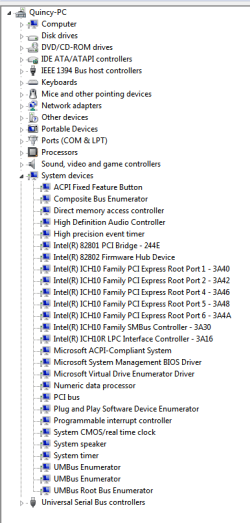
Anyway, I will click on setup to install and it goes though like its going to install and at the end it will say that it has successfully installed. So I will reboot and then I go to device manager, then system devices. It's not there. It doesn't show. I don't know what else to do. here is as of right now what my device manager looks like.
 

Attachments

  • Capture.PNG
    Capture.PNG
    15.2 KB · Views: 98

My Computer

Computer Manufacturer/Model Number
Custom Built
OS
Win 7 Home Premium X64
CPU
Intel E8400 3.0 @ 3.96ghz
Motherboard
Gigabyte GA-EP45-ud3p
Memory
4x1 gig Corsair Dominator
Graphics Card(s)
Radeon HD 4350
Sound Card
onboard
Monitor(s) Displays
Gateway 19" Widescreen
Screen Resolution
1440x900
Hard Drives
1x 320gig WD
1x 500gig WD
PSU
600 watt coolermaster
Case
Antec 300
Cooling
2x 120mm front fans, 1x 120mm rear fan, and 1x 140mm top fan
qwade

Did win 7 install a chipset driver for you? for chipset dont you have to be looking in computer for chipset?

What makes you thiink you need to upgrade your chipset?
 

My Computer

Computer Manufacturer/Model Number
HP Pavillion dv-7 1005 Tx
OS
Win 8 Release candidate 8400
CPU
[email protected]
Memory
4 gigs
Graphics Card(s)
Nvidia 9600M
Sound Card
HD built-in
Monitor(s) Displays
17" Wxga
Screen Resolution
1440x900
Cooling
none
Internet Speed
45Mb down 5Mb up
qwade

Did win 7 install a chipset driver for you? for chipset dont you have to be looking in computer for chipset?

What makes you thiink you need to upgrade your chipset?
Like Zigzag3141 has stated. From the looks of your device mngr snip everything looks fine. this is a list of the win 7 drivers avalible, I don't see where their is any fix or preformance gain from updating, that is to say if 7 hasn't already installed these drivers http://www.gigabyte.us/Support/Moth...?ProductID=3013&ost=windows+7+64bit#anchor_os
 

My Computer

Computer Manufacturer/Model Number
Self Built
OS
Windows 7 ultimate 64 bit / XP Home sp3
CPU
intel Core 2 Duo E8400 3.0ghz
Motherboard
Asus P5ND bios 1401
Memory
8 gigs 1066 OCZ Fata1ty
Graphics Card(s)
EVGA GTX 580 Call of Duty Black Ops Edition
Sound Card
Creative Soundblaster Audigy 2zs
Monitor(s) Displays
Asus 24in LCD's 2MS X2
Screen Resolution
1920x1080p @60Hz
Hard Drives
WD Caviar 500 Black/ WD Caviar 200 Blue
PSU
OCZ 700W GameXtreme
Case
NZXT Apollo
Cooling
Corsair H50 CPU/120mm x3 /60mm x2 /Corsair Dominator Ram
Keyboard
Logitech Bluetooth Wireless MX5000
Mouse
Logitech Bluetooth Wireless MX1000
Internet Speed
Download 19.83 Upload 0.97
Other Info
Logitech Z2300 Speakers/ Bose Noise Cancelling Headphones/Avermedia PCI-e Hybrid TV Bravo/Epson NX415 all in one/ 4 Port Powered USB Hub/ LG 10x Bluray Burner /TSST Corp DVDRW External
qwade

Did win 7 install a chipset driver for you? for chipset dont you have to be looking in computer for chipset?

What makes you thiink you need to upgrade your chipset?

No! here is all the updates that i've got. Right now when I go to update it says everything is up to date.

Well, because as you see that in my device manager it doesn't even show the display adapter. When I go to change my screen res. all it shows is default monitor.
 

Attachments

  • updates.JPG
    updates.JPG
    91.2 KB · Views: 40

My Computer

Computer Manufacturer/Model Number
Custom Built
OS
Win 7 Home Premium X64
CPU
Intel E8400 3.0 @ 3.96ghz
Motherboard
Gigabyte GA-EP45-ud3p
Memory
4x1 gig Corsair Dominator
Graphics Card(s)
Radeon HD 4350
Sound Card
onboard
Monitor(s) Displays
Gateway 19" Widescreen
Screen Resolution
1440x900
Hard Drives
1x 320gig WD
1x 500gig WD
PSU
600 watt coolermaster
Case
Antec 300
Cooling
2x 120mm front fans, 1x 120mm rear fan, and 1x 140mm top fan
I did a clean install of 7600 and when I got to install the chipset driver that I got straight from intel, it doesn't install. I have been trying to figure this out for the past 2 days now. I've searched here and googled so much that I've wore my google toolbar out if you know what I mean.

Anyway, I will click on setup to install and it goes though like its going to install and at the end it will say that it has successfully installed. So I will reboot and then I go to device manager, then system devices. It's not there. It doesn't show. I don't know what else to do. here is as of right now what my device manager looks like.


When you don't get activity with install of latest chipset, it means that it has installed over a version that had all updates. So the driver is installed.
Did you install latest Cats for your vid card?Is this the chipset version? INF_allOS_9.1.1.1020_PV.exe?
 

My Computer

Computer Manufacturer/Model Number
Asus
OS
Windows 7 x64 Ultimate SP1
CPU
I5 875K Unlocked
Motherboard
P7P55D-E-PRO
Memory
Kingston HyperX Genesis DDR3-1600MHz 9-9-9-27 @ 1.65V XMP
Graphics Card(s)
EVGA GeForce GTX 570 HD 732 MHz GPU 1280 MB, 152 GB Mem
Sound Card
Onboard Via 1828S
Monitor(s) Displays
Samsung T240 HD
Screen Resolution
Dual 1920X1200 1027X768
Hard Drives
OCZ Vertex II Extended Sandforce SSD 60 Gig 2X WD Black Caviar 1 terabyte 6GBS Transer Sata 3 Marvell Chip
PSU
Corsair Gold fully Modular 80 Plus 850
Case
Coolermaster Half X Full Tower
Cooling
Noctua NH-U12P
Keyboard
MS
Mouse
MS
Internet Speed
Fast enough
Other Info
My fridge has a water tap
If you know your monitors exact model # then you can go to the gateway site and try to download and install the monitor driver. The picture you posred is of microsoft OS updates. In your first post snip you have to show us the display expanded so we can see what adapter it is showing,which I think is VGA which means you need to find out what your display adapter is and download the driver and install it.
 

My Computer

Computer Manufacturer/Model Number
Self Built
OS
Windows 7 ultimate 64 bit / XP Home sp3
CPU
intel Core 2 Duo E8400 3.0ghz
Motherboard
Asus P5ND bios 1401
Memory
8 gigs 1066 OCZ Fata1ty
Graphics Card(s)
EVGA GTX 580 Call of Duty Black Ops Edition
Sound Card
Creative Soundblaster Audigy 2zs
Monitor(s) Displays
Asus 24in LCD's 2MS X2
Screen Resolution
1920x1080p @60Hz
Hard Drives
WD Caviar 500 Black/ WD Caviar 200 Blue
PSU
OCZ 700W GameXtreme
Case
NZXT Apollo
Cooling
Corsair H50 CPU/120mm x3 /60mm x2 /Corsair Dominator Ram
Keyboard
Logitech Bluetooth Wireless MX5000
Mouse
Logitech Bluetooth Wireless MX1000
Internet Speed
Download 19.83 Upload 0.97
Other Info
Logitech Z2300 Speakers/ Bose Noise Cancelling Headphones/Avermedia PCI-e Hybrid TV Bravo/Epson NX415 all in one/ 4 Port Powered USB Hub/ LG 10x Bluray Burner /TSST Corp DVDRW External
I did a clean install of 7600 and when I got to install the chipset driver that I got straight from intel, it doesn't install. I have been trying to figure this out for the past 2 days now. I've searched here and googled so much that I've wore my google toolbar out if you know what I mean.

Anyway, I will click on setup to install and it goes though like its going to install and at the end it will say that it has successfully installed. So I will reboot and then I go to device manager, then system devices. It's not there. It doesn't show. I don't know what else to do. here is as of right now what my device manager looks like.


When you don't get activity with install of latest chipset, it means that it has installed over a version that had all updates. So the driver is installed.
Did you install latest Cats for your vid card?Is this the chipset version? INF_allOS_9.1.1.1020_PV.exe?

That's another problem about my video card. I go to install, then restart and nothing. I go to device manager and there is no display adapter there so it doesn't see the vid card. I go to ati to get my drivers. I've got the latest 9.9.

About the chipset version, yes! that is the one that I've got installed.
 

My Computer

Computer Manufacturer/Model Number
Custom Built
OS
Win 7 Home Premium X64
CPU
Intel E8400 3.0 @ 3.96ghz
Motherboard
Gigabyte GA-EP45-ud3p
Memory
4x1 gig Corsair Dominator
Graphics Card(s)
Radeon HD 4350
Sound Card
onboard
Monitor(s) Displays
Gateway 19" Widescreen
Screen Resolution
1440x900
Hard Drives
1x 320gig WD
1x 500gig WD
PSU
600 watt coolermaster
Case
Antec 300
Cooling
2x 120mm front fans, 1x 120mm rear fan, and 1x 140mm top fan
Ok so your video card isn't being recognized by windows.This is a problem I have seen on this site a lot. The only thing I can suggest is to reset your CMOS, and or remove the video card then reinstall it( do this with the power off and the cable unplugged) Make sure if their is power needed to be supplied to the card it is plugged in. Then restart your system and see if Windows will recognize your card. If it does it should install a generic driver for it.If this happens then you can download the 9.9 catalyst driver to your desktop, go to device mngr, click on update driver, then select browse your computer and direct it to your desktop.
 

My Computer

Computer Manufacturer/Model Number
Self Built
OS
Windows 7 ultimate 64 bit / XP Home sp3
CPU
intel Core 2 Duo E8400 3.0ghz
Motherboard
Asus P5ND bios 1401
Memory
8 gigs 1066 OCZ Fata1ty
Graphics Card(s)
EVGA GTX 580 Call of Duty Black Ops Edition
Sound Card
Creative Soundblaster Audigy 2zs
Monitor(s) Displays
Asus 24in LCD's 2MS X2
Screen Resolution
1920x1080p @60Hz
Hard Drives
WD Caviar 500 Black/ WD Caviar 200 Blue
PSU
OCZ 700W GameXtreme
Case
NZXT Apollo
Cooling
Corsair H50 CPU/120mm x3 /60mm x2 /Corsair Dominator Ram
Keyboard
Logitech Bluetooth Wireless MX5000
Mouse
Logitech Bluetooth Wireless MX1000
Internet Speed
Download 19.83 Upload 0.97
Other Info
Logitech Z2300 Speakers/ Bose Noise Cancelling Headphones/Avermedia PCI-e Hybrid TV Bravo/Epson NX415 all in one/ 4 Port Powered USB Hub/ LG 10x Bluray Burner /TSST Corp DVDRW External
Are you running a dual boot?
It boots of xp without issues?
 

My Computer

Computer Manufacturer/Model Number
Asus
OS
Windows 7 x64 Ultimate SP1
CPU
I5 875K Unlocked
Motherboard
P7P55D-E-PRO
Memory
Kingston HyperX Genesis DDR3-1600MHz 9-9-9-27 @ 1.65V XMP
Graphics Card(s)
EVGA GeForce GTX 570 HD 732 MHz GPU 1280 MB, 152 GB Mem
Sound Card
Onboard Via 1828S
Monitor(s) Displays
Samsung T240 HD
Screen Resolution
Dual 1920X1200 1027X768
Hard Drives
OCZ Vertex II Extended Sandforce SSD 60 Gig 2X WD Black Caviar 1 terabyte 6GBS Transer Sata 3 Marvell Chip
PSU
Corsair Gold fully Modular 80 Plus 850
Case
Coolermaster Half X Full Tower
Cooling
Noctua NH-U12P
Keyboard
MS
Mouse
MS
Internet Speed
Fast enough
Other Info
My fridge has a water tap

My Computer

Computer Manufacturer/Model Number
Custom Built
OS
Win 7 Home Premium X64
CPU
Intel E8400 3.0 @ 3.96ghz
Motherboard
Gigabyte GA-EP45-ud3p
Memory
4x1 gig Corsair Dominator
Graphics Card(s)
Radeon HD 4350
Sound Card
onboard
Monitor(s) Displays
Gateway 19" Widescreen
Screen Resolution
1440x900
Hard Drives
1x 320gig WD
1x 500gig WD
PSU
600 watt coolermaster
Case
Antec 300
Cooling
2x 120mm front fans, 1x 120mm rear fan, and 1x 140mm top fan
Well alright, I called a friend to help me figure this out because I've been at this for 2 days now and I'm was about ready to throw my computer out the window. So I gave my computer to him to figure out. 30 mins later he calls and says I've got figured out. I did some searching on intel's website and this is what I found.

From intel

The Intel® Chipset Software Installation Utility (also known as the Intel® Chipset Device Software) is often referred to as the chipset driver or chipset drivers. This is a common misconception.

What is a driver?
A driver is a program that allows a computer to communicate (or talk to) a piece of hardware. The Intel Chipset Software Installation Utility, however, is not a driver, nor does it include drivers. It contains information files (INFs).

What is an INF?
An INF is a text file that provides the operating system with information about a piece of hardware on the system. In the case of the current Intel Chipset Software Installation Utility, that information is primarily the product name for the piece of hardware. This allows the operating system to show the correct name for that piece of hardware in Device Manager.
Is an INF useful?
If a chipset is released well after an operating system, the INF allows the operating system to identify all the pieces of the chipset. Intel and Microsoft* work together to include information on both current and future chipsets in new operating systems so, in many cases, the operating system will recognize all the pieces of the chipset even without the INF.

Do I need to install the Intel Chipset Software Installation Utility then?
The best rule of thumb is that, unless you are installing an operating system, you don't need to install the Intel Chipset Software Installation Utility. If you do install the Intel Chipset Software Installation Utility after installing the operating system, and the installation program recognizes that some or all of the product names in Device Manager match the product names in the included INF files, it just won't install those INF files.

After reading this he got to thinking you've got the E8400 that is 3.0ghz but you have it OC'ed to 4.0ghz. So I'm thinking the reason it's not installing is because the chipset doesn't recognize your processor as being an e8400 3.0ghz. It thinks it is something else so it's not going to install.

So what he did is restart go into the bios, hit F7 for optimized defaults. F10 to save. Then reboot again. At this point everything in the bios is at factory defaults. He choose to go to my win7 install and when it starts up, he gets a message in the lower righthand corner where the clock is and it says "device found" then device installing. Last, device/hardware ready to use. Something like that. I think you know what I'm talking about.

After that, I go into my device manager and what do you know, my chipset drivers are there underneath system devices and also at the top is my display device and it show my video card.
Ok, cool he figured this out.

So I get it back from him and bring it home. I go to install all my programs and vid card driver. Everything is installed and working good. Alright, I go to restart and back to my bios to load my overclock settings back. Save, restart, boot to win7 and what the hell. I'm back to the beginning. I go to device manager and no chipset drivers nor video card is showing up now. So I go to screen resolution and what does say "default monitor". I just don't understand why it would do that.

I go back to bios, load optimized defaults. Boot back into win7 and chipset and vid card drivers are all there again in device manager. So I'm thinking it might be a win7 problem because 7600 is a beta version. So I will leave this alone for now until I get the final version come the 22nd. I'm getting home premium.

I thank everybody for helping me.
 

My Computer

Computer Manufacturer/Model Number
Custom Built
OS
Win 7 Home Premium X64
CPU
Intel E8400 3.0 @ 3.96ghz
Motherboard
Gigabyte GA-EP45-ud3p
Memory
4x1 gig Corsair Dominator
Graphics Card(s)
Radeon HD 4350
Sound Card
onboard
Monitor(s) Displays
Gateway 19" Widescreen
Screen Resolution
1440x900
Hard Drives
1x 320gig WD
1x 500gig WD
PSU
600 watt coolermaster
Case
Antec 300
Cooling
2x 120mm front fans, 1x 120mm rear fan, and 1x 140mm top fan
Well alright, I called a friend to help me figure this out because I've been at this for 2 days now and I'm was about ready to throw my computer out the window. So I gave my computer to him to figure out. 30 mins later he calls and says I've got figured out. I did some searching on intel's website and this is what I found.

From intel

The Intel® Chipset Software Installation Utility (also known as the Intel® Chipset Device Software) is often referred to as the chipset driver or chipset drivers. This is a common misconception.

What is a driver?
A driver is a program that allows a computer to communicate (or talk to) a piece of hardware. The Intel Chipset Software Installation Utility, however, is not a driver, nor does it include drivers. It contains information files (INFs).

What is an INF?
An INF is a text file that provides the operating system with information about a piece of hardware on the system. In the case of the current Intel Chipset Software Installation Utility, that information is primarily the product name for the piece of hardware. This allows the operating system to show the correct name for that piece of hardware in Device Manager.
Is an INF useful?
If a chipset is released well after an operating system, the INF allows the operating system to identify all the pieces of the chipset. Intel and Microsoft* work together to include information on both current and future chipsets in new operating systems so, in many cases, the operating system will recognize all the pieces of the chipset even without the INF.

Do I need to install the Intel Chipset Software Installation Utility then?
The best rule of thumb is that, unless you are installing an operating system, you don't need to install the Intel Chipset Software Installation Utility. If you do install the Intel Chipset Software Installation Utility after installing the operating system, and the installation program recognizes that some or all of the product names in Device Manager match the product names in the included INF files, it just won't install those INF files.

After reading this he got to thinking you've got the E8400 that is 3.0ghz but you have it OC'ed to 4.0ghz. So I'm thinking the reason it's not installing is because the chipset doesn't recognize your processor as being an e8400 3.0ghz. It thinks it is something else so it's not going to install.

So what he did is restart go into the bios, hit F7 for optimized defaults. F10 to save. Then reboot again. At this point everything in the bios is at factory defaults. He choose to go to my win7 install and when it starts up, he gets a message in the lower righthand corner where the clock is and it says "device found" then device installing. Last, device/hardware ready to use. Something like that. I think you know what I'm talking about.

After that, I go into my device manager and what do you know, my chipset drivers are there underneath system devices and also at the top is my display device and it show my video card.
Ok, cool he figured this out.

So I get it back from him and bring it home. I go to install all my programs and vid card driver. Everything is installed and working good. Alright, I go to restart and back to my bios to load my overclock settings back. Save, restart, boot to win7 and what the hell. I'm back to the beginning. I go to device manager and no chipset drivers nor video card is showing up now. So I go to screen resolution and what does say "default monitor". I just don't understand why it would do that.

I go back to bios, load optimized defaults. Boot back into win7 and chipset and vid card drivers are all there again in device manager. So I'm thinking it might be a win7 problem because 7600 is a beta version. So I will leave this alone for now until I get the final version come the 22nd. I'm getting home premium.

I thank everybody for helping me.


Chipset Device Software, is the first thing that you want to install on a clean system. Windows usually always has an .INF (as mentioned) file for chipset on install cd whether it be Nvidia, Intel, AMD, SIS, VIA and so on unless the board has a chipset built after OS release then you will more than need to install the chipset driver in order for the OS to properly recognise your hardware.

The word chipset driver was a proper term in the past because most packages included the AGP or Gart driver, IDE ports etc. etc.

It is still always wise to install .INF files after a clean install to make sure that the OS properly identifies your hardware (like in the case of your card or screen) because you could get confused and think that you either have an issue with the hardware or the OS.

In your case, it seems that there is an issue with the bios and chipset communication. Intel will not give support (even on RTM) until it's official release.

You can check to see if .INF files are installed or install them manually this way for Win 7.

************************************************************
* 9F. INSTALLING THE Windows 7* INF FILES AFTER
* OS INSTALLATION
************************************************************
Some Intel(R) chipset platforms already are supported by
Windows 7* so it may not be necessary to use the INF
files provided by this software to update Windows 7*.
The following steps describe the installation process of
the Windows 7* INF files. You may need to repeat these
steps to update all Intel(R) chipset devices not supported
by Windows 7*.
1. Copy the contents of the
<INF Extract Directory>\XXXX\Win7
directory to the root directory A removable media,
such as a USB flash drive (UFD) or floppy disk (A:\).

NOTE:
XXXX is the directory name for the chipset
of interest. Refer to Section 8 for more details.

2. Close all programs currently running on the system.
3. Click on Start.
4. Select Settings.
5. Select the Control Panel.
6. Double-click on the System icon.
7. Click on the Hardware tab.
8. Click on the Device Manager button.
9. Select "Devices by connection" under the View menu.
10. Click on MPS Uniprocessor PC -OR- MPS
Multiprocessor PC.

NOTE:
Only one of the above items will be
displayed for a given system.

11. Click on PCI bus.
12. Right-click on the line containing the description
PCI standard host CPU bridge
-or-
PCI standard ISA bridge
-or-
PCI standard PCI-to-PCI bridge
-or-
PCI System Management Bus
-or-
Standard Dual PCI IDE Controller
-or-
Standard Universal PCI to USB Host Controller
(This line will be selected.)
13. Select Properties from the pull-down menu.
14. Click on the Driver tab.
15. Click on the Update Driver button.
16. Windows 7* will launch the Upgrade Device
Driver Wizard. Select Browse my computer for the driver software.
17. Enter "A:\" in the Combo Box
18. Ensure that the Include Subfolders checkbox is checked
19. Select Next
20. The window Will Display the Device that was installed
21. Select Close
22. Reboot the system if prompted to do so.

 

My Computer

Computer Manufacturer/Model Number
Asus
OS
Windows 7 x64 Ultimate SP1
CPU
I5 875K Unlocked
Motherboard
P7P55D-E-PRO
Memory
Kingston HyperX Genesis DDR3-1600MHz 9-9-9-27 @ 1.65V XMP
Graphics Card(s)
EVGA GeForce GTX 570 HD 732 MHz GPU 1280 MB, 152 GB Mem
Sound Card
Onboard Via 1828S
Monitor(s) Displays
Samsung T240 HD
Screen Resolution
Dual 1920X1200 1027X768
Hard Drives
OCZ Vertex II Extended Sandforce SSD 60 Gig 2X WD Black Caviar 1 terabyte 6GBS Transer Sata 3 Marvell Chip
PSU
Corsair Gold fully Modular 80 Plus 850
Case
Coolermaster Half X Full Tower
Cooling
Noctua NH-U12P
Keyboard
MS
Mouse
MS
Internet Speed
Fast enough
Other Info
My fridge has a water tap
Well alright, I called a friend to help me figure this out because I've been at this for 2 days now and I'm was about ready to throw my computer out the window. So I gave my computer to him to figure out. 30 mins later he calls and says I've got figured out. I did some searching on intel's website and this is what I found.

From intel

The Intel® Chipset Software Installation Utility (also known as the Intel® Chipset Device Software) is often referred to as the chipset driver or chipset drivers. This is a common misconception.

What is a driver?
A driver is a program that allows a computer to communicate (or talk to) a piece of hardware. The Intel Chipset Software Installation Utility, however, is not a driver, nor does it include drivers. It contains information files (INFs).

What is an INF?
An INF is a text file that provides the operating system with information about a piece of hardware on the system. In the case of the current Intel Chipset Software Installation Utility, that information is primarily the product name for the piece of hardware. This allows the operating system to show the correct name for that piece of hardware in Device Manager.
Is an INF useful?
If a chipset is released well after an operating system, the INF allows the operating system to identify all the pieces of the chipset. Intel and Microsoft* work together to include information on both current and future chipsets in new operating systems so, in many cases, the operating system will recognize all the pieces of the chipset even without the INF.

Do I need to install the Intel Chipset Software Installation Utility then?
The best rule of thumb is that, unless you are installing an operating system, you don't need to install the Intel Chipset Software Installation Utility. If you do install the Intel Chipset Software Installation Utility after installing the operating system, and the installation program recognizes that some or all of the product names in Device Manager match the product names in the included INF files, it just won't install those INF files.

After reading this he got to thinking you've got the E8400 that is 3.0ghz but you have it OC'ed to 4.0ghz. So I'm thinking the reason it's not installing is because the chipset doesn't recognize your processor as being an e8400 3.0ghz. It thinks it is something else so it's not going to install.

So what he did is restart go into the bios, hit F7 for optimized defaults. F10 to save. Then reboot again. At this point everything in the bios is at factory defaults. He choose to go to my win7 install and when it starts up, he gets a message in the lower righthand corner where the clock is and it says "device found" then device installing. Last, device/hardware ready to use. Something like that. I think you know what I'm talking about.

After that, I go into my device manager and what do you know, my chipset drivers are there underneath system devices and also at the top is my display device and it show my video card.
Ok, cool he figured this out.

So I get it back from him and bring it home. I go to install all my programs and vid card driver. Everything is installed and working good. Alright, I go to restart and back to my bios to load my overclock settings back. Save, restart, boot to win7 and what the hell. I'm back to the beginning. I go to device manager and no chipset drivers nor video card is showing up now. So I go to screen resolution and what does say "default monitor". I just don't understand why it would do that.

I go back to bios, load optimized defaults. Boot back into win7 and chipset and vid card drivers are all there again in device manager. So I'm thinking it might be a win7 problem because 7600 is a beta version. So I will leave this alone for now until I get the final version come the 22nd. I'm getting home premium.

I thank everybody for helping me.


Chipset Device Software, is the first thing that you want to install on a clean system. Windows usually always has an .INF (as mentioned) file for chipset on install cd whether it be Nvidia, Intel, AMD, SIS, VIA and so on unless the board has a chipset built after OS release then you will more than need to install the chipset driver in order for the OS to properly recognise your hardware.

The word chipset driver was a proper term in the past because most packages included the AGP or Gart driver, IDE ports etc. etc.

It is still always wise to install .INF files after a clean install to make sure that the OS properly identifies your hardware (like in the case of your card or screen) because you could get confused and think that you either have an issue with the hardware or the OS.

In your case, it seems that there is an issue with the bios and chipset communication. Intel will not give support (even on RTM) until it's official release.

You can check to see if .INF files are installed or install them manually this way for Win 7.

************************************************************
* 9F. INSTALLING THE Windows 7* INF FILES AFTER
* OS INSTALLATION
************************************************************
Some Intel(R) chipset platforms already are supported by
Windows 7* so it may not be necessary to use the INF
files provided by this software to update Windows 7*.
The following steps describe the installation process of
the Windows 7* INF files. You may need to repeat these
steps to update all Intel(R) chipset devices not supported
by Windows 7*.
1. Copy the contents of the
<INF Extract Directory>\XXXX\Win7
directory to the root directory A removable media,
such as a USB flash drive (UFD) or floppy disk (A:\).

NOTE:
XXXX is the directory name for the chipset
of interest. Refer to Section 8 for more details.

2. Close all programs currently running on the system.
3. Click on Start.
4. Select Settings.
5. Select the Control Panel.
6. Double-click on the System icon.
7. Click on the Hardware tab.
8. Click on the Device Manager button.
9. Select "Devices by connection" under the View menu.
10. Click on MPS Uniprocessor PC -OR- MPS
Multiprocessor PC.

NOTE:
Only one of the above items will be
displayed for a given system.

11. Click on PCI bus.
12. Right-click on the line containing the description
PCI standard host CPU bridge
-or-
PCI standard ISA bridge
-or-
PCI standard PCI-to-PCI bridge
-or-
PCI System Management Bus
-or-
Standard Dual PCI IDE Controller
-or-
Standard Universal PCI to USB Host Controller
(This line will be selected.)
13. Select Properties from the pull-down menu.
14. Click on the Driver tab.
15. Click on the Update Driver button.
16. Windows 7* will launch the Upgrade Device
Driver Wizard. Select Browse my computer for the driver software.
17. Enter "A:\" in the Combo Box
18. Ensure that the Include Subfolders checkbox is checked
19. Select Next
20. The window Will Display the Device that was installed
21. Select Close
22. Reboot the system if prompted to do so.

I'm just trying to figure out why I can't have overclocked. I have to run it at stock settings on win7 to have chipset and vid card show it device manager. you think a bios update would help? My board is rev. 1.1 with F7 bios.
 

My Computer

Computer Manufacturer/Model Number
Custom Built
OS
Win 7 Home Premium X64
CPU
Intel E8400 3.0 @ 3.96ghz
Motherboard
Gigabyte GA-EP45-ud3p
Memory
4x1 gig Corsair Dominator
Graphics Card(s)
Radeon HD 4350
Sound Card
onboard
Monitor(s) Displays
Gateway 19" Widescreen
Screen Resolution
1440x900
Hard Drives
1x 320gig WD
1x 500gig WD
PSU
600 watt coolermaster
Case
Antec 300
Cooling
2x 120mm front fans, 1x 120mm rear fan, and 1x 140mm top fan
I'm not shure but it looks like a bios issue.

I would update to latest bios if you haven't yet or wait to see if board maker (Gigabyte) puts one out.
 

My Computer

Computer Manufacturer/Model Number
Asus
OS
Windows 7 x64 Ultimate SP1
CPU
I5 875K Unlocked
Motherboard
P7P55D-E-PRO
Memory
Kingston HyperX Genesis DDR3-1600MHz 9-9-9-27 @ 1.65V XMP
Graphics Card(s)
EVGA GeForce GTX 570 HD 732 MHz GPU 1280 MB, 152 GB Mem
Sound Card
Onboard Via 1828S
Monitor(s) Displays
Samsung T240 HD
Screen Resolution
Dual 1920X1200 1027X768
Hard Drives
OCZ Vertex II Extended Sandforce SSD 60 Gig 2X WD Black Caviar 1 terabyte 6GBS Transer Sata 3 Marvell Chip
PSU
Corsair Gold fully Modular 80 Plus 850
Case
Coolermaster Half X Full Tower
Cooling
Noctua NH-U12P
Keyboard
MS
Mouse
MS
Internet Speed
Fast enough
Other Info
My fridge has a water tap
Back
Top