Partition issues....HELP!!!

Davy7RC

New member
Local time
7:46 PM
Messages
47
Location
Massachusetts
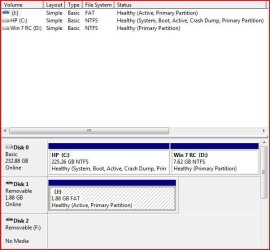
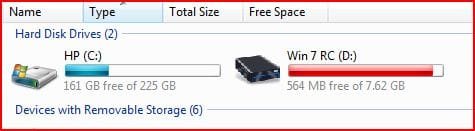
Hi all.....Having a problem after dual-boot install of Vista & 7RC. My HD is 250GB, of which 225GB is used on the Vista partition. When I shrank the volume to create space for the 7RC it only would give me 7.62GB;tried over and over to make a bigger space, that's all I could get. Now the partition for 7 is pretty much full; only have 296MB left...while the Vista part used 158GB out of the 225. I read that you could delete the pagefile.sys and hiberfil.sys to make more space available...Should I??? What would happen to my PC if I did so??? Thank you for any help!!!
 

My Computer

Computer Manufacturer/Model Number
HP Pavilion a6009n Desktop
OS
Vista / 7 RC 7100/Virtual XP
CPU
AMD Athlon 64x2 Dual-Core Processor 3800 + 2.00GHz
Motherboard
Asus M2N68-LA
Memory
2.00GB
Graphics Card(s)
NVidia GeForce 6150SE nForce 430
Monitor(s) Displays
HPmx705
Screen Resolution
1024x768
Hard Drives
SeaGate 7200.10 Barracuda 250GB
Mouse
Logitech TrackMan Wheel
Internet Speed
DSL--1056kbits/sec x 448kbits/sec

My Computer

Computer Manufacturer/Model Number
Keeps changing - (Custom)
OS
Windows 7 Professional x64
CPU
Intel Core i7 860
Motherboard
Gigabyte GA-P55-UD4P
Memory
4GB DDR3 Mushkin 1600Mhz @ 7-8-7-20
Graphics Card(s)
MSI GTS250 1GB DDR3 Twin Frozr
Sound Card
Onboard realtek
Monitor(s) Displays
Samsung SyncMaster 24" P2450 + Samsung 20" 2033
Screen Resolution
1920 X 1080 and 1600 X 900 (#2 system 1440 X 900)
Hard Drives
Patriot Inferno 120GB SSD + 3 WD Blue 640GB drives
PSU
Corsair 750 HX Modular
Case
Lancool PC-K62
Cooling
Cooler Master TX3 CPU cooler and 4-140mm and 1-120mm case
Keyboard
Gigabyte USB keyboard
Mouse
Microsoft wireless laser mouse 5000
Internet Speed
7 Mb down 1.5 up
Other Info
System #2: AMD Phenom II X6 1055T (Freezer 7 Pro cooler) - Gigabyte 880GMA-UD2H - WD 500GB Black - 9500GT (1GB) 500W OCZ modular PSU - Antec 200 case. System #3 (LapTop) Core 2 Duo T6670 - 320GB 7200RPM HD - 4GB DDR3 RAM.
Thanks for your quick reply....I have a 32-bit system/ I have Easeus and tried it but it always says there's an error. Not sure what I'm doing wrong:confused:. I also updated my PC specs; they should be listed. Thanks again!!
 

My Computer

Computer Manufacturer/Model Number
HP Pavilion a6009n Desktop
OS
Vista / 7 RC 7100/Virtual XP
CPU
AMD Athlon 64x2 Dual-Core Processor 3800 + 2.00GHz
Motherboard
Asus M2N68-LA
Memory
2.00GB
Graphics Card(s)
NVidia GeForce 6150SE nForce 430
Monitor(s) Displays
HPmx705
Screen Resolution
1024x768
Hard Drives
SeaGate 7200.10 Barracuda 250GB
Mouse
Logitech TrackMan Wheel
Internet Speed
DSL--1056kbits/sec x 448kbits/sec
The error is the free Easeus doesn't come with a boot disc.

You can't move system files with the windows GUI while you are booted into the o/s partition, neither can you move them on the System partition that way.

There is a bootable partition manager attached to this tutorial:

Dual Boot using free partitioning software - Vista Forums

If you post a screenshot of Disk Management we can advise how to proceed, like this:

DISKMANAGEMENT2009-02-04_031947.jpg

Also , do you need to keep your existing 7 installation, or would you be happy to reinstall after reorganising the partritions.

You don't have to reinstall, you can keep both installations by repartitioning and shifting - it's just a couple more steps are needed.
 

My Computers

System One System Two

  • Computer type
    PC/Desktop
    OS
    7 X64
    CPU
    i5 8400
    Motherboard
    gigabyte b365m ds3h
    Memory
    2x8gb 3200mhz
    Hard Drives
    various
    PSU
    pure power 11 400w cm
    Case
    Coolermaster
    Cooling
    cryorig m9i
  • Computer type
    PC/Desktop
    OS
    7x64
    CPU
    g5400
    Motherboard
    ga b365m ds3h
    Memory
    8gb ddr4 2400
    PSU
    xfx pro 450w
I have tested Acronis DiskDirector Suite v.12 on several systems, Vista and XP, on IDE and SATA HD. It has always been able to adjust partitions as I needed... both ways, up or down...
 
Whichever way is easiest, but it's no biggie if I have to reinstall;already did it twice already. Trying to get a screenshot of my disk management;how do I do that? I have a ScanDisk CruzerMicro 2GB USB Flash drive; noticed that in the disk management ,when it's plugged in it shows as a 1.88GB FAT healthy (Active primary partition). Can I use that to help me? I can show it to you, if you explain how to take a screenshot and post it on here....
 

My Computer

Computer Manufacturer/Model Number
HP Pavilion a6009n Desktop
OS
Vista / 7 RC 7100/Virtual XP
CPU
AMD Athlon 64x2 Dual-Core Processor 3800 + 2.00GHz
Motherboard
Asus M2N68-LA
Memory
2.00GB
Graphics Card(s)
NVidia GeForce 6150SE nForce 430
Monitor(s) Displays
HPmx705
Screen Resolution
1024x768
Hard Drives
SeaGate 7200.10 Barracuda 250GB
Mouse
Logitech TrackMan Wheel
Internet Speed
DSL--1056kbits/sec x 448kbits/sec
Take a jpeg screenshot of the Disk Management window - use whatever screen capture tool you have, or the Snipping Tool.

Click the Go Advanced button at the bottom of this page , then follow Step 8 onward of this tutorial:

How to use the Snipping Tool in Vista - Vista Forums

Hope it helps
 

My Computers

System One System Two

  • Computer type
    PC/Desktop
    OS
    7 X64
    CPU
    i5 8400
    Motherboard
    gigabyte b365m ds3h
    Memory
    2x8gb 3200mhz
    Hard Drives
    various
    PSU
    pure power 11 400w cm
    Case
    Coolermaster
    Cooling
    cryorig m9i
  • Computer type
    PC/Desktop
    OS
    7x64
    CPU
    g5400
    Motherboard
    ga b365m ds3h
    Memory
    8gb ddr4 2400
    PSU
    xfx pro 450w
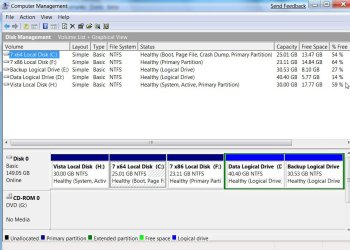
Ok, I'm downloading Paragon Partition Manager Express as I type (takes about an hour and some min) and I figured out the Snipping Tool...here's the screenshot; any ideas on what I could do? I appreciate your help!!
 

Attachments

  • Capture.JPG
    Capture.JPG
    45 KB · Views: 31

My Computer

Computer Manufacturer/Model Number
HP Pavilion a6009n Desktop
OS
Vista / 7 RC 7100/Virtual XP
CPU
AMD Athlon 64x2 Dual-Core Processor 3800 + 2.00GHz
Motherboard
Asus M2N68-LA
Memory
2.00GB
Graphics Card(s)
NVidia GeForce 6150SE nForce 430
Monitor(s) Displays
HPmx705
Screen Resolution
1024x768
Hard Drives
SeaGate 7200.10 Barracuda 250GB
Mouse
Logitech TrackMan Wheel
Internet Speed
DSL--1056kbits/sec x 448kbits/sec
WOW! the windows 7 setup let you install on a partition that small, that should not happen.
 

My Computer

OS
Win 7
Well it did and i've had no problems with it....WEIRD!!! I got it from the Microsoft site directly and used ISO Burner and burned it to a DVD+RW/4x 4.7GB 2hr disc, then created the partition and installed it; no probs at all...maybe there's some sort of compression involved here I really don't know....what's your take???:sarc:
 

My Computer

Computer Manufacturer/Model Number
HP Pavilion a6009n Desktop
OS
Vista / 7 RC 7100/Virtual XP
CPU
AMD Athlon 64x2 Dual-Core Processor 3800 + 2.00GHz
Motherboard
Asus M2N68-LA
Memory
2.00GB
Graphics Card(s)
NVidia GeForce 6150SE nForce 430
Monitor(s) Displays
HPmx705
Screen Resolution
1024x768
Hard Drives
SeaGate 7200.10 Barracuda 250GB
Mouse
Logitech TrackMan Wheel
Internet Speed
DSL--1056kbits/sec x 448kbits/sec
Hi,

You may be able to use Express version from within 7 partition , but you would need to make it the System partition to do that.

Get the boot disc - it is attached to tutorial link:

Click the Blue link - near the top of the page

Dual Boot using free partitioning software - Vista Forums
 

My Computers

System One System Two

  • Computer type
    PC/Desktop
    OS
    7 X64
    CPU
    i5 8400
    Motherboard
    gigabyte b365m ds3h
    Memory
    2x8gb 3200mhz
    Hard Drives
    various
    PSU
    pure power 11 400w cm
    Case
    Coolermaster
    Cooling
    cryorig m9i
  • Computer type
    PC/Desktop
    OS
    7x64
    CPU
    g5400
    Motherboard
    ga b365m ds3h
    Memory
    8gb ddr4 2400
    PSU
    xfx pro 450w
The problem to start with is not having enough drive space to meet the minimum MS recommends being about 16gb. As soon as you went to install everything you ran out of space too fast. You will need to backup things from the Vista primary first and use GParted live in order to see the C Vista primary reduced while booted live from that rather then using any in Windows program.

Once the Vista primary is shrunk and you try to expand the 7 primary be prepared in case the resize sees 7 crash and made unbootable. The best move would be to first shrink the primary once files are removed to free up more space and then see a new larger primary created for 7!
 

My Computers

System One System Two

  • Computer type
    PC/Desktop
    Computer Manufacturer/Model Number
    Custom builds = 2
    OS
    W7 Ultimate x64/W10 Pro x64/W11 Pro Triple Boot - Main PC W7 Remote PC Micro ATX W7 Pro x64/W11 Pro
    CPU
    AMD Phenom II X4 975 Deneb 3.6ghz - 965 2nd remote pc
    Motherboard
    Gigabyte GA-790XTA-UD4-Gigabyte GA-880GM-D2H remote pc
    Memory
    Kingston Hyper X DDR3 1600 1.5v 16gb - Hyper X Fury 8gb 2nd
    Graphics Card(s)
    MSI HD Radeon 5750 1gb - MSI HD Radeon 6450 on mini tower
    Sound Card
    Creative Labs X-Fi Xtreme Audio P - Realtek onooard 2nd case
    Monitor(s) Displays
    ASUS VW199T-P 19" HP 2082a Main-HP 2082a 20" remote pc
    Screen Resolution
    Asus 1440x900 - HP 1600x900
    Hard Drives
    WD Black 1TB HD per OS W7, W10, and pending W11 presently on 500gb OS Drive - Pending Triple 1TB HDs for Spanned Storage/backup volume
    Single 2TB external USB enclosure, single 1TB System 7 Host/Boot drive, Pending 8TB external HD for system image b
    PSU
    Corsair 750TX - primary / Corsair CX600 - second
    Case
    Antec 900-2 - SSD compatible / NZXT Vulcan mini tower
    Cooling
    Zalman CNPS9900A
    Keyboard
    AZIO L70 Backlit Letters Gaming - ONN Cordless/USB
    Mouse
    MSI DS200 Programmable, Logitech Cordless
    Internet Speed
    30mbps upgrade - primary hard wired - mini tower usb WiFi
    Antivirus
    GFI VIPRE Internet Security 2014 on W7 2016 beta on W10,
    Browser
    Cyberfox, WaterFox 64bit FF variants, FireFox x64, Pale Moon
    Other Info
    Accomdata fan cooled usb 2.0 PIDE/Sata II, III external enclosure.
    Sambient usb/eSata PATA/Sata II, III external enclosure.
  • Computer type
    PC/Desktop
    System Manufacturer/Model Number
    CUSTOM ASSEMBLY
    OS
    W7 Pro x64/W11 Pro
    CPU
    AMD Deneb 3.6ghz - 965
    Motherboard
    Gigabyte GA-880GM-D2H remote pc
    Memory
    Kingston Hyper X Fury 8gb
    Graphics Card(s)
    MSI HD Radeon 6450 DVI Output
    Sound Card
    Realtek onooard Creative or Other separate PENDING
    Monitor(s) Displays
    VIZIO 32" LCD TV Separate LCD Pending
    Screen Resolution
    1600x1080
    Hard Drives
    WD 500GB OS Host/Boot WD Green 1TB Storage/Backup
    PSU
    Corsair 600W - THERMALTAKE 600W spare case
    Case
    NZXT Vulcan mini tower
    Cooling
    Twin 120mm Top Fans - 240mm Side Cover
    Keyboard
    ONN Cordless/USB Logitech Cordless
    Mouse
    ONN USB/Cordless - Logitech Cordless
    Internet Speed
    DSL 5G
    Browser
    MS Edge, FireFox, WaterFox x64, FireFox Nightly
    Other Info
    OS Testing-Remote Access to Main TeamViewer
So what kind of files can I get rid of, and how? I already eliminated the Recovery Partition for Vista cause I have the disks anyways. The way it looks to me the primary Vista partition already has a ton of space available (158GB used from 225GB)....or am I wrong??
 

Attachments

  • Drives.JPG
    Drives.JPG
    18.9 KB · Views: 3
  • Capture.JPG
    Capture.JPG
    45 KB · Views: 9

My Computer

Computer Manufacturer/Model Number
HP Pavilion a6009n Desktop
OS
Vista / 7 RC 7100/Virtual XP
CPU
AMD Athlon 64x2 Dual-Core Processor 3800 + 2.00GHz
Motherboard
Asus M2N68-LA
Memory
2.00GB
Graphics Card(s)
NVidia GeForce 6150SE nForce 430
Monitor(s) Displays
HPmx705
Screen Resolution
1024x768
Hard Drives
SeaGate 7200.10 Barracuda 250GB
Mouse
Logitech TrackMan Wheel
Internet Speed
DSL--1056kbits/sec x 448kbits/sec
As per you post Win7 needs mininum or 12GB to - upgrade on the specific HD, your post shows only 7 GB and 500 mb free... it makes no difference how much C:\ has unless your going to clean install from C:\

Increase the FREE Space on D:\ to min 16GB. Then it will upgrade.
 
You need to shrink the C partition first - there are system files in the way - you need to use one of the apps. you are downloading now.

It may take a while to do that .

You will then have ( depending how much you choose to shrink it by - you need to leave some breathing space on there) e.g.

C = 200gb
Unallocated Space=25gb
D=7gb or so.

Then you could either:

1. Simply boot the 7 dvd and reinstall.

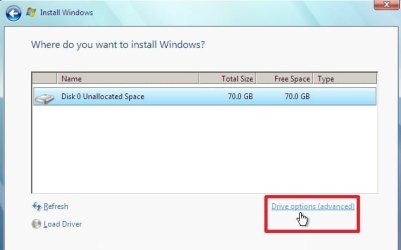
During the installation, select Drive Options (advanced):

DRIVE OPTIONS(ADVANCED)2009-03-19_151649.jpg

DRIVE OPTIONS -2-2009-05-08_003105.jpg

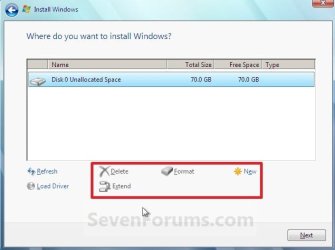
Delete D - you now have 32gb unallocated.

Make one partition of 32gb from the unallocated space.

Install 7 onto that new 32gb partition.

OR:

2. Use the Copy function the on boot cd you downloaded to copy D partition into the 25gb unallocated space.

Delete D then extend the newly copied partition.

Make a bcd entry for it - so you get the boot selection menu ( Running startup repair from the 7 dvd should do that).

http://www.sevenforums.com/tutorials/1649-clean-install-windows-7-a.html


Hope it helps
 

My Computers

System One System Two

  • Computer type
    PC/Desktop
    OS
    7 X64
    CPU
    i5 8400
    Motherboard
    gigabyte b365m ds3h
    Memory
    2x8gb 3200mhz
    Hard Drives
    various
    PSU
    pure power 11 400w cm
    Case
    Coolermaster
    Cooling
    cryorig m9i
  • Computer type
    PC/Desktop
    OS
    7x64
    CPU
    g5400
    Motherboard
    ga b365m ds3h
    Memory
    8gb ddr4 2400
    PSU
    xfx pro 450w
GParted will easiy take care of shrinking the Vista primary down in size without worry of the unmovable files since no OS will be loaded at the time. The problem comes when trying to move the D primary 7 is on back to where the C primary is reduced to.

That's called a time factor and can take a few hours while not worth it. The easiest and best way to proceed since the 7 installation could easily be unusable would be simply seeing the Vista C primary shrunk, delete the existing 7gb 7 partition, and then create the new larger adequate size primary in order to see a good working installation of 7 go on.

Whenever going to dual boot with any two versions of Windows or other OS the first thing is planning out how much space will be needed to add a second OS with the first existing already in working order. You may end up wanting a bit more then a minimum 16gb once you start running 7 and start loading your regular programs on. 60-80gb at first would be an idea without shrinking the C primary too far.
 

My Computers

System One System Two

  • Computer type
    PC/Desktop
    Computer Manufacturer/Model Number
    Custom builds = 2
    OS
    W7 Ultimate x64/W10 Pro x64/W11 Pro Triple Boot - Main PC W7 Remote PC Micro ATX W7 Pro x64/W11 Pro
    CPU
    AMD Phenom II X4 975 Deneb 3.6ghz - 965 2nd remote pc
    Motherboard
    Gigabyte GA-790XTA-UD4-Gigabyte GA-880GM-D2H remote pc
    Memory
    Kingston Hyper X DDR3 1600 1.5v 16gb - Hyper X Fury 8gb 2nd
    Graphics Card(s)
    MSI HD Radeon 5750 1gb - MSI HD Radeon 6450 on mini tower
    Sound Card
    Creative Labs X-Fi Xtreme Audio P - Realtek onooard 2nd case
    Monitor(s) Displays
    ASUS VW199T-P 19" HP 2082a Main-HP 2082a 20" remote pc
    Screen Resolution
    Asus 1440x900 - HP 1600x900
    Hard Drives
    WD Black 1TB HD per OS W7, W10, and pending W11 presently on 500gb OS Drive - Pending Triple 1TB HDs for Spanned Storage/backup volume
    Single 2TB external USB enclosure, single 1TB System 7 Host/Boot drive, Pending 8TB external HD for system image b
    PSU
    Corsair 750TX - primary / Corsair CX600 - second
    Case
    Antec 900-2 - SSD compatible / NZXT Vulcan mini tower
    Cooling
    Zalman CNPS9900A
    Keyboard
    AZIO L70 Backlit Letters Gaming - ONN Cordless/USB
    Mouse
    MSI DS200 Programmable, Logitech Cordless
    Internet Speed
    30mbps upgrade - primary hard wired - mini tower usb WiFi
    Antivirus
    GFI VIPRE Internet Security 2014 on W7 2016 beta on W10,
    Browser
    Cyberfox, WaterFox 64bit FF variants, FireFox x64, Pale Moon
    Other Info
    Accomdata fan cooled usb 2.0 PIDE/Sata II, III external enclosure.
    Sambient usb/eSata PATA/Sata II, III external enclosure.
  • Computer type
    PC/Desktop
    System Manufacturer/Model Number
    CUSTOM ASSEMBLY
    OS
    W7 Pro x64/W11 Pro
    CPU
    AMD Deneb 3.6ghz - 965
    Motherboard
    Gigabyte GA-880GM-D2H remote pc
    Memory
    Kingston Hyper X Fury 8gb
    Graphics Card(s)
    MSI HD Radeon 6450 DVI Output
    Sound Card
    Realtek onooard Creative or Other separate PENDING
    Monitor(s) Displays
    VIZIO 32" LCD TV Separate LCD Pending
    Screen Resolution
    1600x1080
    Hard Drives
    WD 500GB OS Host/Boot WD Green 1TB Storage/Backup
    PSU
    Corsair 600W - THERMALTAKE 600W spare case
    Case
    NZXT Vulcan mini tower
    Cooling
    Twin 120mm Top Fans - 240mm Side Cover
    Keyboard
    ONN Cordless/USB Logitech Cordless
    Mouse
    ONN USB/Cordless - Logitech Cordless
    Internet Speed
    DSL 5G
    Browser
    MS Edge, FireFox, WaterFox x64, FireFox Nightly
    Other Info
    OS Testing-Remote Access to Main TeamViewer
Thanks for helping Davy7RC

SIW2 and Nighthawk

Sounds like very good advice.
 

My Computer

Computer Manufacturer/Model Number
Keeps changing - (Custom)
OS
Windows 7 Professional x64
CPU
Intel Core i7 860
Motherboard
Gigabyte GA-P55-UD4P
Memory
4GB DDR3 Mushkin 1600Mhz @ 7-8-7-20
Graphics Card(s)
MSI GTS250 1GB DDR3 Twin Frozr
Sound Card
Onboard realtek
Monitor(s) Displays
Samsung SyncMaster 24" P2450 + Samsung 20" 2033
Screen Resolution
1920 X 1080 and 1600 X 900 (#2 system 1440 X 900)
Hard Drives
Patriot Inferno 120GB SSD + 3 WD Blue 640GB drives
PSU
Corsair 750 HX Modular
Case
Lancool PC-K62
Cooling
Cooler Master TX3 CPU cooler and 4-140mm and 1-120mm case
Keyboard
Gigabyte USB keyboard
Mouse
Microsoft wireless laser mouse 5000
Internet Speed
7 Mb down 1.5 up
Other Info
System #2: AMD Phenom II X6 1055T (Freezer 7 Pro cooler) - Gigabyte 880GMA-UD2H - WD 500GB Black - 9500GT (1GB) 500W OCZ modular PSU - Antec 200 case. System #3 (LapTop) Core 2 Duo T6670 - 320GB 7200RPM HD - 4GB DDR3 RAM.
The unmovable file being referred to by SIW2 earlier refer to certain hidden system files known to be present. There are a few arounds discussed in some blogs while still not a reliable means for seeing any Vista primary resized.

placing the drive on another system to use the Disk Management there would work while being more of a hassle then worth in the long run just to get past those. Once you boot from a live drive tool lilke GParted those are no longer a concern since you are partitioning out side of Windows.

Just remember not to shrink the C primary down to far since some of the drive space reserved is for the paging file used for virtual memory. And moving D into the empty space towards the front of the drive?

Let's say a fresh install on a new primary takes far less time like 20minutes over an hour to start. Otherwise you shouldn't run into any other problems.
 

My Computers

System One System Two

  • Computer type
    PC/Desktop
    Computer Manufacturer/Model Number
    Custom builds = 2
    OS
    W7 Ultimate x64/W10 Pro x64/W11 Pro Triple Boot - Main PC W7 Remote PC Micro ATX W7 Pro x64/W11 Pro
    CPU
    AMD Phenom II X4 975 Deneb 3.6ghz - 965 2nd remote pc
    Motherboard
    Gigabyte GA-790XTA-UD4-Gigabyte GA-880GM-D2H remote pc
    Memory
    Kingston Hyper X DDR3 1600 1.5v 16gb - Hyper X Fury 8gb 2nd
    Graphics Card(s)
    MSI HD Radeon 5750 1gb - MSI HD Radeon 6450 on mini tower
    Sound Card
    Creative Labs X-Fi Xtreme Audio P - Realtek onooard 2nd case
    Monitor(s) Displays
    ASUS VW199T-P 19" HP 2082a Main-HP 2082a 20" remote pc
    Screen Resolution
    Asus 1440x900 - HP 1600x900
    Hard Drives
    WD Black 1TB HD per OS W7, W10, and pending W11 presently on 500gb OS Drive - Pending Triple 1TB HDs for Spanned Storage/backup volume
    Single 2TB external USB enclosure, single 1TB System 7 Host/Boot drive, Pending 8TB external HD for system image b
    PSU
    Corsair 750TX - primary / Corsair CX600 - second
    Case
    Antec 900-2 - SSD compatible / NZXT Vulcan mini tower
    Cooling
    Zalman CNPS9900A
    Keyboard
    AZIO L70 Backlit Letters Gaming - ONN Cordless/USB
    Mouse
    MSI DS200 Programmable, Logitech Cordless
    Internet Speed
    30mbps upgrade - primary hard wired - mini tower usb WiFi
    Antivirus
    GFI VIPRE Internet Security 2014 on W7 2016 beta on W10,
    Browser
    Cyberfox, WaterFox 64bit FF variants, FireFox x64, Pale Moon
    Other Info
    Accomdata fan cooled usb 2.0 PIDE/Sata II, III external enclosure.
    Sambient usb/eSata PATA/Sata II, III external enclosure.
  • Computer type
    PC/Desktop
    System Manufacturer/Model Number
    CUSTOM ASSEMBLY
    OS
    W7 Pro x64/W11 Pro
    CPU
    AMD Deneb 3.6ghz - 965
    Motherboard
    Gigabyte GA-880GM-D2H remote pc
    Memory
    Kingston Hyper X Fury 8gb
    Graphics Card(s)
    MSI HD Radeon 6450 DVI Output
    Sound Card
    Realtek onooard Creative or Other separate PENDING
    Monitor(s) Displays
    VIZIO 32" LCD TV Separate LCD Pending
    Screen Resolution
    1600x1080
    Hard Drives
    WD 500GB OS Host/Boot WD Green 1TB Storage/Backup
    PSU
    Corsair 600W - THERMALTAKE 600W spare case
    Case
    NZXT Vulcan mini tower
    Cooling
    Twin 120mm Top Fans - 240mm Side Cover
    Keyboard
    ONN Cordless/USB Logitech Cordless
    Mouse
    ONN USB/Cordless - Logitech Cordless
    Internet Speed
    DSL 5G
    Browser
    MS Edge, FireFox, WaterFox x64, FireFox Nightly
    Other Info
    OS Testing-Remote Access to Main TeamViewer
Hi all
Another one for GPARTED -- you can even COPY a partition to another area on disk just in case.

Get the Bootable ISO from here.

Works a treat -- and even if you don't know Linux it's a standard GUI so you won't have probs with it.

GParted -- Download

here's what it looks like after you've booted the live CD

Cheers
jimbo
 

Attachments

  • gparted.jpg
    gparted.jpg
    38.3 KB · Views: 9

My Computer

Computer type
PC/Desktop
Computer Manufacturer/Model Number
Custom built, several laptops HP/ASUS
OS
Linux CENTOS 7 / various Windows OS'es and servers
CPU
Intel i7 Intel i5
Memory
8GB, 16GB
Graphics Card(s)
On Motherboard
Sound Card
Realtek HD audio
Monitor(s) Displays
Apple Cinema display, Samsung LCD
Screen Resolution
1920 X 1080
Hard Drives
4 X 1TB SATA
Mouse
Toshiba wireless laser
Internet Speed
> 20MB up

My Computers

System One System Two

  • Computer type
    PC/Desktop
    Computer Manufacturer/Model Number
    Custom builds = 2
    OS
    W7 Ultimate x64/W10 Pro x64/W11 Pro Triple Boot - Main PC W7 Remote PC Micro ATX W7 Pro x64/W11 Pro
    CPU
    AMD Phenom II X4 975 Deneb 3.6ghz - 965 2nd remote pc
    Motherboard
    Gigabyte GA-790XTA-UD4-Gigabyte GA-880GM-D2H remote pc
    Memory
    Kingston Hyper X DDR3 1600 1.5v 16gb - Hyper X Fury 8gb 2nd
    Graphics Card(s)
    MSI HD Radeon 5750 1gb - MSI HD Radeon 6450 on mini tower
    Sound Card
    Creative Labs X-Fi Xtreme Audio P - Realtek onooard 2nd case
    Monitor(s) Displays
    ASUS VW199T-P 19" HP 2082a Main-HP 2082a 20" remote pc
    Screen Resolution
    Asus 1440x900 - HP 1600x900
    Hard Drives
    WD Black 1TB HD per OS W7, W10, and pending W11 presently on 500gb OS Drive - Pending Triple 1TB HDs for Spanned Storage/backup volume
    Single 2TB external USB enclosure, single 1TB System 7 Host/Boot drive, Pending 8TB external HD for system image b
    PSU
    Corsair 750TX - primary / Corsair CX600 - second
    Case
    Antec 900-2 - SSD compatible / NZXT Vulcan mini tower
    Cooling
    Zalman CNPS9900A
    Keyboard
    AZIO L70 Backlit Letters Gaming - ONN Cordless/USB
    Mouse
    MSI DS200 Programmable, Logitech Cordless
    Internet Speed
    30mbps upgrade - primary hard wired - mini tower usb WiFi
    Antivirus
    GFI VIPRE Internet Security 2014 on W7 2016 beta on W10,
    Browser
    Cyberfox, WaterFox 64bit FF variants, FireFox x64, Pale Moon
    Other Info
    Accomdata fan cooled usb 2.0 PIDE/Sata II, III external enclosure.
    Sambient usb/eSata PATA/Sata II, III external enclosure.
  • Computer type
    PC/Desktop
    System Manufacturer/Model Number
    CUSTOM ASSEMBLY
    OS
    W7 Pro x64/W11 Pro
    CPU
    AMD Deneb 3.6ghz - 965
    Motherboard
    Gigabyte GA-880GM-D2H remote pc
    Memory
    Kingston Hyper X Fury 8gb
    Graphics Card(s)
    MSI HD Radeon 6450 DVI Output
    Sound Card
    Realtek onooard Creative or Other separate PENDING
    Monitor(s) Displays
    VIZIO 32" LCD TV Separate LCD Pending
    Screen Resolution
    1600x1080
    Hard Drives
    WD 500GB OS Host/Boot WD Green 1TB Storage/Backup
    PSU
    Corsair 600W - THERMALTAKE 600W spare case
    Case
    NZXT Vulcan mini tower
    Cooling
    Twin 120mm Top Fans - 240mm Side Cover
    Keyboard
    ONN Cordless/USB Logitech Cordless
    Mouse
    ONN USB/Cordless - Logitech Cordless
    Internet Speed
    DSL 5G
    Browser
    MS Edge, FireFox, WaterFox x64, FireFox Nightly
    Other Info
    OS Testing-Remote Access to Main TeamViewer
Back
Top