Partition issues....HELP!!!

If you have any problems with any of the above mentioned programs.
Consider the use of Acronis Disk Director.
You do have FREE TRIAL time. As I remember it is 30 days Full Function.
Code:
http://www.acronis.com/promo/ADDS/?source=us_google&ad=adds&c=2641788107&k=acronis%20disk%20director&gclid=CK_LycTVr5oCFQzxDAodeTIqdA
at least you can read there page... I recommend it to all Noobies but experienced ppl have also found guite effective.
You have several programs to choose from, I personally recommend this program. PS: it works with Win7 v.7106 also.
 
For seeing any secondary partition resized you can use any one of a number of programs there. For the OS/system boot primary however you can't be booted into the OS installed on it when trying to shrink or grow it.

The advantage of a tool like GParted is being booted live from a cd without any part of Windows running referring back to what SIW2 was pointing to earlier about unmovable files. Since GParted is free and versatile it tends to make that a preferred tool for seeing the Vista primary reduced in size. If you decide to boot more then one OS at some point it will be quite useful there as well.

gpartedlivefeatures_1.jpg
 

My Computers

System One System Two

  • Computer type
    PC/Desktop
    Computer Manufacturer/Model Number
    Custom builds = 2
    OS
    W7 Ultimate x64/W10 Pro x64/W11 Pro Triple Boot - Main PC W7 Remote PC Micro ATX W7 Pro x64/W11 Pro
    CPU
    AMD Phenom II X4 975 Deneb 3.6ghz - 965 2nd remote pc
    Motherboard
    Gigabyte GA-790XTA-UD4-Gigabyte GA-880GM-D2H remote pc
    Memory
    Kingston Hyper X DDR3 1600 1.5v 16gb - Hyper X Fury 8gb 2nd
    Graphics Card(s)
    MSI HD Radeon 5750 1gb - MSI HD Radeon 6450 on mini tower
    Sound Card
    Creative Labs X-Fi Xtreme Audio P - Realtek onooard 2nd case
    Monitor(s) Displays
    ASUS VW199T-P 19" HP 2082a Main-HP 2082a 20" remote pc
    Screen Resolution
    Asus 1440x900 - HP 1600x900
    Hard Drives
    WD Black 1TB HD per OS W7, W10, and pending W11 presently on 500gb OS Drive - Pending Triple 1TB HDs for Spanned Storage/backup volume
    Single 2TB external USB enclosure, single 1TB System 7 Host/Boot drive, Pending 8TB external HD for system image b
    PSU
    Corsair 750TX - primary / Corsair CX600 - second
    Case
    Antec 900-2 - SSD compatible / NZXT Vulcan mini tower
    Cooling
    Zalman CNPS9900A
    Keyboard
    AZIO L70 Backlit Letters Gaming - ONN Cordless/USB
    Mouse
    MSI DS200 Programmable, Logitech Cordless
    Internet Speed
    30mbps upgrade - primary hard wired - mini tower usb WiFi
    Antivirus
    GFI VIPRE Internet Security 2014 on W7 2016 beta on W10,
    Browser
    Cyberfox, WaterFox 64bit FF variants, FireFox x64, Pale Moon
    Other Info
    Accomdata fan cooled usb 2.0 PIDE/Sata II, III external enclosure.
    Sambient usb/eSata PATA/Sata II, III external enclosure.
  • Computer type
    PC/Desktop
    System Manufacturer/Model Number
    CUSTOM ASSEMBLY
    OS
    W7 Pro x64/W11 Pro
    CPU
    AMD Deneb 3.6ghz - 965
    Motherboard
    Gigabyte GA-880GM-D2H remote pc
    Memory
    Kingston Hyper X Fury 8gb
    Graphics Card(s)
    MSI HD Radeon 6450 DVI Output
    Sound Card
    Realtek onooard Creative or Other separate PENDING
    Monitor(s) Displays
    VIZIO 32" LCD TV Separate LCD Pending
    Screen Resolution
    1600x1080
    Hard Drives
    WD 500GB OS Host/Boot WD Green 1TB Storage/Backup
    PSU
    Corsair 600W - THERMALTAKE 600W spare case
    Case
    NZXT Vulcan mini tower
    Cooling
    Twin 120mm Top Fans - 240mm Side Cover
    Keyboard
    ONN Cordless/USB Logitech Cordless
    Mouse
    ONN USB/Cordless - Logitech Cordless
    Internet Speed
    DSL 5G
    Browser
    MS Edge, FireFox, WaterFox x64, FireFox Nightly
    Other Info
    OS Testing-Remote Access to Main TeamViewer
I want to try GParted but I read somewhere there are issues with the VGA card getting fried if you use a HP Pavilion computer.....I have a HP Pavilion a6009n Desktop so I'm kinda leery;even though they said it was the HP Pavilion Elite m9340f,something to do with the NVidia 9300 or something like that. Should I even try???
 

My Computer

Computer Manufacturer/Model Number
HP Pavilion a6009n Desktop
OS
Vista / 7 RC 7100/Virtual XP
CPU
AMD Athlon 64x2 Dual-Core Processor 3800 + 2.00GHz
Motherboard
Asus M2N68-LA
Memory
2.00GB
Graphics Card(s)
NVidia GeForce 6150SE nForce 430
Monitor(s) Displays
HPmx705
Screen Resolution
1024x768
Hard Drives
SeaGate 7200.10 Barracuda 250GB
Mouse
Logitech TrackMan Wheel
Internet Speed
DSL--1056kbits/sec x 448kbits/sec
I don't where you heard that nonsense. The latest builds automatically detect and adjust to your monitor's native resolution. Other then that the tool simply loads into ram in a non instrusive manner. The latest builds are only about 52mb in size.

For something that would cook a video card you would looking the ATI ocing tool or something along those lines. GParted on the other hand is a lightweight drive partitioning tool. It doesn't change things as far as other hardwares are concerned.
 

My Computers

System One System Two

  • Computer type
    PC/Desktop
    Computer Manufacturer/Model Number
    Custom builds = 2
    OS
    W7 Ultimate x64/W10 Pro x64/W11 Pro Triple Boot - Main PC W7 Remote PC Micro ATX W7 Pro x64/W11 Pro
    CPU
    AMD Phenom II X4 975 Deneb 3.6ghz - 965 2nd remote pc
    Motherboard
    Gigabyte GA-790XTA-UD4-Gigabyte GA-880GM-D2H remote pc
    Memory
    Kingston Hyper X DDR3 1600 1.5v 16gb - Hyper X Fury 8gb 2nd
    Graphics Card(s)
    MSI HD Radeon 5750 1gb - MSI HD Radeon 6450 on mini tower
    Sound Card
    Creative Labs X-Fi Xtreme Audio P - Realtek onooard 2nd case
    Monitor(s) Displays
    ASUS VW199T-P 19" HP 2082a Main-HP 2082a 20" remote pc
    Screen Resolution
    Asus 1440x900 - HP 1600x900
    Hard Drives
    WD Black 1TB HD per OS W7, W10, and pending W11 presently on 500gb OS Drive - Pending Triple 1TB HDs for Spanned Storage/backup volume
    Single 2TB external USB enclosure, single 1TB System 7 Host/Boot drive, Pending 8TB external HD for system image b
    PSU
    Corsair 750TX - primary / Corsair CX600 - second
    Case
    Antec 900-2 - SSD compatible / NZXT Vulcan mini tower
    Cooling
    Zalman CNPS9900A
    Keyboard
    AZIO L70 Backlit Letters Gaming - ONN Cordless/USB
    Mouse
    MSI DS200 Programmable, Logitech Cordless
    Internet Speed
    30mbps upgrade - primary hard wired - mini tower usb WiFi
    Antivirus
    GFI VIPRE Internet Security 2014 on W7 2016 beta on W10,
    Browser
    Cyberfox, WaterFox 64bit FF variants, FireFox x64, Pale Moon
    Other Info
    Accomdata fan cooled usb 2.0 PIDE/Sata II, III external enclosure.
    Sambient usb/eSata PATA/Sata II, III external enclosure.
  • Computer type
    PC/Desktop
    System Manufacturer/Model Number
    CUSTOM ASSEMBLY
    OS
    W7 Pro x64/W11 Pro
    CPU
    AMD Deneb 3.6ghz - 965
    Motherboard
    Gigabyte GA-880GM-D2H remote pc
    Memory
    Kingston Hyper X Fury 8gb
    Graphics Card(s)
    MSI HD Radeon 6450 DVI Output
    Sound Card
    Realtek onooard Creative or Other separate PENDING
    Monitor(s) Displays
    VIZIO 32" LCD TV Separate LCD Pending
    Screen Resolution
    1600x1080
    Hard Drives
    WD 500GB OS Host/Boot WD Green 1TB Storage/Backup
    PSU
    Corsair 600W - THERMALTAKE 600W spare case
    Case
    NZXT Vulcan mini tower
    Cooling
    Twin 120mm Top Fans - 240mm Side Cover
    Keyboard
    ONN Cordless/USB Logitech Cordless
    Mouse
    ONN USB/Cordless - Logitech Cordless
    Internet Speed
    DSL 5G
    Browser
    MS Edge, FireFox, WaterFox x64, FireFox Nightly
    Other Info
    OS Testing-Remote Access to Main TeamViewer
I am not knowledgable on GPart. but I have used and tested Acronis Disk Director. I also use a NVidia 9300GS Video card. I have increased the partition and decreased the partition more than once... I have never had a problem but I also have not tested on a HP computer. But to FRY the video card. it would seem very unlikely. in fact i'd give you odds of 1 n 10000 will fail.
 
I would try a much, much hugher ratio like "0%"!!! In fact I just finishing resizing the OS primaries as well as recovery partitions on 3 separate drives here with the live GParted cd and then booted into both 7 RCs and Vista each on their own drive without one concern!

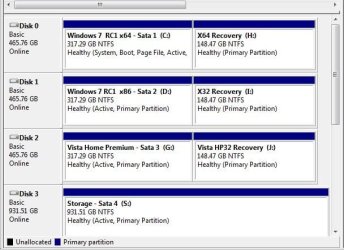
You'll notice that the three 500gb drives now all see equal sized partitions; one for OS, the other for backup and recovery and not one issue. It is still a good idea to backup anything you don't want to lose prior to any partition changes in the event of any mishap being seen.
 

Attachments

  • CURRENT PARTITIONS.jpg
    CURRENT PARTITIONS.jpg
    51.4 KB · Views: 10

My Computers

System One System Two

  • Computer type
    PC/Desktop
    Computer Manufacturer/Model Number
    Custom builds = 2
    OS
    W7 Ultimate x64/W10 Pro x64/W11 Pro Triple Boot - Main PC W7 Remote PC Micro ATX W7 Pro x64/W11 Pro
    CPU
    AMD Phenom II X4 975 Deneb 3.6ghz - 965 2nd remote pc
    Motherboard
    Gigabyte GA-790XTA-UD4-Gigabyte GA-880GM-D2H remote pc
    Memory
    Kingston Hyper X DDR3 1600 1.5v 16gb - Hyper X Fury 8gb 2nd
    Graphics Card(s)
    MSI HD Radeon 5750 1gb - MSI HD Radeon 6450 on mini tower
    Sound Card
    Creative Labs X-Fi Xtreme Audio P - Realtek onooard 2nd case
    Monitor(s) Displays
    ASUS VW199T-P 19" HP 2082a Main-HP 2082a 20" remote pc
    Screen Resolution
    Asus 1440x900 - HP 1600x900
    Hard Drives
    WD Black 1TB HD per OS W7, W10, and pending W11 presently on 500gb OS Drive - Pending Triple 1TB HDs for Spanned Storage/backup volume
    Single 2TB external USB enclosure, single 1TB System 7 Host/Boot drive, Pending 8TB external HD for system image b
    PSU
    Corsair 750TX - primary / Corsair CX600 - second
    Case
    Antec 900-2 - SSD compatible / NZXT Vulcan mini tower
    Cooling
    Zalman CNPS9900A
    Keyboard
    AZIO L70 Backlit Letters Gaming - ONN Cordless/USB
    Mouse
    MSI DS200 Programmable, Logitech Cordless
    Internet Speed
    30mbps upgrade - primary hard wired - mini tower usb WiFi
    Antivirus
    GFI VIPRE Internet Security 2014 on W7 2016 beta on W10,
    Browser
    Cyberfox, WaterFox 64bit FF variants, FireFox x64, Pale Moon
    Other Info
    Accomdata fan cooled usb 2.0 PIDE/Sata II, III external enclosure.
    Sambient usb/eSata PATA/Sata II, III external enclosure.
  • Computer type
    PC/Desktop
    System Manufacturer/Model Number
    CUSTOM ASSEMBLY
    OS
    W7 Pro x64/W11 Pro
    CPU
    AMD Deneb 3.6ghz - 965
    Motherboard
    Gigabyte GA-880GM-D2H remote pc
    Memory
    Kingston Hyper X Fury 8gb
    Graphics Card(s)
    MSI HD Radeon 6450 DVI Output
    Sound Card
    Realtek onooard Creative or Other separate PENDING
    Monitor(s) Displays
    VIZIO 32" LCD TV Separate LCD Pending
    Screen Resolution
    1600x1080
    Hard Drives
    WD 500GB OS Host/Boot WD Green 1TB Storage/Backup
    PSU
    Corsair 600W - THERMALTAKE 600W spare case
    Case
    NZXT Vulcan mini tower
    Cooling
    Twin 120mm Top Fans - 240mm Side Cover
    Keyboard
    ONN Cordless/USB Logitech Cordless
    Mouse
    ONN USB/Cordless - Logitech Cordless
    Internet Speed
    DSL 5G
    Browser
    MS Edge, FireFox, WaterFox x64, FireFox Nightly
    Other Info
    OS Testing-Remote Access to Main TeamViewer
I downloaded and burned the GParted disc, but I tried to ues it and there's no clear directions to use it. I know to go into boot menu and bot from the DVD-CD( for me it's (E:) I can get to the first menu but from there it starts scanning for seems like hours and the only way to stop it was to do a hard reset by holding the power button down til it turned off...Some help????
 

My Computer

Computer Manufacturer/Model Number
HP Pavilion a6009n Desktop
OS
Vista / 7 RC 7100/Virtual XP
CPU
AMD Athlon 64x2 Dual-Core Processor 3800 + 2.00GHz
Motherboard
Asus M2N68-LA
Memory
2.00GB
Graphics Card(s)
NVidia GeForce 6150SE nForce 430
Monitor(s) Displays
HPmx705
Screen Resolution
1024x768
Hard Drives
SeaGate 7200.10 Barracuda 250GB
Mouse
Logitech TrackMan Wheel
Internet Speed
DSL--1056kbits/sec x 448kbits/sec
Which release did you go for? Once you first arrive at the main gui all hard drives are being scanned as they are being detected in order to list each one and any existing partitions and size information. The GParted screen should be seen as a large window as well where the first drive like the first ide or number #1 sata is in plain view.

To select a different drive you look on the right side of the menu bar where the button found there brings down the list of drives as sda1, sda2 for a drive with two primaries. Some additional screenshots you should look over for understanding how drives and partitions are shown are seen at GParted -- Screenshots

For resizing any partition you simply click on the intended once and click the resize button seen on the menu bar to bring up the slide bar with up and down arrows with the increments seen on those. For a a quick and easy method you click and hold on one end of the slide bar indicator shown there to see vertical clamps grasp the end and simply move that while watching the drive space counter increments.

Once you have the primary down as far as needed you then click the apply button and answer the confirmation prompt that comes up to watch that go through the routine. It will take a few minutes as you watch the scoll bar going back and forth until that stops.

Before all that take notice of how much free drive space is available on the C Vista primary there. And remember that ubuntu won't require any large partition to run from being a small distro in comparison to the larger server types like Mandriva, Fedora, and other Red Hat distros.

You don't to see a large change for Vista at this point being a first timer with ubuntu and shouldn't need much over 10-15gb. That will be plenty of room for the root/system partition leaving room for the 3-4gb optional extended swap. That also tends to maintain the partition table for the Windows primary not seeing a large change.
 

My Computers

System One System Two

  • Computer type
    PC/Desktop
    Computer Manufacturer/Model Number
    Custom builds = 2
    OS
    W7 Ultimate x64/W10 Pro x64/W11 Pro Triple Boot - Main PC W7 Remote PC Micro ATX W7 Pro x64/W11 Pro
    CPU
    AMD Phenom II X4 975 Deneb 3.6ghz - 965 2nd remote pc
    Motherboard
    Gigabyte GA-790XTA-UD4-Gigabyte GA-880GM-D2H remote pc
    Memory
    Kingston Hyper X DDR3 1600 1.5v 16gb - Hyper X Fury 8gb 2nd
    Graphics Card(s)
    MSI HD Radeon 5750 1gb - MSI HD Radeon 6450 on mini tower
    Sound Card
    Creative Labs X-Fi Xtreme Audio P - Realtek onooard 2nd case
    Monitor(s) Displays
    ASUS VW199T-P 19" HP 2082a Main-HP 2082a 20" remote pc
    Screen Resolution
    Asus 1440x900 - HP 1600x900
    Hard Drives
    WD Black 1TB HD per OS W7, W10, and pending W11 presently on 500gb OS Drive - Pending Triple 1TB HDs for Spanned Storage/backup volume
    Single 2TB external USB enclosure, single 1TB System 7 Host/Boot drive, Pending 8TB external HD for system image b
    PSU
    Corsair 750TX - primary / Corsair CX600 - second
    Case
    Antec 900-2 - SSD compatible / NZXT Vulcan mini tower
    Cooling
    Zalman CNPS9900A
    Keyboard
    AZIO L70 Backlit Letters Gaming - ONN Cordless/USB
    Mouse
    MSI DS200 Programmable, Logitech Cordless
    Internet Speed
    30mbps upgrade - primary hard wired - mini tower usb WiFi
    Antivirus
    GFI VIPRE Internet Security 2014 on W7 2016 beta on W10,
    Browser
    Cyberfox, WaterFox 64bit FF variants, FireFox x64, Pale Moon
    Other Info
    Accomdata fan cooled usb 2.0 PIDE/Sata II, III external enclosure.
    Sambient usb/eSata PATA/Sata II, III external enclosure.
  • Computer type
    PC/Desktop
    System Manufacturer/Model Number
    CUSTOM ASSEMBLY
    OS
    W7 Pro x64/W11 Pro
    CPU
    AMD Deneb 3.6ghz - 965
    Motherboard
    Gigabyte GA-880GM-D2H remote pc
    Memory
    Kingston Hyper X Fury 8gb
    Graphics Card(s)
    MSI HD Radeon 6450 DVI Output
    Sound Card
    Realtek onooard Creative or Other separate PENDING
    Monitor(s) Displays
    VIZIO 32" LCD TV Separate LCD Pending
    Screen Resolution
    1600x1080
    Hard Drives
    WD 500GB OS Host/Boot WD Green 1TB Storage/Backup
    PSU
    Corsair 600W - THERMALTAKE 600W spare case
    Case
    NZXT Vulcan mini tower
    Cooling
    Twin 120mm Top Fans - 240mm Side Cover
    Keyboard
    ONN Cordless/USB Logitech Cordless
    Mouse
    ONN USB/Cordless - Logitech Cordless
    Internet Speed
    DSL 5G
    Browser
    MS Edge, FireFox, WaterFox x64, FireFox Nightly
    Other Info
    OS Testing-Remote Access to Main TeamViewer
I downloaded and burned the GParted disc, but I tried to ues it and there's no clear directions to use it. I know to go into boot menu and bot from the DVD-CD( for me it's (E:) I can get to the first menu but from there it starts scanning for seems like hours and the only way to stop it was to do a hard reset by holding the power button down til it turned off...Some help????
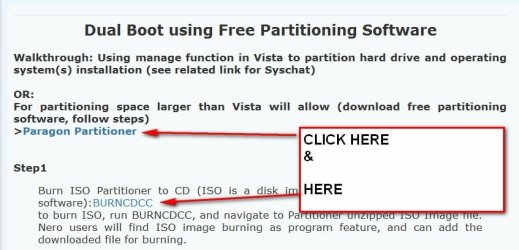
Davy Here is a link to a good how to resize with gpart. It also has a link to download the gpart iso. It has some pictures and might give you some clues to what you need to get done. I used it and it was strange acting but it got the job done and I have not seen evidence of it since. so it do its job then you take the cd out and its gone. good luck.hope you enjoy!
Using GParted to Resize Your Windows Vista Partition :: the How-To Geek
 

My Computer

Computer Manufacturer/Model Number
Gateway GT5692
OS
Windows 7 Ulti. x64
CPU
AMD Phenom 8450 triple-core 2.10 ghz
Memory
4GB
Graphics Card(s)
ATI Radion HD 3200
Monitor(s) Displays
Gateway FPD1775W
Screen Resolution
1280x720
Hard Drives
465.6613 Gibibytes
I downloaded the GParted Live 0.4 4.1 ISO and burned it to a disk. When I boot it, it goes to a screen with a few different options, but I don't know which option to choose...when I tried the default mode, it goes to a BIOS-like screen and starts to scan I don't know what....and it goes on, and on and on til I have to stop it......What am I doing wrong????
 

My Computer

Computer Manufacturer/Model Number
HP Pavilion a6009n Desktop
OS
Vista / 7 RC 7100/Virtual XP
CPU
AMD Athlon 64x2 Dual-Core Processor 3800 + 2.00GHz
Motherboard
Asus M2N68-LA
Memory
2.00GB
Graphics Card(s)
NVidia GeForce 6150SE nForce 430
Monitor(s) Displays
HPmx705
Screen Resolution
1024x768
Hard Drives
SeaGate 7200.10 Barracuda 250GB
Mouse
Logitech TrackMan Wheel
Internet Speed
DSL--1056kbits/sec x 448kbits/sec
It may have been an incomplete download for some reason, bad burn to disk, even a bad blank you ended up with. Try a fresh download and look at the program you used for burning as well. The few found reliable here for seeing great results are the ImgBurn, BurnOn with the annoyance of an IE window ad after each burn to buy the full version, or StarBurn's free version with none of that.

The last named there can also burn video clips and create data dvds as well as burn iso images without problems. I use that regularly for 7 as well as whenever I need a new live distro burned or a newer version of GParted. Here's the links for those.

ImgBurn is rather limited but free at The Official ImgBurn Website BurnOn is also outdated but still works despite the ad windows. BurnOn CD & DVD - Free DVD Burning Software - Freeware CD burner Windows XP & Vista

And the best out of the three there StarBurn runs well on the 64bit as well as 32bit Windows. :: RocketDivision :: CD/DVD/Blu-Ray/HD-DVD recording and mastering And before anyone else jumps in DeepBurner is another oldie with a free version found at DeepBurner

StarBurn is also a light weight while offering more features over the others. The bios like screen is the main window for the GParted tool that opens up right away as you reach what now looks like a desktop in the latest releases. The old GParted simply filled the screen and was limited to the 1024x768 resolution.

(older 0.3.x.x - 0.3.4.x The 0.3.6.x releases saw problems with the automatic start x screen detection)
 

My Computers

System One System Two

  • Computer type
    PC/Desktop
    Computer Manufacturer/Model Number
    Custom builds = 2
    OS
    W7 Ultimate x64/W10 Pro x64/W11 Pro Triple Boot - Main PC W7 Remote PC Micro ATX W7 Pro x64/W11 Pro
    CPU
    AMD Phenom II X4 975 Deneb 3.6ghz - 965 2nd remote pc
    Motherboard
    Gigabyte GA-790XTA-UD4-Gigabyte GA-880GM-D2H remote pc
    Memory
    Kingston Hyper X DDR3 1600 1.5v 16gb - Hyper X Fury 8gb 2nd
    Graphics Card(s)
    MSI HD Radeon 5750 1gb - MSI HD Radeon 6450 on mini tower
    Sound Card
    Creative Labs X-Fi Xtreme Audio P - Realtek onooard 2nd case
    Monitor(s) Displays
    ASUS VW199T-P 19" HP 2082a Main-HP 2082a 20" remote pc
    Screen Resolution
    Asus 1440x900 - HP 1600x900
    Hard Drives
    WD Black 1TB HD per OS W7, W10, and pending W11 presently on 500gb OS Drive - Pending Triple 1TB HDs for Spanned Storage/backup volume
    Single 2TB external USB enclosure, single 1TB System 7 Host/Boot drive, Pending 8TB external HD for system image b
    PSU
    Corsair 750TX - primary / Corsair CX600 - second
    Case
    Antec 900-2 - SSD compatible / NZXT Vulcan mini tower
    Cooling
    Zalman CNPS9900A
    Keyboard
    AZIO L70 Backlit Letters Gaming - ONN Cordless/USB
    Mouse
    MSI DS200 Programmable, Logitech Cordless
    Internet Speed
    30mbps upgrade - primary hard wired - mini tower usb WiFi
    Antivirus
    GFI VIPRE Internet Security 2014 on W7 2016 beta on W10,
    Browser
    Cyberfox, WaterFox 64bit FF variants, FireFox x64, Pale Moon
    Other Info
    Accomdata fan cooled usb 2.0 PIDE/Sata II, III external enclosure.
    Sambient usb/eSata PATA/Sata II, III external enclosure.
  • Computer type
    PC/Desktop
    System Manufacturer/Model Number
    CUSTOM ASSEMBLY
    OS
    W7 Pro x64/W11 Pro
    CPU
    AMD Deneb 3.6ghz - 965
    Motherboard
    Gigabyte GA-880GM-D2H remote pc
    Memory
    Kingston Hyper X Fury 8gb
    Graphics Card(s)
    MSI HD Radeon 6450 DVI Output
    Sound Card
    Realtek onooard Creative or Other separate PENDING
    Monitor(s) Displays
    VIZIO 32" LCD TV Separate LCD Pending
    Screen Resolution
    1600x1080
    Hard Drives
    WD 500GB OS Host/Boot WD Green 1TB Storage/Backup
    PSU
    Corsair 600W - THERMALTAKE 600W spare case
    Case
    NZXT Vulcan mini tower
    Cooling
    Twin 120mm Top Fans - 240mm Side Cover
    Keyboard
    ONN Cordless/USB Logitech Cordless
    Mouse
    ONN USB/Cordless - Logitech Cordless
    Internet Speed
    DSL 5G
    Browser
    MS Edge, FireFox, WaterFox x64, FireFox Nightly
    Other Info
    OS Testing-Remote Access to Main TeamViewer

My Computers

System One System Two

  • Computer type
    PC/Desktop
    OS
    7 X64
    CPU
    i5 8400
    Motherboard
    gigabyte b365m ds3h
    Memory
    2x8gb 3200mhz
    Hard Drives
    various
    PSU
    pure power 11 400w cm
    Case
    Coolermaster
    Cooling
    cryorig m9i
  • Computer type
    PC/Desktop
    OS
    7x64
    CPU
    g5400
    Motherboard
    ga b365m ds3h
    Memory
    8gb ddr4 2400
    PSU
    xfx pro 450w
since GPart does not work for you. (It never worked for me either).
I was told Acronis Disk Manager was made for dummies. (that is why i tested it). works for me.

If at first your version does not secede, try another version.
That is what I do...
 

My Computers

System One System Two

  • Computer type
    PC/Desktop
    Computer Manufacturer/Model Number
    Custom builds = 2
    OS
    W7 Ultimate x64/W10 Pro x64/W11 Pro Triple Boot - Main PC W7 Remote PC Micro ATX W7 Pro x64/W11 Pro
    CPU
    AMD Phenom II X4 975 Deneb 3.6ghz - 965 2nd remote pc
    Motherboard
    Gigabyte GA-790XTA-UD4-Gigabyte GA-880GM-D2H remote pc
    Memory
    Kingston Hyper X DDR3 1600 1.5v 16gb - Hyper X Fury 8gb 2nd
    Graphics Card(s)
    MSI HD Radeon 5750 1gb - MSI HD Radeon 6450 on mini tower
    Sound Card
    Creative Labs X-Fi Xtreme Audio P - Realtek onooard 2nd case
    Monitor(s) Displays
    ASUS VW199T-P 19" HP 2082a Main-HP 2082a 20" remote pc
    Screen Resolution
    Asus 1440x900 - HP 1600x900
    Hard Drives
    WD Black 1TB HD per OS W7, W10, and pending W11 presently on 500gb OS Drive - Pending Triple 1TB HDs for Spanned Storage/backup volume
    Single 2TB external USB enclosure, single 1TB System 7 Host/Boot drive, Pending 8TB external HD for system image b
    PSU
    Corsair 750TX - primary / Corsair CX600 - second
    Case
    Antec 900-2 - SSD compatible / NZXT Vulcan mini tower
    Cooling
    Zalman CNPS9900A
    Keyboard
    AZIO L70 Backlit Letters Gaming - ONN Cordless/USB
    Mouse
    MSI DS200 Programmable, Logitech Cordless
    Internet Speed
    30mbps upgrade - primary hard wired - mini tower usb WiFi
    Antivirus
    GFI VIPRE Internet Security 2014 on W7 2016 beta on W10,
    Browser
    Cyberfox, WaterFox 64bit FF variants, FireFox x64, Pale Moon
    Other Info
    Accomdata fan cooled usb 2.0 PIDE/Sata II, III external enclosure.
    Sambient usb/eSata PATA/Sata II, III external enclosure.
  • Computer type
    PC/Desktop
    System Manufacturer/Model Number
    CUSTOM ASSEMBLY
    OS
    W7 Pro x64/W11 Pro
    CPU
    AMD Deneb 3.6ghz - 965
    Motherboard
    Gigabyte GA-880GM-D2H remote pc
    Memory
    Kingston Hyper X Fury 8gb
    Graphics Card(s)
    MSI HD Radeon 6450 DVI Output
    Sound Card
    Realtek onooard Creative or Other separate PENDING
    Monitor(s) Displays
    VIZIO 32" LCD TV Separate LCD Pending
    Screen Resolution
    1600x1080
    Hard Drives
    WD 500GB OS Host/Boot WD Green 1TB Storage/Backup
    PSU
    Corsair 600W - THERMALTAKE 600W spare case
    Case
    NZXT Vulcan mini tower
    Cooling
    Twin 120mm Top Fans - 240mm Side Cover
    Keyboard
    ONN Cordless/USB Logitech Cordless
    Mouse
    ONN USB/Cordless - Logitech Cordless
    Internet Speed
    DSL 5G
    Browser
    MS Edge, FireFox, WaterFox x64, FireFox Nightly
    Other Info
    OS Testing-Remote Access to Main TeamViewer
Well, it was going to happen sooner or later.....I totally f****d up my Vista partition while trying that Partition Manager....now I have a couple of partitions with all kinds of stuff on it. Now how do I get all these parts together and working?????
 

Attachments

  • Capture.PNG
    Capture.PNG
    10.9 KB · Views: 6

My Computer

Computer Manufacturer/Model Number
HP Pavilion a6009n Desktop
OS
Vista / 7 RC 7100/Virtual XP
CPU
AMD Athlon 64x2 Dual-Core Processor 3800 + 2.00GHz
Motherboard
Asus M2N68-LA
Memory
2.00GB
Graphics Card(s)
NVidia GeForce 6150SE nForce 430
Monitor(s) Displays
HPmx705
Screen Resolution
1024x768
Hard Drives
SeaGate 7200.10 Barracuda 250GB
Mouse
Logitech TrackMan Wheel
Internet Speed
DSL--1056kbits/sec x 448kbits/sec
Hi Davy,


Depends what you want to do and what you have on all those partitions you wish to keep.

Some options:

1. Easiest and quickest is to Delete B and Copy C to the unallocated space that was B.

Gives a 20gb for 7. That is enough for me as I keep my data on separate partition.


2. If you want 7 to have more than 20gb - you could Shrink D first ( depends how much free space you have on it).

Then delete B - the unallocated space will be the amount you shrank D , plus the 20gb you just got by deleting B.

Then Copy C to the unallocated space.


3. You could Move C to between D and B. This is a longer, more complex operation.

Then delete B and Extend C.

You also need to decide which you want to use as your System partition - that will contain the boot files and will be the partition you "boot through" to start up your chosen o/s.
 

My Computers

System One System Two

  • Computer type
    PC/Desktop
    OS
    7 X64
    CPU
    i5 8400
    Motherboard
    gigabyte b365m ds3h
    Memory
    2x8gb 3200mhz
    Hard Drives
    various
    PSU
    pure power 11 400w cm
    Case
    Coolermaster
    Cooling
    cryorig m9i
  • Computer type
    PC/Desktop
    OS
    7x64
    CPU
    g5400
    Motherboard
    ga b365m ds3h
    Memory
    8gb ddr4 2400
    PSU
    xfx pro 450w
Starting over.....GRRRRRRRRR!!!!!

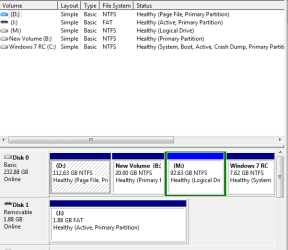
Oh well, since I totally screwed up my Vista partition from trying to fix my partition problems(See the "Partition Problems....Help!" thread I started a few days ago), Now I've finally have two equal sized partitions and a 7 install I don't need anymore but can't get rid of....in the screenshot it's the D: part. The C: part is now a perfectly good 7 install with plenty of space, the E: part is where I want to install Vista again, and the D: part is my old 7 install where I only have about 7.62GB of space including the installation package. How can I get rid of it??? Tried disk mngr and I can't delete it.....I'm glad there's a lot of patient ppl on here(NightHawk,Scruffy, and the others I can't remember right now...)
 

Attachments

  • Capture.PNG
    Capture.PNG
    7.8 KB · Views: 7

My Computer

Computer Manufacturer/Model Number
HP Pavilion a6009n Desktop
OS
Vista / 7 RC 7100/Virtual XP
CPU
AMD Athlon 64x2 Dual-Core Processor 3800 + 2.00GHz
Motherboard
Asus M2N68-LA
Memory
2.00GB
Graphics Card(s)
NVidia GeForce 6150SE nForce 430
Monitor(s) Displays
HPmx705
Screen Resolution
1024x768
Hard Drives
SeaGate 7200.10 Barracuda 250GB
Mouse
Logitech TrackMan Wheel
Internet Speed
DSL--1056kbits/sec x 448kbits/sec
Hi,

That's slightly clearer as to what you are trying to do.

You can't delete D because it is the System partition.

NOTE: If you have just copied D to C to get 7 on it, you should only need to mark C active, reboot and C will be the system partition -( you will need to run startup repair before rebooting to correct the bcd entry).


If you installed 7 again - to get it onto C then :

You can make C the System partition like this:

Go to folder options and make sure Hidden files and Protected operating sytem files are showing.

Copy the bootmgr and Boot folder from D to C. (It won't let you copy bcd as it is in use - just skip it).

Open an elevated command prompt and type :

bcdedit /export D:\Boot\bcd C:\Boot\bcd

Press Enter.

Go to Disk Management and mark C active.

Run startup repair.

Reboot - check in Disk Management - the partition on the left

(C in your screenshot) should be listed as System.


You should then be able to remove the boot menu entry for D by typing msconfig in start search - open it, click the Boot tab , highlight the entry you want to remove- Delete, Apply, OK.

You can then delete / format D.
 
Last edited:

My Computers

System One System Two

  • Computer type
    PC/Desktop
    OS
    7 X64
    CPU
    i5 8400
    Motherboard
    gigabyte b365m ds3h
    Memory
    2x8gb 3200mhz
    Hard Drives
    various
    PSU
    pure power 11 400w cm
    Case
    Coolermaster
    Cooling
    cryorig m9i
  • Computer type
    PC/Desktop
    OS
    7x64
    CPU
    g5400
    Motherboard
    ga b365m ds3h
    Memory
    8gb ddr4 2400
    PSU
    xfx pro 450w
What I still can not figure is "I have tested Acronis" on several different machines. and have yet to MESS any partitions up.
I'm also sure the other members have fully tested there programs, which leads me to believe that the original problem lies in Not moving -up or down in size the partitions but in the quality of the DVD (possibility lack of a proper defrag before upgrade attempt) - apparently there is a corruption somewhere in the disk or the ISO.
Now I've finally have two equal sized partitions and a 7 install I don't need anymore but can't get rid of....
if you remove that entry from the boot.ini (using which ever method you choose),(I find msconfig the easiest) then you can simply FORMAT the partition containing the 7 you do not want. I would recommend boot to DVD and format. If I was using Acronis, I'd use the Disk Wipe included, after Format.
some ppl use 3rd party programs, which work very well also, I usually show or use the included programs or methods which you can find in most Microsoft tutorials. (makes ppl trust you more), that your not doing some PIRATE things. DOS is still the greatest Windows tool going. today the use of DOS is thru the CMD (right click runas Admin). start -> cmd -> click use as admin -> popup window shows -> type Format
see below to format your way. /p:2 is lots of zeros.

L:\Windows\system32>format /?
Formats a disk for use with Windows.
FORMAT volume [/FS:file-system] [/V:label] [/Q] [/A:size] [/C] [/X] [/P:passes]
[/S:state]
FORMAT volume [/V:label] [/Q] [/F:size] [/P:passes]
FORMAT volume [/V:label] [/Q] [/T:tracks /N:sectors] [/P:passes]
FORMAT volume [/V:label] [/Q] [/P:passes]
FORMAT volume [/Q]
volume Specifies the drive letter (followed by a colon),
mount point, or volume name.
/FS:filesystem Specifies the type of the file system (FAT, FAT32, exFAT, NTFS
,
or UDF).
/V:label Specifies the volume label.
/Q Performs a quick format. Note that this switch overrides /P.
/C NTFS only: Files created on the new volume will be compressed
by default.
/X Forces the volume to dismount first if necessary. All opened
handles to the volume would no longer be valid.
/R:revision UDF only: Forces the format to a specific UDF version
(1.02, 1.50, 2.00, 2.01, 2.50). The default
revision is 2.01.
/D UDF 2.50 only: Metadata will be duplicated.
/A:size Overrides the default allocation unit size. Default settings
are strongly recommended for general use.
NTFS supports 512, 1024, 2048, 4096, 8192, 16K, 32K, 64K.
FAT supports 512, 1024, 2048, 4096, 8192, 16K, 32K, 64K,
(128K, 256K for sector size > 512 bytes).
FAT32 supports 512, 1024, 2048, 4096, 8192, 16K, 32K, 64K,
(128K, 256K for sector size > 512 bytes).
exFAT supports 512, 1024, 2048, 4096, 8192, 16K, 32K, 64K,
128K, 256K, 512K, 1M, 2M, 4M, 8M, 16M, 32M.
Note that the FAT and FAT32 files systems impose the
following restrictions on the number of clusters on a volume:
FAT: Number of clusters <= 65526
FAT32: 65526 < Number of clusters < 4177918
Format will immediately stop processing if it decides that
the above requirements cannot be met using the specified
cluster size.
NTFS compression is not supported for allocation unit sizes
above 4096.
/F:size Specifies the size of the floppy disk to format (1.44)
/T:tracks Specifies the number of tracks per disk side.
/N:sectors Specifies the number of sectors per track.
/P:passes Zero every sector on the volume passes times. This switch is
not valid with /Q
/S:state Where "state" is either "enable" or "disable"
Short names are enabled by default
L:\Windows\system32>
 
Hey SIW2----which folder do I copy? the one that says Boot or the one BOOTSECT.DAK??? And when you say copy you mean right-click on it and click "copy"? Just want to be sure......don't want to mess it up!
 

My Computer

Computer Manufacturer/Model Number
HP Pavilion a6009n Desktop
OS
Vista / 7 RC 7100/Virtual XP
CPU
AMD Athlon 64x2 Dual-Core Processor 3800 + 2.00GHz
Motherboard
Asus M2N68-LA
Memory
2.00GB
Graphics Card(s)
NVidia GeForce 6150SE nForce 430
Monitor(s) Displays
HPmx705
Screen Resolution
1024x768
Hard Drives
SeaGate 7200.10 Barracuda 250GB
Mouse
Logitech TrackMan Wheel
Internet Speed
DSL--1056kbits/sec x 448kbits/sec
Back
Top