
Partition shrink error

athon1

New member
Local time
6:19 AM
Messages
5
I am trying to install xp dual boot to a win7 64 ssd, I attempted the following instructions for this link - http://www.sevenforums.com/tutorials/2672-partition-volume-shrink.html and have had the following errors with each of the methods.
The error "The service cannot be started, either because it is disabled or because it has no enabled devices associated with it."
I have attached a screen shot of the error and the event viewer.
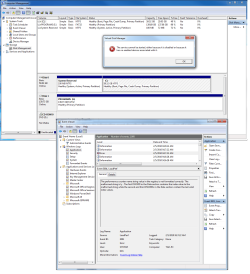
Shrink error.PNG
Any direction would be appreciated.

Thank You,
 

My Computer

Computer Manufacturer/Model Number
self
OS
Win 7 Pro 64
CPU
Intel QX9650 SLAN3 3 GHz. 1333 MHz 12 MB
Motherboard
Gigabyte EP45-UD3P rev. 1.6 - FD Bios
Memory
8 GB. Gskill F2-8500CL5D-4BBPK (DDR2-1066 CL5-5-5-15)
Graphics Card(s)
NVIDIA Quadro FX 4600 R-A2, 768 MB GDDR3
Sound Card
onboard
Monitor(s) Displays
AL2016W
Hard Drives
1- OCZ 60 GB. Vertex sataII ssd for O.S.
2 - 150 GB. WD. VelociRaptor 10,000 RPM SATA 16 MB
PSU
750W Corsair CMPSU-750 PSU
Case
Cooler Master Cosmos
Cooling
Stock air (great case cooling)
The first thing I would try is running sfc /scannow.

But in order to repair the deformed Registry String that is causing the service to malfunction, it may require a http://www.sevenforums.com/tutorials/3413-repair-install.html?ltr=R.

The only way that this should not repair it is if it is corruption imported from a Vista in-place Upgrade to Win7. Then it might require a clean reinstall of Win7.
 
Click :orb: and type Services in the search box and then press Ctrl+Shift+Enter. You will need to provide administrative credentials.

The service that you are having trouble with is Virtual Disk. This is dependant on the following services: Plug and Play and Remote Procedure Call (RPC). Check each of these services in turn and make sure that they are not disabled.

Virtual Disk [Manual] dependant on Plug and Play and Remote Procedure Call (RPC)

Plug and Play [Automatic] not dependant on another service

Remote Procedure Call (RPC) [Automatic] dependant on DCOM Server Process Launcher and RPC Endpoint Mapper

DCOM Server Process Launcher [Automatic] not dependant on another service

RPC Endpoint Mapper [Automatic] not dependant on another service

See http://www.sevenforums.com/tutorials/2495-services-start-disable.html for instructions on how to enable these services. The start up type shown in square brackets [] is the default for these services.
 

My Computer

Computer type
PC/Desktop
Computer Manufacturer/Model Number
Dwarf Dwf/11/2012 r09/2013
OS
Windows 8.1 Pro RTM x64
CPU
Intel Core-i5-3570K 4-core @ 3.4GHz (Ivy Bridge) (OC 4.4GHz)
Motherboard
ASRock Z77 Extreme4-M
Memory
4 x 4GB DDR3-1600 Corsair Vengeance CMZ8GX3M2A1600C9B (16GB)
Graphics Card(s)
MSI GeForce GTX770 Gaming OC 2GB
Sound Card
Realtek High Definition on board solution (ALC 898)
Monitor(s) Displays
ViewSonic VA1912w Widescreen (VGA)
Screen Resolution
1440x900
Hard Drives
OCZ Agility 3 SSD 120GB SATA III x2 (RAID 0)
Samsung HD501LJ 500GB SATA II x2
Hitachi HDS721010CLA332 1TB SATA II
Iomega 1.5TB Ext USB 2.0
WD 2.0TB Ext USB 3.0
PSU
XFX Pro Series 850W Semi-Modular
Case
Gigabyte IF233
Cooling
1 x 120mm Front Inlet 1 x 120mm Rear Exhaust
Keyboard
Microsoft Comfort Curve Keyboard 3000 (USB)
Mouse
Microsoft Comfort Mouse 3000 for Business (USB)
Internet Speed
NetGear DG834Gv3 ADSL Modem/Router (Ethernet) ~4.0 Mb/s (O2)
Antivirus
Avast! 8.0.1497
Browser
IE 11
Other Info
Optical Drive: HL-DT-ST BD-RE BH10LS30 SATA Bluray
Lexmark S305 Printer/Scanner/Copier (USB)
WEI Score: 8.1/8.1/8.5/8.5/8.25
Asus Eee PC 1011PX Netbook (Windows 7 x86 Starter)
Thanks Dwarf and Greglocker
I have confirmed that all services were running and set as recomended by Dwarf.
I will run sfc /scannow as per Gregrocker and let you know.

Thanks again.
 

My Computer

Computer Manufacturer/Model Number
self
OS
Win 7 Pro 64
CPU
Intel QX9650 SLAN3 3 GHz. 1333 MHz 12 MB
Motherboard
Gigabyte EP45-UD3P rev. 1.6 - FD Bios
Memory
8 GB. Gskill F2-8500CL5D-4BBPK (DDR2-1066 CL5-5-5-15)
Graphics Card(s)
NVIDIA Quadro FX 4600 R-A2, 768 MB GDDR3
Sound Card
onboard
Monitor(s) Displays
AL2016W
Hard Drives
1- OCZ 60 GB. Vertex sataII ssd for O.S.
2 - 150 GB. WD. VelociRaptor 10,000 RPM SATA 16 MB
PSU
750W Corsair CMPSU-750 PSU
Case
Cooler Master Cosmos
Cooling
Stock air (great case cooling)
I found the following link about performance counters. I ran the command mentioned (lodctr /R) and got a "Successfully rebuilt performance counter setting from system backup".

I ran it from an administrative command prompt, but I have no other experience with it, so use you own best judgement.

How to Fix Windows Performance Registry Corruption | testingReflections.com
 

My Computer

Computer Manufacturer/Model Number
Homebuilt
OS
Windows 7 x64
CPU
i7-2600K
Motherboard
Asus P8Z77-v Pro
Memory
8 G
Graphics Card(s)
GTX 480
Sound Card
Onboard
Monitor(s) Displays
LG W2753V
Screen Resolution
1920x1080
Hard Drives
Crucial M4 128 G SSD
You have been given good advice by gregrocker & Dwarf.

But at the of end of day you will have 2 small partitions of about 29g each.

Just my two cents worth.
 

My Computer

OS
ME/XP/Vista/Win7
I ran sfc /scannow as per Gregrocker and still no luck, Copy of log attached.
I would like to be able to install good ol xp-pro on a 10 GB. partition on the SSD,
I finally broke down and finished purchasing new hardware to run 64 bit cad software, the architectural rendering screams but the cabinet design software doesn't seem to be up to par yet.
almost three weeks working out driver, memory and disk bugs finally stable in 64 with the exception of 32 bit Java and Quicktime issues of which I suspect the cabinet software utilizes. cant tell you how slow construction work has been here for the last couple of years, I need to get the design work going with xp for a job I just landed. I need to dual boot

:cry:
 

My Computer

Computer Manufacturer/Model Number
self
OS
Win 7 Pro 64
CPU
Intel QX9650 SLAN3 3 GHz. 1333 MHz 12 MB
Motherboard
Gigabyte EP45-UD3P rev. 1.6 - FD Bios
Memory
8 GB. Gskill F2-8500CL5D-4BBPK (DDR2-1066 CL5-5-5-15)
Graphics Card(s)
NVIDIA Quadro FX 4600 R-A2, 768 MB GDDR3
Sound Card
onboard
Monitor(s) Displays
AL2016W
Hard Drives
1- OCZ 60 GB. Vertex sataII ssd for O.S.
2 - 150 GB. WD. VelociRaptor 10,000 RPM SATA 16 MB
PSU
750W Corsair CMPSU-750 PSU
Case
Cooler Master Cosmos
Cooling
Stock air (great case cooling)
Did you try the Repair Install?

If performance is otherwise good enough you decide to forgo clean installing Win7 to overcome this bug now, then you could also use free Partition Wizard bootable CD to shrink your Win7.

Leave the space unallocated to use the XP CD to create New partition and format NTFS, as XP formatting is slightly different.

Back up your data as any resizing operation other than Disk Mgmt can fail.
 
install windows xp first, during installation, partition the drive. then install windows 7. not sure if vice versa is doable.

also i think it looks like you're partitioning the drive that you're currently working on, therefore it's not possible unless you have third party software

partition the drive during the stage of installing the OS
 

My Computer

OS
XP Vista 7
You seem to have a registry entry for the performance counter is corrupt and a journal.exe and its backup corrupt, according to the log.

In spite of the fact theog doesn't think my input is worthwhile, you might try the command I suggested, but it appears you have other things corrupted, so perhaps gregrocker's suggestion about a repair install might be best. But if you are going to do that anyway, trying the command will not hurt.
 

My Computer

Computer Manufacturer/Model Number
Homebuilt
OS
Windows 7 x64
CPU
i7-2600K
Motherboard
Asus P8Z77-v Pro
Memory
8 G
Graphics Card(s)
GTX 480
Sound Card
Onboard
Monitor(s) Displays
LG W2753V
Screen Resolution
1920x1080
Hard Drives
Crucial M4 128 G SSD
You seem to have a registry entry for the performance counter is corrupt and a journal.exe and its backup corrupt, according to the log.

In spite of the fact theog doesn't think my input is worthwhile, you might try the command I suggested, but it appears you have other things corrupted, so perhaps gregrocker's suggestion about a repair install might be best. But if you are going to do that anyway, trying the command will not hurt.

Salty I think theog was posting at the same time as you so didn't see your excellent suggestion to repair the performance counter. I hope OP will try using that tutorial as it directly addresses his specific issue.

My suggestion of a Repair Install was much more General and not as researched as yours typically are. Believe me I notice the hours you put into research and testing for others and I salute you.
 
Back
Top