Pc switch on after shutdown

shankly769

New member
Member
VIP
Local time
11:22 PM
Messages
173
Recently after format my pc is switching on after shutdown,at the moment as it swicth off its power.can someone giude me.my tech tried several thinks even from bios.anyother solution?
 

My Computer

Computer type
PC/Desktop
OS
Windows 7 Ultimate x32
CPU
AMD Athlom(tm064 Processor 3200+
Motherboard
K8M800-8237 EPPOX
Memory
2gb
Graphics Card(s)
NVIDIA GeForce 7600GT
Check your power settings. Make sure that when you push the power button, it is set to shut down and not do anything else (such as hibernate). After doing that, press and hold in the power button till it shuts down. It won't hurt anything to shut it down in this way, because you have told it to do a shutdown when you press the power button.

If that doesn't fix it, try this: When you shut it down, unplug the A/C power at the moment of shutdown, thereby preventing it from starting back up. About a minute or two after unplugging it, plug it in. Now restart it; then shut it down again, to see if it will stay shut down this time. Hopefully unplugging it will reset it somehow and break it out of the restart loop it is stuck in. I'm stabbing in the dark with this suggestion, but you might get lucky and fix it by doing this.
 

My Computer

Computer type
PC/Desktop
Computer Manufacturer/Model Number
Dell
OS
Linux Mint 18.2 xfce 64-bit (VMWare host) / Windows 8.1 Pro 32-bit (VMWare guest)
CPU
Haswell
Memory
4 GB
Monitor(s) Displays
Acer 23"
Screen Resolution
1920 x 1080
Hard Drives
Two hard drives, 1TB each: One for Linux, one for my data.
Keyboard
IBM Model M
Antivirus
Sophos (Linux), Trend Micro (Windows)
Browser
Firefox, Opera
Other Info
I use Samba to share my data drive with the other computers at my house and with my guest session in VMWare Workstation Player.
thanks m8. ill check later,and is there any software that can fix such issues,but i dont know why this happened after a clean format
 

My Computer

Computer type
PC/Desktop
OS
Windows 7 Ultimate x32
CPU
AMD Athlom(tm064 Processor 3200+
Motherboard
K8M800-8237 EPPOX
Memory
2gb
Graphics Card(s)
NVIDIA GeForce 7600GT
Another thing you could try: Go to www.linuxmint.com and make a Linux DVD of the 32-bit xfce version. Then boot the computer with that DVD. This will bring you into a Linux "live" session -- nothing will be written to your hard drive by doing this. Now shut down and restart from the Linux start button -- see if the problem happens in Linux.

If the problem happens in Windows but not in Linux, then something in Windows got messed up and is causing the problem. If it happens both in Linux and in Windows, then it is likely a hardware problem, not a Windows problem.
 

My Computer

Computer type
PC/Desktop
Computer Manufacturer/Model Number
Dell
OS
Linux Mint 18.2 xfce 64-bit (VMWare host) / Windows 8.1 Pro 32-bit (VMWare guest)
CPU
Haswell
Memory
4 GB
Monitor(s) Displays
Acer 23"
Screen Resolution
1920 x 1080
Hard Drives
Two hard drives, 1TB each: One for Linux, one for my data.
Keyboard
IBM Model M
Antivirus
Sophos (Linux), Trend Micro (Windows)
Browser
Firefox, Opera
Other Info
I use Samba to share my data drive with the other computers at my house and with my guest session in VMWare Workstation Player.
thanks good idea,but but i cant try anything as i got the time to check things,i tried to arranghe the wires from behind,its switched off and on and display gone,monitor is ok but display from pc non,pc is on but cant see thedisplay
 

My Computer

Computer type
PC/Desktop
OS
Windows 7 Ultimate x32
CPU
AMD Athlom(tm064 Processor 3200+
Motherboard
K8M800-8237 EPPOX
Memory
2gb
Graphics Card(s)
NVIDIA GeForce 7600GT
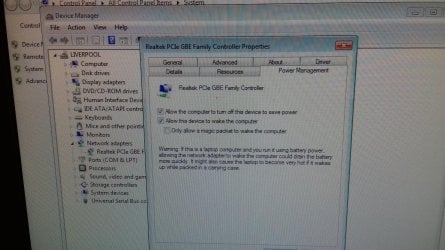
And now I'm have a big problem.as i checked some settings .image attached.pc won't display desktop.what shall i do.im nervous now.please help
 

My Computer

Computer type
PC/Desktop
OS
Windows 7 Ultimate x32
CPU
AMD Athlom(tm064 Processor 3200+
Motherboard
K8M800-8237 EPPOX
Memory
2gb
Graphics Card(s)
NVIDIA GeForce 7600GT
20171118_232726.jpg
 

My Computer

Computer type
PC/Desktop
OS
Windows 7 Ultimate x32
CPU
AMD Athlom(tm064 Processor 3200+
Motherboard
K8M800-8237 EPPOX
Memory
2gb
Graphics Card(s)
NVIDIA GeForce 7600GT
I unchecked them.so now what can i do????
 

My Computer

Computer type
PC/Desktop
OS
Windows 7 Ultimate x32
CPU
AMD Athlom(tm064 Processor 3200+
Motherboard
K8M800-8237 EPPOX
Memory
2gb
Graphics Card(s)
NVIDIA GeForce 7600GT
You can uncheck both of those settings. But I don't think they are what is causing your issue.

Did you try the things I suggested?
 

My Computer

Computer type
PC/Desktop
Computer Manufacturer/Model Number
Dell
OS
Linux Mint 18.2 xfce 64-bit (VMWare host) / Windows 8.1 Pro 32-bit (VMWare guest)
CPU
Haswell
Memory
4 GB
Monitor(s) Displays
Acer 23"
Screen Resolution
1920 x 1080
Hard Drives
Two hard drives, 1TB each: One for Linux, one for my data.
Keyboard
IBM Model M
Antivirus
Sophos (Linux), Trend Micro (Windows)
Browser
Firefox, Opera
Other Info
I use Samba to share my data drive with the other computers at my house and with my guest session in VMWare Workstation Player.
Some MB has a feature called Wake on Lan. It is enabled on BIOS so you can give an instruction by Lan and the computer turns on.
See if you have it and if it is disabled.

Another thing that can be is a problem with the MB or power supply. The suggestion to try to shut down with Linux is a good idea.
You can also try a Shutdown command
Open a CMD window and type:
C:\Windows\System32\shutdown.exe /p
It will shutdown. See if it remains off.
 

My Computers

System One System Two

  • Computer type
    PC/Desktop
    Computer Manufacturer/Model Number
    custom build
    OS
    Windows 7 HP 64
    CPU
    i5 6600K - 800MHz to 4200MHz
    Motherboard
    GA-Z170-HD3P
    Memory
    4+4G GSkill DDR4 3000
    Graphics Card(s)
    IG - Intel 530
    Monitor(s) Displays
    Samsung 226BW
    Screen Resolution
    1680x1050
    Hard Drives
    (1) -1 SM951 – 128GB M.2 AHCI PCIe SSD drive for Windows 7 and Lubuntu
    (2) -1 WD SATA 3 - 1T for Data
    (3) -1 WD SATA 3 - 1T for backup
    PSU
    Thermaltake 450W TR2 gold
    Keyboard
    Old and good Chicony mechanical keyboard
    Mouse
    Logitech mX performance - 9 buttons (had to disable some)
    Internet Speed
    500Mb/s
    Browser
    Firefox 64
    Other Info
    TinyWall firewall
  • Computer type
    Laptop
    System Manufacturer/Model Number
    Asus Q550LF
    OS
    Windows 7 Pro
    CPU
    i7-4500U 800MHz to 3.0GHz
    Motherboard
    Asus Q550LF
    Memory
    (4+4)G DDR3 1600
    Graphics Card(s)
    IG intel 4400 + NVIDIA GeForce GT 745M
    Sound Card
    Realtek
    Monitor(s) Displays
    LG Display LP156WF4-SPH1
    Screen Resolution
    1920 x 1080
    Hard Drives
    BX500 120G SSD for Windows and programs +
    1T HDD for data
    Internet Speed
    500 Mb/s
    Browser
    Firefox
    Other Info
    TinyWall firewall
You can also try a Shutdown command
Open a CMD window and type:
C:\Windows\System32\shutdown.exe /p
It will shutdown. See if it remains off.

If the shutdown command works for him, he could create a shortcut to it and just click on that when he wants to shutdown.
 

My Computer

Computer type
PC/Desktop
Computer Manufacturer/Model Number
Dell
OS
Linux Mint 18.2 xfce 64-bit (VMWare host) / Windows 8.1 Pro 32-bit (VMWare guest)
CPU
Haswell
Memory
4 GB
Monitor(s) Displays
Acer 23"
Screen Resolution
1920 x 1080
Hard Drives
Two hard drives, 1TB each: One for Linux, one for my data.
Keyboard
IBM Model M
Antivirus
Sophos (Linux), Trend Micro (Windows)
Browser
Firefox, Opera
Other Info
I use Samba to share my data drive with the other computers at my house and with my guest session in VMWare Workstation Player.
I can do nothing.tower is on but no display.due what i made.i tried f2and f8 but no wake up
 

My Computer

Computer type
PC/Desktop
OS
Windows 7 Ultimate x32
CPU
AMD Athlom(tm064 Processor 3200+
Motherboard
K8M800-8237 EPPOX
Memory
2gb
Graphics Card(s)
NVIDIA GeForce 7600GT
I would say that you have a problem with the MB or PS. There is nothing wrong with windows. It's a hardware issue.
 

My Computers

System One System Two

  • Computer type
    PC/Desktop
    Computer Manufacturer/Model Number
    custom build
    OS
    Windows 7 HP 64
    CPU
    i5 6600K - 800MHz to 4200MHz
    Motherboard
    GA-Z170-HD3P
    Memory
    4+4G GSkill DDR4 3000
    Graphics Card(s)
    IG - Intel 530
    Monitor(s) Displays
    Samsung 226BW
    Screen Resolution
    1680x1050
    Hard Drives
    (1) -1 SM951 – 128GB M.2 AHCI PCIe SSD drive for Windows 7 and Lubuntu
    (2) -1 WD SATA 3 - 1T for Data
    (3) -1 WD SATA 3 - 1T for backup
    PSU
    Thermaltake 450W TR2 gold
    Keyboard
    Old and good Chicony mechanical keyboard
    Mouse
    Logitech mX performance - 9 buttons (had to disable some)
    Internet Speed
    500Mb/s
    Browser
    Firefox 64
    Other Info
    TinyWall firewall
  • Computer type
    Laptop
    System Manufacturer/Model Number
    Asus Q550LF
    OS
    Windows 7 Pro
    CPU
    i7-4500U 800MHz to 3.0GHz
    Motherboard
    Asus Q550LF
    Memory
    (4+4)G DDR3 1600
    Graphics Card(s)
    IG intel 4400 + NVIDIA GeForce GT 745M
    Sound Card
    Realtek
    Monitor(s) Displays
    LG Display LP156WF4-SPH1
    Screen Resolution
    1920 x 1080
    Hard Drives
    BX500 120G SSD for Windows and programs +
    1T HDD for data
    Internet Speed
    500 Mb/s
    Browser
    Firefox
    Other Info
    TinyWall firewall
The best, and safest way, to power DOWN your PC is to first use a Quick Shutdown shortcut on your desktop, or Task Bar. (also called a Quick Launch toolbar)

Here's the text for the best and fastest Quick shutdown shortcut.

%windir%\System32\shutdown.exe /s /t 1

Then once you have the pc powered DOWN, remove the line power from the PC.
Most PC's are never really OFF, just the OS is shut down....the PSU is still running to provide power to the Power ON switch and several circuits on the motherboard. Several things can turn the PC back on without your intent or permission.

You should have your PC plugged into a switchable power strip, so you can totally turn OFF the power to your PC when you don't want it ON. Your monitor should also be plugged into that same Power Strip.

I've done that with my own PC's for decades and I try to get all my PC customers to do the same.
(I've been in the computer business since 1980)
You don't really need a Computer Engineering degree to operate a PC in an educated manner. Just a little common sense goes a long way.

Good Luck and Happy Computing!
TechnoMage :cool:
 

My Computer

Computer type
PC/Desktop
Computer Manufacturer/Model Number
Various
OS
Win 7 Pro, SP1, x86, Win-11/Pro/64
CPU
AMD
Motherboard
Various
Memory
8GB Crucial
Graphics Card(s)
Various
Sound Card
OnBoard
Monitor(s) Displays
Acer 21.5"
Hard Drives
Crucial SSD, 500 GB
PSU
OEM
Case
SFF Slim Line Case
Cooling
OEM
Keyboard
eMachines
Mouse
Logitech Wireless
Internet Speed
varies
Antivirus
Windows Defender/Super Anti-Spyware
Browser
Firefox
So TM, when you say a "Quick Shutdown", is it a complete shutdown and power down?
 

My Computer

Computer type
PC/Desktop
Computer Manufacturer/Model Number
Dell
OS
Linux Mint 18.2 xfce 64-bit (VMWare host) / Windows 8.1 Pro 32-bit (VMWare guest)
CPU
Haswell
Memory
4 GB
Monitor(s) Displays
Acer 23"
Screen Resolution
1920 x 1080
Hard Drives
Two hard drives, 1TB each: One for Linux, one for my data.
Keyboard
IBM Model M
Antivirus
Sophos (Linux), Trend Micro (Windows)
Browser
Firefox, Opera
Other Info
I use Samba to share my data drive with the other computers at my house and with my guest session in VMWare Workstation Player.
thanks for all your help,i installed Ubuntu,it remains the same problem,that when i turn PC off it will start again,the best thing i noticed is that with Ubuntu,monitor didn't flicked as when on windows and with the HDMI cable monitor flicks and looks that i have graphic card problem,with VGA is OK,the other think is that i cant find how to uninstall Ubuntu,tried several things but then i put the windows CD and from options it gave me to reinstall windows again,now im doing a backup and hope to find the way to install windows again,then ill see this problem again,
 

My Computer

Computer type
PC/Desktop
OS
Windows 7 Ultimate x32
CPU
AMD Athlom(tm064 Processor 3200+
Motherboard
K8M800-8237 EPPOX
Memory
2gb
Graphics Card(s)
NVIDIA GeForce 7600GT
Did it but the same
The best, and safest way, to power DOWN your PC is to first use a Quick Shutdown shortcut on your desktop, or Task Bar. (also called a Quick Launch toolbar)

Here's the text for the best and fastest Quick shutdown shortcut.

%windir%\System32\shutdown.exe /s /t 1

Then once you have the pc powered DOWN, remove the line power from the PC.
Most PC's are never really OFF, just the OS is shut down....the PSU is still running to provide power to the Power ON switch and several circuits on the motherboard. Several things can turn the PC back on without your intent or permission.

You should have your PC plugged into a switchable power strip, so you can totally turn OFF the power to your PC when you don't want it ON. Your monitor should also be plugged into that same Power Strip.

I've done that with my own PC's for decades and I try to get all my PC customers to do the same.
(I've been in the computer business since 1980)
You don't really need a Computer Engineering degree to operate a PC in an educated manner. Just a little common sense goes a long way.

Good Luck and Happy Computing!
TechnoMage :cool:

it is connected with the UPS
 
Last edited:

My Computer

Computer type
PC/Desktop
OS
Windows 7 Ultimate x32
CPU
AMD Athlom(tm064 Processor 3200+
Motherboard
K8M800-8237 EPPOX
Memory
2gb
Graphics Card(s)
NVIDIA GeForce 7600GT
hi guys,i had to format again,my hd is 1 tb,and its showing me 685gb free of 720gb,after instalation.
Before its showed me 3 partitions,i deleted 1 and i got this of 720 and i saw the other partition of 200gb,or less i formatted this and deleted it but remained there,i supposed that the capacity will pass on the primary,so before i began installing drivers and other things what should i do,to regain that capacity?
 

My Computer

Computer type
PC/Desktop
OS
Windows 7 Ultimate x32
CPU
AMD Athlom(tm064 Processor 3200+
Motherboard
K8M800-8237 EPPOX
Memory
2gb
Graphics Card(s)
NVIDIA GeForce 7600GT
fixed c drive capacity ,i entered disk management and extended the c drive with the hidden one.now the start problem still there,and monitor flickering,
 

My Computer

Computer type
PC/Desktop
OS
Windows 7 Ultimate x32
CPU
AMD Athlom(tm064 Processor 3200+
Motherboard
K8M800-8237 EPPOX
Memory
2gb
Graphics Card(s)
NVIDIA GeForce 7600GT
So nothing about the shutdown problem?there's nothing that detect the problem?
 

My Computer

Computer type
PC/Desktop
OS
Windows 7 Ultimate x32
CPU
AMD Athlom(tm064 Processor 3200+
Motherboard
K8M800-8237 EPPOX
Memory
2gb
Graphics Card(s)
NVIDIA GeForce 7600GT
Back
Top