
Hi I'm a newbie here, and have had a look around to try and find similar posts or problems, but none of the solutions posted seem to work......
First thing to say is that I haven't added any new hardware, or software, and have not changed any settings, so onto the problem..... from what I can gather from other posts, this can happen with Office '10 beta, but that I dont have (as I cant stand its layout..... have always preferred Open Office if the truth be known!!)
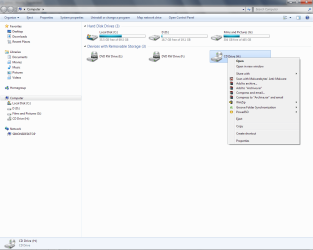
A phantom CD Drive has appeared in My Computer (label H , and there appears no way to remove this - I have right-clicked on it, and Remove or Disable doesnt appear in the drop-down menu; have also gone through the Disk Management and it doesn't appear there either.... so as far as I can see there is no way of removing this. Whilst this would not be an issue normally, and I would probably just leave it be, it seems to have taken the drive normally associated with my Seagate external hard-drive, which is now allocated to G: - again, not perhaps an issue, except that all the other devices, such as laptop, xbox, etc, are all searching for Drive H for info, and cant find it which means that I will have to remap everything unless I can remove this phantom CD drive. If anyone has any tips or answers that would be great...!!!
Cheers in anticpation
S
First thing to say is that I haven't added any new hardware, or software, and have not changed any settings, so onto the problem..... from what I can gather from other posts, this can happen with Office '10 beta, but that I dont have (as I cant stand its layout..... have always preferred Open Office if the truth be known!!)
A phantom CD Drive has appeared in My Computer (label H
, and there appears no way to remove this - I have right-clicked on it, and Remove or Disable doesnt appear in the drop-down menu; have also gone through the Disk Management and it doesn't appear there either.... so as far as I can see there is no way of removing this. Whilst this would not be an issue normally, and I would probably just leave it be, it seems to have taken the drive normally associated with my Seagate external hard-drive, which is now allocated to G: - again, not perhaps an issue, except that all the other devices, such as laptop, xbox, etc, are all searching for Drive H for info, and cant find it which means that I will have to remap everything unless I can remove this phantom CD drive. If anyone has any tips or answers that would be great...!!!Cheers in anticpation
S
Attachments
Last edited:
My Computer
- OS
- Windows 7 Ultimate

 I know the feeling!!


