
- Local time
- 11:45 AM
- Messages
- 50,634
You are welcome to ask questions if you are interested in learning.
Not that you haven't learned enough already.
Not that you haven't learned enough already.



 :huh:
:huh: rb:
rb: Some of us have learned the workarounds for when all else fails.
I'm not as polite as the others.
You have received excellent advice from numerous experts.
These people have spent much time and effort to help you.
Since you are having difficulty following the excellent advice you have received, then as I mentioned once before,
GET SOMEONE TO HELP YOU!
No excuses. Just do it.
I could relocate tomorrow to Timbuktu and within 24 hours I'd be able to locate assistance.
No excuses. You are an adult.

Despite coming across as rather rude, Karl has a valid point.I'm not as polite as the others.
You have received excellent advice from numerous experts.
These people have spent much time and effort to help you.
Since you are having difficulty following the excellent advice you have received, then as I mentioned once before,
GET SOMEONE TO HELP YOU!
No excuses. Just do it.
I could relocate tomorrow to Timbuktu and within 24 hours I'd be able to locate assistance.
No excuses. You are an adult.
You're right. You're not as polite as the others. But you are more of a rude idiot than the others, so score one for you. If they didn't want to continue helping her they wouldn't be. She's doing the best she can, and has been more than upfront from the very beginning about her lack of understanding.
Where exactly do you come off telling her to get help elsewhere? You're an adult, I'm assuming, if you don't want to keep helping, fine, follow some other forum. Maybe someone logged in from Timbuktu.
My external HD is:
SimpleDRIVE Mini - Red Wine - USB 2.0 250GB 2.5 in Portable External Hard Drive
I don't find eSATA thing... not sure, but this website has pics of my pc with side views...
Acer Aspire 4810TZ-414G32MN - Notebookcheck.net External Reviews
Also, I rebooted with SATA in IDE and Network disabled.
I received this error right after the Acer loadup screen:
BOOTMGR is missing
Press Ctrl+Alt+Del to restart
Most laptops HDDs just connect to a header, much like an external enclosure, so there is no cable.115 ICRC Error
Ultra DMA CRC error.
Data sent between the host computer and the drive has been corrupted. If the system cannot properly handle a drive running a specific Ultra ATA rate such as ATA100, the data may become corrupted. To run in ATA 66 and ATA100 rates, an Ultra ATA 80 -conductor cable must be used. Check cabling & retest. May need to run DLGUDMA to set the drive to a slower speed or replace the IDE cable. You may also want to reroute your IDE cable away from sources of electronic bus noise such as your CPU, Power Supply, etc.
Next step: Re-Test Drive
Despite coming across as rather rude, Karl has a valid point.
Her time would be better spent working on her homework, and the $100 or so she would have to pay (or more, I don't know) to get this fixed might be worth just having it done.
However, this is up to her, and (as said above), we will continue to help as we can.
~Lordbob

 click to enlarge
I'm not as polite as the others.
You have received excellent advice from numerous experts.
These people have spent much time and effort to help you.
Since you are having difficulty following the excellent advice you have received, then as I mentioned once before,
GET SOMEONE TO HELP YOU!
No excuses. Just do it.
I could relocate tomorrow to Timbuktu and within 24 hours I'd be able to locate assistance.
No excuses. You are an adult.
You're right. You're not as polite as the others. But you are more of a rude idiot than the others, so score one for you. If they didn't want to continue helping her they wouldn't be. She's doing the best she can, and has been more than upfront from the very beginning about her lack of understanding.
Where exactly do you come off telling her to get help elsewhere? You're an adult, I'm assuming, if you don't want to keep helping, fine, follow some other forum. Maybe someone logged in from Timbuktu.
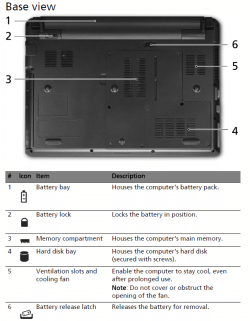
I have "cleaned" my HD via the back route you showed (diagram was super helpful). I haven't taken my screw driver at my external HD as I'm scared to death of that (I'll back everything up in there to my friends pc -just in case), so I'll take that step after I have exhausted my Windows Vista installation tries.What's happening with Vista?
I seem to be going in an endless loop by getting this message:
"Windows could not prepare the computer to boot into the next phase of installation. To install Windows restart the installation."
I've gone through the installation three times and the same error. It goes all the way through Copying Windows files, Expanding files, Installing features, Installing updates, but at Completing installation I get this message. So, I restarted but I just went through a full circle and ended up back to the message
I found a diagram showing your laptop's hard drive bay, which is secured by screws. Open it to take a look, being careful not to drop screws or touch electronics without touching a metal part of the case first. Brush out any dust carefully with an artist's paintbrush, blow it out with a can of compressed air, if necessary use only plastic vacuum attachments without touching case. Remove the HD carefully to clean and reseat the contacts as Dave described. If you can open your external, you can now swap that HD into there:
http://support.acer.com/acerpanam/Manuals/acer/2009/UserGuides/AS_4810T_4810TZ_4410T_QG_Eng_0402.pdf
View attachment 107349 click to enlarge

