please don't laugh...

You are welcome to ask questions if you are interested in learning.

Not that you haven't learned enough already. :geek:

 
Currently crawling at 83%, but let's say that thing finished before the end of the year. What step am I taking next?
 

My Computer

Computer Manufacturer/Model Number
Acer Aspire 4810tz
OS
Windows Home Premium 32bit
Wow... 21 pages and still stuck...

Hi, mypcbroke...
After reading (and re-reading) the whole thread (and amazed that it's still going), I think I know what you should do so that others can help you a bit more effective...
I know that this is probably your 100'th (or so) Windows install, but I'd be glad to know exactly step by step what your screen looks like, and what options you choose every step of the way, and if you can... snap a pic of everything (especially those bizarre error/warning messages). I'm 100% sure that this will clear up many things for the helpers... :)

zzz2496
 

My Computer

Computer Manufacturer/Model Number
Self Built
OS
Windows7 Ultimate 64bit
CPU
Intel Core 2 Quad Q6600
Motherboard
Abit IN9-32X-MMAX
Memory
DDR2 Adata 4GB
Graphics Card(s)
Nvidia GeForce GTX 285 1024 and Nvidia GeForce 8800GT 512
Sound Card
Asus Xonar HDAV 1.3
Monitor(s) Displays
Dell 2407WFP and BenQ 2400v and Philips 150v3
Screen Resolution
3840x1200 and 1024x768
Hard Drives
2 WDC 1TB
1 WDC 1.5TB
1 WDC 640GB
1 WDC 320GB
1 Seagate 200GB
PSU
Corsair TX 850W
Case
Cooler Master HAF932
Cooling
Arctic Cooling Freezer Extreme and plenty of fans...
Keyboard
MicrosoftNaturalKeyboard 4000/Apple Alu keyboard/Dinovo mini
Mouse
Logitech G5/MarbleMouseTrackball/PerformanceMX/SpacePilotPRO
Internet Speed
1.5Mbps down/384Kbps up
Other Info
APC SURT 1000XL
Logitech Z-560
Wiimote
Mikrotik Router
Linksys (now Cisco) SD2008 8 port Gigabit switch
Linksys WRT54G (acting as AP)
Apple wireless Aluminium keyboard
Apple Magic Mouse
Xbox360 wired controller
Would you trust us if we said Walk on Water

Walk_on_Water.jpg :huh:


:orb:

Or do another Install with USB Flash Drive ;)
 

My Computer

Computer type
PC/Desktop
Computer Manufacturer/Model Number
Built them myself, Science Experiments !
OS
Win7 Enterprise, Win7 x86 (Ult 7600), Win7 x64 Ult 7600, TechNet RTM on AMD x64 (2.8Ghz)
CPU
AMD fx8350 4ghz, AMD-32 2400mhz, AMD-64 3200mhz, AMDx64 2.8G
Motherboard
SIS 755, ECS-K8M890M-M (Ult 7600), GigaByte & others
Memory
2gb, 4gb on the Ult 7600, 4gb on Technet RTM, 32gb on FX8350
Graphics Card(s)
Draw my own Graphics, several nVidia cards
Sound Card
on motherboard
Monitor(s) Displays
19" flat scr, 28" I-Inc widescr,22" Emprex Widescr, 23" Acer
Screen Resolution
1280 x 1024, 1440 x 900, 1920 x 1080
Hard Drives
6 pata Ide HD's & 2 Sata HD's
added 80gb external on Ult 7600 computer,
numerous extra 1tb, 2TB, 3Tb SATA HD's
A collection of ext HD Docks w/ HDs
PSU
430w, 550w, 600w, 700, 800, etc
Case
All Generic Full Towers
Cooling
Open Air & a few fans, some w/ colored LEDs
Keyboard
Compaq & Dell recycled from GoodWill
Mouse
Made in China Optical Wired Mouse
Internet Speed
Fast Cable InterNet
Antivirus
AVG Free on 24 different Desktops, NO Problems!
Browser
IE 8 is preferred, but use FireFox sometimes
Other Info
Linksys Routers, switches, & Hubs
Too Many USB Flash Drives to count, Biggest is 64GB !
Eight computers in my home network.
Sixteen computers at my business network.
Linked via TeamViewer !
Lots of old used spare computer parts everywhere!
Honestly? At this point I'm not sure what I'm doing right or wrong, so it's in your hands.
So I'm going for a install via USB?

I just want to clarify, when I do this, do I make partitions with PW or Windows installer?
Also, do I change the boot order via F2 OR should I pick it via F12 boot manager?

I know this is getting annoying for many of you, but I pretty much need a step by step guide of what I should be doing.

And zzz2496, I'll follow your advice and snap away with my camera
 

My Computer

Computer Manufacturer/Model Number
Acer Aspire 4810tz
OS
Windows Home Premium 32bit
Boot the WIndows installer from F12, select Custom install, use Drive Options to create New partition and format it before install. No prob with 100mb SysReserved coming along.

Is your zeroing operation finished and are you ready to try it?
 
I'm not as polite as the others.

You have received excellent advice from numerous experts.

These people have spent much time and effort to help you.

Since you are having difficulty following the excellent advice you have received, then as I mentioned once before,
GET SOMEONE TO HELP YOU!

No excuses. Just do it.

I could relocate tomorrow to Timbuktu and within 24 hours I'd be able to locate assistance.

No excuses. You are an adult.
 

My Computer

Computer Manufacturer/Model Number
Toshiba Satellite S875D-S7239 laptop
OS
MS Windows 7 Ultimate SP1 64-bit
CPU
AMD A10-4600M
Motherboard
AMD Pumori (Socket FT1)
Memory
6.00 GB Dual-Channel DDR3 @ 798MHz (11-11-12-28)
Graphics Card(s)
AMD Radeon HD 7660G
Sound Card
High Definition Audio Device
Monitor(s) Displays
Generic PnP Monitor (1600x900@60Hz)
Screen Resolution
1600x900@60Hz
Hard Drives
SSD 119GB Corsair CSSD-V128GB2 ATA Device
Keyboard
Standard PS/2 Keyboard
Mouse
HP Wireless Optical Mobile Mouse Model FHA-3410
Internet Speed
What the local pub, local coffee shop offers.
Other Info
Optical Drive:MATSHITA BD-CMB UJ160B ATA Device


Also have an Asus ha1002xp netbook with Win 7 Ultimate installed.
We are here to help you until you get it installed or find someone who can.

THere are other options: trying to install another OS to launch BIOS update or Win7, creating an image on another computer to apply to your HD with Paragon Adaptive Restore CD, swapping your external's HD into the laptop, etc.

You can reach out to friends and others to help you as needed, but we will not give up as long as you don't. It really isn't within us. :geek: Some of us have learned the workarounds for when all else fails.
 
@mypcbroke

I'll be waiting for those pics... And I'm still amazed how you're able to install 87++ times and have not succeed at all...
I'm monitoring this thread minute by minute.

zzz2496
 

My Computer

Computer Manufacturer/Model Number
Self Built
OS
Windows7 Ultimate 64bit
CPU
Intel Core 2 Quad Q6600
Motherboard
Abit IN9-32X-MMAX
Memory
DDR2 Adata 4GB
Graphics Card(s)
Nvidia GeForce GTX 285 1024 and Nvidia GeForce 8800GT 512
Sound Card
Asus Xonar HDAV 1.3
Monitor(s) Displays
Dell 2407WFP and BenQ 2400v and Philips 150v3
Screen Resolution
3840x1200 and 1024x768
Hard Drives
2 WDC 1TB
1 WDC 1.5TB
1 WDC 640GB
1 WDC 320GB
1 Seagate 200GB
PSU
Corsair TX 850W
Case
Cooler Master HAF932
Cooling
Arctic Cooling Freezer Extreme and plenty of fans...
Keyboard
MicrosoftNaturalKeyboard 4000/Apple Alu keyboard/Dinovo mini
Mouse
Logitech G5/MarbleMouseTrackball/PerformanceMX/SpacePilotPRO
Internet Speed
1.5Mbps down/384Kbps up
Other Info
APC SURT 1000XL
Logitech Z-560
Wiimote
Mikrotik Router
Linksys (now Cisco) SD2008 8 port Gigabit switch
Linksys WRT54G (acting as AP)
Apple wireless Aluminium keyboard
Apple Magic Mouse
Xbox360 wired controller
I'm not as polite as the others.

You have received excellent advice from numerous experts.

These people have spent much time and effort to help you.

Since you are having difficulty following the excellent advice you have received, then as I mentioned once before,
GET SOMEONE TO HELP YOU!

No excuses. Just do it.

I could relocate tomorrow to Timbuktu and within 24 hours I'd be able to locate assistance.

No excuses. You are an adult.


You're right. You're not as polite as the others. But you are more of a rude idiot than the others, so score one for you. If they didn't want to continue helping her they wouldn't be. She's doing the best she can, and has been more than upfront from the very beginning about her lack of understanding.

Where exactly do you come off telling her to get help elsewhere? You're an adult, I'm assuming, if you don't want to keep helping, fine, follow some other forum. Maybe someone logged in from Timbuktu.
 

My Computer

OS
Windows 7 Home Premium 64 bit
Memory
4GB DDR3
I'm not as polite as the others.

You have received excellent advice from numerous experts.

These people have spent much time and effort to help you.

Since you are having difficulty following the excellent advice you have received, then as I mentioned once before,
GET SOMEONE TO HELP YOU!

No excuses. Just do it.

I could relocate tomorrow to Timbuktu and within 24 hours I'd be able to locate assistance.

No excuses. You are an adult.


You're right. You're not as polite as the others. But you are more of a rude idiot than the others, so score one for you. If they didn't want to continue helping her they wouldn't be. She's doing the best she can, and has been more than upfront from the very beginning about her lack of understanding.

Where exactly do you come off telling her to get help elsewhere? You're an adult, I'm assuming, if you don't want to keep helping, fine, follow some other forum. Maybe someone logged in from Timbuktu.
Despite coming across as rather rude, Karl has a valid point.

Her time would be better spent working on her homework, and the $100 or so she would have to pay (or more, I don't know) to get this fixed might be worth just having it done.

However, this is up to her, and (as said above), we will continue to help as we can.

~Lordbob
 

My Computer

Computer Manufacturer/Model Number
Hera
OS
Windows 7 Ultimate x64, Mint 9
CPU
Intel i5-2500k
Motherboard
ASUS P8P67 Pro
Memory
2x 4Gb Corsair VENGEANCE DDR3-1600
Graphics Card(s)
NVidia GeForce N260GTX Twin Frozr
Sound Card
Realtek HD OnBoard Audio
Monitor(s) Displays
ASUS 24" Monitor
Screen Resolution
1920x1080
Hard Drives
G.SKILL Phoenix Series 60GB SATA II MLC Internal Solid State Drive (SSD)
SAMSUNG Spinpoint F3R 1TB 7200 RPM 32MB Cache SATA II
PSU
Cooler Master Real Power Pro 750W
Case
Cooler Master Haf 932
Cooling
Fans
Keyboard
Razer Tarantula
Mouse
Razer Lachesis
Internet Speed
not fast enough
  • Like
Reactions: JMH
My external HD is:
SimpleDRIVE Mini - Red Wine - USB 2.0 250GB 2.5 in Portable External Hard Drive

I don't find eSATA thing... not sure, but this website has pics of my pc with side views...
Acer Aspire 4810TZ-414G32MN - Notebookcheck.net External Reviews

Also, I rebooted with SATA in IDE and Network disabled.
I received this error right after the Acer loadup screen:
BOOTMGR is missing
Press Ctrl+Alt+Del to restart

Your laptop and external HDD both do not have eSATA connections.
eSATA connections are the same as the internal HDD connectins, this allows you faster access times and to use the external drive for the OS. The computer does not know the external drive is not internal and will allow the OS to be ran from it.
Something to remember for your next purchases.


Are there any screws on the bottom of the external HDD?

A few OEM external HDDs can be opened, but most of them are made specifically to not be opened. You would need to cut or break the case to get into it.
This is not an option for most people.

This is why I recommend to buy a notebook or desktop HDD and buy a seperate external enclosure.
This gives you more flexibility, if you need to use the HDD for testing or emergency use, you can easily. These are also good for putting in you internal HDD for testing or emergancy situations.

Your latest ICRC error info from Data Lifeguard Tools 11 and 10 Error Codes, states:

115 ICRC Error
Ultra DMA CRC error.

Data sent between the host computer and the drive has been corrupted. If the system cannot properly handle a drive running a specific Ultra ATA rate such as ATA100, the data may become corrupted. To run in ATA 66 and ATA100 rates, an Ultra ATA 80 -conductor cable must be used. Check cabling & retest. May need to run DLGUDMA to set the drive to a slower speed or replace the IDE cable. You may also want to reroute your IDE cable away from sources of electronic bus noise such as your CPU, Power Supply, etc.

Next step: Re-Test Drive
Most laptops HDDs just connect to a header, much like an external enclosure, so there is no cable.

This error tells me there is either a HDD failing or connection problem.
Since there is no cable I would pull the HDD out of your laptop, inspect the pins on the connector for obvious defects, like bent pins. Clean the connections with electrical contact cleaner and re-seat the HDD. Be sure it is dry and firmly connected.

Your laptop manual should show you how to open the hard drive bay and remove the HDD.
Let us know if you have any questions about this.

If this doesn't solve the problem, you are going to have to test with another HDD.
Borrow one if you can or if that's not possible, you will need to buy one. The price for a similar HDD is going to be approximately $50, this is much cheaper than a new laptop.
If this is not the cause of your problems, then you may be able to return the HDD, if the store has a good return policy, or you can sell it or use it in an external enclosure for more storage.

Another option would be to have a computer knowledgable friend or computer repair shop do this for you.
Search youtube for laptop HDD replacement for info on how to do this.

From a quick search, here's one from WD

Install a WD Hard Drive in your Laptop
You might want to fast forward past the promotional material at the beginning.
It's a fairly straight forward process.

I'm sure you will have some questions, just ask and we'll help.


EDIT:

Try Greg's suggestions, they have a very good chance of succeding.

You should take the HDD out for inspection and cleaning the connection, then re-seat it.

After trying Greg's procedure, if you keep getting the same type of errors, then you will need to test with a different HDD.
 
Last edited:

My Computer

Computer type
PC/Desktop
Computer Manufacturer/Model Number
76~2.0
OS
Windows 7 Ult x64 - SP1/ Windows 8 Pro x64
CPU
Intel Core i5-3570K 4.6GHz
Motherboard
Gigabyte GA-Z77X UD3H, f18
Memory
8GB (2X4GB) DDR3 1600 Corsair Vengeance CL8 1.5v
Graphics Card(s)
Sapphire HD 7770 Vapor-X OC 1GB DDR5
Sound Card
Onboard VIA VT2021
Monitor(s) Displays
22" LCD Dell
Screen Resolution
1680x1050
Hard Drives
Samsung 840Pro 128GB SSD,
Seagate Barracuda 500GB SATA2 7200rpm 32MB cache, Seagate Barracuda 1TB SATA2 7200rpm 32MB cache,
PSU
Corsair HX650W
Case
Cooler Master Storm Scout
Cooling
Corsair H80 2x12cm Noctua NF P12 , 2x14cm case fans
Keyboard
Logitech Wave
Mouse
CM Sentinel
Internet Speed
Dismal
Antivirus
Avast
Browser
Opera Next
Other Info
Haswell laptop: HP Envy 17t-j, i7-4700MQ, GeForce 740M 2GB DDR3, 17.3" Full HD 1920x1080, 16GB RAM, Samsung 840 Pro 128GB, 1TB Hitachi 7200 HDD,
Desktop: eSATA ports,
External eSATA Seagate 500GB SATA2 7200rpm,
External WD USB 500GB
Despite coming across as rather rude, Karl has a valid point.

Her time would be better spent working on her homework, and the $100 or so she would have to pay (or more, I don't know) to get this fixed might be worth just having it done.

However, this is up to her, and (as said above), we will continue to help as we can.

~Lordbob
I'm sure as a graduate student if she had a spare $100 lying around it would have been fixed long ago.

I have watched this with equal amounts of fascination and awe, and was going to comment on the unbelievable help and knowledge.

I couldn't believe such a comment was being made. Seems like a simple "I give up, you other guys take over", would have sufficed.

But I've had my say. I'll go back to watching the posts and the labor of love the rest of you are involved with. It's been a learning experience for me. I'm thinking of printing it out since I have an Acer desktop, and it could come in very handy someday.
 

My Computer

OS
Windows 7 Home Premium 64 bit
Memory
4GB DDR3
Any positive progress yet ?
 

My Computer

Computer type
PC/Desktop
Computer Manufacturer/Model Number
Built them myself, Science Experiments !
OS
Win7 Enterprise, Win7 x86 (Ult 7600), Win7 x64 Ult 7600, TechNet RTM on AMD x64 (2.8Ghz)
CPU
AMD fx8350 4ghz, AMD-32 2400mhz, AMD-64 3200mhz, AMDx64 2.8G
Motherboard
SIS 755, ECS-K8M890M-M (Ult 7600), GigaByte & others
Memory
2gb, 4gb on the Ult 7600, 4gb on Technet RTM, 32gb on FX8350
Graphics Card(s)
Draw my own Graphics, several nVidia cards
Sound Card
on motherboard
Monitor(s) Displays
19" flat scr, 28" I-Inc widescr,22" Emprex Widescr, 23" Acer
Screen Resolution
1280 x 1024, 1440 x 900, 1920 x 1080
Hard Drives
6 pata Ide HD's & 2 Sata HD's
added 80gb external on Ult 7600 computer,
numerous extra 1tb, 2TB, 3Tb SATA HD's
A collection of ext HD Docks w/ HDs
PSU
430w, 550w, 600w, 700, 800, etc
Case
All Generic Full Towers
Cooling
Open Air & a few fans, some w/ colored LEDs
Keyboard
Compaq & Dell recycled from GoodWill
Mouse
Made in China Optical Wired Mouse
Internet Speed
Fast Cable InterNet
Antivirus
AVG Free on 24 different Desktops, NO Problems!
Browser
IE 8 is preferred, but use FireFox sometimes
Other Info
Linksys Routers, switches, & Hubs
Too Many USB Flash Drives to count, Biggest is 64GB !
Eight computers in my home network.
Sixteen computers at my business network.
Linked via TeamViewer !
Lots of old used spare computer parts everywhere!
After a few more attempts with Windows 7 by wiping/formatting between each try, I am currently trying to install Windows Vista via a DVD I managed to wrangle. It's been "Expanding files" for a little while now, but I figured I had nothing to lose in trying.
 

My Computer

Computer Manufacturer/Model Number
Acer Aspire 4810tz
OS
Windows Home Premium 32bit
If Vista installs or not, may give us some additional clues as to what keeps happening :confused:
 

My Computer

Computer type
PC/Desktop
Computer Manufacturer/Model Number
Built them myself, Science Experiments !
OS
Win7 Enterprise, Win7 x86 (Ult 7600), Win7 x64 Ult 7600, TechNet RTM on AMD x64 (2.8Ghz)
CPU
AMD fx8350 4ghz, AMD-32 2400mhz, AMD-64 3200mhz, AMDx64 2.8G
Motherboard
SIS 755, ECS-K8M890M-M (Ult 7600), GigaByte & others
Memory
2gb, 4gb on the Ult 7600, 4gb on Technet RTM, 32gb on FX8350
Graphics Card(s)
Draw my own Graphics, several nVidia cards
Sound Card
on motherboard
Monitor(s) Displays
19" flat scr, 28" I-Inc widescr,22" Emprex Widescr, 23" Acer
Screen Resolution
1280 x 1024, 1440 x 900, 1920 x 1080
Hard Drives
6 pata Ide HD's & 2 Sata HD's
added 80gb external on Ult 7600 computer,
numerous extra 1tb, 2TB, 3Tb SATA HD's
A collection of ext HD Docks w/ HDs
PSU
430w, 550w, 600w, 700, 800, etc
Case
All Generic Full Towers
Cooling
Open Air & a few fans, some w/ colored LEDs
Keyboard
Compaq & Dell recycled from GoodWill
Mouse
Made in China Optical Wired Mouse
Internet Speed
Fast Cable InterNet
Antivirus
AVG Free on 24 different Desktops, NO Problems!
Browser
IE 8 is preferred, but use FireFox sometimes
Other Info
Linksys Routers, switches, & Hubs
Too Many USB Flash Drives to count, Biggest is 64GB !
Eight computers in my home network.
Sixteen computers at my business network.
Linked via TeamViewer !
Lots of old used spare computer parts everywhere!
What's happening with Vista?

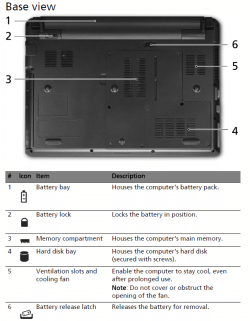
I found a diagram showing your laptop's hard drive bay, which is secured by screws. Open it to take a look, being careful not to drop screws or touch electronics without touching a metal part of the case first. Brush out any dust carefully with an artist's paintbrush, blow it out with a can of compressed air, if necessary use only plastic vacuum attachments without touching case. Remove the HD carefully to clean and reseat the contacts as Dave described. If you can open your external, you can now swap that HD into there:
http://support.acer.com/acerpanam/Manuals/acer/2009/UserGuides/AS_4810T_4810TZ_4410T_QG_Eng_0402.pdf
Capture.PNG click to enlarge

Next attempt...install Win7 on your other machine to a partition you create by shrinking your current installation's partition by about 15-20gb using Partition Wizard CD to Resize. Install 7 to the space you shrink. http://www.sevenforums.com/tutorials/93322-partition-wizard-use-bootable-cd.html

I will give you steps to save a backup image of Win7 to your external HD, then reimage it to your laptop using Paragon Adaptive Restore CD to adjust it to the new hardware.
 
I'm not as polite as the others.

You have received excellent advice from numerous experts.

These people have spent much time and effort to help you.

Since you are having difficulty following the excellent advice you have received, then as I mentioned once before,
GET SOMEONE TO HELP YOU!

No excuses. Just do it.

I could relocate tomorrow to Timbuktu and within 24 hours I'd be able to locate assistance.

No excuses. You are an adult.


You're right. You're not as polite as the others. But you are more of a rude idiot than the others, so score one for you. If they didn't want to continue helping her they wouldn't be. She's doing the best she can, and has been more than upfront from the very beginning about her lack of understanding.

Where exactly do you come off telling her to get help elsewhere? You're an adult, I'm assuming, if you don't want to keep helping, fine, follow some other forum. Maybe someone logged in from Timbuktu.

I agree with nailgunner. Karlsnooks is off base with that post. If he is tired of helping this young lady, no one is forcing him to follow or post in this thread.

Jim :geek:
 

My Computer

Computer type
PC/Desktop
Computer Manufacturer/Model Number
Home Built
OS
Windows 8.1 Pro w/Media Center 64bit, Windows 7 HP 64bit
CPU
Phenom II X6 1100T
Motherboard
ASUS M5A99X EVO
Memory
Crucial Balistic 8gb DDR3-1866 CL9
Graphics Card(s)
MSI R6850 Cyclone IGD5 PE
Sound Card
On Board
Monitor(s) Displays
ASUS VE258Q 25" LED with DVI-HDMI-DisplayPort
Screen Resolution
1920 x 1080
Hard Drives
Two WD Cavier Black 2TB Sata III, WD My Book Essential 2TB USB 3.0
PSU
Seasonic X650 80 Plus GOLD Modular
Case
Corsair 400R
Cooling
Antec Kuhler H2O 620, Two 120mm and four 140mm
Keyboard
Logitech K120
Mouse
Logitech Marble Mouse USB, Logitech Precision Game Pad
Internet Speed
15MB
Antivirus
Norton IS 2013, Malwarebytes Pro Beta 2
Browser
IE-11, FF-27
Other Info
APC UPS ES 750, Netgear WNR3500L Gigabit & Wireless N Router with SamKnows Test Program, Motorola SB6120 Gigabit Cable Modem. Brother HL-2170W Laser Printer, Epson V300 Scanner
  • Like
Reactions: JMH
What's happening with Vista?
I seem to be going in an endless loop by getting this message:
"Windows could not prepare the computer to boot into the next phase of installation. To install Windows restart the installation."
I've gone through the installation three times and the same error. It goes all the way through Copying Windows files, Expanding files, Installing features, Installing updates, but at Completing installation I get this message. So, I restarted but I just went through a full circle and ended up back to the message

I found a diagram showing your laptop's hard drive bay, which is secured by screws. Open it to take a look, being careful not to drop screws or touch electronics without touching a metal part of the case first. Brush out any dust carefully with an artist's paintbrush, blow it out with a can of compressed air, if necessary use only plastic vacuum attachments without touching case. Remove the HD carefully to clean and reseat the contacts as Dave described. If you can open your external, you can now swap that HD into there:
http://support.acer.com/acerpanam/Manuals/acer/2009/UserGuides/AS_4810T_4810TZ_4410T_QG_Eng_0402.pdf
View attachment 107349 click to enlarge
I have "cleaned" my HD via the back route you showed (diagram was super helpful). I haven't taken my screw driver at my external HD as I'm scared to death of that (I'll back everything up in there to my friends pc -just in case), so I'll take that step after I have exhausted my Windows Vista installation tries.
 

My Computer

Computer Manufacturer/Model Number
Acer Aspire 4810tz
OS
Windows Home Premium 32bit
Try booting into the Vista DVD, select Repair My Computer on second screen, click through to Recovery Tools list to run Startup Repair repeatedly.

Next boot into Partition Wizard CD, make sure Vista partition is marked Active, if not Modify>Mark Active and run Startup Repair again repeatedly, post back a camera snap for us to compare with previous 7 install attempts.
 
Back
Top