
azeemamir99
New member
- Local time
- 4:22 PM
- Messages
- 1
WD 1TB Green Caviar internal HDD
Almost a month ago i dropped my hdd from almost 5feet ht, after that it has gone dead (not detected even in bios), it was giving screeching sounds (may be due to some head crash), I left it aside and now yesterday when i connected it, it showed up but the OS didnt boot, no problem i just need the data not the OS.
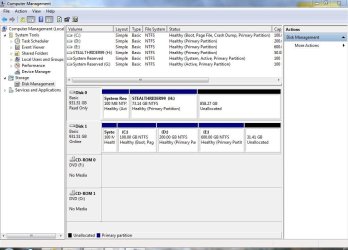
Then I connected it as slave drive, what i see is only my system reserved 100mb and C drive are visible and the whole data in C drive is write protected i can copy the data from it but not delete or add anything in it.
DISK 0
(READ ONLY)!?
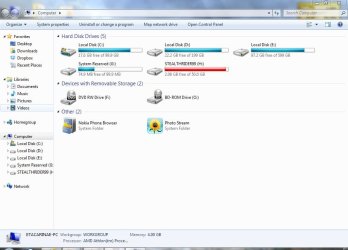
The C drive of Disk 0 in Explorer it is showing as 50gb only, where as in disk management it is showing as some 73gb which is clear in disk management screen shot and the remaining partitions have gone unallocated.
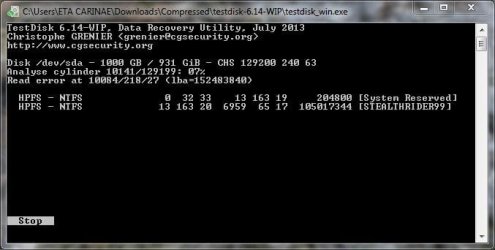
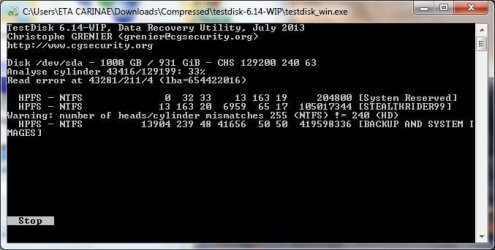
I have so much personal data stored in it with out any backup any where. The unallocated space doesnt even give the option for new simple drive, even i dont want to make a new drive as it decreases the chances for recovery. I have started a test disk utility on my drive by reading some forums but it is running deadly slow, i dont think it will be of any use, any way i will wait till it finishes, after midnight it showed some message in test disk "no of heads/cylinders mismatch.........." please refer screenshot "Test disk 1" what would that mean...
Test disk still running..
Please help me to recover my partitions as i cant afford to invest in any professional recoveries.
i can assure you that i am a bit techy person so PLEASE GUIDE ME STEP BY STEP PROCESSES THROUGH GOOD SOFTWARES so that i can recover my partitions and backup it...
Im attaching some screenshots for your reference please ask if you need any more info needed to understand the problem and guiding me for the solution.
Thanks in advance
Looking forward for the HELP


Almost a month ago i dropped my hdd from almost 5feet ht, after that it has gone dead (not detected even in bios), it was giving screeching sounds (may be due to some head crash), I left it aside and now yesterday when i connected it, it showed up but the OS didnt boot, no problem i just need the data not the OS.
Then I connected it as slave drive, what i see is only my system reserved 100mb and C drive are visible and the whole data in C drive is write protected i can copy the data from it but not delete or add anything in it.
DISK 0
(READ ONLY)!?
The C drive of Disk 0 in Explorer it is showing as 50gb only, where as in disk management it is showing as some 73gb which is clear in disk management screen shot and the remaining partitions have gone unallocated.
I have so much personal data stored in it with out any backup any where. The unallocated space doesnt even give the option for new simple drive, even i dont want to make a new drive as it decreases the chances for recovery. I have started a test disk utility on my drive by reading some forums but it is running deadly slow, i dont think it will be of any use, any way i will wait till it finishes, after midnight it showed some message in test disk "no of heads/cylinders mismatch.........." please refer screenshot "Test disk 1" what would that mean...
Test disk still running..
Please help me to recover my partitions as i cant afford to invest in any professional recoveries.
i can assure you that i am a bit techy person so PLEASE GUIDE ME STEP BY STEP PROCESSES THROUGH GOOD SOFTWARES so that i can recover my partitions and backup it...
Im attaching some screenshots for your reference please ask if you need any more info needed to understand the problem and guiding me for the solution.
Thanks in advance
Looking forward for the HELP
Attachments
Last edited:
My Computer
At a glance
Windows 7 Ultimate 32bitAmd4gbZotac Nvidia GeForce GT 620
- Computer type
- PC/Desktop
- Computer Manufacturer/Model Number
- Custom build
- OS
- Windows 7 Ultimate 32bit
- CPU
- Amd
- Motherboard
- Gigabyte
- Memory
- 4gb
- Graphics Card(s)
- Zotac Nvidia GeForce GT 620
- Hard Drives
- wd 1tb
- Antivirus
- Windows Defender
- Browser
- Internet explorer


