Post Your Overclock! [2]

on my AMD rig, disableing C1E did give me a little better frame rates. but the thing i noticed most was that stuttering stopped in games. there was a lot of micro stutter i was getiing and part of the cause was C1E. i also ran a benchmark, (cinebench) with C1E on and off and with it off i get a better score.

I don't know about that one but...

The overall purpose of power management is to manage the system's inactivates - that is power down things when not in use or low activity. Once those items are needed, power management is disengaged so to speak.

And actually I should have clarified the purpose of C1E/EIST which is actually related to Intel's CPU's. In short, it's an Intel CPU power saving mode, not a system power saving mode -

What you might not know is the purpose of some of the more obscure CPU-related BIOS settings. Both C1E and EIST relate to power-saving techniques employed by Intel CPUs. EIST, or Enhanced Intel SpeedStep Technology, is an offshoot of the notebook SpeedStep feature that lowers the CPU speed when it’s not under heavy use. C1E is an enhanced halt state that cuts the clock multiplier in the CPU to a preset value when the OS tells the chip that it has no work for it. Each has pros and cons. EIST is known for greater granularity, ramping up and down depending on load, but it does require driver support in the OS to manage it. Critics say EIST can actually reduce performance since it’s designed to operate the CPU at lower speeds whenever it’s not running at 100 percent capacity. The C1E state is issued by the OS when it’s idle, so C1E doesn’t require quite as much management. But some overclockers prefer to disable C1E since it can interfere with overclocks. We’ve seen older boards feature settings for both, but in our experience, newer chipsets from Intel contain settings only for C1E. Flipping off the features will force the CPU to always run at its maximum clock speed. Phenoms have similar features with Cool’n’Quiet (akin to EIST) and now C1E support. While you’re not supposed to, we’ve run with both settings on without issues, but your mileage may vary

Source: Maximum PC Essentials: Ultimate BIOS Tweaking Guide - Page 3 | Maximum PC

You can see a perfect example of this by disabling/enabling C1E/EIST in the BIOS and than using CPU-Z check the activity of the CPU. You'll notice the CPU running at full bore with it disabled, and Idle when enabled. This of course is provided you have the proper power management set up. particularly Processor Power Management Plan....
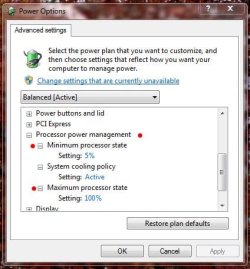
PM - Processor Settings.JPG
 

My Computer

Computer type
PC/Desktop
Computer Manufacturer/Model Number
Custom built by me.
OS
Windows 10 Pro
CPU
Intel Core i7-4770K (3.5Ghz)
Motherboard
Gigabyte G1 Sniper 5 (F10 Bios)
Memory
32 gig Corsair Dominator Platinum (4x8Gig)
Graphics Card(s)
Sapphire Tri-X R9 Fury
Sound Card
Soundblaster ZXR
Monitor(s) Displays
NEC PA242W 24" LCD Monitor
Screen Resolution
1920 x 1200
Hard Drives
Primary - Samsung 850 Pro (512gig), Samsung 840 Pro (256gig), 2TB WD Caviar Black.
PSU
EVGA Supernova 1000 G2
Case
Cooler Master HAF X
Cooling
Corsair H100i with Corsair Air Series SP120 Quiet Fans
Keyboard
Logitech Wireless Wave
Mouse
Logitech Performance MX
Internet Speed
High Speed Cable
Antivirus
Norton Security
Browser
IE11
Other Info
Memory Timings - 1866MHz @ 9-9-9-27-1T @ 1.5 volts
so finally got my swiftech H220 and my 2 nocuta NF-F12s and i got up to a 4.6 on my 8350! i tried to get to 4.7 but i think i may have almost hit the limit to the voltage of the board. i kept going up little by little and couldnt get stable on 4.7. i've read somewhere that most boards hit the point where you have to add a lot more voltage to get to the next level of jiggahertz, and i think thats where i'm at. i could try 1.38 because thats what the default bios settings go to for the 8350 (not sure why), but i'm just being content with a cool 4.6 for now. besides, this board doesnt do well with cpu socket temp heat dissipation.

70l6.jpg
 

My Computer

Computer type
PC/Desktop
Computer Manufacturer/Model Number
Custom Build and MSI GE60 0ND laptop
OS
windows 7 64bit on both
CPU
AMD FX-8350 @4.6GHz/Intel Core i7-3610QM @2.3GHz
Motherboard
ASUS M5A99X EVO R2.0/MS-16GA
Memory
16GB G.Skill 1866MHz/8GB dual channel 1600MHz
Graphics Card(s)
two Sapphire HD7970 OC 3Gb in crossfire/GTX660M 2Gb
Sound Card
Realtek HD Audio/Realtek HD Audio with THX TruStudio Pro
Monitor(s) Displays
Hanns-G 27" 1080p /Generic PnP Monitor
Screen Resolution
both 1920x1080p 60Hz
Hard Drives
250GB Samsung 840 EVO SSD,
1TB WD Blue
3x2TB WD Greens
/Samsung 840 EVO mSATA
PSU
Corsair HX750/laptop psu
Case
NZXT Source 530
Cooling
CoolerMaster Hyper 212 Evo
Keyboard
Logitech G710+/laptop keyboard by steelseries
Mouse
Logitec G500s/Logitec G500
Internet Speed
50Mbps down/1-3 Mbps up
Other Info
Scythe Kaze Master Pro 5.25 fan controller; APC Back-UPS XS 1500

My Computer

Computer type
PC/Desktop
Computer Manufacturer/Model Number
Home Built Desktop By DataTech
OS
Windows 7 Ultimate X64 SP1
CPU
Intel i5-2550K, Differing ~4.4-4.8GHz No built in GPU
Motherboard
ASUS P8Z68-V PRO/GEN3
Memory
16GB G.Skill Sniper 1866MHz @ 2133MHz 2x8GB
Graphics Card(s)
ASUS GTX650TIB-DC2OC-2GD5, (650TI Boost)
Sound Card
Onboard Realtek 5-1
Monitor(s) Displays
Samsung P2570HD
Screen Resolution
1920x1080
Hard Drives
Samsung 840 Pro 256GB SSD for OS, 500GB Seagate Constellation (Enterprise drive) for Data
PSU
Corsair HX650W
Case
Inwin Dragon Rider
Cooling
Hyper 212 EVO w/two Noctua fans, push-pull, @1300 RPM
Keyboard
E-Z Eyes, bright yellow keys with large characters
Mouse
steelseries SENSEI Laser Pro Gaming
Internet Speed
48-51Mbs Mbs down, 11 Mbs up Xfinity Cable
Antivirus
Norton Internet Security 2013
Browser
IE 10, Opera, Pale Moon if needed
Other Info
4 case fans, LG BluRay-RE, ASUS DVD-RW, Mr. Fusion power supply, 1.21 gigawatts.

My Computer

Computer type
PC/Desktop
Computer Manufacturer/Model Number
Custom Build and MSI GE60 0ND laptop
OS
windows 7 64bit on both
CPU
AMD FX-8350 @4.6GHz/Intel Core i7-3610QM @2.3GHz
Motherboard
ASUS M5A99X EVO R2.0/MS-16GA
Memory
16GB G.Skill 1866MHz/8GB dual channel 1600MHz
Graphics Card(s)
two Sapphire HD7970 OC 3Gb in crossfire/GTX660M 2Gb
Sound Card
Realtek HD Audio/Realtek HD Audio with THX TruStudio Pro
Monitor(s) Displays
Hanns-G 27" 1080p /Generic PnP Monitor
Screen Resolution
both 1920x1080p 60Hz
Hard Drives
250GB Samsung 840 EVO SSD,
1TB WD Blue
3x2TB WD Greens
/Samsung 840 EVO mSATA
PSU
Corsair HX750/laptop psu
Case
NZXT Source 530
Cooling
CoolerMaster Hyper 212 Evo
Keyboard
Logitech G710+/laptop keyboard by steelseries
Mouse
Logitec G500s/Logitec G500
Internet Speed
50Mbps down/1-3 Mbps up
Other Info
Scythe Kaze Master Pro 5.25 fan controller; APC Back-UPS XS 1500
I remember the good old days when the first 1gig Athlons came out and some clever person showed how to bridge the L2? and unlock the psu . I did this to mine and got it to 1.3gig with a lot of heat, cpu coolers weren't up to much those days.
 

My Computer

Computer type
PC/Desktop
OS
w7 ult 64 and w7 hp 64 X 2 mint 64 8.1 64 10wtp 64
I remember the good old days when the first 1gig Athlons came out and some clever person showed how to bridge the L2? and unlock the psu . I did this to mine and got it to 1.3gig with a lot of heat, cpu coolers weren't up to much those days.

hahaha! yea the first thing i remember about computers was a tv commercial for an intel pentium 3. LoL i'm glad technology has advanced since then
 

My Computer

Computer type
PC/Desktop
Computer Manufacturer/Model Number
Custom Build and MSI GE60 0ND laptop
OS
windows 7 64bit on both
CPU
AMD FX-8350 @4.6GHz/Intel Core i7-3610QM @2.3GHz
Motherboard
ASUS M5A99X EVO R2.0/MS-16GA
Memory
16GB G.Skill 1866MHz/8GB dual channel 1600MHz
Graphics Card(s)
two Sapphire HD7970 OC 3Gb in crossfire/GTX660M 2Gb
Sound Card
Realtek HD Audio/Realtek HD Audio with THX TruStudio Pro
Monitor(s) Displays
Hanns-G 27" 1080p /Generic PnP Monitor
Screen Resolution
both 1920x1080p 60Hz
Hard Drives
250GB Samsung 840 EVO SSD,
1TB WD Blue
3x2TB WD Greens
/Samsung 840 EVO mSATA
PSU
Corsair HX750/laptop psu
Case
NZXT Source 530
Cooling
CoolerMaster Hyper 212 Evo
Keyboard
Logitech G710+/laptop keyboard by steelseries
Mouse
Logitec G500s/Logitec G500
Internet Speed
50Mbps down/1-3 Mbps up
Other Info
Scythe Kaze Master Pro 5.25 fan controller; APC Back-UPS XS 1500
so finally got my swiftech H220 and my 2 nocuta NF-F12s and i got up to a 4.6 on my 8350! i tried to get to 4.7 but i think i may have almost hit the limit to the voltage of the board. i kept going up little by little and couldnt get stable on 4.7. i've read somewhere that most boards hit the point where you have to add a lot more voltage to get to the next level of jiggahertz, and i think thats where i'm at. i could try 1.38 because thats what the default bios settings go to for the 8350 (not sure why), but i'm just being content with a cool 4.6 for now. besides, this board doesnt do well with cpu socket temp heat dissipation.

70l6.jpg

In order to pass 4.7 to 4.8 Ghz you need to pump at least 1.47 to 1.488 volts there is no other way around it i am selling my FX build on Ebay right now the overclock might still be in effect to who ever buys it
 

My Computer

Computer type
PC/Desktop
Computer Manufacturer/Model Number
CoreI7-6700K MrFingerIII Special Builds
OS
Windows 10 Home Premium 64bit sp1
CPU
Intel I7-6700K @ 4.6 Ghz 1.344 volts everyday OC
Motherboard
Asrock Fatality K6 Z170 Socket 1151
Memory
32GB G-Skill TridentZ 3200mhz 16-18-18-38 DDR4
Graphics Card(s)
Sli Gigabyte Windforce GTX 980 G1
Sound Card
AC97 Creative Rage Tactic 3D Headphones Bluetooth
Monitor(s) Displays
27" Asus ROG Swift PG278Q G-Sync 48" Vizio Smart HD TV
Screen Resolution
2560x1440p 27"- 48" Currently Gaming at 2560x1440p Res 2K
Hard Drives
250GB Samsung Evo840SSD Seagate baracuda 500 GB WD Mybook 500Gb 1TB Seagate Barracuda
PSU
HX1050w Corsair Silver 80plus certified crosfire/sli
Case
Enthod Pro Full Tower
Cooling
Corsair H110i GT 280 mm High Performance WaterBlock
Keyboard
Logitech wireless keyboard
Mouse
Logitech wireless mouse
Internet Speed
Cox Cable 100+ mb
Antivirus
WebRoot Spysweeper with Antivirus
Browser
IE-10, Chrome, Opera
Other Info
My Other Rig is a AMD FX8320E @4.6Ghz 16GB Ballistic Sport Ram
Mobo Asrock Fatality 990FX 120GB OCZ SSD 1TB Seagate Barracuda Corsair H75 Cooling PSU Corsair CX750
GPU GTX Gigabyte 970G1
In order to pass 4.7 to 4.8 Ghz you need to pump at least 1.47 to 1.488 volts there is no other way around it i am selling my FX build on Ebay right now the overclock might still be in effect to who ever buys it

oh wow!! i'm not sure if my board will handle that. it gets close to socket temp throttling already, its just not great at dissipating that heat.
 

My Computer

Computer type
PC/Desktop
Computer Manufacturer/Model Number
Custom Build and MSI GE60 0ND laptop
OS
windows 7 64bit on both
CPU
AMD FX-8350 @4.6GHz/Intel Core i7-3610QM @2.3GHz
Motherboard
ASUS M5A99X EVO R2.0/MS-16GA
Memory
16GB G.Skill 1866MHz/8GB dual channel 1600MHz
Graphics Card(s)
two Sapphire HD7970 OC 3Gb in crossfire/GTX660M 2Gb
Sound Card
Realtek HD Audio/Realtek HD Audio with THX TruStudio Pro
Monitor(s) Displays
Hanns-G 27" 1080p /Generic PnP Monitor
Screen Resolution
both 1920x1080p 60Hz
Hard Drives
250GB Samsung 840 EVO SSD,
1TB WD Blue
3x2TB WD Greens
/Samsung 840 EVO mSATA
PSU
Corsair HX750/laptop psu
Case
NZXT Source 530
Cooling
CoolerMaster Hyper 212 Evo
Keyboard
Logitech G710+/laptop keyboard by steelseries
Mouse
Logitec G500s/Logitec G500
Internet Speed
50Mbps down/1-3 Mbps up
Other Info
Scythe Kaze Master Pro 5.25 fan controller; APC Back-UPS XS 1500
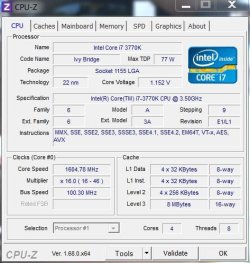
OK, I will not even be attempting an entry into the SF Overclocking leaderboards with the new CPU, it's not the kind of CPU for insane speeds. But I figured I would show my daily OC in here.
It runs at 4.6GHz at 1.264V and then idles down to 1.2GHz at around 0.9V.
The screenshot was just after a run of IBT @ 4.6GHz yesterday, temps are very good, I am happy :)
 

Attachments

  • cpu.PNG
    cpu.PNG
    378.5 KB · Views: 17

My Computer

OS
Windows 7 Professional 64 bit
I see the idle temps, what were the (full) load temps?
 

My Computer

Computer type
PC/Desktop
Computer Manufacturer/Model Number
Custom built by me.
OS
Windows 10 Pro
CPU
Intel Core i7-4770K (3.5Ghz)
Motherboard
Gigabyte G1 Sniper 5 (F10 Bios)
Memory
32 gig Corsair Dominator Platinum (4x8Gig)
Graphics Card(s)
Sapphire Tri-X R9 Fury
Sound Card
Soundblaster ZXR
Monitor(s) Displays
NEC PA242W 24" LCD Monitor
Screen Resolution
1920 x 1200
Hard Drives
Primary - Samsung 850 Pro (512gig), Samsung 840 Pro (256gig), 2TB WD Caviar Black.
PSU
EVGA Supernova 1000 G2
Case
Cooler Master HAF X
Cooling
Corsair H100i with Corsair Air Series SP120 Quiet Fans
Keyboard
Logitech Wireless Wave
Mouse
Logitech Performance MX
Internet Speed
High Speed Cable
Antivirus
Norton Security
Browser
IE11
Other Info
Memory Timings - 1866MHz @ 9-9-9-27-1T @ 1.5 volts
They are in the screen shot Drew. In the Coretemp window, the "Max" values were what the CPU hit when it was under load at 4.6GHz in IBT.
 

My Computer

OS
Windows 7 Professional 64 bit
OK, missed it.

Yeah I usually submitted mine with a screen shot showing load as well. This is from an old benchmark with my i7-930....

CPU Load use.JPG

Never could pass prime 95, temps wise :o

Anyway that's old so don't ask me what the new system is because I've not run any of those benches.
 

My Computer

Computer type
PC/Desktop
Computer Manufacturer/Model Number
Custom built by me.
OS
Windows 10 Pro
CPU
Intel Core i7-4770K (3.5Ghz)
Motherboard
Gigabyte G1 Sniper 5 (F10 Bios)
Memory
32 gig Corsair Dominator Platinum (4x8Gig)
Graphics Card(s)
Sapphire Tri-X R9 Fury
Sound Card
Soundblaster ZXR
Monitor(s) Displays
NEC PA242W 24" LCD Monitor
Screen Resolution
1920 x 1200
Hard Drives
Primary - Samsung 850 Pro (512gig), Samsung 840 Pro (256gig), 2TB WD Caviar Black.
PSU
EVGA Supernova 1000 G2
Case
Cooler Master HAF X
Cooling
Corsair H100i with Corsair Air Series SP120 Quiet Fans
Keyboard
Logitech Wireless Wave
Mouse
Logitech Performance MX
Internet Speed
High Speed Cable
Antivirus
Norton Security
Browser
IE11
Other Info
Memory Timings - 1866MHz @ 9-9-9-27-1T @ 1.5 volts
OK, I will not even be attempting an entry into the SF Overclocking leaderboards with the new CPU, it's not the kind of CPU for insane speeds. But I figured I would show my daily OC in here.
It runs at 4.6GHz at 1.264V and then idles down to 1.2GHz at around 0.9V.
The screenshot was just after a run of IBT @ 4.6GHz yesterday, temps are very good, I am happy :)

Looking good Paul, that's a lot of cores you have there!
 

My Computer

Computer type
PC/Desktop
Computer Manufacturer/Model Number
Dude Build
OS
Windows 10 Pro X64
CPU
Intel(R) Core(TM) i5-3570K CPU OC@ 4.5GHZ Turbo
Motherboard
MSI Z77A-G45 Gaming
Memory
8.00 GB DDR3 1600Mhz
Graphics Card(s)
MSI Gaming X GTX 1070
Sound Card
Realtek High Definition
Monitor(s) Displays
Dell S23O9W, HP L1710
Screen Resolution
DELL-1920 x 1080 HP-1280 x1024
Hard Drives
Crucial m4 256 SSD, WD 7200RPM 500GB WD 1TB
PSU
Seasonic X650 GOLD
Case
Zalman Z12
Cooling
Antec Kuhler 920
Keyboard
Logitech
Mouse
MSI DS100 Interceptor
Internet Speed
50 down and 5 up
Antivirus
MSE
Browser
Chrome, IE 11
Other Info
Logitech X-620 Speakers
OK, I will not even be attempting an entry into the SF Overclocking leaderboards with the new CPU, it's not the kind of CPU for insane speeds. But I figured I would show my daily OC in here.
It runs at 4.6GHz at 1.264V and then idles down to 1.2GHz at around 0.9V.
The screenshot was just after a run of IBT @ 4.6GHz yesterday, temps are very good, I am happy :)

Looking good Paul, that's a lot of cores you have there!
He seems to be missing a couple though. IT should show 8 with HT enabled.
Well maybe 12 cores.
 

My Computer

Computer type
PC/Desktop
Computer Manufacturer/Model Number
Home Built Desktop By DataTech
OS
Windows 7 Ultimate X64 SP1
CPU
Intel i5-2550K, Differing ~4.4-4.8GHz No built in GPU
Motherboard
ASUS P8Z68-V PRO/GEN3
Memory
16GB G.Skill Sniper 1866MHz @ 2133MHz 2x8GB
Graphics Card(s)
ASUS GTX650TIB-DC2OC-2GD5, (650TI Boost)
Sound Card
Onboard Realtek 5-1
Monitor(s) Displays
Samsung P2570HD
Screen Resolution
1920x1080
Hard Drives
Samsung 840 Pro 256GB SSD for OS, 500GB Seagate Constellation (Enterprise drive) for Data
PSU
Corsair HX650W
Case
Inwin Dragon Rider
Cooling
Hyper 212 EVO w/two Noctua fans, push-pull, @1300 RPM
Keyboard
E-Z Eyes, bright yellow keys with large characters
Mouse
steelseries SENSEI Laser Pro Gaming
Internet Speed
48-51Mbs Mbs down, 11 Mbs up Xfinity Cable
Antivirus
Norton Internet Security 2013
Browser
IE 10, Opera, Pale Moon if needed
Other Info
4 case fans, LG BluRay-RE, ASUS DVD-RW, Mr. Fusion power supply, 1.21 gigawatts.
OK, I will not even be attempting an entry into the SF Overclocking leaderboards with the new CPU, it's not the kind of CPU for insane speeds. But I figured I would show my daily OC in here.
It runs at 4.6GHz at 1.264V and then idles down to 1.2GHz at around 0.9V.
The screenshot was just after a run of IBT @ 4.6GHz yesterday, temps are very good, I am happy :)

Looking good Paul, that's a lot of cores you have there!
He seems to be missing a couple though. IT should show 8 with HT enabled.
Well maybe 12 cores.

Lol, last time I checked, CPUz only displays the Physical cores. But here is a shot just for you Gary to show the other ones :geek:
 

Attachments

  • cpu1.PNG
    cpu1.PNG
    22.4 KB · Views: 0

My Computer

OS
Windows 7 Professional 64 bit
Paul, CPUz should show Cores and Threads, like yours does.

z1.JPG
 

My Computers

System One System Two

  • Computer type
    PC/Desktop
    Computer Manufacturer/Model Number
    ALWAYS UNDER CONSTRUCTION
    OS
    Windows 11 Pro
    CPU
    Ryzen 9 5900X
    Motherboard
    Asus X570 Crosshair Viii Hero
    Memory
    32GB G Skill DDR4-3600
    Graphics Card(s)
    EVGA RTX 3080 FTW 3 Ultra
    Sound Card
    On Board/Sennheiser PC37X Headset
    Monitor(s) Displays
    3 X Asus 27"
    Screen Resolution
    2560x1440
    Hard Drives
    2 X 1 TB NVME drives
    PSU
    EVGA 850
    Case
    Phanteks Eclipse P400A
    Cooling
    EVGA 280 AIO
    Keyboard
    Logitech G510s/ Logitech G13
    Mouse
    Logitech G502
    Internet Speed
    24/1
    Antivirus
    ESET/MBAM Pro/SAS Pro
    Browser
    Chrome/ Firefox/ Edge
  • Computer type
    Laptop
    System Manufacturer/Model Number
    Dell 16 Plus
    OS
    Windows 11 Pro
    CPU
    Intel Ultra 9 288V
    Memory
    32 GB LPDDR5X 8533
    Monitor(s) Displays
    16" Mini-LED HDR600 Touch 90 Hz
    Screen Resolution
    2560X1600
    Hard Drives
    1 TB NVME
Sorry I meant coretemp. I had not had my first coffee of the day lol.
 

My Computer

OS
Windows 7 Professional 64 bit
I was looking at your CoreTemp Paul. I've had 6 cups of coffee....so far. :p
 

My Computer

Computer type
PC/Desktop
Computer Manufacturer/Model Number
Home Built Desktop By DataTech
OS
Windows 7 Ultimate X64 SP1
CPU
Intel i5-2550K, Differing ~4.4-4.8GHz No built in GPU
Motherboard
ASUS P8Z68-V PRO/GEN3
Memory
16GB G.Skill Sniper 1866MHz @ 2133MHz 2x8GB
Graphics Card(s)
ASUS GTX650TIB-DC2OC-2GD5, (650TI Boost)
Sound Card
Onboard Realtek 5-1
Monitor(s) Displays
Samsung P2570HD
Screen Resolution
1920x1080
Hard Drives
Samsung 840 Pro 256GB SSD for OS, 500GB Seagate Constellation (Enterprise drive) for Data
PSU
Corsair HX650W
Case
Inwin Dragon Rider
Cooling
Hyper 212 EVO w/two Noctua fans, push-pull, @1300 RPM
Keyboard
E-Z Eyes, bright yellow keys with large characters
Mouse
steelseries SENSEI Laser Pro Gaming
Internet Speed
48-51Mbs Mbs down, 11 Mbs up Xfinity Cable
Antivirus
Norton Internet Security 2013
Browser
IE 10, Opera, Pale Moon if needed
Other Info
4 case fans, LG BluRay-RE, ASUS DVD-RW, Mr. Fusion power supply, 1.21 gigawatts.
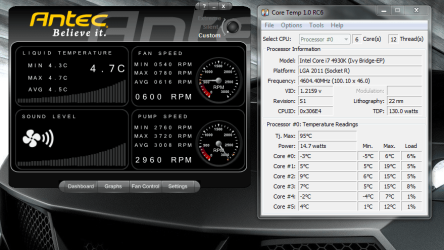
Here's a COLD shot for Drew :eek:

Widespread frost this morning outside and I have just come out to the Cabin and fired the PC up, I also opened up the Antec control so you can see the water temp. I don't actually believe the minus figures in coretemp for the CPU though, I expect there are a bit inaccurate.
 

Attachments

  • cold.PNG
    cold.PNG
    258.5 KB · Views: 3

My Computer

OS
Windows 7 Professional 64 bit
Here's a COLD shot for Drew :eek:

Widespread frost this morning outside and I have just come out to the Cabin and fired the PC up, I also opened up the Antec control so you can see the water temp. I don't actually believe the minus figures in coretemp for the CPU though, I expect there are a bit inaccurate.

It's a bit chilly up your manor today then mate, I'd seize up while hitting the power button lol. It was 12c in my room this morning and that was cold enough.
 

My Computer

Computer type
PC/Desktop
Computer Manufacturer/Model Number
Custom build
OS
Win7 Home Premium x64 SP1
CPU
i7 4770k
Motherboard
Asus maximus VI Hero
Memory
8Gb Kingston HyperX Beast 2400MHz @2133MHz 11-12-11-30
Graphics Card(s)
MSI GTX 780ti Gaming Oc x2
Sound Card
Onboard ROG SupremeFX
Monitor(s) Displays
Asus VG248QE
Screen Resolution
3840X1080 144Hz
Hard Drives
Samung Evo 256Gb, OCZ Agility4 128Gb
1x1TB hitachi storage
PSU
EVGA Supernova 1000w Platinum
Case
Corsair Air 540
Cooling
Corsair H100i
Keyboard
Coolermaster Quickfire Pro
Mouse
Corsair M65 RGB
Internet Speed
74mb dwn/16up
Antivirus
MSE,Malwarebytes
Browser
Chrome
Back
Top