
Solved Problem adding space to my C drive???

In an elevated command window type diskpart <enter> then list volume and post a snip here.


Hello again Jim.


Do this again so I can see what's up.


I still have a plan with Partition Wizard so don't give up, I just want to see something first.
 

My Computer My Computer

At a glance

W 7 64-bit UltimateIntel Q9550 Yorkfield8GB Dominator 8500C5DATI : XFX 5870
Computer Manufacturer/Model Number
* BFK Customs *
OS
W 7 64-bit Ultimate
CPU
Intel Q9550 Yorkfield
Motherboard
ASUS P5Q Pro
Memory
8GB Dominator 8500C5D
Graphics Card(s)
ATI : XFX 5870
Sound Card
Realtek HD Audio 7-1
Monitor(s) Displays
1x 47" LCD HDMI & 3x 26" LCD HDMI
Screen Resolution
1920x1080P & 1920x1200
Hard Drives
1x 80GB Intel X25-M G2 SSD : 1x 500GB & 1x 640GB WD Caviar Black(s)
PSU
Corsair 620HX
Case
Cooler Master RC-690
Cooling
Tuniq Tower 120, 2x 140mm and 3x 120mm case fans
Keyboard
Microsoft 500
Mouse
Razer Diamondback 3G
Internet Speed
14 Mb/s
Other Info
1x Koutech 3Gb/s SATA HDD Hot Swap Rack
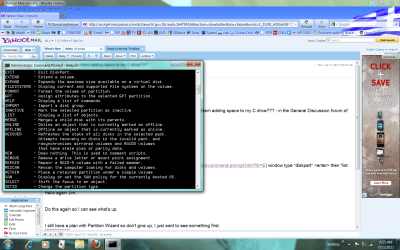
Good morning low country friend.....here is the list volume readout
Jim
 

Attachments

  • listvolume.png
    listvolume.png
    178.2 KB · Views: 17

My Computer My Computer

At a glance

w7
OS
w7
Hello Jim, are you in the Lowcountry also?

Here's what to do use disk management to create the F: again so that space will have a drive letter.

Open Partition Wizard and right click/select the F: drive, in the drop down box click Move/Resize, in the dialog box that opens move the left side slider to the size you want to resize to create unallocated space, I would suggest you shrink to 102400 / 100GB so you will have enough for the future, that'll give you a 200GB C: partition.

Then Apply and Yes for the confirmation box and after the progress bar, click to finish.

After a restart, post back with the disk management outcome.
click to enlarge
drag.jpg
 

My Computer My Computer

At a glance

W 7 64-bit UltimateIntel Q9550 Yorkfield8GB Dominator 8500C5DATI : XFX 5870
Computer Manufacturer/Model Number
* BFK Customs *
OS
W 7 64-bit Ultimate
CPU
Intel Q9550 Yorkfield
Motherboard
ASUS P5Q Pro
Memory
8GB Dominator 8500C5D
Graphics Card(s)
ATI : XFX 5870
Sound Card
Realtek HD Audio 7-1
Monitor(s) Displays
1x 47" LCD HDMI & 3x 26" LCD HDMI
Screen Resolution
1920x1080P & 1920x1200
Hard Drives
1x 80GB Intel X25-M G2 SSD : 1x 500GB & 1x 640GB WD Caviar Black(s)
PSU
Corsair 620HX
Case
Cooler Master RC-690
Cooling
Tuniq Tower 120, 2x 140mm and 3x 120mm case fans
Keyboard
Microsoft 500
Mouse
Razer Diamondback 3G
Internet Speed
14 Mb/s
Other Info
1x Koutech 3Gb/s SATA HDD Hot Swap Rack
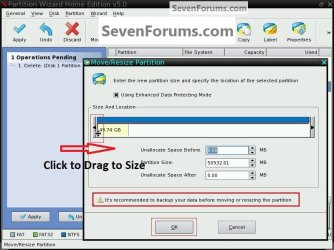
I've been running some sims in VirtualBox and I see what you mean by the "delete" option being greyed out, it lists "Delete Partition"; I thought you would get "Delete Volume" my bad mate. :shock:


The method I posted above should work for you, as you can see it worked for me in VB.


click to enlarge
sims.jpg
 
Last edited:

My Computer My Computer

At a glance

W 7 64-bit UltimateIntel Q9550 Yorkfield8GB Dominator 8500C5DATI : XFX 5870
Computer Manufacturer/Model Number
* BFK Customs *
OS
W 7 64-bit Ultimate
CPU
Intel Q9550 Yorkfield
Motherboard
ASUS P5Q Pro
Memory
8GB Dominator 8500C5D
Graphics Card(s)
ATI : XFX 5870
Sound Card
Realtek HD Audio 7-1
Monitor(s) Displays
1x 47" LCD HDMI & 3x 26" LCD HDMI
Screen Resolution
1920x1080P & 1920x1200
Hard Drives
1x 80GB Intel X25-M G2 SSD : 1x 500GB & 1x 640GB WD Caviar Black(s)
PSU
Corsair 620HX
Case
Cooler Master RC-690
Cooling
Tuniq Tower 120, 2x 140mm and 3x 120mm case fans
Keyboard
Microsoft 500
Mouse
Razer Diamondback 3G
Internet Speed
14 Mb/s
Other Info
1x Koutech 3Gb/s SATA HDD Hot Swap Rack
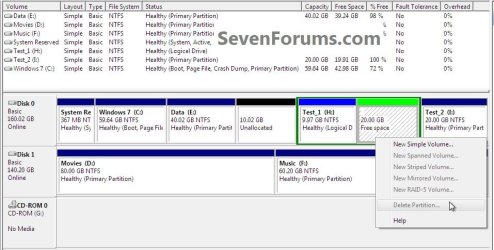
screenshot of new 100GB F DRIVE

Okay I figured it out
here is the new partition setup after I created the F drive with the 100GB you told me to. Thanks for your help!
Jim
 

Attachments

  • after finall creating the 100GB  F partition.png
    after finall creating the 100GB F partition.png
    74.9 KB · Views: 28

My Computer My Computer

At a glance

w7
OS
w7
Hello Jim, well done.


A couple suggestions if I may.

It would be wise to extend the C: into all the unallocated space, even if you never use it at least you will not have this issue again.

Create another logical of the new free space and keep the F: drive, you can reorder the Logical drive letters if you like; you may find them useful for storage, have a look at Method One #2 of this tutorial for some ideas.


My Computer My Computer

At a glance

W 7 64-bit UltimateIntel Q9550 Yorkfield8GB Dominator 8500C5DATI : XFX 5870
Computer Manufacturer/Model Number
* BFK Customs *
OS
W 7 64-bit Ultimate
CPU
Intel Q9550 Yorkfield
Motherboard
ASUS P5Q Pro
Memory
8GB Dominator 8500C5D
Graphics Card(s)
ATI : XFX 5870
Sound Card
Realtek HD Audio 7-1
Monitor(s) Displays
1x 47" LCD HDMI & 3x 26" LCD HDMI
Screen Resolution
1920x1080P & 1920x1200
Hard Drives
1x 80GB Intel X25-M G2 SSD : 1x 500GB & 1x 640GB WD Caviar Black(s)
PSU
Corsair 620HX
Case
Cooler Master RC-690
Cooling
Tuniq Tower 120, 2x 140mm and 3x 120mm case fans
Keyboard
Microsoft 500
Mouse
Razer Diamondback 3G
Internet Speed
14 Mb/s
Other Info
1x Koutech 3Gb/s SATA HDD Hot Swap Rack
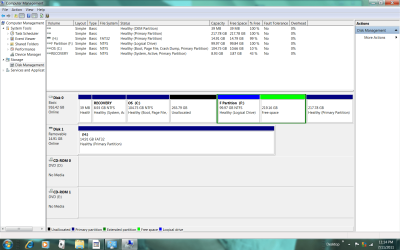
Good morning friend

how can I extend the C drive to the F partition I created for that purpose as the G partition is now to the right of the C Partition I want to expand??


Thanks for your help


Jim
 

My Computer My Computer

At a glance

w7
OS
w7
Hello.


You are supposed to extend C: into the 265.79GB unallocated space, that's why I suggested you extend C: to take the whole of the space, that is the only option;

... and if you want access to the data on G: you need to give its drive letter back.
 

My Computer My Computer

At a glance

W 7 64-bit UltimateIntel Q9550 Yorkfield8GB Dominator 8500C5DATI : XFX 5870
Computer Manufacturer/Model Number
* BFK Customs *
OS
W 7 64-bit Ultimate
CPU
Intel Q9550 Yorkfield
Motherboard
ASUS P5Q Pro
Memory
8GB Dominator 8500C5D
Graphics Card(s)
ATI : XFX 5870
Sound Card
Realtek HD Audio 7-1
Monitor(s) Displays
1x 47" LCD HDMI & 3x 26" LCD HDMI
Screen Resolution
1920x1080P & 1920x1200
Hard Drives
1x 80GB Intel X25-M G2 SSD : 1x 500GB & 1x 640GB WD Caviar Black(s)
PSU
Corsair 620HX
Case
Cooler Master RC-690
Cooling
Tuniq Tower 120, 2x 140mm and 3x 120mm case fans
Keyboard
Microsoft 500
Mouse
Razer Diamondback 3G
Internet Speed
14 Mb/s
Other Info
1x Koutech 3Gb/s SATA HDD Hot Swap Rack
Hello,
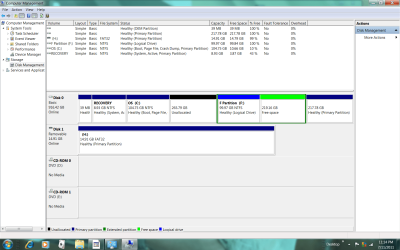
please bear with me because I'm somewhat confused.
you suggested I add 100GB to the C drive instead of the 50 I had planned. So we created the 100GB F Drive with that in mind.

Now you advise to increase the C drive by the unallocated 265.79

If I do that can I somehow combine the "healthy primary partition of 217.78 with the 99.97 F drive and then add them to the existing G (data ) drive?

How much space will I have for data if I expand the C drive into the unallocated sector as you recommend??

Although the storage is supposed to be a 750 GB HD all the current sectors
add up to 916.38 GB???

8.93 recovery
104.75 C (OS)
265.79 unallocated
219.16 free space
217.78 Healthy primary partition

Greatly appreciate your patience and help!

Jim
 

Attachments

  • current.png
    current.png
    74.9 KB · Views: 8

My Computer My Computer

At a glance

w7
OS
w7
Here's the deal, Windows disk management will only do anything to the right and cannot "jump over" existing partitions/drives.

If you'll think about it, all along I have been trying to get you to end up with unallocated space to the right of the C: partition, you will not be able to add any of the Extended/Logical space to the C: at all.

There are Primary partitions and there are Extended partitions, Logical drives are contained within Extended partitions and the two, Primary and Extended cannot be mixed and matched, they are incompatible.

As you now have and have had from the beginning, 3 Primaries and an Extended you cannot create any more partitions though you can create as many Logical drives (within the Extended) as there are available drive letters.

Be advised: if you try and create any other partitions, the odds are very good the PC will become un-bootable and you will be in a lot of trouble trying to recover from that.

If you want/need to add space to C: it must come from the unallocated space directly to the right of the C: partition.

My suggesting 100GB was for you to Move/Resize the F: so you would have 100GB to add to C:
 

My Computer My Computer

At a glance

W 7 64-bit UltimateIntel Q9550 Yorkfield8GB Dominator 8500C5DATI : XFX 5870
Computer Manufacturer/Model Number
* BFK Customs *
OS
W 7 64-bit Ultimate
CPU
Intel Q9550 Yorkfield
Motherboard
ASUS P5Q Pro
Memory
8GB Dominator 8500C5D
Graphics Card(s)
ATI : XFX 5870
Sound Card
Realtek HD Audio 7-1
Monitor(s) Displays
1x 47" LCD HDMI & 3x 26" LCD HDMI
Screen Resolution
1920x1080P & 1920x1200
Hard Drives
1x 80GB Intel X25-M G2 SSD : 1x 500GB & 1x 640GB WD Caviar Black(s)
PSU
Corsair 620HX
Case
Cooler Master RC-690
Cooling
Tuniq Tower 120, 2x 140mm and 3x 120mm case fans
Keyboard
Microsoft 500
Mouse
Razer Diamondback 3G
Internet Speed
14 Mb/s
Other Info
1x Koutech 3Gb/s SATA HDD Hot Swap Rack
thanks for your quick response
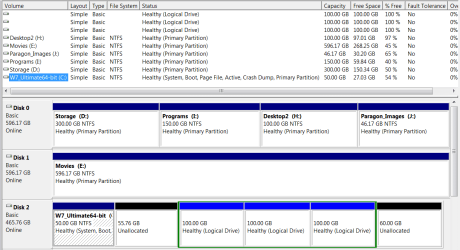
After I extend the C partition can I somehow combine the "healthy primary partition of 217.78 with the 99.97 F drive and then add them to the existing G (data ) drive?

How much space will I have for data if I expand the C drive into the unallocated sector as you recommend??

Whats confusing me is that although the HD is supposed to be a 750 GB, all the current sectors
add up to 916.38 GB???

8.93 recovery
104.75 C (OS)
265.79 unallocated
219.16 free space
217.78 Healthy primary partition

Greatly appreciate your patience and help!

Jim


My Computer My Computer

At a glance

w7
OS
w7
Hello Jim, my apologies for not better explaining earlier.


If you don't want to extend C: into all the unallocated space you will have to use Partition Wizard to Move/Resize the Extended/Logical F: back into that space, it would be the reverse of the way you created the unallocated space in the first place.

Always remember, Windows disk management can only do operations to the direct right of an existing partition, anything else will have to be done with PW.

Obviously that is a 1TB Hard Disk Drive and not a 750GB as you thought, all the better.

If you add the unallocated space as is to C: you will have just over 322GB for use, and that is a very good thing.

Don't mess with F: just leave it as it is and re-letter G: so you will be able to get to the data you moved there, HDD/partitions/drives without letters can't be opened.

My suggesting 100GB was for you to Move/Resize the F: by 100GB so you would have 100GB to add to C: sorry for the misunderstanding.

Create a third Logical of the Free Space for future use, it being there won't hurt anything and there's nothing else to be done with that space unless it's added to one of the other Logicals.
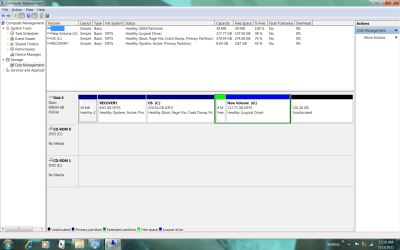
Here's what my HDD structure looks like at present

hdd.PNG
 

My Computer My Computer

At a glance

W 7 64-bit UltimateIntel Q9550 Yorkfield8GB Dominator 8500C5DATI : XFX 5870
Computer Manufacturer/Model Number
* BFK Customs *
OS
W 7 64-bit Ultimate
CPU
Intel Q9550 Yorkfield
Motherboard
ASUS P5Q Pro
Memory
8GB Dominator 8500C5D
Graphics Card(s)
ATI : XFX 5870
Sound Card
Realtek HD Audio 7-1
Monitor(s) Displays
1x 47" LCD HDMI & 3x 26" LCD HDMI
Screen Resolution
1920x1080P & 1920x1200
Hard Drives
1x 80GB Intel X25-M G2 SSD : 1x 500GB & 1x 640GB WD Caviar Black(s)
PSU
Corsair 620HX
Case
Cooler Master RC-690
Cooling
Tuniq Tower 120, 2x 140mm and 3x 120mm case fans
Keyboard
Microsoft 500
Mouse
Razer Diamondback 3G
Internet Speed
14 Mb/s
Other Info
1x Koutech 3Gb/s SATA HDD Hot Swap Rack
Low Country Friend,
I'm not questioning your expertise, but just trying to make sure we're on the same page. With all of the kind help you are giving to myself and others I'm just trying to accomplish the same objective.


If you don't want to extend C: into all the unallocated space you will have to use Partition Wizard to Move/Resize the Extended/Logical F: back into that space, it would be the reverse of the way you created the unallocated space in the first place.
Are you saying that I can use a part of the unallocated space for expansion? or is it all of the space or nothing?

If you add the unallocated space as is to C: you will have just over 322GB for use, and that is a very good thing.

Don't mess with F: just leave it as it is and re-letter G: so you will be able to get to the data you moved there, HDD/partitions/drives without letters can't be opened.
I haven't moved any data all my backup data was moved from the F Drive to the newly created G Drive as above
I copied all my data that was on my original F (Data) partition to the new G partition so that I wouldn't lose the data when I changed the F drive in the attempt to resolve the C Drive expansion on Sunday

My suggesting 100GB was for you to Move/Resize the F: by 100GB so you would have 100GB to add to C: sorry for the misunderstanding.
I take it for some unkown reason to me this is no longer a possibilty


Create a third Logical of the Free Space for future use, it being there won't hurt anything and there's nothing else to be done with that space unless it's added to one of the other Logicals.
Will I be able to add/combine the free space to another drive? Ideally in addition to the small recovery drive, one data drive and one OS C drive is all I need
 

My Computer My Computer

At a glance

w7
OS
w7
Are you saying that I can use a part of the unallocated space for expansion? or is it all of the space or nothing?
You can use any part of the unallocated space to add to C: and the rest can be Resized back into the F: drive if you choose.
I copied all my data that was on my original F (Data) partition to the new G partition so that I wouldn't lose the data when I changed the F drive in the attempt to resolve the C Drive expansion on Sunday
According to the last disk management snip you posted the new G: you created and moved the data to doesn't have a drive letter and a partition/drive that doesn't have a drive letter can't be opened.
Will I be able to add/combine the free space to another drive? Ideally in addition to the small recovery drive, one data drive and one OS C drive is all I need
No, please re-read my post #s 50 and 52.
 

My Computer My Computer

At a glance

W 7 64-bit UltimateIntel Q9550 Yorkfield8GB Dominator 8500C5DATI : XFX 5870
Computer Manufacturer/Model Number
* BFK Customs *
OS
W 7 64-bit Ultimate
CPU
Intel Q9550 Yorkfield
Motherboard
ASUS P5Q Pro
Memory
8GB Dominator 8500C5D
Graphics Card(s)
ATI : XFX 5870
Sound Card
Realtek HD Audio 7-1
Monitor(s) Displays
1x 47" LCD HDMI & 3x 26" LCD HDMI
Screen Resolution
1920x1080P & 1920x1200
Hard Drives
1x 80GB Intel X25-M G2 SSD : 1x 500GB & 1x 640GB WD Caviar Black(s)
PSU
Corsair 620HX
Case
Cooler Master RC-690
Cooling
Tuniq Tower 120, 2x 140mm and 3x 120mm case fans
Keyboard
Microsoft 500
Mouse
Razer Diamondback 3G
Internet Speed
14 Mb/s
Other Info
1x Koutech 3Gb/s SATA HDD Hot Swap Rack
okay so the way things worked out I can use 100GB of the unallocated 265.79 space to its right and that then will leave 165.79 of unallocated space that I can't do anything with and it will be useless space?


The 100GB 'F' will not be combinable with the 218GB 'G'


How will I re-letter G and how will I benefit in doing so? (in Windows or Partition Wizard?)
 

My Computer My Computer

At a glance

w7
OS
w7
Why not just extend C: to include all the unallocated space and be done with it?


You could delete the F: in Windows disk management, then in PW Move/Resize the G: to the left to include all that Free Space.


If you don't re-letter G" you won't be able to get to the data you moved there the other day.

In Windows disk management right click the Logical that was/is G: and you'll see what to do.
 

My Computer My Computer

At a glance

W 7 64-bit UltimateIntel Q9550 Yorkfield8GB Dominator 8500C5DATI : XFX 5870
Computer Manufacturer/Model Number
* BFK Customs *
OS
W 7 64-bit Ultimate
CPU
Intel Q9550 Yorkfield
Motherboard
ASUS P5Q Pro
Memory
8GB Dominator 8500C5D
Graphics Card(s)
ATI : XFX 5870
Sound Card
Realtek HD Audio 7-1
Monitor(s) Displays
1x 47" LCD HDMI & 3x 26" LCD HDMI
Screen Resolution
1920x1080P & 1920x1200
Hard Drives
1x 80GB Intel X25-M G2 SSD : 1x 500GB & 1x 640GB WD Caviar Black(s)
PSU
Corsair 620HX
Case
Cooler Master RC-690
Cooling
Tuniq Tower 120, 2x 140mm and 3x 120mm case fans
Keyboard
Microsoft 500
Mouse
Razer Diamondback 3G
Internet Speed
14 Mb/s
Other Info
1x Koutech 3Gb/s SATA HDD Hot Swap Rack
okay I extended the C to the full unallocated space to its right and re-lettered and resized the G to include the free space to its left. I somehow got left with an unallocated space to the right of G and I can't expand G into it in windows.
When I try to extend the G into the unallocated space using partition magic, by sliding the G partition it to the right, the unallocated space in the (bottom) after window moves to the unallocated space before (top) window.
Am I not going to be able to expand G by adding the 100GB unallocated space to it
 

Attachments

  • Untitled.png
    Untitled.png
    69 KB · Views: 11

My Computer My Computer

At a glance

w7
OS
w7
Hello again Jim.


Have you got this sorted or are you still at the same place?
 

My Computer My Computer

At a glance

W 7 64-bit UltimateIntel Q9550 Yorkfield8GB Dominator 8500C5DATI : XFX 5870
Computer Manufacturer/Model Number
* BFK Customs *
OS
W 7 64-bit Ultimate
CPU
Intel Q9550 Yorkfield
Motherboard
ASUS P5Q Pro
Memory
8GB Dominator 8500C5D
Graphics Card(s)
ATI : XFX 5870
Sound Card
Realtek HD Audio 7-1
Monitor(s) Displays
1x 47" LCD HDMI & 3x 26" LCD HDMI
Screen Resolution
1920x1080P & 1920x1200
Hard Drives
1x 80GB Intel X25-M G2 SSD : 1x 500GB & 1x 640GB WD Caviar Black(s)
PSU
Corsair 620HX
Case
Cooler Master RC-690
Cooling
Tuniq Tower 120, 2x 140mm and 3x 120mm case fans
Keyboard
Microsoft 500
Mouse
Razer Diamondback 3G
Internet Speed
14 Mb/s
Other Info
1x Koutech 3Gb/s SATA HDD Hot Swap Rack
Good morning!
I have not sorted it out as it seemed that when I attempted to, by using partition wizard, I somehow would shift the unallocated space from the right of G to the left of G.

When I try to extend the G into the unallocated space by sliding the G partition it to the right, the unallocated space in the (bottom window) after G moves to the unallocated space before (top window).

Am trying to expand G by adding the 100GB unallocated space to it. Is this going to be possible?

Thank you
 

My Computer My Computer

At a glance

w7
OS
w7
Perhaps you should try this with the Partition Wizard boot disk instead of the installed version, the steps would be the same you will just be booted to the boot CD.

First download the Partition Wizard Bootable Disk (PWBD) ISO file to the desktop, be sure to get the PWBD and not the installed version; scroll down to see the download link for the Bootable CD ISO file at this link below.
Then use ImgBurn to burn the ISO to a CD, at no greater than 4x speed with a verify; it was designed for use and works best from a CD rather than a DVD; then boot the created CD to make the changes, it doesn't take any input from the user to setup, just relax and let it load.


My Computer My Computer

At a glance

W 7 64-bit UltimateIntel Q9550 Yorkfield8GB Dominator 8500C5DATI : XFX 5870
Computer Manufacturer/Model Number
* BFK Customs *
OS
W 7 64-bit Ultimate
CPU
Intel Q9550 Yorkfield
Motherboard
ASUS P5Q Pro
Memory
8GB Dominator 8500C5D
Graphics Card(s)
ATI : XFX 5870
Sound Card
Realtek HD Audio 7-1
Monitor(s) Displays
1x 47" LCD HDMI & 3x 26" LCD HDMI
Screen Resolution
1920x1080P & 1920x1200
Hard Drives
1x 80GB Intel X25-M G2 SSD : 1x 500GB & 1x 640GB WD Caviar Black(s)
PSU
Corsair 620HX
Case
Cooler Master RC-690
Cooling
Tuniq Tower 120, 2x 140mm and 3x 120mm case fans
Keyboard
Microsoft 500
Mouse
Razer Diamondback 3G
Internet Speed
14 Mb/s
Other Info
1x Koutech 3Gb/s SATA HDD Hot Swap Rack
Back
Top