Problem with Hard Drives setup

geopet544

New member
Local time
11:16 PM
Messages
4
Hi
I am in the process of migrating to a new computer.
In my current computer I have three drives, connected on the same multiple plugs wiring.

I have a 500Gb drive which I use for all files and data created by my activities.
The other two are identical 750Gb drives - designated "C" and "D" - but NOT - as far as I can tell - in a RAID array.
The thing is, I thought I had the operating system and all programme files on "C" and nothing on "D";

I want to leave my current old computer running with Win7 and take out the other drive and use it in the new computer.
I have tried to identify which drive is "C" and which one is "D" by unplugging one of them and seeing if Windows fails to boot: unfortunately, Windows fails to boot whichever one I unplug with the other left plugged in!
Why is this . . and what can I do?

Cheers
Peter
 

My Computer

Computer type
PC/Desktop
Computer Manufacturer/Model Number
PC Specialist custom build
OS
Win 7 home premium
CPU
Intel Core i5-2500 @ 3.30 ghz
Motherboard
Asus P8Z68-V
Memory
8 Gb
Graphics Card(s)
nvidia
Hard Drives
"C" - WDC WD7502AAEX-00Y9A0 ATA Device
"D" - WDC WD7502AAEX-00Y9A0 ATA Device
"F" - WDC WD5000AAKX-001CA0 ATA Device
["F2 & "G" rte DVD Drives
Antivirus
Norton 365
Browser
Google Chrome
Welcome to the forum. often windows will put the boot files on another drive if you post a screenshot from disk manager showing all the details so we can see
 

My Computer

Computer type
PC/Desktop
OS
win 8 32 bit
That's one reason why I give individual storage drives or individual partitions their own name - so there's no confusion about what each one is used for.
 

My Computer

Computer type
PC/Desktop
Computer Manufacturer/Model Number
Dell OptiPlex 9020
OS
Windows 7 Professional SP1 64-bit
CPU
Intel Core i7-4790 3.60 GHz
Memory
32 GB DDR3-1600 MHz
Graphics Card(s)
Integrated Intel HD Graphics 4600
Monitor(s) Displays
Viewsonic 32" LCD
Hard Drives
Kingston SATA 3 240 GB SSD
Internet Speed
Spectrum Internet 1000 Mbps
That's one reason why I give individual storage drives or individual partitions their own name - so there's no confusion about what each one is used for.


That's especially critical, when you're using two drives of the same Make, Model and size.


When I CLONE one drive to another, and they are identical, one of the first things I do is go in and change the name of the CLONE.


:cool:
 

My Computer

Computer type
PC/Desktop
Computer Manufacturer/Model Number
Various
OS
Win 7 Pro, SP1, x86, Win-11/Pro/64
CPU
AMD
Motherboard
Various
Memory
8GB Crucial
Graphics Card(s)
Various
Sound Card
OnBoard
Monitor(s) Displays
Acer 21.5"
Hard Drives
Crucial SSD, 500 GB
PSU
OEM
Case
SFF Slim Line Case
Cooling
OEM
Keyboard
eMachines
Mouse
Logitech Wireless
Internet Speed
varies
Antivirus
Windows Defender/Super Anti-Spyware
Browser
Firefox
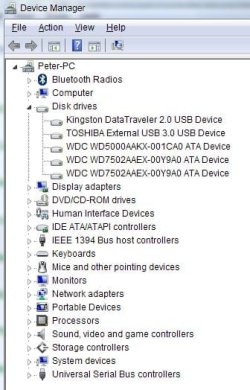
Hopefully this is the screen shot you mentioned.

Pls note I am away now until Wednesday 2nd Sept

Cheers
Peter
 

Attachments

  • Screenshot Disk Manager.jpg
    Screenshot Disk Manager.jpg
    34.1 KB · Views: 17

My Computer

Computer type
PC/Desktop
Computer Manufacturer/Model Number
PC Specialist custom build
OS
Win 7 home premium
CPU
Intel Core i5-2500 @ 3.30 ghz
Motherboard
Asus P8Z68-V
Memory
8 Gb
Graphics Card(s)
nvidia
Hard Drives
"C" - WDC WD7502AAEX-00Y9A0 ATA Device
"D" - WDC WD7502AAEX-00Y9A0 ATA Device
"F" - WDC WD5000AAKX-001CA0 ATA Device
["F2 & "G" rte DVD Drives
Antivirus
Norton 365
Browser
Google Chrome
No it disk mangment that show partitions and there details
 

My Computer

Computer type
PC/Desktop
OS
win 8 32 bit
Sorry to be stupid - but how do I get to 'Disk Management'? Remember. I'm in Win7 Home
 

My Computer

Computer type
PC/Desktop
Computer Manufacturer/Model Number
PC Specialist custom build
OS
Win 7 home premium
CPU
Intel Core i5-2500 @ 3.30 ghz
Motherboard
Asus P8Z68-V
Memory
8 Gb
Graphics Card(s)
nvidia
Hard Drives
"C" - WDC WD7502AAEX-00Y9A0 ATA Device
"D" - WDC WD7502AAEX-00Y9A0 ATA Device
"F" - WDC WD5000AAKX-001CA0 ATA Device
["F2 & "G" rte DVD Drives
Antivirus
Norton 365
Browser
Google Chrome
It's under admin tools
 

My Computer

Computer type
PC/Desktop
OS
win 8 32 bit
In the run or search box in the lower left, type in
diskmgmt.msc
and then press the Enter key.
 

My Computer

Computer type
PC/Desktop
Computer Manufacturer/Model Number
Dell OptiPlex 9020
OS
Windows 7 Professional SP1 64-bit
CPU
Intel Core i7-4790 3.60 GHz
Memory
32 GB DDR3-1600 MHz
Graphics Card(s)
Integrated Intel HD Graphics 4600
Monitor(s) Displays
Viewsonic 32" LCD
Hard Drives
Kingston SATA 3 240 GB SSD
Internet Speed
Spectrum Internet 1000 Mbps
ScreenShot Image

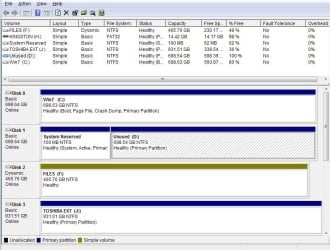
here is disk management file.
 

Attachments

  • Screenshot Disk Management.jpg
    Screenshot Disk Management.jpg
    86.4 KB · Views: 0

My Computer

Computer type
PC/Desktop
Computer Manufacturer/Model Number
PC Specialist custom build
OS
Win 7 home premium
CPU
Intel Core i5-2500 @ 3.30 ghz
Motherboard
Asus P8Z68-V
Memory
8 Gb
Graphics Card(s)
nvidia
Hard Drives
"C" - WDC WD7502AAEX-00Y9A0 ATA Device
"D" - WDC WD7502AAEX-00Y9A0 ATA Device
"F" - WDC WD5000AAKX-001CA0 ATA Device
["F2 & "G" rte DVD Drives
Antivirus
Norton 365
Browser
Google Chrome
The boot files are on disk 1 not drive c you will need to copy the boot partition from d to c or remove all drives but c boot install dvd and do a repair
 

My Computer

Computer type
PC/Desktop
OS
win 8 32 bit
Back
Top