Your help please,
Here we are on xmas eve and I am the sad person posting questions about pc problems!
Today I took delivery parts to build my new pc, which consisted of the following.
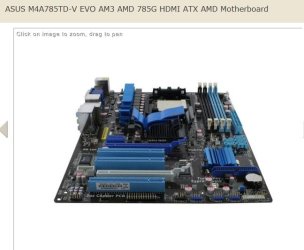
Asus M4A785TD-V EVO mother board
AMD Phenom II X4 925 2.8GHz processor
OCZ 4GB (2x2GB) DDR3 1333MHz/PC3-10666 Platinum Ram
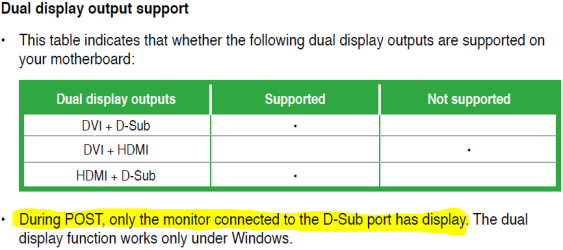
I installed all as should be but when I switched on my screen just keeps saying NO SIGNAL I have checked everything at least 10 times but still no signal to the screen I have even tried a different screen. Everything is as it should be, but obviously something is wrong but is it the mother board, cpu or the ram? As I am not getting any signal to the screen I assume it is the mother board (I am using the on board graphics via the vga)
I need to send something back to the supplier but which part is at fault? My feeling is the m/b, any views would be very welcome.
Oh and a merry xmas to all
Here we are on xmas eve and I am the sad person posting questions about pc problems!
Today I took delivery parts to build my new pc, which consisted of the following.
Asus M4A785TD-V EVO mother board
AMD Phenom II X4 925 2.8GHz processor
OCZ 4GB (2x2GB) DDR3 1333MHz/PC3-10666 Platinum Ram
I installed all as should be but when I switched on my screen just keeps saying NO SIGNAL I have checked everything at least 10 times but still no signal to the screen I have even tried a different screen. Everything is as it should be, but obviously something is wrong but is it the mother board, cpu or the ram? As I am not getting any signal to the screen I assume it is the mother board (I am using the on board graphics via the vga)
I need to send something back to the supplier but which part is at fault? My feeling is the m/b, any views would be very welcome.
Oh and a merry xmas to all
My Computer
- OS
- windows 7 home pre 64 bit
- CPU
- AMD quad 4
- Motherboard
- Asus
- Memory
- Kingston
- Graphics Card(s)
- On board
- Sound Card
- On board
- Monitor(s) Displays
- Samsung
- Screen Resolution
- 1280 x 1024
- Hard Drives
- Samsung 1TB
WD 300GB