problem with new system build

Ballie

New member
Member
Local time
12:21 AM
Messages
76
Location
Norfolk
Your help please,
Here we are on xmas eve and I am the sad person posting questions about pc problems!
Today I took delivery parts to build my new pc, which consisted of the following.
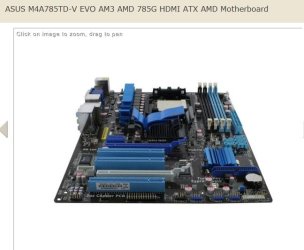
Asus M4A785TD-V EVO mother board
AMD Phenom II X4 925 2.8GHz processor
OCZ 4GB (2x2GB) DDR3 1333MHz/PC3-10666 Platinum Ram
I installed all as should be but when I switched on my screen just keeps saying NO SIGNAL I have checked everything at least 10 times but still no signal to the screen I have even tried a different screen. Everything is as it should be, but obviously something is wrong but is it the mother board, cpu or the ram? As I am not getting any signal to the screen I assume it is the mother board (I am using the on board graphics via the vga)
I need to send something back to the supplier but which part is at fault? My feeling is the m/b, any views would be very welcome.
Oh and a merry xmas to all
 

My Computer

OS
windows 7 home pre 64 bit
CPU
AMD quad 4
Motherboard
Asus
Memory
Kingston
Graphics Card(s)
On board
Sound Card
On board
Monitor(s) Displays
Samsung
Screen Resolution
1280 x 1024
Hard Drives
Samsung 1TB
WD 300GB
If you have any pci graphics card you can installed to test if you get any video or hopefully your borrow one from a friend. Also how about trying with only one memory stick?.
 

My Computer

Computer Manufacturer/Model Number
HP a6720f
OS
7 Ultimate x64 RTM 7600.16385
CPU
AMD Phenom 9550 @ 2.20ghz
Motherboard
Asus M2N78-LA
Memory
4x2GB DDR2 Patriot Viper 800mhz
Graphics Card(s)
GeForce 9400 GT 512MB
Sound Card
Onboard Realtek Hi-Definition ALC 888S chipset
Monitor(s) Displays
Samsung P2370HD 23" 1080P HDTV
Screen Resolution
1920x1080
Hard Drives
Western Digital 640GB; Samsung 1 TB; WD 500GB; Seagate Portable 250gb;
Keyboard
Logitech LX310 Wireless Internet Keyboard
Mouse
Logitech LX310 Wireless Laser Mouse
Internet Speed
7Mbps/384Kbps
yes if I had a pci card I would try but I don't I will try with one ram but because I am not even getting anything on screen my feelings are faulty mo/bo! it just my luck to get this on xmas eve! time to hit the bottle ma be?
 

My Computer

OS
windows 7 home pre 64 bit
CPU
AMD quad 4
Motherboard
Asus
Memory
Kingston
Graphics Card(s)
On board
Sound Card
On board
Monitor(s) Displays
Samsung
Screen Resolution
1280 x 1024
Hard Drives
Samsung 1TB
WD 300GB
Are you getting any beeps from the system when you turn it on?
 

My Computer

Computer Manufacturer/Model Number
Black_Box (homebuilt)
OS
windows 7 RTM x64
CPU
Phenom II 965 Quad Core 3.4Ghz
Motherboard
Asus M4A79T Deluxe
Memory
Mushkin Blackline 8GB (4x2gb)
Graphics Card(s)
XFX Radeon 5970 Black Edition
Sound Card
onboard
Monitor(s) Displays
Dell 2408WPF-main Dell E248WFP-secondary
Screen Resolution
1920x1200-main 1920x1200-secondary
Hard Drives
OCZ Vertex Limited Edition 100GB (OS)
x1 WD Black Edition 500GB drive (Storage)
PSU
XFX 850w Black Edition (Modular)
Case
Mountian Mods H2go
Cooling
CoolITSystems ECO A.L.C.
Keyboard
Logitech MX 5500 wireless keyboard
Mouse
Razor Copperhead
Internet Speed
16Mb down/2Mb up Wowway Cable Internet
Can you hear anything like the motherboard counting the memory ?

CPU fan running ? any led lights working ?
 

My Computer

Computer type
PC/Desktop
Computer Manufacturer/Model Number
Built them myself, Science Experiments !
OS
Win7 Enterprise, Win7 x86 (Ult 7600), Win7 x64 Ult 7600, TechNet RTM on AMD x64 (2.8Ghz)
CPU
AMD fx8350 4ghz, AMD-32 2400mhz, AMD-64 3200mhz, AMDx64 2.8G
Motherboard
SIS 755, ECS-K8M890M-M (Ult 7600), GigaByte & others
Memory
2gb, 4gb on the Ult 7600, 4gb on Technet RTM, 32gb on FX8350
Graphics Card(s)
Draw my own Graphics, several nVidia cards
Sound Card
on motherboard
Monitor(s) Displays
19" flat scr, 28" I-Inc widescr,22" Emprex Widescr, 23" Acer
Screen Resolution
1280 x 1024, 1440 x 900, 1920 x 1080
Hard Drives
6 pata Ide HD's & 2 Sata HD's
added 80gb external on Ult 7600 computer,
numerous extra 1tb, 2TB, 3Tb SATA HD's
A collection of ext HD Docks w/ HDs
PSU
430w, 550w, 600w, 700, 800, etc
Case
All Generic Full Towers
Cooling
Open Air & a few fans, some w/ colored LEDs
Keyboard
Compaq & Dell recycled from GoodWill
Mouse
Made in China Optical Wired Mouse
Internet Speed
Fast Cable InterNet
Antivirus
AVG Free on 24 different Desktops, NO Problems!
Browser
IE 8 is preferred, but use FireFox sometimes
Other Info
Linksys Routers, switches, & Hubs
Too Many USB Flash Drives to count, Biggest is 64GB !
Eight computers in my home network.
Sixteen computers at my business network.
Linked via TeamViewer !
Lots of old used spare computer parts everywhere!
All pc lights up, cpu and system fans running, even led on mo/bo lights up, I can hear the cd rom start up (which has my win 7 64 bit cd in it) but there is NO bleep like you normally get and screen is just black with no signal showing on it!
 

My Computer

OS
windows 7 home pre 64 bit
CPU
AMD quad 4
Motherboard
Asus
Memory
Kingston
Graphics Card(s)
On board
Sound Card
On board
Monitor(s) Displays
Samsung
Screen Resolution
1280 x 1024
Hard Drives
Samsung 1TB
WD 300GB
Which slots do you have you memory in ?
 

Attachments

  • Asus_M4A785TD-V_EVO.JPG
    Asus_M4A785TD-V_EVO.JPG
    40.2 KB · Views: 26

My Computer

Computer type
PC/Desktop
Computer Manufacturer/Model Number
Built them myself, Science Experiments !
OS
Win7 Enterprise, Win7 x86 (Ult 7600), Win7 x64 Ult 7600, TechNet RTM on AMD x64 (2.8Ghz)
CPU
AMD fx8350 4ghz, AMD-32 2400mhz, AMD-64 3200mhz, AMDx64 2.8G
Motherboard
SIS 755, ECS-K8M890M-M (Ult 7600), GigaByte & others
Memory
2gb, 4gb on the Ult 7600, 4gb on Technet RTM, 32gb on FX8350
Graphics Card(s)
Draw my own Graphics, several nVidia cards
Sound Card
on motherboard
Monitor(s) Displays
19" flat scr, 28" I-Inc widescr,22" Emprex Widescr, 23" Acer
Screen Resolution
1280 x 1024, 1440 x 900, 1920 x 1080
Hard Drives
6 pata Ide HD's & 2 Sata HD's
added 80gb external on Ult 7600 computer,
numerous extra 1tb, 2TB, 3Tb SATA HD's
A collection of ext HD Docks w/ HDs
PSU
430w, 550w, 600w, 700, 800, etc
Case
All Generic Full Towers
Cooling
Open Air & a few fans, some w/ colored LEDs
Keyboard
Compaq & Dell recycled from GoodWill
Mouse
Made in China Optical Wired Mouse
Internet Speed
Fast Cable InterNet
Antivirus
AVG Free on 24 different Desktops, NO Problems!
Browser
IE 8 is preferred, but use FireFox sometimes
Other Info
Linksys Routers, switches, & Hubs
Too Many USB Flash Drives to count, Biggest is 64GB !
Eight computers in my home network.
Sixteen computers at my business network.
Linked via TeamViewer !
Lots of old used spare computer parts everywhere!
Refer to the manual and reset your BIOS by means of the jumper and/or removing/replacing the battery.
 

My Computer

Computer type
PC/Desktop
Computer Manufacturer/Model Number
Dwarf Dwf/11/2012 r09/2013
OS
Windows 8.1 Pro RTM x64
CPU
Intel Core-i5-3570K 4-core @ 3.4GHz (Ivy Bridge) (OC 4.4GHz)
Motherboard
ASRock Z77 Extreme4-M
Memory
4 x 4GB DDR3-1600 Corsair Vengeance CMZ8GX3M2A1600C9B (16GB)
Graphics Card(s)
MSI GeForce GTX770 Gaming OC 2GB
Sound Card
Realtek High Definition on board solution (ALC 898)
Monitor(s) Displays
ViewSonic VA1912w Widescreen (VGA)
Screen Resolution
1440x900
Hard Drives
OCZ Agility 3 SSD 120GB SATA III x2 (RAID 0)
Samsung HD501LJ 500GB SATA II x2
Hitachi HDS721010CLA332 1TB SATA II
Iomega 1.5TB Ext USB 2.0
WD 2.0TB Ext USB 3.0
PSU
XFX Pro Series 850W Semi-Modular
Case
Gigabyte IF233
Cooling
1 x 120mm Front Inlet 1 x 120mm Rear Exhaust
Keyboard
Microsoft Comfort Curve Keyboard 3000 (USB)
Mouse
Microsoft Comfort Mouse 3000 for Business (USB)
Internet Speed
NetGear DG834Gv3 ADSL Modem/Router (Ethernet) ~4.0 Mb/s (O2)
Antivirus
Avast! 8.0.1497
Browser
IE 11
Other Info
Optical Drive: HL-DT-ST BD-RE BH10LS30 SATA Bluray
Lexmark S305 Printer/Scanner/Copier (USB)
WEI Score: 8.1/8.1/8.5/8.5/8.25
Asus Eee PC 1011PX Netbook (Windows 7 x86 Starter)
Monitor

Welcome to Windows 7 support forum.
Baillie, I would ask what output device are you connected to?
Is your monitor connected via DVI, HDMI?
There is a possibility that the onboard Video Card is damaged.
 

My Computer

Computer Manufacturer/Model Number
Custom Build
OS
Windows 7 7600 1 X64
CPU
AMD PHENOM II X 550 PROCESSOR 3.1 ghz
Motherboard
ASUS M4A78-TE
Memory
Corsair 4 gig ddr 3
Graphics Card(s)
ati radeon 3300
Sound Card
ati hd
Monitor(s) Displays
syncmaster 2033sw
Screen Resolution
1600X900 60 hz refresh
Hard Drives
twin_seagates SATA's 1 TB & 500 Gig, hitachi_slimline 160 gig
PSU
antec_550 watt
Case
cooler master GLite
Cooling
stock_heat sink
Internet Speed
20mbs up/ 1.5mbs down
Other Info
favorite child "stewie"
favorite dog "brian"
I have tried the ram in both blue slots and one in blue and other in black but no change, my screen is in the VGA slot.
 

My Computer

OS
windows 7 home pre 64 bit
CPU
AMD quad 4
Motherboard
Asus
Memory
Kingston
Graphics Card(s)
On board
Sound Card
On board
Monitor(s) Displays
Samsung
Screen Resolution
1280 x 1024
Hard Drives
Samsung 1TB
WD 300GB
MSI Motherboard not Posting

I found this MSI support site including a list of "Post Codes" (the beeps after the computer powers up but before the video screen starts). Since you are not hearing any beeps, your motherboard is "Not Posting". Start there -->

MSI Computer Corp. - Support

Cheers!
Robert
 

My Computer

OS
...
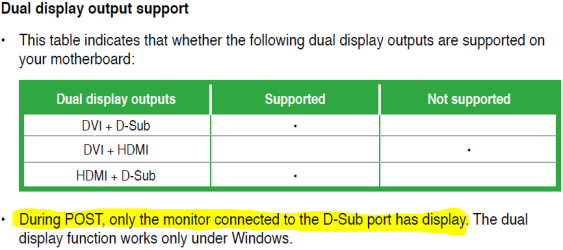
From the manual:
Capture.PNG
 

My Computer

Computer type
PC/Desktop
Computer Manufacturer/Model Number
Dwarf Dwf/11/2012 r09/2013
OS
Windows 8.1 Pro RTM x64
CPU
Intel Core-i5-3570K 4-core @ 3.4GHz (Ivy Bridge) (OC 4.4GHz)
Motherboard
ASRock Z77 Extreme4-M
Memory
4 x 4GB DDR3-1600 Corsair Vengeance CMZ8GX3M2A1600C9B (16GB)
Graphics Card(s)
MSI GeForce GTX770 Gaming OC 2GB
Sound Card
Realtek High Definition on board solution (ALC 898)
Monitor(s) Displays
ViewSonic VA1912w Widescreen (VGA)
Screen Resolution
1440x900
Hard Drives
OCZ Agility 3 SSD 120GB SATA III x2 (RAID 0)
Samsung HD501LJ 500GB SATA II x2
Hitachi HDS721010CLA332 1TB SATA II
Iomega 1.5TB Ext USB 2.0
WD 2.0TB Ext USB 3.0
PSU
XFX Pro Series 850W Semi-Modular
Case
Gigabyte IF233
Cooling
1 x 120mm Front Inlet 1 x 120mm Rear Exhaust
Keyboard
Microsoft Comfort Curve Keyboard 3000 (USB)
Mouse
Microsoft Comfort Mouse 3000 for Business (USB)
Internet Speed
NetGear DG834Gv3 ADSL Modem/Router (Ethernet) ~4.0 Mb/s (O2)
Antivirus
Avast! 8.0.1497
Browser
IE 11
Other Info
Optical Drive: HL-DT-ST BD-RE BH10LS30 SATA Bluray
Lexmark S305 Printer/Scanner/Copier (USB)
WEI Score: 8.1/8.1/8.5/8.5/8.25
Asus Eee PC 1011PX Netbook (Windows 7 x86 Starter)
I have tried resetting the coms via jumper but still no post on screen, my thoughts are faulty mo/bo
 

My Computer

OS
windows 7 home pre 64 bit
CPU
AMD quad 4
Motherboard
Asus
Memory
Kingston
Graphics Card(s)
On board
Sound Card
On board
Monitor(s) Displays
Samsung
Screen Resolution
1280 x 1024
Hard Drives
Samsung 1TB
WD 300GB
I have tried resetting the coms via jumper but still no post on screen, my thoughts are faulty mo/bo
I just hate passing on bad news ... sorry ...

This is an old motherboard. If you are planning to install 7 you should know that there are no NForce2 or 3 chipset drivers compatible with Vista or 7. Also, I came across a link that suggests the motherboard will not support "High Density" memory so your Corsair XMS may be the cause of not posting. You can verify that by borrowing an old stick of memory just to see if it will boot.

Does My nForse2 based K7N2 Delta-L Support this memory?? - nV News Forums

Check out the link?
 

My Computer

OS
...
Try one stick at a time, 1 slot at a time. A few months ago, a user finally got his to boot with 1 stick in the last slot. He sent the MB back for a replacement.
 

My Computer

Computer type
PC/Desktop
Computer Manufacturer/Model Number
Built them myself, Science Experiments !
OS
Win7 Enterprise, Win7 x86 (Ult 7600), Win7 x64 Ult 7600, TechNet RTM on AMD x64 (2.8Ghz)
CPU
AMD fx8350 4ghz, AMD-32 2400mhz, AMD-64 3200mhz, AMDx64 2.8G
Motherboard
SIS 755, ECS-K8M890M-M (Ult 7600), GigaByte & others
Memory
2gb, 4gb on the Ult 7600, 4gb on Technet RTM, 32gb on FX8350
Graphics Card(s)
Draw my own Graphics, several nVidia cards
Sound Card
on motherboard
Monitor(s) Displays
19" flat scr, 28" I-Inc widescr,22" Emprex Widescr, 23" Acer
Screen Resolution
1280 x 1024, 1440 x 900, 1920 x 1080
Hard Drives
6 pata Ide HD's & 2 Sata HD's
added 80gb external on Ult 7600 computer,
numerous extra 1tb, 2TB, 3Tb SATA HD's
A collection of ext HD Docks w/ HDs
PSU
430w, 550w, 600w, 700, 800, etc
Case
All Generic Full Towers
Cooling
Open Air & a few fans, some w/ colored LEDs
Keyboard
Compaq & Dell recycled from GoodWill
Mouse
Made in China Optical Wired Mouse
Internet Speed
Fast Cable InterNet
Antivirus
AVG Free on 24 different Desktops, NO Problems!
Browser
IE 8 is preferred, but use FireFox sometimes
Other Info
Linksys Routers, switches, & Hubs
Too Many USB Flash Drives to count, Biggest is 64GB !
Eight computers in my home network.
Sixteen computers at my business network.
Linked via TeamViewer !
Lots of old used spare computer parts everywhere!
double check that your cpu 12v power on the mobo is plugged in. Also try a different power supply if you have one
 

My Computer

Computer type
PC/Desktop
Computer Manufacturer/Model Number
diy
OS
Win7 pro x64
CPU
stock i7 7700k
Motherboard
Gigabyte Z270N-WIFI mini-ITX
Memory
Corsair Vengeance LPX 16GB (2x8GB) DDR4 @ 3200MHz
Graphics Card(s)
integrated Intel HD 630
Sound Card
onboard Realtek ALC1220
Monitor(s) Displays
two vertically mounted samsung 55" 4k un55mu8000
Screen Resolution
1920x1280
Hard Drives
256GB Samsung EVO 960 M.2 pci-e NVMe SSD
PSU
SilverStone Nightjar ST45NF 450Watt Fanless
Case
No case. Motherboard is mounted directly onto power supply
Cooling
Evercool low profile 815EP with Panaflow 12L fan at 7v
Keyboard
Ortek MCK-86 mini
Mouse
Belkin 5-button USB
Internet Speed
spectrum 400mbps
I have tried resetting the coms via jumper but still no post on screen, my thoughts are faulty mo/bo
I just hate passing on bad news ... sorry ...

This is an old motherboard. If you are planning to install 7 you should know that there are no NForce2 or 3 chipset drivers compatible with Vista or 7. Also, I came across a link that suggests the motherboard will not support "High Density" memory so your Corsair XMS may be the cause of not posting. You can verify that by borrowing an old stick of memory just to see if it will boot.

Does My nForse2 based K7N2 Delta-L Support this memory?? - nV News Forums

Check out the link?

ISEEUU,

You haven't read my post correctly (however, the N/F 2 board in my spec is running win 7 just fine!) the problem I am having is with a new Asus M4A785TD-V EVO mother board, AMD Phenom II X4 925 2.8GHz processor and OCZ 4GB (2x2GB) DDR3 1333MHz/PC3-10666 Platinum Ram which I have bought to up grade, but it won't post anything on the screen.
 

My Computer

OS
windows 7 home pre 64 bit
CPU
AMD quad 4
Motherboard
Asus
Memory
Kingston
Graphics Card(s)
On board
Sound Card
On board
Monitor(s) Displays
Samsung
Screen Resolution
1280 x 1024
Hard Drives
Samsung 1TB
WD 300GB
I have tried resetting the coms via jumper but still no post on screen, my thoughts are faulty mo/bo
I just hate passing on bad news ... sorry ...

This is an old motherboard. If you are planning to install 7 you should know that there are no NForce2 or 3 chipset drivers compatible with Vista or 7. Also, I came across a link that suggests the motherboard will not support "High Density" memory so your Corsair XMS may be the cause of not posting. You can verify that by borrowing an old stick of memory just to see if it will boot.

Does My nForse2 based K7N2 Delta-L Support this memory?? - nV News Forums

Check out the link?

ISEEUU,

You haven't read my post correctly (however, the N/F 2 board in my spec is running win 7 just fine!) the problem I am having is with a new Asus M4A785TD-V EVO mother board, AMD Phenom II X4 925 2.8GHz processor and OCZ 4GB (2x2GB) DDR3 1333MHz/PC3-10666 Platinum Ram which I have bought to up grade, but it won't post anything on the screen.
Yup ... you are right ... my bad ... stayed up past my bedtime last night! Sorry.

Still ... motherboard not posting is either defective, OR something plugged into it is the cause. In my experience memory has most often been the cause. I did have one where the motherboard did not like the brand of Ethernet card. You have apparently tried moving the memory around, did you try reseating the processor? It would seem the only other component is the power supply? Is any part of the motherboard touching the case? Did you try unplugging the hard drive? You do not need it to post so you can see if will post without the hard drive?

The MSI basic troubleshooting guide, although a different brand, is still an excellent guide for eliminating the possible causes of a motherboard not posting.

Cheers!
Robert
 

My Computer

OS
...
ISEEUU, I have checked all plugs (about 5 times now!) the ram is one that Ausus has pasted as suitable for the board so I assume thats ok, I haven't tried reseating the cpu but I will try that tomorrow and I will also double check that the the underside of the mobo isn't touching the case in anyway. Thanks for your time.
 

My Computer

OS
windows 7 home pre 64 bit
CPU
AMD quad 4
Motherboard
Asus
Memory
Kingston
Graphics Card(s)
On board
Sound Card
On board
Monitor(s) Displays
Samsung
Screen Resolution
1280 x 1024
Hard Drives
Samsung 1TB
WD 300GB
ISEEUU, I have checked all plugs (about 5 times now!) the ram is one that Ausus has pasted as suitable for the board so I assume thats ok, I haven't tried reseating the cpu but I will try that tomorrow and I will also double check that the the underside of the mobo isn't touching the case in anyway. Thanks for your time.
Also unplug any hard drive. I have had hard drives prevent posting. It is good to eliminate any possibilities.

Later!
 

My Computer

OS
...
Back
Top