Problem with RAM

!

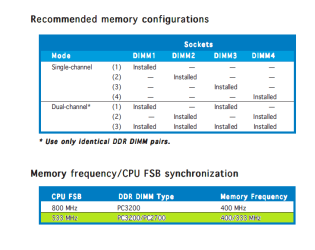
From Motherboard Specification.
 

Attachments

  • Kind Of Ram.png
    Kind Of Ram.png
    56.4 KB · Views: 27

My Computer

OS
Windows 7 Ultimate x64
CPU
Intel(R) Core(TM)2 Quad Q6600
Motherboard
ASUS P5K Deluxe/WiFi-AP
Memory
4.00 GB
Graphics Card(s)
NVIDIA GEForce 8800 GTX
Sound Card
SoundMAX Intergrated Digital HD Audio
Monitor(s) Displays
LG Flatron Wide 22"

My Computer

Computer type
PC/Desktop
Computer Manufacturer/Model Number
Custom assembled by me :}
OS
Win-7-Pro64bit 7-H-Prem-64bit
CPU
i7-5930K 2nd i9-9940x both water blocked VRM's too
Motherboard
ASUS SABERTOOTH X99 2nd ASUS x299 Apex
Memory
Trident-z 3200C14 2nd Trident-z 3600C16
Graphics Card(s)
EVGA 1080ti ftw3 2nd Titan Xp both water blocked
Sound Card
Built-in Realtek
Monitor(s) Displays
1-AOC G2460PG 24"G-Sync 144Hz/ 2nd 1-ASUS VG248QE 24" 144Hz
Screen Resolution
1920 x 1080 144Hz
Hard Drives
2-Samsung M.2 Evo & Evo Plus
2-Samsung 850 EVO 500GB SSD's/ 3-2.5 W.D. Black 1tb-&3-1tb/3-3.5 WD Black 1tb hdd's
PSU
EVGA SuperNOVA 1000-P2 2nd 1200-P2
Case
2-Corsair Obsidian Series 450D Black ATX Mid Tower
Cooling
Custom water loops
Keyboard
Logitech G710+/ 2nd Logitech G910
Mouse
2-RedDragon M901 Perdition 16400 dpi Gaming mouse = wired
Internet Speed
Comcast Ping 19ms 89.31mbps download speed 6.12mbps upload
Antivirus
Malwarebytes Pro/ Superantispyware Pro
Browser
FireFox & Pale moon
Other Info
2nd ASUS X299 Apex/Intel i9-9940x with Custom water loop/7H-Prem-x64/Corsair 450D case/Ram Trident-z 3600C16 4x8gb / Samsung970Evo plus 500gb SSD/Dual ssd EZ swap evo/PSU EVGA SuperNova 1200w-P2 80+Platinum/GPU Titan Xp /8-ML-140 on push-pull on 2-280GTX rads
hi is exactly one:

Supports PC3200 (400 MHz) CPU FSB 533 /PC2700 (333 MHz) / PC2100 (266 MHz) DDR DIMM type
 

My Computer

OS
Windows 7 Ultimate x64
CPU
Intel(R) Core(TM)2 Quad Q6600
Motherboard
ASUS P5K Deluxe/WiFi-AP
Memory
4.00 GB
Graphics Card(s)
NVIDIA GEForce 8800 GTX
Sound Card
SoundMAX Intergrated Digital HD Audio
Monitor(s) Displays
LG Flatron Wide 22"
Hi,
According to your image you posted of the dimm's
I guess this little over 1gb hardware reserved is normal unfortunately :/
Contact H-P support to confirm is all I can say.
 

My Computer

Computer type
PC/Desktop
Computer Manufacturer/Model Number
Custom assembled by me :}
OS
Win-7-Pro64bit 7-H-Prem-64bit
CPU
i7-5930K 2nd i9-9940x both water blocked VRM's too
Motherboard
ASUS SABERTOOTH X99 2nd ASUS x299 Apex
Memory
Trident-z 3200C14 2nd Trident-z 3600C16
Graphics Card(s)
EVGA 1080ti ftw3 2nd Titan Xp both water blocked
Sound Card
Built-in Realtek
Monitor(s) Displays
1-AOC G2460PG 24"G-Sync 144Hz/ 2nd 1-ASUS VG248QE 24" 144Hz
Screen Resolution
1920 x 1080 144Hz
Hard Drives
2-Samsung M.2 Evo & Evo Plus
2-Samsung 850 EVO 500GB SSD's/ 3-2.5 W.D. Black 1tb-&3-1tb/3-3.5 WD Black 1tb hdd's
PSU
EVGA SuperNOVA 1000-P2 2nd 1200-P2
Case
2-Corsair Obsidian Series 450D Black ATX Mid Tower
Cooling
Custom water loops
Keyboard
Logitech G710+/ 2nd Logitech G910
Mouse
2-RedDragon M901 Perdition 16400 dpi Gaming mouse = wired
Internet Speed
Comcast Ping 19ms 89.31mbps download speed 6.12mbps upload
Antivirus
Malwarebytes Pro/ Superantispyware Pro
Browser
FireFox & Pale moon
Other Info
2nd ASUS X299 Apex/Intel i9-9940x with Custom water loop/7H-Prem-x64/Corsair 450D case/Ram Trident-z 3600C16 4x8gb / Samsung970Evo plus 500gb SSD/Dual ssd EZ swap evo/PSU EVGA SuperNova 1200w-P2 80+Platinum/GPU Titan Xp /8-ML-140 on push-pull on 2-280GTX rads
my interpretation of his image is that when 4 diims are installed the motherboard tries to run them in dual channel.

zungul - there should be a QVL Memory list for your specific motherboard model. Can you find the qvl memory list for your board and verify that your exact dimm brand and module are on that list?

here is a sample qvl for one board (not yours) that shows what i mean. you need to find this list for your motherboard.


qvl list


when people get a large hardware reserved report when running dual channel, it is usually because their memory is not on the qvl list imo
 

My Computer

Computer type
PC/Desktop
Computer Manufacturer/Model Number
diy
OS
Win7 pro x64
CPU
stock i7 7700k
Motherboard
Gigabyte Z270N-WIFI mini-ITX
Memory
Corsair Vengeance LPX 16GB (2x8GB) DDR4 @ 3200MHz
Graphics Card(s)
integrated Intel HD 630
Sound Card
onboard Realtek ALC1220
Monitor(s) Displays
two vertically mounted samsung 55" 4k un55mu8000
Screen Resolution
1920x1280
Hard Drives
256GB Samsung EVO 960 M.2 pci-e NVMe SSD
PSU
SilverStone Nightjar ST45NF 450Watt Fanless
Case
No case. Motherboard is mounted directly onto power supply
Cooling
Evercool low profile 815EP with Panaflow 12L fan at 7v
Keyboard
Ortek MCK-86 mini
Mouse
Belkin 5-button USB
Internet Speed
spectrum 400mbps
Hi,
Yep I've asked several times where the memory came from and what brand and have not gotten a response :)

Show the memory and SPD images using this
CPU-Z | Softwares | CPUID
 

My Computer

Computer type
PC/Desktop
Computer Manufacturer/Model Number
Custom assembled by me :}
OS
Win-7-Pro64bit 7-H-Prem-64bit
CPU
i7-5930K 2nd i9-9940x both water blocked VRM's too
Motherboard
ASUS SABERTOOTH X99 2nd ASUS x299 Apex
Memory
Trident-z 3200C14 2nd Trident-z 3600C16
Graphics Card(s)
EVGA 1080ti ftw3 2nd Titan Xp both water blocked
Sound Card
Built-in Realtek
Monitor(s) Displays
1-AOC G2460PG 24"G-Sync 144Hz/ 2nd 1-ASUS VG248QE 24" 144Hz
Screen Resolution
1920 x 1080 144Hz
Hard Drives
2-Samsung M.2 Evo & Evo Plus
2-Samsung 850 EVO 500GB SSD's/ 3-2.5 W.D. Black 1tb-&3-1tb/3-3.5 WD Black 1tb hdd's
PSU
EVGA SuperNOVA 1000-P2 2nd 1200-P2
Case
2-Corsair Obsidian Series 450D Black ATX Mid Tower
Cooling
Custom water loops
Keyboard
Logitech G710+/ 2nd Logitech G910
Mouse
2-RedDragon M901 Perdition 16400 dpi Gaming mouse = wired
Internet Speed
Comcast Ping 19ms 89.31mbps download speed 6.12mbps upload
Antivirus
Malwarebytes Pro/ Superantispyware Pro
Browser
FireFox & Pale moon
Other Info
2nd ASUS X299 Apex/Intel i9-9940x with Custom water loop/7H-Prem-x64/Corsair 450D case/Ram Trident-z 3600C16 4x8gb / Samsung970Evo plus 500gb SSD/Dual ssd EZ swap evo/PSU EVGA SuperNova 1200w-P2 80+Platinum/GPU Titan Xp /8-ML-140 on push-pull on 2-280GTX rads
!

I ALREADY answered for your question about What kind memor. #28
From the computer store (NEW). I don't really understand your question about from where they come.
This is not new purchase I have them already about one year nd they were working perfect.
I told this already 4X in this topic.:doh:
 

My Computer

OS
Windows 7 Ultimate x64
CPU
Intel(R) Core(TM)2 Quad Q6600
Motherboard
ASUS P5K Deluxe/WiFi-AP
Memory
4.00 GB
Graphics Card(s)
NVIDIA GEForce 8800 GTX
Sound Card
SoundMAX Intergrated Digital HD Audio
Monitor(s) Displays
LG Flatron Wide 22"
"I ALREADY answered for your question about What kind memor. #28"

yes you did, one time in a 7 page thread, you did indeed say exactly what kind of memory you have. Hopefully you can forgive Thrash for not being aware of that.

"This is not a new purchase I have them already about one year and they were working perfect."

Yes, they were working perfectly at 2.75GB useable. They have been at 2.75GB usable since the day you got them. The odds that they were at 4.0GB usable a month ago then suddenly dropped down to 2.75GB are infinitesimally small.

You really need to update your profile system specs. People here who try to help you (for free) are looking at your hardware specs and thinking you are on an ASUS P5K Deluxe/WiFi-AP motherboard. The fact that you said once, in a post a few pages back, that you are actually running an Asus PTGD1-LA (HP Goldfish3), is probably something that few here are aware of. If your profile specs were accurate for your memory and your motherboard, you would find that people are better able to help you.

Having said that, neither HP nor ASUS have published a Memory QVL for that board that I can find.

Power supplies all work with any system if they are rated high enough. Graphics cards work with any system they can attach to. Same with Hard Drives. But memory is different! Because of the unique timing challenges of dual channel that I outlined in post #55, memory is not compatible with a motherboard just because the specs match, it MUST be qualified by the maker of the motherboard for you to be sure it will work perfectly. Your memory is "Value Select", which is a low-end product. It is obvious that it is not fully compatible with your motherboard. No biggie though, because its also not the problem here.

Here's what I think. Your computer slowed down a few days ago and in post #14 you concluded that this is because you are running with 2.75GB of memory instead of 4.00GB. I assert the following as facts:

1) your computer is running slowly and/or poorly
2) Your system has been running with only 2.75GB since the day you put in the memory, which was not a problem a year ago and is not a problem now.
3) Memory is not the problem here. There is some other problem and we need to start over.

 

My Computer

Computer type
PC/Desktop
Computer Manufacturer/Model Number
diy
OS
Win7 pro x64
CPU
stock i7 7700k
Motherboard
Gigabyte Z270N-WIFI mini-ITX
Memory
Corsair Vengeance LPX 16GB (2x8GB) DDR4 @ 3200MHz
Graphics Card(s)
integrated Intel HD 630
Sound Card
onboard Realtek ALC1220
Monitor(s) Displays
two vertically mounted samsung 55" 4k un55mu8000
Screen Resolution
1920x1280
Hard Drives
256GB Samsung EVO 960 M.2 pci-e NVMe SSD
PSU
SilverStone Nightjar ST45NF 450Watt Fanless
Case
No case. Motherboard is mounted directly onto power supply
Cooling
Evercool low profile 815EP with Panaflow 12L fan at 7v
Keyboard
Ortek MCK-86 mini
Mouse
Belkin 5-button USB
Internet Speed
spectrum 400mbps
Hi,
I would add
4) Are you using a graphic's card or onboard graphic's :)
 

My Computer

Computer type
PC/Desktop
Computer Manufacturer/Model Number
Custom assembled by me :}
OS
Win-7-Pro64bit 7-H-Prem-64bit
CPU
i7-5930K 2nd i9-9940x both water blocked VRM's too
Motherboard
ASUS SABERTOOTH X99 2nd ASUS x299 Apex
Memory
Trident-z 3200C14 2nd Trident-z 3600C16
Graphics Card(s)
EVGA 1080ti ftw3 2nd Titan Xp both water blocked
Sound Card
Built-in Realtek
Monitor(s) Displays
1-AOC G2460PG 24"G-Sync 144Hz/ 2nd 1-ASUS VG248QE 24" 144Hz
Screen Resolution
1920 x 1080 144Hz
Hard Drives
2-Samsung M.2 Evo & Evo Plus
2-Samsung 850 EVO 500GB SSD's/ 3-2.5 W.D. Black 1tb-&3-1tb/3-3.5 WD Black 1tb hdd's
PSU
EVGA SuperNOVA 1000-P2 2nd 1200-P2
Case
2-Corsair Obsidian Series 450D Black ATX Mid Tower
Cooling
Custom water loops
Keyboard
Logitech G710+/ 2nd Logitech G910
Mouse
2-RedDragon M901 Perdition 16400 dpi Gaming mouse = wired
Internet Speed
Comcast Ping 19ms 89.31mbps download speed 6.12mbps upload
Antivirus
Malwarebytes Pro/ Superantispyware Pro
Browser
FireFox & Pale moon
Other Info
2nd ASUS X299 Apex/Intel i9-9940x with Custom water loop/7H-Prem-x64/Corsair 450D case/Ram Trident-z 3600C16 4x8gb / Samsung970Evo plus 500gb SSD/Dual ssd EZ swap evo/PSU EVGA SuperNova 1200w-P2 80+Platinum/GPU Titan Xp /8-ML-140 on push-pull on 2-280GTX rads
!

Graphic Card: 256MB NVIDIA GeForce 6200
 

My Computer

OS
Windows 7 Ultimate x64
CPU
Intel(R) Core(TM)2 Quad Q6600
Motherboard
ASUS P5K Deluxe/WiFi-AP
Memory
4.00 GB
Graphics Card(s)
NVIDIA GEForce 8800 GTX
Sound Card
SoundMAX Intergrated Digital HD Audio
Monitor(s) Displays
LG Flatron Wide 22"
Hi,
Well you could remove it and use onboard graphic's and see if the issue changes :/
 

My Computer

Computer type
PC/Desktop
Computer Manufacturer/Model Number
Custom assembled by me :}
OS
Win-7-Pro64bit 7-H-Prem-64bit
CPU
i7-5930K 2nd i9-9940x both water blocked VRM's too
Motherboard
ASUS SABERTOOTH X99 2nd ASUS x299 Apex
Memory
Trident-z 3200C14 2nd Trident-z 3600C16
Graphics Card(s)
EVGA 1080ti ftw3 2nd Titan Xp both water blocked
Sound Card
Built-in Realtek
Monitor(s) Displays
1-AOC G2460PG 24"G-Sync 144Hz/ 2nd 1-ASUS VG248QE 24" 144Hz
Screen Resolution
1920 x 1080 144Hz
Hard Drives
2-Samsung M.2 Evo & Evo Plus
2-Samsung 850 EVO 500GB SSD's/ 3-2.5 W.D. Black 1tb-&3-1tb/3-3.5 WD Black 1tb hdd's
PSU
EVGA SuperNOVA 1000-P2 2nd 1200-P2
Case
2-Corsair Obsidian Series 450D Black ATX Mid Tower
Cooling
Custom water loops
Keyboard
Logitech G710+/ 2nd Logitech G910
Mouse
2-RedDragon M901 Perdition 16400 dpi Gaming mouse = wired
Internet Speed
Comcast Ping 19ms 89.31mbps download speed 6.12mbps upload
Antivirus
Malwarebytes Pro/ Superantispyware Pro
Browser
FireFox & Pale moon
Other Info
2nd ASUS X299 Apex/Intel i9-9940x with Custom water loop/7H-Prem-x64/Corsair 450D case/Ram Trident-z 3600C16 4x8gb / Samsung970Evo plus 500gb SSD/Dual ssd EZ swap evo/PSU EVGA SuperNova 1200w-P2 80+Platinum/GPU Titan Xp /8-ML-140 on push-pull on 2-280GTX rads
The same !
 

My Computer

OS
Windows 7 Ultimate x64
CPU
Intel(R) Core(TM)2 Quad Q6600
Motherboard
ASUS P5K Deluxe/WiFi-AP
Memory
4.00 GB
Graphics Card(s)
NVIDIA GEForce 8800 GTX
Sound Card
SoundMAX Intergrated Digital HD Audio
Monitor(s) Displays
LG Flatron Wide 22"
Hi, Is there any chance to fix this problem?
 

My Computer

OS
Windows 7 Ultimate x64
CPU
Intel(R) Core(TM)2 Quad Q6600
Motherboard
ASUS P5K Deluxe/WiFi-AP
Memory
4.00 GB
Graphics Card(s)
NVIDIA GEForce 8800 GTX
Sound Card
SoundMAX Intergrated Digital HD Audio
Monitor(s) Displays
LG Flatron Wide 22"
Hi,
If you have another hard drive or ssd reinstall windows on it and see if the present install is corrupt :/
Otherwise the only other test is to replace the ram with another brand so it is sort of an expensive test :(
 

My Computer

Computer type
PC/Desktop
Computer Manufacturer/Model Number
Custom assembled by me :}
OS
Win-7-Pro64bit 7-H-Prem-64bit
CPU
i7-5930K 2nd i9-9940x both water blocked VRM's too
Motherboard
ASUS SABERTOOTH X99 2nd ASUS x299 Apex
Memory
Trident-z 3200C14 2nd Trident-z 3600C16
Graphics Card(s)
EVGA 1080ti ftw3 2nd Titan Xp both water blocked
Sound Card
Built-in Realtek
Monitor(s) Displays
1-AOC G2460PG 24"G-Sync 144Hz/ 2nd 1-ASUS VG248QE 24" 144Hz
Screen Resolution
1920 x 1080 144Hz
Hard Drives
2-Samsung M.2 Evo & Evo Plus
2-Samsung 850 EVO 500GB SSD's/ 3-2.5 W.D. Black 1tb-&3-1tb/3-3.5 WD Black 1tb hdd's
PSU
EVGA SuperNOVA 1000-P2 2nd 1200-P2
Case
2-Corsair Obsidian Series 450D Black ATX Mid Tower
Cooling
Custom water loops
Keyboard
Logitech G710+/ 2nd Logitech G910
Mouse
2-RedDragon M901 Perdition 16400 dpi Gaming mouse = wired
Internet Speed
Comcast Ping 19ms 89.31mbps download speed 6.12mbps upload
Antivirus
Malwarebytes Pro/ Superantispyware Pro
Browser
FireFox & Pale moon
Other Info
2nd ASUS X299 Apex/Intel i9-9940x with Custom water loop/7H-Prem-x64/Corsair 450D case/Ram Trident-z 3600C16 4x8gb / Samsung970Evo plus 500gb SSD/Dual ssd EZ swap evo/PSU EVGA SuperNova 1200w-P2 80+Platinum/GPU Titan Xp /8-ML-140 on push-pull on 2-280GTX rads
Ok, I'll try this.:eek:
 

My Computer

OS
Windows 7 Ultimate x64
CPU
Intel(R) Core(TM)2 Quad Q6600
Motherboard
ASUS P5K Deluxe/WiFi-AP
Memory
4.00 GB
Graphics Card(s)
NVIDIA GEForce 8800 GTX
Sound Card
SoundMAX Intergrated Digital HD Audio
Monitor(s) Displays
LG Flatron Wide 22"
Back
Top