Problems with recovery

aintnorock

New member
Member
Local time
5:50 PM
Messages
72
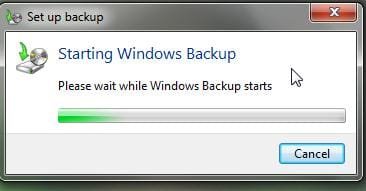
I was considering doing a recovery to an earlier restore point because I was having problems with an installation, and when I tried to run recovery, it wouldn't work.

What I got was this:
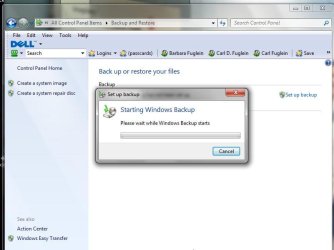
ScreenShot008.jpg
ScreenShot009.jpg


Is there any alternative to backup and recovery, or a way to reinstall or fix it?

Thanks,

Carl
 

My Computer

Computer type
Laptop
Computer Manufacturer/Model Number
compaq
OS
windows 7 home premium 64 bit
Motherboard
AMD V140
Memory
2gb
Internet Speed
30mb
Other Info
malwarebytes
Are you trying to recover using a stored image? Use your DVD Repair Console or Repair CD:
http://www.sevenforums.com/tutorials/675-system-image-recovery.html

It's too late to make the image now. If you're trying to back up your files drag the active User folders to an external, another network computer or DVD.

Or are you trying to http://www.sevenforums.com/tutorials/700-system-restore.html?

Your other options if you have a Win7 DVD are to http://www.sevenforums.com/tutorials/3413-repair-install.html?ltr=R or to http://www.sevenforums.com/installation-setup/125874-re-install-windows-7-a.html#post1086729

If you have factory OEM, you can also run your Recovery Disks or the Recovery Partition from boot after backing up your files.
 
Are you trying to recover using a stored image? Use your DVD Repair Console or Repair CD:
http://www.sevenforums.com/tutorials/675-system-image-recovery.html

It's too late to make the image now. If you're trying to back up your files drag the active User folders to an external, another network computer or DVD.

Or are you trying to http://www.sevenforums.com/tutorials/700-system-restore.html?

Your other options if you have a Win7 DVD are to http://www.sevenforums.com/tutorials/3413-repair-install.html?ltr=R or to http://www.sevenforums.com/installation-setup/125874-re-install-windows-7-a.html#post1086729

If you have factory OEM, you can also run your Recovery Disks or the Recovery Partition from boot after backing up your files.


I was actually trying to do a system restore. I tried that, and got the same result - it hiccupped on trying to set a restore point.

I have a Windows 7 upgrade disk - I upgraded from XP. Can I repair Windows 7 with that without having to back everything up?
 

My Computer

Computer type
Laptop
Computer Manufacturer/Model Number
compaq
OS
windows 7 home premium 64 bit
Motherboard
AMD V140
Memory
2gb
Internet Speed
30mb
Other Info
malwarebytes

My Computers

System One System Two

  • Computer type
    PC/Desktop
    OS
    7 X64
    CPU
    i5 8400
    Motherboard
    gigabyte b365m ds3h
    Memory
    2x8gb 3200mhz
    Hard Drives
    various
    PSU
    pure power 11 400w cm
    Case
    Coolermaster
    Cooling
    cryorig m9i
  • Computer type
    PC/Desktop
    OS
    7x64
    CPU
    g5400
    Motherboard
    ga b365m ds3h
    Memory
    8gb ddr4 2400
    PSU
    xfx pro 450w
It is always recommended to backup the user data before you do such a manipulation. In principle, a system restore from a restore point should not touch the user data nor should a Repair Install. But it is better safe than sorry.

The other day I had all partitions on seperate data disk (not a different partition but different drive) disappear to end up with a completely empty 320GB RAW disk. It even wiped out my Vista system that I had kept on that disk. Fortunately I have recent images for everything so I could bail myself out.
 

My Computer

Computer Manufacturer/Model Number
HP, Dell, Gateway, Toshiba - 4 laptops and 2 desktops
OS
Vista, Windows7, Mint Mate, Zorin, Windows 8
CPU
from 1.6GHz Duo to i7
Monitor(s) Displays
2x HP w2207
Hard Drives
5x HDD, 7x SSD, 12x Externals
Keyboard
with trackball - no mices
Mouse
Trackball mice
Internet Speed
DSL 6000
Just to clarify: You want to run System Restore and not set a Restore Point.

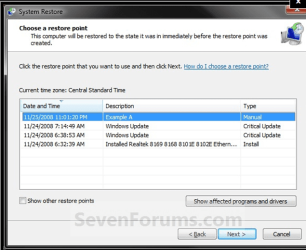
It seems you're confused about creating an image and setting a restore point. It's too late to do either. You want to restore now from either an image (if you have it) or a restore point which should be given in a list when you open System Restore:

Capture.PNG from tutorial System Restore

If for some reason you don't have a Restore Point to try, then run a http://www.sevenforums.com/tutorials/3413-repair-install.html?ltr=R
 

My Computer

Computer type
Laptop
Computer Manufacturer/Model Number
compaq
OS
windows 7 home premium 64 bit
Motherboard
AMD V140
Memory
2gb
Internet Speed
30mb
Other Info
malwarebytes
No, read the link which explains exactly what it does: Repair Install.

The type in light blue are links to tutorials which explain everything in depth.

First: do you have any listed Restore Points to System Restore from? Look at my post above.
 
No, read the link which explains exactly what it does: Repair Install. The type in light blue are links to tutorials which explain everything in depth.

First: do you have any listed Restore Points to System Restore from? Look at my post above.

I'm doind what the tutorial says and I get this:

ScreenShot010.jpg
before it does anything. It just hangs there.
 

My Computer

Computer type
Laptop
Computer Manufacturer/Model Number
compaq
OS
windows 7 home premium 64 bit
Motherboard
AMD V140
Memory
2gb
Internet Speed
30mb
Other Info
malwarebytes
OK, I see now that you have hangs when trying to start both Backup and Restore. How long before the utilities then open?

Is this new behavior? If you know for sure this type of corruption was not existing previously, booting Win7 Recovery to run System Restore may remedy it.
http://www.sevenforums.com/tutorials/668-system-recovery-options.html
http://www.sevenforums.com/tutorials/2083-system-repair-disc-create.html

If not, then I'd try the Repair Install as it can fix problems like this.

If not, you'll need to consider a Clean Reinstall. http://www.sevenforums.com/tutorials/1649-clean-install-windows-7-a.html
 
OK, I see now that you have hangs when trying to start both Backup and Restore. How long before the utilities then open?

Is this new behavior? If you know for sure this type of corruption was not existing previously, booting Win7 Recovery to run System Restore may remedy it.
http://www.sevenforums.com/tutorials/668-system-recovery-options.html
http://www.sevenforums.com/tutorials/2083-system-repair-disc-create.html

If not, then I'd try the Repair Install as it can fix problems like this.

If not, you'll need to consider a Clean Reinstall. http://www.sevenforums.com/tutorials/1649-clean-install-windows-7-a.html

Dear gregrocker,
Your replies in this thread are bordering on "genius" and especially in the last reply, you have all bases covered, except one thing! I wonder whether @op, has set aside enough disk space in C:/ drive for the restore points not to be automatically deleted! Congratulations for a terrific reply sequence!
Regards,
Sreedhav:)
 

My Computer

Computer Manufacturer/Model Number
Sony Vaio C series VPCCB35FN laptop
OS
MS Windows 7 Home Premium 64-bit SP1
CPU
IntelCore [email protected]; Sandy Bridge 32nm Tech.
Motherboard
Sony Vaio Version:C609NJYJ
Memory
4096Mb RAM; Single ChannelDDR3@665MHz; DRAM Freq:662MHz
Graphics Card(s)
AMD Radeon HD 6630M; GPU:Whistler;BIOS Core&mem Clock:123.36
Sound Card
REALTEK High Definition Audio Device; INTEL Display Card
Monitor(s) Displays
Generic PnP Intel HD;Resolution:1920*1040 Pixels; BPP:32bits
Screen Resolution
Current Resolution:1920*1080 Pixels; Monitor Frequency:60Hz
Hard Drives
Internal HD:TOSHIBA MK5061GSY; Real Size:488 GB;NTFS; 3 Partitions; SATA; HEADS:16

External HDD: WD Elements 1023 PORTABLE; Estimated Size: 1TB; NTFS; 3 Partitions
Cooling
Lateral Exhaust with a Cooling Pad Placed Beneath.
Keyboard
Logitech Bluetooth+ Generic Integrated K-B
Mouse
Logitech Bluetooth
Internet Speed
2MBPS
Other Info
1)Trend Micro Titanium Maximum Security Suite Version:3
2)SAS-PRO

3)MBAM--PRO


4)WATERFOX+IE9 +WOT+LINKEXTEND+ DRWEBCUREIT LINK CHECKER

5)SPYWAREBLASTER

6) WINPATROL PLUS

7) SANDBOXIE and
8) A BIT OF COMMON SENSE.
You can check how much disk space is apportioned for System Restore at Control Panel>System>System Protection>Configure.

Highlight your Win7 partition and set slider to 15-20% if you can afford the Disk Space so more points stay around longer.
 
OK, I see now that you have hangs when trying to start both Backup and Restore. How long before the utilities then open?

Is this new behavior? If you know for sure this type of corruption was not existing previously, booting Win7 Recovery to run System Restore may remedy it.
http://www.sevenforums.com/tutorials/668-system-recovery-options.html
http://www.sevenforums.com/tutorials/2083-system-repair-disc-create.html

If not, then I'd try the Repair Install as it can fix problems like this.

If not, you'll need to consider a Clean Reinstall. http://www.sevenforums.com/tutorials/1649-clean-install-windows-7-a.html


I left it running overnight, and I don't know how long it ran, but it gave me a message that said that I had no restore points, so apparently it's never been turned on. I'm going to do the restore again and get the exact message and see if it tells me exactly what to do. I read the Repair Install again, more carefully this time, and see that I' won't lose a whole lot.

I'll get back to you tomorrow or later tonight if it finishes.

Thanks for your patience with me.


Carl
 

My Computer

Computer type
Laptop
Computer Manufacturer/Model Number
compaq
OS
windows 7 home premium 64 bit
Motherboard
AMD V140
Memory
2gb
Internet Speed
30mb
Other Info
malwarebytes
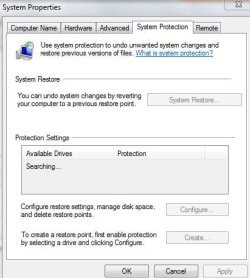
okay, so the message I got after about a half hour of trying to open System restore said I didn't have any restore points and that I needed to turn system protection on. So I tried that, and now it's hung up with this screen:

ScreenShot011.jpg

I guess I'll try booting to System Restore if this never comes back.

Thanks. Stay tuned.
 

My Computer

Computer type
Laptop
Computer Manufacturer/Model Number
compaq
OS
windows 7 home premium 64 bit
Motherboard
AMD V140
Memory
2gb
Internet Speed
30mb
Other Info
malwarebytes

My Computer

Computer type
Laptop
Computer Manufacturer/Model Number
compaq
OS
windows 7 home premium 64 bit
Motherboard
AMD V140
Memory
2gb
Internet Speed
30mb
Other Info
malwarebytes
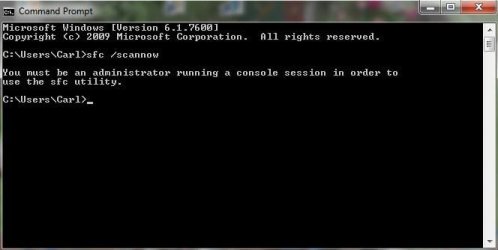
I ran that, got this:

ScreenShot014.jpg

I'm running system restore again.
 

My Computer

Computer type
Laptop
Computer Manufacturer/Model Number
compaq
OS
windows 7 home premium 64 bit
Motherboard
AMD V140
Memory
2gb
Internet Speed
30mb
Other Info
malwarebytes
Dear gregrocker,
Sorry to butt in, but without any "restore points created or present", the options left for aintnorock are either a " REPAIR INSTALL" or " CLEAN INSTALL,isn't it?

Before we delve into "why no restore points were generated by the OS" (commonest cause,either the option was in the off mode or no space was dedicated for system restore), i think it would be fair that the @OP, gives us his system specs!

Dear aintnorock,
Kindly download "speccy" from : Speccy - System Information - Free Download.

Speccy gives you" (courtesy piriform)
  • Processor brand and model
  • Hard drive size and speed
  • Amount of memory (RAM)
  • Graphics card
  • Operating system
Speccy was designed as a free electronic "what's inside" sticker for your PC.
I would also request the op,to tell us what security software is installed!

Regards,
Sreedhav
 

My Computer

Computer Manufacturer/Model Number
Sony Vaio C series VPCCB35FN laptop
OS
MS Windows 7 Home Premium 64-bit SP1
CPU
IntelCore [email protected]; Sandy Bridge 32nm Tech.
Motherboard
Sony Vaio Version:C609NJYJ
Memory
4096Mb RAM; Single ChannelDDR3@665MHz; DRAM Freq:662MHz
Graphics Card(s)
AMD Radeon HD 6630M; GPU:Whistler;BIOS Core&mem Clock:123.36
Sound Card
REALTEK High Definition Audio Device; INTEL Display Card
Monitor(s) Displays
Generic PnP Intel HD;Resolution:1920*1040 Pixels; BPP:32bits
Screen Resolution
Current Resolution:1920*1080 Pixels; Monitor Frequency:60Hz
Hard Drives
Internal HD:TOSHIBA MK5061GSY; Real Size:488 GB;NTFS; 3 Partitions; SATA; HEADS:16

External HDD: WD Elements 1023 PORTABLE; Estimated Size: 1TB; NTFS; 3 Partitions
Cooling
Lateral Exhaust with a Cooling Pad Placed Beneath.
Keyboard
Logitech Bluetooth+ Generic Integrated K-B
Mouse
Logitech Bluetooth
Internet Speed
2MBPS
Other Info
1)Trend Micro Titanium Maximum Security Suite Version:3
2)SAS-PRO

3)MBAM--PRO


4)WATERFOX+IE9 +WOT+LINKEXTEND+ DRWEBCUREIT LINK CHECKER

5)SPYWAREBLASTER

6) WINPATROL PLUS

7) SANDBOXIE and
8) A BIT OF COMMON SENSE.
Back
Top