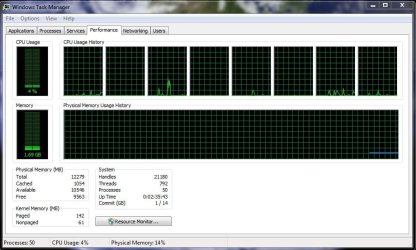
Processors - Limit Number Used by Windows 7

How to Set the Number of Processors or Cores to be Used by Windows 7

   Information
If you have a multiple core processor (CPU) or multiple processors, then this will show you how to limit the number of processors to be used by Windows 7, or to make sure that you are using all processors.

This can be handy for troubleshooting and debugging purposes to be able to determine if there is a problem with a single processor/core, or for a programmer to test their code against a single core while still running on their multi-processor/core system.

Windows 7 uses all of your processors or processor cores by default.
   Note
You must be logged in as an administrator to be able to do this.


Here's How: 1. Open the Start Menu, then type msconfig and press enter.

2. If prompted by UAC, then click on Yes.

3. Under the Boot tab in System Configuration, click on the Advanced options button. (see screenshot below) Step1.jpg
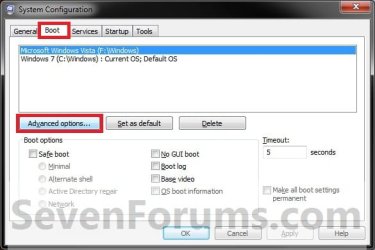
4. To Have Windows 7 Use All Processors or Cores A) Uncheck the Number of processors box, and click on OK. (see screenshot below)
NOTE: This is the default setting. Default_CPU.jpg
B) Go to step 6.
5. For Windows 7 to Use a Specified Number of Processors or Cores A) Check the Number of processors box, then select how may processors or cores you want Windows 7 to only be able to use in the drop down arrow menu and click on OK. Set_number_of_Processors.jpg
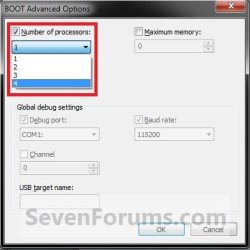
6. Check the Make all boot settings permanent box, and click on OK. (see screenshot below)
NOTE: You will still be able to come back and make changes again if you like. Step3.jpg
7. Click on Yes. (see screenshot below)
NOTE: You will still be able to come back and make changes again if you like. Step4.jpg
8. Click on the Restart button. (see screenshot below)
WARNING: This will restart the computer immediately. Make sure you save and close anything open that you do not want to lose first.

   Tip
If you checked the Don't show this message again box and would like to restore this Restart box to display again, then see: How to Restore the System Configuration Restart Prompt in Vista or Windows 7

Step5.jpg
9. When Windows 7 is finished restarting, it will now be using only the number of processors or cores that you specified.
NOTE: You can look in Task Manager (CTRL+SHIFT+ESC) to confirm this number of processors or cores. You will have one graph per core in the CPU Usage History area. Task_Manager.jpg
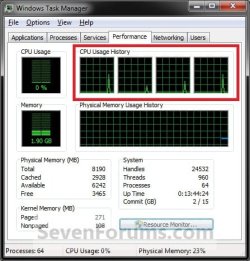
That's it,
Shawn


Last edited:
As far as I understand, this setting is not really doing anything for you. The setting is only there for some testing purposes. But I may be wrong.
 

My Computer My Computer

Computer Manufacturer/Model Number
HP, Dell, Gateway, Toshiba - 4 laptops and 2 desktops
OS
Vista, Windows7, Mint Mate, Zorin, Windows 8
CPU
from 1.6GHz Duo to i7
Monitor(s) Displays
2x HP w2207
Hard Drives
5x HDD, 7x SSD, 12x Externals
Keyboard
with trackball - no mices
Mouse
Trackball mice
Internet Speed
DSL 6000
Hello Wolfgang,

Yes, it's only for testing purposes for troubleshooting and debugging to be able to determine if there is a problem with a single processor/core, or for a programmer to test their code against a single core while still running on their multi-processor/core system.

I also added it for reference just in case someone used this option and forgot about it, and is wondering why not all of the processor cores are being used.
 

My Computer My Computer

Computer type
PC/Desktop
Computer Manufacturer/Model Number
Self built custom
OS
64-bit Windows 11 Pro for Workstations
CPU
Intel i7-8700K OC'd to 5 GHz
Motherboard
ASUS ROG Maximus XI Formula Z390
Memory
64 GB (4x16GB) G.SKILL TridentZ RGB DDR4 3600 MHz
Graphics Card(s)
ASUS ROG-STRIX-GTX1080TI-O11G-GAMING
Sound Card
Integrated
Monitor(s) Displays
2 x Samsung Odyssey G7 27"
Screen Resolution
2560x1440
Hard Drives
1TB Samsung 990 PRO M.2,
4TB Samsung 990 PRO PRO M.2,
TerraMaster F8 SSD Plus NAS
PSU
Seasonic Prime Titanium 850W
Case
Thermaltake Core P3
Cooling
Corsair Hydro H115i
Keyboard
Logitech wireless K800
Mouse
Logitech MX Master 4
Internet Speed
2 Gb/s Download and 100 Mb/s Upload
Antivirus
Malwarebyte Anti-Malware Premium
Browser
Google Chrome
Other Info
Logitech Z625 speaker system,
Logitech BRIO 4K Pro webcam,
HP Color LaserJet Pro MFP M477fdn,
APC SMART-UPS RT 1000 XL - SURT1000XLI,
Galaxy S23 Plus phone
Good, that clarification is useful. I posted my comment because I have seen guys thinking that it would speed up their system - which, of course, it does not.
 

My Computer My Computer

Computer Manufacturer/Model Number
HP, Dell, Gateway, Toshiba - 4 laptops and 2 desktops
OS
Vista, Windows7, Mint Mate, Zorin, Windows 8
CPU
from 1.6GHz Duo to i7
Monitor(s) Displays
2x HP w2207
Hard Drives
5x HDD, 7x SSD, 12x Externals
Keyboard
with trackball - no mices
Mouse
Trackball mice
Internet Speed
DSL 6000
LOL, yeah I still get people that report to me that they swear that it has improved performance by selecting all processors. I just do not see how though since they are all used by default anyway.
 

My Computer My Computer

Computer type
PC/Desktop
Computer Manufacturer/Model Number
Self built custom
OS
64-bit Windows 11 Pro for Workstations
CPU
Intel i7-8700K OC'd to 5 GHz
Motherboard
ASUS ROG Maximus XI Formula Z390
Memory
64 GB (4x16GB) G.SKILL TridentZ RGB DDR4 3600 MHz
Graphics Card(s)
ASUS ROG-STRIX-GTX1080TI-O11G-GAMING
Sound Card
Integrated
Monitor(s) Displays
2 x Samsung Odyssey G7 27"
Screen Resolution
2560x1440
Hard Drives
1TB Samsung 990 PRO M.2,
4TB Samsung 990 PRO PRO M.2,
TerraMaster F8 SSD Plus NAS
PSU
Seasonic Prime Titanium 850W
Case
Thermaltake Core P3
Cooling
Corsair Hydro H115i
Keyboard
Logitech wireless K800
Mouse
Logitech MX Master 4
Internet Speed
2 Gb/s Download and 100 Mb/s Upload
Antivirus
Malwarebyte Anti-Malware Premium
Browser
Google Chrome
Other Info
Logitech Z625 speaker system,
Logitech BRIO 4K Pro webcam,
HP Color LaserJet Pro MFP M477fdn,
APC SMART-UPS RT 1000 XL - SURT1000XLI,
Galaxy S23 Plus phone
where do get that all cores are used by default. this is not the case. when you go to msconfig, boot, advance option and it's default setting for cores being used is 1, that is exactly what it is using. changing it 2 or more depending on you cpu makes windows use more cores. various programs you install may or may not use all cores by default, but win 7 does not.
 

My Computer My Computer

OS
Windows 7
where do get that all cores are used by default. this is not the case. when you go to msconfig, boot, advance option and it's default setting for cores being used is 1, that is exactly what it is using. changing it 2 or more depending on you cpu makes windows use more cores. various programs you install may or may not use all cores by default, but win 7 does not.


Here we go. No core setting will change that if the program is not designed for it. And the windows kernel needs a major revamp in order to use all cores.
 

My Computer My Computer

Computer Manufacturer/Model Number
HP, Dell, Gateway, Toshiba - 4 laptops and 2 desktops
OS
Vista, Windows7, Mint Mate, Zorin, Windows 8
CPU
from 1.6GHz Duo to i7
Monitor(s) Displays
2x HP w2207
Hard Drives
5x HDD, 7x SSD, 12x Externals
Keyboard
with trackball - no mices
Mouse
Trackball mice
Internet Speed
DSL 6000
where do get that all cores are used by default. this is not the case. when you go to msconfig, boot, advance option and it's default setting for cores being used is 1, that is exactly what it is using. changing it 2 or more depending on you cpu makes windows use more cores. various programs you install may or may not use all cores by default, but win 7 does not.


Funny, it's using all my cores by default.

Capture.JPG
 

My Computer My Computer

Computer type
PC/Desktop
Computer Manufacturer/Model Number
Airbot 2.0
OS
Windows 7 Ultimate x64 SP1
CPU
Core i7 920 (D0) @ 4Ghz, *26c idle *65c full load on air
Motherboard
Asus P6X58D Premium - Sata 6Gb/s - USB 3.0
Memory
12GB DDR3 Corsair Dominator -CMD12GX3M6A1600C8 at 1600MHz
Graphics Card(s)
Zotac Geforce GTX 770
Sound Card
ASUS Xonar D2X
Monitor(s) Displays
1 LG 24" Flatron W2453V-PF 1 Samsung 24" P2450H both 2ms RT
Screen Resolution
1920x1080@60hz
Hard Drives
1 Samsung 250GB 840 Evo SSD
1 OCZ Vertex2 180GB SSD
1 TB Samsung Spinpoint F1 7200RPM 32MB cache
2 500GB WD Caviar Blacks 7200RPM 32MB cache (WD5001AALS)

Pioneer DVD Burner DVR-S18M
PSU
Corsair HX1000W
Case
Cooler Master HAF 932
Cooling
Case Fans *3 230mm, *1 140mm/CPU - *Tuniq Tower 120 Extreme
Keyboard
Logitech Wireless MK700
Mouse
Logitech Wireless MK700
Internet Speed
DL 15 Mbps UL 0.98 Mbps
Antivirus
None
Browser
Firefox Nightly
Other Info
Processor-7.7 *RAM- 7.9 *Graphics-7.9 *Gaming Graphics- 7.9 *SSD- 7.8 W.E.I final score= 7.7
*Phone- LG Nexus 5
where do get that all cores are used by default. this is not the case. when you go to msconfig, boot, advance option and it's default setting for cores being used is 1, that is exactly what it is using. changing it 2 or more depending on you cpu makes windows use more cores. various programs you install may or may not use all cores by default, but win 7 does not.


Here we go. No core setting will change that if the program is not designed for it. And the windows kernel needs a major revamp in order to use all cores.

what did you mean "here we go"? here we go someone who does not know what they are talking about, or here we go these two lines are my proof? win 7 out of the box when you click on computer it takes about 3 seconds before it list the drives. click on one of the drives and it takes about 3 seconds before it list the contents. when i go in and change the core count to 2 and do the required restart once back in 7 i no longer have this lag accessing my drives and files. i have tested this on a clean install where it was the first thing i changed. i have tested on a clean install where i have installed all of my drivers, software, and performed all of my tweaks then change the core setting. the only time that i actually get rid of this lag is when i change the cores from 1 to 2. nothing else gets rid of the lag.
 

My Computer My Computer

OS
Windows 7
"Here we go" was supposed to mean "here we go starting the discussion". Since you were the first poster after Brink and I had the little exchange of ideas, you started the (very useful) discussion. There is a lot of mystery around the full usage of multi cores and therefore this will help us to better understand it.

PS: your observation/setting is interesting. I never tried that.
 

My Computer My Computer

Computer Manufacturer/Model Number
HP, Dell, Gateway, Toshiba - 4 laptops and 2 desktops
OS
Vista, Windows7, Mint Mate, Zorin, Windows 8
CPU
from 1.6GHz Duo to i7
Monitor(s) Displays
2x HP w2207
Hard Drives
5x HDD, 7x SSD, 12x Externals
Keyboard
with trackball - no mices
Mouse
Trackball mice
Internet Speed
DSL 6000
then i apologize if i misunderstood what you meant. as for my observations they come from running 7 from the first beta through my purchase of 7. the first thing i noticed when i installed the first beta was this lag. i thought it was just a driver issue. so after the install i did my security software, then i did my drivers. this did not fix it. i tried tweak after tweak to fix it, nothing. one day i ran across an article about the cores, so i changed it from 1 to 2. after i rebooted i decided to click on computer just to see if there was any difference, and the lag was gone. i am a skeptic so i could not believe after all the tweaks i had tried to fix the lag that i had just run across the fix by accident. this is when i ran the various test beds i mentioned. i do not know if others are having this lag or not, but i do know what seems to have fixed it for me.
 

My Computer My Computer

OS
Windows 7
There is no need to apologize. Misunderstandings happen - especially from postings made by "foreigners" like me who's native language is not English. Sometimes the intended semantics get twisted in the translation.
But back to your observation. I have never encountered this lag - neither on my 32bit Win7 nor on my 64bit Win7. But if the setting worked for you, you might as well apply it. Nothing wrong with that.
 

My Computer My Computer

Computer Manufacturer/Model Number
HP, Dell, Gateway, Toshiba - 4 laptops and 2 desktops
OS
Vista, Windows7, Mint Mate, Zorin, Windows 8
CPU
from 1.6GHz Duo to i7
Monitor(s) Displays
2x HP w2207
Hard Drives
5x HDD, 7x SSD, 12x Externals
Keyboard
with trackball - no mices
Mouse
Trackball mice
Internet Speed
DSL 6000
i have checked forum after forum and searched for this and with the exception of a few no one seems to get it. so i'm thinking that for some reason it is just a odd quark with my hardware setup.
 

My Computer My Computer

OS
Windows 7
Once the new build is together here I will be able to put all of this to the test since I'll be moving from a dual core into a quad core build. It should be interesting to see what the performance monitor and other logs reveal as well as a look at the performance monitor.

As far as speeding things up there was some discussions that taking a single core cpu or dual core model and bumping the number of cores was supposedly resulting in some kind of performance gain there. The idea was put to the test and revealed no notible performance boosts.

That discussion was seen over the last few years on different forums. I tend to agree with Shawn on not seeing any particular gain with that alone. Hope you Digg the guide here just the same! :D
 

My Computers My Computers

System One System Two

  • Computer type
    PC/Desktop
    Computer Manufacturer/Model Number
    Custom builds = 2
    OS
    W7 Ultimate x64/W10 Pro x64/W11 Pro Triple Boot - Main PC W7 Remote PC Micro ATX W7 Pro x64/W11 Pro
    CPU
    AMD Phenom II X4 975 Deneb 3.6ghz - 965 2nd remote pc
    Motherboard
    Gigabyte GA-790XTA-UD4-Gigabyte GA-880GM-D2H remote pc
    Memory
    Kingston Hyper X DDR3 1600 1.5v 16gb - Hyper X Fury 8gb 2nd
    Graphics Card(s)
    MSI HD Radeon 5750 1gb - MSI HD Radeon 6450 on mini tower
    Sound Card
    Creative Labs X-Fi Xtreme Audio P - Realtek onooard 2nd case
    Monitor(s) Displays
    ASUS VW199T-P 19" HP 2082a Main-HP 2082a 20" remote pc
    Screen Resolution
    Asus 1440x900 - HP 1600x900
    Hard Drives
    WD Black 1TB HD per OS W7, W10, and pending W11 presently on 500gb OS Drive - Pending Triple 1TB HDs for Spanned Storage/backup volume
    Single 2TB external USB enclosure, single 1TB System 7 Host/Boot drive, Pending 8TB external HD for system image b
    PSU
    Corsair 750TX - primary / Corsair CX600 - second
    Case
    Antec 900-2 - SSD compatible / NZXT Vulcan mini tower
    Cooling
    Zalman CNPS9900A
    Keyboard
    AZIO L70 Backlit Letters Gaming - ONN Cordless/USB
    Mouse
    MSI DS200 Programmable, Logitech Cordless
    Internet Speed
    30mbps upgrade - primary hard wired - mini tower usb WiFi
    Antivirus
    GFI VIPRE Internet Security 2014 on W7 2016 beta on W10,
    Browser
    Cyberfox, WaterFox 64bit FF variants, FireFox x64, Pale Moon
    Other Info
    Accomdata fan cooled usb 2.0 PIDE/Sata II, III external enclosure.
    Sambient usb/eSata PATA/Sata II, III external enclosure.
  • Computer type
    PC/Desktop
    System Manufacturer/Model Number
    CUSTOM ASSEMBLY
    OS
    W7 Pro x64/W11 Pro
    CPU
    AMD Deneb 3.6ghz - 965
    Motherboard
    Gigabyte GA-880GM-D2H remote pc
    Memory
    Kingston Hyper X Fury 8gb
    Graphics Card(s)
    MSI HD Radeon 6450 DVI Output
    Sound Card
    Realtek onooard Creative or Other separate PENDING
    Monitor(s) Displays
    VIZIO 32" LCD TV Separate LCD Pending
    Screen Resolution
    1600x1080
    Hard Drives
    WD 500GB OS Host/Boot WD Green 1TB Storage/Backup
    PSU
    Corsair 600W - THERMALTAKE 600W spare case
    Case
    NZXT Vulcan mini tower
    Cooling
    Twin 120mm Top Fans - 240mm Side Cover
    Keyboard
    ONN Cordless/USB Logitech Cordless
    Mouse
    ONN USB/Cordless - Logitech Cordless
    Internet Speed
    DSL 5G
    Browser
    MS Edge, FireFox, WaterFox x64, FireFox Nightly
    Other Info
    OS Testing-Remote Access to Main TeamViewer
where do get that all cores are used by default. this is not the case. when you go to msconfig, boot, advance option and it's default setting for cores being used is 1, that is exactly what it is using. changing it 2 or more depending on you cpu makes windows use more cores. various programs you install may or may not use all cores by default, but win 7 does not.

Hello Staple Head,

Was the boxed checked with 1 selected?

By default, when the Number of Processors options is unchecked, the number in the grayed out drop down menu is irrelevant. It is only a relevant option to select how many when the box is checked instead.
When grayed out, all processors or cores are available for use in Windows 7. When you check the box, only the number of cores/processors you select will be available to for use in Windows 7.

Now whether Windows 7 decides to use them, programs are programmed to make use of multiple cores or processors or not, and how the CPU affinity for a process is set is another story completely and will affect how many cores/processors are used as well.
 

My Computer My Computer

Computer type
PC/Desktop
Computer Manufacturer/Model Number
Self built custom
OS
64-bit Windows 11 Pro for Workstations
CPU
Intel i7-8700K OC'd to 5 GHz
Motherboard
ASUS ROG Maximus XI Formula Z390
Memory
64 GB (4x16GB) G.SKILL TridentZ RGB DDR4 3600 MHz
Graphics Card(s)
ASUS ROG-STRIX-GTX1080TI-O11G-GAMING
Sound Card
Integrated
Monitor(s) Displays
2 x Samsung Odyssey G7 27"
Screen Resolution
2560x1440
Hard Drives
1TB Samsung 990 PRO M.2,
4TB Samsung 990 PRO PRO M.2,
TerraMaster F8 SSD Plus NAS
PSU
Seasonic Prime Titanium 850W
Case
Thermaltake Core P3
Cooling
Corsair Hydro H115i
Keyboard
Logitech wireless K800
Mouse
Logitech MX Master 4
Internet Speed
2 Gb/s Download and 100 Mb/s Upload
Antivirus
Malwarebyte Anti-Malware Premium
Browser
Google Chrome
Other Info
Logitech Z625 speaker system,
Logitech BRIO 4K Pro webcam,
HP Color LaserJet Pro MFP M477fdn,
APC SMART-UPS RT 1000 XL - SURT1000XLI,
Galaxy S23 Plus phone
Well, I'm happy to hear that you say you clearly notice a performance gain by checking the box and selecting them all manually instead of having them selected automatically with it being unchecked. I'm just not sure why or what would make a difference like that. That's all. :confused:
 

My Computer My Computer

Computer type
PC/Desktop
Computer Manufacturer/Model Number
Self built custom
OS
64-bit Windows 11 Pro for Workstations
CPU
Intel i7-8700K OC'd to 5 GHz
Motherboard
ASUS ROG Maximus XI Formula Z390
Memory
64 GB (4x16GB) G.SKILL TridentZ RGB DDR4 3600 MHz
Graphics Card(s)
ASUS ROG-STRIX-GTX1080TI-O11G-GAMING
Sound Card
Integrated
Monitor(s) Displays
2 x Samsung Odyssey G7 27"
Screen Resolution
2560x1440
Hard Drives
1TB Samsung 990 PRO M.2,
4TB Samsung 990 PRO PRO M.2,
TerraMaster F8 SSD Plus NAS
PSU
Seasonic Prime Titanium 850W
Case
Thermaltake Core P3
Cooling
Corsair Hydro H115i
Keyboard
Logitech wireless K800
Mouse
Logitech MX Master 4
Internet Speed
2 Gb/s Download and 100 Mb/s Upload
Antivirus
Malwarebyte Anti-Malware Premium
Browser
Google Chrome
Other Info
Logitech Z625 speaker system,
Logitech BRIO 4K Pro webcam,
HP Color LaserJet Pro MFP M477fdn,
APC SMART-UPS RT 1000 XL - SURT1000XLI,
Galaxy S23 Plus phone
Mysteries surround our life - LOL.
 

My Computer My Computer

Computer Manufacturer/Model Number
HP, Dell, Gateway, Toshiba - 4 laptops and 2 desktops
OS
Vista, Windows7, Mint Mate, Zorin, Windows 8
CPU
from 1.6GHz Duo to i7
Monitor(s) Displays
2x HP w2207
Hard Drives
5x HDD, 7x SSD, 12x Externals
Keyboard
with trackball - no mices
Mouse
Trackball mice
Internet Speed
DSL 6000
Well, I'm happy to hear that you say you clearly notice a performance gain by checking the box and selecting them all manually instead of having them selected automatically with it being unchecked. I'm just not sure why or what would make a difference like that. That's all. :confused:

Mysteries surround our life - LOL.

mystery is right, because when i setup my roommates system i never see the lag on his machine. the thing our systems are more similar than not.
 

My Computer My Computer

OS
Windows 7
This thread should be removed by an Admin. You should NEVER tell inexperienced users to go messing around in the advanced boot options for how the OS handles CPU's. This setting should NEVER be touched unless you know what your doing. It's one of the few places where the OS communicates directly with the BIOS. If you have a dual core, or quad core CPU it should still be set at 1 by default. Only when you actually have two seperate physical processors should it be set to two. And the OS will do that automatically when installed. Unless you have a problem with your BIOS.

Leave this setting alone!
 

My Computer My Computer

Computer Manufacturer/Model Number
NVIDIA
OS
Windows 7 Enterprise x64
CPU
AMD Athlon 64X2 Dual Core 3800+
Motherboard
GeForce 6100-M9
Memory
OCZ Platinum Dual Channel - 4x1Gb
Graphics Card(s)
NVIDIA GeForce 8800 GT PCI Express x16
Sound Card
Creative Audigy Sound Blaster Extreme PCI
Monitor(s) Displays
Compaq 7500
Screen Resolution
1024x768
Hard Drives
C: Seagate ST3250318AS SataII - 250Gb

D: Seagate ST3500418AS SataII - 500Gb
PSU
OCZ 600w Dual 12v Rails
Case
Thermaltake
Cooling
OCZ Heatsinks, Fans, and Thermal Paste on CPU & Chipsets
Keyboard
Logitech
Mouse
Radio Shack PS2
Internet Speed
Cable
Other Info
Dual Pioneer DVD/RW optical drives. LG CD/RW optical drive.
Back
Top