Question about Format/Quick Format

My Computer

Computer type
PC/Desktop
Computer Manufacturer/Model Number
Self Built
OS
Windows 10 Pro
CPU
Core i5 9600K
Motherboard
ASUS ROG Strix Z390-F Gaming
Memory
Corsair Vengeance Pro 2x 8GB (16GB) 3200MHz DDR4
Graphics Card(s)
MSI GTX 1070 Gaming X 8GB
Sound Card
ASRock A-Style Purity Sound
Monitor(s) Displays
ASUS VX239H IPS
Screen Resolution
1920x1080
Hard Drives
XPG SPECTRIX S40G 2566GB M.2 NVMe | Patriot P210 512GB SSD | Seagate BarraCuda 4TB 5400RPM
PSU
Thermaltake Smart 600w RGB 80Plus
Case
NZXT H500 with 3x Corsair HD120 RGB w/Node Pro
Cooling
Cryorig H7
Keyboard
Corsair K70 RapidFire RGB (Cherry MX Speed)
Mouse
Logitech G402 Hyperion Fury
Internet Speed
20MB Cable Broadband
Browser
Chrome
Other Info
Corsair MM300 Extended Anti-Fray Mouse Pad | Edifier C2 2.1ch Sound System | XBOX One S Controller | XBOX 360 Wireless Controller for Windows | APC SUA1000i Smart-UPS | PS4 Slim 500GB [Region 1 - USA]
There will be dozens if not hundreds of other readers of this thread who find it on Google or browsing forums, which is why we narrate a bit what is going on and try to correct misinformation.
 
I don't like formatting anything from an OS I use a bootdisc (or usb, ur choice) called hiren's boot.
You should full format if you have a newer disc, to keep it nice and pristine, you probably don't need to format that often anyways.
I would normally quick format. If ur worried about bad sectors because its an old drive then run chkdisk first, it'll take care of ur bad or corrupted sectors
You can still retrieve data off of disks after a full or quick format. (Even a "secure erase" as its's described could be read through with the right software.)
If you're worried about ur data being retrieved...maybe you had all the lists of your stolen credit cards info and the SSNs you've stolen on it, get yourself wipedrive. DOD certified, if overwrites the data multiple times to ensure it wants be re accessed
 
Last edited:

My Computer

OS
Windows 7 Ultimate x86
Motherboard
Asus P5N-D
Memory
8 Gig(4 x 2 Gig)
Graphics Card(s)
2 x GeForce 9500 GT (SLI)
Monitor(s) Displays
2 x 25" VGA, 1 37" DVI-D
Hard Drives
1x 5400 RPM 100 gig
4 x 5400 RPM 250 gig RAID 0+1
1 TB USB 3.0 external hard drive
500 gig external

My Computer

Computer Manufacturer/Model Number
* BFK Customs *
OS
W 7 64-bit Ultimate
CPU
Intel Q9550 Yorkfield
Motherboard
ASUS P5Q Pro
Memory
8GB Dominator 8500C5D
Graphics Card(s)
ATI : XFX 5870
Sound Card
Realtek HD Audio 7-1
Monitor(s) Displays
1x 47" LCD HDMI & 3x 26" LCD HDMI
Screen Resolution
1920x1080P & 1920x1200
Hard Drives
1x 80GB Intel X25-M G2 SSD : 1x 500GB & 1x 640GB WD Caviar Black(s)
PSU
Corsair 620HX
Case
Cooler Master RC-690
Cooling
Tuniq Tower 120, 2x 140mm and 3x 120mm case fans
Keyboard
Microsoft 500
Mouse
Razer Diamondback 3G
Internet Speed
14 Mb/s
Other Info
1x Koutech 3Gb/s SATA HDD Hot Swap Rack
Is it posible, is it thinkable that the format command also behaves like that in Windows 7? Yes, it is.
 

My Computer

OS
Windows
The information does not refer to the behavior of the installer's Custom>Drive Options>Format function which is by default a Quick Format.
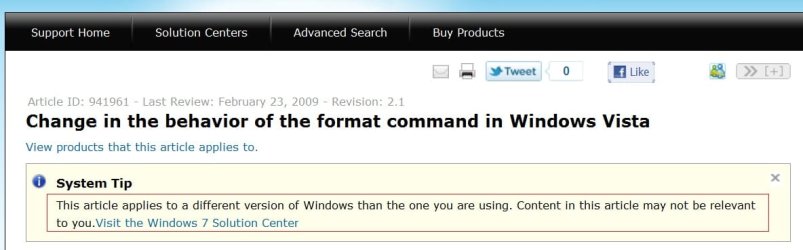
You seek correct information, you say. The information given in this thread was that not even a full format is going to overwrite data. The correct answer is: it will, if you have vista or newer.
 

My Computer

OS
Windows
I've run the clean all command way too many times in Windows 7 followed by a full format (using diskpart) to believe that the format writes zeroes as the clean all does, when the format takes half the time as the clean all takes.

You are just causing FUD and I'm finished discussing this foolish issue with you.
 

My Computer

Computer Manufacturer/Model Number
* BFK Customs *
OS
W 7 64-bit Ultimate
CPU
Intel Q9550 Yorkfield
Motherboard
ASUS P5Q Pro
Memory
8GB Dominator 8500C5D
Graphics Card(s)
ATI : XFX 5870
Sound Card
Realtek HD Audio 7-1
Monitor(s) Displays
1x 47" LCD HDMI & 3x 26" LCD HDMI
Screen Resolution
1920x1080P & 1920x1200
Hard Drives
1x 80GB Intel X25-M G2 SSD : 1x 500GB & 1x 640GB WD Caviar Black(s)
PSU
Corsair 620HX
Case
Cooler Master RC-690
Cooling
Tuniq Tower 120, 2x 140mm and 3x 120mm case fans
Keyboard
Microsoft 500
Mouse
Razer Diamondback 3G
Internet Speed
14 Mb/s
Other Info
1x Koutech 3Gb/s SATA HDD Hot Swap Rack
Back
Top