
RAID array isn't recognized?

mastacox

New member
Local time
2:51 AM
Messages
26
Location
Los Alamos, NM
Hey all,

So I'm running an ASUS M4N72-E mobo which has the Nvidia nForce 750a SLI chipset with built-in SATA RAID. I bought a pair of 1TB Samsung SATA hard drives to set up in a RAID 1 (mirrored) array for backing up pictures and the like, but I can't get the thing to show up in Windows for the life of me...

I first installed the nVidia driver set which supports in-Windows setup and configuration of RAID arrays (Nvidia Mediashield). With that all installed, I shutdown installed the two drives on SATA ports 5&6 which are supposedly for dedicated RAID according to the mobo manual. I went into the BIOS and set onboard SATA to RAID, and went to the RAID configuration utility to make sure both drives were showing up (they are). At first, I didn't set up the RAID in the BIOS config because I was going to do it in Mediashield.

Once I got back into windows the two drives show up as unpartitioned drives in Windows drive manager, and so I load up Nvidia Mediashield go through the steps to set up the array, and when I click "finish" the utility locks up for about 5 minutes (at first I thought formatting the array), but then closes with no messages. Once mediashield closes the drives no longer show up in the device manager or drive partitioner, and no RAID array shows up either. Rebooting is the only way to get them back. I've tried plugging the drives into different SATA ports, tried setting the RAID up in the BIOS config utility and then booting to Windows, and tried uninstalling and re-installing the Nvidia software/drivers... When I set the RAID up in the BIOS config utility and then boot to Windows, the drive just doesn't show up at all (but the BIOS post shows the drives set up in a healthy array).

So what gives? Is my onboard RAID bad? Do I need to update my BIOS? I'm stumped...
 

My Computer

Computer Manufacturer/Model Number
Custom Box
OS
Windows 7 Professional, 64-Bit Install
CPU
AMD Phenom II X4 940 Black Edition, 3.5GHz OC
Motherboard
Asus M4N72-E
Memory
8GB (4 x 2GB) OCZ Platinum Edition DDR2 800 SDRAM
Graphics Card(s)
XFX GeForce GTX 260 Core 216
Sound Card
Mobo On-Board 7.1
Monitor(s) Displays
37" HDTV
Hard Drives
160GB PATA (System Drive)
500GB PATA (Programs Drive)
2X Samsung 1TB SATA in RAID 1
PSU
Thermaltake Toughpower XT 775W Modular
Case
NZXT Full Tower
Cooling
Cooler Master Hyper 212+, lots of case fans
Keyboard
HP Wireless Elite
Mouse
Logitech MX1100
Internet Speed
Comcast Cable 18 Mbps
Other Info
Optical: LG WH10LS30K 10x Blu-Ray Burner
Hey all,

So I'm running an ASUS M4N72-E mobo which has the Nvidia nForce 750a SLI chipset with built-in SATA RAID. I bought a pair of 1TB Samsung SATA hard drives to set up in a RAID 1 (mirrored) array for backing up pictures and the like, but I can't get the thing to show up in Windows for the life of me...

I first installed the nVidia driver set which supports in-Windows setup and configuration of RAID arrays (Nvidia Mediashield). With that all installed, I shutdown installed the two drives on SATA ports 5&6 which are supposedly for dedicated RAID according to the mobo manual. I went into the BIOS and set onboard SATA to RAID, and went to the RAID configuration utility to make sure both drives were showing up (they are). At first, I didn't set up the RAID in the BIOS config because I was going to do it in Mediashield.

Once I got back into windows the two drives show up as unpartitioned drives in Windows drive manager, and so I load up Nvidia Mediashield go through the steps to set up the array, and when I click "finish" the utility locks up for about 5 minutes (at first I thought formatting the array), but then closes with no messages. Once mediashield closes the drives no longer show up in the device manager or drive partitioner, and no RAID array shows up either. Rebooting is the only way to get them back. I've tried plugging the drives into different SATA ports, tried setting the RAID up in the BIOS config utility and then booting to Windows, and tried uninstalling and re-installing the Nvidia software/drivers... When I set the RAID up in the BIOS config utility and then boot to Windows, the drive just doesn't show up at all (but the BIOS post shows the drives set up in a healthy array).

So what gives? Is my onboard RAID bad? Do I need to update my BIOS? I'm stumped...

Ok, Let's run some thoughts,

1. Can you Init The Array using Your Local Disk Management, and just skip mediasheid and BIOSRAID?

2. Are you sure the RAID didn't Correctly Finish and you need to make sure that your GUI ust isn't Configured to the wrong listening port and just doesn't see the new array?

check those and lemme know i'll be checking for a reply...

Hope this helps, and Good luck

-Tweek
 

My Computer

Computer Manufacturer/Model Number
Custom Built, RsPC!{Ltd.}
OS
Windows 7 Ultimate x64 & OSX 10.6
CPU
Intel Core 2 Quad Q9550 12MB 2.86 @ 5.09GHz, 1.3Vcore@87
Motherboard
ASUS P5E3 Deluxe w/ Intel X58 Chipset BIOS 0304
Memory
8Gb (4x2Gb) *Serial Sequential* Corsair XMS2 DDR-800 1.8v
Graphics Card(s)
EVGA GTX 470 @865MHz Core, 1730MHz Shader, 1855MHz Mem, >43C
Sound Card
MOTU 192HD+424+3x2408Mk3, D8B, ASUS X-Fi 24, only 96kHz :(
Monitor(s) Displays
Asus VK278Q 27" 2ms HD LED Backlit LCD Monitors
Screen Resolution
2x 1920x1080
Hard Drives
2x OCZ 60GB SSDs RAID0 - OS, (100+ GB Part-Page file)
5x Samsung SATAII 1TB RAID5 - Music,
6x WD RE2 SATAII 1Tb RAID1+0 - Storage,
4x WD Dual 64MB 2TB RAID5 - Backup
3x WD Velociraptor 600GB RAID5 - Audio Production
PSU
2x Corsair 850w, Compaq R3000 UPS Backup
Case
Built Steel/Dynamat/Neopreme Shock Mount 6U Silent Rack Case
Cooling
iXrema+2x12cm Magmas 3x20cm Case Fans 4x14cm Exhaust Fans
Keyboard
Cherry 6316 Mechanical, IBM Model M, Das Keyboard, 10key USB
Mouse
2x Logitec G500... Yes 2 :)
Internet Speed
Fiber, Dual 85Mb/s up 105 Mb/s Down
Other Info
Audio system =
Dynaudio BM6A Near Fields + BM10 Sub for Reference & monitoring
Klipschorns & Servodrive Sub for Music Playback...
Mackie D8B converted into 24ch Automated DAW controller/MIDI interface, MOTU Rig for AD/DA I/O & Professional Recording, ASUS Sound Card for Music Playback (needs upgrade!)

Boot up Time = ~30sec from Dead off Init RAID, then ~9.877-12.454sec for windows, as per B
Ok, Let's run some thoughts,

1. Can you Init The Array using Your Local Disk Management, and just skip mediasheid and BIOSRAID?

The array doesn't show up in windows. I only see the disks in Windows individually before they're applied to an array. The BIOS Raid utility is able to create an array as far as I can tell, but it never shows up in Windows; Mediashield apparently errors out and isn't able to create an array (and the drives disappear after is errors out).

Does Win7 have native support for creating RAID arrays from multiple drives?

2. Are you sure the RAID didn't Correctly Finish and you need to make sure that your GUI ust isn't Configured to the wrong listening port and just doesn't see the new array?

The BIOS RAID utility appears to be able to create an array successfully, but it doesn't show up in Windows as a drive. Mediashield is definitely not working correctly.

I'm fine with creating the aray in BIOS as long as it shows up in Windows. Mediashield doesn't appear to be working for me, not sure why.
 

My Computer

Computer Manufacturer/Model Number
Custom Box
OS
Windows 7 Professional, 64-Bit Install
CPU
AMD Phenom II X4 940 Black Edition, 3.5GHz OC
Motherboard
Asus M4N72-E
Memory
8GB (4 x 2GB) OCZ Platinum Edition DDR2 800 SDRAM
Graphics Card(s)
XFX GeForce GTX 260 Core 216
Sound Card
Mobo On-Board 7.1
Monitor(s) Displays
37" HDTV
Hard Drives
160GB PATA (System Drive)
500GB PATA (Programs Drive)
2X Samsung 1TB SATA in RAID 1
PSU
Thermaltake Toughpower XT 775W Modular
Case
NZXT Full Tower
Cooling
Cooler Master Hyper 212+, lots of case fans
Keyboard
HP Wireless Elite
Mouse
Logitech MX1100
Internet Speed
Comcast Cable 18 Mbps
Other Info
Optical: LG WH10LS30K 10x Blu-Ray Burner
Hello Mastacox,
You are trying to do the impossible with your mobo, you get a choice of IDE/AHCI or SATA but not both together this is quite normal on Asus motherboards with only one chipset.
See the attachment from your manual
 

Attachments

  • Capture.PNG
    Capture.PNG
    42.3 KB · Views: 311

My Computer

Computer Manufacturer/Model Number
Something I threw together
OS
Windows 7 Ultimate x64
CPU
Intel Core i7-2600K
Motherboard
Asus P8P67
Memory
16 GB G Skill F3-10666 CL9D-4GBRL
Graphics Card(s)
ATI Radeon HD 6870
Sound Card
ATI Radeon HDMI / Realtek ALC892
Monitor(s) Displays
2 x 22" standard monitors / LG32LC56v TV to watch films
Screen Resolution
1920 x1080
Hard Drives
2 x OCZ Vertex2 111.79GB
3 x Samsung103SJ
1 x Samsung103UJ
1 x WD3200BEVT
1 x Hitachi5K320-160
PSU
Thermaltake Toughpower Cable Management 750W
Case
Antec 300
Cooling
Noctua NH-U12P SE2 and 5 120mm Case fans
Keyboard
Microsoft Comfort Curve Keyboard 2000
Mouse
Hama M3110 / Logitech M305
Internet Speed
16000
Other Info
I have also used Fedora, Suse, Ubuntu Linux
And all other Windows from 95 to date except ME
The only drives I'm trying to run over SATA are the two Samsung hard drives, although I do have a SATA Blu-Ray burner... Is the Blu-Ray burner preventing me from creating a RAID array?

If this is the case, I'll set up the RAID array on another computer on the network.
 

My Computer

Computer Manufacturer/Model Number
Custom Box
OS
Windows 7 Professional, 64-Bit Install
CPU
AMD Phenom II X4 940 Black Edition, 3.5GHz OC
Motherboard
Asus M4N72-E
Memory
8GB (4 x 2GB) OCZ Platinum Edition DDR2 800 SDRAM
Graphics Card(s)
XFX GeForce GTX 260 Core 216
Sound Card
Mobo On-Board 7.1
Monitor(s) Displays
37" HDTV
Hard Drives
160GB PATA (System Drive)
500GB PATA (Programs Drive)
2X Samsung 1TB SATA in RAID 1
PSU
Thermaltake Toughpower XT 775W Modular
Case
NZXT Full Tower
Cooling
Cooler Master Hyper 212+, lots of case fans
Keyboard
HP Wireless Elite
Mouse
Logitech MX1100
Internet Speed
Comcast Cable 18 Mbps
Other Info
Optical: LG WH10LS30K 10x Blu-Ray Burner
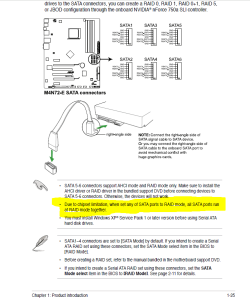
The only drives I'm trying to run over SATA are the two Samsung hard drives, although I do have a SATA Blu-Ray burner... Is the Blu-Ray burner preventing me from creating a RAID array?

If this is the case, I'll set up the RAID array on another computer on the network.
No you misunderstand your operating system is on a non raid drive
 

My Computer

Computer Manufacturer/Model Number
Something I threw together
OS
Windows 7 Ultimate x64
CPU
Intel Core i7-2600K
Motherboard
Asus P8P67
Memory
16 GB G Skill F3-10666 CL9D-4GBRL
Graphics Card(s)
ATI Radeon HD 6870
Sound Card
ATI Radeon HDMI / Realtek ALC892
Monitor(s) Displays
2 x 22" standard monitors / LG32LC56v TV to watch films
Screen Resolution
1920 x1080
Hard Drives
2 x OCZ Vertex2 111.79GB
3 x Samsung103SJ
1 x Samsung103UJ
1 x WD3200BEVT
1 x Hitachi5K320-160
PSU
Thermaltake Toughpower Cable Management 750W
Case
Antec 300
Cooling
Noctua NH-U12P SE2 and 5 120mm Case fans
Keyboard
Microsoft Comfort Curve Keyboard 2000
Mouse
Hama M3110 / Logitech M305
Internet Speed
16000
Other Info
I have also used Fedora, Suse, Ubuntu Linux
And all other Windows from 95 to date except ME
My operating system is installed on a 160GB PATA drive (IDE). The only SATA devices plugged into the mobo are the 2 Samsung drives I want to set up in a RAID, and the LG Blu-Ray burner. It could be the SATA optical drive is causing the grief, but if that's the case I'm better off installing the RAID array on another computer on the network, even though I'll take a big hit in speed...

All this effort was to save some money avoid getting a NAS box, but now it's looking like a Gigabit NAS box might be my only solution that wouldn't bottleneck my access to the array... My only other option would be to buy a new mobo for my computer it looks like.
 

My Computer

Computer Manufacturer/Model Number
Custom Box
OS
Windows 7 Professional, 64-Bit Install
CPU
AMD Phenom II X4 940 Black Edition, 3.5GHz OC
Motherboard
Asus M4N72-E
Memory
8GB (4 x 2GB) OCZ Platinum Edition DDR2 800 SDRAM
Graphics Card(s)
XFX GeForce GTX 260 Core 216
Sound Card
Mobo On-Board 7.1
Monitor(s) Displays
37" HDTV
Hard Drives
160GB PATA (System Drive)
500GB PATA (Programs Drive)
2X Samsung 1TB SATA in RAID 1
PSU
Thermaltake Toughpower XT 775W Modular
Case
NZXT Full Tower
Cooling
Cooler Master Hyper 212+, lots of case fans
Keyboard
HP Wireless Elite
Mouse
Logitech MX1100
Internet Speed
Comcast Cable 18 Mbps
Other Info
Optical: LG WH10LS30K 10x Blu-Ray Burner
My operating system is installed on a 160GB PATA drive (IDE). The only SATA devices plugged into the mobo are the 2 Samsung drives I want to set up in a RAID, and the LG Blu-Ray burner. It could be the SATA optical drive is causing the grief, but if that's the case I'm better off installing the RAID array on another computer on the network, even though I'll take a big hit in speed...

All this effort was to save some money avoid getting a NAS box, but now it's looking like a Gigabit NAS box might be my only solution that wouldn't bottleneck my access to the array... My only other option would be to buy a new mobo for my computer it looks like.
Sorry my bad I didn't see the PATA
The optical drive may well cause problems I am not sure
 

My Computer

Computer Manufacturer/Model Number
Something I threw together
OS
Windows 7 Ultimate x64
CPU
Intel Core i7-2600K
Motherboard
Asus P8P67
Memory
16 GB G Skill F3-10666 CL9D-4GBRL
Graphics Card(s)
ATI Radeon HD 6870
Sound Card
ATI Radeon HDMI / Realtek ALC892
Monitor(s) Displays
2 x 22" standard monitors / LG32LC56v TV to watch films
Screen Resolution
1920 x1080
Hard Drives
2 x OCZ Vertex2 111.79GB
3 x Samsung103SJ
1 x Samsung103UJ
1 x WD3200BEVT
1 x Hitachi5K320-160
PSU
Thermaltake Toughpower Cable Management 750W
Case
Antec 300
Cooling
Noctua NH-U12P SE2 and 5 120mm Case fans
Keyboard
Microsoft Comfort Curve Keyboard 2000
Mouse
Hama M3110 / Logitech M305
Internet Speed
16000
Other Info
I have also used Fedora, Suse, Ubuntu Linux
And all other Windows from 95 to date except ME
Well it's an easy thing to find out- all I have to do is unplug the optical drive and see what happens.

Problem is, I need that optical drive because this machine is our media center for watching movies and such, so we may have to dump the RAID on this machine and run it somewhere else. The other box on the network that can support SATA RAID is an older one that's connected to the network through Wireless-N on the other side of the house...

Decisions, decisions. The "best" option may be to find a replacement mobo, but most if not all mobos that suport AM2+ and DDR2 ram are running the nVidia 750a chippset, which means they're probably hobbled by the same RAID limitation. But it occurs to me I could get a SATA card for one of my PCI-E slots and run the optical drive on that; or I could get a SATA PCI-E card that supports RAID and run the hard drives on that.
 

My Computer

Computer Manufacturer/Model Number
Custom Box
OS
Windows 7 Professional, 64-Bit Install
CPU
AMD Phenom II X4 940 Black Edition, 3.5GHz OC
Motherboard
Asus M4N72-E
Memory
8GB (4 x 2GB) OCZ Platinum Edition DDR2 800 SDRAM
Graphics Card(s)
XFX GeForce GTX 260 Core 216
Sound Card
Mobo On-Board 7.1
Monitor(s) Displays
37" HDTV
Hard Drives
160GB PATA (System Drive)
500GB PATA (Programs Drive)
2X Samsung 1TB SATA in RAID 1
PSU
Thermaltake Toughpower XT 775W Modular
Case
NZXT Full Tower
Cooling
Cooler Master Hyper 212+, lots of case fans
Keyboard
HP Wireless Elite
Mouse
Logitech MX1100
Internet Speed
Comcast Cable 18 Mbps
Other Info
Optical: LG WH10LS30K 10x Blu-Ray Burner
I can't find a complete manual for this but you have to select RAID in the BIOS which you said you did.
When you start the PC do you get a screen to make a RAID array?
I ask because I am somewhat confused as windows should see just one disc
when the RAID is set up and running you might be able to reconnect the optical drive
 

My Computer

Computer Manufacturer/Model Number
Something I threw together
OS
Windows 7 Ultimate x64
CPU
Intel Core i7-2600K
Motherboard
Asus P8P67
Memory
16 GB G Skill F3-10666 CL9D-4GBRL
Graphics Card(s)
ATI Radeon HD 6870
Sound Card
ATI Radeon HDMI / Realtek ALC892
Monitor(s) Displays
2 x 22" standard monitors / LG32LC56v TV to watch films
Screen Resolution
1920 x1080
Hard Drives
2 x OCZ Vertex2 111.79GB
3 x Samsung103SJ
1 x Samsung103UJ
1 x WD3200BEVT
1 x Hitachi5K320-160
PSU
Thermaltake Toughpower Cable Management 750W
Case
Antec 300
Cooling
Noctua NH-U12P SE2 and 5 120mm Case fans
Keyboard
Microsoft Comfort Curve Keyboard 2000
Mouse
Hama M3110 / Logitech M305
Internet Speed
16000
Other Info
I have also used Fedora, Suse, Ubuntu Linux
And all other Windows from 95 to date except ME
So my power supply took a dump last week, after shutting down the rig I couldn't turn it back on (the system wouldn't post or anything). There were multiple symptoms prior to final failure- my overclock stopped working, the BIOS was resetting intermittently, and several of my case fans were running very slowly. Putting a spare power supply in the machine fixed the problems; I was happy it wasn't the mobo or anything...

So I bought a new power supply (Thermaltake Toughpower 775W modular) and while I was at it bought a PCI-E SATA RAID card.

Newegg.com - Thermaltake Toughpower XT TPX-775M 775W ATX 12V v2.3 / EPS 12V v2.91 SLI Certified CrossFire Certified 80 PLUS BRONZE Certified Modular Active PFC Power Supply GeForce GTX 470 Certified
17-153-127-Z07


Amazon.com: Syba SY-PEX40013 PCI Express SATA II 4x Ports RAID Controller Card, JMB Chipset: Electronics
51SBMrEjMqL._SL500_AA300_.jpg


I think with the new power supply I'll try using the PCI-E card for just my optical drive, and see if I can get the mobo's onboard RAID to work for me (I like nVidia's Windows RAID configuration utililty). It could be the problems I was seeing in setting up the RAID were all related to voltage drop due to a failing PSU, who knew? :sarc:
 

My Computer

Computer Manufacturer/Model Number
Custom Box
OS
Windows 7 Professional, 64-Bit Install
CPU
AMD Phenom II X4 940 Black Edition, 3.5GHz OC
Motherboard
Asus M4N72-E
Memory
8GB (4 x 2GB) OCZ Platinum Edition DDR2 800 SDRAM
Graphics Card(s)
XFX GeForce GTX 260 Core 216
Sound Card
Mobo On-Board 7.1
Monitor(s) Displays
37" HDTV
Hard Drives
160GB PATA (System Drive)
500GB PATA (Programs Drive)
2X Samsung 1TB SATA in RAID 1
PSU
Thermaltake Toughpower XT 775W Modular
Case
NZXT Full Tower
Cooling
Cooler Master Hyper 212+, lots of case fans
Keyboard
HP Wireless Elite
Mouse
Logitech MX1100
Internet Speed
Comcast Cable 18 Mbps
Other Info
Optical: LG WH10LS30K 10x Blu-Ray Burner
Thanks for the post keep us informed how it goes :)
 

My Computer

Computer Manufacturer/Model Number
Something I threw together
OS
Windows 7 Ultimate x64
CPU
Intel Core i7-2600K
Motherboard
Asus P8P67
Memory
16 GB G Skill F3-10666 CL9D-4GBRL
Graphics Card(s)
ATI Radeon HD 6870
Sound Card
ATI Radeon HDMI / Realtek ALC892
Monitor(s) Displays
2 x 22" standard monitors / LG32LC56v TV to watch films
Screen Resolution
1920 x1080
Hard Drives
2 x OCZ Vertex2 111.79GB
3 x Samsung103SJ
1 x Samsung103UJ
1 x WD3200BEVT
1 x Hitachi5K320-160
PSU
Thermaltake Toughpower Cable Management 750W
Case
Antec 300
Cooling
Noctua NH-U12P SE2 and 5 120mm Case fans
Keyboard
Microsoft Comfort Curve Keyboard 2000
Mouse
Hama M3110 / Logitech M305
Internet Speed
16000
Other Info
I have also used Fedora, Suse, Ubuntu Linux
And all other Windows from 95 to date except ME
Well I got the power supply installed- it works great; but it didn't solve my problems in setting up a RAID array on the motherboard. I tried setting up an array in BIOS, it doesn't show up in windows; I tried setting up the array in the nVidia windows utility, same problem as before.

SO, I'm going to set it up on the PCI-E RAID board I got, and I'll just run the Blu-Ray drive on the motherboard. Would have liked to use the mobo for the nVidia configuration software in windows, but it seems that it doesn't work for me.
 

My Computer

Computer Manufacturer/Model Number
Custom Box
OS
Windows 7 Professional, 64-Bit Install
CPU
AMD Phenom II X4 940 Black Edition, 3.5GHz OC
Motherboard
Asus M4N72-E
Memory
8GB (4 x 2GB) OCZ Platinum Edition DDR2 800 SDRAM
Graphics Card(s)
XFX GeForce GTX 260 Core 216
Sound Card
Mobo On-Board 7.1
Monitor(s) Displays
37" HDTV
Hard Drives
160GB PATA (System Drive)
500GB PATA (Programs Drive)
2X Samsung 1TB SATA in RAID 1
PSU
Thermaltake Toughpower XT 775W Modular
Case
NZXT Full Tower
Cooling
Cooler Master Hyper 212+, lots of case fans
Keyboard
HP Wireless Elite
Mouse
Logitech MX1100
Internet Speed
Comcast Cable 18 Mbps
Other Info
Optical: LG WH10LS30K 10x Blu-Ray Burner
Scratch that, I FINALLY got Windows to recognize a RAID array that I set up using the BIOS utility. It turns out that I had some sort of corrupt driver install- I went into Device Manager and uninstalled the driver for the nForce RAID controller and restarted. Windows found a driver on Windows Update and installed it, and after a restart voila! A new unallocated disk appears in the hard disk manager.

The nVidia configuration utility still doesn't seem to work, and in fact I think it was never properly communicating (maybe another driver problem?) When I load the nVidia Storage utility, it gives a message that "System information is not available." Not sure what's going on there, but at least I've finally got a mirrored array going that I can back my stuff up on.

:party: Thank you Windows Update! :party:
 

My Computer

Computer Manufacturer/Model Number
Custom Box
OS
Windows 7 Professional, 64-Bit Install
CPU
AMD Phenom II X4 940 Black Edition, 3.5GHz OC
Motherboard
Asus M4N72-E
Memory
8GB (4 x 2GB) OCZ Platinum Edition DDR2 800 SDRAM
Graphics Card(s)
XFX GeForce GTX 260 Core 216
Sound Card
Mobo On-Board 7.1
Monitor(s) Displays
37" HDTV
Hard Drives
160GB PATA (System Drive)
500GB PATA (Programs Drive)
2X Samsung 1TB SATA in RAID 1
PSU
Thermaltake Toughpower XT 775W Modular
Case
NZXT Full Tower
Cooling
Cooler Master Hyper 212+, lots of case fans
Keyboard
HP Wireless Elite
Mouse
Logitech MX1100
Internet Speed
Comcast Cable 18 Mbps
Other Info
Optical: LG WH10LS30K 10x Blu-Ray Burner
Pictures of the new power supply. The cable routing's nothing exotic, but it is cleaner than before, and I've got less extra cables lying around in there...

IMG_1269.jpg


IMG_1276.jpg


IMG_1278.jpg


IMG_1281.jpg


IMG_1280.jpg
 

My Computer

Computer Manufacturer/Model Number
Custom Box
OS
Windows 7 Professional, 64-Bit Install
CPU
AMD Phenom II X4 940 Black Edition, 3.5GHz OC
Motherboard
Asus M4N72-E
Memory
8GB (4 x 2GB) OCZ Platinum Edition DDR2 800 SDRAM
Graphics Card(s)
XFX GeForce GTX 260 Core 216
Sound Card
Mobo On-Board 7.1
Monitor(s) Displays
37" HDTV
Hard Drives
160GB PATA (System Drive)
500GB PATA (Programs Drive)
2X Samsung 1TB SATA in RAID 1
PSU
Thermaltake Toughpower XT 775W Modular
Case
NZXT Full Tower
Cooling
Cooler Master Hyper 212+, lots of case fans
Keyboard
HP Wireless Elite
Mouse
Logitech MX1100
Internet Speed
Comcast Cable 18 Mbps
Other Info
Optical: LG WH10LS30K 10x Blu-Ray Burner
Scratch that, I FINALLY got Windows to recognize a RAID array that I set up using the BIOS utility. It turns out that I had some sort of corrupt driver install- I went into Device Manager and uninstalled the driver for the nForce RAID controller and restarted. Windows found a driver on Windows Update and installed it, and after a restart voila! A new unallocated disk appears in the hard disk manager.
Mastacox you made my day! I had the same problem and nearly gave up until I found your post! Thank you!!!
 

My Computer

OS
Win7
Back
Top