ram issues after adding 4 gb

jabarker76

New member
Local time
12:36 PM
Messages
10
i added 4gb to the 4gb it had but it has 5gb allocated to hardware???? win 7 64 home premium sp1
 

My Computer

Computer type
Laptop
Computer Manufacturer/Model Number
hp pavilion 6
OS
Microsoft Windows 7 Home Premium 64-bit 7601 Multiprocessor Free Service Pack 1
CPU
Intel(R) Core(TM) i3 CPU M 370 @ 2.40GHz
Motherboard
Hewlett-Packard 1693
Memory
8.00 GB
Graphics Card(s)
(1) LogMeIn Mirror Driver (2) Intel(R) HD Graphics
Sound Card
(1) IDT High Definition Audio CODEC (2) Intel(R) Display A
Screen Resolution
1366 x 768 x 32 bits (4294967296 colors) @ 60 Hz
Hard Drives
Hitachi HTS547550A9E384
Welcome to Seven Forums.

Would your computer actually be a hp pavilion dv6? If yes, the Crucial Memory Advisor shows it should be able to handle 8GB RAM. But it's recommended that the modules be a matched pair. If the original stick was brand "ABC" and the new stick is brand "XYZ", there could be some compatibility issues.

You could check if the new stick is defective by putting it in slot 1 and see if the computer recognizes it. And you could also try swapping the sticks into the two slots. In other words, if you had stick 1 in slot 1, stick 2 in slot 2, try reversing them. Stick 2 in slot 1 and stick 1 in slot 2.

It might also help if you posted a screenshot of your resource monitor, memory tab.

http://www.sevenforums.com/tutorials/9733-screenshots-files-upload-post-seven-forums.html

http://www.sevenforums.com/tutorials/12523-resource-monitor.html
 

My Computer

Computer type
Laptop
Computer Manufacturer/Model Number
Sony Vaio VPCEB47GM Laptop
OS
Win 7 Pro 64-bit
CPU
Intel i5 2.4 Ghz
Memory
8GB DDR3
Graphics Card(s)
Intel HD 3000
Sound Card
IDT High Definition
Monitor(s) Displays
15.6 WGXA Anti-Glare LED
Screen Resolution
1280x800
Hard Drives
640Gb 7200rpm
Antivirus
MSE
Browser
Opera (primary) with IE9 backup

My Computer

Computer type
PC/Desktop
Computer Manufacturer/Model Number
Home made Desktop
OS
Windows 10 Pro. 64/ version 1709 Windows 7 Pro/64
CPU
Intel i7-6800K @ 4.3
Motherboard
ASUS X-99 Deluxe II
Memory
Corsair Platinum 16 gig @2400
Graphics Card(s)
EVGA GTX 1070 OC
Monitor(s) Displays
Asus 27" LED LCD/VE278Q
Screen Resolution
1920-1080 or 1280-720 HDMI
Hard Drives
INTEL SSD 730-240 Gb Sata 3.0/
PSU
EVGA Platium 1200W
Case
Phanteks Luxe Tempered Glass 8 fans/ one radiator
Cooling
XSPC/ Water Cooled CPU
Keyboard
Das 4 Professional
Mouse
Logitech M705/MX Anywhere 2-S
Internet Speed
100 mbits
Antivirus
Microsoft Security Essentials/ Malwarebytes Premium 3.0/ SAS
Browser
I.E. 11 default/Firefox/ ISP Time Warner Cable/Spectrum
Other Info
LG BluRay Burner/
Sound system-KLipsch-THX/
Icy Dock ssd Hot Swap bays.
added.PNG

cpuz.PNG

first.PNG

system.PNG

resourcemem.PNG

here are the screen shots
 

My Computer

Computer type
Laptop
Computer Manufacturer/Model Number
hp pavilion 6
OS
Microsoft Windows 7 Home Premium 64-bit 7601 Multiprocessor Free Service Pack 1
CPU
Intel(R) Core(TM) i3 CPU M 370 @ 2.40GHz
Motherboard
Hewlett-Packard 1693
Memory
8.00 GB
Graphics Card(s)
(1) LogMeIn Mirror Driver (2) Intel(R) HD Graphics
Sound Card
(1) IDT High Definition Audio CODEC (2) Intel(R) Display A
Screen Resolution
1366 x 768 x 32 bits (4294967296 colors) @ 60 Hz
Hard Drives
Hitachi HTS547550A9E384
It is a HP Pavilion g6. I had to do msconfig and change max memory to 8192 to get it to boot with both stick in it. If i just uncheck max memory it will not boot. I have tried to find relocate memory in bios but can't seem to find it.
 

Attachments

Last edited:

My Computer

Computer type
Laptop
Computer Manufacturer/Model Number
hp pavilion 6
OS
Microsoft Windows 7 Home Premium 64-bit 7601 Multiprocessor Free Service Pack 1
CPU
Intel(R) Core(TM) i3 CPU M 370 @ 2.40GHz
Motherboard
Hewlett-Packard 1693
Memory
8.00 GB
Graphics Card(s)
(1) LogMeIn Mirror Driver (2) Intel(R) HD Graphics
Sound Card
(1) IDT High Definition Audio CODEC (2) Intel(R) Display A
Screen Resolution
1366 x 768 x 32 bits (4294967296 colors) @ 60 Hz
Hard Drives
Hitachi HTS547550A9E384
It might be the shared graphics robbing your ram, but I cannot see it taking that much. Something strange is going on.
Have you tried resetting your bios back to default settings? Something strange might have gotten messed up in the bios config.
Also you may want to check to see if your system has a bios update available.
 

My Computer

Computer type
PC/Desktop
Computer Manufacturer/Model Number
Custom Built
OS
Windows 10 Pro
CPU
AMD Ryzen 5 2400G Processor with Radeon RX Vega 11 Graphics
Motherboard
ASRock X470 Master SLI/AC AM4 AMD Promontory X470 SATA 6Gb/s
Memory
G.SKILL Ripjaws V Series 16GB (2 x 8GB) 288-Pin DDR4 SDRAM D
Graphics Card(s)
2047MB NVIDIA GeForce GTX 1060 6GB (EVGA)
Sound Card
Motherboard Built in
Monitor(s) Displays
Acer R240HY bidx 23.8-Inch IPS HDMI DVI VGA (1920 x 1080) Wi
Screen Resolution
1920 x 1080
Hard Drives
1TB Sandisk SSD PLUS (Main drive)
500 GB Seagate 7200 RPM (Games)
500 GB Western Digital 7200 RPM (Virtual Machines)
PSU
CORSAIR TX Series TX650M 650W 80+ Gold Modular Power Supply
Case
CORSAIR CARBIDE SPEC-02 Mid-Tower Gaming Case, Red LED Fan
Cooling
220mm, two 120mm, and four 60mm fans
Keyboard
Wired Dell keyboard
Mouse
Wireless Logitech mouse
Internet Speed
250mb down, 30mb up
Antivirus
Panda Cloud Antivirus
Browser
Chrome-ish x64
Other Info
Your awesome for reading this.
it just updated the bios, think it was day before yesterday. I am about half scared to play in bios too much seems easy to make it lock up and wont even boot into bios. it does that if i uncheck the max ram box on msconfig.


It looks like it is the default settings.
 

My Computer

Computer type
Laptop
Computer Manufacturer/Model Number
hp pavilion 6
OS
Microsoft Windows 7 Home Premium 64-bit 7601 Multiprocessor Free Service Pack 1
CPU
Intel(R) Core(TM) i3 CPU M 370 @ 2.40GHz
Motherboard
Hewlett-Packard 1693
Memory
8.00 GB
Graphics Card(s)
(1) LogMeIn Mirror Driver (2) Intel(R) HD Graphics
Sound Card
(1) IDT High Definition Audio CODEC (2) Intel(R) Display A
Screen Resolution
1366 x 768 x 32 bits (4294967296 colors) @ 60 Hz
Hard Drives
Hitachi HTS547550A9E384
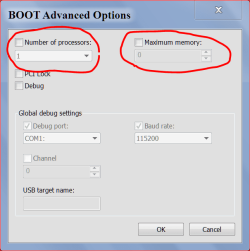
What are your settings here.

ADVANCE OPTIONS 8 9 2013.PNG
 

My Computer

Computer type
PC/Desktop
Computer Manufacturer/Model Number
Home made Desktop
OS
Windows 10 Pro. 64/ version 1709 Windows 7 Pro/64
CPU
Intel i7-6800K @ 4.3
Motherboard
ASUS X-99 Deluxe II
Memory
Corsair Platinum 16 gig @2400
Graphics Card(s)
EVGA GTX 1070 OC
Monitor(s) Displays
Asus 27" LED LCD/VE278Q
Screen Resolution
1920-1080 or 1280-720 HDMI
Hard Drives
INTEL SSD 730-240 Gb Sata 3.0/
PSU
EVGA Platium 1200W
Case
Phanteks Luxe Tempered Glass 8 fans/ one radiator
Cooling
XSPC/ Water Cooled CPU
Keyboard
Das 4 Professional
Mouse
Logitech M705/MX Anywhere 2-S
Internet Speed
100 mbits
Antivirus
Microsoft Security Essentials/ Malwarebytes Premium 3.0/ SAS
Browser
I.E. 11 default/Firefox/ ISP Time Warner Cable/Spectrum
Other Info
LG BluRay Burner/
Sound system-KLipsch-THX/
Icy Dock ssd Hot Swap bays.
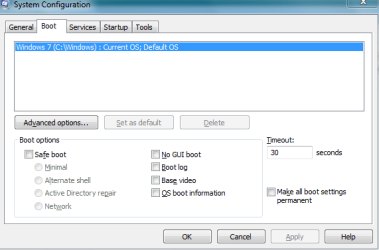
I had to change the max memory from 4096 to 8192 to put the ram in. I dont know why it shows o now. if i uncheck it the laptop wont boot
 

Attachments

  • msconfig.PNG
    msconfig.PNG
    8.6 KB · Views: 15

My Computer

Computer type
Laptop
Computer Manufacturer/Model Number
hp pavilion 6
OS
Microsoft Windows 7 Home Premium 64-bit 7601 Multiprocessor Free Service Pack 1
CPU
Intel(R) Core(TM) i3 CPU M 370 @ 2.40GHz
Motherboard
Hewlett-Packard 1693
Memory
8.00 GB
Graphics Card(s)
(1) LogMeIn Mirror Driver (2) Intel(R) HD Graphics
Sound Card
(1) IDT High Definition Audio CODEC (2) Intel(R) Display A
Screen Resolution
1366 x 768 x 32 bits (4294967296 colors) @ 60 Hz
Hard Drives
Hitachi HTS547550A9E384
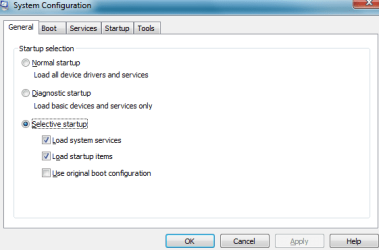
I do not know why it shows up as selective startup either?Capture.PNG
 

My Computer

Computer type
Laptop
Computer Manufacturer/Model Number
hp pavilion 6
OS
Microsoft Windows 7 Home Premium 64-bit 7601 Multiprocessor Free Service Pack 1
CPU
Intel(R) Core(TM) i3 CPU M 370 @ 2.40GHz
Motherboard
Hewlett-Packard 1693
Memory
8.00 GB
Graphics Card(s)
(1) LogMeIn Mirror Driver (2) Intel(R) HD Graphics
Sound Card
(1) IDT High Definition Audio CODEC (2) Intel(R) Display A
Screen Resolution
1366 x 768 x 32 bits (4294967296 colors) @ 60 Hz
Hard Drives
Hitachi HTS547550A9E384
Remove the check mark from max memory and reboot.
Then look at your memory.
 

My Computer

Computer type
PC/Desktop
Computer Manufacturer/Model Number
Home made Desktop
OS
Windows 10 Pro. 64/ version 1709 Windows 7 Pro/64
CPU
Intel i7-6800K @ 4.3
Motherboard
ASUS X-99 Deluxe II
Memory
Corsair Platinum 16 gig @2400
Graphics Card(s)
EVGA GTX 1070 OC
Monitor(s) Displays
Asus 27" LED LCD/VE278Q
Screen Resolution
1920-1080 or 1280-720 HDMI
Hard Drives
INTEL SSD 730-240 Gb Sata 3.0/
PSU
EVGA Platium 1200W
Case
Phanteks Luxe Tempered Glass 8 fans/ one radiator
Cooling
XSPC/ Water Cooled CPU
Keyboard
Das 4 Professional
Mouse
Logitech M705/MX Anywhere 2-S
Internet Speed
100 mbits
Antivirus
Microsoft Security Essentials/ Malwarebytes Premium 3.0/ SAS
Browser
I.E. 11 default/Firefox/ ISP Time Warner Cable/Spectrum
Other Info
LG BluRay Burner/
Sound system-KLipsch-THX/
Icy Dock ssd Hot Swap bays.
when i do that it will not boot. Tries to load windows repair but will not do that either. Then have to hold power button to shut off, remove on stick of ram, doesnt seem to matter which and then restart.
 

My Computer

Computer type
Laptop
Computer Manufacturer/Model Number
hp pavilion 6
OS
Microsoft Windows 7 Home Premium 64-bit 7601 Multiprocessor Free Service Pack 1
CPU
Intel(R) Core(TM) i3 CPU M 370 @ 2.40GHz
Motherboard
Hewlett-Packard 1693
Memory
8.00 GB
Graphics Card(s)
(1) LogMeIn Mirror Driver (2) Intel(R) HD Graphics
Sound Card
(1) IDT High Definition Audio CODEC (2) Intel(R) Display A
Screen Resolution
1366 x 768 x 32 bits (4294967296 colors) @ 60 Hz
Hard Drives
Hitachi HTS547550A9E384
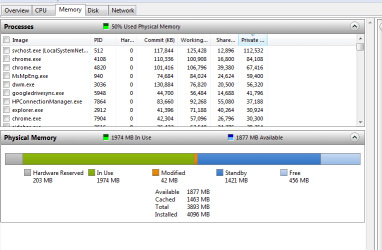
That is very odd. As you can see in my picture (post #8) their is no check mark in either box and I have this.

Resource Monitor RAM.PNG

Are you sure both sticks of ram are the same?
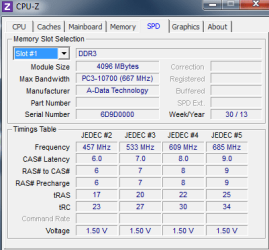
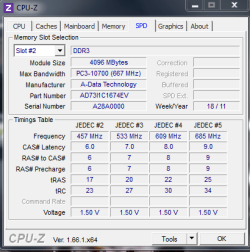
Same serial numbers, speed, volts and bought as a pair at the same time.
Are you also sure that the bios are set a default?
 

My Computer

Computer type
PC/Desktop
Computer Manufacturer/Model Number
Home made Desktop
OS
Windows 10 Pro. 64/ version 1709 Windows 7 Pro/64
CPU
Intel i7-6800K @ 4.3
Motherboard
ASUS X-99 Deluxe II
Memory
Corsair Platinum 16 gig @2400
Graphics Card(s)
EVGA GTX 1070 OC
Monitor(s) Displays
Asus 27" LED LCD/VE278Q
Screen Resolution
1920-1080 or 1280-720 HDMI
Hard Drives
INTEL SSD 730-240 Gb Sata 3.0/
PSU
EVGA Platium 1200W
Case
Phanteks Luxe Tempered Glass 8 fans/ one radiator
Cooling
XSPC/ Water Cooled CPU
Keyboard
Das 4 Professional
Mouse
Logitech M705/MX Anywhere 2-S
Internet Speed
100 mbits
Antivirus
Microsoft Security Essentials/ Malwarebytes Premium 3.0/ SAS
Browser
I.E. 11 default/Firefox/ ISP Time Warner Cable/Spectrum
Other Info
LG BluRay Burner/
Sound system-KLipsch-THX/
Icy Dock ssd Hot Swap bays.
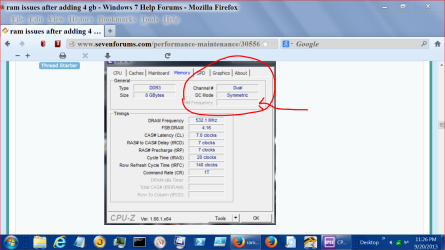
From you post #4. I don't understand this.

Memory problem 9 20.PNG

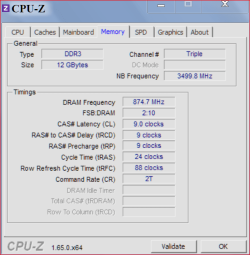
Mine looks like this.

My CPUZ MEMORY 9 20.PNG

Do you get the same ram reading on battery and when plugged into the wall socket? I'm not a laptop person and I'm running out of ideas.
 

My Computer

Computer type
PC/Desktop
Computer Manufacturer/Model Number
Home made Desktop
OS
Windows 10 Pro. 64/ version 1709 Windows 7 Pro/64
CPU
Intel i7-6800K @ 4.3
Motherboard
ASUS X-99 Deluxe II
Memory
Corsair Platinum 16 gig @2400
Graphics Card(s)
EVGA GTX 1070 OC
Monitor(s) Displays
Asus 27" LED LCD/VE278Q
Screen Resolution
1920-1080 or 1280-720 HDMI
Hard Drives
INTEL SSD 730-240 Gb Sata 3.0/
PSU
EVGA Platium 1200W
Case
Phanteks Luxe Tempered Glass 8 fans/ one radiator
Cooling
XSPC/ Water Cooled CPU
Keyboard
Das 4 Professional
Mouse
Logitech M705/MX Anywhere 2-S
Internet Speed
100 mbits
Antivirus
Microsoft Security Essentials/ Malwarebytes Premium 3.0/ SAS
Browser
I.E. 11 default/Firefox/ ISP Time Warner Cable/Spectrum
Other Info
LG BluRay Burner/
Sound system-KLipsch-THX/
Icy Dock ssd Hot Swap bays.
do you have three sticks of ram in your system? I don't really know what else to try neither. My desk top isn't like this. Think it is an HP thing more than anything. I had a dell lap top before and it just took ram and allocated it itself when i added to it.
 

My Computer

Computer type
Laptop
Computer Manufacturer/Model Number
hp pavilion 6
OS
Microsoft Windows 7 Home Premium 64-bit 7601 Multiprocessor Free Service Pack 1
CPU
Intel(R) Core(TM) i3 CPU M 370 @ 2.40GHz
Motherboard
Hewlett-Packard 1693
Memory
8.00 GB
Graphics Card(s)
(1) LogMeIn Mirror Driver (2) Intel(R) HD Graphics
Sound Card
(1) IDT High Definition Audio CODEC (2) Intel(R) Display A
Screen Resolution
1366 x 768 x 32 bits (4294967296 colors) @ 60 Hz
Hard Drives
Hitachi HTS547550A9E384
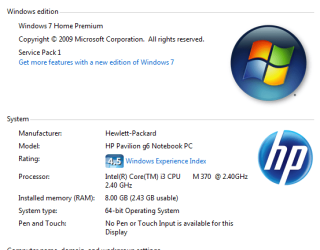
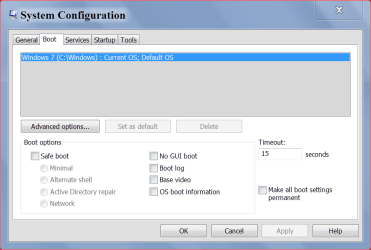
Can you give me one of these. Might show something.

W7 system boot 9 21.PNG

You could also compare your settings with the other computer you have.

You do not need to select or set max memory or any kind of memory in Windows 7in any way shape or form. Where ever you have been changing memory settings I would suggest setting it to default and let Windows 7 take care of memory, page filing and the like. I would also suggest if you have any programs that adjust/changes/ or any thing else with ram/memory to remove such programs.
2 and 2 is not adding up to 4.

Did you have this problem before you updated the bios?
Is the bios set to default settings?
 

My Computer

Computer type
PC/Desktop
Computer Manufacturer/Model Number
Home made Desktop
OS
Windows 10 Pro. 64/ version 1709 Windows 7 Pro/64
CPU
Intel i7-6800K @ 4.3
Motherboard
ASUS X-99 Deluxe II
Memory
Corsair Platinum 16 gig @2400
Graphics Card(s)
EVGA GTX 1070 OC
Monitor(s) Displays
Asus 27" LED LCD/VE278Q
Screen Resolution
1920-1080 or 1280-720 HDMI
Hard Drives
INTEL SSD 730-240 Gb Sata 3.0/
PSU
EVGA Platium 1200W
Case
Phanteks Luxe Tempered Glass 8 fans/ one radiator
Cooling
XSPC/ Water Cooled CPU
Keyboard
Das 4 Professional
Mouse
Logitech M705/MX Anywhere 2-S
Internet Speed
100 mbits
Antivirus
Microsoft Security Essentials/ Malwarebytes Premium 3.0/ SAS
Browser
I.E. 11 default/Firefox/ ISP Time Warner Cable/Spectrum
Other Info
LG BluRay Burner/
Sound system-KLipsch-THX/
Icy Dock ssd Hot Swap bays.
the only place i changed ram settings is on the advanced tab on memory in msconfig. if i uncheck max memory the computer will not boot unlrss i remove one stick of ram. i am thinking the other slot is messed up, or it doesnt like 8 gig.
it looks right with one stick.
 

Attachments

  • Capture1.PNG
    Capture1.PNG
    10.6 KB · Views: 13
  • Capture2.PNG
    Capture2.PNG
    16.7 KB · Views: 0

My Computer

Computer type
Laptop
Computer Manufacturer/Model Number
hp pavilion 6
OS
Microsoft Windows 7 Home Premium 64-bit 7601 Multiprocessor Free Service Pack 1
CPU
Intel(R) Core(TM) i3 CPU M 370 @ 2.40GHz
Motherboard
Hewlett-Packard 1693
Memory
8.00 GB
Graphics Card(s)
(1) LogMeIn Mirror Driver (2) Intel(R) HD Graphics
Sound Card
(1) IDT High Definition Audio CODEC (2) Intel(R) Display A
Screen Resolution
1366 x 768 x 32 bits (4294967296 colors) @ 60 Hz
Hard Drives
Hitachi HTS547550A9E384

My Computer

Computer type
PC/Desktop
Computer Manufacturer/Model Number
Golden Mk. I.4
OS
Windows 10 Pro x64 ; Xubuntu x64
CPU
Intel i7 860 @ 2.80 GHz O/C'ed to 4.0GHz
Motherboard
Gigabyte P55A-UD3R Rev.1. Award BIOS F13
Memory
16GB Corsair Vengance DDR3 @ 661 MHz Dual Channel (9-9-9-24)
Graphics Card(s)
EVGA NVidia GTX 560 1024MB
Sound Card
Realtek Integrated
Monitor(s) Displays
Dual Samsung SyncMaster 2494HS
Screen Resolution
1920*1080 and 1920*1080
Hard Drives
1*Samsung 840 EVO 120GB SSD;
1*OCZ Vertex 2 60GB SSD;
2*Samsung F3 SpinPoint 1TB in RAID0;
1*Samsung F1 SpinPoint 1TB;
2*Western Digital 1TB External USB 3.0
1*Western Digital 500GB External USB 3.0
1*Seagate 500GB External USB 2.0
PSU
Thermaltake ToughPower QFan 750W
Case
Thermaltake Element S VK60001W2Z
Cooling
Corsair H60 Water Cooling, 2*230mm and 2*80mm case fans
Keyboard
Logitech G110
Mouse
Logitech MX518
Thanks Golden I was looking for the MEMORY + every where except Tutorials.

@ jabarker76 If you swap the stick of ram you got the picture in post #17 with the other stick of ram and you still get the picture like the one in #17 indicates the ram modules are good and it's the motherboard slot is bad. As long as things are set to default.
 

My Computer

Computer type
PC/Desktop
Computer Manufacturer/Model Number
Home made Desktop
OS
Windows 10 Pro. 64/ version 1709 Windows 7 Pro/64
CPU
Intel i7-6800K @ 4.3
Motherboard
ASUS X-99 Deluxe II
Memory
Corsair Platinum 16 gig @2400
Graphics Card(s)
EVGA GTX 1070 OC
Monitor(s) Displays
Asus 27" LED LCD/VE278Q
Screen Resolution
1920-1080 or 1280-720 HDMI
Hard Drives
INTEL SSD 730-240 Gb Sata 3.0/
PSU
EVGA Platium 1200W
Case
Phanteks Luxe Tempered Glass 8 fans/ one radiator
Cooling
XSPC/ Water Cooled CPU
Keyboard
Das 4 Professional
Mouse
Logitech M705/MX Anywhere 2-S
Internet Speed
100 mbits
Antivirus
Microsoft Security Essentials/ Malwarebytes Premium 3.0/ SAS
Browser
I.E. 11 default/Firefox/ ISP Time Warner Cable/Spectrum
Other Info
LG BluRay Burner/
Sound system-KLipsch-THX/
Icy Dock ssd Hot Swap bays.
Back
Top