Solved random BSODs on windows 7 fresh install

Keep us posted
 

My Computer My Computer

At a glance

Windows 10 Home 64BitIntel Core i5 10400 @ 2.90GHz8.00GB Single-Channel Unknown @ 1329MHz (16-2...
Computer type
PC/Desktop
Computer Manufacturer/Model Number
Self assembled
OS
Windows 10 Home 64Bit
CPU
Intel Core i5 10400 @ 2.90GHz
Motherboard
Intel Corporation DG41WV (PROCESSOR)
Memory
8.00GB Single-Channel Unknown @ 1329MHz (16-20-20-38)
Sound Card
Realtek High Definition Audio
Monitor(s) Displays
DELL E170S
Screen Resolution
1280x1024 pixels
Hard Drives
931GB TOSHIBA DT01ACA100 (SATA)
238GB TEAM TM8PS7256G (SATA SSD)
Case
Nothing Fancy
Cooling
Fans
Keyboard
A4 Tech Co LTD
Mouse
A4 Tech Co Ltd/Logitech
Internet Speed
25 Mbps
well the System Update Readiness Tooldiddn't do squat so I am going to try fixing it with the update disk
 

My Computer My Computer

At a glance

Microsoft Windows 7 Home Premium 64-bitAMD Athlon(tm) II X4 640 Processor8.00 GBATI Radeon HD 5450
OS
Microsoft Windows 7 Home Premium 64-bit
CPU
AMD Athlon(tm) II X4 640 Processor
Motherboard
Gigabyte Technology Co., Ltd. GA-78LMT-S2P
Memory
8.00 GB
Graphics Card(s)
ATI Radeon HD 5450
Sound Card
(1) Realtek High Definition Audio (2) ATI HDMI Audio
Hard Drives
Maxtor 6B300S0 ATA Device / 279.48 GB
Keyboard
Microsoft Natural Ergonomic Keyboard 4000 V1.0
Mouse
Microsoft Basic Optical Mouse
alright so my system is stable and the updates are downloading. Unfortunately for me though, I have to reinstall all of them. Windows didn't like installing them all at once so I am doing them one by one and so far it is working. It just takes it a long time to download and install each one
 

My Computer My Computer

At a glance

Microsoft Windows 7 Home Premium 64-bitAMD Athlon(tm) II X4 640 Processor8.00 GBATI Radeon HD 5450
OS
Microsoft Windows 7 Home Premium 64-bit
CPU
AMD Athlon(tm) II X4 640 Processor
Motherboard
Gigabyte Technology Co., Ltd. GA-78LMT-S2P
Memory
8.00 GB
Graphics Card(s)
ATI Radeon HD 5450
Sound Card
(1) Realtek High Definition Audio (2) ATI HDMI Audio
Hard Drives
Maxtor 6B300S0 ATA Device / 279.48 GB
Keyboard
Microsoft Natural Ergonomic Keyboard 4000 V1.0
Mouse
Microsoft Basic Optical Mouse
Not sure why that's happening.
 

My Computer My Computer

At a glance

Windows 10 Home 64BitIntel Core i5 10400 @ 2.90GHz8.00GB Single-Channel Unknown @ 1329MHz (16-2...
Computer type
PC/Desktop
Computer Manufacturer/Model Number
Self assembled
OS
Windows 10 Home 64Bit
CPU
Intel Core i5 10400 @ 2.90GHz
Motherboard
Intel Corporation DG41WV (PROCESSOR)
Memory
8.00GB Single-Channel Unknown @ 1329MHz (16-20-20-38)
Sound Card
Realtek High Definition Audio
Monitor(s) Displays
DELL E170S
Screen Resolution
1280x1024 pixels
Hard Drives
931GB TOSHIBA DT01ACA100 (SATA)
238GB TEAM TM8PS7256G (SATA SSD)
Case
Nothing Fancy
Cooling
Fans
Keyboard
A4 Tech Co LTD
Mouse
A4 Tech Co Ltd/Logitech
Internet Speed
25 Mbps
well it is one of the larger ones. right nowI am downloading service pack one which is 61.6 MB
 

My Computer My Computer

At a glance

Microsoft Windows 7 Home Premium 64-bitAMD Athlon(tm) II X4 640 Processor8.00 GBATI Radeon HD 5450
OS
Microsoft Windows 7 Home Premium 64-bit
CPU
AMD Athlon(tm) II X4 640 Processor
Motherboard
Gigabyte Technology Co., Ltd. GA-78LMT-S2P
Memory
8.00 GB
Graphics Card(s)
ATI Radeon HD 5450
Sound Card
(1) Realtek High Definition Audio (2) ATI HDMI Audio
Hard Drives
Maxtor 6B300S0 ATA Device / 279.48 GB
Keyboard
Microsoft Natural Ergonomic Keyboard 4000 V1.0
Mouse
Microsoft Basic Optical Mouse
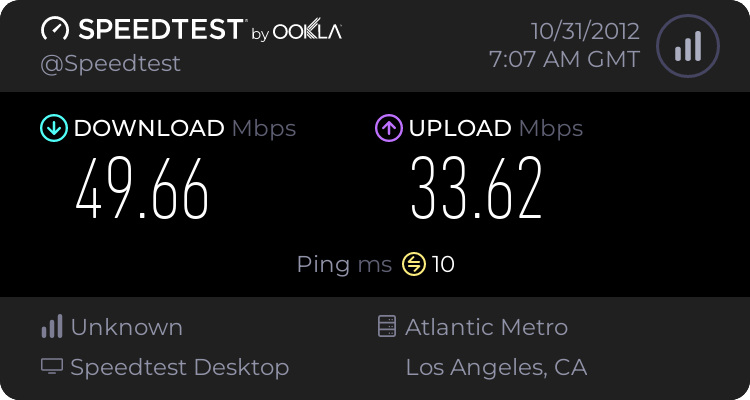
What's your internet speed?
 

My Computer My Computer

At a glance

Windows 10 Home 64BitIntel Core i5 10400 @ 2.90GHz8.00GB Single-Channel Unknown @ 1329MHz (16-2...
Computer type
PC/Desktop
Computer Manufacturer/Model Number
Self assembled
OS
Windows 10 Home 64Bit
CPU
Intel Core i5 10400 @ 2.90GHz
Motherboard
Intel Corporation DG41WV (PROCESSOR)
Memory
8.00GB Single-Channel Unknown @ 1329MHz (16-20-20-38)
Sound Card
Realtek High Definition Audio
Monitor(s) Displays
DELL E170S
Screen Resolution
1280x1024 pixels
Hard Drives
931GB TOSHIBA DT01ACA100 (SATA)
238GB TEAM TM8PS7256G (SATA SSD)
Case
Nothing Fancy
Cooling
Fans
Keyboard
A4 Tech Co LTD
Mouse
A4 Tech Co Ltd/Logitech
Internet Speed
25 Mbps
my download speed is about 49.5 MB/s
my upload speed is about 33.5 MB/s
 

My Computer My Computer

At a glance

Microsoft Windows 7 Home Premium 64-bitAMD Athlon(tm) II X4 640 Processor8.00 GBATI Radeon HD 5450
OS
Microsoft Windows 7 Home Premium 64-bit
CPU
AMD Athlon(tm) II X4 640 Processor
Motherboard
Gigabyte Technology Co., Ltd. GA-78LMT-S2P
Memory
8.00 GB
Graphics Card(s)
ATI Radeon HD 5450
Sound Card
(1) Realtek High Definition Audio (2) ATI HDMI Audio
Hard Drives
Maxtor 6B300S0 ATA Device / 279.48 GB
Keyboard
Microsoft Natural Ergonomic Keyboard 4000 V1.0
Mouse
Microsoft Basic Optical Mouse
Random BSODs and computer freezes

I just replaced the graphics card that was causing most of my BSODs before, however, I am still getting them as well as having my computer hang up completely (I can't move my mouse or use keyboard shortcuts like Ctrl+Alt+Del)
I added the file with my infoz and whatnot.
Any and all help is appreciated.
 

My Computer My Computer

At a glance

Microsoft Windows 7 Home Premium 64-bitAMD Athlon(tm) II X4 640 Processor8.00 GBATI Radeon HD 5450
OS
Microsoft Windows 7 Home Premium 64-bit
CPU
AMD Athlon(tm) II X4 640 Processor
Motherboard
Gigabyte Technology Co., Ltd. GA-78LMT-S2P
Memory
8.00 GB
Graphics Card(s)
ATI Radeon HD 5450
Sound Card
(1) Realtek High Definition Audio (2) ATI HDMI Audio
Hard Drives
Maxtor 6B300S0 ATA Device / 279.48 GB
Keyboard
Microsoft Natural Ergonomic Keyboard 4000 V1.0
Mouse
Microsoft Basic Optical Mouse
From the specs listed in the first post, I can't see any reason why W7 should give you BSODs. There is nothing wrong with the BIOS version/date, as the only reason for updating is to ensure compatability with newer hardware.

How old is the memory, and how have you installed it? Try using just one stick and test it in each socket in turn. Repeat with the other stick(s). In addition, since you mentioned about graphics cards, I take it that you have a PCI card and an AGP one (since that is what the board supports). Remove the PCI card whilst you carry out the above memory test (leaving the AGP installed). Repeat, this time having the PCI card installed whilst the AGP one is uninstalled.

As regards keyboard/mouse, sometimes they can be fussy as to which actual ports they are connected to (if USB). Is the keyboard active during POST? Can you enter the BIOS configuration? If PS2, have you tried an alternative keyboard/mouse?
 

My Computer My Computer

At a glance

Windows 8.1 Pro RTM x64Intel Core-i5-3570K 4-core @ 3.4GHz (Ivy Brid...4 x 4GB DDR3-1600 Corsair Vengeance CMZ8GX3M2...MSI GeForce GTX770 Gaming OC 2GB
Computer type
PC/Desktop
Computer Manufacturer/Model Number
Dwarf Dwf/11/2012 r09/2013
OS
Windows 8.1 Pro RTM x64
CPU
Intel Core-i5-3570K 4-core @ 3.4GHz (Ivy Bridge) (OC 4.4GHz)
Motherboard
ASRock Z77 Extreme4-M
Memory
4 x 4GB DDR3-1600 Corsair Vengeance CMZ8GX3M2A1600C9B (16GB)
Graphics Card(s)
MSI GeForce GTX770 Gaming OC 2GB
Sound Card
Realtek High Definition on board solution (ALC 898)
Monitor(s) Displays
ViewSonic VA1912w Widescreen (VGA)
Screen Resolution
1440x900
Hard Drives
OCZ Agility 3 SSD 120GB SATA III x2 (RAID 0)
Samsung HD501LJ 500GB SATA II x2
Hitachi HDS721010CLA332 1TB SATA II
Iomega 1.5TB Ext USB 2.0
WD 2.0TB Ext USB 3.0
PSU
XFX Pro Series 850W Semi-Modular
Case
Gigabyte IF233
Cooling
1 x 120mm Front Inlet 1 x 120mm Rear Exhaust
Keyboard
Microsoft Comfort Curve Keyboard 3000 (USB)
Mouse
Microsoft Comfort Mouse 3000 for Business (USB)
Internet Speed
NetGear DG834Gv3 ADSL Modem/Router (Ethernet) ~4.0 Mb/s (O2)
Antivirus
Avast! 8.0.1497
Browser
IE 11
Other Info
Optical Drive: HL-DT-ST BD-RE BH10LS30 SATA Bluray
Lexmark S305 Printer/Scanner/Copier (USB)
WEI Score: 8.1/8.1/8.5/8.5/8.25
Asus Eee PC 1011PX Netbook (Windows 7 x86 Starter)
Hello blazingflare....

your BIOS is very old, you should think of updating it.
Code:
Machine ID Information [From Smbios 2.3, DMIVersion 35, Size=1920]
BiosVendor = American Megatrends Inc.
[COLOR=Red]BiosVersion = 1024.001
BiosReleaseDate = 08/04/2005[/COLOR]

Enable driver verifier. Driver Verifier - Enable and Disable
Run Driver Verifier for 24 hours or the occurrence of the next crash, whichever is earlier.

Let us know the results, with the subsequent crash dumps, if any.
 

My Computer My Computer

At a glance

Microsoft Windows 10 Pro Insider Preview 64-bitIntel(R) Core(TM) i3-4130 CPU @ 3.40GHzCorsair Vengence 4GB x2 (8.00GB Dual-Channel ...2047MB GeForce GTS 450 (ZOTAC International)
Computer type
PC/Desktop
Computer Manufacturer/Model Number
Self Assembled
OS
Microsoft Windows 10 Pro Insider Preview 64-bit
CPU
Intel(R) Core(TM) i3-4130 CPU @ 3.40GHz
Motherboard
Gigabyte Technology Co., Ltd. B85M-D3H
Memory
Corsair Vengence 4GB x2 (8.00GB Dual-Channel DDR3 @ 798MHz)
Graphics Card(s)
2047MB GeForce GTS 450 (ZOTAC International)
Sound Card
Onboard (Realtek High Definition Audio)
Monitor(s) Displays
LG Flatron E2040T
Screen Resolution
1600x900
Hard Drives
Western Digital 1 TB
Seagate 500 GB
PSU
Corsair VS550
Case
Cooler Master K380
Cooling
Cooler Master Seidon 120V Plus
Keyboard
Logitech MK260r
Mouse
Logitech MK260r
Internet Speed
PMPL Broadband
Antivirus
Windows Defender + MBAM
Browser
Firefox
Other Info
Dell Studio 15" Laptop
Thank you both for replying. However I won't be able to try out your suggestions just yet as it is late where I am and I am going to bed. I understand how to do the ram/memory stick trick but I don't quite understand what you mean for me to do with the API card, or even what the API card is specifically. If you could clarify a bit it would be appreciated :)
 

My Computer My Computer

At a glance

Microsoft Windows 7 Home Premium 64-bitAMD Athlon(tm) II X4 640 Processor8.00 GBATI Radeon HD 5450
OS
Microsoft Windows 7 Home Premium 64-bit
CPU
AMD Athlon(tm) II X4 640 Processor
Motherboard
Gigabyte Technology Co., Ltd. GA-78LMT-S2P
Memory
8.00 GB
Graphics Card(s)
ATI Radeon HD 5450
Sound Card
(1) Realtek High Definition Audio (2) ATI HDMI Audio
Hard Drives
Maxtor 6B300S0 ATA Device / 279.48 GB
Keyboard
Microsoft Natural Ergonomic Keyboard 4000 V1.0
Mouse
Microsoft Basic Optical Mouse
Hello blazingflare....

your BIOS is very old, you should think of updating it.
Code:
Machine ID Information [From Smbios 2.3, DMIVersion 35, Size=1920]
BiosVendor = American Megatrends Inc.
[COLOR=Red]BiosVersion = 1024.001
BiosReleaseDate = 08/04/2005[/COLOR]
Enable driver verifier. Driver Verifier - Enable and Disable
Run Driver Verifier for 24 hours or the occurrence of the next crash, whichever is earlier.

Let us know the results, with the subsequent crash dumps, if any.
I tried looking for an update for it but I wasn't able to find one. But that might just be me not knowing how to find it -_-
 

My Computer My Computer

At a glance

Microsoft Windows 7 Home Premium 64-bitAMD Athlon(tm) II X4 640 Processor8.00 GBATI Radeon HD 5450
OS
Microsoft Windows 7 Home Premium 64-bit
CPU
AMD Athlon(tm) II X4 640 Processor
Motherboard
Gigabyte Technology Co., Ltd. GA-78LMT-S2P
Memory
8.00 GB
Graphics Card(s)
ATI Radeon HD 5450
Sound Card
(1) Realtek High Definition Audio (2) ATI HDMI Audio
Hard Drives
Maxtor 6B300S0 ATA Device / 279.48 GB
Keyboard
Microsoft Natural Ergonomic Keyboard 4000 V1.0
Mouse
Microsoft Basic Optical Mouse
Search in your motherboard manufacturer's website.

Can you enable driver verifier? :)
 

My Computer My Computer

At a glance

Microsoft Windows 10 Pro Insider Preview 64-bitIntel(R) Core(TM) i3-4130 CPU @ 3.40GHzCorsair Vengence 4GB x2 (8.00GB Dual-Channel ...2047MB GeForce GTS 450 (ZOTAC International)
Computer type
PC/Desktop
Computer Manufacturer/Model Number
Self Assembled
OS
Microsoft Windows 10 Pro Insider Preview 64-bit
CPU
Intel(R) Core(TM) i3-4130 CPU @ 3.40GHz
Motherboard
Gigabyte Technology Co., Ltd. B85M-D3H
Memory
Corsair Vengence 4GB x2 (8.00GB Dual-Channel DDR3 @ 798MHz)
Graphics Card(s)
2047MB GeForce GTS 450 (ZOTAC International)
Sound Card
Onboard (Realtek High Definition Audio)
Monitor(s) Displays
LG Flatron E2040T
Screen Resolution
1600x900
Hard Drives
Western Digital 1 TB
Seagate 500 GB
PSU
Corsair VS550
Case
Cooler Master K380
Cooling
Cooler Master Seidon 120V Plus
Keyboard
Logitech MK260r
Mouse
Logitech MK260r
Internet Speed
PMPL Broadband
Antivirus
Windows Defender + MBAM
Browser
Firefox
Other Info
Dell Studio 15" Laptop
I decided to see how my system would run in safe mode and it ran fine and didn't crash. I will also try your Guys' suggestions in a bit.
 

My Computer My Computer

At a glance

Microsoft Windows 7 Home Premium 64-bitAMD Athlon(tm) II X4 640 Processor8.00 GBATI Radeon HD 5450
OS
Microsoft Windows 7 Home Premium 64-bit
CPU
AMD Athlon(tm) II X4 640 Processor
Motherboard
Gigabyte Technology Co., Ltd. GA-78LMT-S2P
Memory
8.00 GB
Graphics Card(s)
ATI Radeon HD 5450
Sound Card
(1) Realtek High Definition Audio (2) ATI HDMI Audio
Hard Drives
Maxtor 6B300S0 ATA Device / 279.48 GB
Keyboard
Microsoft Natural Ergonomic Keyboard 4000 V1.0
Mouse
Microsoft Basic Optical Mouse
I am running driver verifier right now and the BSODs it is pumping out right now list Smwdm.sys. My question is why the driver for my sound chip is giving errors. I will upload the dump files in a bit.
Edit: here it is.
 
Last edited:

My Computer My Computer

At a glance

Microsoft Windows 7 Home Premium 64-bitAMD Athlon(tm) II X4 640 Processor8.00 GBATI Radeon HD 5450
OS
Microsoft Windows 7 Home Premium 64-bit
CPU
AMD Athlon(tm) II X4 640 Processor
Motherboard
Gigabyte Technology Co., Ltd. GA-78LMT-S2P
Memory
8.00 GB
Graphics Card(s)
ATI Radeon HD 5450
Sound Card
(1) Realtek High Definition Audio (2) ATI HDMI Audio
Hard Drives
Maxtor 6B300S0 ATA Device / 279.48 GB
Keyboard
Microsoft Natural Ergonomic Keyboard 4000 V1.0
Mouse
Microsoft Basic Optical Mouse
It is caused by SoundMAX Integrated Digital Audio driver.
Code:
*******************************************************************************
*                                                                             *
*                        Bugcheck Analysis                                    *
*                                                                             *
*******************************************************************************

Use !analyze -v to get detailed debugging information.

BugCheck C4, {f6, 1fc, 97a54030, 8dd22495}

*** WARNING: Unable to verify timestamp for smwdm.sys
*** ERROR: Module load completed but symbols could not be loaded for smwdm.sys
Probably caused by : smwdm.sys ( smwdm+3495 )

Followup: MachineOwner
---------
And it is extremely old.
Code:
 kd> lmvm smwdm
start    end        module name
8dd1f000 8dd54f40   smwdm    T (no symbols)           
    Loaded symbol image file: smwdm.sys
    Image path: \SystemRoot\system32\drivers\smwdm.sys
    Image name: smwdm.sys
    Timestamp:        Mon Mar 28 19:49:36 2005 (42481278)
    CheckSum:         00037796
    ImageSize:        00035F40
    Translations:     0000.04b0 0000.04e4 0409.04b0 0409.04e4
Update it from Analog Devices | Semiconductors and Signal Processing ICs.

Let us know the results.
 

My Computer My Computer

At a glance

Microsoft Windows 10 Pro Insider Preview 64-bitIntel(R) Core(TM) i3-4130 CPU @ 3.40GHzCorsair Vengence 4GB x2 (8.00GB Dual-Channel ...2047MB GeForce GTS 450 (ZOTAC International)
Computer type
PC/Desktop
Computer Manufacturer/Model Number
Self Assembled
OS
Microsoft Windows 10 Pro Insider Preview 64-bit
CPU
Intel(R) Core(TM) i3-4130 CPU @ 3.40GHz
Motherboard
Gigabyte Technology Co., Ltd. B85M-D3H
Memory
Corsair Vengence 4GB x2 (8.00GB Dual-Channel DDR3 @ 798MHz)
Graphics Card(s)
2047MB GeForce GTS 450 (ZOTAC International)
Sound Card
Onboard (Realtek High Definition Audio)
Monitor(s) Displays
LG Flatron E2040T
Screen Resolution
1600x900
Hard Drives
Western Digital 1 TB
Seagate 500 GB
PSU
Corsair VS550
Case
Cooler Master K380
Cooling
Cooler Master Seidon 120V Plus
Keyboard
Logitech MK260r
Mouse
Logitech MK260r
Internet Speed
PMPL Broadband
Antivirus
Windows Defender + MBAM
Browser
Firefox
Other Info
Dell Studio 15" Laptop
I am pretty sure I found the link I needed that would have the update, but there is an internal server error every time I try it
http://www.analog.com/en/content/soundmax_drivers_information/fca.html

Edit: I have the most recent update for both the audio driver and for my BIOS as well. I'm pretty sure ASUS stopped supporting my motherboard as there are no updates past 2005. It also appears that it doesn't officially support windows 7 either -_-
 
Last edited:

My Computer My Computer

At a glance

Microsoft Windows 7 Home Premium 64-bitAMD Athlon(tm) II X4 640 Processor8.00 GBATI Radeon HD 5450
OS
Microsoft Windows 7 Home Premium 64-bit
CPU
AMD Athlon(tm) II X4 640 Processor
Motherboard
Gigabyte Technology Co., Ltd. GA-78LMT-S2P
Memory
8.00 GB
Graphics Card(s)
ATI Radeon HD 5450
Sound Card
(1) Realtek High Definition Audio (2) ATI HDMI Audio
Hard Drives
Maxtor 6B300S0 ATA Device / 279.48 GB
Keyboard
Microsoft Natural Ergonomic Keyboard 4000 V1.0
Mouse
Microsoft Basic Optical Mouse
bump
 

My Computer My Computer

At a glance

Microsoft Windows 7 Home Premium 64-bitAMD Athlon(tm) II X4 640 Processor8.00 GBATI Radeon HD 5450
OS
Microsoft Windows 7 Home Premium 64-bit
CPU
AMD Athlon(tm) II X4 640 Processor
Motherboard
Gigabyte Technology Co., Ltd. GA-78LMT-S2P
Memory
8.00 GB
Graphics Card(s)
ATI Radeon HD 5450
Sound Card
(1) Realtek High Definition Audio (2) ATI HDMI Audio
Hard Drives
Maxtor 6B300S0 ATA Device / 279.48 GB
Keyboard
Microsoft Natural Ergonomic Keyboard 4000 V1.0
Mouse
Microsoft Basic Optical Mouse
I am pretty sure I found the link I needed that would have the update, but there is an internal server error every time I try it
http://www.analog.com/en/content/soundmax_drivers_information/fca.html

Edit: I have the most recent update for both the audio driver and for my BIOS as well. I'm pretty sure ASUS stopped supporting my motherboard as there are no updates past 2005. It also appears that it doesn't officially support windows 7 either -_-
In that situation, better you upgrade your hardware.
 

My Computer My Computer

At a glance

Microsoft Windows 10 Pro Insider Preview 64-bitIntel(R) Core(TM) i3-4130 CPU @ 3.40GHzCorsair Vengence 4GB x2 (8.00GB Dual-Channel ...2047MB GeForce GTS 450 (ZOTAC International)
Computer type
PC/Desktop
Computer Manufacturer/Model Number
Self Assembled
OS
Microsoft Windows 10 Pro Insider Preview 64-bit
CPU
Intel(R) Core(TM) i3-4130 CPU @ 3.40GHz
Motherboard
Gigabyte Technology Co., Ltd. B85M-D3H
Memory
Corsair Vengence 4GB x2 (8.00GB Dual-Channel DDR3 @ 798MHz)
Graphics Card(s)
2047MB GeForce GTS 450 (ZOTAC International)
Sound Card
Onboard (Realtek High Definition Audio)
Monitor(s) Displays
LG Flatron E2040T
Screen Resolution
1600x900
Hard Drives
Western Digital 1 TB
Seagate 500 GB
PSU
Corsair VS550
Case
Cooler Master K380
Cooling
Cooler Master Seidon 120V Plus
Keyboard
Logitech MK260r
Mouse
Logitech MK260r
Internet Speed
PMPL Broadband
Antivirus
Windows Defender + MBAM
Browser
Firefox
Other Info
Dell Studio 15" Laptop
I have a machine here with that MB and processor combination. I also have an Asus 9800 Pro card. I successfully installed W7 32 bit on it just about a year ago. Here are some suggestions from my notes:

I installed W7 SP1 by creating a slipstream install disk. This greatly improves the odds of a good install. And saves a lot of time with updates too.
http://www.sevenforums.com/tutorial...ows-7-sp1-into-installation-dvd-iso-file.html

If you are going to install SP1 from WU then you must install this alone. It is very important to be patient and wait for the install to completely finish after the restart before touching the computer. This can take up to 30 minutes. Wait for all hard drive activity to slow down/stop.

The list of Windows Updates to install afterward is massive. It is not a good idea to install these in large batches. What I do is install them by starting with the oldest updates and installing them in batches by month (all the updates from Jan 2011), and further by installing them by type: Security, Update, ActiveX, Explorer, .NET .
This is tedious, but avoids the problems (and performing System Restores) that occur when updates conflict.

The motherboard is old and the on board devices do not have W7 or Vista drivers.
I actually found that the drivers for these devices offered by Windows Update worked best to get functionality and stability. Any non original Asus drivers I found did not work well. Some drivers would only work if from WU. Particularly graphics.

The AD1985 audio chip on the board uses a driver that is too old to use in W7. I only recently starting having problems with the audio drivers and bluescreens after installing tuner cards in the machine. I am pretty convinced I am going to need to upgrade my audio hardware and disable the on board chip and remove those drivers from the system.

In your BIOS settings you should check to be sure you have 2 changes made from the defaults:

  • Advanced Tab > USB Configuration > USB 2.0 Controller Mode > should be HIGHSPEED.
  • Power Tab > ACPI 2.0 Support > Should be ENABLED
Hope that helps

 

My Computer My Computer

At a glance

Windows 7 64 Bit Home Premium SP1i7-3820GSkill F3-14900CL9Q - 16GBEVGA GeForce GTX660 - Driver 352.86
Computer type
PC/Desktop
Computer Manufacturer/Model Number
Home Built - Jan 2013
OS
Windows 7 64 Bit Home Premium SP1
CPU
i7-3820
Motherboard
Asus P9X79-PRO - Bios 4608
Memory
GSkill F3-14900CL9Q - 16GB
Graphics Card(s)
EVGA GeForce GTX660 - Driver 352.86
Sound Card
On board Realtek ALC898
Monitor(s) Displays
Acer S271HL
Screen Resolution
1920 x 1080
Hard Drives
#1- Samsung 840 Pro Series
#2- Western Digital WD1002FAEX Sata3 Black
#3- Western Digital WD1002FAEX Sata3 Black
PSU
Corsair CMPSU-850TX-V2 - 850 watt (by Seasonic)
Case
Corsair Obsidian 550D
Cooling
Standard 3 120mm case fans, Cooler Master Hyper 212 EVO
Keyboard
MS KC-0405
Mouse
Intellimouse 5-button
Internet Speed
56 Mbits/Sec (on a good day)
Antivirus
Avast & Malwarebytes
Browser
Firefox
Other Info
Asus DVD - DRW-24B1ST 24X
Back
Top