re-installing ancient software

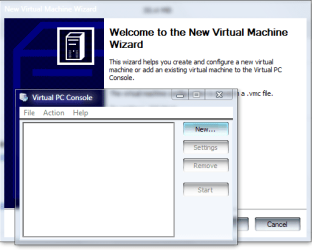
The Virtual PC I linked to allows you to install ANY OS you want, that is just the "shell" or "sandbox" for the virtual OS. You could run Linux in there if you really wanted to. I've installed that version on my XP machine at work...
 

My Computer My Computer

At a glance

Windows 7 Home Premium x64Phenom II X4 955 BE8 GB OCZ BE 1667EVGA GeForce GTX470 SC
Computer Manufacturer/Model Number
Home built
OS
Windows 7 Home Premium x64
CPU
Phenom II X4 955 BE
Motherboard
Asus Sabertooth 990FX
Memory
8 GB OCZ BE 1667
Graphics Card(s)
EVGA GeForce GTX470 SC
Monitor(s) Displays
BenQ 19"
Screen Resolution
1280x1024
Hard Drives
256 GB OCZ Vertex 3 SSD
2x WD 1 TB
1x WD 2 TB
PSU
Thermaltake 850W
Case
Coolermaster Cosmos 1000
Cooling
Air
Keyboard
Logitech
Mouse
Cyborg R.A.T 7
Internet Speed
Standard RR

My Computer My Computer

At a glance

Windows 7 Ultimate 64 bit Steve Ballmer Signa...Intel Core 2 Quad - Q9550 - 2.83GHz stock - O...4GB DDR2 800MHz (PC6400) OCZ ReaperNvidia GE Force 8800 GTS
Computer Manufacturer/Model Number
Homebrew PC - "Alpha_Dawg"
OS
Windows 7 Ultimate 64 bit Steve Ballmer Signature Edition
CPU
Intel Core 2 Quad - Q9550 - 2.83GHz stock - OC'd to 3.6GHz
Motherboard
Gigabyte EP45-UD3P
Memory
4GB DDR2 800MHz (PC6400) OCZ Reaper
Graphics Card(s)
Nvidia GE Force 8800 GTS
Sound Card
Asus Xonar DX
Monitor(s) Displays
Samsung SyncMaster 2333HD
Screen Resolution
1920 x 1080
Hard Drives
WD Caviar Black 750GB - 7200RPM - 32MB cache
WD Caviar Green 1.5TB - 5400RPM - 64MB cache
WD Caviar Green 2.0TB - 5400RPM - 64MB cache
PSU
PC Power & Cooling Silencer 750
Case
Gigabyte 3D Aurora
Cooling
Case is Air - 5ea. 120mm fans (mix of Arctic and Xigmatec)
Keyboard
MS Natural Wireless KB
Mouse
MS Wireless Mouse
Internet Speed
50 mbps down/5 mbps up
Other Info
AVerMedia - AVerTVHD G2 Dual Tuner Card
Yes, I read your post. You refer to NEEDING Win 7 Pro or better. I clicked the link, the only info I could find DID say that was the case. When I go to the download page from your link it tells me my version of Windows is incompatible.

Did YOU read MY link? My link points to a version-independent version of VirtualPC. You could install it on Win 7 STARTER if you want, it works on XP and Vista as well. Despite the warnings that 7 is an incompatible Windows version, it DOES run..
 

Attachments

  • VPC Screen.PNG
    VPC Screen.PNG
    15.6 KB · Views: 4

My Computer My Computer

At a glance

Windows 7 Home Premium x64Phenom II X4 955 BE8 GB OCZ BE 1667EVGA GeForce GTX470 SC
Computer Manufacturer/Model Number
Home built
OS
Windows 7 Home Premium x64
CPU
Phenom II X4 955 BE
Motherboard
Asus Sabertooth 990FX
Memory
8 GB OCZ BE 1667
Graphics Card(s)
EVGA GeForce GTX470 SC
Monitor(s) Displays
BenQ 19"
Screen Resolution
1280x1024
Hard Drives
256 GB OCZ Vertex 3 SSD
2x WD 1 TB
1x WD 2 TB
PSU
Thermaltake 850W
Case
Coolermaster Cosmos 1000
Cooling
Air
Keyboard
Logitech
Mouse
Cyborg R.A.T 7
Internet Speed
Standard RR
I have an automobile service manual on CD that uses an old version (2001) of Stirling Technologies installSHIELD that worked fine on Windows XP. Now that I have "upgraded" to Windows 7 I cannot load the program into the new system, even changing the "compatibility" to WindowsXP or Windows2000. Can you suggest some other trick - I need to fix my car.

There are several "install".exe files on the disk. I can't get any of them to run, and the compatibility troubleshooter can't figure them out either.
Is there a way to identify and run the program directly from the disk without installing it?

I'm guessing you're on X64?
Wanna bet this is a 16bit installer program?

Shop around the disk, see if you can find PDF files with the information in them... you could just copy the PDFs to a folder and work from there.
 

My Computer My Computer

At a glance

XP Pro SP3 X86 / Win7 Pro X86Amd 64 x2 4200 (2.4ghz)Kingston DDR2 800 2gbNvidia GF-8400
Computer Manufacturer/Model Number
Homebrew
OS
XP Pro SP3 X86 / Win7 Pro X86
CPU
Amd 64 x2 4200 (2.4ghz)
Motherboard
Asus M2N-MX SE Plus
Memory
Kingston DDR2 800 2gb
Graphics Card(s)
Nvidia GF-8400
Sound Card
Realtek on Motherboard
Monitor(s) Displays
Acer x-193bw
Screen Resolution
1440 x 900
Hard Drives
Western Digital 500g
PSU
350watt In-Win
Case
In-Win
Cooling
Air
Keyboard
yes
Mouse
yes
Internet Speed
5mpbs
Other Info
Also ASRock ION 330 as HTPC (on XP).
Acer Aspire as GP netbook (on XP).
I'm guessing you're on X64?
Wanna bet this is a 16bit installer program?

Shop around the disk, see if you can find PDF files with the information in them... you could just copy the PDFs to a folder and work from there.

It is a 16 bit installer, and I am on X64. Unfortunately, none of the files are pdf. There is a 32 bit installer on the CD, but I cannot make it work either. It produces a fleeting error message on the screen too fast to read. Any suggestions?
 

My Computer My Computer

At a glance

Windows 7Intel E53006GIntel GMA X4500
Computer Manufacturer/Model Number
Gateway 4822
OS
Windows 7
CPU
Intel E5300
Memory
6G
Graphics Card(s)
Intel GMA X4500
Monitor(s) Displays
Gateway FHX2300
Hard Drives
Serial ATA, 1TB
Yes, I read your post. You refer to NEEDING Win 7 Pro or better. I clicked the link, the only info I could find DID say that was the case. When I go to the download page from your link it tells me my version of Windows is incompatible.

Did YOU read MY link? My link points to a version-independent version of VirtualPC. You could install it on Win 7 STARTER if you want, it works on XP and Vista as well. Despite the warnings that 7 is an incompatible Windows version, it DOES run..

OK... OK... it's not VPC that needs it... it is XP Mode that requires Pro or higher.

Note: Windows XP Mode is only available in Windows 7 Enterprise, Windows 7 Professional, and Windows 7 Ultimate.
http://www.microsoft.com/windows/virtual-pc/support/requirements.aspx

User of the higher-end editions of Windows 7 (Professional, Ultimate and Enterprise) will be able to download and install the XP Mode feature that will allow them to run a virtualized copy of XP SP3 in order to minimize compatibility issues. However, to run this you’ll need a PC that’s up to the job.
Windows 7 "XP Mode" system requirements | Hardware 2.0 | ZDNet.com

Because I have nearly the same auto manual app... I tested mine in virtual machines, it works fine in 32 bit XP, Vista, & Win7. We have also determined that it is a 16 bit installer with a 32 bit app... 64 bit Win7 doesnt work with 16 bit installers! He needs a 32 bit windows vm to run.
 

My Computer My Computer

At a glance

Windows 7 Ultimate 64 bit Steve Ballmer Signa...Intel Core 2 Quad - Q9550 - 2.83GHz stock - O...4GB DDR2 800MHz (PC6400) OCZ ReaperNvidia GE Force 8800 GTS
Computer Manufacturer/Model Number
Homebrew PC - "Alpha_Dawg"
OS
Windows 7 Ultimate 64 bit Steve Ballmer Signature Edition
CPU
Intel Core 2 Quad - Q9550 - 2.83GHz stock - OC'd to 3.6GHz
Motherboard
Gigabyte EP45-UD3P
Memory
4GB DDR2 800MHz (PC6400) OCZ Reaper
Graphics Card(s)
Nvidia GE Force 8800 GTS
Sound Card
Asus Xonar DX
Monitor(s) Displays
Samsung SyncMaster 2333HD
Screen Resolution
1920 x 1080
Hard Drives
WD Caviar Black 750GB - 7200RPM - 32MB cache
WD Caviar Green 1.5TB - 5400RPM - 64MB cache
WD Caviar Green 2.0TB - 5400RPM - 64MB cache
PSU
PC Power & Cooling Silencer 750
Case
Gigabyte 3D Aurora
Cooling
Case is Air - 5ea. 120mm fans (mix of Arctic and Xigmatec)
Keyboard
MS Natural Wireless KB
Mouse
MS Wireless Mouse
Internet Speed
50 mbps down/5 mbps up
Other Info
AVerMedia - AVerTVHD G2 Dual Tuner Card
I'm guessing you're on X64?
Wanna bet this is a 16bit installer program?

Shop around the disk, see if you can find PDF files with the information in them... you could just copy the PDFs to a folder and work from there.

It is a 16 bit installer, and I am on X64. Unfortunately, none of the files are pdf. There is a 32 bit installer on the CD, but I cannot make it work either. It produces a fleeting error message on the screen too fast to read. Any suggestions?

Well, not really... but have you tried contacting the company you got the CD from (Ford?) to see if there's an updated version for Win 7?

Also... you could install it on a different machine and copy the whole thing to a thumb drive and manually reinstall it on Win 7 ... so long as the software itself is not 16 bit code you should be able to get it working.
 

My Computer My Computer

At a glance

XP Pro SP3 X86 / Win7 Pro X86Amd 64 x2 4200 (2.4ghz)Kingston DDR2 800 2gbNvidia GF-8400
Computer Manufacturer/Model Number
Homebrew
OS
XP Pro SP3 X86 / Win7 Pro X86
CPU
Amd 64 x2 4200 (2.4ghz)
Motherboard
Asus M2N-MX SE Plus
Memory
Kingston DDR2 800 2gb
Graphics Card(s)
Nvidia GF-8400
Sound Card
Realtek on Motherboard
Monitor(s) Displays
Acer x-193bw
Screen Resolution
1440 x 900
Hard Drives
Western Digital 500g
PSU
350watt In-Win
Case
In-Win
Cooling
Air
Keyboard
yes
Mouse
yes
Internet Speed
5mpbs
Other Info
Also ASRock ION 330 as HTPC (on XP).
Acer Aspire as GP netbook (on XP).
Well, not really... but have you tried contacting the company you got the CD from (Ford?) to see if there's an updated version for Win 7?

Also... you could install it on a different machine and copy the whole thing to a thumb drive and manually reinstall it on Win 7 ... so long as the software itself is not 16 bit code you should be able to get it working.

That is my latest attempt. I haven't sent the old XP machine to the dump yet, so I hooked it back up and tried to force it to install the 32 bit version which I would copy to the new. I am not familiar with how you guys put systems together, but this one seems to have 2 layers of installer - an INSTALL.EXE at the top directory level and 2 secondary(?) installers in a WINSTALL folder. Neither of the winstall programs will execute by themselves and I can't find a way to force the top level installer to use the 32 bit version. The last thing I tried was copying the whole CD to the hard drive and deleting the 16 bit winstall. It built most of the folders but ended with an incomplete error and when I tried to run the program it was looking for the 16 bit version.
[FONT=&quot]
clip_image002.jpg
[/FONT]
 

Attachments

  • Capture.PNG
    Capture.PNG
    15.6 KB · Views: 28
Last edited:

My Computer My Computer

At a glance

Windows 7Intel E53006GIntel GMA X4500
Computer Manufacturer/Model Number
Gateway 4822
OS
Windows 7
CPU
Intel E5300
Memory
6G
Graphics Card(s)
Intel GMA X4500
Monitor(s) Displays
Gateway FHX2300
Hard Drives
Serial ATA, 1TB
Well, not really... but have you tried contacting the company you got the CD from (Ford?) to see if there's an updated version for Win 7?

Also... you could install it on a different machine and copy the whole thing to a thumb drive and manually reinstall it on Win 7 ... so long as the software itself is not 16 bit code you should be able to get it working.

That is my latest attempt. I haven't sent the old XP machine to the dump yet, so I hooked it back up and tried to force it to install the 32 bit version which I would copy to the new. I am not familiar with how you guys put systems together, but this one seems to have 2 layers of installer - an INSTALL.EXE at the top directory level and 2 secondary(?) installers in a WINSTALL folder. Neither of the winstall programs will execute by themselves and I can't find a way to force the top level installer to use the 32 bit version. The last thing I tried was copying the whole CD to the hard drive and deleting the 16 bit winstall. It built most of the folders but ended with an incomplete error and when I tried to run the program it was looking for the 16 bit version.
[FONT=&quot]
clip_image002.jpg
[/FONT]

TerryinNC:

Our manuals have the same exact structure in the WINSTALL folder. as shown by your screenie above.

I found out some more on this sw... mine is also from Stirling Technologies.

I have many PCs here, and after installing I copied the install folder (C:\FORD in my case) to a flash drive for testing... that's what made me look at the shortcut for the app. The shortcut that the manuals install places on the desktop is C:\FORD\PUBS\PROGRAMS\VIEW16.EXE

So, perhaps our thinking is reversed... it seems that the installer is a 32 bit but the actual app for viewing the electronic manuals is a 16 bit. I have copied the FORD directory over to my Win7 32bit lappy and it works fine. I cannot get the manual to work on any 64 bit OS, it gives the same earlier bit version error.

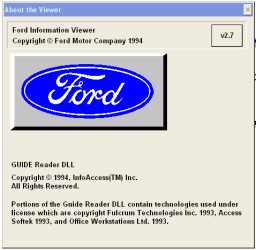
Oh yes, I clicked HELP --> ABOUT in mine and here is what shows... NOTE Copyright dates...

About Ford Manual.PNG
 

My Computer My Computer

At a glance

Windows 7 Ultimate 64 bit Steve Ballmer Signa...Intel Core 2 Quad - Q9550 - 2.83GHz stock - O...4GB DDR2 800MHz (PC6400) OCZ ReaperNvidia GE Force 8800 GTS
Computer Manufacturer/Model Number
Homebrew PC - "Alpha_Dawg"
OS
Windows 7 Ultimate 64 bit Steve Ballmer Signature Edition
CPU
Intel Core 2 Quad - Q9550 - 2.83GHz stock - OC'd to 3.6GHz
Motherboard
Gigabyte EP45-UD3P
Memory
4GB DDR2 800MHz (PC6400) OCZ Reaper
Graphics Card(s)
Nvidia GE Force 8800 GTS
Sound Card
Asus Xonar DX
Monitor(s) Displays
Samsung SyncMaster 2333HD
Screen Resolution
1920 x 1080
Hard Drives
WD Caviar Black 750GB - 7200RPM - 32MB cache
WD Caviar Green 1.5TB - 5400RPM - 64MB cache
WD Caviar Green 2.0TB - 5400RPM - 64MB cache
PSU
PC Power & Cooling Silencer 750
Case
Gigabyte 3D Aurora
Cooling
Case is Air - 5ea. 120mm fans (mix of Arctic and Xigmatec)
Keyboard
MS Natural Wireless KB
Mouse
MS Wireless Mouse
Internet Speed
50 mbps down/5 mbps up
Other Info
AVerMedia - AVerTVHD G2 Dual Tuner Card
I have many PCs here, and after installing I copied the install folder (C:\FORD in my case) to a flash drive for testing... that's what made me look at the shortcut for the app. The shortcut that the manuals install places on the desktop is C:\FORD\PUBS\PROGRAMS\VIEW16.EXE

So, perhaps our thinking is reversed... it seems that the installer is a 32 bit but the actual app for viewing the electronic manuals is a 16 bit. I have copied the FORD directory over to my Win7 32bit lappy and it works fine. I cannot get the manual to work on any 64 bit OS, it gives the same earlier bit version error.

So why do you think they would need to build a 32 bit version of the installer and a set of 32 bit dll's if they are going to load a 16 bit program?

Notice there is no VIEW16.EXE on the CD. The installer must load something and rename it - maybe itself? I know almost nothing about this stuff, but I've been expecting the install to produce a VIEW32.EXE. Did you try installing it to your 32 bit laptop directly?
 

My Computer My Computer

At a glance

Windows 7Intel E53006GIntel GMA X4500
Computer Manufacturer/Model Number
Gateway 4822
OS
Windows 7
CPU
Intel E5300
Memory
6G
Graphics Card(s)
Intel GMA X4500
Monitor(s) Displays
Gateway FHX2300
Hard Drives
Serial ATA, 1TB
I have many PCs here, and after installing I copied the install folder (C:\FORD in my case) to a flash drive for testing... that's what made me look at the shortcut for the app. The shortcut that the manuals install places on the desktop is C:\FORD\PUBS\PROGRAMS\VIEW16.EXE

So, perhaps our thinking is reversed... it seems that the installer is a 32 bit but the actual app for viewing the electronic manuals is a 16 bit. I have copied the FORD directory over to my Win7 32bit lappy and it works fine. I cannot get the manual to work on any 64 bit OS, it gives the same earlier bit version error.

So why do you think they would need to build a 32 bit version of the installer and a set of 32 bit dll's if they are going to load a 16 bit program?

Notice there is no VIEW16.EXE on the CD. The installer must load something and rename it - maybe itself? I know almost nothing about this stuff, but I've been expecting the install to produce a VIEW32.EXE. Did you try installing it to your 32 bit laptop directly?

No need to I have confirmed on each virtual machine that I've installed it on that it is the same 16 bit viewer! So it will never run in a 64bit OS!
 

My Computer My Computer

At a glance

Windows 7 Ultimate 64 bit Steve Ballmer Signa...Intel Core 2 Quad - Q9550 - 2.83GHz stock - O...4GB DDR2 800MHz (PC6400) OCZ ReaperNvidia GE Force 8800 GTS
Computer Manufacturer/Model Number
Homebrew PC - "Alpha_Dawg"
OS
Windows 7 Ultimate 64 bit Steve Ballmer Signature Edition
CPU
Intel Core 2 Quad - Q9550 - 2.83GHz stock - OC'd to 3.6GHz
Motherboard
Gigabyte EP45-UD3P
Memory
4GB DDR2 800MHz (PC6400) OCZ Reaper
Graphics Card(s)
Nvidia GE Force 8800 GTS
Sound Card
Asus Xonar DX
Monitor(s) Displays
Samsung SyncMaster 2333HD
Screen Resolution
1920 x 1080
Hard Drives
WD Caviar Black 750GB - 7200RPM - 32MB cache
WD Caviar Green 1.5TB - 5400RPM - 64MB cache
WD Caviar Green 2.0TB - 5400RPM - 64MB cache
PSU
PC Power & Cooling Silencer 750
Case
Gigabyte 3D Aurora
Cooling
Case is Air - 5ea. 120mm fans (mix of Arctic and Xigmatec)
Keyboard
MS Natural Wireless KB
Mouse
MS Wireless Mouse
Internet Speed
50 mbps down/5 mbps up
Other Info
AVerMedia - AVerTVHD G2 Dual Tuner Card
No need to I have confirmed on each virtual machine that I've installed it on that it is the same 16 bit viewer! So it will never run in a 64bit OS!

Thanks. Guess I'll give up on 7 and just run it on the wife's Mac.
 

My Computer My Computer

At a glance

Windows 7Intel E53006GIntel GMA X4500
Computer Manufacturer/Model Number
Gateway 4822
OS
Windows 7
CPU
Intel E5300
Memory
6G
Graphics Card(s)
Intel GMA X4500
Monitor(s) Displays
Gateway FHX2300
Hard Drives
Serial ATA, 1TB
...using Codeweaver's crossover?
 

My Computer My Computer

At a glance

Windows 8 Pro (32-bit)1.83GHz Intel Core Duo2GB 667MHz DDR2 SDRAM (PC2-5300) (upgrade)ATI Radeon X1600 with 128MB GDDR3 memory
Computer type
PC/Desktop
Computer Manufacturer/Model Number
Apple 17" iMac MA199LL (Early 2006)
OS
Windows 8 Pro (32-bit)
CPU
1.83GHz Intel Core Duo
Memory
2GB 667MHz DDR2 SDRAM (PC2-5300) (upgrade)
Graphics Card(s)
ATI Radeon X1600 with 128MB GDDR3 memory
Monitor(s) Displays
17-inch TFT active-matrix LCD, millions of colors
Screen Resolution
1440 x 900
Hard Drives
Hitachi 320GB HDT721032SLA360 7200RPM SATA II (upgrade)
Keyboard
Microsoft Wired Keyboard 600
Mouse
Microsoft Basic Optical Mouse v2.0
Internet Speed
4 Mbps
Antivirus
Microsoft Security Essentials
Browser
Google Chrome
Other Info
WEI:
Base Score: 3.9 Processor: 4.4 Memory 4.7
Graphics: 3.9 Gaming Graphics: 4.1 Primary HD: 5.9
...using Codeweaver's crossover?

No. She has XP for her dual boot and Bootcamp. XP can load/handle this relic: Windows 7 can't.
 

My Computer My Computer

At a glance

Windows 7Intel E53006GIntel GMA X4500
Computer Manufacturer/Model Number
Gateway 4822
OS
Windows 7
CPU
Intel E5300
Memory
6G
Graphics Card(s)
Intel GMA X4500
Monitor(s) Displays
Gateway FHX2300
Hard Drives
Serial ATA, 1TB

My Computer My Computer

At a glance

Windows 7 Ultimate 64 bit Steve Ballmer Signa...Intel Core 2 Quad - Q9550 - 2.83GHz stock - O...4GB DDR2 800MHz (PC6400) OCZ ReaperNvidia GE Force 8800 GTS
Computer Manufacturer/Model Number
Homebrew PC - "Alpha_Dawg"
OS
Windows 7 Ultimate 64 bit Steve Ballmer Signature Edition
CPU
Intel Core 2 Quad - Q9550 - 2.83GHz stock - OC'd to 3.6GHz
Motherboard
Gigabyte EP45-UD3P
Memory
4GB DDR2 800MHz (PC6400) OCZ Reaper
Graphics Card(s)
Nvidia GE Force 8800 GTS
Sound Card
Asus Xonar DX
Monitor(s) Displays
Samsung SyncMaster 2333HD
Screen Resolution
1920 x 1080
Hard Drives
WD Caviar Black 750GB - 7200RPM - 32MB cache
WD Caviar Green 1.5TB - 5400RPM - 64MB cache
WD Caviar Green 2.0TB - 5400RPM - 64MB cache
PSU
PC Power & Cooling Silencer 750
Case
Gigabyte 3D Aurora
Cooling
Case is Air - 5ea. 120mm fans (mix of Arctic and Xigmatec)
Keyboard
MS Natural Wireless KB
Mouse
MS Wireless Mouse
Internet Speed
50 mbps down/5 mbps up
Other Info
AVerMedia - AVerTVHD G2 Dual Tuner Card
Back
Top