I have found a solution to this:
Perform a backup of all registry keys before you delete them in case something goes wrong. Seriously...I found these keys and removed them because they look suspicious, I have no idea what the long term effects are...
- Open Regedit and go to
Code:
HKEY_LOCAL_MACHINE\SOFTWARE\Microsoft\Windows\CurrentVersion\Explorer\MyComputer\NameSpace
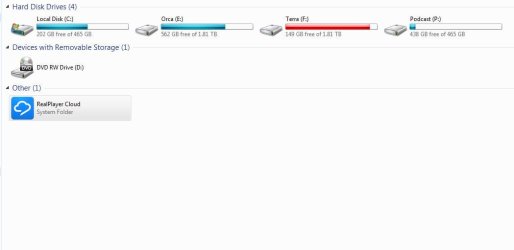
- Expand Namespace and you should see a key that is a random mix of numbers and letters (a GUID). For me it was located above "DelegateFolders". If you click on this GUID you should see that the default value has the data "Real Player Cloud".
- Once you have confirmed that you have selected the correct GUID, copy the GUID value to your clipboard or some other handy place, like a text file.
- Now do a search for that GUID in your whole registry. For me there were 4 keys and 2 values. Perform backups of these keys and values. Delete any Keys (including the subkeys which should be done automatically) and values that are this GUID.
- Re-open any windows explorer windows you have open and the Real Player Cloud drive should be gone.


 A Guy
A Guy

