Solved Real Player Delete System Folder

ZMan

New member
Member
VIP
Local time
1:28 PM
Messages
225
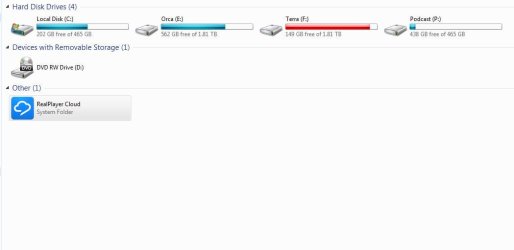
I want to keep Real Player but I want to delete this stupid system folder from my computer window. Any help? I try unlock but I can't selected it as it don't come up as an option to do so. I know the solution is in RegEdit maybe...Any ideas?
 

Attachments

  • System.JPG
    System.JPG
    38.9 KB · Views: 0

My Computer

OS
windows 7 professional x32
I believe the RealPlayer Cloud Service is an integrated part of the program and cannot be removed without uninstalling the entire program.

John
 

My Computers

System One System Two

  • Computer type
    PC/Desktop
    Computer Manufacturer/Model Number
    HP Pavilion 6751c
    OS
    Win7, Win10, Win11
    Internet Speed
    100 Mbps
    Antivirus
    Norton 360
    Browser
    IE 11
  • Computer type
    PC/Desktop
    System Manufacturer/Model Number
    HP ENVY 750-514 & Dell XPS 8960
    OS
    Win7, Win10, Win11
    Antivirus
    Norton 360
I don't want to remove it, I just want to disable the folder in the image. So it don't display at all.
 

My Computer

OS
windows 7 professional x32
I do not believe this can be done.

Since, you do not use the Cloud feature. Why not just use an older version of RealPlayer. Version 15, does not have the Cloud feature. After downloading it, disable the auto update. This way the new cloud version will not be installed. Of course, you would first need to uninstall version 16 before installing the older version 15.

Download Old Versions of RealPlayer for Windows - OldVersion.com

John
 

My Computers

System One System Two

  • Computer type
    PC/Desktop
    Computer Manufacturer/Model Number
    HP Pavilion 6751c
    OS
    Win7, Win10, Win11
    Internet Speed
    100 Mbps
    Antivirus
    Norton 360
    Browser
    IE 11
  • Computer type
    PC/Desktop
    System Manufacturer/Model Number
    HP ENVY 750-514 & Dell XPS 8960
    OS
    Win7, Win10, Win11
    Antivirus
    Norton 360
I need the new download feature of the software of 16 . Still I like to miss with the software to try and get it be turn off the icon. Any regedit information you can help out with?
 

My Computer

OS
windows 7 professional x32
In this case, it would be best to contact their tech support department.

They know their own software better than anyone else.

Contact Us | RealNetworks
 

My Computers

System One System Two

  • Computer type
    PC/Desktop
    Computer Manufacturer/Model Number
    HP Pavilion 6751c
    OS
    Win7, Win10, Win11
    Internet Speed
    100 Mbps
    Antivirus
    Norton 360
    Browser
    IE 11
  • Computer type
    PC/Desktop
    System Manufacturer/Model Number
    HP ENVY 750-514 & Dell XPS 8960
    OS
    Win7, Win10, Win11
    Antivirus
    Norton 360
Can we consider this thread Solved?
 

My Computers

System One System Two

  • Computer type
    PC/Desktop
    Computer Manufacturer/Model Number
    HP Pavilion 6751c
    OS
    Win7, Win10, Win11
    Internet Speed
    100 Mbps
    Antivirus
    Norton 360
    Browser
    IE 11
  • Computer type
    PC/Desktop
    System Manufacturer/Model Number
    HP ENVY 750-514 & Dell XPS 8960
    OS
    Win7, Win10, Win11
    Antivirus
    Norton 360
Hoo boy, I haven't let Realplayer near my PCs in years, but understand people still like to use it. In searching, I see everyone hates this new cloud. I also see there is no way to remove the system folder without uninstalling. I don't think you can hide it either as methods to hide drives involve using their drive letters, and this listing has none :rolleyes: A Guy
 

My Computer

Computer type
PC/Desktop
OS
Windows 10 Home x64
CPU
INTEL Core i5-750 Quad-Core 3.37GHz
Motherboard
ASUS P7P55D
Memory
HyperX Fury Black Series 8GB (2 x 4GB) 1866Mhz
Graphics Card(s)
EVGA GeForce GTX 750 Superclocked 1GB 128-Bit GDDR5
Monitor(s) Displays
LG 32MA68HY 32" IPS
Screen Resolution
1920 x 1080
Hard Drives
Samsung 840 Evo 120GB, SEAGATE 500GB Barracuda® 7200.12, SATA 3 Gb/s, 7200 RPM, 16MB cache
PSU
ANTEC TruePower New TP-550, 80 PLUS, 550W
Case
ANTEC Three Hundred Illusion
Cooling
COOLER MASTER Hyper 212 Plus, 4 x 120mm 1 x 140mm Noctua's
Internet Speed
85 + Mbps
Antivirus
Avast
Browser
Vivaldi
I have found a solution to this:
Perform a backup of all registry keys before you delete them in case something goes wrong. Seriously...I found these keys and removed them because they look suspicious, I have no idea what the long term effects are...
  1. Open Regedit and go to
    Code:
    HKEY_LOCAL_MACHINE\SOFTWARE\Microsoft\Windows\CurrentVersion\Explorer\MyComputer\NameSpace
  2. Expand Namespace and you should see a key that is a random mix of numbers and letters (a GUID). For me it was located above "DelegateFolders". If you click on this GUID you should see that the default value has the data "Real Player Cloud".
  3. Once you have confirmed that you have selected the correct GUID, copy the GUID value to your clipboard or some other handy place, like a text file.
  4. Now do a search for that GUID in your whole registry. For me there were 4 keys and 2 values. Perform backups of these keys and values. Delete any Keys (including the subkeys which should be done automatically) and values that are this GUID.
  5. Re-open any windows explorer windows you have open and the Real Player Cloud drive should be gone.
 

My Computer

Computer type
PC/Desktop
Computer Manufacturer/Model Number
Custom
OS
Windows x64 Ultimate
CPU
Intel Core i7 4000K
Motherboard
Asrock
Memory
16 GB
Graphics Card(s)
2 AMD 6870
Hard Drives
2 X 1 TB HDD
1 X 96 GB SSD
To uninstall the unlovesome RealPlayer Cloud without uninstalling other versions of Real Player go to the file folder:

C:/Program Files/Real/RealPlayer/RPDS

where you will find the Cloud uninstall command. Hope that helps, it worked for me.
 

My Computer

Computer type
PC/Desktop
Computer Manufacturer/Model Number
Custom build
OS
Windows 7 Home Premium 32bit
CPU
AMD PhenomII 800*2
Motherboard
GeForce6100PM-M2 V:3.0
Memory
2GB 800MHz
Hard Drives
Seagate Barracuda 7200.10 160 Gbytes
Browser
IE 11
I have found a solution to this:
Perform a backup of all registry keys before you delete them in case something goes wrong. Seriously...I found these keys and removed them because they look suspicious, I have no idea what the long term effects are...
  1. Open Regedit and go to
    Code:
    HKEY_LOCAL_MACHINE\SOFTWARE\Microsoft\Windows\CurrentVersion\Explorer\MyComputer\NameSpace
  2. Expand Namespace and you should see a key that is a random mix of numbers and letters (a GUID). For me it was located above "DelegateFolders". If you click on this GUID you should see that the default value has the data "Real Player Cloud".
  3. Once you have confirmed that you have selected the correct GUID, copy the GUID value to your clipboard or some other handy place, like a text file.
  4. Now do a search for that GUID in your whole registry. For me there were 4 keys and 2 values. Perform backups of these keys and values. Delete any Keys (including the subkeys which should be done automatically) and values that are this GUID.
  5. Re-open any windows explorer windows you have open and the Real Player Cloud drive should be gone.


I try this and it work 100%! Thanks!
 

My Computer

OS
windows 7 professional x32
To uninstall the unlovesome RealPlayer Cloud without uninstalling other versions of Real Player go to the file folder:

C:/Program Files/Real/RealPlayer/RPDS

where you will find the Cloud uninstall command. Hope that helps, it worked for me.

Didn't work for me, the uninstall command was not working.
 

My Computer

OS
windows 7 professional x32
It does works!

To uninstall the unlovesome RealPlayer Cloud without uninstalling other versions of Real Player go to the file folder:

C:/Program Files/Real/RealPlayer/RPDS

where you will find the Cloud uninstall command. Hope that helps, it worked for me.


It is diffidently works for me! No icon on my computer folder and system tray.
Thanks, glfstream!
 

My Computer

Computer type
PC/Desktop
Computer Manufacturer/Model Number
Custom build
OS
Windows 7 Professional x64
CPU
AMD Phenom X6 T1100 Black edition
Motherboard
Asus AMD Sabertooth 990FX
Memory
G. Skill Ripjawx DDR3 16GB
Graphics Card(s)
Radeon HD 6850
Hard Drives
SSD 500GB
Antivirus
Norton, Malwarebytes, Adware cleaner, etc.
To uninstall the unlovesome RealPlayer Cloud without uninstalling other versions of Real Player go to the file folder:

C:/Program Files/Real/RealPlayer/RPDS

where you will find the Cloud uninstall command. Hope that helps, it worked for me.


This helped solve my problem. Thanks glfstream
 

My Computer

Computer type
PC/Desktop
Computer Manufacturer/Model Number
Custom Build
OS
Windows 8.1, x64
CPU
Intel Core i7-4770K (De-lidded)
Motherboard
EVGA Z87 FTW (ATX)
Memory
Corsair Vengeance Pro 16GB DDR3 2400MHz
Graphics Card(s)
EVGA GeForce GTX 680 SC
Hard Drives
OCZ Vertex 4 512GB (Windows 8.1.1)
Western Digital VelociRaptor 500GB (Mac OS X 10.9.3)
Antivirus
ESET Smart Security
Browser
Opera beta 26.0
This worked for me, thank you pulsar9

I have found a solution to this:
Perform a backup of all registry keys before you delete them in case something goes wrong. Seriously...I found these keys and removed them because they look suspicious, I have no idea what the long term effects are...
Open Regedit and go to
Code:
HKEY_LOCAL_MACHINE\SOFTWARE\Microsoft\Windows\CurrentVersion\Explorer\MyComputer\NameSpace
Expand Namespace and you should see a key that is a random mix of numbers and letters (a GUID). For me it was located above "DelegateFolders". If you click on this GUID you should see that the default value has the data "Real Player Cloud".
Once you have confirmed that you have selected the correct GUID, copy the GUID value to your clipboard or some other handy place, like a text file.
Now do a search for that GUID in your whole registry. For me there were 4 keys and 2 values. Perform backups of these keys and values. Delete any Keys (including the subkeys which should be done automatically) and values that are this GUID.
Re-open any windows explorer windows you have open and the Real Player Cloud drive should be gone.
 

My Computer

Computer type
PC/Desktop
OS
Windows 7 pro 64 bit
Back
Top